



LG Google Nexus 5 Manual
Get to know your very own LG Google Nexus 5 with the help of Sydney CBD Repair Team. Read the manual to get the most out of your smartphone.










Download the PDF version of this manual here.
-
Set Up Your Phone
You must first charge your phone.
1. Charge your phone.
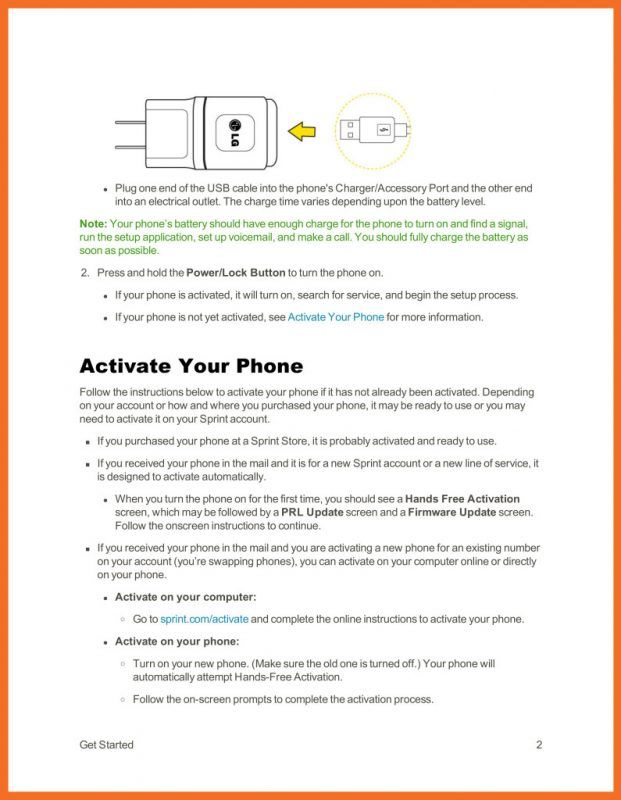
– Connect the charging adapter and USB cable as shown; the LG logo on the charging adapter should face toward you.
– Plug one end of the USB cable into the phone’s Charger/Accessory Port and the other end into an electrical outlet. The charge time varies depending upon the battery level.Note: Your phone’s battery should have enough charge for the phone to turn on and find a signal, run the setup application, set up voicemail, and make a call. You should fully charge the battery as soon as possible.
2. Press and hold the Power/Lock Button to turn the phone on.
– If your phone is activated, it will turn on, search for service, and begin the setup process.
– If your phone is not yet activated, see Activate Your Phone for more information.Activate Your Phone
Follow the instructions below to activate your phone if it has not already been activated. Depending on your account or how and where you purchased your phone, it may be ready to use or you may need to activate it on your Sprint account.
If you purchased your phone at a Sprint Store, it is probably activated and ready to use.
If you received your phone in the mail and it is for a new Sprint account or a new line of service, it is designed to activate automatically.When you turn the phone on for the first time, you should see a Hands Free Activation screen, which may be followed by a PRL Update screen and a Firmware Update screen. Follow the onscreen instructions to continue.
If you received your phone in the mail and you are activating a new phone for an existing number on your account (you’re swapping phones), you can activate on your computer online or directly on your phone.Activate on your computer:
Go to sprint.com/activate and complete the online instructions to activate your phone.Activate on your phone:
Turn on your new phone. (Make sure the old one is turned off.) Your phone will automatically attempt Hands-Free Activation.
Follow the on-screen prompts to complete the activation process.

