


Why Your Google Pixel 9 Screen Failed Suddenly and How to Fix

Why Your Google Pixel 9 Screen Failed Suddenly and How to Fix It Fast: 9 Powerful Solutions
Introduction: Understanding Sudden Google Pixel 9 Screen Failure
If your Google Pixel 9 screen failed suddenly, you are not alone. Many smartphone users experience unexpected display issues that seem to appear without warning. One moment your phone works perfectly, and the next moment the screen turns black, flickers, or becomes unresponsive.
Modern smartphones rely on advanced OLED display technology. While these screens deliver incredible color accuracy and brightness, they are also delicate. Even minor internal issues can cause a complete display failure.
When a Google Pixel 9 screen failed, the problem could originate from several factors including hardware damage, internal cable disconnection, liquid exposure, or software glitches. Understanding the cause is the first step toward fixing the issue effectively.
Fortunately, many screen issues can be resolved quickly with the right troubleshooting steps. In some cases, a simple restart solves the problem. In more serious situations, the display assembly may need professional replacement.
This comprehensive guide explains:
- Why your Google Pixel 9 screen failed suddenly
- The most common warning signs
- Diagnostic techniques
- Powerful repair solutions
- How to prevent future display failures
By the end of this guide, you will know exactly what to do if your Pixel display stops working.
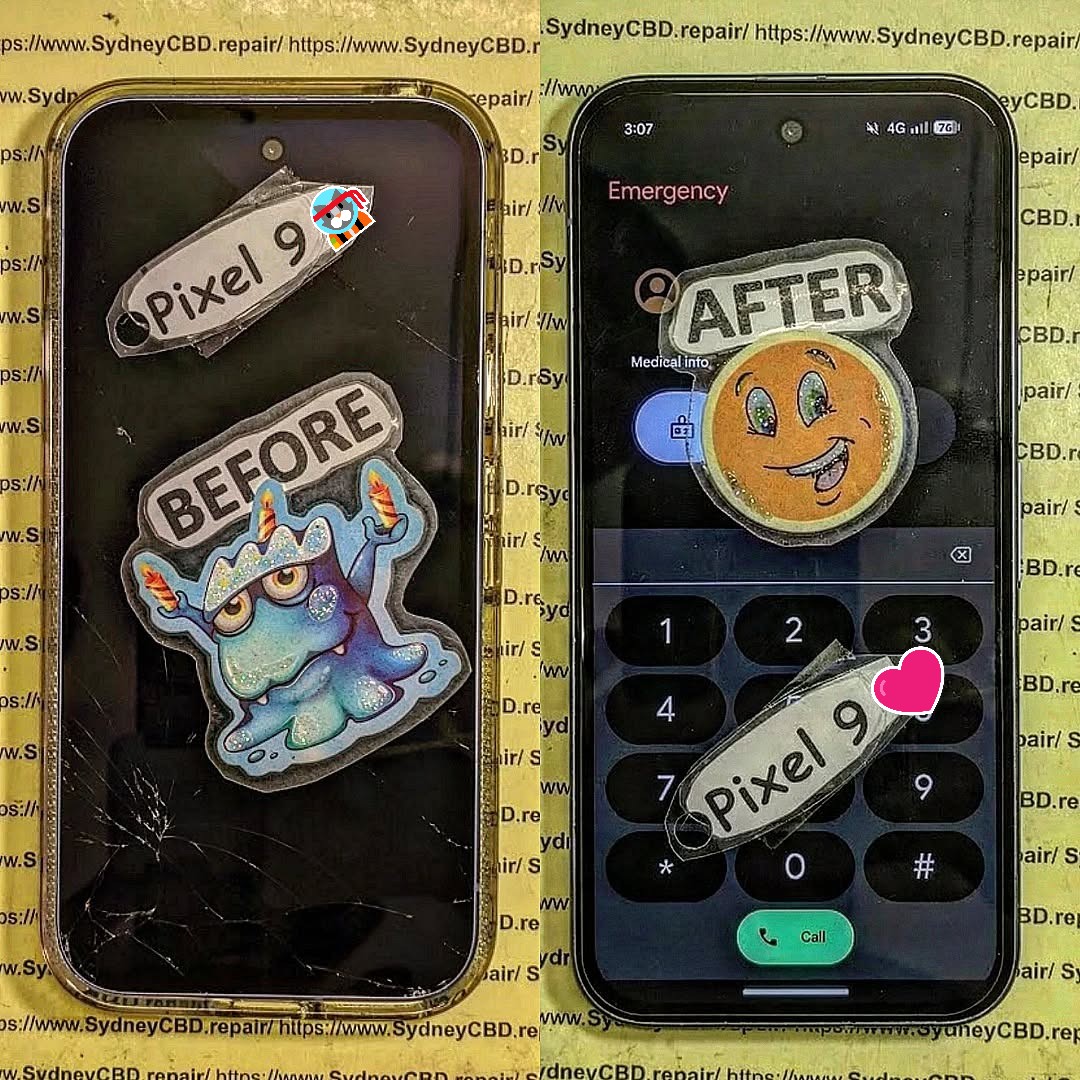
Common Signs Your Google Pixel 9 Screen Failed
When a Google Pixel 9 screen failed suddenly, several symptoms may appear. Identifying these signs helps determine whether the issue is hardware or software related.
Display Not Turning On
One of the most obvious indicators of a display failure is when the phone powers on but the screen remains black.
Typical signs include:
- Phone vibrates but screen stays dark
- Notifications sounds still occur
- Alarm rings but display is blank
This often indicates a damaged OLED panel or disconnected screen flex cable.
Green or Purple Lines on Screen
Vertical or horizontal lines appearing on your screen usually suggest display panel damage.
Common causes include:
- Impact damage
- Internal OLED pixel failure
- Loose display connectors
These lines may gradually worsen over time.
Touchscreen Not Responding
Sometimes the display appears normal but the touchscreen stops responding.
This could occur due to:
- Digitizer failure
- Software conflicts
- Internal connector issues
Flickering or Black Screen
Flickering screens often indicate a deeper hardware problem.
Symptoms include:
- Random brightness changes
- Screen flashing on and off
- Partial display visibility
When a Google Pixel 9 screen failed suddenly, flickering is a warning sign that the display may soon stop working completely.
Top Reasons Why a Google Pixel 9 Screen Failed Suddenly
Understanding the root cause helps determine the best repair solution.
Physical Impact Damage
Even if the glass is not cracked, dropping the phone can damage internal display components.
OLED screens are extremely thin. A minor impact can break internal layers and cause the Google Pixel 9 screen to fail suddenly.
Internal Display Connector Issues
Inside the phone, a flexible ribbon cable connects the display to the motherboard.
Over time, this connector may become loose due to:
- Drops
- Device bending
- Manufacturing tolerance issues
When the connection fails, the display stops working.
Water or Liquid Damage
Although Pixel devices have water resistance ratings, liquid exposure can still damage internal circuits.
Water damage may cause:
- Screen flickering
- Ghost touch
- Complete display failure
Manufacturing Defects
Occasionally, a device leaves the factory with hidden defects. These problems may not appear until weeks or months later.
Examples include:
- Weak display solder joints
- Faulty OLED panels
- Connector wear
Software or Firmware Glitches
Not every screen failure is hardware related.
Software issues can cause:
- Display driver crashes
- Android UI bugs
- GPU conflicts
Sometimes a simple system reboot resolves the problem.
How to Diagnose a Google Pixel 9 Screen Problem

Before replacing the display, it is important to perform basic diagnostics.
Performing a Forced Restart
A forced restart can fix temporary software crashes.
Steps:
- Hold Power + Volume Down
- Keep holding for 20 seconds
- Wait for the Google logo
If the screen turns on afterward, the issue was likely software related.
Checking for Visible Damage
Inspect the phone carefully.
Look for:
- Hairline cracks
- Screen discoloration
- Pressure marks
These signs suggest hardware damage.
Running Safe Mode
Safe Mode disables third-party apps.
Steps:
- Hold Power button
- Tap Restart in Safe Mode
- Observe if the display works normally
If the screen works in Safe Mode, an app may be causing the issue.
External Display Testing
If possible, connect the phone to an external display or cast to another device.
If the external display works but the phone screen does not, the Google Pixel 9 screen failed due to hardware damage.
9 Powerful Ways to Fix a Google Pixel 9 Screen Failure
Now let’s explore effective repair solutions.
Solution 1: Restart the Device
This simple step solves many temporary software issues.
A system restart refreshes display drivers and clears memory conflicts.
Solution 2: Charge the Phone Fully
Low battery levels sometimes prevent the screen from turning on.
Plug the phone into a charger and wait 20 minutes.
Solution 3: Remove Case and Screen Protector
Some thick cases or magnetic accessories may interfere with screen sensors.
Remove them temporarily and test the display.
Solution 4: Boot into Safe Mode
If a third-party app caused the screen malfunction, Safe Mode helps isolate the issue.
If the display works normally in Safe Mode, uninstall recently installed apps.
Solution 5: Update Android Software
Software updates often include bug fixes for display drivers.
Check updates in:
Settings → System → Software Update
You can learn more about Android updates from the official Google support page:
https://support.google.com/pixelphone
Solution 6: Perform Factory Reset
If the screen issue started after installing new software, a factory reset may resolve it.
Important: Backup your data first.
Solution 7: Reseat Internal Display Cable
Advanced users may open the phone and reseat the display connector.
However, this requires:
- Heat gun
- Plastic pry tools
- Precision screwdrivers
Improper disassembly can damage the phone further.
Solution 8: Replace the OLED Screen
If the OLED panel is damaged, replacement is the only permanent solution.
Pixel displays are modular units that include:
- OLED panel
- Touch digitizer
- Front glass
Replacing the entire display assembly restores functionality.
Solution 9: Professional Repair Service
Professional technicians can quickly diagnose the issue and install a genuine display.
Benefits include:
- Warranty coverage
- Quality parts
- Safe repair process
Preventing Future Pixel Screen Failures
While accidents happen, you can reduce the risk of display damage.
Use Protective Cases
Shock-absorbing cases reduce impact damage during drops.
Avoid Overheating
Excess heat can damage OLED screens and internal circuits.
Avoid leaving your phone in hot environments.
Keep Phone Dry
Even water-resistant devices are not waterproof.
Avoid:
- Swimming with your phone
- Heavy rain exposure
- Steam environments
Regular Software Updates
Keeping Android updated helps prevent system crashes and display bugs.
Cost of Repairing a Google Pixel 9 Screen
The repair cost depends on several factors.
| Repair Type | Estimated Cost |
|---|---|
| DIY Screen Replacement | $180 – $300 |
| Authorized Service Repair | $280 – $420 |
| Independent Repair Shop | $200 – $350 |
Professional repair often includes warranty protection.
DIY Repair vs Professional Repair
| Factor | DIY Repair | Professional Repair |
|---|---|---|
| Cost | Lower | Higher |
| Risk | High | Low |
| Warranty | None | Usually included |
| Difficulty | Advanced | Easy for customer |
If you lack experience, professional repair is usually safer.
Frequently Asked Questions (FAQs)
1. Why did my Google Pixel 9 screen suddenly go black?
The most common reasons include OLED panel damage, software crashes, or internal connector failure.
2. Can a software update cause screen issues?
Yes. Occasionally a firmware bug may cause display glitches. Updating or resetting the phone usually fixes it.
3. How much does it cost to fix a Pixel 9 screen?
Repairs typically cost between $200 and $420 depending on the repair method and parts used.
4. Can water damage cause screen failure?
Yes. Liquid exposure can short internal circuits and damage the display controller.
5. Is it safe to replace the screen yourself?
DIY repair is possible but requires specialized tools and technical experience.
6. How long does professional screen repair take?
Most repair shops complete screen replacements within 1–2 hours.
Conclusion

When a Google Pixel 9 screen failed suddenly, the issue may feel frustrating and unexpected. However, many display problems have clear causes and reliable solutions.
From simple fixes like restarting the phone to advanced repairs like OLED replacement, understanding the problem is key to restoring your device.
If troubleshooting steps do not resolve the issue, professional repair services offer the safest and fastest solution. With proper care and protective accessories, you can also prevent future screen failures and keep your Pixel device running smoothly for years to come.
David from Sydney CBD Repair Centre – The Best place to fix mobile phones as 7 Years In A Row! Top Mobile Phone Repair In Sydney. More than 2000 Positive Reviews on Google and Same Day Repairs.
We take pride in delivering exceptional repair services for all major phone brands including Apple, Samsung, Google, and more. Our expert technicians use only genuine parts and offer 90days warranty on repairs. Located in the heart of Sydney CBD, we’re your one-stop solution for all mobile device repairs.
Our commitment to excellence has earned us the trust of thousands of satisfied customers. Whether it’s a cracked screen, battery replacement, or water damage repair, we handle it all with professional care and expertise. Walk in today and experience why we’re Sydney’s #1 choice for mobile phone repairs.
Visit us for:
✓ Same Day Express Repairs
✓ Genuine Parts Guarantee
✓ Professional Technicians
✓ Competitive Pricing
✓ 2000+ 5-Star Google Reviews
✓ 7-Time Award Winner for Best Phone Repairs
Sydney CBD Repair Centre – Where Quality Meets Reliability.
Call : +61280114119
Website: https://SydneyCBD.repair/locate-us

