



How to set an alarm on Apple Watch
Use the Alarm Clock app Alarm icon to play a sound or vibrate Apple Watch at a set time. Add an alarm to your watch face so you can quickly see upcoming alarms and open the Alarm Clock app with a tap.
Set an alarm.
Open Alarm Clock Alarm icon, then tap Add Alarm. Tap AM or PM, tap the hours or minutes, turn the Digital Crown to adjust, then tap Set.

Select options for an alarm.
Open Alarm Clock Alarm icon, then tap the alarm switch to turn it on or off, or tap the alarm time to change its settings. Set repeat, label, and snooze to suit you.

See the next alarm on your watch face.
With the watch face showing, firmly press the display, then tap Customize. Swipe left until you can select individual complications, tap the one you’d like to use for alarms, then turn the Digital Crown to choose the alarm. When you’re finished, press the Digital Crown.

Don’t let yourself snooze.
When an alarm sounds, you can tap Snooze to wait several minutes before the alarm sounds again. If you don’t want to allow snooze, open Alarm Clock Alarm icon, tap the alarm in the list of alarms, then turn off Snooze.

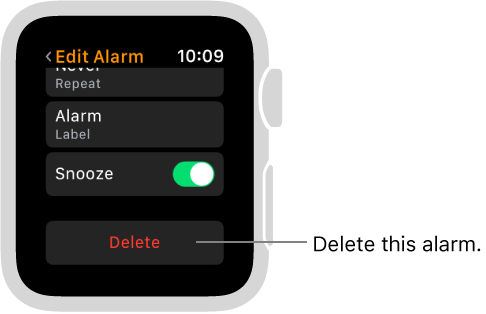
Delete an alarm.
Open Alarm Clock Alarm icon, tap the alarm in the list, scroll to the bottom, then tap Delete.


This is the Sydney CBD Repair Centre Team who constantly innovates to bring you Apple Watch screen repair that won’t break the bank.
Apple Watch screen repair? No other shops can do it. Sydney CBD Repair Centre is the FIRST to do it successfully. Highly-trained technicians with years of mobile device repair.
These guys are AMAZING.
Which Apple Watch do you have?
We are currently offering Apple Watch screen repair and Apple Watch screen replacement for Generation 1 and Series 1Apple watches.




Sydney CBD Repair Centre is the
First Apple Watch Screen Replacement Service Provider
in Australia.
OR 043 777 4119 , Locate Us⇒.
Suite 201, Level 2, 661 George St, Haymarket, NSW 2000
ask@SydneyCBDrepairCentre.com.au
OPEN 6 DAYS
Weekdays: 10am – 6pm
Saturday: 10am – 6pm
Sunday : Closed
After Business Hours, By Appointment only.
All Highly Skilled Technicians who came from South Korea can help you out quickly.
Enjoy ‘Brand New Gangnam Style Repair Service‘ in Sydney CBD.

