



Advanced ROG Phone 7 Screen Replacement: Beyond the Basic Repair Guide

Advanced ROG Phone 7 Screen Replacement: Beyond the Basic Repair Guide + 10 Expert Tips
Introduction
The ROG Phone 7 is a powerhouse in the world of gaming smartphones, known for its stunning AMOLED display, high refresh rates, and immersive graphics. However, even the most robust devices aren’t immune to accidents, and a cracked or malfunctioning screen can quickly turn your gaming experience into a frustrating ordeal. Whether caused by a drop, impact, or long-term wear, a damaged display doesn’t just affect aesthetics—it can compromise touch sensitivity, color accuracy, and overall device functionality.
This comprehensive guide goes beyond the basic repair steps to provide you with expert insights, practical tips, and troubleshooting strategies for replacing your ROG Phone 7 screen. From understanding screen technology to selecting the right tools, following step-by-step instructions, and learning proper maintenance techniques, this article ensures you have everything you need to perform a safe, efficient, and lasting repair.
By the end of this guide, you’ll not only know how to replace your screen but also gain the confidence to maintain and protect your device for years to come. Whether you’re a tech enthusiast attempting a DIY repair or someone exploring professional options, this article will equip you with the knowledge and tips to get your ROG Phone 7 looking and performing like new.
Replacing the screen of your ROG Phone 7 may seem daunting, but with the right guidance, tools, and precautions, you can restore your device’s display to perfection. This guide goes beyond the basic repair tutorial, providing expert tips, troubleshooting advice, and maintenance strategies to ensure long-lasting results. Whether you’re a tech enthusiast or simply need a reliable repair, this article covers everything from identifying screen issues to professional advice for complex repairs.
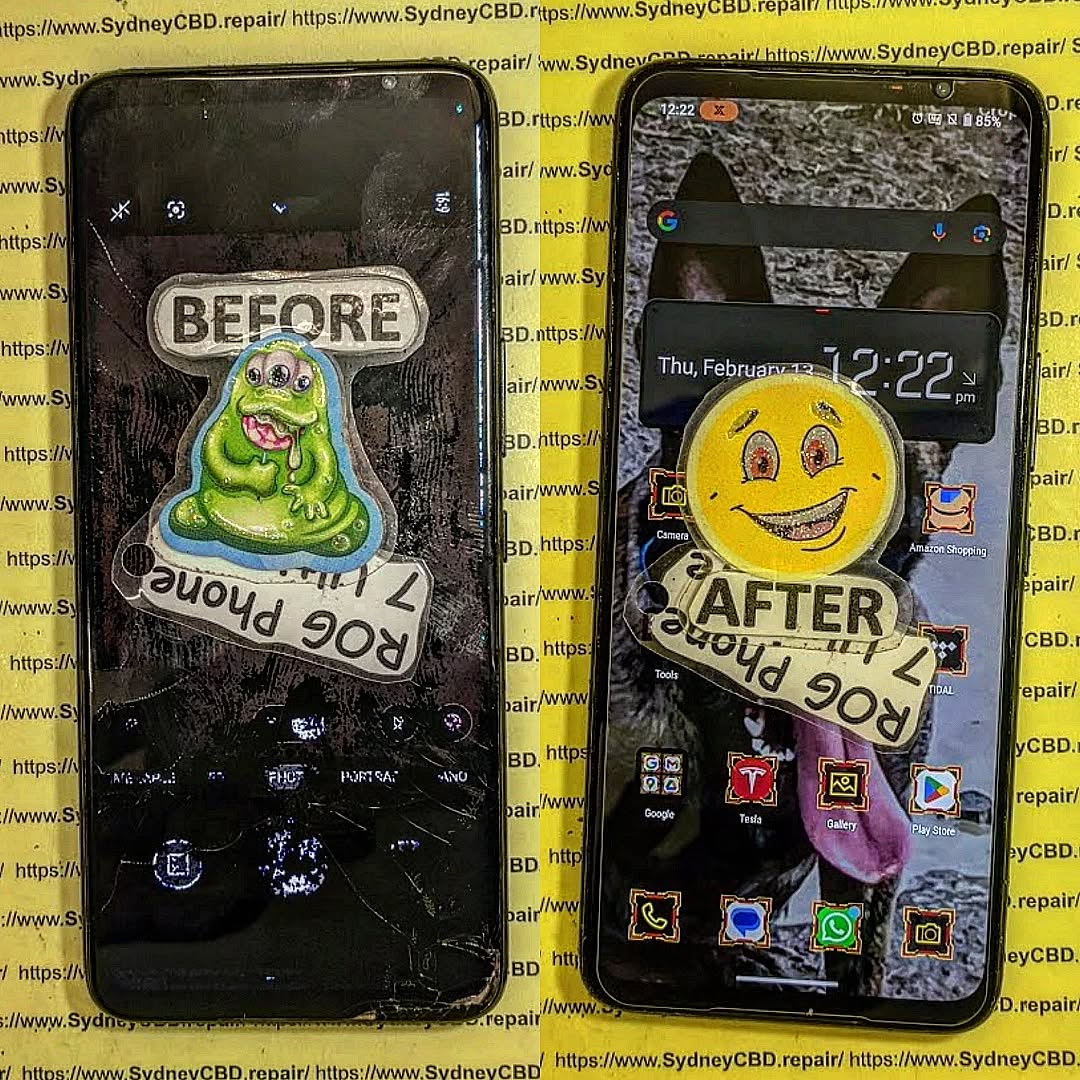
Understanding Your ROG Phone 7 Display
Before diving into the replacement process, it’s essential to understand the technology behind your ROG Phone 7’s screen. Knowing how your display works helps prevent damage during repair and ensures optimal performance post-replacement.
Screen Types: AMOLED vs. Super AMOLED
The ROG Phone 7 features a high-end AMOLED display, which provides vibrant colors, deep blacks, and energy efficiency. AMOLED screens are made of organic light-emitting diodes that illuminate individually, offering better contrast than traditional LCDs. Super AMOLED, on the other hand, integrates touch sensors directly into the display layer, making it thinner and more responsive.
Key differences to note:
- AMOLED: Slightly thicker, requires separate touch digitizer
- Super AMOLED: Slimmer design, integrated touch functionality
- Both: Prone to screen burn-in if static images are displayed too long
Understanding this distinction ensures you purchase the correct replacement part for your ROG Phone 7.
Common Screen Issues
Several problems indicate that a screen replacement might be necessary:
- Cracks or physical damage from drops or impacts
- Unresponsive touch or ghost touch issues
- Dead pixels or lines across the display
- Screen flickering or color distortion
- Black spots or uneven backlighting
Identifying the exact issue early can save time and prevent further complications during repair.
Tools Required for Screen Replacement
Having the right tools is critical for a smooth screen replacement process. Using improper equipment can damage your phone irreversibly.
Essential Tools Checklist
- Precision screwdriver set for tiny screws
- Plastic pry tools and spudgers to avoid scratching
- Tweezers for delicate component handling
- Suction cup to lift the screen carefully
- Heat gun or hair dryer to soften adhesive
- Replacement adhesive for resealing the phone
Optional Tools for Easier Replacement
- Magnetic mat to organize screws
- ESD wrist strap to prevent static damage
- Plastic picks for lifting the screen
- Screen protector for immediate post-replacement protection
Proper tools not only make the process easier but also reduce the risk of further damage.
Safety Precautions Before You Begin
Screen replacement involves delicate internal components. Taking proper safety measures ensures both your device and yourself remain safe.
Powering Down and Disconnecting the Battery
Always turn off your ROG Phone 7 and disconnect the battery before removing any components. This prevents short circuits and reduces the risk of electrical damage to the motherboard.
Anti-Static Measures
Wear an anti-static wrist strap and work on a non-conductive surface. Electrostatic discharge (ESD) can permanently damage sensitive electronic components. Avoid working on carpets or near metal objects.
Step-by-Step Screen Replacement Guide

Replacing the screen of your ROG Phone 7 requires patience and precision. Follow each step carefully.
Removing the Back Cover
- Use a heat gun to gently soften the adhesive around the back cover.
- Apply a suction cup and lift the edge slightly.
- Insert a plastic pry tool and carefully work around the edges.
- Lift the back cover slowly to avoid damaging the fingerprint sensor cable.
Disconnecting the Old Screen
- Remove all screws securing the internal frame.
- Disconnect display flex cables carefully using a spudger.
- Gently lift the screen away, ensuring no cables are torn.
- Remove any residual adhesive and clean the surface with isopropyl alcohol.
Installing the New Screen
- Align the new screen and gently connect the flex cables.
- Test the screen functionality before final installation (touch, display colors, brightness).
- Apply new adhesive around the edges.
- Carefully press the screen into place, ensuring full contact with the frame.
Testing Your New Display
Once installed, turn on the device and check:
- Touch responsiveness across all areas
- Color accuracy and brightness levels
- Absence of flickering, dead pixels, or black spots
Testing before sealing the device ensures you won’t need to repeat the process.
Troubleshooting Common Replacement Issues
Even after careful installation, some issues might arise.
Touch Sensitivity Problems
If touch input is unresponsive:
- Ensure flex cables are fully seated
- Remove and reapply adhesive if the screen isn’t flush
- Calibrate touch sensitivity in settings
Color Calibration and Display Artifacts
Flickering or inaccurate colors often occur due to loose connections. Recheck connectors, or perform a factory display calibration if supported by your device.
Tips for Maintaining Your ROG Phone 7 Screen
After replacing the screen, maintenance is key to longevity.
Screen Protectors and Cases
- Apply a tempered glass protector to prevent scratches and cracks
- Use a shock-absorbent case to reduce impact damage
Cleaning and Care Tips
- Avoid harsh chemicals; use a microfiber cloth
- Keep your phone away from extreme heat or moisture
- Avoid leaving static images on screen for prolonged periods to prevent burn-in
When to Seek Professional Help
Even with the best DIY skills, some situations require expert assistance.
Warranty Considerations
Opening the device yourself may void the warranty. If your phone is under warranty, contact Asus authorized service for safe repairs.
Complex Internal Damage
If internal components like the motherboard or charging ports are damaged, professional tools and experience are necessary to prevent permanent damage.
FAQs About ROG Phone 7 Screen Replacement
Can I replace the screen myself safely?
Yes, with proper tools, guidance, and precautions, you can safely replace the screen. However, expertise and patience are essential to avoid damaging internal components.
How long does a typical replacement take?
A careful replacement typically takes 60–90 minutes for an experienced DIYer. Beginners may need up to 2–3 hours.
Will this void my warranty?
Yes, self-replacement may void manufacturer warranty. Check your warranty terms before proceeding.
Where can I get genuine replacement parts?
Purchase parts from official Asus distributors or trusted online retailers such as Asus Official Parts.
What if the new screen doesn’t respond properly?
Check flex cable connections, ensure proper adhesive placement, and confirm there’s no physical damage. If issues persist, consult a professional.
Are there risks of damaging other components?
Yes, improper handling can damage the motherboard, camera connectors, or battery. Always work slowly and use non-metallic tools.
Conclusion

Replacing the ROG Phone 7 screen doesn’t have to be intimidating. With the right tools, detailed instructions, and expert tips outlined in this guide, you can restore your phone’s display to peak condition. Remember to prioritize safety, double-check connections, and maintain your new screen with protective accessories. When in doubt, professional repair services like Sydney CBD Repair Centre ensure efficient, high-quality, and safe replacement with genuine parts and warranty coverage.
Taking control of your device’s maintenance not only saves time and money but also ensures you enjoy the vibrant and responsive display that the ROG Phone 7 was designed to deliver.
David from Sydney CBD Repair Centre – The Best place to fix mobile phones as 6 Years In A Row! Top Mobile Phone Repair In Sydney. More than 2000 Positive Reviews on Google and Same Day Repairs.
We take pride in delivering exceptional repair services for all major phone brands including Apple, Samsung, Google, and more. Our expert technicians use only genuine parts and offer 90days warranty on repairs. Located in the heart of Sydney CBD, we’re your one-stop solution for all mobile device repairs.
Our commitment to excellence has earned us the trust of thousands of satisfied customers. Whether it’s a cracked screen, battery replacement, or water damage repair, we handle it all with professional care and expertise. Walk in today and experience why we’re Sydney’s #1 choice for mobile phone repairs.
Visit us for:
✓ Same Day Express Repairs
✓ Genuine Parts Guarantee
✓ Professional Technicians
✓ Competitive Pricing
✓ 2000+ 5-Star Google Reviews
✓ 6-Time Award Winner for Best Phone Repairs
Sydney CBD Repair Centre – Where Quality Meets Reliability.
Call : +61280114119
Website: https://SydneyCBD.repair/locate-us

