




Swollen Battery Damaging An Apple Watch Series 8 Display Safe Teardown Routine

Swollen Battery Damaging an Apple Watch Series 8 Display: Safe Teardown Routine + CRITICAL WARNING + 14 Expert Checks
Introduction
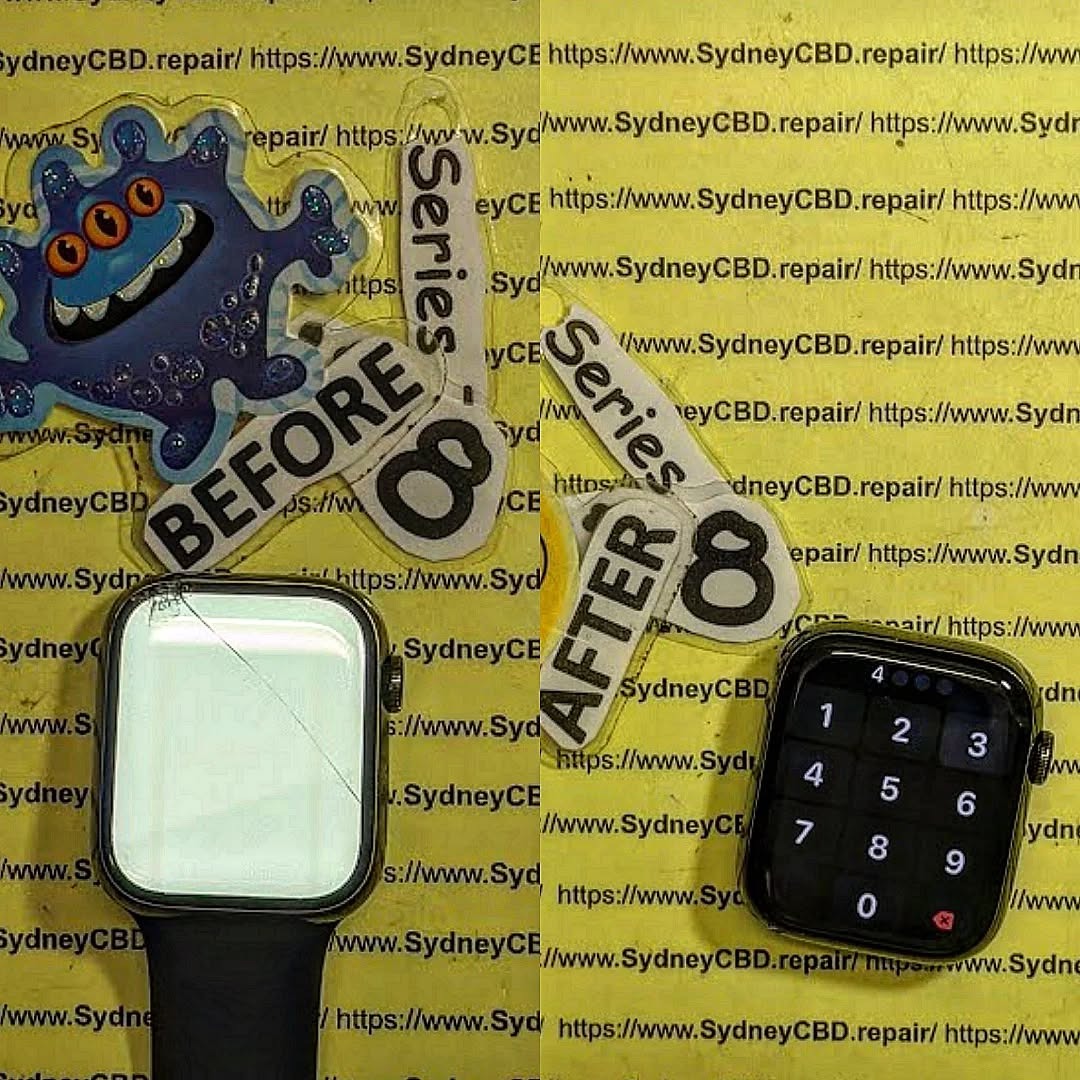
An Apple Watch Series 8 with a swollen battery isn’t just a device with a poor battery life. It’s a potential safety hazard that can damage the display, weaken the internal frame, and create serious risks during repair. When the battery expands, it pushes against nearby components and may lift the screen away from the watch body.
In this comprehensive guide, we’ll explain how to recognise battery swelling, understand the damage it causes, and follow a safe professional inspection and teardown routine. We’ll also explore why forcing the display open can make things worse and when it’s best to leave the repair to experienced technicians.
Important safety note: A swollen lithium-ion battery should never be squeezed, punctured, bent, heated, or forced out. If your Apple Watch shows signs of battery swelling, stop wearing it, stop charging it, and arrange professional assessment. The teardown guidance below is intended for trained repair technicians using suitable equipment and safety procedures.
1. Understanding Apple Watch Series 8 Battery Swelling
The Apple Watch Series 8 is a compact smartwatch that combines a bright Retina display, health sensors, wireless connectivity and a rechargeable lithium-ion battery. Its slim design makes it comfortable to wear, but it also means that internal components have very little spare space.
When the battery begins to swell, that limited space becomes a serious problem.
A swollen battery develops internal gas and expands beyond its original shape. As the battery grows, it can push against the display assembly, internal brackets and other nearby components.
This is particularly concerning when the watch has been worn daily for several years.
1.1 What Causes an Apple Watch Battery to Swell?
Lithium-ion batteries gradually change as they age. Their internal chemical reactions can produce gas when the battery becomes damaged or experiences certain forms of degradation.
Several factors may contribute:
- Natural battery ageing.
- Repeated charging and discharging.
- Exposure to excessive heat.
- Physical impact or crushing.
- Manufacturing defects.
- Internal electrical damage.
- Poor-quality replacement batteries.
- Incorrect repair or installation.
Not every ageing battery will swell. However, visible expansion should always be treated as a warning sign.
1.2 Early Warning Signs to Watch For
The most obvious symptom is a display that begins lifting away from the watch housing.
Other warning signs include:
- A visible gap between the screen and case.
- Display adhesive separating around the edges.
- Unexpected screen movement or looseness.
- A watch that becomes unusually hot.
- Rapid battery percentage changes.
- Unusual pressure marks beneath the display.
- A screen that appears slightly raised on one side.
Some symptoms can also result from damaged adhesive, previous repairs or physical impact. Therefore, technicians should inspect the complete assembly before deciding that battery swelling is responsible.
Important: Don’t press the display back into position to close the gap. Doing so could compress or damage the battery.
1.3 Why Immediate Attention Matters
A swollen battery isn’t simply an inconvenience. Continued use can increase the risk of battery damage, overheating and fire.
The safest response is to stop wearing and charging the watch. Keep it away from combustible materials and arrange an assessment by a qualified repair provider.
If the battery becomes hot, smokes, hisses or releases an unusual smell, don’t handle or transport it unnecessarily. Move away and contact local emergency services if there’s an immediate fire or safety risk.
2. How a Swollen Battery Damages an Apple Watch Series 8 Display
The Apple Watch Series 8 uses a tightly assembled display structure. Its screen is attached to the housing with specialised adhesive, while delicate flex cables connect the display to the internal electronics.
A battery that expands can interfere with this entire arrangement.
2.1 Display Adhesive Separation
The first visible problem is often adhesive failure.
The battery expands and creates pressure inside the housing. That pressure can push the display upwards, gradually separating the adhesive around its edges.
Once the adhesive begins releasing, the display may become loose.
However, simply applying new adhesive won’t solve the underlying problem. The swollen battery must be professionally assessed and addressed first.
2.2 Cracked OLED Display
The Series 8 features an OLED display. Although OLED technology provides excellent contrast and colour, the display assembly remains vulnerable to physical pressure.
Battery expansion can contribute to:
- Cracked display glass.
- Damaged OLED pixels.
- Black patches.
- Coloured vertical lines.
- Flickering.
- Touchscreen malfunction.
- Complete display failure.
A display can sometimes look normal externally while suffering internal damage.
2.3 Damage to Display Flex Cables
The display flex cables carry information and electrical signals between the screen and the motherboard.
When the display is forced upwards, these cables can become stretched, folded or torn.
This may cause a screen that works intermittently, fails to respond to touch or remains completely black.
2.4 Damage to the Watch Housing
Battery swelling can also affect the watch’s structural components.
Potential problems include:
- Distorted internal mounting areas.
- Damaged adhesive surfaces.
- Bent or displaced brackets.
- Pressure damage to nearby components.
- Difficulty achieving a proper screen seal.
A technician must inspect these areas before fitting a replacement battery or display.
2.5 Why Replacing Only the Screen Isn’t Enough
Imagine replacing a damaged window without fixing the pressure pushing against it from inside the building.
The same principle applies here.
A new Apple Watch display may initially work perfectly, but if the swollen battery remains installed, the replacement screen can become damaged again.
The correct repair approach is to assess the battery, inspect the display and determine whether either component requires replacement.
3. Nine Expert Safety Checks Before Teardown
A safe teardown starts before the first repair tool touches the watch.
These nine checks help technicians identify hazards and prevent unnecessary damage.
Check 1: Confirm the Battery Swelling
Inspect the watch from different angles.
Look for:
- Raised display edges.
- Uneven gaps.
- Separation between the screen and frame.
- Visible deformation.
Don’t push the display down to test whether it moves.
Check 2: Stop Charging Immediately
Disconnect the charger if it can be done safely.
A suspected swollen lithium-ion battery shouldn’t be charged. Don’t attempt to restore its charge level or run a battery calibration routine.
Check 3: Stop Wearing the Watch
Remove the watch carefully if it can be done without squeezing or bending the device.
Don’t continue wearing it for fitness tracking, notifications or sleep monitoring.
Check 4: Inspect for Heat and Physical Damage
Check for unusual heat, smoke, leakage, impact marks and other signs of battery failure.
If the device is hot, smoking or hissing, avoid handling it and move away.
Check 5: Identify the Exact Model
Apple Watch Series 8 is available in two main case sizes:
| Model | Case size | Repair consideration |
|---|---|---|
| Apple Watch Series 8 | 41 mm | Uses model-specific battery and components |
| Apple Watch Series 8 | 45 mm | Uses a different battery configuration |
GPS and cellular versions also need to be identified correctly.
Check 6: Prepare a Safe Work Area
A professional repair environment should include:
- A clean, stable workbench.
- Suitable battery-safe storage.
- Eye protection.
- Appropriate protective equipment.
- ESD-safe handling equipment.
- Suitable fire-response equipment.
- A clear emergency exit.
Check 7: Inspect the Display Assembly
Look for cracks, black spots, dead pixels, lifted edges and signs of liquid exposure.
Document the original condition before starting any repair.
Check 8: Evaluate the Repair Risks
A swollen battery requires a different approach from an ordinary worn-out battery.
Don’t automatically follow a standard battery replacement tutorial. If the battery is visibly swollen, damaged or unstable, stop the routine teardown and refer the device to a technician trained in damaged lithium-ion battery handling.
Check 9: Establish a Safe Repair Decision
Determine whether the watch can be safely assessed and repaired.
If the battery is unstable, the correct decision may be specialist battery handling rather than conventional bench disassembly.
These checks protect both the technician and the customer’s device.
4. Preparing for a Safe Apple Watch Series 8 Teardown
A professional teardown requires the correct tools, controlled working conditions and a clear understanding of the device’s internal structure.
4.1 Essential Repair Equipment
| Equipment | Purpose |
|---|---|
| Precision screwdriver set | Internal fasteners |
| Plastic opening tools | Controlled component handling |
| Fine tweezers | Small brackets and connectors |
| ESD protection | Reducing electrostatic damage |
| Safety glasses | Eye protection |
| Appropriate gloves | Task-specific hand protection |
| Magnification equipment | Inspecting small components |
| Replacement adhesive | Display resealing |
| Battery-safe containment | Damaged battery management |
The exact equipment depends on the battery’s condition and the repair facility’s safety procedures.
4.2 Understanding the Display Adhesive
Apple Watch Series 8 displays are held in place with strong adhesive.
Opening a standard device requires careful adhesive separation. However, a swollen battery changes the situation because the display may already be under pressure.
A technician must not assume that the usual opening method is safe.
For a normal battery replacement, specialist repair guides describe controlled adhesive softening and careful display separation. They also warn against excessive force and damage to the display bezel.
See the iFixit Apple Watch Series 8 opening procedure for the standard device-opening reference. This isn’t a swollen-battery handling procedure.
4.3 Why Excessive Heat Is Dangerous
Heat is commonly used to soften display adhesive.
However, applying uncontrolled heat near a damaged lithium-ion battery can increase the risk of a hazardous reaction.
A swollen battery must not be heated as part of an ordinary screen-opening routine.
Technicians should follow an appropriate damaged-battery handling procedure instead of applying a heat gun or hot plate simply because a standard repair guide recommends adhesive softening.
5. Safe Apple Watch Series 8 Teardown: Professional Inspection Routine
The following describes the professional inspection workflow. It isn’t a step-by-step instruction to pry out an actively swollen battery.
5.1 Initial Device Assessment
Before opening the housing, the technician should record:
- Case size.
- GPS or cellular configuration.
- External screen condition.
- Visible battery swelling.
- Signs of impact.
- Signs of moisture exposure.
- Previous repair marks.
Photographs can help document the original condition and explain the repair decision to the customer.
5.2 Display Condition Assessment
The screen should be assessed for physical and functional damage where safe testing is possible.
Technicians should look for:
- Glass fractures.
- OLED discoloration.
- Display separation.
- Touch response problems.
- Damaged display connectors.
- Distorted screen edges.
A lifted display doesn’t automatically mean the screen needs replacing. Sometimes the display remains functional, but its adhesive has separated because of internal pressure.
5.3 Inspecting the Internal Assembly
Once the device has been safely accessed using an appropriate professional procedure, the internal assembly can be assessed.
The technician should check for:
- Battery deformation.
- Battery adhesive failure.
- Connector damage.
- Display flex cable damage.
- Liquid corrosion.
- Housing distortion.
- Displaced internal brackets.
- Signs of previous repair work.
The important point is that the technician shouldn’t force an unstable battery out of its compartment.
5.4 Battery Connector and Internal Electronics
Battery isolation is an important part of many electronic repair procedures.
The Series 8 battery replacement reference describes a battery connector bracket and a small connector that must be handled carefully.
However, connector access must be determined by the condition of the device. A severely swollen battery may make ordinary access unsafe.
The technician should follow the repair facility’s damaged-cell procedure and avoid applying pressure to the battery while attempting to reach the connector.
5.5 Protecting the Display Flex Cables
Display flex cables are particularly delicate.
Even when a screen appears separated from the housing, it may still be electrically connected.
Technicians must avoid pulling the screen away from the watch or allowing its weight to strain the cables.
This is one reason professional inspection is more reliable than forcing open a damaged smartwatch at home.
6. Battery Removal and Replacement: What Professionals Must Consider
Battery removal is one of the most sensitive parts of an Apple Watch repair.
A standard battery replacement and a swollen battery replacement shouldn’t be treated as identical procedures.
6.1 Why Swollen Batteries Need Special Handling
A swollen lithium-ion battery may be more vulnerable to mechanical damage.
Puncturing, bending, crushing or sharply folding it can cause dangerous chemical reactions.
The technician must assess whether the battery can be safely handled using the facility’s approved procedure.
If it cannot, specialist damaged-battery handling is required.
6.2 Removing the Battery Adhesive
Standard Series 8 repair instructions describe softening battery adhesive before removal.
However, that standard approach must not be copied blindly when a battery is swollen.
The battery’s condition takes priority over convenience. Technicians should never insert tools under a swollen cell or apply leverage that may bend or puncture it.
6.3 Selecting the Correct Replacement Battery
The replacement battery must match the exact watch configuration.
Check:
- Apple Watch Series 8 compatibility.
- 41 mm or 45 mm case size.
- Connector configuration.
- Physical dimensions.
- Battery quality.
- Supplier reliability.
- Warranty and traceability.
A replacement that looks similar isn’t necessarily electrically or physically compatible.
6.4 Battery Disposal
A removed swollen battery must never be placed in ordinary household rubbish.
It should be isolated, stored and transported according to applicable damaged lithium-ion battery requirements.
Use an appropriate specialist battery recycling or hazardous-waste service.
7. Apple Watch Series 8 Display Damage Assessment
Once the battery problem has been addressed safely, the technician can determine whether the original display can be reused.
This is an important step because replacing a screen unnecessarily increases repair costs.
7.1 Identifying OLED Display Damage
OLED damage can appear in several forms.
| Display symptom | Possible cause | Recommended assessment |
|---|---|---|
| Black patches | Damaged OLED pixels | Screen replacement assessment |
| Green or white lines | Internal display damage | Display assembly inspection |
| Flickering | Display or connection fault | Connector and screen testing |
| Touch failure | Digitiser or display damage | Touch functionality test |
| Cracked glass | Physical screen damage | Glass and OLED inspection |
| Raised screen | Adhesive separation or battery swelling | Battery and housing inspection |
7.2 Can the Original Display Be Reused?
Yes, provided it remains structurally sound and passes functional testing.
A technician should examine:
- Glass condition.
- OLED brightness.
- Colour consistency.
- Touch response.
- Display cable condition.
- Rear display bezel.
- Adhesive contact surfaces.
If the display has cracked or developed internal OLED damage, replacement may be necessary.
7.3 Inspecting the Frame
The housing must also be checked.
A distorted frame can prevent the replacement display from sitting correctly.
Even a small structural problem may cause uneven adhesive contact or leave gaps around the screen.
A replacement screen shouldn’t be forced into a damaged housing.
7.4 Checking the Display Connector
A damaged display connector can produce symptoms that look like a defective screen.
Before recommending a replacement, the technician should inspect the connector and surrounding circuitry under magnification.
This helps avoid replacing an expensive display when the actual problem is elsewhere.
8. Installing a Replacement Apple Watch Series 8 Battery
After the damaged battery has been safely handled and removed, attention turns to selecting and installing the replacement.
8.1 Use a Compatible Battery
Battery compatibility matters.
The 41 mm and 45 mm Series 8 models don’t use interchangeable battery assemblies.
The replacement should have the correct dimensions, connector and electrical specifications.
8.2 Inspect the Battery Compartment
Before installation, the technician should inspect the battery compartment for:
- Remaining adhesive.
- Dust and debris.
- Corrosion.
- Damaged contacts.
- Housing deformation.
- Signs of previous overheating.
Any damaged mounting surfaces should be evaluated before proceeding.
8.3 Check the Replacement Battery
A replacement battery should be inspected before installation.
Look for:
- Physical deformation.
- Damaged insulation.
- Swollen areas.
- Connector damage.
- Signs of leakage.
- Incorrect dimensions.
Never install a damaged, swollen or questionable replacement battery.
8.4 Battery Connector Inspection
The battery connector must align correctly with its socket.
Poor alignment can bend connector pins or damage the motherboard.
Technicians should use appropriate magnification and controlled handling rather than pressing a misaligned connector into position.
8.5 Battery Adhesive and Positioning
The replacement battery must be secured using the appropriate adhesive arrangement.
Incorrect positioning may create pressure against surrounding components.
The battery should sit correctly without bending, twisting or being compressed.
9. Display Reassembly and Waterproof Sealing
Reassembly is just as important as the initial repair.
A working screen doesn’t automatically mean that the watch has been restored correctly.
9.1 Clean the Adhesive Surfaces
Old adhesive should be removed from the appropriate bonding surfaces.
The technician should avoid damaging the display bezel, housing or surrounding components.
The surfaces must be clean and suitable for the replacement adhesive.
9.2 Apply Correct Replacement Adhesive
Apple Watch Series 8 requires suitable replacement display adhesive.
Old adhesive shouldn’t simply be reused.
The new adhesive must match the display and housing arrangement.
9.3 Check Display Alignment
Before final bonding, the technician should confirm:
- Even screen positioning.
- Correct edge alignment.
- No trapped cables.
- No visible gaps.
- No interference from internal components.
The display must not be forced into place.
9.4 Understand Water Resistance Limitations
This is particularly important.
Apple Watch Series 8 was designed with water-resistance capabilities, but opening the device can compromise its original seals.
Replacing adhesive doesn’t automatically restore the factory water-resistance rating.
A suitable professional pressure or leak test may help assess sealing performance, but no repair should be advertised as restoring factory water resistance unless that result has been properly established.
Customers should be advised to avoid swimming and water exposure until the repair provider has assessed the seal.
10. Nine Post-Repair Tests Every Technician Should Perform
Once the battery and display repairs are complete, the watch needs a thorough inspection.
| Test | What to check | Expected result | ||
|---|---|---|---|---|
| 1. | ||||
| Power test | Startup and shutdown | Normal operation | ||
| 2. | ||||
| Display test | Brightness and colours | Clear image | ||
| 3. | ||||
| Touch test | Screen responsiveness | Accurate touch | ||
| 4. | ||||
| Battery test | Charging and discharge behaviour | Stable operation | ||
| 5. | ||||
| Digital Crown | Rotation and pressing | Normal response | ||
| 6. | ||||
| Side button | Button functionality | Consistent operation | ||
| 7. | ||||
| Sensors | Available health and activity sensors | Normal operation | ||
| 8. | ||||
| Connectivity | Bluetooth and wireless functions | Stable connection | ||
| 9. | ||||
| Seal assessment | Screen bonding and suitable leak testing | No detected sealing fault |
10.1 Display and Touchscreen Testing
The display should be checked for:
- Dead pixels.
- Uneven brightness.
- Colour distortion.
- Flickering.
- Touchscreen dead zones.
- Unexpected screen shutdowns.
10.2 Battery Performance Testing
The replacement battery should be assessed for normal charging behaviour and stable operation.
Unexpected heating, rapid discharge or shutdowns should be investigated before the watch is returned.
10.3 Sensor and Connectivity Testing
Apple Watch Series 8 includes several important features.
Depending on the model and repair, technicians should check relevant functions such as:
- Heart-rate monitoring.
- Blood oxygen functionality where supported and available.
- Temperature sensing features.
- Bluetooth connectivity.
- Wi-Fi connectivity.
- Digital Crown operation.
- Side button operation.
Not every fault will be caused by the battery, so proper testing matters.
11. Seven Common Teardown Mistakes That Can Ruin an Apple Watch
Even experienced technicians can encounter problems when working with compact smartwatch components.
Here are seven mistakes worth avoiding.
Mistake 1: Forcing the Display Open
Applying excessive pressure can crack the OLED panel or damage its rear bezel.
Better approach: Use an appropriate professional opening procedure and stop if the battery condition makes access unsafe.
Mistake 2: Heating a Swollen Battery
Uncontrolled heat can increase the risk of a battery failure.
Better approach: Don’t use ordinary adhesive-heating methods around an unstable swollen battery.
Mistake 3: Puncturing the Battery
A sharp tool can damage the battery pouch.
Better approach: Never insert a tool beneath a swollen cell. Use the appropriate damaged-battery handling procedure.
Mistake 4: Pulling the Display Flex Cable
A stretched flex cable may tear or become disconnected.
Better approach: Support the display assembly and avoid pulling on connected components.
Mistake 5: Installing an Incorrect Battery
An incompatible battery can cause fitting and electrical problems.
Better approach: Confirm the exact Series 8 size and connector configuration.
Mistake 6: Reusing Old Adhesive
Old adhesive may not provide reliable bonding.
Better approach: Use suitable replacement adhesive and inspect the bonding surfaces.
Mistake 7: Skipping Final Testing
A watch may turn on but still have touchscreen, sensor or battery problems.
Better approach: Complete all relevant post-repair checks before returning the device.
12. Professional Apple Watch Battery Repair vs DIY
Some smartwatch owners consider replacing their own batteries to save money.
However, a swollen battery makes DIY repair particularly risky.
12.1 The DIY Approach
DIY repair may appear attractive because online videos and repair guides make the process look straightforward.
Nevertheless, Apple Watch Series 8 has a compact internal layout with delicate connectors, adhesive-mounted components and a sensitive OLED display.
A swollen battery adds another layer of risk.
Common DIY problems include:
- Cracked display glass.
- Torn flex cables.
- Damaged battery connectors.
- Punctured batteries.
- Incorrect replacement parts.
- Poor adhesive application.
- Compromised water resistance.
12.2 Professional Repair Advantages
A qualified repair technician can assess the battery condition, identify secondary damage and select suitable replacement components.
Professional repair also provides a better opportunity to inspect the device before and after the work.
| Consideration | DIY repair | Professional repair |
|---|---|---|
| Battery safety | Depends on experience and facilities | Appropriate specialist procedures |
| Display protection | Higher risk for inexperienced users | Controlled inspection |
| Component selection | Customer must verify compatibility | Technician checks compatibility |
| Internal inspection | Depends on available equipment | Professional diagnostic tools |
| Adhesive replacement | Depends on skill | Appropriate repair materials |
| Final testing | May be limited | Structured testing |
| Repair warranty | Depends on parts supplier | Depends on repair provider |
12.3 When Professional Repair Is Essential
Seek professional help when:
- The display is visibly lifting.
- The battery appears swollen.
- The watch becomes unusually hot.
- The screen has cracked.
- The watch has suffered impact damage.
- There are signs of liquid exposure.
- The battery has leaked.
- The device has experienced previous unsuccessful repairs.
The most important rule is simple: don’t risk injury or further damage to save a small amount on repair costs.
13. Apple Watch Series 8 Battery and Display Repair Costs: Is It Worth Fixing?
The cost of repairing an Apple Watch Series 8 depends on the condition of the battery, display and housing.
There isn’t one universal repair price.
13.1 Factors That Affect Repair Pricing
| Factor | How it affects cost |
|---|---|
| Battery replacement | Depends on the compatible battery and service |
| Display replacement | OLED assembly costs can be significant |
| Frame damage | May require additional repair or replacement |
| Connector damage | Requires further electronic inspection |
| Liquid damage | Can increase repair complexity |
| Previous repair attempts | May introduce additional faults |
| Parts availability | Affects repair options and turnaround |
13.2 Battery Replacement Only
If the original display remains in good condition and the housing is undamaged, the repair may be limited to the battery service.
This is usually a more straightforward situation than a watch requiring multiple component replacements.
13.3 Battery and Display Replacement
If swelling has damaged the OLED screen, both the battery and display may require attention.
The technician should provide a combined quotation rather than treating each problem separately without considering the complete repair.
13.4 When Replacement Makes More Sense
Sometimes repairing an older smartwatch isn’t economical.
Consider replacement when:
- The motherboard is severely damaged.
- The frame is badly distorted.
- Multiple internal components have failed.
- Genuine or suitable replacement parts are unavailable.
- The total repair cost approaches the cost of a suitable replacement device.
A professional assessment helps customers make an informed decision instead of spending money on repairs that may not provide lasting value.
14. How to Prevent Future Apple Watch Battery Problems
No rechargeable battery lasts forever, but good charging habits can help reduce unnecessary stress.
14.1 Avoid Excessive Heat
Heat is one of the major concerns for lithium-ion battery health.
Avoid leaving your Apple Watch:
- Inside a hot vehicle.
- In direct sunlight for extended periods.
- Near heating equipment.
- Under thick bedding while charging.
- In an environment outside Apple’s recommended operating conditions.
14.2 Use Suitable Charging Accessories
Use compatible charging equipment and avoid damaged cables or unreliable accessories.
A charging accessory should be in good condition and suitable for the device.
14.3 Monitor Battery Behaviour
Pay attention to unusual changes.
If the watch starts overheating, showing unexpected battery behaviour or separating around the display, arrange an inspection.
Don’t wait until the screen completely detaches.
14.4 Don’t Ignore Physical Damage
A watch that has suffered a serious impact should be inspected if its battery or housing appears damaged.
Internal battery damage isn’t always visible from the outside.
14.5 Avoid DIY Battery Pressure Tests
Never squeeze the watch to check whether the battery is swollen.
Visible display separation is already enough reason to stop using the device and arrange an inspection.
14.6 Choose Quality Replacement Parts
If the battery eventually requires replacement, use a suitable, reliable component.
Poor-quality batteries can introduce compatibility, performance and safety problems.
14.7 Schedule Repairs Early
Early professional inspection may prevent additional damage to the display and internal assembly.
A battery problem that is addressed promptly may be less expensive to resolve than one that has damaged several components.
Frequently Asked Questions About Apple Watch Series 8 Battery Swelling
FAQ 1: Can a swollen Apple Watch Series 8 battery damage the screen?
Yes. A swollen battery can expand against the internal display assembly and push the screen away from the housing. This pressure may cause adhesive separation, cracked glass, OLED damage and touchscreen problems.
The battery should be professionally assessed before the display is repaired.
FAQ 2: Is it safe to continue wearing an Apple Watch with a swollen battery?
No. Stop wearing the watch as soon as swelling is suspected. A damaged lithium-ion battery can create overheating, fire and injury risks.
Don’t continue charging or using the device. Arrange professional assistance.
FAQ 3: Can I repair a swollen Apple Watch battery at home?
It’s not recommended. Swollen lithium-ion batteries require specialised handling because puncturing, bending or crushing them can cause dangerous reactions.
A professional repair facility is the safer choice.
FAQ 4: Does a swollen battery always require a new Apple Watch display?
No. The original display may remain functional if it hasn’t suffered physical or internal damage.
A technician should inspect the OLED panel, glass, display connectors and bezel before recommending a replacement.
FAQ 5: Can I use a hair dryer to open an Apple Watch with a swollen battery?
No. Don’t apply a hair dryer, heat gun or hot plate to a watch containing a suspected swollen battery.
Although controlled adhesive heating is described in standard repair guides, a damaged battery requires a different safety assessment. Uncontrolled heating can increase the risk of battery failure.
FAQ 6: Are the 41 mm and 45 mm Apple Watch Series 8 batteries interchangeable?
No. The two models have different battery configurations.
Always identify the exact watch model before selecting replacement components. The connector and physical dimensions must match.
FAQ 7: Will replacing the battery restore the original water resistance?
Not automatically. Opening the watch can compromise its original sealing system.
New adhesive and appropriate professional testing are important, but they don’t guarantee restoration of the original factory water-resistance rating.
FAQ 8: What happens if I continue charging a swollen Apple Watch?
Charging a suspected swollen battery can increase the risk of overheating and fire.
Stop charging immediately. Don’t attempt to discharge, calibrate or test the battery by repeatedly powering the watch on.
FAQ 9: Can a swollen battery cause a completely black Apple Watch screen?
Yes, it can contribute to display damage through physical pressure. However, a black screen can also result from a failed OLED panel, damaged flex cable, connector problem or motherboard fault.
A proper diagnosis is necessary to identify the actual cause.
FAQ 10: How long does an Apple Watch Series 8 battery replacement take?
The time depends on the battery condition, display damage, parts availability and repair complexity.
A standard battery replacement may be relatively straightforward for an experienced technician, but a swollen battery requires additional safety assessment. If the display or housing is also damaged, the repair may take longer.
FAQ 11: Should I replace the battery and display together?
Not necessarily. If the original display remains fully functional and structurally sound, it may be reusable.
However, if the swollen battery has damaged the OLED assembly, replacing both components may be necessary.
Conclusion: Protect Your Apple Watch Series 8 Before the Damage Gets Worse

A swollen battery damaging an Apple Watch Series 8 display is a problem that should never be ignored.
What begins as a small gap around the screen can develop into a much more serious repair involving the OLED display, internal connectors, adhesive and housing.
The safest solution is to stop using and charging the device, avoid putting pressure on the display and arrange professional battery assessment.
Remember these nine important checks:
- Identify the signs of battery swelling.
- Stop charging the watch.
- Remove it from your wrist safely.
- Inspect the display and housing.
- Confirm the exact 41 mm or 45 mm model.
- Prepare a suitable professional repair environment.
- Assess the battery before attempting disassembly.
- Replace damaged components with compatible parts.
- Complete display, battery and sealing tests.
A successful repair isn’t just about installing a new battery. It’s about protecting the display, preserving the internal electronics and ensuring the watch operates reliably after the repair.
For Apple Watch owners, early diagnosis can make a significant difference. Don’t wait for a swollen battery to destroy an otherwise perfectly usable display.
Choose professional inspection, safe battery handling and quality replacement components. That’s the smart way to protect your Apple Watch Series 8.
Professional Mobile Phone and Smartwatch Repair in Sydney
David from Sydney CBD Repair Centre – The Best place to fix mobile phones as 7 Years In A Row! Top Mobile Phone Repair In Sydney. More than 2000 Positive Reviews on Google and Same Day Repairs.
We take pride in delivering exceptional repair services for all major phone brands including Apple, Samsung, Google, and more. Our expert technicians use only genuine parts and offer 90days warranty on repairs. Located in the heart of Sydney CBD, we’re your one-stop solution for all mobile device repairs.
Our commitment to excellence has earned us the trust of thousands of satisfied customers. Whether it’s a cracked screen, battery replacement, or water damage repair, we handle it all with professional care and expertise. Walk in today and experience why we’re Sydney’s #1 choice for mobile phone repairs.
Visit us for:
- ✓ Same Day Express Repairs
- ✓ Genuine Parts Guarantee
- ✓ Professional Technicians
- ✓ Competitive Pricing
- ✓ 2000+ 5-Star Google Reviews
- ✓ 7-Time Award Winner for Best Phone Repairs
Sydney CBD Repair Centre – Where Quality Meets Reliability.
Call: +61280114119
Website: https://SydneyCBD.repair/locate-us

