


Z Flip 6 Touchscreen Unresponsive Common Fixes & Expert Solutions

Z Flip 6 Touchscreen Unresponsive? Common Fixes & Expert Solutions for Instant Recovery
Introduction
When your Samsung Galaxy Z Flip 6 touchscreen becomes unresponsive, it can feel like your entire digital world has suddenly stopped. Whether the screen freezes, only responds on one side, or stops registering touch altogether, the issue can disrupt your daily routine—especially if your phone is your main tool for communication, work, or navigation.
The Z Flip 6 is a powerful and modern smartphone, but like all foldable devices, its display system is more complex than standard phones. This means that even small glitches can sometimes affect touch performance. The good news? Most touchscreen issues are completely fixable, and many of the solutions don’t require professional tools or advanced technical knowledge.
In this comprehensive guide, we’ll break down why your Z Flip 6 touchscreen becomes unresponsive, the most effective at-home fixes, and the expert repair options available to restore your device to peak performance. Whether the problem started after a software update, a drop, or seemingly out of nowhere, you’ll find practical steps, insider tips, and professional insights to help you resolve the issue quickly and safely.
Let’s dive into the proven methods that can bring your Z Flip 6 back to life—so you can get back to using your phone with confidence and ease.
Experiencing a Z Flip 6 touchscreen unresponsive issue can be incredibly frustrating—especially when you can’t open apps, swipe, tap, or even unlock your device. Don’t worry, though. This detailed guide will walk you through exactly what causes the Z Flip 6 touchscreen to stop working, the best at-home fixes, and which expert repair solutions actually solve the problem.
Touch issues on foldable phones like the Z Flip 6 are more delicate than standard smartphones because the display is flexible, layered, and highly sensitive to pressure, dust, humidity, and hinge alignment. Fortunately, most touch problems can be fixed without replacing the entire screen.
This article covers everything you need—from quick fixes to deeper expert insights—written in simple language, with a professional and informative tone.
Understanding the Z Flip 6 Touchscreen Issue
Why the Touchscreen Becomes Unresponsive
The Samsung Galaxy Z Flip 6 has a sophisticated AMOLED foldable display. While it’s durable, several factors can cause touch failure:
- Software glitch after an update
- Minor system freeze
- Faulty screen protector reducing touch sensitivity
- Impact or pressure damage
- Dust or debris inside the hinge
- Flex-cable stress from repeated opening and closing
- Moisture exposure even without visible water damage
Because foldable screens rely on internal wiring within the hinge, even a small misalignment can affect touch response.
Common Symptoms Users Experience
If your Z Flip 6 touchscreen becomes unresponsive, you may notice:
- Touch works only on one side of the screen
- Entire screen stops responding
- Delay or lag when tapping
- Ghost touches
- Apps opening on their own
- Screen flickering before freezing
- Touch failure after folding/unfolding the phone
These symptoms help narrow down whether the issue is software-related or hardware-related.
Quick At-Home Fixes You Can Try First
Before assuming the worst, try these simple fixes. Many users recover full touch functionality in minutes.
Method 1: Force Restart Your Z Flip 6
A force restart reloads system processes without deleting data.
Steps:
- Press and hold Power Button + Volume Down
- Hold for 10–12 seconds
- Wait for Samsung logo to appear
This resolves:
- Frozen apps
- Minor OS crashes
- Touchscreen lag
If the screen responds after restarting, the issue is temporary.
Method 2: Boot into Safe Mode
Safe Mode disables third-party apps that may interfere with touch.
Steps:
- Hold the Power button
- Long press Power Off
- Select Safe Mode
If touch works fine in Safe Mode, a conflicting app is the cause. Remove:
- Screen-overlay apps
- Launchers
- Gesture/navigation apps
- Recently installed utilities
Method 3: Check for Software Updates
Samsung often releases touch stability patches.
Go to:
Settings → Software Update → Download and Install
Updating may fix:
- Touch responsiveness issues
- Display driver bugs
- Post-update glitches
Method 4: Inspect for Physical Damage
Foldable screens can be sensitive.
Check for:
- Crease damage
- Air bubbles
- Small cracks
- Lifted screen protector
- Hinge stiffness
Even a tiny mark can disrupt touch signals.
Intermediate Fixes That Improve Touch Response

If the basic troubleshooting didn’t work, try these more detailed steps.
Adjust Touch Sensitivity
Go to:
Settings → Display → Touch Sensitivity → Turn ON
This helps when using:
- Tempered glass protectors
- Hydrogel protectors
- Old / worn-out protectors
Remove or Replace Your Screen Protector
A large percentage of Z Flip touchscreen issues come from:
- Misaligned protectors
- Cheap protectors
- Bubbles or dust under the film
Because the Z Flip 6 uses a flexible display, only use Samsung-approved protectors.
Reset All Settings (Non-destructive)
This resets system configurations but keeps data untouched.
Settings → General Management → Reset → Reset Settings
Fixes issues related to:
- System misconfiguration
- Touch calibration errors
- Conflicting hidden settings
Advanced Solutions for Persistent Issues
If none of the above worked, the issue may be deeper.
Wipe Cache Partition
This removes corrupted temporary system files.
Steps:
- Power off the device
- Hold Volume Up + Power
- Release at Samsung logo
- Select Wipe Cache Partition
- Confirm and reboot
This does NOT delete data and often fixes touch instability after updates.
Factory Reset (Use Only if Necessary)
Back up your data first.
Settings → General Management → Reset → Factory Data Reset
This resolves:
- Severe OS corruption
- Malware infections
- Persistent ghost touches
When Hardware Repair Is Required
You likely need expert repair if:
- Touch fails only when folding/unfolding
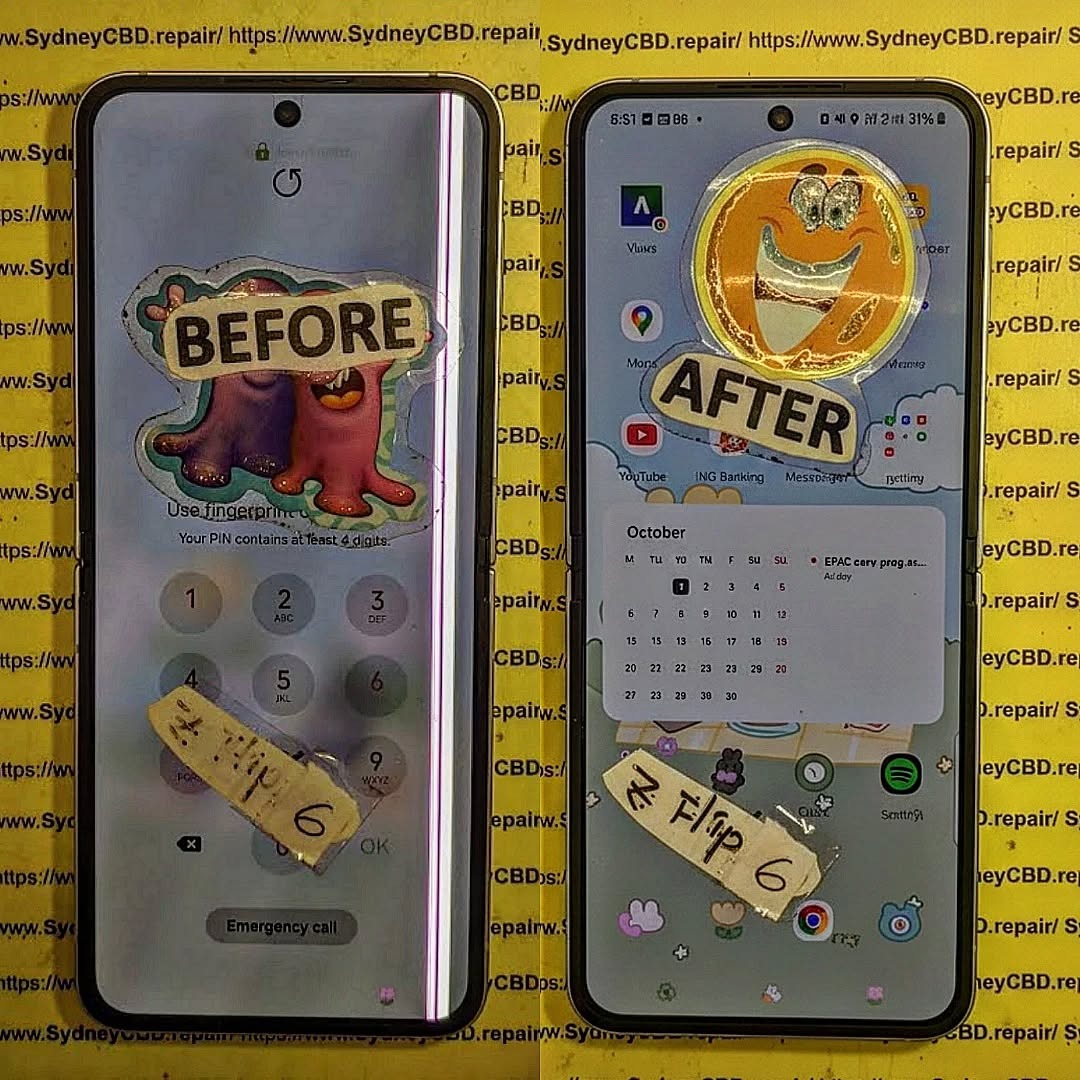
- You see lines or discoloration
- Outer screen works but inner screen doesn’t
- Pressure marks appear along the crease
- Moisture warning appeared recently
Hardware-related causes include:
- Damaged OLED layer
- Flex cable issue
- Hinge pressure imbalance
- Burn-in or display degradation
At this point, a certified technician is the best solution.
Professional Repair Options & Costs
Typical Repair Prices (Estimated)
| Repair Service | Estimated Cost |
|---|---|
| Inner Screen Replacement | High (depends on region) |
| Touch Layer Repair | Moderate |
| Hinge Adjustment | Low–Moderate |
| Flex Cable Replacement | Moderate |
| Full Diagnostic | Usually Free |
Why Choose Certified Technicians
- Foldable screens require specialized training
- Incorrect repair can cause permanent damage
- Genuine parts ensure long-term durability
- Warranty protection maintains device value
Warranty, Parts Quality & What to Expect
A reputable repair centre provides:
- Genuine Samsung parts
- At least 90 days warranty
- Transparent pricing
- Same-day service
- Proper diagnostic testing
For trusted repairs, choose professionals with strong reviews and industry recognition.
FAQs
1. Why is my Z Flip 6 touchscreen unresponsive?
It usually happens due to software glitches, damaged screen protectors, flex cable stress, or physical damage to the foldable display.
2. How do I fix an unresponsive touchscreen?
Start with a force restart, remove screen protectors, adjust sensitivity, wipe cache, or boot into Safe Mode.
3. Can the Z Flip 6 hinge affect touchscreen performance?
Yes. A misaligned hinge can put pressure on the internal display, causing touch failure.
4. Is it safe to remove the factory-installed screen protector?
No. Only remove it if professionally advised. Samsung does not recommend removing the default protective layer.
5. How much does a Z Flip 6 screen replacement cost?
It varies, but foldable screens are expensive. Prices depend on your location and the type of part used.
6. Should I go to a repair shop or Samsung service center?
Choose certified repair centres with genuine parts, strong reputation, and experience handling foldable phones.
Conclusion

The Z Flip 6 touchscreen unresponsive problem can be annoying, but it’s usually fixable. Most users recover full function using the methods in this guide. However, if hardware issues are involved—especially on foldable screens—professional repair is the safest option.
You now know the causes, solutions, and expert repair steps needed to get your Z Flip 6 working perfectly again.
For additional reading on Samsung foldables, here’s a helpful resource:
https://www.samsung.com/global/galaxy/
David from Sydney CBD Repair Centre – The Best place to fix mobile phones as 6 Years In A Row! Top Mobile Phone Repair In Sydney. More than 2000 Positive Reviews on Google and Same Day Repairs.
We take pride in delivering exceptional repair services for all major phone brands including Apple, Samsung, Google, and more. Our expert technicians use only genuine parts and offer 90 days warranty on repairs. Located in the heart of Sydney CBD, we’re your one-stop solution for all mobile device repairs.
Our commitment to excellence has earned us the trust of thousands of satisfied customers. Whether it’s a cracked screen, battery replacement, or water damage repair, we handle it all with professional care and expertise. Walk in today and experience why we’re Sydney’s #1 choice for mobile phone repairs.
Visit us for:
✓ Same Day Express Repairs
✓ Genuine Parts Guarantee
✓ Professional Technicians
✓ Competitive Pricing
✓ 2000+ 5-Star Google Reviews
✓ 6-Time Award Winner for Best Phone Repairs
Sydney CBD Repair Centre – Where Quality Meets Reliability.
Call : +61280114119
Website: https://SydneyCBD.repair/locate-us

