


Cracked Cover, Dead Signal: How a Sydney Tech Wizard Saved an S23 Ultra Signal

The Case of the Mysterious Signal Dropout: A Sydney CBD Repair Centre Story
S23 Ultra Signal Dropout – It was just another bustling day at the Sydney CBD Repair Centre when David, our ace technician, encountered a puzzling case that would put his skills to the test.
An Unexpected Visitor
The bell chimed as a visibly frustrated customer walked in, clutching her Galaxy S23 Ultra. “I can’t make a single call without the signal dropping,” she explained, her voice tinged with exasperation. “It’s driving me mad!”
David leaned in, his interest piqued. He’d seen his fair share of phone troubles, but this one promised to be intriguing.
The Initial Clue
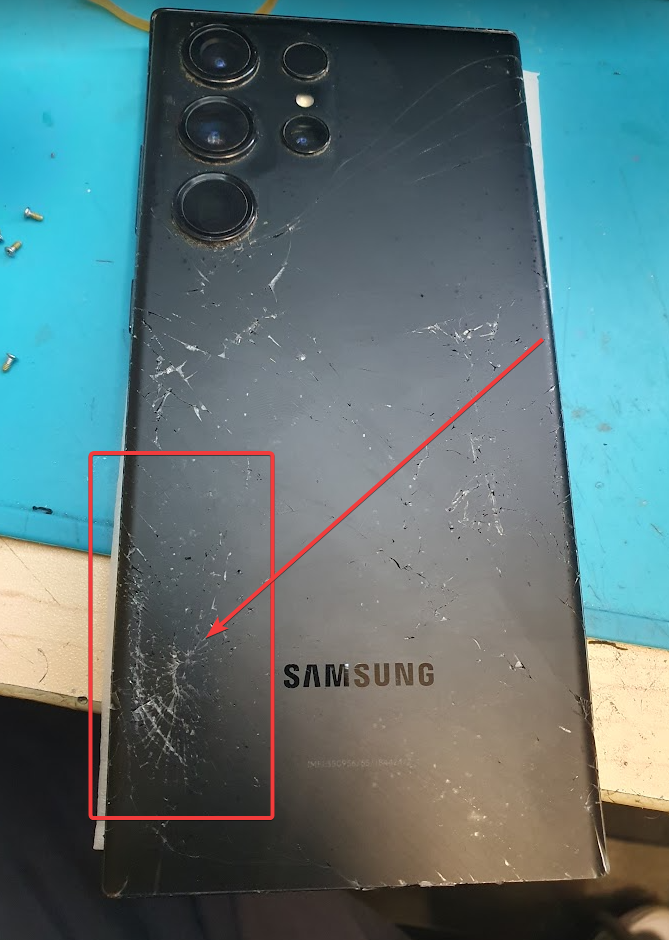
As the customer handed over her phone, David’s trained eye immediately spotted the spider-web of cracks sprawling across the back cover. “Hmm,” he mused, “I wonder if there’s more to this than meets the eye.”
Digging Deeper
With the precision of a surgeon, David carefully removed the damaged back cover. His suspicions were confirmed – the damage wasn’t just superficial. There, nestled among the intricate circuitry, he spotted the real culprit: a damaged antenna connection on the charging port module.
“Aha!” David exclaimed, a smile playing on his lips. “Found you, you sneaky little troublemaker.”
A Twist in the Tale
But the case wasn’t closed just yet. As David prepared to replace the faulty component, he realized this wasn’t just any S23 Ultra – it was a USA version. Lesser technicians might have been stumped, but not our David. He’d always prided himself on being prepared for anything.
“Good thing I stocked up on those USA version ports last month,” he chuckled to himself, reaching for the correct replacement part.
The Fix
With steady hands and laser focus, David swapped out the damaged component and fitted a brand-new back cover. It was like watching an artist restore a masterpiece – each move deliberate, each action precise.
The Big Reveal
As David handed the phone back to the customer, her eyes widened in disbelief. Not only was her phone as good as new on the outside, but a quick test confirmed the signal was strong and steady.
“It’s perfect!” she exclaimed, her earlier frustration replaced with joy. “How did you do it?”
David smiled, the satisfaction of a job well done evident in his eyes. “Just another day at Sydney CBD Repair Centre,” he said with a wink.
Epilogue
As the happy customer left, David turned to prepare for his next challenge. In the world of tech repair, especially here in the heart of Sydney, you never know what each day will bring. But for techs like David, that’s exactly what makes the job so exciting.
Remember, folks – whether it’s a cracked screen or a mysterious signal dropout, the team at Sydney CBD Repair Centre is always ready to solve your mobile mysteries!
Understanding the Galaxy S23 Ultra Signal Dropouts Issue
Introduction to the Signal Dropout Problem
Smartphones have become an essential part of our daily lives. But what happens when your trusted device starts losing signal, and you can’t make a call? Recently, a customer experienced this frustrating issue with her Galaxy S23 Ultra. The phone’s signal kept dropping, making it nearly impossible to communicate. What could cause such a problem? Let’s dive into this real-life story and find out.
A Customer’s Frustration with the Galaxy S23 Ultra
Imagine owning one of the most advanced smartphones on the market, only to find out that you can’t even make a call due to constant signal dropouts. This was the unfortunate situation of a customer who walked into our repair shop. She complained about the signal dropping frequently, leaving her in a state of utter frustration. She couldn’t make or receive calls – a nightmare for any smartphone user!
Signal Dropouts Explained
Signal dropouts occur when a phone loses its connection to the cellular network. This can be caused by various factors, such as software glitches, damaged internal components, or, as in this case, a broken back cover that damaged the antenna connection.
Diagnosing the Root Cause of Signal Issues – Galaxy S23 Ultra Signal
The Technician’s Approach: A Case Study of David’s Expertise
When the customer brought her phone to our shop, the best technician, David, took on the challenge. Diagnosing a signal issue requires a keen eye and experience, and David was ready to uncover the mystery behind the dropouts.
Initial Observations: Broken Back Cover and Signal Issues
David first noticed that the back cover of the Galaxy S23 Ultra was broken. This was an unusual sign, but it sparked his curiosity. Could this seemingly minor crack be the reason for the poor signal? He decided to investigate further.
The Discovery: Antenna Connection Damage
Upon removing the damaged back cover, David discovered the real culprit: a damaged antenna connection on the charging port module. The antenna is a crucial component for receiving and transmitting signals, and any damage to it can cause significant issues.
Importance of the Back Cover in Smartphone Signal Reception
Understanding the Role of the Back Cover
The back cover of a smartphone does more than just protect the internals from dust and impact; it plays a crucial role in maintaining the integrity of internal connections, such as the antenna. A damaged back cover can expose these components to further damage, which in turn affects the phone’s signal strength.
How a Damaged Back Cover Affects Signal Strength
When the back cover is broken, the internal components, like the antenna, may be displaced or damaged. Even a small crack can lead to a disruption in signal transmission, causing frequent dropouts and an overall poor user experience.
Antenna Connection: The Lifeline of Signal Reception – Galaxy S23 Ultra Signal
What is the Antenna Connection?
The antenna connection is the link between the phone’s motherboard and the antenna itself, which allows your device to communicate with cellular towers. It is the heart of signal reception and transmission.
How Antenna Connection Damage Occurs
Antenna connection damage can occur due to physical impact, such as dropping the phone, which can crack the back cover and affect the internal components. In this case, the damage was found on the charging port module, which is directly connected to the antenna.
Specifics of the Galaxy S23 Ultra USA Version
For this particular Galaxy S23 Ultra, a USA version, the damaged antenna connection was a specific part that needed replacement. Luckily, David was prepared for this scenario and had the necessary replacement part in stock.
Repair Process of the Damaged Antenna Connection – Galaxy S23 Ultra Signal
Step 1: Removing the Broken Back Cover
David started by carefully removing the broken back cover to avoid further damage to the internal components. This step is crucial as any mishandling can worsen the existing damage.
Step 2: Identifying the Damaged Antenna Connection on the Charging Port Module
Next, he pinpointed the exact location of the damage – the antenna connection on the charging port module. This was a delicate process requiring precision and expertise.
Step 3: Replacing the Damaged Component
David successfully replaced the damaged antenna connection with a new one, ensuring it was securely attached and properly aligned.
Importance of Using Genuine Parts
Using genuine parts is vital for repairs. They ensure compatibility and maintain the device’s performance and longevity. David used a genuine USA version port for the replacement, which was key to restoring the phone’s functionality.
Step 4: Installing a New Back Cover
Finally, David installed a brand-new back cover on the Galaxy S23 Ultra. This not only restored the phone’s aesthetic but also protected the newly repaired internal components.
Customer’s Experience and Satisfaction Galaxy S23 Ultra Signal
A Happy Ending: Restoring Full Signal Strength
After the repair, the customer was thrilled to find that her Galaxy S23 Ultra had full signal strength again. No more dropped calls or frustrating moments!
The Importance of a Skilled Technician
This story highlights the importance of having a skilled technician. David’s expertise and preparation were crucial in quickly diagnosing and fixing the problem, leading to a satisfied customer.
Conclusion of Galaxy S23 Ultra Signal
Summary of Key Points
A broken back cover may seem like a minor issue, but it can cause serious problems, like signal dropouts, by damaging critical internal components like the antenna connection. In this case, a skilled technician, David, successfully diagnosed the issue, replaced the damaged part, and restored the phone’s full functionality.
Final Thoughts on Preventing Future Damage
To avoid such problems, always handle your phone with care, use protective cases, and seek professional help if you notice any unusual behavior. Ensuring your device is in good condition can save you from many headaches down the line.
FAQs Galaxy S23 Ultra Signal
FAQ 1: What Should I Do If My Phone’s Signal Keeps Dropping?
If your phone’s signal keeps dropping, check for any visible damage to the back cover or other components. If you find any, take it to a professional technician for diagnosis and repair.
FAQ 2: Can a Broken Back Cover Really Affect My Phone’s Signal?
Yes, a broken back cover can expose internal components, like the antenna, to damage, which can lead to signal dropouts.
FAQ 3: How Do I Know If My Antenna Connection Is Damaged?
Symptoms of a damaged antenna connection include frequent signal dropouts, poor call quality, and the inability to connect to a cellular network.
FAQ 4: Should I Use Genuine Parts for Repairs?
Always use genuine parts for repairs to ensure compatibility and maintain your device’s performance and warranty.
FAQ 5: What Is the Cost of Replacing an Antenna Connection?
The cost of replacing an antenna connection varies depending on the model of the phone and the availability of parts. It’s best to consult a professional technician for an accurate quote.
galaxy s23 ultra signal dropout, galaxy s23 ultra weak signal solutions, galaxy s23 ultra antenna repairs, galaxy s23 ultra antenna replacement cost, galaxy s23 ultra signal troubleshooting, how to boost galaxy s23 ultra signal, galaxy s23 ultra repair near me, best galaxy s23 ultra repair shops, galaxy s23 ultra signal booster case, signal booster for galaxy s23 ultra, galaxy s23 ultra signal fix update, galaxy s23 ultra software signal boost, user guide for galaxy s23 ultra signal issues, galaxy s23 ultra antenna troubleshooting, diy antenna repair galaxy s23 ultra, how to replace galaxy s23 ultra antenna,

