




GAMING PHONE DISASSEMBLY: INSIDE THE ROG 8

Gaming Phone Disassembly: Inside the ROG 8 – A Deep Dive Into Next-Level Engineering
🎮 H1: Gaming Phone Disassembly: Inside the ROG 8 – A Deep Dive Into Next-Level Engineering
The ASUS ROG Phone 8 is not just a smartphone—it’s a purpose-built gaming machine in your pocket. Featuring cutting-edge specs like a Snapdragon 8 Gen 3, 165Hz AMOLED display, dual-cell battery, and advanced cooling system, it’s no wonder gamers and tech enthusiasts can’t stop talking about it.
But what’s it like under the hood?
At Sydney CBD Repair Centre, we had the chance to disassemble the ROG 8 and see first-hand just how advanced (and complicated) this beast really is. Whether you’re a repair tech, a modder, or just curious, let’s take you inside.
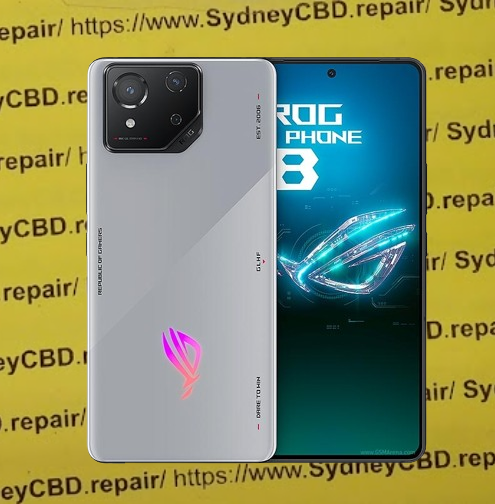
📱 H2: Why the ROG Phone 8 is a Game-Changer
Key Specs:
- Snapdragon 8 Gen 3 processor
- 6.78” AMOLED 165Hz screen
- 12–24GB LPDDR5X RAM
- 5500mAh split dual battery
- AirTrigger 8 ultrasonic shoulder buttons
- X-Haptics vibration motor
- IP68-rated (first in ROG series)
This isn’t just hardware—it’s innovation packed into every square millimetre.
🧰 H2: Disassembly: What Tools You’ll Need
Before diving in, gather:
- Plastic pry tools
- Suction handle
- Heat gun or iOpener
- Phillips #000 screwdriver
- Tweezers
- ESD-safe gloves
- Anti-static mat
⚠️ Warning: The ROG 8’s waterproof sealing and adhesive make it easy to damage if you’re not careful.
🔧 H2: Step-by-Step Disassembly Overview
1. Back Panel Removal
- Apply heat to loosen adhesive
- Use plastic picks to carefully separate the Gorilla Glass Victus back
- Watch out for flex cables near the top-left!
2. Internal Screws & Midframe
- Unscrew and remove plastic midframe (includes antenna, NFC, and wireless charging)
- Disconnect battery and display flex cables
🔋 H2: Dual Battery Design – What It Means for Repairability
The ROG 8 uses two battery cells for thermal balance and faster charging.
- Each cell is placed on either side of the motherboard
- Replacing just one? Not recommended. Replace both to maintain power efficiency.
Important: Cells are heavily glued—removal requires extra heat and patience.
❄️ H2: Cooling System Breakdown
The ROG 8 includes:
- Large vapour chamber cooling beneath the motherboard
- Copper heat spreaders across chips
- Generous use of thermal paste
This system is impressive but delicate—removal without damage takes serious finesse.
🧠 H2: Advanced Internal Architecture
Snapdragon Processor & Storage
- The Snapdragon 8 Gen 3 SoC sits at the center with direct copper cooling
- UFS 4.0 storage chip is soldered—non-upgradable
Motherboard Layout
- Split into two PCBs—top for logic, bottom for charging and audio
- Makes repairs modular but increases risk of connector damage
🌈 H2: Display & AMOLED Panel Insights
The 165Hz AMOLED is stunning—but a pain to remove.
- Adhesive is thick and evenly spread
- Extreme caution required to avoid panel bending or digitiser cracks
Pro Tip: Always remove the screen last to avoid damaging internals during repair.
🎮 H2: Ultrasonic Triggers & Gaming Features Internally
AirTriggers are embedded with precision:
- Sit near the corners, sandwiched between layers
- Flex connectors are fragile and easily torn if mishandled
Other features:
- RGB lighting module
- Custom vibration motor (X-Haptics)
- Secondary charging port (side-mounted USB-C)
⚙️ H2: What Makes the ROG 8 Harder to Repair Than Other Phones
- Heavily glued components
- Curved screen with fragile AMOLED
- Tight tolerance layout leaves little room for error
- IP68 sealing makes opening harder
- Unusual dual-motherboard stack
It’s an engineer’s dream—but a DIY nightmare.
🔁 H2: Common Repair Jobs for ROG Phones
- Screen replacement (most frequent)
- Charging port repair
- Battery replacement
- Back glass repair
- Ultrasonic trigger replacement
- Cooling system maintenance
🧪 H2: Should You Try DIY Repair on the ROG 8?
You can try… but should you?
Risks:
- Breaking the screen while opening
- Damaging flex cables
- Losing IP68 seal
- Misapplying thermal paste or pads
Best left to pros with experience, especially given the part costs.
🧰 H2: How Sydney CBD Repair Centre Handles ROG Repairs

- Trained technicians with experience in gaming phones
- OEM-certified parts only
- Proper tools to preserve the IP rating
- 90-day warranty on all repairs
- Optional express service available
🔬 H2: Our Real Experience: Disassembling the ROG 8
We’ve repaired dozens of ROG 8 units. What surprised us?
- The layered complexity of the internal design
- Heat management is world-class
- AirTriggers are incredibly sensitive—handling them requires surgeon-like precision
This phone earns its rep as a gaming powerhouse, but one that demands respect during repair.
❓ H2: Frequently Asked Questions (FAQs)
1. Can you upgrade the ROG 8’s storage?
No. Storage is soldered directly to the board and not expandable.
2. Does removing the back void waterproofing?
Yes. Once opened, the IP68 seal is compromised unless resealed professionally.
3. Can the cooling system be replaced?
Yes, but it’s complex. It’s best done during a motherboard replacement.
4. How long does a ROG 8 screen replacement take?
At Sydney CBD Repair Centre, it typically takes 2–4 hours, same day.
5. Are ROG 8 parts hard to find?
Yes. Parts are limited and not available in regular repair chains. We use trusted OEM suppliers.
6. Is ROG 8 harder to repair than an iPhone?
Yes. Due to the complexity, layered design, and custom features, it’s far more technical.
🧠 H2: Conclusion – Engineering Marvel or Repair Nightmare?
The ASUS ROG Phone 8 is undeniably one of the most advanced smartphones ever built—especially for gamers. But its internal complexity makes it a challenge even for professional repair technicians.
Unless you’re highly experienced, don’t risk DIY. Bring it to specialists like Sydney CBD Repair Centre, where your device is treated with care and expertise.
David from Sydney CBD Repair Centre – Your Trusted Gaming Phone Experts
📍 Sydney CBD Repair Centre – Where Quality Meets Reliability
📞 Call: +61280114119
🌐 Website: https://SydneyCBD.repair/locate-us

