


ASUS ROG Phone 8 screen repair deep dive.

📱 ASUS ROG Phone 8 Screen Repair Deep Dive: Ultimate Fix Guide + 12 Power Tips
🧠 Understanding the ASUS ROG Phone 8 Display
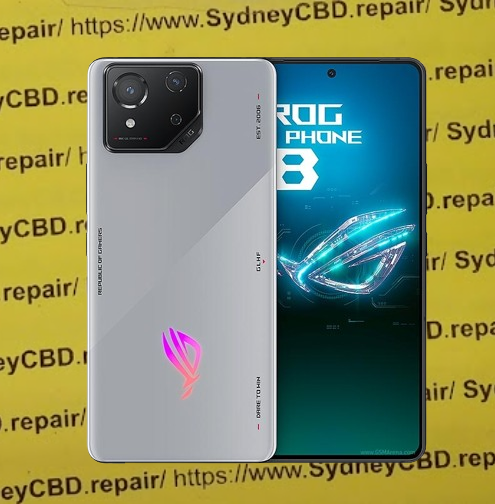
The ASUS ROG Phone 8 is a powerhouse made for gamers — and its screen reflects that high-performance focus. Featuring an AMOLED display, 165Hz refresh rate, HDR10+ support, and Corning Gorilla Glass Victus, it’s not your average smartphone screen.
But even a display this tough can’t always survive a harsh drop.
Key Features of the ROG Phone 8 Display:
| Feature | Description |
|---|---|
| Size | 6.78 inches |
| Resolution | 2448 x 1080 pixels |
| Refresh Rate | 165Hz |
| Protection | Gorilla Glass Victus |
| Touch Sampling Rate | 720Hz |
| Brightness | Up to 1500 nits |
These specs make it one of the best screens on the market — and also one of the most expensive to replace. That’s why screen repair for the ROG Phone 8 should be handled with extra care.
🔍 Common Screen Issues with the ROG Phone 8
Even the best displays have vulnerabilities. Some of the most frequent problems reported by ASUS ROG Phone 8 users include:
- Cracked or shattered glass from drops
- Ghost touches or phantom screen taps
- Display not turning on, despite full battery
- Lines or black spots appearing on the screen
- Screen flickering or rapid dimming
These issues are often caused by physical damage, pressure stress, or internal component failures linked to the screen assembly.
🛠 Can You Repair the ROG Phone 8 Screen Yourself?
Short answer: Yes, but it’s not recommended unless you’re experienced.
The ROG Phone 8’s compact internal structure and adhesive-based assembly mean you’ll need a careful hand and proper tools. ASUS does not make it particularly easy for DIYers to replace components like screens — mainly to protect device integrity.
That said, a screen replacement is technically possible at home. You just need to be aware of what you’re getting into.
🧰 Tools You’ll Need for DIY Repairs
If you’re still set on a DIY route, here’s your toolkit checklist:
- Precision screwdriver set (PH00, T2, etc.)
- Suction cup and plastic opening tools
- Heat gun or hair dryer
- Anti-static mat and gloves
- Replacement AMOLED screen (genuine or OEM)
- Adhesive strips or liquid adhesive
- Isopropyl alcohol and microfiber cloth
⚠️ Important: One misstep can cause motherboard damage, ruin touch sensitivity, or void your warranty. Always weigh the risk before proceeding.
🔧 Step-by-Step Guide to Replacing the Screen
If you’ve got steady hands and the right tools, follow these general steps to replace the ASUS ROG Phone 8 screen. Note: This is a simplified overview. Always consult a professional guide or video tutorial for exact steps.
✅ Screen Replacement Steps:
- Power Off and Remove SIM Tray
- Hold the power button until the device turns off completely.
- Remove the SIM tray to avoid damage during disassembly.
- Soften the Adhesive
- Use a heat gun or hair dryer to warm the screen edges.
- Apply even heat to loosen the strong adhesive holding the display.
- Pry Open the Screen
- Insert a plastic opening tool between the frame and the screen.
- Carefully work your way around the edges — avoid using metal tools.
- Disconnect the Battery
- Once the back cover or screen is loosened, carefully unplug the battery connector to prevent shorts.
- Remove Broken Display
- Unclip the display flex cable(s) from the motherboard.
- Carefully lift and remove the damaged screen.
- Install New Screen
- Connect the new screen’s flex cable.
- Test the screen functionality before sealing.
- Reassemble the Phone
- If the screen works, apply new adhesive or double-sided tape.
- Re-seal the phone, making sure it’s tightly closed.
⚠️ Pro Tip:
Don’t forget to test touch response, brightness, and color accuracy before finalizing the reassembly.
⚠️ Risks of DIY Repairs on Gaming Phones
Gaming phones like the ASUS ROG Phone 8 come with added complexity — including high-refresh displays, internal vapor chambers, and tuned speakers. DIY repairs can risk:
- Thermal misalignment (impacting cooling systems)
- Broken flex cables
- Touchscreen calibration issues
- Waterproofing failure
- Void warranty or resale value
Unless you’re highly experienced or the screen damage is superficial, you’re better off trusting a professional repair service.
🧑🔧 When Should You See a Professional?
Let’s be real — if your screen is cracked, unresponsive, or has deep discoloration, you need professional help. A certified technician can:
- Diagnose secondary damage (e.g., to digitizers or motherboard)
- Use original OLED/AMOLED replacement panels
- Ensure waterproofing is re-applied
- Offer repair warranties
For Sydney locals, the Sydney CBD Repair Centre offers same-day repairs and has 2000+ five-star reviews. That’s the kind of peace of mind you want with a $1500+ gaming phone.
💸 Cost Breakdown: DIY vs Professional Repair
Let’s compare the typical costs for ROG Phone 8 screen replacement:
| Option | Estimated Cost | Includes | Risk |
|---|---|---|---|
| DIY | $350–$500 | Screen part, tools, adhesives | High |
| Professional Repair | $450–$600 | Genuine screen, labor, warranty | Low |
Extra Value with Sydney CBD Repair Centre:
- Genuine AMOLED screens
- Free diagnosis
- 90-day repair warranty
- Same-day turnaround
Check their current pricing here: Sydney CBD Repair Centre – Locate Us
⏱️ How Long Does a Screen Repair Take?
At Sydney CBD Repair Centre, most screen replacements for the ASUS ROG Phone 8 are completed within the same day — sometimes in under 2 hours if you book ahead.
Factors That Affect Repair Time:
- Availability of parts
- Extent of internal damage
- Device model and complexity
- Current workload at the repair centre
For walk-ins, you can still expect fast service — but we recommend calling ahead at +61280114119.
🛡️ Why Choose Sydney CBD Repair Centre?

David and his expert team have been voted the #1 phone repair shop in Sydney for 6 consecutive years. Here’s why they stand out:
- ✅ Use of 100% genuine parts
- ✅ Repairs by trained technicians
- ✅ More than 2,000 5-star Google reviews
- ✅ 90-day warranty
- ✅ Award-winning service
They specialize in Samsung, Apple, ASUS, OPPO, Huawei, and more — and they handle gaming phones with extra care.
🧩 Benefits of Using Genuine Parts
When it comes to high-performance displays, using genuine parts is non-negotiable. Here’s why:
- 🔁 Perfect compatibility
- 🎮 Preserves refresh rate (165Hz)
- 🌈 No color distortion or brightness issues
- 🤳 Touch sensitivity remains accurate
- 💧 Water-resistance is retained
Third-party or fake screens might cost less, but you’ll pay more in the long run with glitches, screen burns, or early failure.
🧾 Warranty and Aftercare for Screen Repairs
At Sydney CBD Repair Centre, you get a 90-day warranty on all screen replacements.
What the warranty covers:
- Screen malfunctions not caused by new drops
- Touch/display failures due to faulty installation
- Warranty claims processed within 1 business day
They also offer helpful aftercare like:
- Screen protectors
- Free diagnostics if issues reoccur
- Repair receipt for warranty proof
🛡️ Protecting Your ROG Phone 8 Post-Repair
After your screen has been replaced, keep it safe! Here’s how:
Post-Repair Tips:
- Install a premium screen protector (tempered glass preferred)
- Use a rugged case that supports heat dissipation
- Avoid extreme temperatures
- Enable touch sensitivity mode if using thicker protectors
- Back up data regularly — just in case
Your ROG Phone 8 is a gaming beast — treat it like one.
🙋 Frequently Asked Questions (FAQs)
1. How do I know if my ROG Phone 8 needs a screen replacement?
If the display is cracked, unresponsive, flickering, or has lines — it likely needs replacement. A professional can diagnose it quickly.
2. Is the screen covered by ASUS warranty?
Physical damage isn’t covered by standard ASUS warranty. Only manufacturing defects are included.
3. Can I use any screen or does it have to be OEM?
Using OEM (original equipment manufacturer) or genuine parts ensures performance, compatibility, and longer lifespan.
4. Is it safe to repair my phone at Sydney CBD Repair Centre?
Yes. They’re an award-winning repair shop with 2000+ verified reviews and a reputation for quality and speed.
5. Will my phone still be water-resistant after the repair?
Yes, if the repair is done professionally with proper sealing adhesives — like at Sydney CBD Repair Centre.
6. Can I walk in for a screen replacement or do I need an appointment?
Walk-ins are welcome, but appointments help you get faster service. Call ahead to secure a same-day repair.
✅ Conclusion: Your Screen, Restored with Confidence
The ASUS ROG Phone 8 deserves premium care — and whether you attempt a DIY fix or go to a professional, knowing your options matters. For most users, the safest, most cost-effective route is to get it repaired by experts who specialize in high-performance devices.
💼 If you’re in Sydney, Sydney CBD Repair Centre offers everything you need:
- Same-day repair
- Genuine parts
- Transparent pricing
- Friendly service
📞 Call them today at +61280114119 or visit: https://SydneyCBD.repair/locate-us

