


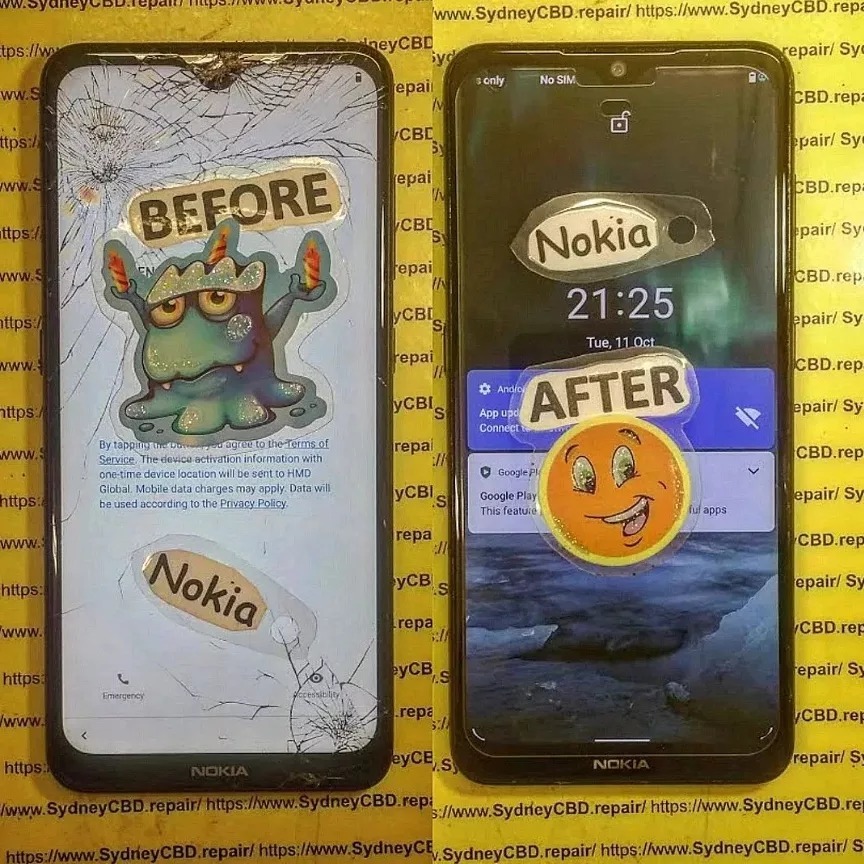
Replacing the screen of a popular budget gaming phone

Replacing the Screen of a Popular Budget Gaming Phone – The Ultimate Fix Guide + 15 Pro Tips
🕹️ Why Budget Gaming Phones Are More Popular Than Ever
Mobile gaming has exploded over the past five years, and not everyone can afford a flagship device like the Samsung Galaxy S24 Ultra or iPhone 15 Pro Max. That’s where budget gaming phones shine—offering impressive performance, smooth gameplay, and large displays at a fraction of the cost.
🚀 The Rise of Mobile Gaming
From Call of Duty: Mobile to Genshin Impact, today’s mobile games demand more from hardware. Budget phones like the Poco X3 Pro, Realme Narzo 50, and Samsung Galaxy M14 now come with powerful processors, high-refresh-rate screens, and ample RAM—making them ideal for gaming on a budget.
💸 Budget vs. Flagship Phones
| Feature | Budget Gaming Phones | Flagship Phones |
|---|---|---|
| Cost | $200 – $400 | $800 – $1500 |
| Performance | Mid-to-High | High-End |
| Build Quality | Plastic/Glass | Premium Materials |
| Screen Durability | Moderate | High |
🧩 Common Screen Problems in Budget Gaming Phones
Despite the advancements, screen damage remains the Achilles’ heel of budget devices.
💥 Cracks, Flickers & Dead Pixels
- Cracked screens from drops are the most common issue.
- Flickering displays may indicate cable or digitizer issues.
- Dead pixels can ruin gaming experiences.
🤷♂️ Touchscreen Unresponsiveness
- Cheap screen replacements may lead to laggy or dead touch zones.
- Damage can interfere with multi-touch capabilities, which are essential in games like PUBG Mobile.
🔍 Signs You Need a Screen Replacement
👁️ Visual Symptoms
- Spiderweb-like cracks
- Discoloration or lines running across the screen
- Random blackouts
🧠 Performance Impact
- Lag or freezing during gaming
- Ghost touches
- Apps opening or closing without input
🧰 Tools and Parts Needed for DIY Screen Replacement
Thinking of doing it yourself? You’ll need the right gear.
🛠️ Essential Repair Tools
- Heat gun or hairdryer
- Pry tools and suction cup
- Screwdrivers (Torx and Philips)
- Isopropyl alcohol and microfiber cloth
🛒 Where to Buy Genuine Parts
- Official brand stores (if available)
- Trusted third-party vendors like iFixit
- Sydney CBD Repair Centre offers OEM-quality screens for most models
📌 Avoid generic parts from unknown eBay sellers—they often fail within weeks.
🧱 Step-by-Step Screen Replacement Process
⚠️ Warning: Screen replacements require precision. Follow every step carefully.
🔒 Precautions Before You Start
- Backup your phone
- Turn it off and remove the SIM card
- Wear anti-static gloves
🧹 Removing the Damaged Screen
- Heat the edges with a heat gun
- Use a suction cup and plastic tool to pry the screen
- Disconnect display cables using tweezers
🧩 Installing the New Screen
- Clean the inside of the frame
- Connect the new screen’s flex cables
- Test before sealing
- Seal with adhesive strips or liquid glue
- Reassemble and power on
🔥 Budget Gaming Phones with the Easiest Screens to Replace
Not all phones are created equal—some budget gaming phones are a dream for DIYers, while others are nightmares.
📱 Xiaomi Poco Series
Models like the Poco X3 Pro and Poco M4 Pro are well-known for:
- Modular design with easy-to-access components
- Fewer screws and clips compared to Samsung or Apple
- LCD panels that are easier (and cheaper) to replace
📱 Samsung Galaxy M Series
While Samsung phones generally use AMOLED screens, the M Series:
- Offers easier disassembly than the flagship Galaxy S and Z series
- Uses standard screws and battery pull tabs
- Has widely available replacement screens
📱 Realme Narzo Lineup
These phones are built for affordability and repairability:
- Use mostly LCD screens, lowering repair costs
- Adhesive is strong but manageable with a heat gun
- Display connectors are accessible once the back is removed
Tip: Avoid budget phones with in-screen fingerprint sensors—they complicate screen replacements significantly.
⚠️ When You Shouldn’t DIY: Knowing Your Limits
Sometimes it’s better (and safer) to leave it to the pros. DIY isn’t always the best path, especially if you’re dealing with:
🔧 Signs of Internal Damage
- Bent frame or dented housing
- Display working but showing unusual light bleeding
- Motherboard exposure after screen breakage
💾 Data Recovery Risks
Replacing a screen without proper static control or technique can:
- Fry internal chips
- Corrupt important game save files or personal photos
- Permanently damage the logic board
🧠 Always backup your data before attempting a repair.
💰 Cost Breakdown: DIY vs. Professional Repair
Let’s break down the financial side of things.
📊 What You’re Paying For
| Item | DIY | Professional Repair |
|---|---|---|
| Replacement Screen | $40 – $100 | $70 – $160 |
| Tools | $30 (initial) | Included |
| Time | 2–4 hours | 1–2 hours |
| Risk of Damage | High | Low |
| Warranty | None | Often 60–90 Days |
DIY may be cheaper up front, but you risk voiding warranties or damaging the device further.
⏳ Time vs. Money
Time is money, especially if the phone is essential for work, school, or your gaming streams.
A professional service saves hours and offers peace of mind.
🛡️ Warranty Considerations & Manufacturer Restrictions
Before diving into repairs, it’s important to consider how screen replacements affect your warranty.
📝 How DIY Affects Warranty
- Most brands void your warranty once the phone is opened
- Water resistance is lost unless reassembled with proper seals
- Apple and Samsung both discourage non-authorized repairs
🏷️ Brand-Specific Rules
- Samsung: Voids warranty if unofficial parts are used
- Xiaomi & Realme: Warranty remains only if serviced at authorized centres
- Google Pixel: Requires calibration tools post-repair
✅ Professional repair centres like Sydney CBD Repair Centre maintain warranty compliance by using genuine parts and trained technicians.
🔍 Finding a Trusted Repair Shop
Not all repair shops are created equal. Here’s how to choose wisely.
🤝 Questions to Ask
- Do they use OEM or aftermarket parts?
- What’s their screen warranty policy?
- Do they offer same-day service?
🌟 Why Reviews Matter
With over 2000+ positive Google reviews, Sydney CBD Repair Centre stands out for:
- Consistency in quality
- Transparent pricing
- Excellent after-service care
Don’t trust your phone with the cheapest option—trust the most reliable one.
🏆 Real-Life Example: Sydney CBD Repair Centre

🛠️ 6-Time Award-Winning Service
David and his team have earned their reputation as Sydney’s go-to mobile repair experts. With 6 years in a row as the top-rated centre, here’s what sets them apart:
- Same-day screen replacements
- Genuine replacement parts only
- Technicians trained in Samsung, Apple, Google & more
🧾 90-Day Warranty + Genuine Parts
Every screen replacement comes with:
- A 90-day repair warranty
- Assurance of zero counterfeit components
- Careful handling and data safety
🔗 Visit SydneyCBD.repair/locate-us for walk-ins and appointments.
🔧 Maintenance Tips After a Screen Replacement
Keeping your new screen in good shape is crucial.
🛡️ Using Screen Protectors
- Tempered glass or hydrogel film
- Reduces cracks from drops by 80%
- Easy to reapply when damaged
🧳 Avoiding Future Damage
- Invest in a shockproof case
- Avoid charging while gaming to reduce heat
- Use fingerprint-resistant wipes for cleaning
🎮 Must-Have Accessories for Budget Gaming Phones
Power up your gameplay with these essentials:
❄️ Cooling Fans
- Clip-on USB-powered fans reduce overheating
- Helps extend your screen’s and battery’s life
💼 Protective Cases
- Rugged or gaming cases with built-in stands
- Choose silicone-backed or hybrid protection models
❓ Frequently Asked Questions (FAQs)
1. How long does a screen replacement take?
With professionals like Sydney CBD Repair Centre, most screens are replaced within 1–2 hours.
2. Is it worth repairing a screen on a budget phone?
Yes—if the phone is less than 2 years old and still performs well, screen repair is usually more cost-effective than buying a new phone.
3. Can I replace a screen without special tools?
Not effectively. Basic tools like a heat gun, pry tools, and suction cup are necessary to avoid further damage.
4. Does screen replacement affect my data?
No, unless the motherboard is damaged. Still, it’s best to back up your data before any repair.
5. Are third-party screens as good as original ones?
Some are decent, but genuine parts provide the best clarity, color accuracy, and durability.
6. Will I lose water resistance after a screen replacement?
Yes—unless properly sealed using factory-grade adhesives. Most DIY kits don’t restore full water resistance.
✅ Conclusion
Replacing the screen of a popular budget gaming phone doesn’t have to be a risky venture. Whether you’re a hands-on DIYer or someone who values professional care, knowing the tools, risks, and best practices is half the battle. For guaranteed results, Sydney CBD Repair Centre offers top-tier service, OEM parts, and trusted expertise.
Don’t let a cracked screen keep you out of the game—repair it the right way, today.
🛠️ David from Sydney CBD Repair Centre
📞 Call: +61280114119
📍 Locate Us Here

