



Decoding Pink Line: Beyond Samsung’s Quick Fix

Decoding Pink Line: Beyond Samsung’s Quick Fix – 7 Proven Solutions You Need to Know
Introduction
In the world of smartphones, Samsung devices are celebrated for their vibrant displays and cutting-edge technology. Yet, even the most advanced screens are not immune to technical glitches, and one problem that has increasingly frustrated users is the appearance of a pink line on the screen. This faint yet persistent line can mar your viewing experience, interfere with touch responsiveness, and, in some cases, indicate a deeper hardware issue.
While Samsung has released quick fixes and software updates to address minor display irregularities, the pink line issue often requires more than a simple restart. It could stem from software bugs, app conflicts, or, more seriously, hardware problems such as loose connectors or defective display panels. Understanding the cause of the pink line is essential to determine the best course of action—whether it’s a temporary home fix or a professional repair.
This comprehensive guide, “Decoding Pink Line: Beyond Samsung’s Quick Fix – 7 Proven Solutions You Need to Know,” explores the root causes of pink lines, step-by-step DIY troubleshooting methods, professional repair options, and preventative measures. By the end of this article, you’ll have a clear roadmap to not only fix the pink line but also maintain your Samsung device’s screen quality for the long term.
Understanding the Pink Line Issue on Samsung Devices
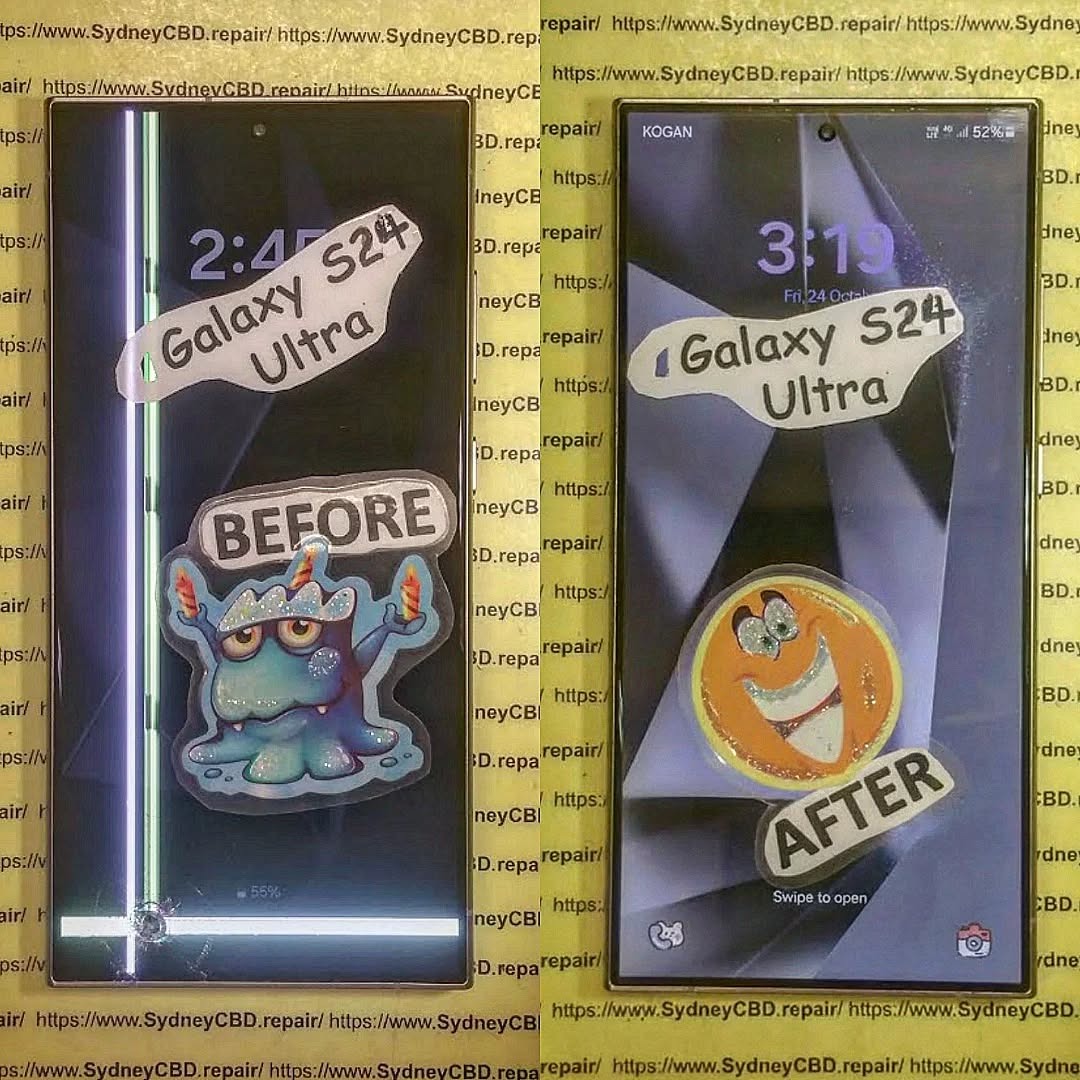
If you’ve noticed a pink line running vertically or horizontally on your Samsung screen, you’re not alone. This issue has been increasingly reported across Samsung models, from the Galaxy S series to the Note lineup. The pink line often appears suddenly and can vary in thickness and brightness, making it difficult to ignore.
The first step in tackling this problem is understanding why it happens. The pink line is typically a symptom rather than the root cause. By decoding its origin, you can decide whether a simple software fix is enough or if professional intervention is necessary.
Common Causes of Pink Line on Screens
The pink line may appear due to hardware issues, software glitches, or a combination of both. Let’s break these down:
Hardware-Related Causes
- Physical Damage: Dropping your phone or exposing it to pressure can damage the screen or internal connectors.
- Display Panel Defects: Manufacturing inconsistencies sometimes lead to uneven color display over time.
- Loose Flex Cables: Connectors linking the display to the motherboard may become loose, causing color distortion.
Software-Related Causes
- Firmware Bugs: Updates can occasionally introduce display issues.
- App Conflicts: Certain apps may interfere with the screen rendering.
- System Glitches: Minor bugs can temporarily affect color calibration, sometimes causing lines or flickers.
Quick Diagnostics Before You Start

Before rushing into repairs, it’s essential to diagnose the problem accurately.
Screen Test Tools on Samsung Devices
Samsung devices have built-in diagnostic tools accessible via the Samsung Members app or by dialing *#0*# on your keypad. These tests allow you to check:
- Color consistency
- Touch responsiveness
- Pixel defects
Using these tools can help differentiate between a software-induced pink line and a hardware fault.
When to Consider Professional Help
Some signs indicate that DIY fixes may not be enough:
- Lines expanding or changing over time
- Flickering or dead pixels along with the pink line
- Device overheating or battery issues
In such cases, professional assessment is highly recommended.
DIY Fixes: Step-by-Step Solutions
If the pink line appears due to software issues or minor glitches, there are several steps you can take at home.
Soft Reset and Safe Mode
- Soft Reset: Press and hold the power button, then select “Restart.” This refreshes system memory and may resolve temporary glitches.
- Safe Mode: Booting into Safe Mode disables third-party apps, helping you identify if a specific app is causing the issue.
Display Calibration & Software Updates
- Calibration: Navigate to Settings → Display → Screen Mode and adjust color balance to reduce the prominence of pink lines.
- Software Updates: Ensure your Samsung device is running the latest firmware to fix known display bugs.
Temporary Screen Adjustments
- Lower brightness to reduce strain on defective pixels.
- Use “Night Mode” or color filters available under Settings → Display → Eye Comfort Shield.
- Avoid prolonged exposure to extreme temperatures which can worsen screen issues.
Hardware Repairs and Professional Interventions
When DIY steps fail, it’s time to consider hardware solutions.
Replacing the Display Panel
Replacing the entire screen is often the most reliable solution. Professionals ensure:
- Proper alignment
- Compatibility with your device model
- Use of genuine Samsung parts
Flex Cable and Connector Repairs
Technicians can reseat or replace loose connectors, restoring normal display function without a full screen replacement.
Advanced Repair Tools Used by Technicians
Repair centers like Sydney CBD Repair Centre use precision tools such as:
- Microsoldering equipment for tiny connectors
- UV curing lamps for adhesive-based repairs
- High-resolution diagnostic monitors for testing post-repair
Preventing Pink Lines in the Future
Prevention is better than cure. Here’s how to protect your Samsung screen:
Protective Cases and Screen Protectors
- Shock-absorbing cases minimize impact damage.
- Tempered glass protects the display from scratches and minor cracks.
Software Hygiene
- Keep your device updated with the latest firmware.
- Avoid installing apps from unverified sources.
- Regularly clear cache and manage background apps to reduce system strain.
Comparing Genuine vs Aftermarket Screens
| Feature | Genuine Samsung Screen | Aftermarket Screen |
|---|---|---|
| Color Accuracy | Excellent | Variable |
| Touch Sensitivity | High | Sometimes laggy |
| Warranty | Covered by Samsung | Limited or none |
| Durability | Long-lasting | Can degrade faster |
| Cost | Higher | Lower |
While aftermarket screens are cheaper, genuine replacements provide reliability and prevent recurring issues.
Frequently Asked Questions (FAQs)
Q1: Can a pink line disappear on its own?
A1: If caused by a software glitch, a restart or update may temporarily fix it. Persistent lines usually indicate hardware issues.
Q2: Is screen replacement the only permanent fix?
A2: For hardware defects, yes. However, software-related lines can often be fixed without replacement.
Q3: Will Samsung repair a pink line under warranty?
A3: If it’s a manufacturing defect and your device is under warranty, Samsung may cover the repair. Physical damage usually isn’t covered.
Q4: Can flex cable repair save money?
A4: Yes, reseating or replacing the flex cable can restore display function without replacing the entire screen.
Q5: Are aftermarket screens safe to use?
A5: While cheaper, they may not match Samsung’s color accuracy or touch responsiveness. Using genuine parts is recommended.
Q6: How to prevent pink lines from returning?
A6: Protect your phone from drops, maintain software hygiene, and use screen protectors and cases to reduce stress on the display.
Conclusion

Decoding the pink line issue on Samsung devices requires patience and understanding. While minor software glitches may be addressed at home, most cases stem from hardware faults that demand professional care. By following preventive measures, performing regular diagnostics, and choosing genuine parts for repairs, you can ensure your Samsung device remains vibrant and fully functional.
For reliable, expert repair services, Sydney CBD Repair Centre offers same-day repairs using genuine parts, backed by a 90-day warranty.
David from Sydney CBD Repair Centre – The Best place to fix mobile phones as 6 Years In A Row! Top Mobile Phone Repair In Sydney. More than 2000 Positive Reviews on Google and Same Day Repairs.
We take pride in delivering exceptional repair services for all major phone brands including Apple, Samsung, Google, and more. Our expert technicians use only genuine parts and offer 90days warranty on repairs. Located in the heart of Sydney CBD, we’re your one-stop solution for all mobile device repairs.
Our commitment to excellence has earned us the trust of thousands of satisfied customers. Whether it’s a cracked screen, battery replacement, or water damage repair, we handle it all with professional care and expertise. Walk in today and experience why we’re Sydney’s #1 choice for mobile phone repairs.
Visit us for:
✓ Same Day Express Repairs
✓ Genuine Parts Guarantee
✓ Professional Technicians
✓ Competitive Pricing
✓ 2000+ 5-Star Google Reviews
✓ 6-Time Award Winner for Best Phone Repairs
Sydney CBD Repair Centre – Where Quality Meets Reliability.
Call : +61280114119
Website: https://SydneyCBD.repair/locate-us

