




Smartwatch Screen: Unseen Damage and Repair Hacks

Smartwatch Screen: Unseen Damage and Repair Hacks That Save You Hundreds
Understanding Smartwatch Screen Damage
Smartwatches have evolved from fitness trackers to miniature smart devices on your wrist. However, their screens remain one of the most vulnerable components. Even the slightest impact can lead to unseen damage that worsens over time.
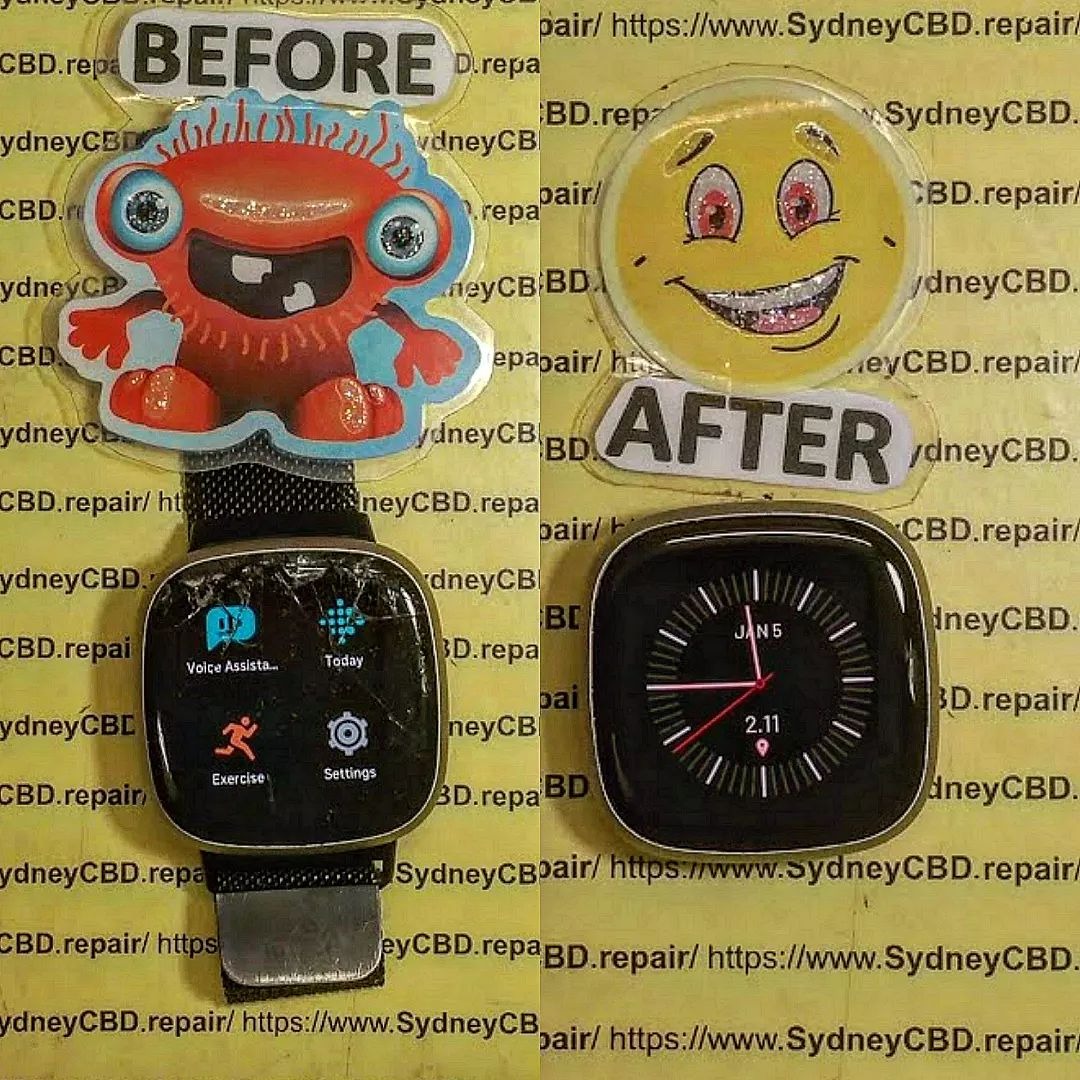
Why Smartwatch Screens Are More Fragile Than You Think
Despite being marketed as “scratch-resistant” or “shatterproof,” smartwatch screens often use tempered glass or AMOLED displays, which can suffer from internal stress cracks or pixel bleeding. Repeated exposure to sunlight, moisture, and daily wear can cause microscopic fractures invisible to the naked eye.
Common Causes of Unseen Screen Damage
| Cause | Description | Impact |
|---|---|---|
| Sweat and Moisture | Seeps into crevices, weakening internal seals | Screen fogging, touchscreen lag |
| Pressure | Tight straps or accidental knocks | Micro-cracks, pressure spots |
| Heat Exposure | Leaving watch in direct sunlight | Pixel burn-in, display discoloration |
| Poor Charging Habits | Overheating battery during charge | Glass warping, adhesive softening |
How Everyday Use Impacts Screen Longevity
Every time you tap, swipe, or expose your smartwatch to changing temperatures, the materials expand and contract slightly. Over time, this stress accumulates, creating invisible cracks that eventually cause touch sensitivity issues or display flickering.
Identifying Hidden Screen Issues
Knowing the signs of hidden damage helps prevent major repairs. Many smartwatch owners notice small glitches but overlook them—until it’s too late.
Signs of Micro Cracks and Internal Screen Damage
- Faint lines under certain lighting angles
- Dull or uneven brightness in specific screen areas
- Random ghost touches or unresponsive zones
- Distorted icons or colors near screen edges
How to Test for Dead Pixels or Touch Malfunctions
You can use a simple pixel testing app or even a white background on your watch face to identify missing pixels. For touch tests, slide your finger slowly across the screen; lag or dead zones indicate deeper issues.
Why Ignoring Minor Damage Can Lead to Costly Repairs
That barely visible crack may seem harmless, but it compromises the waterproof seal. Moisture can creep inside and damage the motherboard, causing the entire watch to fail—leading to repairs costing up to 80% of a new device’s price.
DIY Smartwatch Screen Repair Hacks That Actually Work
If you notice minor scratches or surface imperfections, there are a few safe at-home fixes to help mitigate further damage.
Temporary Fixes for Hairline Cracks
Use clear nail polish or UV glue to fill tiny surface cracks. It prevents dust and moisture from spreading the fracture line. Apply a thin layer, let it cure under UV light, and gently wipe off excess residue.
Screen Protection Hacks Using Household Items
- Toothpaste: Non-abrasive toothpaste can polish away light scratches.
- Petroleum Jelly: Seals cracks temporarily, reducing glare lines.
- Plastic Polish (like Polywatch): Restores clarity for older models.
⚠️ Note: These are temporary measures. For long-term protection, seek a professional repair service.
When to Use UV Glue and Screen Adhesives
When cracks start affecting visibility or touch, optical UV glue can restore display integrity. However, improper use can cause display bleeding or adhesive smudging—so professional application is strongly advised.
Professional Smartwatch Screen Repair: What to Expect
If your screen is cracked, unresponsive, or displays discoloration, it’s time for a professional repair.
At Sydney CBD Repair Centre, technicians use genuine OEM screens and precision tools to restore your smartwatch to factory condition.
Step-by-Step Professional Repair Process
- Diagnostics – Assess hidden and visible damage
- Disassembly – Carefully remove the screen with anti-static tools
- Screen Replacement – Fit genuine parts with proper sealing
- Testing – Confirm touch response, color accuracy, and waterproofing
- Final Calibration – Optimize brightness and battery performance
How Genuine Parts Affect Screen Performance
Using counterfeit or third-party screens may save money upfront but leads to color inaccuracy, touch delays, and faster degradation. Genuine parts maintain device performance and warranty integrity.
Warranty and Aftercare Tips from Experts
At Sydney CBD Repair Centre, every repair comes with a 90-day warranty.
Keep your smartwatch dry for 24 hours post-repair and avoid applying pressure on the screen to let adhesives settle.
Comparing DIY vs. Professional Repairs
| Criteria | DIY Repair | Professional Repair |
|---|---|---|
| Cost | Low upfront, risky long-term | Competitive with warranty |
| Time | Quick but uncertain | Same-day repairs available |
| Risk | High (possible internal damage) | Minimal, handled by experts |
| Longevity | Short-term fix | Long-term performance |
Professional repairs ensure that seals, adhesives, and waterproofing are correctly restored—something DIY kits can’t guarantee.
Benefits of Choosing a Certified Repair Centre
- Same-day express repairs
- Over 2,000 verified 5-star Google reviews
- Experienced technicians with award-winning service
- Genuine parts guaranteed
Sydney CBD Repair Centre has been voted Best Mobile Phone Repair Shop in Sydney for 6 years running — proof of reliability and excellence.
Preventing Future Smartwatch Screen Damage
An ounce of prevention is worth a full repair bill. Following these simple steps can extend your smartwatch lifespan.
Best Screen Protectors and Protective Cases
- Tempered glass protectors – High-impact resistance
- TPU films – Flexible and bubble-free
- Rugged bumpers – Extra corner protection
Handling and Maintenance Best Practices
- Avoid charging overnight to prevent overheating
- Keep watch away from direct sunlight or extreme cold
- Don’t over-tighten straps—pressure can warp the display frame
Smart Cleaning Techniques That Protect Your Screen
Use microfiber cloths and alcohol-free cleaning sprays. Avoid tissues or paper towels that can scratch the glass.
Weekly cleaning prevents grime buildup that dulls the display.
FAQs

Q1: Can I replace my smartwatch screen myself?
You can, but it’s risky. Without proper tools, you may damage waterproof seals or connectors. Always seek certified repair help for best results.
Q2: How long does a professional repair take?
At Sydney CBD Repair Centre, most smartwatch screen replacements are done same-day.
Q3: Are smartwatch screens covered by warranty?
Manufacturer warranties often exclude accidental damage. However, some premium protection plans may include it.
Q4: How can I tell if my smartwatch screen has internal damage?
Watch for flickering, unresponsive touch zones, or uneven brightness. These indicate hidden cracks or internal pressure damage.
Q5: What’s the average cost of smartwatch screen repair in Sydney?
Depending on the model, expect $120–$250 for genuine parts and expert labor.
Q6: How can I prevent scratches altogether?
Invest in a tempered glass protector and clean your device regularly to avoid abrasive residue.
Conclusion: Protect Your Investment with Expert Care

A smartwatch is more than a gadget—it’s an essential part of daily life.
From fitness tracking to notifications, its screen is the gateway to everything you do. By understanding unseen damage, applying smart prevention, and trusting Sydney CBD Repair Centre, you ensure your device stays in top shape for years.
📍 Visit Sydney CBD Repair Centre
Same-Day Repairs | Genuine Parts | 90-Day Warranty
Call: +61 2 8011 4119
Website: https://SydneyCBD.repair/locate-us

