


How To Replace Samsung Galaxy S23 Ultra Back Glass

How to Replace Samsung Galaxy S23 Ultra Back Glass – Step-by-Step Guide for a Professional Repair
📱 Introduction
The Samsung Galaxy S23 Ultra is a flagship masterpiece, but its sleek glass back, while stunning, is vulnerable to drops and cracks. If the rear glass is shattered, scratched, or coming loose, it’s more than a cosmetic issue—it could affect your phone’s water resistance and internal components.
This guide explains how to replace the back glass of your Samsung S23 Ultra, the tools you need, risks of DIY, and why professional repair might be your best bet.
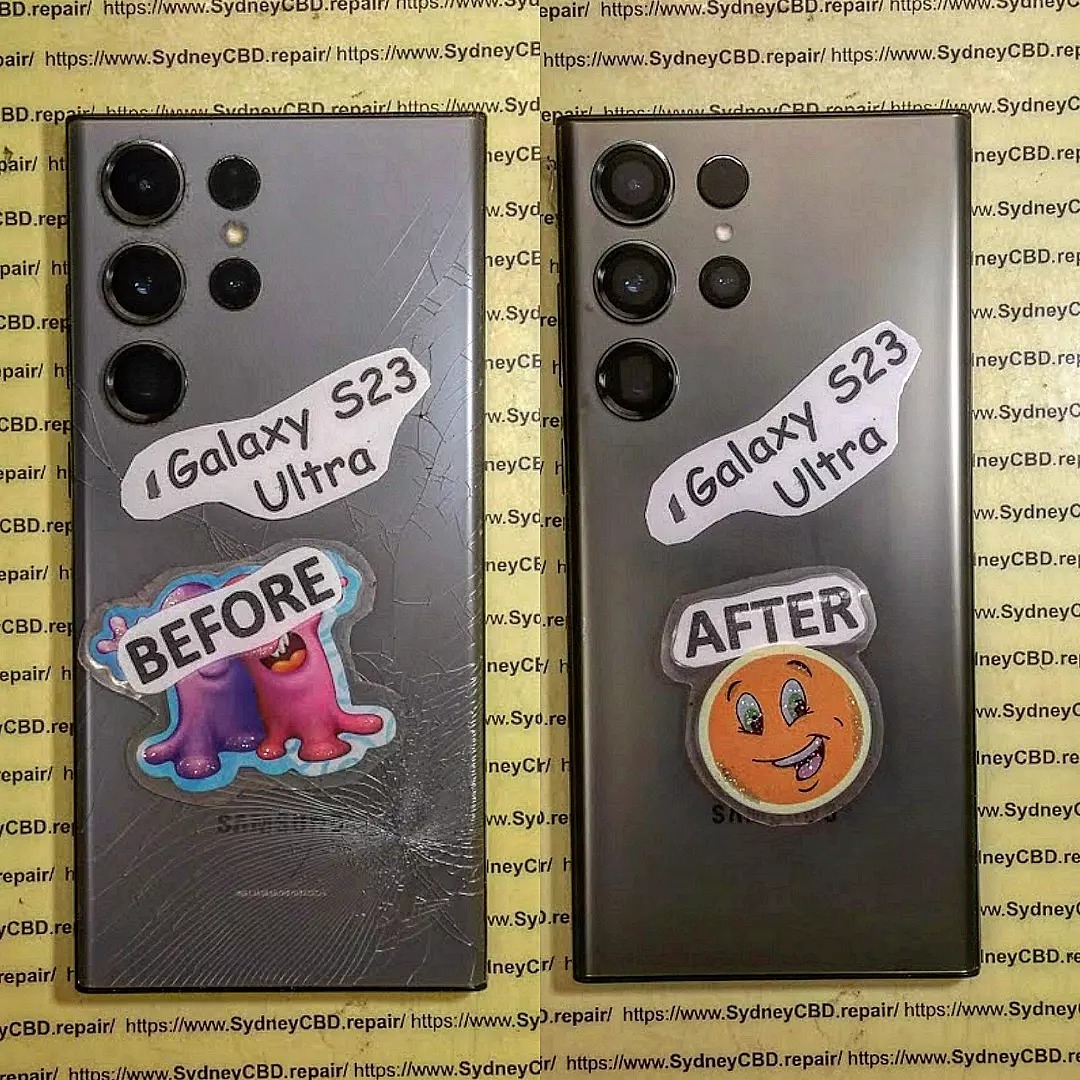
🧩 Why Back Glass Replacement is Important
The back glass serves more than aesthetic purposes. It:
- Protects internal components (battery, wireless charging coil, etc.)
- Helps dissipate heat
- Supports wireless charging
- Maintains device integrity and water resistance (IP68 rating)
Neglecting to fix a cracked back can lead to dust, moisture, or debris damage inside your phone.
⚠️ Signs You Need to Replace the Back Glass
- Visible cracks or shattering
- Sharp edges or glass shards
- Wireless charging doesn’t work
- Moisture trapped inside
- The glass feels loose or creaky
🧰 Tools Required for Back Glass Replacement
If you plan to attempt it yourself (not recommended without experience), you’ll need:
- Heat gun or hairdryer
- Suction cup
- Thin plastic pry tool or guitar pick
- Isopropyl alcohol (90% or higher)
- Lint-free cloth
- Adhesive strips or OEM adhesive
- Replacement back glass for Samsung S23 Ultra (genuine preferred)
🛠️ Step-by-Step Guide to Replace Back Glass
⚠️ Warning: Attempting DIY repair without proper tools and training may damage your device or void warranties.
🔋 Step 1: Power Off the Device
Before anything, completely shut down your S23 Ultra to avoid short-circuiting.
♨️ Step 2: Heat the Back Glass Panel
Use a heat gun or hairdryer on medium heat. Focus on the edges to soften the adhesive.
Do this for about 2–3 minutes in small circular motions.
🪝 Step 3: Use Suction Cup and Pry Tool
- Place the suction cup on the back glass.
- Gently lift and insert a plastic pry tool.
- Slide around the edges to separate the adhesive.
- Be careful near the camera bump—it’s fragile and glued securely.
🧽 Step 4: Remove Remaining Adhesive
Clean the edges of the phone using isopropyl alcohol and a microfiber cloth.
Remove all sticky residue for a smooth, secure fit.
🧲 Step 5: Install the New Back Glass
- Apply pre-cut adhesive strips or OEM adhesive.
- Align the new back glass and press gently into place.
- Place the phone under a lightweight object for 30 minutes to ensure bonding.
❌ Common Mistakes to Avoid During DIY Replacement
- Overheating the phone (can damage internals)
- Using metal tools (scratches or breaks internal parts)
- Not cleaning adhesive properly
- Misaligning the new back glass
- Using low-quality glass or incorrect adhesive
🔍 Genuine vs Aftermarket Back Glass
| Type | Pros | Cons |
|---|---|---|
| Genuine OEM | Perfect fit, wireless charging support, strong adhesive | Higher cost |
| Aftermarket | Affordable, widely available | May not fit perfectly, poor heat dissipation, weak adhesive |
At Sydney CBD Repair Centre, we only use Samsung-authorised parts to ensure flawless fit and durability.
🔧 DIY vs Professional Back Glass Replacement
| Factor | DIY Repair | Professional Repair |
|---|---|---|
| Cost | Lower upfront | Slightly higher but includes warranty |
| Risk | High – possible damage | Low – expert handling |
| Tools | Must buy separately | All included |
| Time | 1–2 hours | 30–60 minutes |
| Warranty | None | 90 Days (at Sydney CBD Repair Centre) |
💰 Cost of Samsung S23 Ultra Back Glass Replacement in Sydney
| Repair Shop | Estimated Cost (AUD) | Warranty |
|---|---|---|
| Sydney CBD Repair Centre | $199–$249 | 90 Days |
| Samsung Official Repair | $250–$350 | 90 Days |
| Generic Repair Shops | $150–$200 | Varies (check quality) |
We match quality with price—genuine glass, certified technicians, express service.
🏆 Why Choose Sydney CBD Repair Centre

- ✅ Over 2000+ Positive Google Reviews
- ✅ Only genuine Samsung parts used
- ✅ Same-Day Repairs available
- ✅ 90-Day Warranty on all back glass repairs
- ✅ Convenient Sydney CBD location
- ✅ Award-Winning Service – 6 Years in a Row
- ✅ Certified Samsung repair specialists
📞 Call Now: +61280114119
📍 Visit Our Repair Centre
❓ FAQs
1. How long does it take to replace the back glass of the S23 Ultra?
Typically 30–60 minutes if done by a professional repair shop.
2. Will the repair affect wireless charging?
Not if you use genuine parts and follow proper installation steps. All features remain functional.
3. Is the S23 Ultra still waterproof after the repair?
The IP68 seal can be compromised if not resealed correctly. We apply water-resistant adhesive, but water resistance is not guaranteed post-repair.
4. Can I use a skin or case after back glass replacement?
Absolutely. In fact, it’s recommended to prevent future damage.
5. Can the camera glass also be replaced?
Yes, the camera lens covers can be replaced separately if damaged.
6. Do I need to back up my phone before the repair?
It’s good practice, though back glass repair doesn’t affect internal data.
✅ Conclusion
Replacing the Samsung Galaxy S23 Ultra’s back glass might seem simple, but it involves delicate steps that, if done incorrectly, could lead to more costly repairs. Whether you’re aiming to restore functionality, preserve wireless charging, or maintain the premium feel of your device, it’s best done by professionals.
Trust Sydney CBD Repair Centre—we’ve repaired thousands of Samsung devices with care, speed, and expertise.

