


White Line on Screen: Fix or Replace?

White Line on Screen: Fix or Replace? The Ultimate 2025 Guide
Introduction
Seeing a white line on your phone screen can be frustrating and even alarming. Whether it’s a faint vertical streak or a bold horizontal bar cutting across your display, it usually means something’s not quite right—either with your phone’s hardware or software. Many smartphone users panic when this happens, thinking their device is beyond repair. However, that’s not always the case.
In many instances, a white line can be caused by minor software glitches, a loose display connector, or even temporary pixel issues—all of which can be fixed without replacing your entire screen. But if it’s a sign of deeper damage, knowing when to repair or replace your screen can save you time, money, and stress.
In this comprehensive 2025 guide, we’ll explore the main causes behind white lines on your screen, walk you through diagnostic steps, explain temporary and permanent fixes, and help you decide whether it’s best to repair or replace your device. Backed by expert insights from Sydney CBD Repair Centre, this article will give you the clarity and confidence to handle this issue the smart way.
So, if you’ve been staring at that stubborn line wondering what to do next, you’re in the right place. Let’s dive in and uncover the ultimate solution to white line screen problems once and for all.
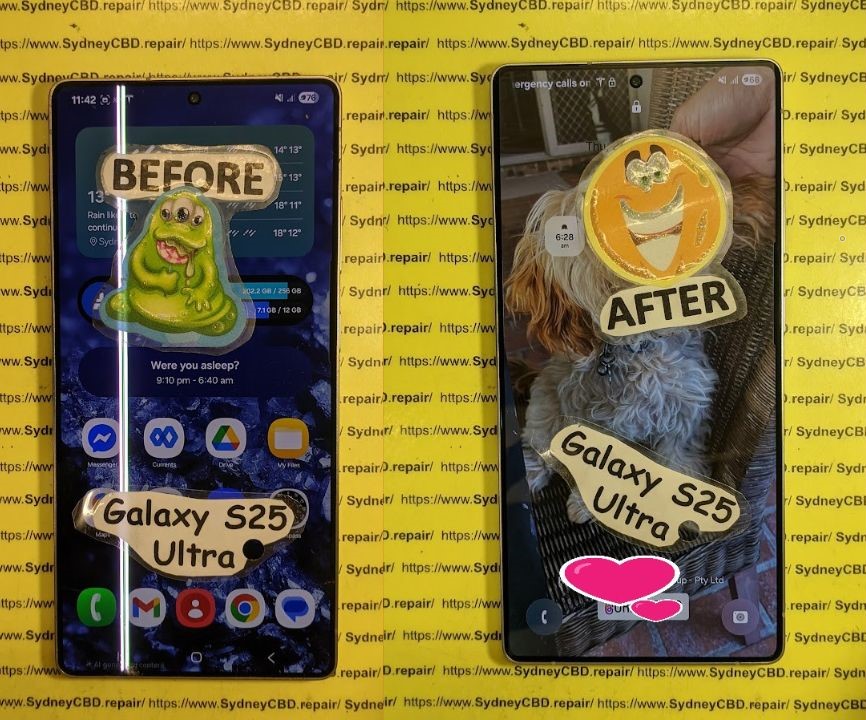
What Causes a White Line on Screen?
A white line on your phone screen is more than just an annoying distraction—it’s often a warning sign that your device’s display or internal components are damaged. Understanding the root cause helps you decide whether it can be fixed or needs a full replacement.
Hardware-Related Causes
One of the most common reasons for a white line is physical damage to the display panel. If you’ve dropped your phone or applied excessive pressure on the screen, the LCD or OLED layers might be cracked internally. This disrupts the flow of electrical signals to specific pixels, creating vertical or horizontal white lines.
Another possible culprit is a loose or damaged flex cable connecting the display to the motherboard. These cables are fragile, and even a minor misalignment can cause flickering, ghosting, or white lines across your screen.
Software Glitches and Firmware Errors
Sometimes, the issue isn’t physical at all. A corrupted firmware update or a buggy app can interfere with your display’s performance. In these cases, white lines might appear temporarily or during certain operations, such as opening specific apps or changing brightness levels.
Manufacturing Defects or Screen Aging
If your device is older or has been repaired before, you might be experiencing screen degradation. Over time, exposure to heat, dust, and moisture can affect display uniformity. Certain models also have known display faults that cause persistent lines after extended use.
Diagnosing the Problem: Is It Fixable?
Before jumping to conclusions, it’s crucial to diagnose whether your white line problem is software-related or hardware-based.
Simple Tests You Can Try at Home
- Restart your device – A quick reboot often clears minor glitches.
- Boot in safe mode – If the line disappears, an app is likely causing the issue.
- Screenshot test – Take a screenshot. If the white line appears in the image, it’s a software issue; if not, it’s hardware-related.
- Connect to an external display – If the image looks normal externally, your internal screen needs repair.
When to Seek Professional Help
If you’ve done these tests and the white line remains, it’s time to consult a repair technician. Sydney CBD Repair Centre offers free diagnostics and can determine whether a simple reconnection or full screen replacement is needed.
Temporary Fixes for White Line on Screen

While these fixes aren’t permanent, they can temporarily alleviate the issue until you get professional help.
Restarting and Resetting the Device
Restarting your phone clears cache and refreshes system memory. If the issue persists, consider a factory reset—just remember to back up your data first.
Software Update or Rollback
If the white line appeared after an update, it might be a software bug. Try rolling back to a previous version or checking for the latest firmware update.
Pixel Repair and Screen Calibration Tools
There are apps and tools that can “massage” stuck pixels or recalibrate your display. While these can sometimes help, they don’t fix hardware-level damage.
Permanent Fixes: Repair vs. Replacement
When Screen Replacement Is Necessary
If the damage is caused by a cracked display, broken connector, or faulty panel, the only real solution is screen replacement. Attempting to repair individual pixels or solder points usually leads to more damage.
How Much Does Screen Replacement Cost?
Costs vary depending on your device model and screen type:
| Brand | Estimated Cost (AUD) |
|---|---|
| Samsung Galaxy S Series | $380–$550 |
| iPhone Models | $250–$500 |
| Google Pixel | $320–$480 |
| Oppo / Xiaomi | $200–$400 |
(Prices from Sydney CBD Repair Centre, 2025)
Choosing Between OEM and Aftermarket Parts
Opting for OEM screens guarantees original quality and brightness, while aftermarket screens may save money but sacrifice performance. Sydney CBD Repair Centre only uses genuine OEM parts with a 90-day warranty for peace of mind.
Professional Repair Process Explained
Step-by-Step Breakdown by Sydney CBD Repair Centre
- Device inspection and free diagnostic
- Safe disassembly and screen removal
- Connector and motherboard testing
- Genuine screen installation
- Functionality and touch calibration
- Final quality assurance test
Quality Assurance and Warranty
Every repair comes with a 90-day parts and labor warranty. Our technicians are certified professionals with years of experience, ensuring your device is restored to like-new condition.
DIY Repair: Risks and Considerations
Required Tools and Skills
DIY screen replacement requires:
- Precision screwdriver set
- Heat gun or separator
- Suction tool and prying picks
- Replacement screen (OEM preferred)
Why DIY Repairs Can Be Risky
Improper disassembly can cause additional damage to your battery, connectors, or sensors. You might also void your warranty. It’s best to leave this to professionals like Sydney CBD Repair Centre, where repairs are quick, affordable, and guaranteed.
How to Prevent White Lines in the Future
Safe Charging Habits and Screen Care
Overcharging or using faulty chargers can cause voltage spikes that damage the display. Always use certified charging accessories.
Using Genuine Accessories
Avoid cheap cables and cases that may put unnecessary pressure on your screen. Genuine accessories not only ensure performance but also protect your investment.
FAQs
1. Can a white line on my phone screen disappear on its own?
Sometimes, yes—if caused by software issues. However, physical damage requires professional repair.
2. How long does screen replacement take?
At Sydney CBD Repair Centre, most repairs are completed the same day, often within an hour.
3. Does screen replacement affect waterproofing?
Professional repair centres reseal the device properly to maintain its water resistance.
4. Can I use my phone with a white line?
Yes, but continued use might worsen the damage or lead to full display failure.
5. Are aftermarket screens reliable?
They can work temporarily but often lack brightness, touch sensitivity, and durability.
6. Is screen repair covered under warranty?
Manufacturer warranty typically excludes accidental damage, but repair shops offer independent warranties.
Conclusion: Trust the Experts at Sydney CBD Repair Centre

If you’re dealing with a white line on your phone screen, don’t ignore it. Whether it’s a simple connector issue or a damaged OLED panel, professional assessment is key.
At Sydney CBD Repair Centre, we provide genuine parts, same-day service, and transparent pricing—ensuring your device looks and performs like new.
👉 Visit us today for:
✓ Same Day Express Repairs
✓ Genuine Parts Guarantee
✓ 2000+ 5-Star Google Reviews
✓ 6-Time Award Winner for Best Phone Repairs
📞 Call: +61280114119
🌐 Website: https://SydneyCBD.repair/locate-us
David from Sydney CBD Repair Centre – Sydney’s #1 Choice for Mobile Phone Repairs 6 Years in a Row!

