




THE ADHESIVE CHALLENGE! Waterproofing Secrets During A Google Pixel 8 Pro Repair

THE ADHESIVE CHALLENGE! Waterproofing Secrets During A Google Pixel 8 Pro Repair + Proven Techniques + 9 Expert Tips
Introduction to Waterproofing in Smartphone Repairs
Waterproofing has become one of the most critical aspects of modern smartphone design. When performing a Google Pixel 8 Pro repair, maintaining that water resistance is not just a bonus—it’s essential. Without proper sealing, even a minor repair can expose the device to dust, moisture, and long-term damage.
Today’s smartphones are engineered with tight tolerances and precision adhesives. So, when you open a device, you’re essentially breaking a carefully designed waterproof barrier. Recreating that barrier is where the real challenge begins.
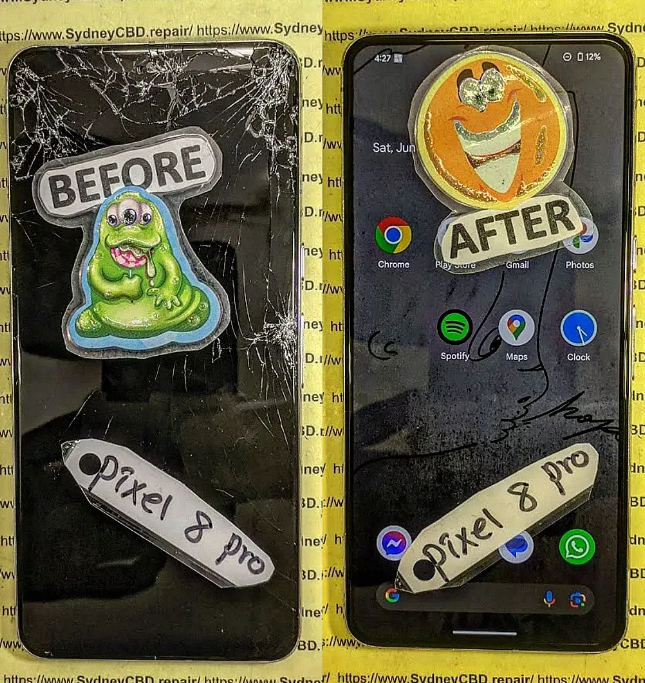
Why Waterproofing Matters in Modern Devices
Smartphones like the Pixel 8 Pro come with water resistance ratings, often marketed as protection against splashes and submersion. However, once opened, that factory seal is compromised.
Here’s why waterproofing matters:
- Protects internal components from corrosion
- Prevents short circuits
- Extends device lifespan
- Maintains resale value
Without proper resealing during a Google Pixel 8 Pro repair, the device becomes vulnerable—even if it looks perfectly fine externally.
Overview of Google Pixel 8 Pro Repair Challenges
Repairing this device isn’t straightforward. The biggest hurdles include:
- Delicate OLED display removal
- Tight adhesive placement around edges
- Precision alignment requirements
- Fragile internal connectors
Add waterproofing to the mix, and suddenly the repair becomes a high-skill task.
Understanding Adhesives Used in Google Pixel 8 Pro Repair

Adhesives are the backbone of waterproofing. Choosing and applying the right type determines whether your repair succeeds—or fails over time.
Types of Adhesives Used
Pressure-Sensitive Adhesives
These are pre-cut adhesive strips that activate under pressure. They’re commonly used because they’re:
- Easy to apply
- Clean and consistent
- Designed for specific models
However, they require precise alignment.
Liquid Adhesives
Liquid adhesives like B7000 or T7000 offer flexibility but demand experience. They:
- Fill gaps effectively
- Provide strong bonding
- Require curing time
Too much, though, can cause seepage and internal damage.
Manufacturer Standards and Limitations
Manufacturers use industrial-grade adhesives applied under controlled conditions. Replicating this during a Google Pixel 8 Pro repair is tough.
That said, using high-quality aftermarket adhesives and proper techniques can get you close.
Tools and Materials Required for Proper Waterproofing
You can’t achieve reliable waterproofing without the right tools. Improvising here often leads to failure.
Essential Tools Checklist
- Heat gun or heating pad
- Plastic pry tools
- Isopropyl alcohol (90%+)
- Microfiber cloth
- Precision tweezers
- Adhesive strips or liquid adhesive
- Clamps or rubber bands
Each tool plays a role in ensuring proper sealing.
Choosing the Right Adhesive
Not all adhesives are created equal. When working on a Google Pixel 8 Pro repair, always:
- Use model-specific adhesive strips when possible
- Avoid low-quality generic glue
- Ensure compatibility with glass and metal surfaces
A good adhesive ensures durability and water resistance.
Step-by-Step Waterproofing Process
This is where theory meets practice. Proper execution makes all the difference.
Device Disassembly Best Practices
Start by applying controlled heat to soften the adhesive. Avoid overheating, as it can damage components.
Use plastic tools to gently separate the screen. Never rush—patience prevents cracks.
Cleaning and Surface Preparation
Once opened, remove old adhesive completely. This step is often overlooked but critical.
- Use isopropyl alcohol
- Ensure surfaces are dry
- Remove debris and dust
Clean surfaces ensure proper bonding.
Applying Adhesive Correctly
This is the heart of waterproofing.
- Align adhesive carefully
- Avoid stretching strips
- Apply even pressure
If using liquid adhesive, apply a thin, consistent layer.
Reassembly Techniques
Reattach the screen carefully. Apply uniform pressure using clamps or weights.
Let the adhesive cure fully before powering the device.
Common Mistakes in Google Pixel 8 Pro Repair
Even experienced technicians slip up. Here are the most common pitfalls.
Overusing Adhesive
More isn’t better. Excess adhesive can:
- Leak into internal components
- Interfere with buttons or sensors
- Create uneven sealing
Ignoring Seal Alignment
Misaligned adhesive leads to gaps. Even tiny gaps compromise waterproofing.
Always double-check alignment before sealing.
Advanced Waterproofing Techniques
For those looking to go the extra mile, advanced techniques can improve results.
Heat Activation Methods
Applying gentle heat after sealing helps activate adhesive bonds. This improves:
- Adhesion strength
- Seal uniformity
Pressure Sealing Techniques
Using clamps ensures even pressure distribution. This mimics factory conditions.
Leave the device clamped for at least 30 minutes.
Testing Waterproof Integrity
You don’t want to guess—you want assurance.
Visual Inspection
Check for:
- Gaps in the seal
- Uneven edges
- Adhesive overflow
Functional Testing
While full submersion isn’t recommended, you can:
- Test touch sensitivity
- Check speaker performance
- Monitor for condensation
Long-Term Durability and Maintenance
Waterproofing doesn’t end after repair. Maintenance matters too.
Environmental Factors
Exposure to heat, humidity, and drops can weaken seals over time.
Maintenance Tips
- Avoid exposing the device to water unnecessarily
- Use protective cases
- Recheck seals after future repairs
Professional vs DIY Repairs
Should you do it yourself or go pro?
Pros and Cons
| Option | Pros | Cons |
|---|---|---|
| DIY | Cost-saving, flexible | Risk of damage, no warranty |
| Professional | Expertise, warranty | Higher cost |
For complex tasks like Google Pixel 8 Pro repair, professionals often deliver better waterproofing results.
FAQs
1. Can a phone remain waterproof after repair?
Yes, but only if proper adhesive and techniques are used. It may not match factory standards exactly.
2. What adhesive is best for Google Pixel 8 Pro repair?
Pre-cut adhesive strips designed for the model are the safest choice.
3. How long should adhesive cure?
Typically 30 minutes to 24 hours, depending on the type used.
4. Is liquid adhesive better than adhesive strips?
Not necessarily. Liquid adhesive offers flexibility but requires experience.
5. Can I test waterproofing at home?
You can do basic checks, but full waterproof testing requires specialized equipment.
6. What happens if waterproofing fails?
Moisture can enter the device, leading to corrosion and hardware failure.
Conclusion

Waterproofing during a Google Pixel 8 Pro repair is both an art and a science. It demands precision, patience, and the right materials. While it’s challenging to replicate factory conditions, following proven techniques can significantly improve results.
Whether you’re a DIY enthusiast or a professional technician, mastering adhesive application is the key to long-lasting repairs. With careful attention to detail, you can restore both functionality and protection—giving the device a second life.
David from Sydney CBD Repair Centre – The Best place to fix mobile phones as 7 Years In A Row! Top Mobile Phone Repair In Sydney. More than 2000 Positive Reviews on Google and Same Day Repairs.
We take pride in delivering exceptional repair services for all major phone brands including Apple, Samsung, Google, and more. Our expert technicians use only genuine parts and offer 90days warranty on repairs. Located in the heart of Sydney CBD, we’re your one-stop solution for all mobile device repairs.
Our commitment to excellence has earned us the trust of thousands of satisfied customers. Whether it’s a cracked screen, battery replacement, or water damage repair, we handle it all with professional care and expertise. Walk in today and experience why we’re Sydney’s #1 choice for mobile phone repairs.
Visit us for:
✓ Same Day Express Repairs
✓ Genuine Parts Guarantee
✓ Professional Technicians
✓ Competitive Pricing
✓ 2000+ 5-Star Google Reviews
✓ 7-Time Award Winner for Best Phone Repairs
Sydney CBD Repair Centre – Where Quality Meets Reliability.
Call : +61280114119
Website: https://SydneyCBD.repair/locate-us

