


Data recovery from a shattered foldable phone

Data Recovery from a Shattered Foldable Phone: Ultimate Guide + 7 Proven Steps
Introduction
When a foldable phone shatters, panic usually follows—and for good reason. These devices store some of our most precious memories, important work files, messages, contacts, and personal information. Because foldable phones are built with delicate flexible displays and complex hinge systems, even a single drop can lead to catastrophic damage that makes accessing your data nearly impossible. That’s why understanding data recovery from a shattered foldable phone is more important than ever.
In this guide, we’ll break down exactly what happens to your data when your foldable device breaks, the steps you should take immediately, and the safest and most effective ways to recover your files. Whether your phone still turns on, has a dead display, or won’t power up at all, there are proven methods—both DIY and professional—that can help you retrieve your important information. With the right knowledge, quick action, and the help of experts when needed, you can dramatically increase your chances of successful data recovery.
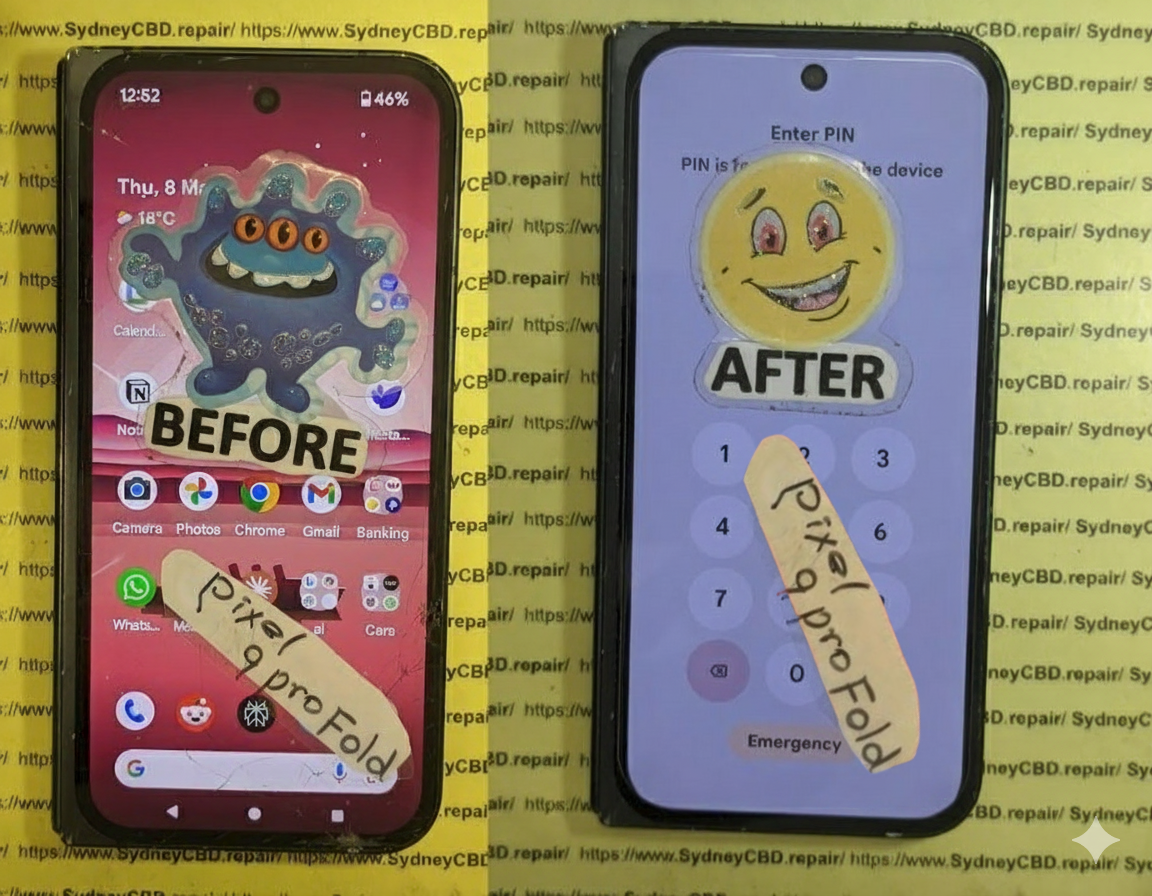
Understanding Data Recovery from a Shattered Foldable Phone
Foldable phones are more fragile than traditional slab phones, making data recovery from a shattered foldable phone a crucial topic for many users today. With dual-display panels, a complex hinge system, flexible OLED technology, and ultra-thin glass, foldables introduce unique risks that can lead to unexpected data loss. Because of this, it’s essential to understand what really happens when a foldable device shatters and how it affects your stored files.
Why Foldable Phones Are More Prone to Data Loss
Foldable designs, while futuristic and convenient, come with structural vulnerabilities:
- Flexible OLED layers are ultra-thin, making them more likely to crack from impact.
- The hinge houses critical display circuitry, and damage to this area can disrupt screen output.
- Two displays depend on a coordinated system, so one broken panel can affect the entire interface.
- Internal components are tightly packed, increasing the chance of motherboard damage when the phone shatters.
When internal circuits are compromised, accessing data becomes difficult or impossible without special tools.
Common Damage Scenarios That Affect Data
These situations often lead to data recovery requests:
- Phone dropped while folded → internal crease damage
- Device hit by a sharp object → OLED tear
- Pressure damage in a bag or pocket → display blackout
- Moisture entering through a cracked hinge → board corrosion
- Sudden impact → phone won’t turn on at all
Each scenario affects recovery differently, and some require immediate professional intervention.
Types of Data at Risk After Phone Shattering
A shattered device can endanger the following:
- Photos & videos
- Contacts & messages
- WhatsApp, Viber, Telegram chats
- Notes and documents
- App data
- System settings and saved passwords
Because most foldables rely heavily on touch navigation, if the display is dead or unresponsive, accessing anything becomes a serious challenge.
First Things To Do When Your Foldable Phone Is Shattered
Your actions immediately after the accident can determine whether data recovery succeeds or fails.
Safety Precautions Before Handling the Device
Shattered foldable phones can be dangerous. Ultra-thin glass splinters easily and can cut skin. Before doing anything:
- Avoid bending or folding the device further.
- Turn off the phone if the display flickers or shows black spots.
- Use gloves if the glass is splintering.
- Do not try to pry open the phone.
Signs That Your Data Is Still Recoverable
You might still be in luck if:
- The phone vibrates when powered on.
- LED notification lights appear.
- Charging sound or screen backlight turns on.
- Your PC recognizes the device when plugged in.
- Touch works on some parts of the screen.
These signs indicate the motherboard is alive—meaning the data is safe.
What NOT To Do After Physical Damage
Avoid these common but harmful mistakes:
- Don’t keep pressing the damaged screen—it worsens internal OLED cracks.
- Don’t attempt at-home disassembly, especially for foldables.
- Don’t expose the phone to heat—it can kill the motherboard.
- Don’t run online “screen fix apps”—they won’t fix physical damage.
- Don’t keep using the phone with a flickering screen—it can lead to full failure.
Step-by-Step Data Recovery Process for Shattered Foldable Phones

This section gives you a clear, actionable plan.
Step 1: Assessing the Screen and Hinge Damage
Before anything else, inspect:
- Is the outer display broken or the main folding display?
- Is the hinge bent or cracked?
- Does the screen show lines, flickers, or a full blackout?
A hinge break often means internal flex cables are damaged.
Step 2: Testing Power, Charging, and Boot Response
Plug the device into a charger and check:
- Does it vibrate?
- Does it warm up slightly?
- Does the charging LED light up?
- Do you hear startup sounds?
These clues confirm whether the motherboard is functional.
Step 3: Using External Display Connection for Access
Many foldables support:
- USB-C to HDMI cable
- Samsung DeX / Motorola Ready For / EMUI Desktop
This allows you to mirror your screen onto a monitor and extract data easily.
Step 4: Extracting Files Using PC Tools
If touch isn’t working, PC software can help:
- Android File Transfer
- Smart Switch
- ADB tools
- MTP file explorer
Sometimes a simple USB connection is enough to copy files.
Step 5: Professional Data Recovery Techniques
Professionals use advanced methods such as:
- Motherboard-level display bypassing
- Chip-off extraction
- Micro-soldering on damaged boards
- Hinge cable reconstruction
These techniques require expertise, especially on foldables.
Can You Recover Data If the Phone Won’t Turn On?
Absolutely—BUT only with the right tools and expertise.
Motherboard-Level Issues Explained
Your foldable may not turn on due to:
- Short circuits
- Power IC failure
- Damaged PMIC
- Corrosion on board connections
- Broken flex cables to the battery
Even if it won’t power on, data chips may still be intact.
When Chip-Off Data Recovery Is Necessary
Chip-off is used when:
- The motherboard is physically cracked
- Severe liquid damage occurred
- The phone is completely dead with no response
This involves removing the memory chip and reading it externally.
Cost Expectations for Different Recovery Levels
Approximate pricing:
- Screen-based access recovery: Low cost
- Board-level repair for data access: Medium cost
- Chip-off recovery: Highest cost
Foldable phones often fall into the more complex range because of their design.
Best Tools and Software for Data Recovery from Shattered Foldable Phone
These tools can assist depending on the situation.
Recommended Apps for Screen-Damaged Devices
- Google Photos
- Drive / OneDrive / Dropbox
- Samsung Cloud
- WhatsApp Cloud Backup
PC-Based Data Extraction Software
- Dr.Fone
- Tenorshare UltData
- EaseUS
- iMobie DroidKit
Tools Professionals Use
- Microsoldering stations
- Hot air rework tools
- Oscilloscopes
- Boardview schematics
- BGA reballing tools
These enable safe recovery without damaging crucial components.
Professional vs DIY Recovery: Which Should You Choose?
When DIY Is Safe
DIY is okay when:
- Only the screen is cracked
- Phone still turns on
- Touch works in some areas
- You can connect to external display
When Professional Help Is a Must
Seek experts when:
- The device won’t turn on
- The hinge is broken
- The folding display is completely black
- There’s liquid damage
- You hear crackling or popping inside the device
Risks of Attempting Recovery Yourself
- Permanent board damage
- Data chip destruction
- Warranty void
- Electrical hazards
- Data loss due to software missteps
Foldables require specialized handling—DIY often causes more harm than good.
How Sydney CBD Repair Centre Recovers Data from Shattered Foldable Phones
Sydney CBD Repair Centre is one of the leading experts in foldable phone recovery.
Specialized Equipment for Foldable Display Damage
We use:
- OEM-grade screen connectors
- Board-level diagnostic tools
- Microsoldering benches
- ESD-protected workspaces
- Professional data extraction software
Techniques Used by Expert Technicians
Our team performs:
- Temporary display reconnection
- Hinge cable repair
- Motherboard power system restoration
- Chip-level diagnostics
- Safe NAND extraction
Real Examples of Successful Recoveries
We’ve recovered data from:
- Samsung Galaxy Z Fold series
- Galaxy Z Flip series
- Huawei Mate X
- Motorola Razr
- Oppo Find N series
Even heavily shattered foldable devices are often still recoverable.
Preventing Data Loss on Foldable Phones
Backup Strategies
- Enable automatic Google Photos backup
- Sync your WhatsApp weekly
- Turn on Samsung Cloud / OneDrive sync
- Use PC backup tools regularly
Apps for Automatic Syncing
- Dropbox
- Mega
- Google Drive
- Syncthing
Protective Accessories for Foldables
- Anti-shock cases
- Hinge-protection covers
- Drop-resistant foldable screen protectors
- Padded bags for travel
FAQs
1. Can data be recovered from a foldable phone with a dead screen?
Yes, as long as the motherboard is functional. External display tools or professional display bypassing can help.
2. What if my foldable phone doesn’t turn on?
Data may still be recoverable with board-level repair or chip-off recovery.
3. Is chip-off recovery safe?
Yes, when performed by trained technicians. It’s used only for severely damaged devices.
4. How long does data recovery take?
Most recoveries take 24–72 hours, depending on damage severity.
5. Can a shattered foldable screen be temporarily powered for data extraction?
Professionals can connect a test screen or bypass connectors to access data safely.
6. Will my data be kept private during professional recovery?
Reputable service centers follow strict privacy protocols. Always check reviews and certifications.
Conclusion

Recovering data from a shattered foldable phone may seem impossible, but with the right steps and professional support, your files can often be saved. Whether the device still turns on or is completely dead, modern tools and expert-level techniques make successful recovery highly achievable. Foldable phones require specialized handling, so choosing a trusted repair centre—like Sydney CBD Repair Centre—ensures your data stays safe throughout the process.
David from Sydney CBD Repair Centre
6 Years in a Row — Sydney’s #1 Mobile Phone Repair Centre
📞 Call: +61280114119
📍 Location: https://SydneyCBD.repair/locate-us

