


Gaming Phone Screen Swap: ROG 7 Ultimate!

Gaming Phone Screen Swap: ROG 7 Ultimate! Unlock Pro Power in 10 Steps
Introduction: Why Screen Repair Matters for the ROG 7 Ultimate
The ASUS ROG 7 Ultimate isn’t just any smartphone—it’s a gaming powerhouse. Built for performance, this device features lightning-fast refresh rates, ultra-responsive touch controls, and a display that immerses players into every battle. But like any advanced piece of technology, one accident can compromise it all. A cracked or unresponsive screen doesn’t just make the phone look bad; it affects your gameplay, productivity, and entertainment experience.
Whether you dropped your ROG 7 Ultimate during an intense gaming session or noticed ghost touches interfering with controls, screen issues are a deal-breaker. Thankfully, with professional screen replacement, you can restore your phone’s full gaming capabilities without needing to buy a brand-new device.
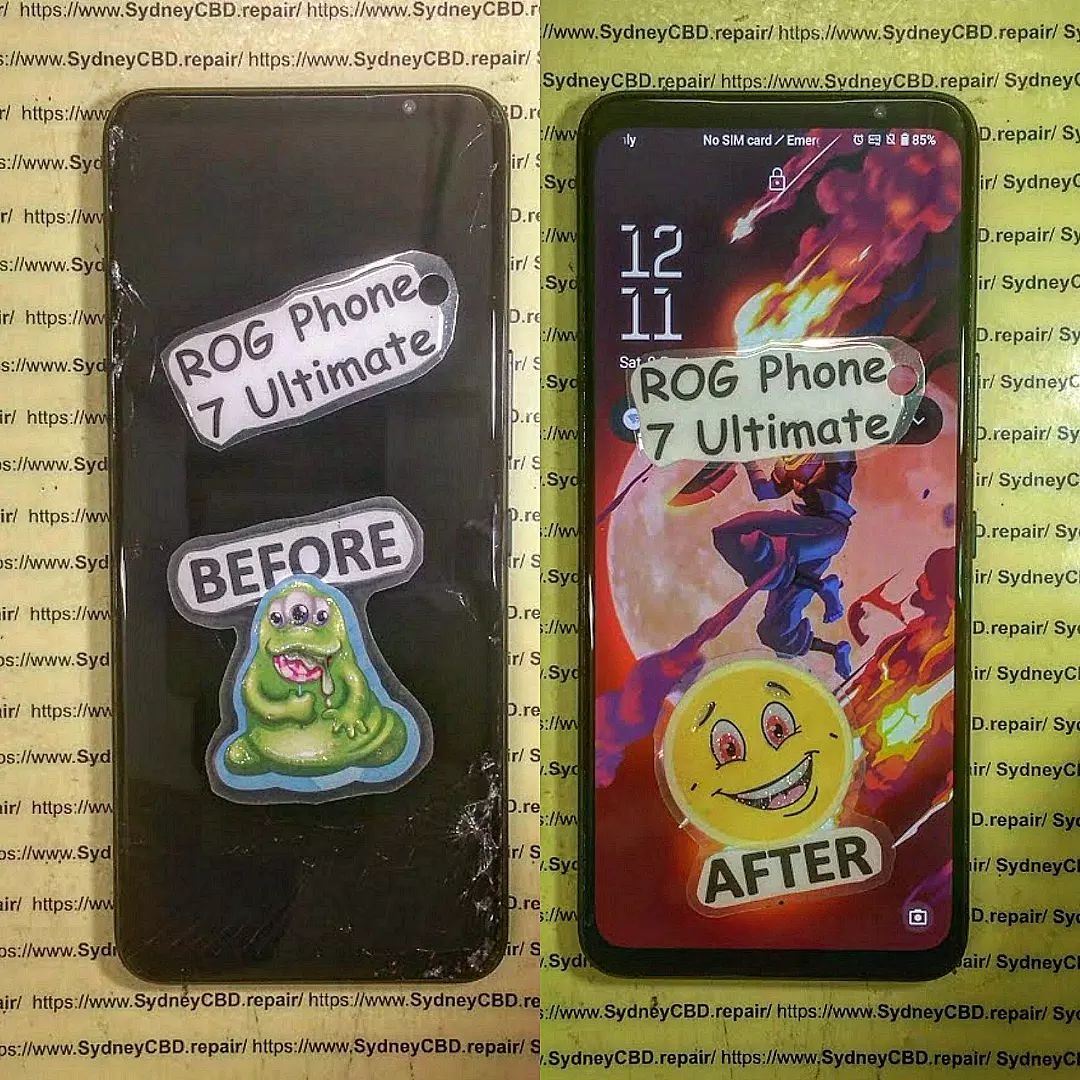
Understanding the ROG 7 Ultimate: A Gaming Beast
The ROG (Republic of Gamers) brand by ASUS is synonymous with elite-level gaming gear, and the ROG 7 Ultimate continues that tradition. More than a phone, it’s a pocket console designed for serious gamers.
Key Features of the ROG 7 Ultimate
- 6.78-inch AMOLED Display with 165Hz refresh rate for buttery-smooth visuals
- Snapdragon 8 Gen 2 processor for ultra-fast performance
- AirTrigger controls that replicate console-like gaming buttons
- GameCool 7 cooling system to prevent overheating during long sessions
- 6000mAh dual-cell battery for extended gaming marathons
Why Gamers Love the ROG 7 Ultimate
Gamers choose this device because it delivers immersion and speed. The vivid AMOLED screen ensures colors pop, while the high refresh rate guarantees every swipe and tap registers instantly. But here’s the catch: the screen is the most vulnerable component. A cracked display or malfunctioning touch sensor can ruin everything.
That’s why understanding screen replacement for this device is crucial. If you want to keep dominating leaderboards and enjoying seamless gameplay, a timely repair can make all the difference.
Common Screen Issues in Gaming Phones
Gaming phones like the ROG 7 Ultimate undergo more stress than regular devices. Fast-paced swipes, long hours of use, and accidental drops all contribute to wear and tear.
Cracked or Shattered Display
One of the most common issues is a shattered front glass. Even a small crack can spread quickly, distorting visuals and making gaming frustrating.
Touch Sensitivity Problems
Ghost touches or unresponsive areas on the screen can make gameplay nearly impossible. Imagine losing a ranked match because your device didn’t register a tap—it’s every gamer’s nightmare.
Dead Pixels and Screen Burn-In
For heavy gamers, prolonged use can cause burn-in or dead pixels. These imperfections may seem minor, but they ruin immersion and can worsen over time.
When Do You Need a Screen Replacement?
Not every small scratch means you need to swap your screen. However, there are certain warning signs that tell you it’s time for a professional screen replacement for your ROG 7 Ultimate.
- Severe Cracks or Shattered Glass – If cracks obstruct visibility or risk cutting your fingers, it’s best to replace the screen immediately.
- Unresponsive Touch Controls – Ghost touches or lag in touch input are clear signs of digitizer damage.
- Distorted Display or Flickering – If colors look washed out, pixels are stuck, or the screen flickers, a replacement is necessary.
- Black Spots or Dead Zones – These usually spread over time and indicate permanent damage.
- Overheating During Use – A faulty screen can cause power drain and generate excess heat during gaming sessions.
Ignoring these issues often makes the problem worse, and in some cases, it may even damage the motherboard. That’s why acting early is key.
Preparing for a Screen Swap: What You Should Know
Before you jump into the repair process, whether DIY or with a technician, preparation is crucial.
Backing Up Your Gaming Data
Since screen swaps involve disconnecting major components, there’s always a small risk of data loss. Ensure you back up:
- Game progress (cloud sync if available)
- Photos and videos
- Important documents and app data
Choosing Genuine Parts vs. Aftermarket
- Genuine OEM parts: Match original specs, maintain display brightness, and ensure accurate touch response.
- Aftermarket parts: Often cheaper, but may compromise color accuracy, refresh rates, or durability.
For a high-performance gaming device like the ROG 7 Ultimate, using genuine parts is strongly recommended.
Cost Considerations for Screen Replacement
The cost varies depending on whether you choose OEM or aftermarket parts, and whether you go DIY or professional. Typically, in Sydney, a professional ROG 7 Ultimate screen swap costs between AUD $450 – $650, depending on labor and parts availability.
Think of it as an investment in your device’s lifespan—especially when compared to the $1,500+ price tag of a new gaming phone.
Step-by-Step Guide: ROG 7 Ultimate Screen Swap in 10 Steps
For those who want to understand the repair process, here’s a simplified breakdown of the 10 steps technicians follow during a professional ROG 7 Ultimate screen replacement.
Step 1: Power Down the Device
Always turn off your phone to prevent short circuits.
Step 2: Remove SIM Tray & Back Cover
Using precision tools, the back cover is carefully lifted without damaging internal components.
Step 3: Disconnect the Battery
The battery connector must be unplugged to ensure no electrical current flows during the repair.
Step 4: Unscrew and Detach Motherboard
Tiny screws are removed, and the motherboard is gently lifted to access the display connectors.
Step 5: Safely Remove Broken Screen
The damaged display is detached using heat and suction tools. Patience is key here to avoid bending the frame.
Step 6: Prepare Frame for New Screen
Any adhesive residue is cleaned, ensuring a snug fit for the replacement screen.
Step 7: Install the Replacement Screen
The new display is placed and aligned with extreme precision.
Step 8: Reconnect Components
The motherboard, battery, and flex cables are carefully reattached.
Step 9: Secure Screws and Back Cover
The device is reassembled, and all screws are tightened to factory standards.
Step 10: Test Display & Touch Responsiveness
Finally, the phone is powered on, and the display is tested for brightness, refresh rate, and touch accuracy.
💡 Pro Tip: Even though these steps look simple, the ROG 7 Ultimate has advanced cooling and gaming components that make repairs tricky. That’s why it’s best left to experienced technicians.
Risks of DIY Repairs vs. Professional Help
With countless tutorials online, many gamers are tempted to try fixing their ROG 7 Ultimate at home. While DIY repair may look cost-effective, it comes with serious risks:
- Complex Design: The ROG 7 Ultimate has advanced cooling systems and multiple flex cables. One wrong move could damage the motherboard.
- Loss of Water Resistance: Without professional sealing, your phone may lose its water-resistance rating after a DIY swap.
- Invalidated Warranty: Attempting repairs without certified parts or expertise often voids the manufacturer warranty.
- Higher Long-Term Costs: A failed DIY repair may cause additional damage, leading to more expensive fixes later.
In short, DIY is risky unless you’re highly skilled and have the proper tools. For most gamers, professional help is the smarter choice.
Benefits of Professional Repair Services in Sydney

When it comes to high-end gaming devices, professional repair services provide peace of mind.
Why Choose Sydney CBD Repair Centre
David and his expert team at Sydney CBD Repair Centre have built a reputation as Sydney’s #1 choice for phone repairs—and for good reason:
- ✅ Same-Day Express Repairs – No long waits; your ROG 7 Ultimate is back in action fast.
- ✅ Genuine Parts Guarantee – OEM-quality screens for unmatched touch and display performance.
- ✅ Professional Technicians – Experienced specialists who understand complex gaming hardware.
- ✅ Warranty Protection – All screen replacements include a 90-day warranty for added security.
- ✅ Award-Winning Service – Voted the best phone repair shop in Sydney for 6 years running.
Warranty and Genuine Parts Guarantee
Unlike many repair shops that cut corners, Sydney CBD Repair Centre only uses genuine parts. This means your screen’s refresh rate, brightness, and responsiveness remain exactly as ASUS designed. Plus, every repair is covered by a 90-day warranty, ensuring your device is protected even after the repair.
Cost Breakdown: ROG 7 Ultimate Screen Replacement
A screen replacement is a premium repair, but far more affordable than buying a new gaming phone. Here’s a rough breakdown of costs in Sydney:
| Repair Option | Estimated Cost | Turnaround Time | Notes |
|---|---|---|---|
| DIY Repair (Aftermarket Screen) | $200 – $300 | 3–5 hours (if skilled) | Risk of damage, no warranty |
| Generic Repair Shop | $350 – $450 | 2–3 days | May use non-OEM parts |
| Sydney CBD Repair Centre (OEM Parts) | $450 – $650 | Same Day | Genuine parts + 90-day warranty |
When considering both cost and long-term reliability, professional repair with genuine parts is the best value.
Conclusion: Keep Your ROG 7 Ultimate Gaming Strong with Expert Repairs
Your ROG 7 Ultimate is more than just a smartphone—it’s your gateway to immersive gaming, smooth performance, and endless entertainment. When the screen is damaged, you don’t just lose visibility; you lose the very core of your gaming experience. That’s why timely and professional screen replacement is essential.
Instead of taking risks with DIY repairs or unreliable shops, trust the experts who have been Sydney’s top choice for six years in a row—Sydney CBD Repair Centre. With genuine parts, skilled technicians, same-day service, and a 90-day warranty, you can rest assured your ROG 7 Ultimate will be restored to peak performance.
So whether it’s a cracked display, touch issues, or any other repair need, make the smart choice. Visit Sydney CBD Repair Centre today and see why thousands of satisfied customers continue to rely on us.
🎮 Keep your gaming uninterrupted, your phone protected, and your peace of mind intact—with Sydney CBD Repair Centre: Where Quality Meets Reliability.
📍 Visit: Sydney CBD Repair Centre
📞 Call: +61280114119

