




Is Fixing The Samsung Galaxy Z Flip 7 Cover Screen Actually Worth The Price?

Is Fixing The Samsung Galaxy Z Flip 7 Cover Screen Actually Worth The Price? + Power Word + Number
Introduction: Is Samsung Galaxy Z Flip 7 Cover Screen Repair Worth It?
The Samsung Galaxy Z Flip 7 combines a compact folding design with a useful outer display that makes everyday tasks easier. You can check notifications, view messages, control music, take selfies, and access supported widgets without opening the phone.
However, what happens when that small display cracks, develops black spots, or stops responding to touch?
Samsung Galaxy Z Flip 7 cover screen repair can be a smart investment when the phone’s main folding display, hinge, battery, and other components remain in good condition. Repairing the outer display may restore important functions without the expense of purchasing another smartphone.
Still, the right decision depends on more than the visible damage. The replacement part, labour, availability of components, warranty, and condition of the rest of the phone all affect the value of a repair.
A small crack might appear harmless at first, but it can spread or make touch controls unreliable. Likewise, a black screen doesn’t always mean the display panel itself is broken. A technician may need to inspect the display connection and related components before recommending a replacement.
The good news is that you don’t need to guess. By understanding the repair process and asking the right questions, you can compare your options and avoid unnecessary costs.
This guide explores seven powerful insights, practical troubleshooting advice, repair-quality considerations, and common questions to help you decide what to do next.
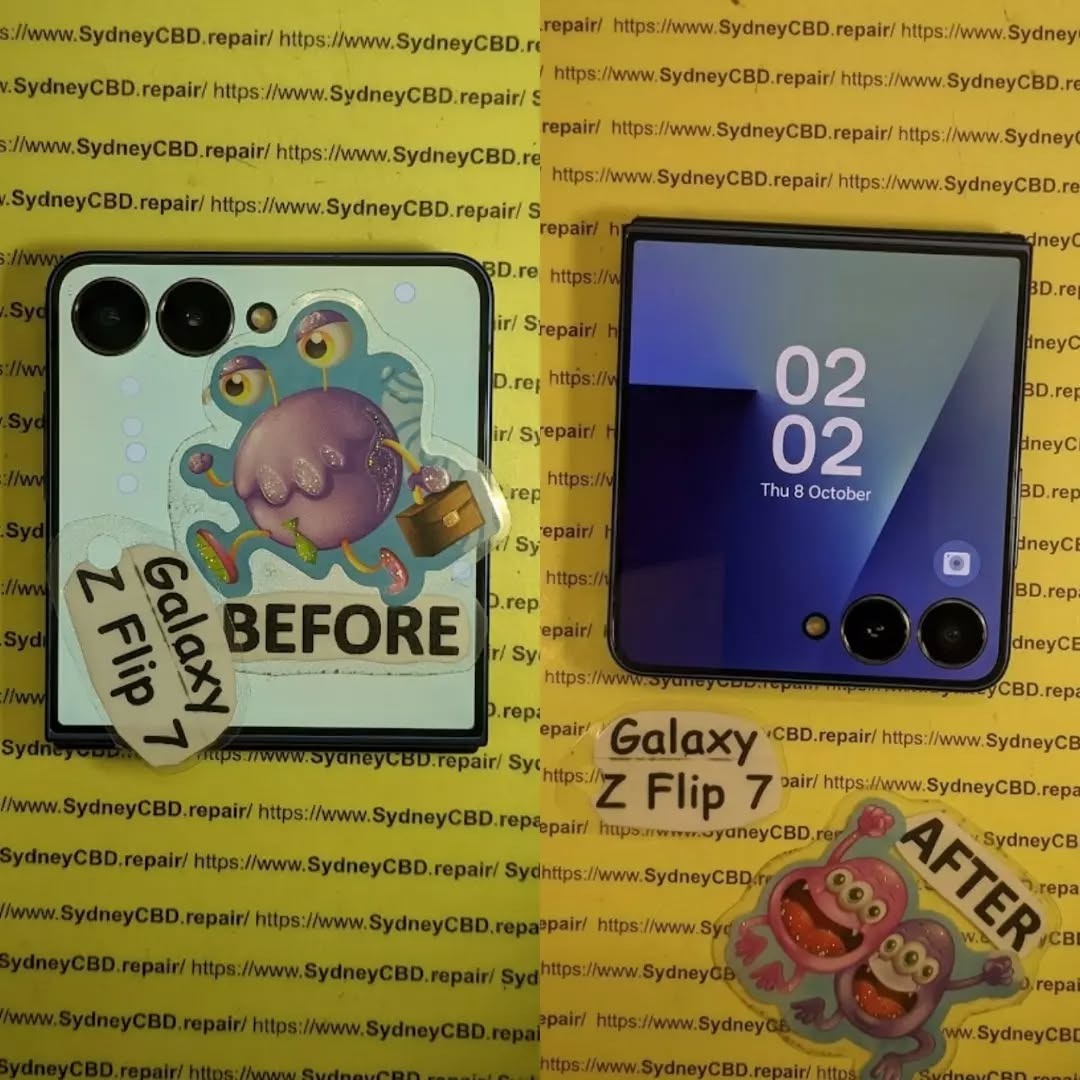
1. Understanding the Samsung Galaxy Z Flip 7 Cover Screen
The cover screen, also called the FlexWindow, is one of the most useful features of the Galaxy Z Flip 7. Unlike older flip phones with small outer displays, this model has a 4.1-inch cover screen designed to support a wide range of everyday tasks.
What Does the Cover Screen Actually Do?
The outer display lets you interact with your phone while it remains folded. Depending on your settings and supported apps, you can use it to:
-
Read messages and check notifications.
-
View the time, weather, and calendar information.
-
Control music playback.
-
Preview photographs and take selfies with the rear cameras.
-
Access supported widgets and other convenient features.
-
Check selected information without opening the main screen.
The screen is especially helpful when you’re travelling, working, or trying to complete quick tasks with one hand.
Samsung lists the Galaxy Z Flip 7 cover display as a Super AMOLED panel with a resolution of 1048 × 948 pixels. It also supports a refresh rate of up to 120 Hz, helping compatible content look smooth and responsive.
These features explain why a damaged cover screen can be more than a cosmetic problem.
Does a Cracked Cover Screen Affect the Main Display?
Not necessarily.
The cover screen and the large folding display serve different functions. A crack on the outside doesn’t automatically mean the inner display is damaged.
However, a strong impact can affect several components at once. For example, dropping the phone onto a hard surface might crack the cover glass, damage the display panel, bend part of the frame, or affect internal connections.
A technician should therefore check both screens and inspect the surrounding housing before quoting for repairs.
| Problem | What it might indicate | Recommended action |
|---|---|---|
| Small crack with normal display | Physical damage to the outer screen | Arrange an inspection |
| Black patches or coloured lines | Possible panel damage | Request professional diagnosis |
| Display works but touch fails | Touch layer or connection issue | Test before replacing parts |
| Screen stays completely black | Panel, connection, power, or software fault | Diagnose before ordering a replacement |
| Cover screen works intermittently | Possible connection or component problem | Avoid unnecessary pressure and seek repair |
| Cracked glass with frame damage | Impact may have affected several components | Request a full damage assessment |
These symptoms are clues, not final diagnoses. The exact fault depends on the phone’s condition.
Is It Safe to Keep Using a Damaged Cover Screen?
A minor crack may not stop the phone from working immediately. Nevertheless, sharp glass edges can cause injuries, and additional pressure can make the damage worse.
If the screen is lifting, exposing sharp fragments, or showing signs of liquid entry, stop using that part of the device and arrange an inspection. Don’t press hard on the damaged area or attempt to push the glass back into place.
You should also avoid applying excessive heat or using household glue. Such fixes can damage nearby components and make a later repair more difficult.
The bottom line: the cover screen is an important part of the Galaxy Z Flip 7 experience. If it no longer works properly, a professional assessment can help establish whether replacing it is worthwhile.
2. Seven Powerful Reasons to Repair Your Cover Screen

Is Samsung Galaxy Z Flip 7 cover screen repair worth the price? In many situations, yes. However, the decision should be based on the phone’s overall condition, the repair quote, and how long you intend to keep the device.
Here are seven important reasons to consider fixing the cover screen instead of ignoring the problem or buying another phone.
Reason 1: Restore Everyday Convenience
One of the main advantages of the Z Flip 7 is its ability to handle quick tasks while folded.
When the cover screen breaks, checking notifications or controlling music may become difficult. You might need to open the phone for activities that previously took only a few seconds.
A successful repair can restore this convenience and make the device more comfortable to use.
For people who rely on the outer display throughout the day, that improvement can make a meaningful difference.
Reason 2: Avoid the Cost of a New Smartphone
Replacing a phone involves more than its purchase price. You may also need to transfer your data, set up applications, reconnect accessories, and adjust your settings.
If the main display, battery, hinge, cameras, and other components still work properly, repairing the cover screen may be the more economical choice.
However, don’t assume that repair is always cheaper. Compare the complete repair quotation with the cost of a suitable replacement phone, including any trade-in value for your damaged device.
Reason 3: Protect the Phone’s Long-Term Value
A damaged display can make a phone less attractive to a future buyer or trade-in provider.
Repairing the screen may improve its condition and make it easier to sell later. Still, a repair doesn’t guarantee a higher resale price, and the amount recovered will depend on the phone’s age, storage capacity, condition, and market demand.
Keep the repair invoice and warranty details. These records can help demonstrate that the phone received professional attention.
Reason 4: Keep Using a Phone You Already Know
Moving to another phone can be inconvenient. Your contacts, applications, passwords, photos, and accessibility settings may require attention during the change.
If you’re happy with your Galaxy Z Flip 7, fixing a damaged cover screen allows you to continue using a familiar device.
This is especially useful if your phone meets your work and personal needs and you don’t have a strong reason to upgrade.
Reason 5: Reduce Unnecessary Electronic Waste
Repairing a device that still has years of useful life can reduce the need to replace it prematurely.
A screen replacement doesn’t eliminate every environmental impact, because replacement parts and repair processes also use resources. Even so, keeping a functioning phone in service can be a practical alternative to disposing of it solely because of one damaged component.
If sustainability matters to you, ask whether the damaged component can be replaced without replacing other working parts unnecessarily.
Reason 6: Identify Hidden Damage Before It Gets Worse
A cracked screen may be only one part of the problem.
An impact can also affect the frame, camera area, or internal connections. Similarly, liquid exposure can cause faults that aren’t immediately visible.
A qualified technician can inspect the phone and identify additional problems before completing the repair. This helps you make a better decision about the total cost.
It’s worth asking for a diagnosis rather than requesting a replacement automatically.
Reason 7: Restore the Phone With a Clear Warranty
A professional repair may provide a warranty covering specified replacement parts and workmanship.
Before agreeing to the service, check the warranty duration, what it covers, and whether accidental damage or liquid exposure is excluded. Also ask what happens if the same fault returns.
Warranty terms vary by repair provider, so get them in writing.
Seven-reason verdict: Repair is most attractive when the phone is otherwise healthy, the quote is reasonable, and the service includes appropriate testing and clear warranty terms.
3. How Much Does Samsung Galaxy Z Flip 7 Cover Screen Repair Cost?
The repair price is often the deciding factor. Unfortunately, there isn’t one universal price that applies to every Galaxy Z Flip 7 cover screen repair.
Costs vary by country, repair provider, parts availability, warranty coverage, and the extent of the damage. A phone that needs only an outer display replacement may cost less to repair than one with additional frame or internal component damage.
The Main Factors That Affect the Price
1. Replacement part quality
The type and source of the replacement display affect the quote. Ask whether the part is a genuine Samsung service part, an approved replacement, or a third-party component.
2. Labour costs
Foldable smartphones have compact assemblies that require careful handling. The technician’s experience, equipment, and testing procedures all contribute to the total price.
3. Additional damage
A cracked housing, damaged connector, or other impact-related fault may require extra work. A good quotation should distinguish the main repair from additional recommended services.
4. Warranty coverage
If your phone has applicable manufacturer coverage or another valid protection plan, some costs may be covered. Accidental damage is often treated differently from a manufacturing defect, so check the specific terms before assuming the repair is free.
5. Part availability
Newer models can have different parts availability across regions. This may affect waiting times and the price offered by individual repair centres.
How to Compare Repair Quotes
Use this table when comparing service providers.
| Question to ask | Why it matters |
|---|---|
| Is the quote specifically for the Z Flip 7? | Helps avoid confusion with older Flip models |
| Does the price include the display and labour? | Prevents unexpected extra charges |
| Is the part genuine or third-party? | Clarifies what you’re paying for |
| Is the frame damaged too? | Identifies possible additional work |
| Is the repair covered by a warranty? | Explains your options if the fault returns |
| Will both displays be tested? | Helps confirm that the repair is complete |
| Is there a diagnostic fee? | Clarifies the cost if you decline the repair |
| How long will the repair take? | Helps you plan around phone downtime |
Should You Choose the Cheapest Repair?
Not automatically.
A low quotation may be reasonable, but it may also exclude labour, use a different part type, or offer limited warranty coverage. On the other hand, a high price doesn’t guarantee better quality.
Compare the actual service, parts, testing, and warranty rather than looking at the headline number alone.
Ask for an itemised quotation and confirm the final price before authorising the work.
Is Samsung’s Official Repair Service Worth Checking?
Yes. Start by checking Samsung’s official support resources for repair options in your region.
You can visit the official Samsung Galaxy Z Flip 7 page and navigate to its support options. Availability, pricing, and repair arrangements depend on your location and service terms.
You can also request a quotation from a reputable independent repair centre and compare the two options.
Important: Don’t rely on an estimated price from another Galaxy Z Flip model. The Z Flip 7 has its own display design, so confirm part compatibility and pricing for the exact model.
4. Repair or Replace the Entire Phone?
Once you know the likely repair cost, the next step is deciding whether fixing the cover screen makes financial sense.
The best option depends on the phone’s condition, expected remaining lifespan, and whether you can afford to be without it during the repair.
When Repair Is Usually the Better Choice
Repair is often sensible when:
-
The inner folding display works normally.
-
The hinge opens and closes without unusual noises or resistance.
-
The battery lasts long enough for your needs.
-
The cameras, charging port, speakers, and buttons work correctly.
-
The damage is limited to the cover screen.
-
The repair quote is reasonable compared with buying another phone.
In this situation, a focused repair may restore most of the phone’s usefulness without requiring a complete replacement.
When Replacing the Phone May Make More Sense
Consider comparing replacement options if the device has several major faults.
For example, a phone with a damaged cover screen, failing inner display, weak battery, and bent housing may need multiple repairs. Their combined cost could approach the price of another suitable device.
However, don’t make that decision based on one fault alone. Ask a technician to identify which problems are confirmed and which are only possibilities.
A Simple Repair Value Comparison
| Situation | Likely practical choice |
|---|---|
| Cover screen damaged, everything else works | Compare repair quotes first |
| Cover screen and housing damaged | Request a complete assessment |
| Cover screen and inner display both damaged | Compare total repair cost with replacement |
| Phone is under applicable accidental-damage coverage | Check the coverage terms first |
| Repair cost is close to the cost of a suitable replacement | Compare warranty, age, and overall value |
| Phone has sentimental or work-related importance | Consider the value of retaining the existing device |
Calculate the Real Cost of Keeping Your Phone
Don’t compare repair costs with the original price you paid months ago. Instead, compare the cost of repair with the cost of obtaining a suitable replacement today.
For example, suppose a repair quotation is $300 and a replacement phone that meets your needs costs $1,000. If the Z Flip 7 is otherwise in good condition, repairing it could avoid a much larger expense.
These figures are illustrative only, not a current Galaxy Z Flip 7 repair quote.
Also consider the likely lifespan of the repaired phone. A repair that keeps a device working reliably for another year or two may offer good value, while a phone with several unrelated faults may not.
The key principle: Make the decision using the total cost and expected usefulness of the phone, not the repair price in isolation.
5. Genuine Replacement Parts Versus Cheap Aftermarket Displays
Replacement part quality is another important consideration when arranging Samsung Galaxy Z Flip 7 cover screen repair.
Not every display offered by a repair provider has the same origin, specifications, or quality controls. Understanding the differences helps you ask better questions before handing over your phone.
What Are Genuine Replacement Parts?
Genuine Samsung service parts are components supplied through Samsung’s authorised parts channels. Their availability depends on the model, market, and repair programme.
Ask the repair provider to explain the part’s source and whether the service is authorised to use it.
Avoid relying on labels such as original quality or OEM quality without clarification. These phrases alone don’t prove that a component was manufactured by Samsung or supplied through its authorised channels.
What About Aftermarket Screens?
Aftermarket displays are produced or supplied outside the manufacturer’s official replacement-parts channel. Their quality can vary.
A third-party component isn’t automatically defective, just as an expensive part isn’t automatically perfect. However, you should understand the trade-offs before choosing one.
| Consideration | Genuine service part | Third-party replacement |
|---|---|---|
| Supply source | Manufacturer’s authorised parts channel | External manufacturer or supplier |
| Compatibility | Intended for the specified device when correctly sourced | Depends on the particular part |
| Quality assurance | Subject to the manufacturer’s applicable controls | Varies by supplier |
| Documentation | Ask for part and service documentation | Ask for supplier details and specifications |
| Warranty | Depends on the service provider and applicable terms | Depends on the provider and part warranty |
| Price | Varies by market and service channel | May be lower or comparable |
This comparison describes general differences, not a guarantee that every part in either category will perform identically.
Why Compatibility Matters
The Z Flip 7’s outer display is part of a specific device design. A component intended for an older Galaxy Z Flip model shouldn’t be assumed to fit or work correctly.
A compatible replacement must suit the exact model and support the functions expected from the repaired device.
After installation, the technician should check the display, touch response, brightness, and relevant functions. The repair should also include an inspection of the surrounding frame and any components disturbed during the work.
Questions to Ask Before Approving the Repair
-
What is the exact replacement part being installed?
-
Can you confirm that it is compatible with the Galaxy Z Flip 7?
-
Is it a genuine Samsung service part or a third-party component?
-
What warranty applies to the replacement and labour?
-
Will you test the screen before returning the phone?
-
Will you explain any limitations affecting water resistance or other features?
A trustworthy provider should answer these questions clearly without pressuring you into an immediate decision.
6. Common Symptoms of a Damaged Cover Screen
Not every cover screen problem requires the same repair. Recognising the symptoms can help you describe the issue accurately and avoid unnecessary part replacements.
Cracked Glass
A visible crack is the most obvious sign of damage. Even when the image still looks normal, the crack may spread after further impacts or pressure.
Avoid picking at loose glass or trying to remove the damaged layer yourself. The correct repair depends on the condition of the complete display assembly.
Black Spots or Coloured Lines
Black patches, vertical lines, or unusual colour changes may indicate damage to the display panel.
If these marks appeared after a drop, physical damage is a likely possibility. Nevertheless, a technician should examine the device before confirming the cause.
Touchscreen Not Responding
If the picture looks normal but taps and swipes don’t work, the problem may involve the touch-sensitive layer, the display assembly, or a connection.
Restarting the phone may help rule out a temporary software issue, provided the device is otherwise safe to use. If the fault continues, professional diagnosis is the next step.
Cover Screen Completely Black
A black cover screen doesn’t automatically prove that the display must be replaced.
Possible causes include panel damage, a connection fault, a power-related issue, or a software problem. Check whether the phone otherwise operates normally, and avoid repeatedly forcing the device to restart if it shows signs of physical or liquid damage.
Flickering or Intermittent Display
A screen that flickers, flashes, or works only sometimes needs attention. Record when the problem occurs and whether it started after a drop, repair, or exposure to moisture.
This information can help the technician narrow down the possible causes.
When to Stop Using the Phone
Arrange prompt professional inspection if the phone has sharp glass fragments, a lifting screen, visible liquid entry, unusual heat, or signs of battery swelling. Don’t press the screen flat or attempt to open the device yourself.
7. What Happens During a Professional Cover Screen Repair?
A careful repair involves more than removing a damaged part and fitting a replacement. The technician should first establish the fault, check for related damage, and test the device after the work.
Step 1: Initial Inspection
The technician checks the cover screen, inner display, frame, hinge area, cameras, and other accessible functions.
They should document visible damage and explain any additional concerns before proceeding.
Step 2: Fault Diagnosis
The repairer determines whether the issue is likely to involve the display panel, touch function, connection, or another component.
This matters because replacing a working display won’t solve a fault caused by a different component.
Step 3: Safe Disassembly
Foldable phones contain compact assemblies that require careful handling. The technician follows an appropriate procedure for the specific model and uses suitable tools to reduce the risk of additional damage.
Step 4: Replacement and Reassembly
If a replacement is necessary, the technician installs a compatible part and checks the surrounding assembly during reassembly.
Any adhesives, seals, or other components affected by the procedure should be handled according to the applicable repair requirements.
Step 5: Functional Testing
Before returning the phone, the technician should check:
-
Cover screen image and brightness.
-
Touch response across the usable display area.
-
Notifications and supported widgets.
-
Camera preview and other relevant functions.
-
Inner display operation.
-
Hinge movement and general physical condition.
-
Any functions affected by the repair.
Not every test applies to every fault, but the final checks should match the work performed.
Step 6: Warranty and Collection
Ask for an invoice describing the repair and the part used. Confirm the warranty period and exclusions, and report any concerns before leaving the repair centre.
A clear handover gives you a better understanding of what was repaired and what to do if the problem returns.
8. DIY Repair Versus Professional Repair
It may be tempting to repair the cover screen at home, especially if you’ve watched smartphone repair videos online. However, a foldable phone is not the easiest device for a beginner to work on.
Is DIY Cover Screen Replacement a Good Idea?
DIY repair may appeal to experienced technicians with suitable tools, reliable parts, and access to model-specific repair instructions.
For beginners, the risks can outweigh the potential savings. Opening the phone incorrectly can damage the display, housing, connectors, or nearby components. You might also struggle to reassemble the device properly.
Before attempting any repair, check the warranty implications and whether you can obtain the correct part and service information.
Comparing the Two Options
| Factor | DIY repair | Professional repair |
|---|---|---|
| Initial labour cost | No technician labour charge | Labour is included in the quotation |
| Tools | Must be obtained separately if needed | Repair provider supplies suitable tools |
| Technical experience | Essential for complex procedures | Depends on technician training and experience |
| Risk of accidental damage | Higher for inexperienced users | Reduced when performed competently |
| Testing | You must carry out suitable checks | Provider should test the repaired functions |
| Warranty | Depends on parts and any applicable coverage | Depends on the provider and repair terms |
| Time | Can be unpredictable | Depends on parts availability and workload |
Why Foldable Phones Need Extra Care
The cover screen sits within a compact assembly, and damage around the housing can complicate the job.
A technician needs to distinguish the visible crack from other potential faults and use a suitable repair procedure. Incorrect tools, excessive force, or poor reassembly can create additional problems.
If your phone is still under warranty or covered by an accidental-damage plan, check the terms before attempting a self-repair.
Practical advice: Unless you have relevant repair experience, a professional diagnosis is usually the safer starting point.
9. Protecting Your Phone After Repair
Once your cover screen has been repaired, a few sensible habits can help reduce the chance of another accident.
Use a Compatible Protective Case
Choose a case designed specifically for the Galaxy Z Flip 7. Look for a design that protects the exposed outer display and corners without interfering with the hinge or folding action.
A case can’t guarantee that the screen won’t crack, but suitable protection may reduce damage from everyday bumps.
Keep Keys and Hard Objects Separate
Avoid storing your phone in a pocket or bag where hard objects can press against the cover screen.
Even though the device uses protective glass, it isn’t indestructible. Concentrated pressure and accidental impacts can still cause damage.
Avoid Excessive Pressure
Don’t sit on the phone, place heavy objects on it, or squeeze it tightly inside a bag.
Use the folding mechanism normally and avoid forcing the phone closed when something is trapped between its halves.
Keep Moisture Away From Damaged Areas
If the screen is cracked or the housing has been damaged, don’t assume the device retains its original resistance to water and dust.
Even after repair, water resistance can depend on the quality of the repair, replacement seals, and the condition of the rest of the phone. Don’t deliberately submerge the device to test it.
Clean the Screen Carefully
Use a soft, lint-free cloth and follow the manufacturer’s cleaning guidance. Avoid abrasive materials, excessive liquid, and strong household cleaners.
If the screen is cracked, don’t rub directly over sharp or loose fragments.
Inspect the Phone Regularly
Look for new cracks, lifting edges, unusual display behaviour, or changes in touch response. Early inspection can help identify developing issues before they become more serious.
10. Preparing Your Phone for Repair or Mail-In Service
You don’t always need to visit a repair centre in person. Depending on your location and the provider’s service options, you may be able to arrange shipping or mail-in repair.
However, preparation is important, particularly when your phone contains personal or business information.
Back Up Important Data
If the phone is still usable, back up important photos, documents, contacts, and other information before sending it away.
Don’t assume that every repair will preserve all data. Some faults may require additional work, and certain repair procedures may involve a reset.
Protect Your Personal Information
Use the security and repair-preparation features available on your device where appropriate. Samsung provides official support resources that can help you understand device care and service options.
For additional guidance, start with Samsung’s official support website.
Ask the repair provider whether they need the device unlocked for testing and what information they require. Don’t share account passwords unnecessarily.
Package the Phone Properly
If you’re using a mail-in service:
-
Confirm the repair provider’s shipping instructions.
-
Photograph the phone’s condition before packing.
-
Use protective packaging to prevent movement during transit.
-
Follow the carrier’s rules for shipping electronic devices with batteries.
-
Keep the tracking number and shipping receipt.
-
Confirm how the provider will communicate the diagnosis and final quotation.
Before sending the phone, ask whether a diagnostic fee applies and whether the provider will wait for your approval before carrying out paid repairs.
Get the Final Quote in Writing
The quotation should explain the replacement part, labour, any additional damage, estimated turnaround time, and warranty terms.
If the technician discovers a problem beyond the original cover screen damage, request an explanation and revised quote before authorising extra work.
This simple step helps prevent unexpected costs and gives you a clear basis for comparing repair providers.
11. Frequently Asked Questions About Samsung Galaxy Z Flip 7 Cover Screen Repair
1. Is fixing the Samsung Galaxy Z Flip 7 cover screen worth the price?
Yes, it can be worthwhile if the damage is limited to the outer display and the rest of the phone works properly. Compare the complete repair quotation with the cost of replacing the phone before deciding.
2. Can I use my Galaxy Z Flip 7 if the cover screen is cracked?
Possibly, if the phone is otherwise functioning and there are no sharp fragments or other safety concerns. However, the damage may spread or affect touch response. Arrange an inspection rather than relying on the damaged screen indefinitely.
3. Does cover screen replacement affect the inner folding display?
It shouldn’t necessarily affect the inner display, because the two displays perform different functions. However, disassembly and existing impact damage can introduce risks. A qualified technician should test both displays after the repair.
4. How long does Samsung Galaxy Z Flip 7 cover screen repair take?
Repair time depends on parts availability, the extent of the damage, the technician’s workload, and the repair procedure. Some repairs may be completed the same day, while others require ordering components or additional diagnosis. Ask the repair centre for an estimate before booking.
5. Is an aftermarket cover screen a good choice?
It depends on the component’s quality, compatibility, price, and warranty. Ask whether the part is genuine Samsung stock or a third-party replacement, and request details about testing and after-sales support.
6. Will replacing the cover screen restore water resistance?
You shouldn’t assume it will. Water resistance depends on the phone’s condition, seals, adhesives, and repair quality. Ask the service provider what sealing procedures are performed and whether any relevant testing is available. Avoid deliberately exposing the repaired phone to water.
7. Will my data be erased during cover screen repair?
A display replacement doesn’t automatically require data erasure, but data loss is possible during some repairs or if additional faults are discovered. Back up your important information before service whenever possible.
8. Should I repair the cover screen or buy a new phone?
Repair is often the better value when the phone is otherwise in good condition and the quotation is reasonable. If several expensive components are damaged, compare the combined repair cost with the cost of a suitable replacement.
9. Can I replace the cover screen myself?
It’s possible for someone with suitable technical skills, tools, and model-specific repair information. However, beginners risk damaging the display, connectors, or housing. Professional repair is generally the safer option if you’re unfamiliar with foldable smartphone disassembly.
10. What should I check before choosing a repair centre?
Confirm that the provider has experience with Samsung foldable phones, uses a compatible replacement part, gives an itemised quotation, tests the repaired functions, and explains its warranty terms. Ask about turnaround time and any additional fees as well.
Conclusion: Make a Smart Decision About Your Galaxy Z Flip 7

So, is fixing the Samsung Galaxy Z Flip 7 cover screen actually worth the price?
For many owners, the answer is yes — provided the phone is otherwise in good condition and the repair quote represents good value.
The cover screen is more than a decorative feature. It gives you convenient access to notifications, supported apps, widgets, and camera previews while the phone remains folded. When it breaks, repairing it can restore these everyday benefits without the expense and inconvenience of replacing the entire device.
Before making your decision, remember these seven key insights:
-
Check whether the damage is limited to the cover screen.
-
Compare repair costs with the price of a suitable replacement phone.
-
Confirm the replacement part’s source and compatibility.
-
Request an itemised quotation with a clear warranty.
-
Choose a technician experienced with foldable phones.
-
Back up your data and follow the repair provider’s preparation instructions.
-
Protect the phone after repair to reduce the risk of future damage.
Don’t choose a repair based on price alone. The quality of the part, the technician’s experience, and the final testing all matter.
If you’re unsure about the damage, start with a professional inspection. A clear diagnosis and written quotation will help you decide whether repairing your Galaxy Z Flip 7 is the right investment.
David from Sydney CBD Repair Centre — The Best place to fix mobile phones as 7 Years In A Row! Top Mobile Phone Repair In Sydney. More than 2000 Positive Reviews on Google and Same Day Repairs.
We take pride in delivering exceptional repair services for all major phone brands, including Apple, Samsung, Google, and more. Our expert technicians use only genuine parts and offer a 90-day warranty on repairs. Located in the heart of Sydney CBD, we’re your one-stop solution for all mobile device repairs.
Our commitment to excellence has earned us the trust of thousands of satisfied customers. Whether it’s a cracked screen, battery replacement, or water damage repair, we handle it all with professional care and expertise. Walk in today and experience why we’re Sydney’s #1 choice for mobile phone repairs.
Visit us for:
-
Same Day Express Repairs
-
Genuine Parts Guarantee
-
Professional Technicians
-
Competitive Pricing
-
2000+ 5-Star Google Reviews
-
7-Time Award Winner for Best Phone Repairs
Sydney CBD Repair Centre — Where Quality Meets Reliability.
Call: +61280114119
Website: https://SydneyCBD.repair/locate-us

