




Beyond Screens: Replacing Dead Batteries and Malfunctioning Charge Ports

Beyond Screens: Replacing Dead Batteries and Malfunctioning Charge Ports – The Ultimate Power Guide 7
Introduction: Why Power Issues Matter More Than Screens
When people think about phone repairs, cracked screens usually steal the spotlight. However, beyond screens, replacing dead batteries and malfunctioning charge ports is often far more important for long-term usability. A phone with a flawless display is useless if it won’t turn on or charge reliably.
Dead batteries and faulty charging ports are among the most common smartphone issues worldwide. They creep up gradually, then suddenly your phone shuts down at 40% or only charges at a strange angle. These problems affect productivity, safety, and even data security. That’s why understanding battery replacement and charging port repair is critical for every smartphone owner.
In this guide, we go beyond screens to explore how power systems work, how to diagnose issues correctly, and when professional repair is the smartest move.
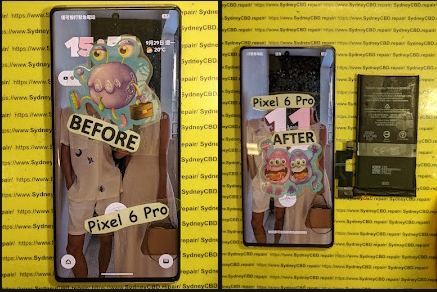
Understanding Smartphone Power Systems
How Phone Batteries Actually Work
Modern smartphones rely on lithium-ion or lithium-polymer batteries. These batteries store energy chemically and release it when needed. Each full charge cycle slightly degrades the battery. Over time, capacity drops, and the phone can no longer hold enough charge to last the day.
Key facts:
- Average battery lifespan: 2–3 years
- Typical charge cycles: 300–500
- Degradation is normal and unavoidable
Once capacity falls below 80%, performance issues become noticeable.
The Role of the Charging Port
The charging port acts as the gateway between external power and the internal battery. It handles:
- Power input
- Data transfer
- Fast-charging communication
Because it’s exposed, the charging port is vulnerable to dust, moisture, and physical stress. Even minor damage can disrupt charging consistency.
Signs of a Dead or Dying Battery
Performance Symptoms
A failing battery doesn’t always die suddenly. Common signs include:
- Rapid battery drain
- Phone shutting down unexpectedly
- Slower performance during low charge
- Overheating during normal use
These symptoms often appear gradually, making them easy to ignore.
Physical Warning Signs
Some issues are visible:
- Battery swelling causing screen lift
- Phone feeling unusually warm
- Back panel separating slightly
If you notice swelling, stop using the device immediately. It’s a safety hazard.
Common Causes of Battery Failure

Age and Charge Cycles
Every charge cycle reduces battery health. Even with perfect care, batteries wear out. Heavy users reach this point faster, especially gamers and streamers.
Heat, Software, and User Habits
Heat is the enemy of battery health. Causes include:
- Leaving phones in hot cars
- Heavy multitasking
- Poorly optimized apps
Software bugs can also drain batteries faster, but hardware degradation remains the leading cause.
Diagnosing Charging Port Problems
Dirt, Damage, and Internal Faults
Most charging port issues start with lint and debris. Pocket dust compacts over time, blocking proper cable contact. However, repeated forceful plugging can loosen internal pins.
Port vs Cable vs Adapter Issues
Before assuming port failure:
- Try a different cable
- Test another adapter
- Use a different power outlet
If problems persist, the port itself may need repair or replacement.
Dead Battery vs Faulty Charging Port
Distinguishing between the two saves money. Here’s a quick comparison:
| Symptom | Likely Cause |
|---|---|
| Charges only at certain angles | Charging port |
| Drains extremely fast | Battery |
| Won’t power on but shows charging icon | Battery |
| No response when plugged in | Port or motherboard |
Professional diagnostics are often the safest way to be sure.
Battery Replacement: What to Expect
Professional Replacement Process
A professional battery replacement involves:
- Full device inspection
- Safe removal of adhesive-sealed components
- Installation of a compatible, high-quality battery
- Calibration and testing
This process minimizes risk and ensures optimal performance.
Time, Cost, and Warranty
Most battery replacements take 30–60 minutes. Costs are significantly lower than buying a new phone. Reputable repair centers offer warranties, giving peace of mind.
According to consumer repair data from iFixit, battery replacement is one of the highest-value repairs for extending phone lifespan.
Charging Port Repair and Replacement
Cleaning vs Replacement
Not all ports need replacement. Professional ultrasonic cleaning can restore connectivity if debris is the issue. However, bent or broken pins require full port replacement.
Soldering and Micro-Component Risks
Charging ports are often soldered to the motherboard. Improper handling can damage surrounding components. That’s why expert technicians and proper tools matter.
DIY Repairs: Are They Worth It?
DIY repair kits are tempting, but risks include:
- Damaging flex cables
- Breaking screens
- Voiding warranties
While DIY may work for older phones, modern devices are tightly sealed. Professional repair usually costs less than fixing DIY mistakes.
Cost Comparison: Repair vs Replacement Phone
| Option | Average Cost | Lifespan |
|---|---|---|
| Battery replacement | Low | 1–2 years |
| Charging port repair | Moderate | 1–3 years |
| New phone | High | 3–5 years |
Repairing power issues is often the most cost-effective choice.
How to Extend Battery and Port Lifespan
Practical tips:
- Avoid overnight charging
- Use certified chargers
- Keep ports clean
- Avoid extreme heat
- Update software regularly
Small habits go a long way.
Environmental and Safety Considerations
Repairing instead of replacing reduces e-waste. Batteries contain harmful chemicals that require proper disposal. Professional repair centers recycle responsibly, helping the environment while saving money.
FAQs
1. How long does a phone battery replacement last?
A quality replacement battery typically lasts 1–2 years with normal use.
2. Can a charging port be repaired without replacement?
Yes, if debris is the issue. Cleaning often solves minor problems.
3. Is it safe to use a phone with a swollen battery?
No. Stop using it immediately and seek professional repair.
4. Does fast charging damage batteries faster?
Slightly, but modern phones manage heat efficiently. Quality chargers matter.
5. How do I know if my phone needs a new battery or port?
Professional diagnostics are the most accurate method.
6. Is repairing older phones worth it?
If performance meets your needs, repair is often cheaper than replacement.
Conclusion: Power Restored, Device Revived

Going beyond screens, replacing dead batteries and malfunctioning charge ports can dramatically extend your phone’s life. These repairs restore reliability, save money, and reduce environmental impact. With professional service, your device can feel new again—without the cost of replacement.
David from Sydney CBD Repair Centre – The Best place to fix mobile phones as 6 Years In A Row! Top Mobile Phone Repair In Sydney. More than 2000 Positive Reviews on Google and Same Day Repairs.
We take pride in delivering exceptional repair services for all major phone brands including Apple, Samsung, Google, and more. Our expert technicians use only genuine parts and offer 90days warranty on repairs. Located in the heart of Sydney CBD, we’re your one-stop solution for all mobile device repairs.
Our commitment to excellence has earned us the trust of thousands of satisfied customers. Whether it’s a cracked screen, battery replacement, or water damage repair, we handle it all with professional care and expertise. Walk in today and experience why we’re Sydney’s #1 choice for mobile phone repairs.
Visit us for:
✓ Same Day Express Repairs
✓ Genuine Parts Guarantee
✓ Professional Technicians
✓ Competitive Pricing
✓ 2000+ 5-Star Google Reviews
✓ 6-Time Award Winner for Best Phone Repairs
Sydney CBD Repair Centre – Where Quality Meets Reliability.
Call : +61280114119
Website: https://SydneyCBD.repair/locate-us

