


Fixing Samsung S25 Ultra Screen Lines

Fixing Samsung S25 Ultra Screen Lines: 7 Expert Solutions for a Flawless Display
Introduction
The Samsung S25 Ultra stands as one of the most powerful smartphones on the market, boasting cutting-edge features, a professional-grade camera system, and a stunning AMOLED display. But even with all that advanced technology, users occasionally face one frustrating issue — screen lines appearing on the display. Whether it’s faint green streaks, flickering horizontal lines, or dark vertical bands, these screen anomalies can disrupt your everyday experience and raise concerns about permanent damage.
Understanding why these lines appear and how to fix them effectively is crucial to keeping your device in peak condition. While some issues may stem from minor software glitches, others indicate deeper hardware problems that require professional attention.
In this comprehensive guide, you’ll discover the most effective solutions to fix Samsung S25 Ultra screen lines, from simple DIY troubleshooting steps to expert repair options available right here in Sydney. You’ll also learn how to prevent these problems from happening again — ensuring your phone’s display remains as flawless and vibrant as the day you bought it.
So, if you’re tired of staring at those annoying screen lines, keep reading — your Samsung S25 Ultra’s display perfection is just a few steps away.
Understanding Samsung S25 Ultra Screen Lines
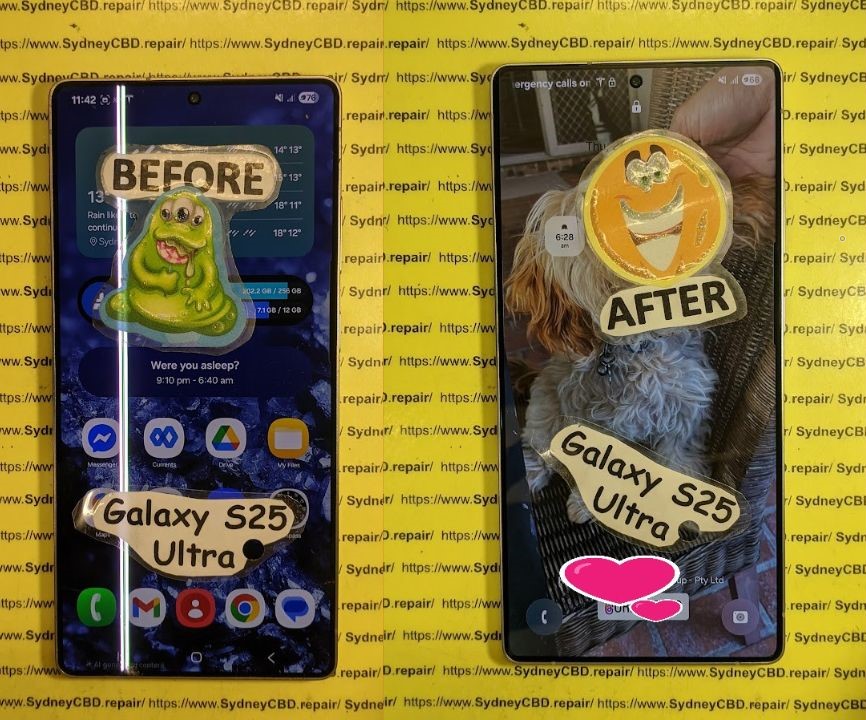
The Samsung S25 Ultra is known for its exceptional AMOLED display—vibrant, detailed, and sharp. However, even the most advanced screens can develop vertical or horizontal lines that ruin your viewing experience.
These screen lines often appear as thin green, purple, or black streaks that cut across the display. In some cases, they flicker or worsen over time. Understanding the root cause is key to fixing the issue effectively and preventing future damage.
Common Types of Screen Lines on Samsung S25 Ultra
- Vertical lines – usually caused by hardware damage or loose display connectors.
- Horizontal lines – often linked to internal short circuits or software glitches.
- Flickering or color-shifting lines – indicate GPU or display driver issues.
- Dead pixel bands – show permanent damage to the AMOLED layer.
Why Screen Lines Appear After a Drop or Update
It’s common to notice screen lines after dropping your phone or following a firmware update. Physical impact can loosen the display cable, while software updates might temporarily disrupt display calibration.
In rare cases, moisture exposure or overheating can trigger screen flickering or line artifacts, especially if the internal seal is compromised.
Quick Fixes You Can Try at Home
Before heading to a repair shop, try these simple troubleshooting steps to rule out software issues.
Restart and Safe Mode Boot
Restart your Samsung S25 Ultra. Sometimes, background apps or system glitches can cause temporary display errors.
If the problem persists, boot into Safe Mode to see if the lines disappear. If they do, it means a third-party app is responsible. You can then uninstall recently installed apps to fix the issue.
Software Updates and Cache Clearing
Outdated firmware can cause display driver conflicts.
Go to Settings → Software Update → Download and Install.
Next, clear the system cache:
- Power off your phone.
- Hold Power + Volume Up until recovery mode appears.
- Select Wipe Cache Partition.
- Reboot your phone.
This process clears corrupted temporary files without deleting your data.
Factory Reset (Last Resort Option)
If all else fails, perform a factory reset:
Settings → General Management → Reset → Factory Data Reset.
⚠️ Backup your data before proceeding. This step removes all files and resets your device to default conditions—sometimes eliminating deep software glitches that cause display anomalies.
When It’s a Hardware Issue
If screen lines remain after software fixes, it’s likely a hardware problem. Let’s explore what could be wrong internally.
Display Connector Damage
When a phone is dropped, the display flex cable may become partially detached. This causes flickering or intermittent lines. Reconnecting it properly usually fixes the problem, but doing so requires opening the device—a job for professionals.
Water or Moisture Exposure
Even minimal water exposure can short-circuit the display circuitry. Over time, corrosion can lead to green or purple lines appearing. If your phone has been exposed to water, power it off immediately and seek professional help.
Defective AMOLED Screen
If you see persistent or expanding lines, the AMOLED display itself might be damaged. Replacement is the only permanent fix in such cases. Using genuine Samsung parts ensures full brightness and color accuracy after repair.
Professional Repair Options in Sydney

When DIY fixes fail, professional repair is the next logical step. Sydney offers several reputable repair centres—but not all are created equal.
Samsung Authorised vs. Independent Repair Centres
- Samsung Authorised Centres use official parts but may take days or weeks.
- Independent Centres like Sydney CBD Repair Centre provide same-day service using genuine OEM components—saving you both time and money.
Why Choose Sydney CBD Repair Centre
✅ Over 2000+ 5-star Google Reviews
✅ 6-time award winner for best mobile repair in Sydney
✅ Uses only genuine Samsung screens
✅ Same-day repairs (usually under 2 hours)
✅ Located conveniently in the Sydney CBD
✅ Offers a 90-day warranty on all repairs
Visit: SydneyCBD.repair/locate-us
Step-by-Step Process of Professional Screen Repair
Diagnostic Test and Estimate
Technicians run full diagnostics to check for connector, board, or screen issues. You’ll receive a free quote before proceeding.
Genuine Screen Replacement Procedure
Once approved, your S25 Ultra’s screen is removed using precision heat tools. The new AMOLED display is bonded using professional adhesives to ensure factory-like quality.
Final Testing and Warranty Assurance
Before handover, your device undergoes rigorous display calibration and multi-touch testing. Sydney CBD Repair Centre guarantees 90 days of warranty for all screen repairs.
Preventing Future Screen Line Issues
Keeping your S25 Ultra in perfect condition requires preventive care.
Use Quality Screen Protectors
Invest in a tempered glass protector to absorb shocks from accidental drops.
Avoid Software Beta Versions
Unstable updates can introduce display driver bugs—stick to official firmware releases.
Keep Your Device Cool and Dry
Avoid direct sunlight and moisture. Overheating can cause screen discoloration or line patterns.
FAQs About Samsung S25 Ultra Screen Line Problems
1. Can screen lines go away on their own?
Sometimes, minor software glitches resolve after a reboot—but hardware-related lines usually worsen over time.
2. How much does it cost to fix screen lines in Sydney?
Depending on damage severity, expect around $450–$550 for genuine Samsung S25 Ultra screen replacement.
3. Will replacing the screen remove all lines?
Yes—if the issue is with the display itself, a full screen replacement restores flawless visuals.
4. How long does the repair take?
At Sydney CBD Repair Centre, most screen replacements are completed within 2 hours.
5. Is it safe to keep using a phone with screen lines?
Not recommended. Prolonged use can worsen the damage and affect touch sensitivity.
6. Do repairs affect Samsung warranty?
If repaired by certified technicians using genuine parts, your device warranty remains valid under Australian consumer law.
Conclusion: Restore Your Samsung S25 Ultra’s Brilliance

Dealing with Samsung S25 Ultra screen lines can be frustrating, but you don’t have to live with them. Whether it’s a software hiccup or display damage, professional repair services in Sydney can bring your phone back to life—often the same day.
For fast, reliable, and warranty-backed repairs, trust the Sydney CBD Repair Centre. With thousands of happy customers and years of proven expertise, you can enjoy your Samsung’s stunning display once again—without the lines.
📍 Sydney CBD Repair Centre – Where Quality Meets Reliability
- Call: +61 2 8011 4119
- Website: https://SydneyCBD.repair/locate-us
- Address: Heart of Sydney CBD
- Hours: Monday–Saturday, 10 AM – 6 PM
David from Sydney CBD Repair Centre — The Best place to fix mobile phones, 6 Years In A Row! Over 2000+ 5-Star Reviews.
Same Day Repairs. Genuine Parts. Trusted Technicians.

