


FIXING THE INFAMOUS GREEN LINE! GALAXY S25 Ultra DISPLAY RESTORATION AND COST

FIXING THE INFAMOUS GREEN LINE! GALAXY S25 Ultra DISPLAY RESTORATION AND COST – Ultimate Repair Guide (2026)
Introduction to the Galaxy S25 Ultra Green Line Problem
The Galaxy S25 Ultra green line display issue has quickly become one of the most talked-about problems among smartphone users and repair technicians. While the device itself is packed with cutting-edge technology, even premium smartphones can occasionally experience display defects.
Many users notice a thin vertical green line suddenly appearing on the screen. At first glance, it might look harmless. However, over time the line can become more noticeable and interfere with normal device usage.
The Galaxy S25 Ultra green line display issue usually appears without warning. Sometimes it happens after a software update, while in other cases it appears following minor drops or screen pressure.
Here’s what typically happens:
- A vertical green line appears on the display
- The line remains visible across all apps
- Restarting the phone does not remove it
- The issue gradually becomes more prominent
Although this problem may seem alarming, the good news is that several repair solutions are available. In many cases, the phone can be restored without losing performance or data.
This guide explains everything you need to know about Galaxy S25 Ultra display restoration, including causes, repair methods, and the real cost of fixing the issue.
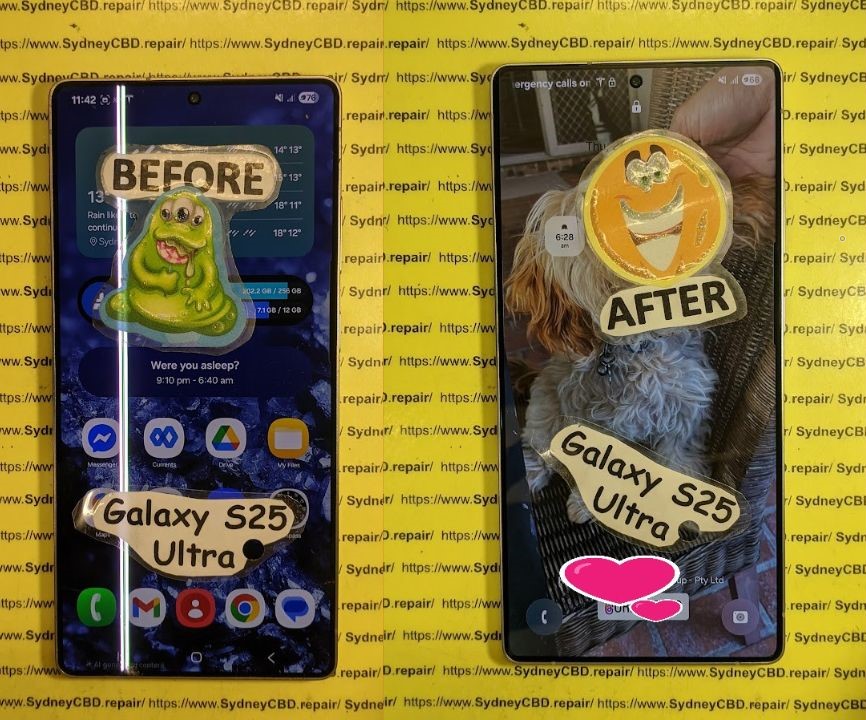
Understanding the Galaxy S25 Ultra Display Technology
To understand why the Galaxy S25 Ultra green line display issue occurs, it’s helpful to first understand how modern smartphone displays work.
The device uses a high-resolution AMOLED panel, a technology known for vibrant colors, deep blacks, and energy efficiency.
AMOLED Panel Structure
AMOLED stands for Active Matrix Organic Light Emitting Diode.
Instead of using a backlight like LCD displays, each pixel in an AMOLED panel produces its own light.
The display consists of:
- Organic LED pixels
- Thin-film transistor layers
- Touch digitizer layer
- Flexible display connectors
- Protective glass
Each pixel is controlled individually. That’s what allows AMOLED screens to achieve incredibly rich contrast and color accuracy.
However, this complex structure also means that pixel control failures can create visible lines on the display.
Why AMOLED Screens Develop Green Lines
The infamous green line typically appears when a column of pixels receives incorrect voltage signals.
This can occur due to:
- Pixel driver malfunction
- OLED degradation
- Ribbon cable damage
- Software display driver bugs
When a vertical column of pixels becomes stuck in a single state, the result is a bright green line stretching from top to bottom of the display.
Interestingly, green lines are more common than other colors because green pixels are most sensitive to voltage irregularities.
What Causes the Galaxy S25 Ultra Green Line Issue
Several different factors can trigger the Galaxy S25 Ultra green line display issue.
Let’s explore the most common causes.
Manufacturing Defects
In rare cases, the issue may be linked to factory defects in the OLED panel.
Even high-quality panels occasionally leave production with:
- weak pixel columns
- fragile transistor pathways
- microscopic panel stress
These defects might not appear immediately. Instead, they show up weeks or months later.
Software Glitches
Sometimes the issue appears after a system software update.
Software problems can affect:
- display drivers
- GPU rendering
- pixel voltage calibration
Before assuming hardware damage, it’s always wise to test software fixes.
Physical or Water Damage
Physical impact is another major cause.
Even if the screen glass doesn’t crack, internal damage can occur to:
- OLED layers
- display flex cables
- motherboard connectors
Water exposure can also lead to corrosion that disrupts pixel signals.
Display Connector Failure
The display ribbon cable connects the screen to the phone’s motherboard.
If the connector becomes loose or damaged, it can produce:
- green lines
- flickering
- partial screen failure
Professional technicians often inspect this connection before recommending a full screen replacement.
Diagnosing the Galaxy S25 Ultra Green Line Problem

Proper diagnosis is critical before starting any repair.
Many technicians follow a systematic troubleshooting process.
Software Troubleshooting Steps
Start with these simple checks:
- Restart the phone
- Boot into safe mode
- Update system software
- Reset display settings
- Perform factory reset
If the line remains after these steps, the problem is almost certainly hardware related.
Hardware Inspection Methods
Professional repair technicians use several tools to diagnose the problem.
Common inspection steps include:
- Display voltage testing
- Connector inspection
- Flex cable testing
- OLED panel analysis
Advanced repair labs may even use microscopes to detect microscopic display damage.
Professional Galaxy S25 Ultra Display Restoration Methods
Once the issue is confirmed, technicians can perform Galaxy S25 Ultra display restoration using several techniques.
Display Recalibration
In rare cases, the issue can be resolved through display recalibration software.
This process adjusts:
- pixel voltage levels
- display driver configuration
- OLED current distribution
However, this fix works only when the issue is software related.
Display Cable Repair
If the problem is caused by a loose connector, technicians may perform:
- cable reseating
- connector cleaning
- motherboard socket repair
This is often the most affordable repair option.
Full OLED Screen Replacement
Unfortunately, most cases require complete display replacement.
Because AMOLED panels are delicate, repairing individual pixel columns is usually impossible.
A full screen replacement restores:
- display brightness
- touch sensitivity
- color accuracy
Once replaced, the device typically works as good as new.
For additional information on smartphone display technologies, you can visit
https://www.displaymate.com
Cost Breakdown for Galaxy S25 Ultra Screen Repair
Repair costs vary depending on parts, location, and service quality.
Here’s a typical breakdown.
OEM Screen Replacement Costs
Original Samsung AMOLED displays are expensive.
Estimated cost:
| Repair Type | Estimated Cost |
|---|---|
| OEM AMOLED Display | $350 – $520 |
| Premium Service Center Repair | $450 – $650 |
OEM screens offer the best brightness, durability, and color accuracy.
Third-Party Screen Repair Pricing
Some repair shops offer aftermarket OLED screens.
Cost range:
| Screen Type | Estimated Cost |
|---|---|
| Aftermarket OLED | $250 – $400 |
| Refurbished OEM Panel | $300 – $450 |
These can be more affordable but may vary in quality.
Labor Costs
Labor fees depend on the repair center.
Typical charges:
- $80 – $150 labor
- same-day service in many shops
Professional technicians usually complete the repair within 1–2 hours.
Step-by-Step Repair Process Used by Professionals
Professional technicians follow a careful repair process to avoid damaging internal components.
Typical repair steps include:
- Powering off the device
- Heating the rear glass adhesive
- Removing the back panel
- Disconnecting the battery
- Removing internal shields
- Detaching the display flex cable
- Heating and separating the broken display
- Installing the new AMOLED screen
- Reassembling the device
- Running display quality tests
The entire process requires specialized tools and technical expertise.
Should You Repair or Replace Your Galaxy S25 Ultra
Many users wonder whether repair is worth it.
In most cases, repairing the Galaxy S25 Ultra green line display issue is significantly cheaper than buying a new phone.
Consider repair if:
- the phone is less than 3 years old
- the device still performs well
- the damage is limited to the display
Replacing the device only makes sense if multiple hardware components are failing.
Preventing Green Line Issues on AMOLED Displays
Although some cases are unavoidable, you can reduce the risk of display damage.
Helpful tips include:
- Avoid extreme heat
- Use a protective phone case
- Install screen protectors
- Avoid dropping the phone
- Keep software updated
These habits help extend the lifespan of AMOLED screens.
FAQs About Galaxy S25 Ultra Green Line Fix
1. Why does my Galaxy S25 Ultra suddenly show a green line?
The issue usually occurs due to OLED pixel failure or display cable damage.
2. Can software updates cause green lines?
Occasionally yes. Display driver bugs can trigger the issue, but hardware problems are more common.
3. Can a green line disappear on its own?
Rarely. If the line persists after restarting, it typically requires repair.
4. How long does the repair take?
Most professional repairs take 1 to 2 hours.
5. Is the repair covered by warranty?
If the issue is due to manufacturing defects, it may be covered under warranty.
6. Will replacing the screen fix the problem permanently?
Yes. A full AMOLED replacement usually resolves the issue permanently.
Conclusion

The Galaxy S25 Ultra green line display issue can be frustrating, especially when it appears unexpectedly. However, understanding the cause of the problem makes it much easier to find the right solution.
In many cases, the issue stems from OLED pixel column failure or connector damage. While software troubleshooting should always be attempted first, most situations ultimately require professional display restoration or screen replacement.
Fortunately, modern repair services can restore the device quickly and effectively. With the right technicians and genuine parts, your phone can return to perfect working condition.
If you ever encounter the Galaxy S25 Ultra green line display issue, don’t panic. With the repair solutions outlined in this guide, fixing the problem is entirely achievable.
David from Sydney CBD Repair Centre – The Best place to fix mobile phones as 7 Years In A Row! Top Mobile Phone Repair In Sydney. More than 2000 Positive Reviews on Google and Same Day Repairs.
We take pride in delivering exceptional repair services for all major phone brands including Apple, Samsung, Google, and more. Our expert technicians use only genuine parts and offer 90days warranty on repairs. Located in the heart of Sydney CBD, we’re your one-stop solution for all mobile device repairs.
Our commitment to excellence has earned us the trust of thousands of satisfied customers. Whether it’s a cracked screen, battery replacement, or water damage repair, we handle it all with professional care and expertise. Walk in today and experience why we’re Sydney’s #1 choice for mobile phone repairs.
Visit us for:
✓ Same Day Express Repairs
✓ Genuine Parts Guarantee
✓ Professional Technicians
✓ Competitive Pricing
✓ 2000+ 5-Star Google Reviews
✓ 7-Time Award Winner for Best Phone Repairs
Sydney CBD Repair Centre – Where Quality Meets Reliability.
Call : +61280114119
Website: https://SydneyCBD.repair/locate-us

