



From Curiosity to Creation: Take Your Ideas Further with the Galaxy Tab S12 Series

Key Takeaways
## Key takeaways
– **The Galaxy Tab S12 series is positioned as an end-to-end creative workspace**, supporting users from researching an interest and developing ideas through to producing finished work.
– **AI and multitasking support the learning and planning stages.** Samsung Browser can summarise information across webpages; Gemini Notebook can organise notes and other materials and turn them into summaries, podcasts, or quizzes. Multi Window supports up to three on-screen sections, and the included S Pen enables note-taking, annotation, and sketching.
– **Creative tools span several disciplines.** The tablets support Galaxy AI-powered Creative Studio and professional apps including Adobe Photoshop, LumaFusion, and Clip Studio Paint. Photoshop is preloaded; the other apps may require purchase or a subscription, depending on the app and offer.
– **Hardware is designed for demanding creative work and portability.** Both models use a 3nm processor and offer large displays: 14.6 inches on the Tab S12 Ultra and 12.6 inches on the Tab S12+. Samsung describes the Ultra as 5.1 mm thick and the S12+ as 5.3 mm thick.
– **Battery life is a headline feature:** Samsung estimates up to 23 hours of video playback for the Ultra and up to 21 hours for the S12+. Both support up to 45W wired charging; the 45W adapter is sold separately.
– **The article lists promotional and service conditions.** These include a six-month Google AI Pro trial for eligible purchasers, and app-specific trials, discounts, subscription requirements, and availability limits. Battery playback figures and other claims are subject to stated test conditions.
**In short:** Samsung presents the S12 series as a portable, AI-enabled tablet lineup for learning, planning, and creating across photography, video, and illustration.
Summary of From Curiosity to Creation: Take Your Ideas Further with the Galaxy Tab S12 Series
- The Galaxy Tab S12 series supports creative journeys starting from research and learning to creating original work with features such as Galaxy AI[1], Gemini[2] Notebook and Multi Window.
- Users can access professional-grade applications such as Adobe Photoshop[3], LumaFusion[4] and Clip Studio Paint[5], alongside Galaxy AI-powered Creative Studio[6].
- A long-lasting battery and a slim design provide users with a powerful and portable creative workspace
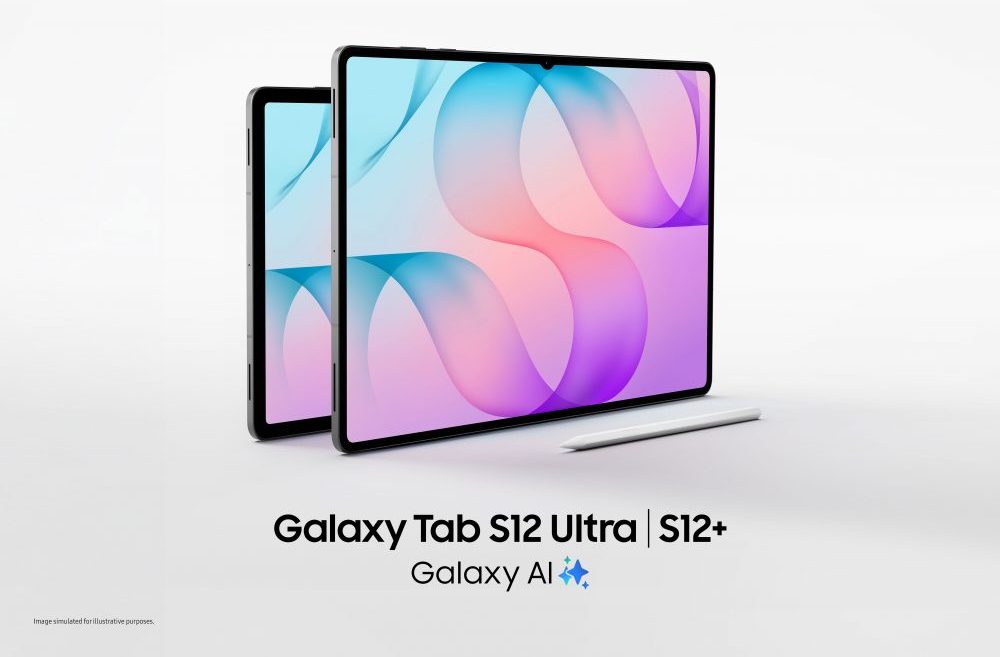
From exploring a new interest to bringing an idea to life, the Galaxy Tab S12 series combines Galaxy AI, the S Pen and professional-grade creative tools to support every stage of the creative journey.
A new creative pursuit can begin anywhere. It might start with an interest in photography, a desire to produce videos or the initial idea for an original illustration. Turning that curiosity into something tangible, however, takes time. You need to start with building knowledge, developing ideas, and then finding the right tools to bring them to life, often while balancing an already busy schedule.
The Galaxy Tab S12 series supports each stage of that journey. Powered by a cutting-edge 3nm processor, the series delivers Samsung’s most powerful Galaxy Tab performance to date, supporting even demanding and intensive activities such as multitasking, image editing and video production. Combining the latest Galaxy AI1 features, expansive displays, an S Pen and access to professional-grade creative applications, the new line-up can help users move from early exploration to active creation all within one versatile workspace.
Start by Building Your Knowledge
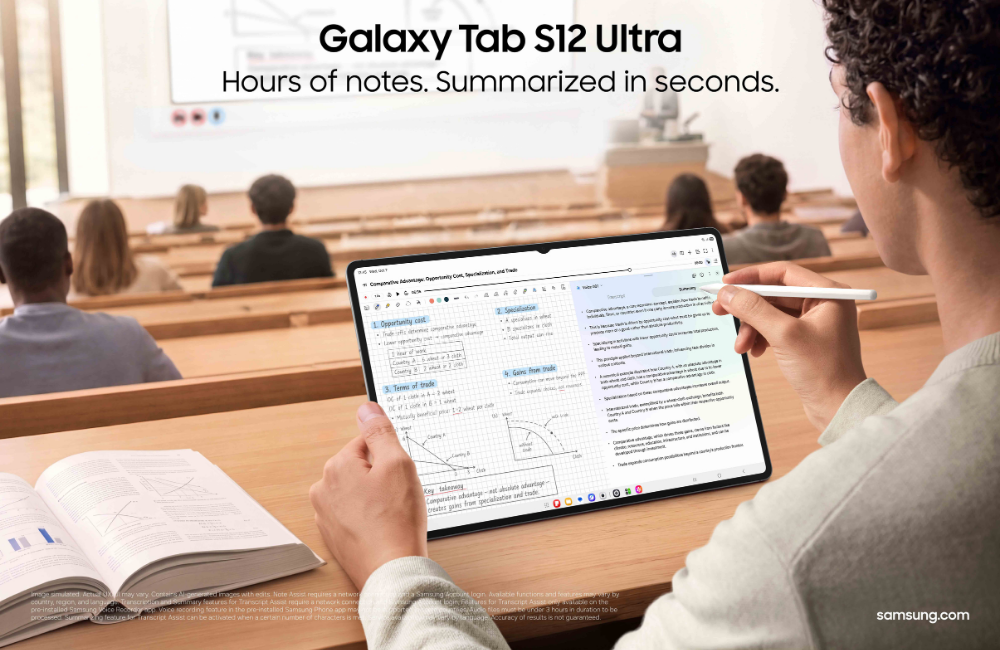
Samsung Browser powered by Galaxy AI and Google’s Gemini Notebook help users explore new interests, organise information and build their knowledge.
Before creating something new, you often need to understand the fundamentals. An aspiring photographer may need to study composition and editing techniques. Someone interested in video production might start with research about storytelling and transitions, while a budding illustrator may explore different drawing styles.
This early stage can involve moving between online tutorials, study notes, webpages and other reference materials. Samsung Browser[7] can provide support by consolidating what you’ve discovered by summarising information across open webpages and resurfacing relevant sources from the browsing history. This makes it easier to focus on insights that truly aid understanding, while reducing the hassle and time spent toggling through different tabs.
The Galaxy Tab S12 series comes equipped with a six-month trial of Google AI Pro[8], providing access to powerful AI models. As reference materials begin to accumulate, Gemini Notebook brings notes, images, recordings and files into one workspace. It can transform these materials into summaries, podcasts and quizzes, helping you build up understanding and apply what you’ve learned. And if additional clarification is needed or users would like to dive deeper into a particular topic, you can easily activate Gemini[9] for more information.
Shape Inspiration into an Idea
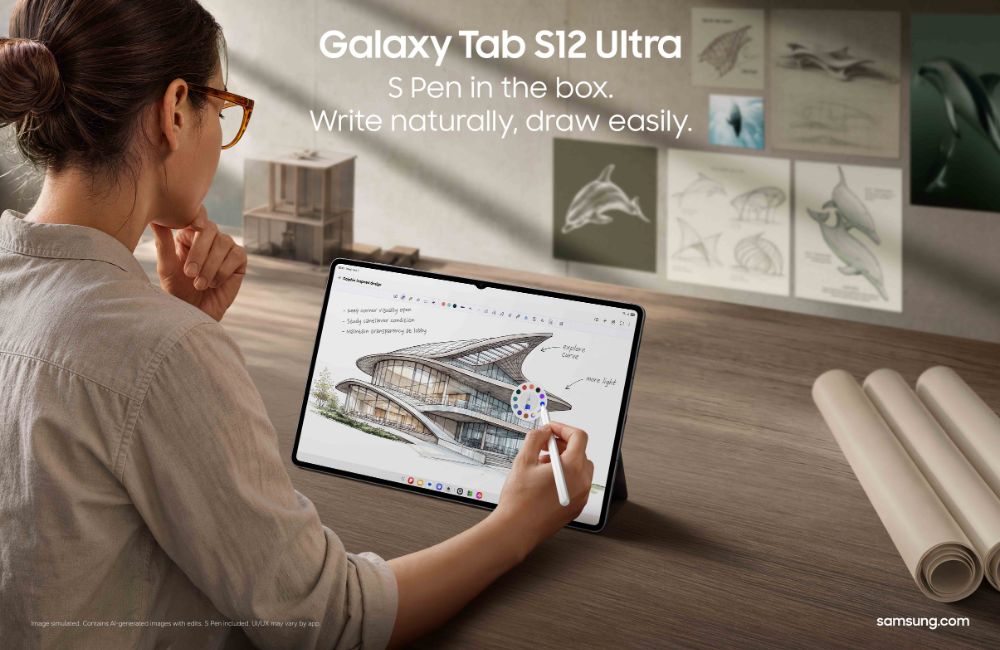
The Galaxy Tab S12 series comes bundled with an ergonomic S Pen, offering precise, intuitive input for note-taking, annotating materials, and sketching concepts.
Once the knowledge foundation is built, the next step is to begin shaping your own ideas.
With Multi Window, the expansive display of the Galaxy Tab S12 series can become a flexible workspace. Users can divide the screen into up to three sections, enabling you to simultaneously watch a tutorial, capture observations in Samsung Notes and consult an AI assistant without repeatedly moving between applications.
Meanwhile, the in-box S Pen provides an intuitive way to annotate reference materials, or sketch an early concept, with the Note Assist[10] function helping to summarise long notes so that you can identify important points and conveniently revisit key insights as an idea develops.
Whether it’s planning a sequence of photographs, storyboarding a video or sketching a visual concept, these tools help gather scattered thoughts, giving you a clearer direction as you move into creation.
Turn Your Ideas into a Masterpiece
With the groundwork in place, users can begin putting theory into practice. The Galaxy Tab S12 series offers professional-grade applications for different creative pursuits, allowing users to choose the tools that are most suitable for what you would like to achieve.
An initial sketch can be the starting point for a more developed creative concept. With Creative Studio[11], users can combine S Pen sketches, images and text prompts with Galaxy AI to generate and refine visuals, exploring different creative directions as their ideas take shape.
For the first time on an Android tablet, Adobe Photoshop2 comes pre-loaded on the Galaxy Tab S12 series[12]. Its tablet-optimised interface and S Pen give photographers and visual creators more precise control as they edit images, adjust compositions and refine design elements. AI-powered features, including Generative Fill and Image to Video, can also help users explore creative possibilities as they work on producing a masterpiece.[13]
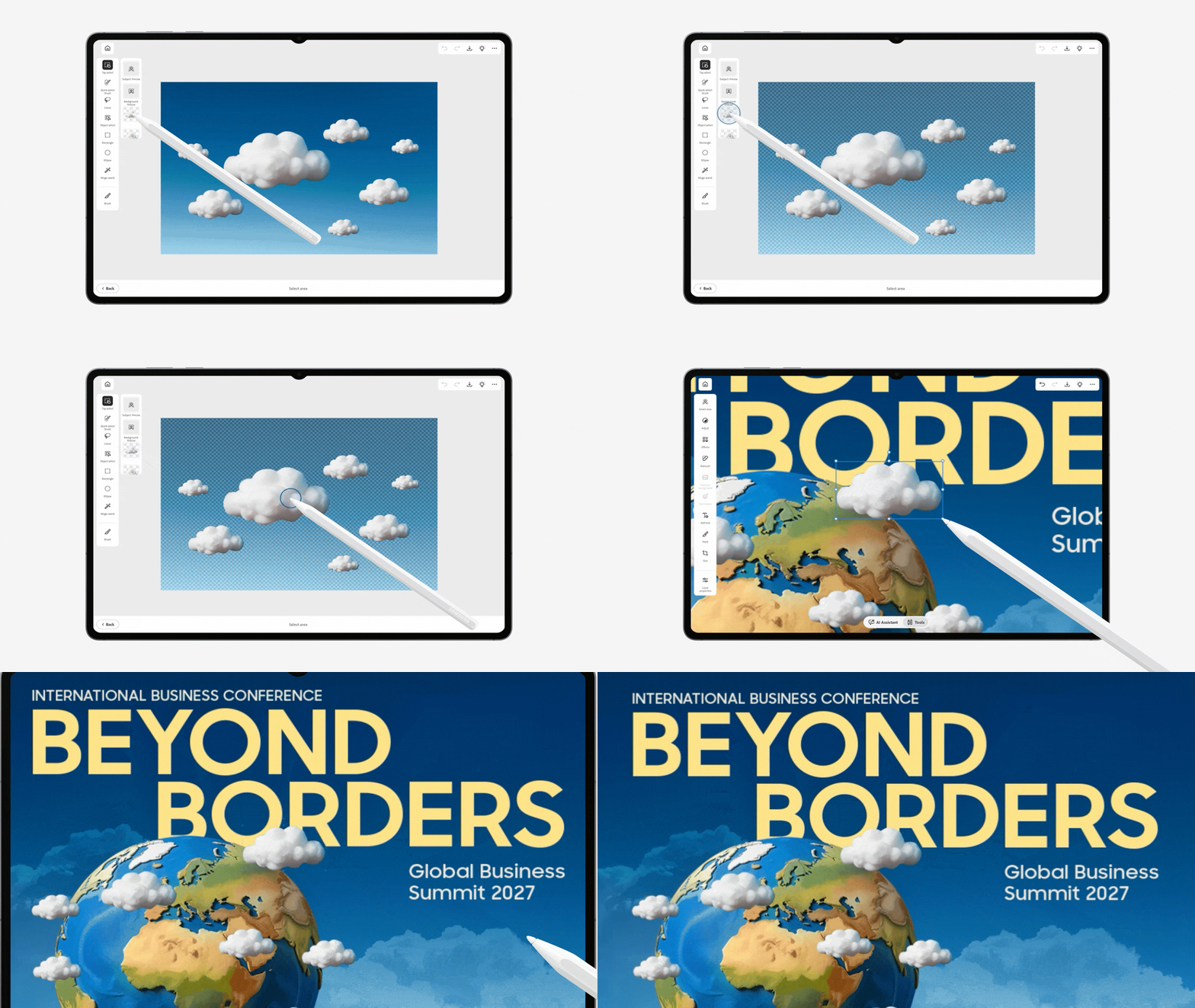
Adobe Photoshop provides tools for editing and refining visual compositions on the Galaxy Tab S12 series.
Those pursuing video creation can use LumaFusion[14] for professional-grade editing, assembling footage and refining video sequences to tell a story. Meanwhile, Clip Studio Paint[15] provides precision drawing and painting tools for digital artists developing original illustrations and visual concepts.
The Galaxy Tab S12 series gives these ideas room to grow. The Galaxy Tab S12 Ultra has a 14.6-inch Dynamic AMOLED 2X display[16], while the Galaxy Tab S12+ offers a 12.6-inch display[17] with slimmer bezels than its predecessor. From reviewing detailed photographs and arranging a video timeline, to drawing with the S Pen, users can enjoy an expansive canvas to work on.
Keep Creating Wherever Inspiration Strikes

Powerful processing performance, long-lasting battery life and a slim design support creative pursuits wherever users go.
A creative pursuit does not always happen at a desk. Learning, experimenting and creating can take place in the moments between everyday commitments – being struck by a moment of inspiration during a commute, editing content at a café, or refining a project at home after a busy day.
The Galaxy Tab S12 series is designed to support that flexibility. Even with large displays, the devices are incredibly portable so users can freely move and work across locations. In fact, the Galaxy Tab S12 Ultra measures just 5.1mm thick, making it Samsung’s thinnest Galaxy Tab.
Creative sessions can take a long time which means users need a device that lasts. The Galaxy Tab S12 Ultra’s 11,600mAh battery supports up to 23 hours of video playback[18], while the Tab S12+’s 10,600mAh battery supports up to 21 hours[19]. When it is time to recharge, the battery goes from 0% to 100% in about 95 minutes with the 45W adapter [20] – minimising downtime so users can get back to what they were doing.
Exploring a creative interest can help users develop new skills and create something uniquely their own. With Galaxy AI and a suite of professional-grade creative tools, the Galaxy Tab S12 series gives users the flexibility to keep learning, experimenting and bringing their ideas to life.
For more information about the Galaxy Tab S12 series, visit www.samsung.com/au/tablets/galaxy-tab-s/
Frequently Asked Questions
| Q. What devices are available in the Galaxy Tab S12 series?
The Galaxy Tab S12 series comprises of two models: Galaxy Tab S12 Ultra and Galaxy Tab S12+. The Galaxy Tab S12 Ultra is a premium large-screen tablet featuring a 14.6-inch display[21] and a 11600mAh battery16, delivering powerful performance and enhanced productivity. In comparison, Galaxy Tab S12+ prioritises portability with its 12.6-inch[22] display, lightweight 553g (Wi-Fi model) or 555g (5G model) design and 5.3mm thickness. Both models are powered by a cutting edge-edge 3nm processor.
Q. What Galaxy AI features are available on the Galaxy Tab S12 series? Running Android 17 with One UI 9, the Galaxy Tab S12 series includes the latest Galaxy AI experiences. Features include Samsung Browser5 powered by Galaxy AI1 for summariaing information across webpages, Note Assist8 for organising and summarising notes, and access to AI agents like Gemini7, Perplexity and Bixby[23]. Users also receive a six-month Google AI Pro trial, which includes Gemini Notebook[24] for creating summaries, quizzes and other learning materials.
Q. How long does the battery last? The Galaxy Tab S12 Ultra features an 11,600mAh16 battery that supports up to 23 hours of video playback, while the Galaxy Tab S12+ features a 10,600mAh17 battery that supports up to 21 hours. Both models support 45W Super Fast Charging18 to minimise downtime.
Q. How portable and durable is Galaxy Tab S12 series? Galaxy Tab S12 Ultra is a lightweight tablet about 5.1 mm thick and weighs only about 692g. Galaxy Tab S12+ is just about 5.3mm thick — thinner than the 5.6mm Galaxy Tab S10+ — and weighs only about 553g. Both also feature IP68-rated water and dust resistance[25] for added durability and peace of mind during outdoor use.
|
[1] Galaxy AI basic features provided by Samsung are free. Future releases may include enhanced features or new services that are offered on a paid basis. Different terms may apply for AI features provided by third parties. Galaxy AI basic features are those listed under “Advanced Intelligence” in the current Samsung T&C’s. For details visit www.samsung.com/au/.
[2] Gemini is a trade mark of Google LLC.
[3] Adobe Photoshop comes preloaded on Galaxy Tab S12 series in the Galaxy Picks folder. Adobe Photoshop for Tablet will be launched exclusively in the Galaxy Store for a period of at least six months starting 7 Oct 2026, after which Adobe may launch the app in other app stores. Galaxy Tab S12 series users are eligible to receive a 4-month free Adobe Photoshop premium mobile subscription, including 100 monthly generative credits. Adobe Photoshop free trial subject to Adobe’s standard terms and conditions.
[4] LumaFusion app is preloaded as a stub, requiring users to click the icon and complete the purchase from Galaxy Store. All Galaxy device users can get a 66% discount when purchasing from Galaxy Store and receive a 30-day free Creator Pass subscription. 66% discount promotion limited until 31 Dec, 2026.
[5] Clip Studio Paint membership required. Clip Studio Paint app comes pre-installed in select markets. The app can be downloaded from Galaxy Store and comes with a 6-month free trial for first-time users. Once the free trial period ends, paid subscription to a monthly or annual usage plan is required for continuous use. A 20% discount is available on the first subscription.
[6] Creative Studio feature requires a network connection and Samsung Account login. Service availability may vary by country, language or device model. The accuracy and reliability of the generated output is not guaranteed. Sticker sets only compatible with Samsung keyboard and can only be shared via Quick Share feature with other Galaxy devices that have One UI 5.0 or later installed and Quick Share app version 13.8.50.x or later.
[7] Available functions and features may vary by country, region, language, and Samsung Browser version. The number of search queries may be subject to limitations. Accuracy of results is not guaranteed. Some features of Samsung Browser for Android require a network connection and Samsung Account login.
[8] Purchasers of the Galaxy Tab S12 Series devices can receive 6 months of Google AI Pro at no extra cost, valued at AUD $197.94, based on an Australian subscription price of AUD $32.99 per month. Google Account sign-in and Google Payments registration are required. Additional eligibility requirements and exclusions apply. Google AI Pro offer must be redeemed by 1 August 2027. All other benefits, including YouTube Premium Lite, AI Top Up Credit or other Google AI Pro benefits not mentioned are excluded during the promotional period. At the end of the 6-month promotional period, the subscription will renew automatically at the applicable Australian subscription price unless cancelled. Offer is subject to Google’s eligibility, redemption, account, subscription and service terms. Availability of individual services, features and content may vary.
[9] Gemini is a trademark of Google LLC. Gemini Live feature requires internet connection and Google Account login. Compatible with certain features and certain accounts. Available on select devices and select countries, languages, and to users 18+.
[10] Note Assist feature requires a Samsung Account login. Available functions and features may vary by country, region, and language.
[11] Edited images on Creative Studio may be resized and will have a visible AI watermark. The accuracy and reliability of the generated output is not guaranteed. Galaxy AI basic features provided by Samsung are free. Any Samsung enhanced AI features and all third-party AI features are subject to different terms and may be subject to fees.
[12] Adobe Photoshop comes preloaded on Galaxy Tab S12 series in the Galaxy Picks folder. Adobe Photoshop for Tablet will be launched exclusively in the Galaxy Store for a period of at least six months starting Oct 7, 2026, after which Adobe may launch the app in other app stores. Galaxy Tab S12 series users are eligible to receive a 4-month free Adobe Photoshop premium mobile subscription, including 100 monthly generative credits.
[13] Photoshop includes AI-powered features including AI Assistant and generative AI features powered by Adobe Firefly like Generative Fill and Image to Video, helping creatives edit faster and effortlessly. Exclusively for the Galaxy Tab S12 series, users receive four months of free access to the Photoshop mobile plan.
[14] LumaFusion app is preloaded as stub, requiring users to click the icon and complete the purchase from Galaxy Store. All Galaxy device users can get a 66% discount when purchasing from Galaxy Store and receive a 1-month free Creator Pass subscription. 66% discount promotion limited until Dec 31, 2027.
[15] Clip Studio Paint membership required. Clip Studio Paint app comes pre-installed in select markets. The app can be downloaded from Galaxy Store and comes with a 6-month free trial for first-time users. Once the free trial period ends, paid subscription to a monthly or annual usage plan is required for continuous use. A 20% discount is available on the first subscription.
[16] Measured diagonally, Galaxy Tab S12 Ultra’s screen size is 14.6″ in the full rectangle and 14.5″ accounting for the rounded corners. Actual viewable area is less due to the rounded corners. Dynamic AMOLED 2X display on Galaxy Tab S12 Ultra have maximum brightness of 1600 nits, and outdoor brightness of 1000 nits in High Brightness Mode.
[17] Measured diagonally, Galaxy Tab S12+’s screen size is 12.6″ in the full rectangle and 12.5″ accounting for the rounded corners. Actual viewable area is less due to the rounded corners.
[18] Typical value tested under third-party lab conditions. Typical value is the estimated average value considering the deviation in battery capacity among the battery samples tested under IEC61960 standard. Rated (minimum) capacity is 11374 mAh. Based on Samsung internal lab test conditions with pre-release version of given model connected to earphone via Bluetooth under default settings over LTE. Estimated against battery capacity and measured current over battery power consumption during video playback (video file resolution 720 p, saved on device), respectively. Actual video playback times vary by network connection, settings, file format, screen brightness, battery condition, and other factors.
[19] Typical value tested under third-party lab conditions. Typical value is the estimated average value considering the deviation in battery capacity among the battery samples tested under IEC61960 standard. Rated (minimum) capacity is 10392 mAh. Based on Samsung internal lab test conditions with pre-release version of given model connected to earphone via Bluetooth under default settings over LTE. Estimated against battery capacity and measured current over battery power consumption during video playback (video file resolution 720 p, saved on device), respectively. Actual video playback times vary by network connection, settings, file format, screen brightness, battery condition, and other factors.
[20] Galaxy Tab S12 series supports up to 45W wired charging. 45W power adapter sold separately. Use only Samsung-approved chargers and cables.
[21] Measured diagonally, Galaxy Tab S12 Ultra’s screen size is 14.6″ in the full rectangle and 14.5″ accounting for the rounded corners. Actual viewable area is less due to the rounded corners and the camera hole.
[22] Measured diagonally, Galaxy Tab S12+’s screen size is 12.6″ in the full rectangle and 12.5″ accounting for the rounded corners. Actual viewable area is less due to the rounded corners and the camera hole.
[23] Bixby is Samsung’s brand of Internet of Things (IoT) voice assistant. Bixby service availability may vary depending on the country. Bixby recognises selected languages and certain accents/dialects, including Korean, English (US/GB/IN), Spanish (MX/ES), German, French, Italian, and Portuguese (BR). The user interface may change and differ by device. The availability of Bixby features and content providers may vary depending on the country/carrier/language/device model/OS version. A Samsung account log-in and data network connection (Wi-Fi or data network) are required.
[24] Users can access free version of Gemini Notebook without a Google AI Pro subscription.
[25] Galaxy Tab S12 series and the included S Pen have an IP68 rating based on lab test conditions and are dust resistant and water resistant for submersion in up to 1.5 meters of fresh water for up to 30 minutes. Third party testing was conducted in fresh water. Not suitable for diving or high pressure water activities. Refer to user manual for further care and instructions.
from Samsung Newsroom Australia https://ift.tt/5mHjhix
via IFTTT

