




SYDNEY’S EXTREME HEAT: Replacing a Swollen Battery and Screen on Galaxy S25

SYDNEY’S EXTREME HEAT: Replacing a Swollen Battery and Screen on Galaxy S25 Lifesaver Guide 2026
Introduction
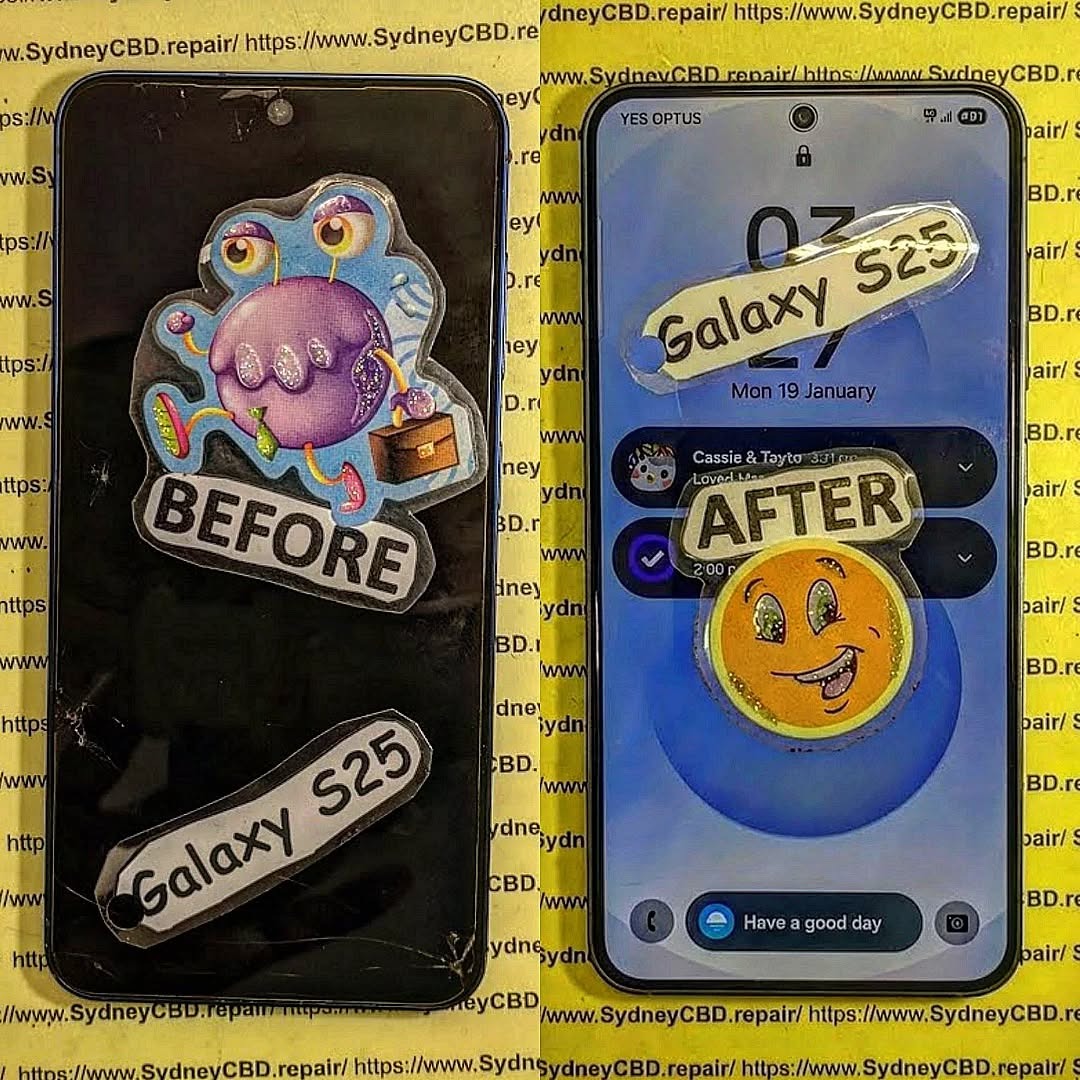
Sydney’s summer temperatures can be brutal on modern smartphones. One increasingly common issue technicians encounter is replacing a swollen battery and screen on Galaxy S25 devices after prolonged exposure to heat, heavy charging cycles, or aging battery cells.
As smartphones become thinner and more powerful, battery technology is pushed closer to its operational limits. While the Galaxy S25 is engineered with advanced thermal management, no lithium-ion battery is completely immune to heat-related degradation.
If you’ve noticed your screen lifting, unusual battery drain, overheating, or a bulging back cover, it may be time to consider replacing a swollen battery and screen on Galaxy S25 before more serious damage occurs.
This guide explains everything Sydney smartphone owners need to know.
Understanding Sydney’s Heat Challenges
Sydney regularly experiences temperatures exceeding 35°C during summer. When phones are left inside cars, near windows, or exposed to direct sunlight, internal temperatures can climb dramatically.
Modern smartphones generate heat from:
- Gaming
- Video streaming
- Fast charging
- GPS navigation
- Background applications
- Wireless charging
When environmental heat combines with device-generated heat, battery stress increases significantly.
For Galaxy S25 owners, extreme temperatures can reduce battery lifespan and increase the likelihood of swelling over time.
Why Heat Is a Major Concern
Lithium-ion batteries rely on stable chemical reactions. Excessive heat speeds up those reactions, leading to:
- Faster degradation
- Reduced battery capacity
- Increased internal gas formation
- Physical expansion
- Potential screen separation
This is why technicians frequently recommend replacing a swollen battery and screen on Galaxy S25 as soon as swelling becomes noticeable.
Why Galaxy S25 Batteries Swell
Battery swelling occurs when gases accumulate inside battery cells.
Although uncommon in newer devices, several factors can contribute to battery expansion.
The Science Behind Battery Expansion
Inside every lithium-ion battery are chemical components that store and release energy.
Over time:
- Chemical compounds degrade.
- Internal resistance increases.
- Gas forms within the battery.
- Pressure builds.
- The battery expands.
Since smartphones have limited internal space, expansion pushes against surrounding components.
How Heat Accelerates Battery Damage
Heat acts like a catalyst.
It speeds up:
- Electrolyte breakdown
- Chemical aging
- Cell degradation
- Internal gas production
Sydney’s climate can therefore contribute to earlier battery failure, particularly for users who:
- Charge overnight every day
- Use wireless chargers extensively
- Leave devices in hot vehicles
- Frequently run demanding apps
When these factors combine, replacing a swollen battery and screen on Galaxy S25 may eventually become unavoidable.
Common Signs of a Swollen Battery
Recognizing early warning signs can prevent expensive repairs.
Physical Warning Signs
Look for:
- Screen lifting from the frame
- Gaps around display edges
- Back panel separation
- Visible bulging
- Difficulty pressing buttons
Many customers initially believe their adhesive has failed when the real culprit is battery expansion.
Performance Warning Signs
Battery swelling is often accompanied by:
- Rapid battery drain
- Unexpected shutdowns
- Excessive heat generation
- Slow charging
- Reduced charging capacity
If these symptoms appear alongside screen separation, professional inspection should be arranged immediately.
Why Screen Damage Often Happens Together

One reason technicians frequently perform replacing a swollen battery and screen on Galaxy S25 simultaneously is because swelling places enormous pressure on the display assembly.
Internal Pressure Effects
As the battery expands:
- Pressure pushes against the OLED screen
- Display adhesives weaken
- Internal cables become stressed
- Screen alignment shifts
Over time, this pressure can permanently damage the display.
Risks of Delaying Repairs
Ignoring a swollen battery can result in:
| Potential Issue | Consequence |
|---|---|
| Screen cracking | Costlier repair |
| Touch failure | Reduced usability |
| Display discoloration | Permanent OLED damage |
| Internal frame bending | Structural issues |
| Battery rupture | Safety risk |
Prompt action often reduces repair costs and prevents additional damage.
Professional Galaxy S25 Battery Replacement Process
Professional repair centres follow strict procedures when replacing a swollen battery and screen on Galaxy S25 devices.
Inspection and Diagnosis
The repair process begins with:
- External inspection
- Battery health testing
- Thermal analysis
- Screen evaluation
- Frame integrity checks
Technicians determine whether the screen remains reusable or requires replacement.
Safe Battery Removal
Safety is critical.
A swollen battery cannot simply be pried out.
Professional technicians use:
- Specialized tools
- Controlled heat
- Anti-static equipment
- Protective safety measures
The battery is carefully removed without puncturing the cells.
Screen Replacement Procedure
When display damage is present, technicians may:
- Remove the damaged screen.
- Clean remaining adhesive.
- Inspect internal components.
- Install a replacement OLED display.
- Perform calibration tests.
- Verify touch functionality.
The device then undergoes comprehensive quality control testing.
Benefits of Immediate Repairs
Repairing a swollen battery promptly provides several advantages.
Enhanced Safety
A healthy battery reduces risks associated with:
- Overheating
- Device failure
- Unexpected shutdowns
- Internal pressure damage
Improved Battery Life
New batteries restore:
- Longer screen-on time
- Better charging performance
- Consistent power delivery
- Improved reliability
Better User Experience
Following replacing a swollen battery and screen on Galaxy S25, users often notice:
- Brighter displays
- Improved touch response
- Faster charging
- Reduced overheating
The phone feels almost new again.
Preventing Future Battery Swelling
Prevention is always better than repair.
Fortunately, there are practical ways to extend battery lifespan.
Best Charging Habits
Consider the following practices:
- Avoid charging under pillows
- Use certified chargers
- Disconnect after reaching full charge
- Keep software updated
- Avoid constant 0% to 100% cycles
Ideal charging typically occurs between 20% and 80%.
Heat Protection Strategies
Protect your device by:
- Keeping it out of direct sunlight
- Removing thick cases during charging
- Avoiding hot vehicles
- Limiting heavy gaming during charging
- Using ventilation when charging
These habits significantly reduce battery stress.
Repair Costs and Value Considerations
The cost of replacing a swollen battery and screen on Galaxy S25 depends on several factors.
These include:
- Extent of damage
- Screen condition
- Parts quality
- Repair complexity
- Warranty coverage
While some users consider replacing their phone entirely, repairs are often far more cost-effective.
Benefits of repair include:
- Retaining personal data
- Avoiding setup hassles
- Extending device lifespan
- Reducing electronic waste
For premium flagship devices like the Galaxy S25, repair frequently delivers excellent value.
Choosing a Reliable Repair Centre
Not all repair providers offer the same level of service.
When selecting a repair centre, consider:
Experience
Look for technicians with extensive experience repairing Samsung flagship devices.
Warranty Coverage
A trustworthy repair provider offers warranty protection for both parts and workmanship.
Quality Components
High-quality replacement parts help ensure:
- Reliable performance
- Better durability
- Longer lifespan
- Improved safety
Customer Reviews
Positive customer feedback can provide confidence in a repair provider’s reputation.
A repair centre with thousands of successful repairs demonstrates a strong commitment to quality.
Frequently Asked Questions
1. Is a swollen Galaxy S25 battery dangerous?
Yes. A swollen battery should be inspected promptly because internal pressure can damage components and create safety concerns.
2. Can I continue using my phone if the screen is lifting?
It’s not recommended. Screen lifting often indicates battery expansion, which can worsen over time.
3. How long does replacing a swollen battery and screen on Galaxy S25 take?
Most professional repairs can often be completed on the same day, depending on parts availability and damage severity.
4. What causes battery swelling most often?
The most common causes include heat exposure, battery aging, excessive charging cycles, and poor charging habits.
5. Will replacing the battery improve performance?
Yes. A new battery often restores battery life, charging reliability, and overall device stability.
6. Can battery swelling damage the motherboard?
In severe cases, expanding batteries can place pressure on internal components and potentially contribute to additional hardware damage.
7. Is it cheaper to repair or replace a Galaxy S25?
In many situations, repairing a Galaxy S25 is significantly more affordable than purchasing a new flagship smartphone.
8. How can I prevent battery swelling in the future?
Avoid excessive heat, use quality chargers, maintain proper charging habits, and seek professional servicing when issues first appear.
Conclusion

Sydney’s hot climate can place tremendous stress on smartphone batteries. Over time, heat exposure, charging habits, and natural battery aging can contribute to swelling that affects both the battery and display assembly.
Recognizing early warning signs is essential. Screen lifting, overheating, rapid battery drain, and visible bulging should never be ignored. By addressing these issues early and seeking professional assistance, users can avoid more extensive damage and restore their devices safely.
When it comes to replacing a swollen battery and screen on Galaxy S25, professional repairs offer a practical, cost-effective solution that extends the life of your premium smartphone while maintaining performance, safety, and reliability.
For additional information about lithium-ion battery safety, visit the official Samsung Support resource center.
David from Sydney CBD Repair Centre – The Best place to fix mobile phones as 7 Years In A Row! Top Mobile Phone Repair In Sydney. More than 2000 Positive Reviews on Google and Same Day Repairs.
We take pride in delivering exceptional repair services for all major phone brands including Apple, Samsung, Google, and more. Our expert technicians use only genuine parts and offer 90days warranty on repairs. Located in the heart of Sydney CBD, we’re your one-stop solution for all mobile device repairs.
Our commitment to excellence has earned us the trust of thousands of satisfied customers. Whether it’s a cracked screen, battery replacement, or water damage repair, we handle it all with professional care and expertise. Walk in today and experience why we’re Sydney’s #1 choice for mobile phone repairs.
Visit us for:
✓ Same Day Express Repairs
✓ Genuine Parts Guarantee
✓ Professional Technicians
✓ Competitive Pricing
✓ 2000+ 5-Star Google Reviews
✓ 7-Time Award Winner for Best Phone Repairs
Sydney CBD Repair Centre – Where Quality Meets Reliability.
Call : +61280114119
Website: Sydney CBD Repair Centre

