




Solving The Samsung Green Line Display Mystery During Expert Screen Panel Swaps

Solving The Samsung Green Line Display Mystery During Expert Screen Panel Swaps: Ultimate Guide + 7 Powerful Fixes
📱 Introduction to Samsung Green Line Display Issue
What is the Samsung Green Line Display Problem?
The Samsung green line display issue is one of the most frustrating problems encountered by technicians and users alike. It appears as a vertical green line running across the screen, often permanent and highly visible. This problem frequently arises after drops, overheating, or even software updates.
Interestingly, the issue becomes even more complicated during screen panel swaps, where replacing the display doesn’t always eliminate the green line. That’s where deeper diagnostics come into play.
Why It Matters During Screen Panel Swaps
When performing repairs, especially premium AMOLED replacements, the expectation is a flawless display. However, many technicians encounter a persistent Samsung green line display even after installing a new panel.
This raises a critical question: is the problem truly the screen—or something deeper within the device?
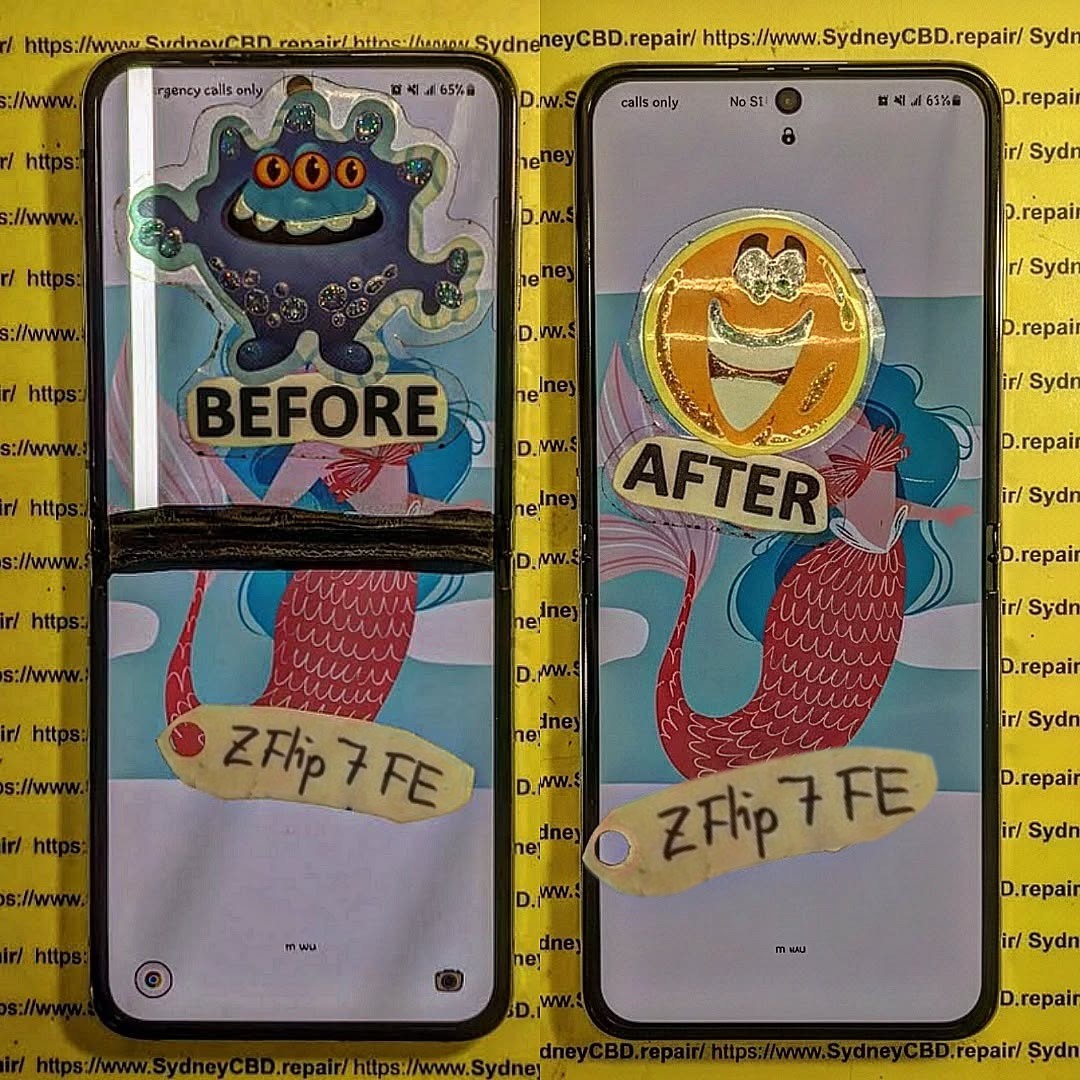
🔍 Common Causes of Samsung Green Line Display
AMOLED Panel Degradation
Samsung devices use AMOLED technology, which offers vibrant colors but is sensitive to damage. Over time, individual pixels may fail, resulting in a Samsung green line display.
Flex Cable Damage
The display flex cable connects the screen to the motherboard. Even slight tears or bends can cause signal disruption, leading to vertical lines.
Software Glitches
Sometimes, software updates or bugs can mimic hardware issues. A quick factory reset or firmware reinstall may resolve what appears to be a hardware fault.
Manufacturing Defects
Certain batches of devices are more prone to this issue due to inherent design or production flaws.
🛠️ Pre-Swap Diagnostics for Green Line Issues
Visual Inspection Techniques
Before replacing the screen, inspect:
- Connector pins
- Flex cables
- Motherboard contact points
A magnifying tool can reveal micro-damage invisible to the naked eye.
Diagnostic Tools and Apps
Use built-in diagnostic menus or apps to test:
- RGB display
- Touch responsiveness
- Pixel integrity
Identifying Hardware vs Software Issues
A simple rule:
- If the line appears in recovery mode → Hardware issue
- If not → Possibly software-related
🔧 Expert Screen Panel Swap Process Explained

Tools Required
- Heat gun or separator
- Precision screwdrivers
- Anti-static mat
- High-quality adhesive
- Replacement AMOLED panel
Step-by-Step Replacement
- Power off the device
- Heat and remove the back cover
- Disconnect battery
- Remove faulty display
- Install new panel carefully
- Reassemble device
Common Mistakes to Avoid
- Overheating components
- Using low-quality panels
- Improper cable alignment
These mistakes can actually cause a Samsung green line display after repair.
✅ Post-Repair Testing and Calibration
Display Calibration Methods
After replacement, calibrate brightness and color settings to ensure uniform output.
Burn-in Testing
Run static images for 15–30 minutes to detect any abnormal lines or ghosting.
Final Quality Assurance
Checklist:
- No visible lines
- Smooth touch response
- Even brightness
🛡️ Preventing Samsung Green Line After Repair
Proper Handling Practices
Avoid:
- Excessive bending
- Static discharge
- Overheating
Choosing Quality Replacement Panels
Cheap panels are often the root cause of recurring issues. Always opt for OEM-grade parts.
Environmental Considerations
Humidity and heat can degrade display performance over time.
🔬 Advanced Repair Techniques
Micro-soldering Fixes
If the issue lies in the motherboard, micro-soldering may repair broken connections.
IC Replacement
Display IC failure can cause persistent lines. Replacing it requires expert-level skills.
OLED Layer Repair
In rare cases, internal OLED layers can be repaired—but this is highly specialized.
💰 Cost vs Value of Repair
When to Repair vs Replace
| Scenario | Recommendation |
|---|---|
| Minor line issue | Repair |
| Severe motherboard damage | Replace device |
| High-end phone | Repair worth it |
Long-term Device Health
A proper repair ensures:
- Extended lifespan
- Better resale value
- Improved performance
❓ FAQs
1. Why does the green line remain after screen replacement?
It may be due to motherboard issues or faulty connectors rather than the screen itself.
2. Can software updates fix the Samsung green line display?
In rare cases, yes. But most issues are hardware-related.
3. Is the green line dangerous?
No, but it indicates underlying hardware damage.
4. How much does it cost to fix?
Costs vary depending on model and severity, typically ranging from moderate to high.
5. Can I fix it myself?
Only if you have proper tools and experience. Otherwise, it’s risky.
6. How do I prevent it from happening again?
Use protective cases, avoid overheating, and choose quality repairs.
🔚 Conclusion

The Samsung green line display issue isn’t just a simple screen defect—it’s often a complex interplay of hardware, software, and repair quality. While screen panel swaps are a common solution, they don’t always address the root cause.
By following expert diagnostics, using high-quality components, and applying advanced repair techniques when needed, technicians can confidently solve this persistent problem. In the end, attention to detail and professional expertise make all the difference.
David from Sydney CBD Repair Centre – The Best place to fix mobile phones as 7 Years In A Row! Top Mobile Phone Repair In Sydney. More than 2000 Positive Reviews on Google and Same Day Repairs.
We take pride in delivering exceptional repair services for all major phone brands including Apple, Samsung, Google, and more. Our expert technicians use only genuine parts and offer 90days warranty on repairs. Located in the heart of Sydney CBD, we’re your one-stop solution for all mobile device repairs.
Our commitment to excellence has earned us the trust of thousands of satisfied customers. Whether it’s a cracked screen, battery replacement, or water damage repair, we handle it all with professional care and expertise. Walk in today and experience why we’re Sydney’s #1 choice for mobile phone repairs.
Visit us for:
✓ Same Day Express Repairs
✓ Genuine Parts Guarantee
✓ Professional Technicians
✓ Competitive Pricing
✓ 2000+ 5-Star Google Reviews
✓ 7-Time Award Winner for Best Phone Repairs
Sydney CBD Repair Centre – Where Quality Meets Reliability.
Call : +61280114119
Website: https://SydneyCBD.repair/locate-us

