




Advanced Tips for Transferring Under-Display Fingerprint Sensors Without Damaging Screen Glass

15 Advanced Tips for Transferring Under-Display Fingerprint Sensors Without Damaging Screen Glass
Introduction
Modern smartphones have evolved dramatically over the past decade. One of the most impressive innovations is the under-display fingerprint sensor. These sensors create seamless smartphone designs while improving device security. However, repairing phones with these systems is significantly more complicated than older devices.
Technicians often struggle when transferring under-display fingerprint sensors without damaging screen glass. A small mistake can crack the OLED panel, destroy the digitizer, or render biometric security unusable. Consequently, mastering proper repair methods is essential for successful repairs.
In this comprehensive guide, you’ll discover advanced professional techniques, safe heating practices, adhesive management methods, and expert-level repair strategies that help preserve delicate screen assemblies.
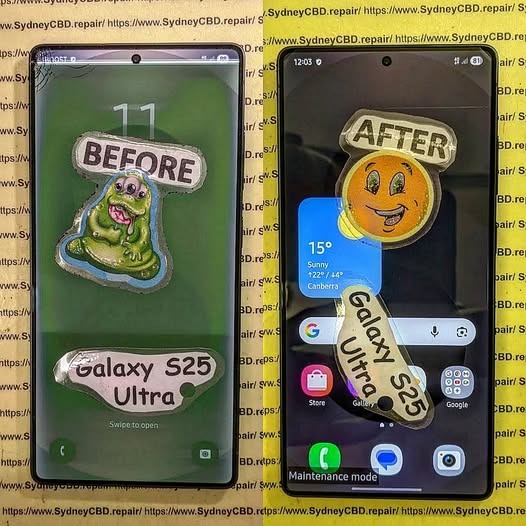
Understanding Under-Display Fingerprint Sensor Technology
Before attempting any repair, it’s important to understand how these systems work. Under-display sensors rely on sophisticated imaging or ultrasonic scanning technology integrated beneath the OLED panel.
Optical vs Ultrasonic Fingerprint Sensors
Optical sensors illuminate the finger and capture a visual image. They’re commonly found in mid-range smartphones because they’re cheaper to manufacture.
Ultrasonic sensors, on the other hand, use sound waves to create a 3D fingerprint map. Premium devices from Samsung and other flagship brands frequently use this technology due to better accuracy and enhanced security.
Each type requires different repair handling procedures:
| Sensor Type | Heat Sensitivity | Transfer Difficulty | Risk Level |
|---|---|---|---|
| Optical | Moderate | Medium | Moderate |
| Ultrasonic | High | Difficult | High |
Why Screen Glass Damage Happens During Transfer
Most damage occurs because of uneven heat application or improper prying techniques. OLED displays are extremely thin. Once localized stress develops, cracks spread rapidly across the panel.
Another common issue is adhesive resistance. Manufacturers use strong industrial adhesives to secure the fingerprint module. Pulling too aggressively often causes glass separation or OLED delamination.
Therefore, careful preparation is absolutely critical.
Essential Tools for Safe Fingerprint Sensor Transfer
Professional-grade tools make a huge difference when transferring under-display fingerprint sensors without damaging screen glass.
Heat Pads and Controlled Temperature Tools
A controlled heat source is mandatory. Cheap heat guns fluctuate unpredictably and may overheat OLED layers.
Recommended professional tools include:
- Adjustable LCD separator heat pads
- Infrared heating stations
- Precision hot air systems
- OLED-safe temperature monitors
The ideal temperature usually falls between 70°C and 90°C depending on the phone model.
Avoid overheating because excessive temperatures can:
- Burn AMOLED layers
- Warp display adhesives
- Damage proximity sensors
- Cause touch dead zones
Adhesives and Precision Pry Equipment
Technicians should avoid metal blades whenever possible. Instead, use:
- Plastic opening cards
- Nylon spudgers
- Flexible OLED-safe picks
- Ultra-thin molybdenum wire
Additionally, high-quality adhesive removers are helpful for softening stubborn glue without stressing the glass.
Some technicians also use isopropyl alcohol above 90% purity to loosen adhesive residue safely.
Preparing the Device Before Disassembly

Preparation is often overlooked, yet it’s one of the most important stages in smartphone repair.
Backing Up Device Data
Even experienced technicians encounter unexpected issues. A failed display repair may result in permanent data loss.
Always recommend that customers:
- Back up photos
- Sync cloud accounts
- Save authentication credentials
- Disable banking app security temporarily
This creates a safer repair environment and improves customer trust.
Power Isolation and Battery Safety
Before heating any device:
- Power it off completely
- Disconnect the battery connector
- Remove SIM trays
- Discharge static electricity
Lithium-ion batteries react poorly to excessive heat. Consequently, technicians should never apply prolonged heat near swollen or damaged batteries.
Advanced Heating Techniques to Protect OLED Panels
Heat management is the single most important factor in transferring under-display fingerprint sensors without damaging screen glass.
Ideal Temperature Ranges
Different manufacturers use varying adhesive formulas. Still, these general ranges work well:
| Device Type | Recommended Temperature |
|---|---|
| Samsung AMOLED | 75°C–85°C |
| Google Pixel OLED | 70°C–80°C |
| Xiaomi OLED | 75°C–90°C |
| Foldable Displays | 65°C–75°C |
Using an infrared thermometer improves consistency significantly.
Preventing AMOLED Burn and Delamination
OLED panels contain multiple fragile layers bonded together. Excessive heat weakens these bonds.
To prevent damage:
- Heat gradually
- Rotate heat evenly
- Never focus on one point too long
- Use circular heating movements
- Avoid exceeding 90°C
Professional repair technicians often heat the panel in cycles rather than continuously. This method distributes thermal stress more evenly.
Moreover, patience matters. Rushing almost always leads to expensive mistakes.
Proper Adhesive Removal Methods
Factory adhesives are designed to survive years of use. Removing them safely requires precision.
Removing Factory Adhesive Carefully
The safest approach involves gradual separation.
Follow this process:
- Warm the adhesive evenly
- Insert a plastic pick slowly
- Slide carefully around edges
- Reheat stubborn sections
- Avoid twisting pressure
Technicians should never force entry into resistant areas.
If the adhesive remains stubborn, apply additional controlled heat instead of increasing physical force.
Avoiding Pressure Points on Glass
Localized pressure causes microscopic fractures that later become visible cracks.
To minimize stress:
- Support the display fully
- Use thin flexible picks
- Maintain shallow insertion angles
- Avoid bending the OLED assembly
This is especially important on curved-edge displays found on flagship smartphones.
Safe Fingerprint Sensor Separation Procedures
Separating the fingerprint sensor itself requires exceptional care.
Lifting the Sensor Flex Correctly
The sensor flex cable is incredibly delicate. Even slight tears can disable biometric functionality permanently.
Professionals usually:
- Heat the sensor area lightly
- Lift gradually with tweezers
- Separate adhesive slowly
- Keep cable tension minimal
Patience cannot be overstated here.
Preventing Flex Cable Tears
Common causes of cable damage include:
- Sudden pulling
- Cold adhesive separation
- Sharp metal tools
- Excessive twisting
Using microscope magnification greatly improves repair accuracy.
Many advanced repair centers also employ vacuum stabilization platforms to reduce hand movement during delicate procedures.
Common Mistakes That Crack Screen Glass
Even experienced technicians occasionally make avoidable errors.
Excessive Heat Exposure
Too much heat creates several problems simultaneously:
- OLED discoloration
- Green lines
- Dead pixels
- Adhesive bubbling
- Touch failure
Additionally, ultrasonic fingerprint sensors are highly temperature-sensitive.
Always monitor heat levels carefully.
Metal Tool Damage
Metal blades remain one of the biggest causes of accidental breakage.
Although they can cut adhesive quickly, they also:
- Scratch OLED layers
- Crack curved glass
- Sever flex cables
- Damage polarizer films
Plastic and nylon alternatives are much safer.
Reinstallation Best Practices
After successfully transferring the sensor, proper reinstallation is equally important.
Aligning the Sensor Accurately
Even tiny alignment errors can reduce fingerprint recognition speed.
For proper alignment:
- Match factory positioning marks
- Use alignment templates
- Test fit before final sealing
- Avoid adhesive overflow
Incorrect alignment often leads to failed enrollment errors.
Using Correct Adhesive Thickness
Adhesive thickness directly affects sensor performance.
If the adhesive layer is:
- Too thick → fingerprint reading weakens
- Too thin → pressure points develop
Professional technicians use OEM-grade adhesive precuts whenever possible.
Calibration and Testing After Repair
Testing ensures repair quality and long-term reliability.
Fingerprint Enrollment Testing
After reassembly:
- Power on the device
- Test fingerprint enrollment
- Verify recognition speed
- Test multiple fingers
- Confirm security apps function properly
Some devices require software calibration after screen replacement.
For example, certain models from Google require fingerprint recalibration utilities after OLED repairs.
Display Uniformity Checks
Always inspect the display for:
- Green tinting
- Bright spots
- Touch dead zones
- Pressure marks
- Uneven brightness
Testing under low brightness helps reveal hidden OLED damage.
Professional Repair vs DIY Repairs
Many consumers attempt repairs themselves after watching online tutorials. Unfortunately, under-display fingerprint sensor repairs are not beginner-friendly.
Risks of Inexperienced Repairs
DIY repair attempts commonly result in:
| Repair Mistake | Consequence |
|---|---|
| Overheating | OLED failure |
| Incorrect prying | Cracked glass |
| Adhesive contamination | Fingerprint malfunction |
| Cable tearing | Permanent sensor failure |
Moreover, replacement OLED panels are expensive.
One failed attempt can cost more than professional repair services.
Benefits of Certified Technicians
Professional repair centers offer several advantages:
- Controlled repair environments
- OEM-grade parts
- Advanced calibration tools
- Warranty-backed repairs
- Experienced technicians
Certified professionals also understand brand-specific repair procedures, which significantly lowers risk.
If you’re researching professional repair standards, the Sydney CBD Repair Centre Guides platform provides valuable educational resources for technicians and consumers alike.
Advanced Technician Tips for Better Success Rates
Experienced technicians continuously refine their methods to improve repair consistency.
Here are additional expert-level techniques:
Use Preheating Mats Instead of Direct Heat Guns
Preheating distributes warmth more evenly and reduces hot spots.
Work in Low-Dust Environments
Dust trapped under OLED panels becomes highly visible after reassembly.
Replace Damaged Adhesive Completely
Reusing old adhesive increases failure rates and reduces waterproofing integrity.
Wear Finger Cots or Gloves
Skin oils can contaminate display layers and adhesives.
Test Before Full Sealing
Always verify fingerprint functionality before permanently sealing the phone.
These habits dramatically increase successful repair outcomes.
Why OLED Displays Are More Fragile Than LCD Panels
OLED technology enables thinner and more vibrant displays. However, the structure is inherently delicate.
OLED assemblies contain:
- Organic emissive layers
- Thin-film encapsulation
- Flexible substrates
- Integrated sensor systems
Unlike LCD screens, OLED panels lack rigid backlighting support. As a result, they flex more easily and crack under uneven stress.
This fragility explains why transferring under-display fingerprint sensors without damaging screen glass requires specialized expertise.
Best Smartphone Brands for Repairability
Some brands design phones with easier repair access than others.
Easier Devices to Repair
Generally considered easier:
- Google Pixel devices
- Nothing smartphones
- Older Samsung models
More Difficult Devices
More complex repairs often involve:
- Foldable phones
- Curved-edge OLED devices
- Ultrasonic fingerprint systems
- Thin titanium-frame phones
Repair complexity continues increasing as smartphone designs become thinner and more integrated.
Frequently Asked Questions
Can under-display fingerprint sensors be reused after screen replacement?
Yes, many sensors can be reused if transferred carefully. However, damage to the flex cable or improper alignment may cause fingerprint failure.
What temperature is safest for OLED screen repairs?
Most OLED repairs work best between 70°C and 90°C. Going beyond this range significantly increases damage risk.
Why does my fingerprint sensor stop working after repair?
Common reasons include:
- Incorrect alignment
- Torn flex cable
- Adhesive interference
- Missing software calibration
Are ultrasonic fingerprint sensors harder to repair?
Yes. Ultrasonic sensors are more sensitive to adhesive thickness, heat exposure, and positioning errors.
Can excessive heat permanently damage AMOLED displays?
Absolutely. Excessive heat can cause:
- Burn marks
- Green lines
- Dead pixels
- Touchscreen malfunction
Should beginners attempt fingerprint sensor transfer repairs?
Generally, no. These repairs require advanced skills, specialized tools, and experience handling fragile OLED assemblies.
Is waterproofing affected after screen repairs?
Yes, unless professional-grade adhesive sealing is restored properly after reassembly.
Conclusion

Modern smartphone repair is becoming increasingly sophisticated. Transferring under-display fingerprint sensors without damaging screen glass demands patience, technical knowledge, precision tools, and advanced repair experience.
Technicians who understand heat control, adhesive management, OLED fragility, and sensor calibration achieve far better outcomes. Meanwhile, rushed repairs often lead to cracked displays, failed biometric systems, and expensive replacement costs.
By following the advanced methods outlined in this guide, repair professionals and serious enthusiasts can greatly improve repair success rates while protecting delicate OLED assemblies.
Whether you’re repairing a premium flagship or learning advanced microsoldering techniques, mastering these procedures is essential in today’s evolving smartphone repair industry.
David from Sydney CBD Repair Centre – The Best place to fix mobile phones as 7 Years In A Row! Top Mobile Phone Repair In Sydney. More than 2000 Positive Reviews on Google and Same Day Repairs.
We take pride in delivering exceptional repair services for all major phone brands including Apple, Samsung, Google, and more. Our expert technicians use only genuine parts and offer 90days warranty on repairs. Located in the heart of Sydney CBD, we’re your one-stop solution for all mobile device repairs.
Our commitment to excellence has earned us the trust of thousands of satisfied customers. Whether it’s a cracked screen, battery replacement, or water damage repair, we handle it all with professional care and expertise. Walk in today and experience why we’re Sydney’s #1 choice for mobile phone repairs.
Visit us for:
✓ Same Day Express Repairs
✓ Genuine Parts Guarantee
✓ Professional Technicians
✓ Competitive Pricing
✓ 2000+ 5-Star Google Reviews
✓ 7-Time Award Winner for Best Phone Repairs
Sydney CBD Repair Centre – Where Quality Meets Reliability.
Call : +61280114119
Website: https://SydneyCBD.repair/locate-us

