


Troubleshooting Common Smartphone Screen Issues

Troubleshooting Common Smartphone Screen Issues: Expert Fixes from Sydney’s Top Repair Team
📱 Introduction: Screens Are More Fragile Than You Think
Smartphones are modern marvels, but their sleek glass screens can be vulnerable to everyday wear and tear. Whether it’s a minor scratch or a completely shattered display, screen issues are among the most common problems users face. But don’t panic — many screen-related problems can be diagnosed and fixed, especially if you catch them early.
⚠️ Most Common Smartphone Screen Issues
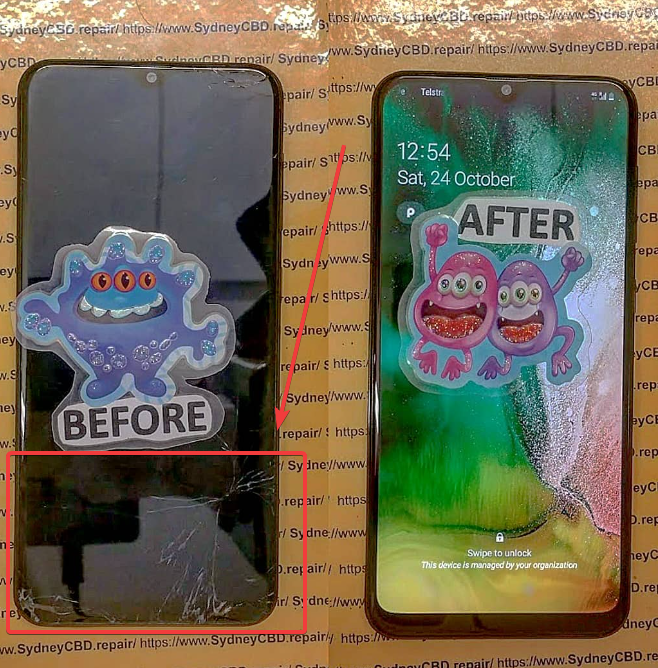
Cracked or Smashed Glass
This is the number one reason people seek screen repairs. A single drop can cause anything from a small crack to total shatter. Cracks not only look bad but can also:
- Cause cuts on your fingers
- Compromise water resistance
- Spread further over time
Display Not Turning On
Sometimes the phone vibrates or rings, but the screen stays black. This could mean:
- A dead battery
- Display connector damage
- Internal screen failure
Screen Flickering or Glitching
If your display flickers or flashes:
- You might have a faulty display ribbon
- Apps may be causing graphical conflicts
- It could be a software bug or hardware malfunction
Touchscreen Not Responding
Non-responsive screens are often linked to:
- Moisture or dirt under the glass
- Faulty digitizer
- Overheating
Ghost Touch Issues
Ghost touches occur when your phone acts like it’s being touched — even when it isn’t. This is usually due to:
- Screen damage
- Poor-quality screen replacements
- System glitches
🔧 DIY Troubleshooting Tips You Can Try
Restart or Soft Reset
Sometimes, a simple restart clears up glitches. Hold down your power button and give your device a fresh start.
Screen Calibration Apps
Apps like “Touchscreen Repair” can recalibrate screen sensitivity, especially useful for ghost touch or lagging responses.
Safe Mode for App Conflicts
Booting into safe mode disables third-party apps. If the screen behaves normally here, a rogue app may be to blame.
Cleaning the Screen Surface
Use a microfiber cloth to remove dirt or grease. Moisture or grime can affect touch accuracy.
🛠️ When to See a Professional Repair Technician
Signs Your Screen Needs Replacement
- Deep cracks or shattered glass
- Lines or dark patches on the display
- Persistent flickering or blackouts
- No response to touch
Why Ignoring Screen Issues Can Be Costly
Putting off repairs can lead to:
- Internal water damage (through cracks)
- Touch malfunction spreading
- Damage to motherboard from short-circuits
🏆 How We Fix Common Screen Issues at Sydney CBD Repair Centre

As Sydney’s most trusted mobile repair shop, we take pride in fast, affordable, and high-quality screen fixes.
Genuine Screen Replacements
We use 100% original screens for all major phone brands — including Samsung, Apple, and Google — ensuring durability and perfect display quality.
Calibration for Touch & Fingerprint Sensors
After replacement, we recalibrate touch and fingerprint sensors, especially important for in-display readers like those in Samsung and Google Pixel phones.
90-Day Warranty on Repairs
Enjoy peace of mind with our 90-day guarantee. If your screen has issues post-repair, we’ll take care of it — no extra cost.
🛡️ Avoiding Screen Issues in the Future
Screen Protectors and Phone Cases
Invest in tempered glass screen protectors and shock-resistant phone cases. These small accessories can save you hundreds in repair costs.
Avoiding Water and Heat Exposure
Don’t leave your phone in hot cars or near water. Excess moisture or heat can cause internal damage, even without cracks.
Regular Software Updates
Keep your operating system updated. Some screen issues are software-related and get resolved with updates.
❓ FAQs
1. Can I fix a cracked screen without replacing it?
In most cases, a cracked screen needs full replacement, especially if the crack affects touch or visibility.
2. Why is my phone pressing itself?
This is likely a ghost touch issue. It could be caused by pressure on the screen, internal damage, or faulty screen replacements.
3. How long does a screen repair take?
At Sydney CBD Repair Centre, most screen repairs are done same day, often within 1–2 hours.
4. Will my fingerprint scanner still work after a screen repair?
Yes — if the repair is done professionally using genuine parts and proper calibration.
5. What’s the difference between original and aftermarket screens?
Original screens match your phone’s quality exactly. Aftermarket ones are cheaper but may lack touch sensitivity, brightness, or durability.
6. How do I know if my screen issue is hardware or software?
Try restarting in Safe Mode. If the issue disappears, it’s likely software. If not, it’s probably hardware-related.
✅ Conclusion: Don’t Let a Damaged Screen Slow You Down
Screen issues can range from mild annoyances to serious problems. Whether it’s a hairline crack or a blank display, don’t ignore the signs. Quick action can prevent bigger (and more expensive) issues. At Sydney CBD Repair Centre, we’re committed to giving your device the expert care it deserves — with genuine parts, same-day service, and a solid warranty to back it all up.
David from Sydney CBD Repair Centre – The Best Place to Fix Mobile Phones 6 Years in a Row! Top Mobile Phone Repair in Sydney. Over 2000 Positive Reviews and Same Day Repairs.
Call: +61280114119
Website: https://SydneyCBD.repair/locate-us

