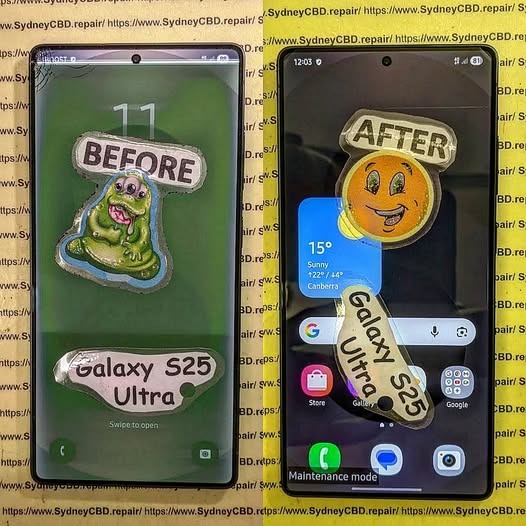
The Hidden Screen Repair Secrets: Unlocking Expert Techniques
🔧 The Secret World of Expert Screen Repairs—Revealed
Most people think screen repair is just about swapping a broken glass for a new one. But at Sydney CBD Repair Centre, we know the truth: screen repair is a craft. A delicate balance of tools, timing, technique, and experience.
Whether you’re a curious tech enthusiast or someone who wants to make smarter repair decisions, here’s an exclusive look into the hidden screen repair secrets only the best technicians use.
15 Advanced Tips for Transferring Under-Display Fingerprint Sensors Without Damaging Screen Glass
Introduction
Modern smartphones have evolved dramatically over the past decade. One of the most impressive innovations is the under-display fingerprint sensor. These sensors create seamless smartphone designs while improving device security. However, repairing phones with these systems is significantly more complicated than older devices.
Technicians often struggle when transferring under-display fingerprint sensors without damaging screen glass. A small mistake can crack the OLED panel, destroy the digitizer, or render biometric security unusable. Consequently, mastering proper repair methods is essential for successful repairs.
In this comprehensive guide, you’ll discover advanced professional techniques, safe heating practices, adhesive management methods, and expert-level repair strategies that help preserve delicate screen assemblies.
Before attempting any repair, it’s important to understand how these systems work. Under-display sensors rely on sophisticated imaging or ultrasonic scanning technology integrated beneath the OLED panel.
Optical vs Ultrasonic Fingerprint Sensors
Optical sensors illuminate the finger and capture a visual image. They’re commonly found in mid-range smartphones because they’re cheaper to manufacture.
Ultrasonic sensors, on the other hand, use sound waves to create a 3D fingerprint map. Premium devices from Samsung and other flagship brands frequently use this technology due to better accuracy and enhanced security.
Each type requires different repair handling procedures:
Sensor Type
Heat Sensitivity
Transfer Difficulty
Risk Level
Optical
Moderate
Medium
Moderate
Ultrasonic
High
Difficult
High
Why Screen Glass Damage Happens During Transfer
Most damage occurs because of uneven heat application or improper prying techniques. OLED displays are extremely thin. Once localized stress develops, cracks spread rapidly across the panel.
Another common issue is adhesive resistance. Manufacturers use strong industrial adhesives to secure the fingerprint module. Pulling too aggressively often causes glass separation or OLED delamination.
Therefore, careful preparation is absolutely critical.
Professional technicians use OEM-grade adhesive precuts whenever possible.
Calibration and Testing After Repair
Testing ensures repair quality and long-term reliability.
Fingerprint Enrollment Testing
After reassembly:
Power on the device
Test fingerprint enrollment
Verify recognition speed
Test multiple fingers
Confirm security apps function properly
Some devices require software calibration after screen replacement.
For example, certain models from Google require fingerprint recalibration utilities after OLED repairs.
Display Uniformity Checks
Always inspect the display for:
Green tinting
Bright spots
Touch dead zones
Pressure marks
Uneven brightness
Testing under low brightness helps reveal hidden OLED damage.
Professional Repair vs DIY Repairs
Many consumers attempt repairs themselves after watching online tutorials. Unfortunately, under-display fingerprint sensor repairs are not beginner-friendly.
Risks of Inexperienced Repairs
DIY repair attempts commonly result in:
Repair Mistake
Consequence
Overheating
OLED failure
Incorrect prying
Cracked glass
Adhesive contamination
Fingerprint malfunction
Cable tearing
Permanent sensor failure
Moreover, replacement OLED panels are expensive.
One failed attempt can cost more than professional repair services.
Benefits of Certified Technicians
Professional repair centers offer several advantages:
Controlled repair environments
OEM-grade parts
Advanced calibration tools
Warranty-backed repairs
Experienced technicians
Certified professionals also understand brand-specific repair procedures, which significantly lowers risk.
If you’re researching professional repair standards, the Sydney CBD Repair Centre Guides platform provides valuable educational resources for technicians and consumers alike.
Advanced Technician Tips for Better Success Rates
Experienced technicians continuously refine their methods to improve repair consistency.
Here are additional expert-level techniques:
Use Preheating Mats Instead of Direct Heat Guns
Preheating distributes warmth more evenly and reduces hot spots.
Work in Low-Dust Environments
Dust trapped under OLED panels becomes highly visible after reassembly.
Replace Damaged Adhesive Completely
Reusing old adhesive increases failure rates and reduces waterproofing integrity.
Wear Finger Cots or Gloves
Skin oils can contaminate display layers and adhesives.
Test Before Full Sealing
Always verify fingerprint functionality before permanently sealing the phone.
These habits dramatically increase successful repair outcomes.
Why OLED Displays Are More Fragile Than LCD Panels
OLED technology enables thinner and more vibrant displays. However, the structure is inherently delicate.
OLED assemblies contain:
Organic emissive layers
Thin-film encapsulation
Flexible substrates
Integrated sensor systems
Unlike LCD screens, OLED panels lack rigid backlighting support. As a result, they flex more easily and crack under uneven stress.
This fragility explains why transferring under-display fingerprint sensors without damaging screen glass requires specialized expertise.
Best Smartphone Brands for Repairability
Some brands design phones with easier repair access than others.
Easier Devices to Repair
Generally considered easier:
Google Pixel devices
Nothing smartphones
Older Samsung models
More Difficult Devices
More complex repairs often involve:
Foldable phones
Curved-edge OLED devices
Ultrasonic fingerprint systems
Thin titanium-frame phones
Repair complexity continues increasing as smartphone designs become thinner and more integrated.
Frequently Asked Questions
Can under-display fingerprint sensors be reused after screen replacement?
Yes, many sensors can be reused if transferred carefully. However, damage to the flex cable or improper alignment may cause fingerprint failure.
What temperature is safest for OLED screen repairs?
Most OLED repairs work best between 70°C and 90°C. Going beyond this range significantly increases damage risk.
Why does my fingerprint sensor stop working after repair?
Common reasons include:
Incorrect alignment
Torn flex cable
Adhesive interference
Missing software calibration
Are ultrasonic fingerprint sensors harder to repair?
Yes. Ultrasonic sensors are more sensitive to adhesive thickness, heat exposure, and positioning errors.
Can excessive heat permanently damage AMOLED displays?
Absolutely. Excessive heat can cause:
Burn marks
Green lines
Dead pixels
Touchscreen malfunction
Should beginners attempt fingerprint sensor transfer repairs?
Generally, no. These repairs require advanced skills, specialized tools, and experience handling fragile OLED assemblies.
Is waterproofing affected after screen repairs?
Yes, unless professional-grade adhesive sealing is restored properly after reassembly.
Conclusion
Modern smartphone repair is becoming increasingly sophisticated. Transferring under-display fingerprint sensors without damaging screen glass demands patience, technical knowledge, precision tools, and advanced repair experience.
Technicians who understand heat control, adhesive management, OLED fragility, and sensor calibration achieve far better outcomes. Meanwhile, rushed repairs often lead to cracked displays, failed biometric systems, and expensive replacement costs.
By following the advanced methods outlined in this guide, repair professionals and serious enthusiasts can greatly improve repair success rates while protecting delicate OLED assemblies.
Whether you’re repairing a premium flagship or learning advanced microsoldering techniques, mastering these procedures is essential in today’s evolving smartphone repair industry.
David from Sydney CBD Repair Centre – The Best place to fix mobile phones as 7 Years In A Row! Top Mobile Phone Repair In Sydney. More than 2000 Positive Reviews on Google and Same Day Repairs.
We take pride in delivering exceptional repair services for all major phone brands including Apple, Samsung, Google, and more. Our expert technicians use only genuine parts and offer 90days warranty on repairs. Located in the heart of Sydney CBD, we’re your one-stop solution for all mobile device repairs.
Our commitment to excellence has earned us the trust of thousands of satisfied customers. Whether it’s a cracked screen, battery replacement, or water damage repair, we handle it all with professional care and expertise. Walk in today and experience why we’re Sydney’s #1 choice for mobile phone repairs.
Visit us for:
✓ Same Day Express Repairs
✓ Genuine Parts Guarantee
✓ Professional Technicians
✓ Competitive Pricing
✓ 2000+ 5-Star Google Reviews
✓ 7-Time Award Winner for Best Phone Repairs