


UNFIXABLE? Samsung S24 Ultra Green Line Mystery

UNFIXABLE? Samsung S24 Ultra Green Line Mystery + Expert Insights + 15 Causes
Introduction
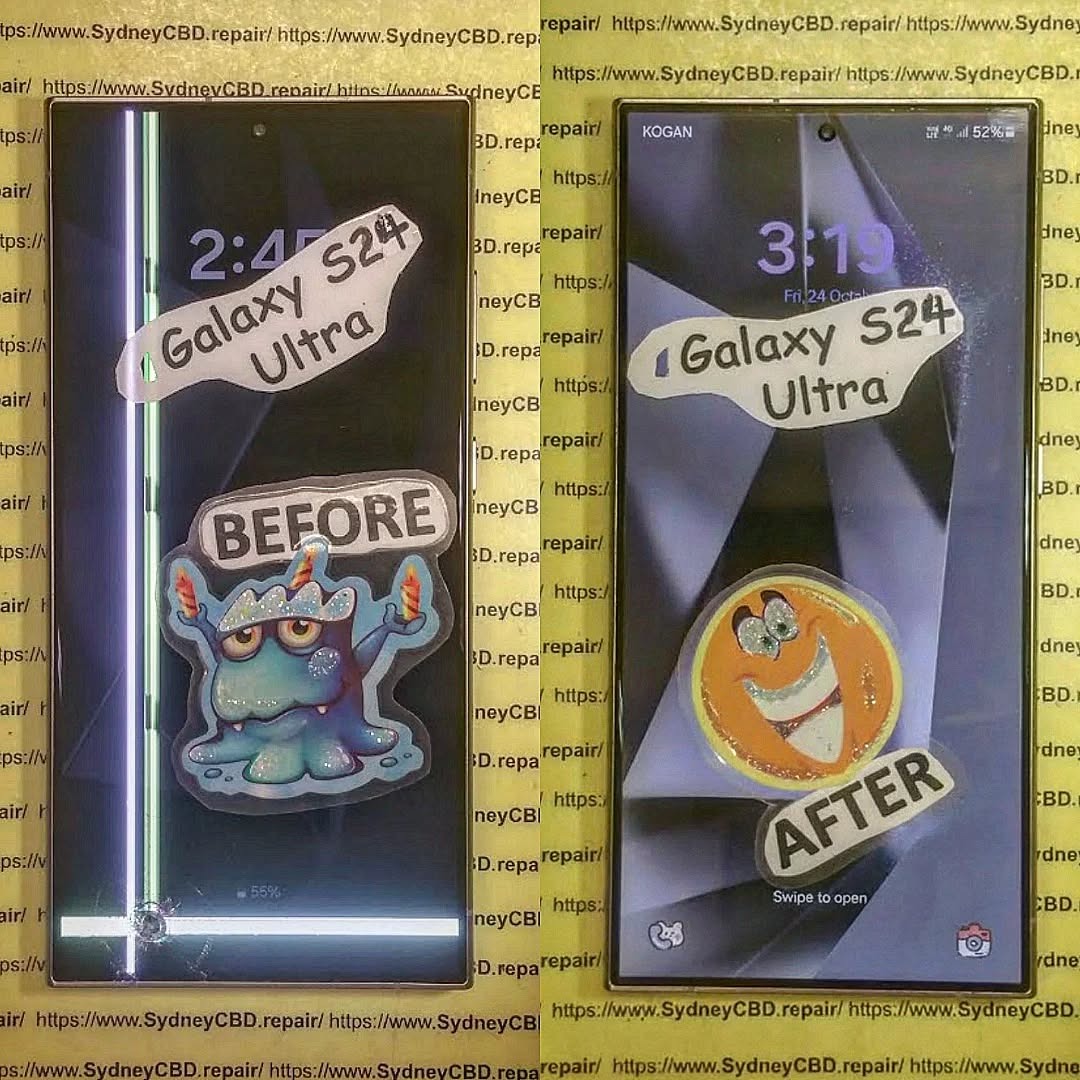
The Samsung S24 Ultra has taken the smartphone world by storm with its stunning display, cutting-edge features, and high-performance capabilities. Yet, even the most premium devices can encounter unexpected issues, and one of the most concerning for S24 Ultra users is the appearance of a persistent green line across the screen. This seemingly small defect can interfere with everyday usage, impact visual experience, and leave users wondering if their device is “unfixable.”
In this comprehensive guide, we will dive into the mystery of the Samsung S24 Ultra green line, exploring its possible causes—from software glitches to hardware defects—and providing practical solutions for both DIY troubleshooting and professional repairs. Whether you’re facing this issue for the first time or want to prevent it from occurring, this article will equip you with the knowledge to understand, diagnose, and address the green line effectively. By the end, you’ll know whether the problem can be permanently fixed and how to maintain your device to avoid future display anomalies.
Understanding the Samsung S24 Ultra Display
The Samsung S24 Ultra is celebrated for its stunning AMOLED display, delivering vibrant colors, deep blacks, and ultra-smooth scrolling. AMOLED technology, especially the dynamic Super AMOLED panels used in the S24 Ultra, provides unmatched visual quality but also introduces unique vulnerabilities. One of the most reported issues among users is the appearance of a green line across the display. While initially subtle, this line can grow over time, affecting both usability and aesthetics.
The green line phenomenon is often associated with screen defects, whether from manufacturing or physical damage. Understanding your device’s display is crucial before attempting any fix.
AMOLED vs Super AMOLED Displays
Samsung’s AMOLED displays rely on individually lit pixels, which contribute to their high contrast ratio and energy efficiency. Super AMOLED, an advanced version, integrates touch sensors into the display layer, making the screen thinner and more responsive. However, these layers make the screen more susceptible to pixel-level defects, like the infamous green line.
| Feature | AMOLED | Super AMOLED |
|---|---|---|
| Touch Integration | Separate layer | Integrated layer |
| Thickness | Slightly thicker | Thinner design |
| Brightness | High | Higher with better sunlight visibility |
| Vulnerability | Moderate | Higher for pixel-level defects |
What Causes the Green Line on Samsung S24 Ultra?
Several factors contribute to the green line issue. Identifying the root cause can save time and money.
Hardware Defects
Factory defects remain one of the primary reasons. Even premium models like the S24 Ultra can occasionally have faulty display connectors, uneven pixel arrays, or internal layer misalignments. These issues typically manifest shortly after purchase and are usually covered under warranty.
Software Glitches
Sometimes, the green line is not physical but software-related. Firmware bugs, incompatible updates, or app conflicts can create display anomalies. A soft reset or firmware reinstallation often resolves these temporary issues.
Physical Damage
Dropping your device or applying pressure to specific areas can damage the display internally. Even if the glass appears intact, pressure can create permanent pixel damage, manifesting as lines on the screen.
Pixel Burn-in and Aging
Long-term usage can lead to pixel burn-in, especially with static images. Over time, certain areas of the screen may degrade faster than others, forming colored lines. While less common in new devices, it’s still a risk for heavy users.
Identifying if Your Device Is Affected
Knowing the signs of a green line early can prevent worsening damage.
Visual Inspection Techniques
Check the screen under different lighting conditions and angles. Green lines often appear brighter or more noticeable at higher brightness settings. Inspect for any physical distortions or pressure marks.
Using Samsung Diagnostic Tools
Samsung devices include a diagnostic mode accessible via the phone dialer or Settings. Navigate to Settings > About Phone > Diagnostics to test screen uniformity, touch sensitivity, and pixel performance. A green line in diagnostics indicates a physical screen issue.
DIY Troubleshooting Steps

Before rushing to a repair center, try these safe troubleshooting steps.
Soft Reset and Cache Clearing
Restarting the device can eliminate minor software glitches. Clearing cache through Settings > Storage > Cached Data can also help.
Safe Mode and App Conflict Resolution
Boot your S24 Ultra in Safe Mode to disable third-party apps temporarily. If the green line disappears, the issue may be caused by a recently installed app.
Professional Repair Options
If DIY attempts fail, professional repair is often the most reliable solution.
Screen Replacement Solutions
A defective display often requires a full screen replacement. Ensure that replacement parts are OEM-certified, as third-party panels may not offer the same color accuracy or touch sensitivity.
Repair Costs and Warranty Coverage
Repair costs for the Samsung S24 Ultra can vary. If your device is under warranty, check for coverage. Out-of-warranty repairs typically range from AUD $400–$650, depending on the service provider. Sydney CBD Repair Centre is an example of a trusted service provider offering genuine parts and same-day repairs.
Can a Green Line Be Permanently Fixed?
Understanding the realistic expectations of repair is key.
Cases of Permanent Fix
Some green lines are caused by software or minor connector issues. In these cases, updates or professional repair can permanently resolve the problem.
Situations Where It’s Truly Unfixable
Hardware failures such as damaged AMOLED layers are irreversible. In these instances, replacement is the only solution.
Preventing Display Issues in the Future
Protecting your device can prevent recurrence.
Proper Device Handling
Avoid dropping your phone, over-tightening cases, and exposing it to extreme temperatures.
Software Maintenance
Regularly update your device, reset software if necessary, and avoid prolonged static images on the display to minimize burn-in.
FAQs About Samsung S24 Ultra Green Line
1. Why did a green line appear on my Samsung S24 Ultra overnight?
Sudden green lines are usually caused by hardware defects, but software glitches or recent updates could also trigger this anomaly.
2. Is a green line covered under Samsung warranty?
Yes, if it is due to a manufacturing defect or hardware failure, most warranties will cover repair or replacement.
3. Can I fix the green line without professional help?
Minor software-related lines can sometimes be fixed via reset or firmware updates. Hardware-related issues require professional repair.
4. How much does a Samsung S24 Ultra screen replacement cost?
Out-of-warranty replacements typically cost AUD $400–$650. Prices vary based on location and service provider.
5. Will using a third-party screen affect my phone?
Yes, third-party screens may not match the original in color, touch sensitivity, or durability. OEM parts are recommended.
6. How can I prevent green lines in the future?
Avoid drops, limit static images, keep software updated, and handle your device with care to prolong screen lifespan.
Conclusion

The Samsung S24 Ultra green line mystery can be unnerving, but understanding its causes and available solutions can alleviate frustration. While some cases are permanently unfixable without screen replacement, many lines result from software or minor hardware issues that can be addressed effectively. Always rely on professional services like Sydney CBD Repair Centre for guaranteed quality and genuine parts. Maintaining your device with careful usage and regular software updates helps prevent future display anomalies.
Sydney CBD Repair Centre – Where Quality Meets Reliability. Call : +61280114119 | Website

