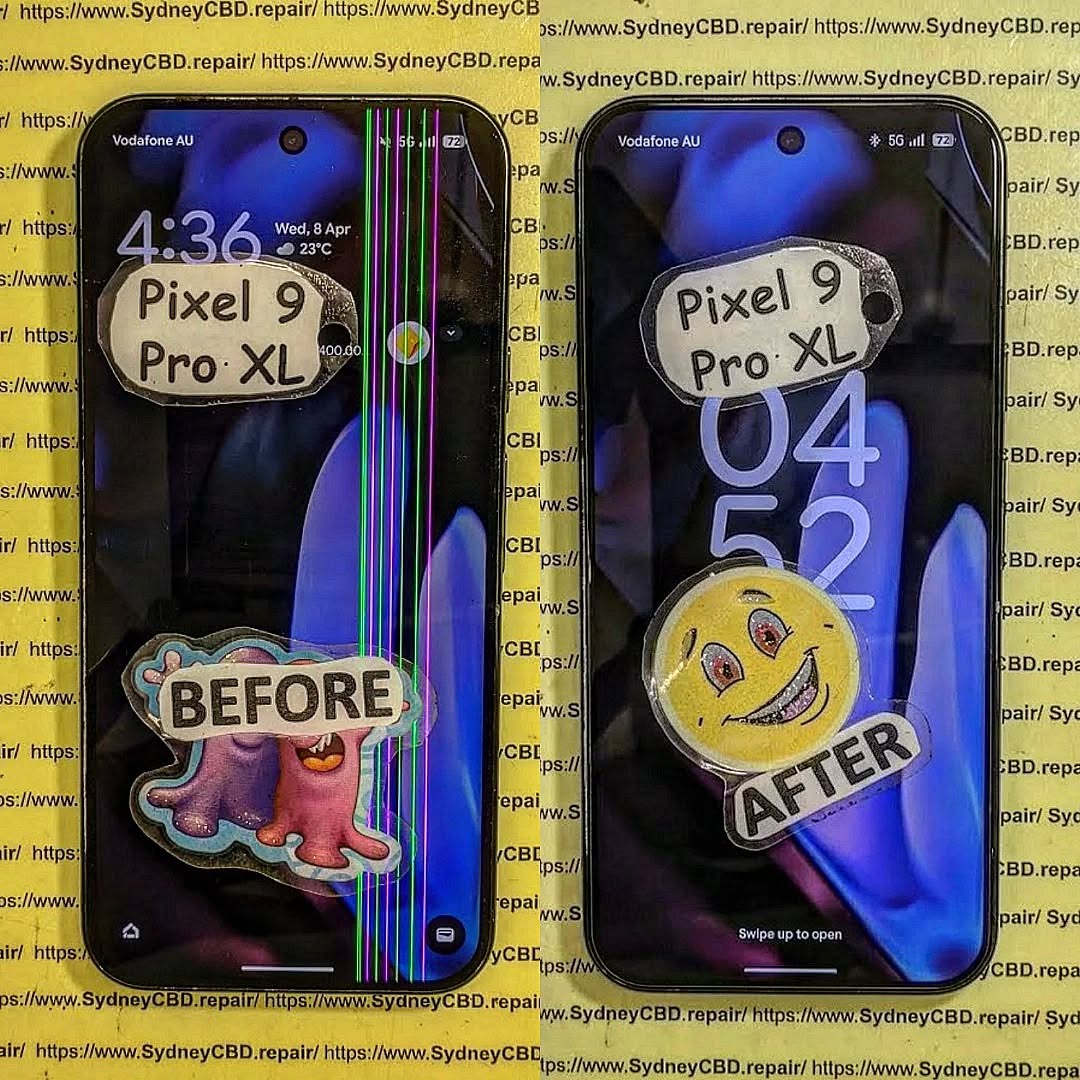
WHAT HAPPENS NEXT? Unseen Damage From Phone Screen Repair + 7 Critical Mistakes You Must Avoid
Introduction: The Hidden Side of Screen Repairs
Screen damage can happen to anyone. A sudden drop, an accidental bump, or even sitting on your phone can lead to a cracked screen that demands immediate attention. But what most users don’t realize is that screen repair is more than just replacing the glass—it involves delicate electronic systems that require precision and expertise.
At first glance, your phone might look and function perfectly after a repair. However, beneath the surface, unseen damage can develop over time—affecting your phone’s responsiveness, display brightness, and even battery life.
When done incorrectly, even minor missteps during a screen replacement can cause long-term harm. Let’s explore the unseen damage that can happen during or after screen repairs and how to avoid it.
Replacing a screen isn’t just a matter of swapping out parts. Modern smartphones are built with integrated circuits, touch sensors, proximity detectors, and other intricate components that work in harmony.
The Role of Micro-Connections and Internal Components
Every tap, swipe, and gesture depends on micro-connections between the digitizer (the touch layer) and your phone’s logic board. When a repair technician mishandles these components, even slightly, it can lead to problems like:
Ghost touches or unresponsive screens
Dimming or color inconsistency
Delayed touch feedback
This is why proper disassembly tools and expertise are crucial during screen repair.
Common Issues After Screen Replacement
Unseen damage often manifests gradually. Users may experience:
Battery draining faster than usual
Front camera malfunction or misalignment
Face ID or fingerprint sensor issues
Display flickering under sunlight
These problems often stem from cheap replacement parts or improper installation, both of which can compromise your device’s performance.
After a repair, your phone must undergo a full diagnostic check. Skipping this step is one of the most common yet dangerous mistakes.
How Skipping Testing Can Cause Long-Term Issues
Without diagnostics, small problems like sensor misalignment, loose connectors, or temperature irregularities go unnoticed. Over time, these can lead to:
Display freezing or lag
Accelerated battery wear
Internal corrosion from unnoticed microdamage
Professional repair centers like Sydney CBD Repair Centre perform a 20-point diagnostic test after every repair to ensure every component functions perfectly before handing the device back.
Mistake #2: Using Non-Genuine Parts
Many repair shops cut corners by using aftermarket or counterfeit screens that mimic OEM quality. While they may look the same initially, the differences become obvious after a few days of use.
The Difference Between OEM and Aftermarket Screens
Feature
OEM Screen
Aftermarket Screen
Brightness
True-to-original
Dull or tinted
Touch Sensitivity
Perfectly responsive
Laggy or inconsistent
Durability
Tempered and tested
Prone to cracks
Compatibility
100% match
May cause software conflicts
At Sydney CBD Repair Centre, only genuine parts are used—backed by a 90-day warranty for complete peace of mind.
Mistake #3: DIY Screen Repairs Without Expertise
You might think you’re saving money by fixing your phone yourself, but DIY repairs often lead to hidden internal damage that costs more to fix later.
The Hidden Costs of Attempting It Yourself
Cable tears during disassembly
Overheating due to improper adhesive removal
Waterproofing seals broken permanently
Battery punctures, which can cause dangerous short circuits
Without proper training and tools, even a small mistake can destroy a device worth hundreds of dollars.
Mistake #4: Overlooking Battery and Sensor Calibration
When your screen is replaced, battery and sensor calibration must be redone to ensure optimal performance.
How Improper Calibration Impacts Device Performance
Without proper calibration, your device might:
Show incorrect battery percentages
Have auto-brightness issues
Experience inaccurate proximity detection (like the screen staying on during calls)
Professional repair centers use specialized diagnostic software to recalibrate these systems—something DIY kits or unqualified shops can’t do.
Mistake #5: Failing to Address Water and Dust Resistance
Most modern smartphones come with IP67 or IP68 water resistance ratings, which can be compromised after screen replacement.
How Repairs Affect Your Device’s IP Rating
Improper resealing after repair allows microscopic water or dust particles to enter the device, causing corrosion, speaker damage, and short circuits over time.
Expert technicians reapply factory-grade waterproof seals, ensuring your device maintains its protection standards.
Mistake #6: Not Choosing a Certified Repair Centre
Your choice of repair shop determines whether your phone lasts or fails prematurely.
Why Expertise and Experience Matter
Certified technicians understand manufacturer repair guidelines, use anti-static environments, and follow strict part-handling protocols.
At Sydney CBD Repair Centre, over 2000 customers have rated their experience 5-stars for quality, speed, and reliability.
Mistake #7: Ignoring Early Warning Signs Post-Repair
Even after a seemingly successful repair, subtle issues can indicate hidden damage.
Common Symptoms That Indicate Deeper Damage
Screen flickers under dim light
Face ID or fingerprint not registering
Battery drains unusually fast
Phone heats up during idle
If you notice any of these, return to your repair centre immediately for inspection.
FAQs: Everything You Need to Know About Screen Repairs
1. How long does a professional screen repair take?
Most high-quality screen repairs take 30–60 minutes at trusted centres like Sydney CBD Repair Centre.
2. Does screen repair affect water resistance?
Yes, if not done properly. Always ensure resealing is done with factory-grade adhesives.
3. Are aftermarket screens really that bad?
They often compromise brightness, responsiveness, and longevity. OEM parts ensure the best results.
4. Can a bad screen repair affect my battery life?
Yes, poor installation or calibration can cause increased battery drain.
5. Will my warranty be voided after third-party repair?
Only if the repairer is unlicensed or uses non-genuine parts.
6. How do I know if my phone has unseen damage?
Look for performance changes—like slow touch response, camera blur, or sudden restarts.
Conclusion: Protect Your Investment with Expert Repairs
Your smartphone is more than a device—it’s your connection to work, family, and daily life. Don’t risk it with unqualified repairs. Unseen damage from screen repair can cost more in the long run than the repair itself. Always choose certified professionals who use genuine parts, perform full diagnostics, and provide post-repair support.
Why Sydney CBD Repair Centre Is the Trusted Name in Screen Repairs
🏆 6 Years in a Row – Sydney’s Best Phone Repair Service
📍 Located in the heart of Sydney CBD
📱 Genuine parts, expert technicians, and same-day service
⭐ 2000+ Google 5-Star Reviews
🛠️ 90-Day Warranty on All Repairs
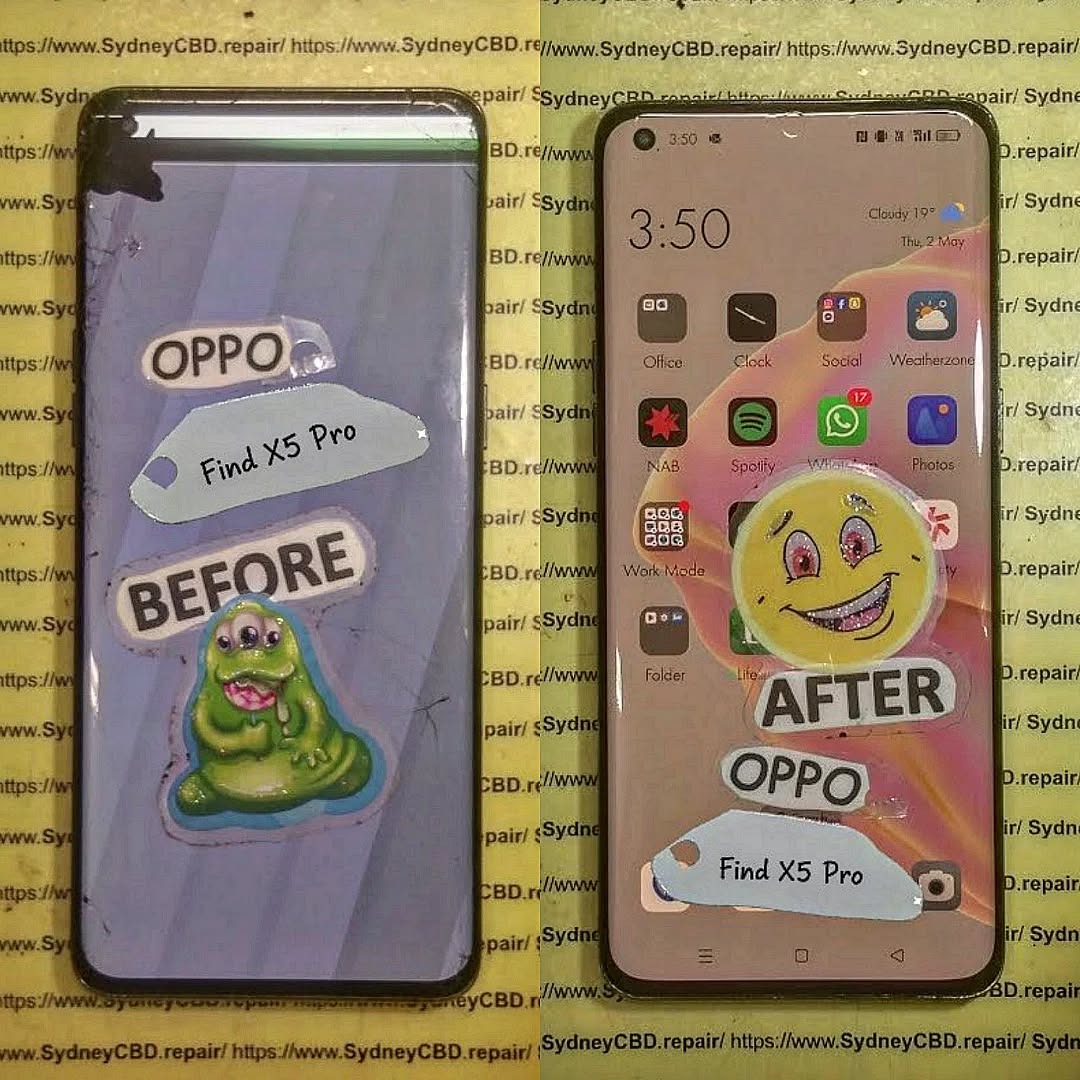
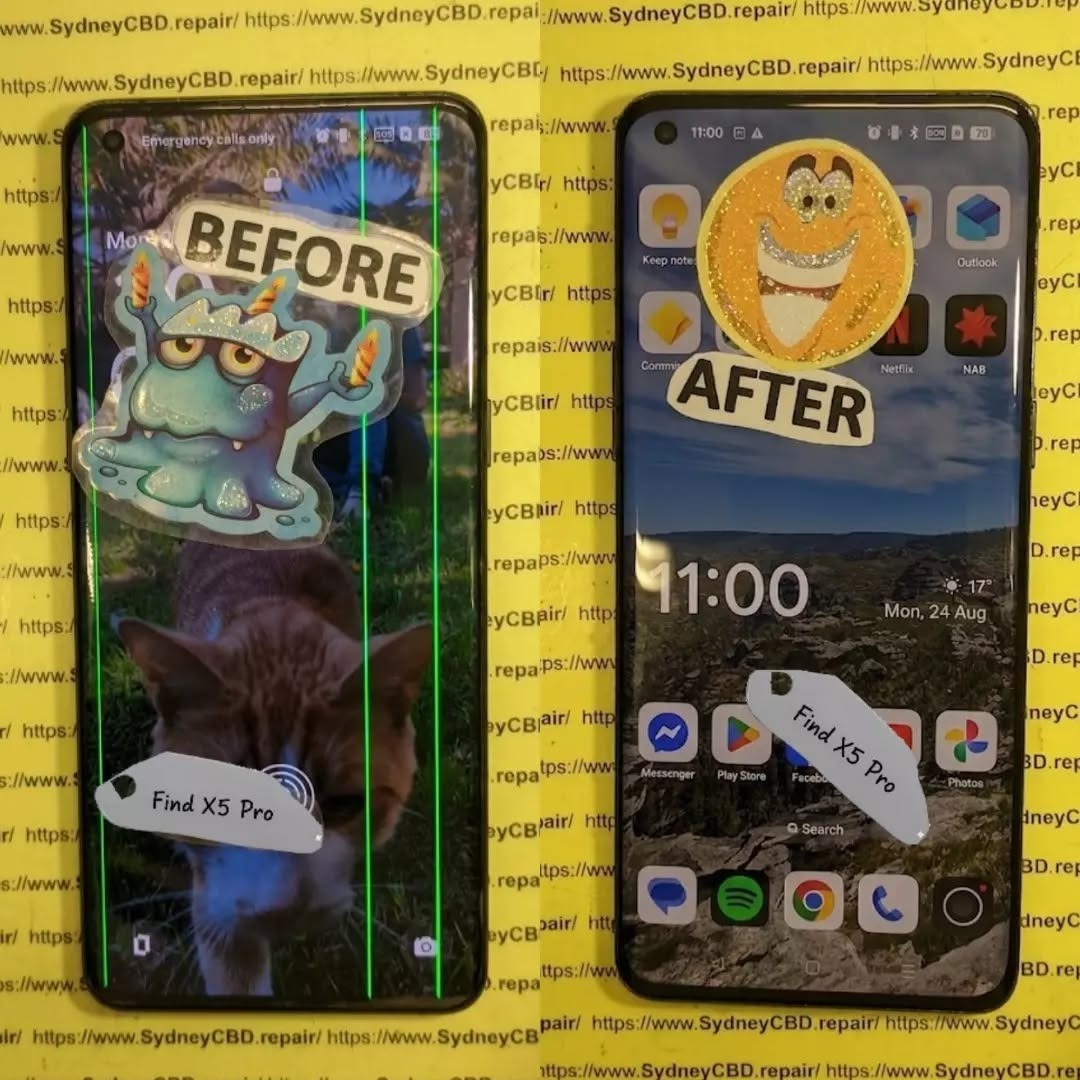
Diagnosing Black Screen And Green Line Glitches On Damaged OPPO Find X5 Pro Displays: 11 Powerful Fixes
Introduction
The OPPO Find X5 Pro is equipped with a high-end 6.7-inch curved AMOLED display designed for detailed images, smooth motion, and rich colour reproduction. OPPO’s specifications describe the panel as a 1 Billion Colour Bionic Display with a 120Hz dynamic refresh rate, while the company also lists Gorilla Glass Victus protection and WQHD+ resolution. (OPPO)
However, even a premium display can develop problems after a drop, impact, pressure, liquid exposure, overheating, or internal component failure. Two symptoms that deserve particular attention are a completely black screen and a persistent green line running vertically or horizontally across the display.
If your phone still vibrates, rings, receives notifications, or connects to a computer while the screen remains black, the problem may be concentrated in the display assembly rather than the entire phone. Likewise, a green line that remains visible after restarting the device can indicate a hardware-related OLED panel problem.
This guide explains how to diagnose these symptoms safely, distinguish software glitches from physical display damage, and determine when professional repair is the sensible next step.
The first step in diagnosing a display problem is understanding what you’re dealing with.
The OPPO Find X5 Pro uses a curved AMOLED display. Its official specifications list a 6.7-inch panel, 3216 × 1440 resolution, 10-bit colour depth, and an adaptive refresh rate that can operate up to 120Hz. OPPO also highlights its 1 Billion Colour Bionic Display technology and 8192-level brightness control. (OPPO)
That technology produces an excellent viewing experience, but an AMOLED panel isn’t indestructible.
A modern smartphone display consists of several layers and components working together. Depending on the exact fault, damage can affect:
The outer protective glass
Touch-sensitive layers
The AMOLED/OLED panel
Display driver circuitry
Flexible display cables
Connectors
Power circuitry
Mainboard display components
Software responsible for rendering images
A phone can therefore have a display that looks physically acceptable but has internal damage.
For example, a small impact near the edge of a curved screen may damage the panel underneath the glass. You might initially notice only a tiny line or flicker. Over time, however, additional pixels may stop working.
On the other hand, a phone that suddenly goes black after a fall may have suffered connector damage, panel damage, or a failure in the display power circuit.
That’s why simply looking at the glass isn’t always enough.
Why AMOLED Damage Can Look Different
AMOLED technology produces light at the individual pixel level. This means panel damage can create distinctive symptoms.
A damaged OLED panel might show:
Green or pink lines
Black spots
Flickering
Partial screen failure
Brightness abnormalities
Unusual colour patches
Ghost-like images
A completely black display
The symptom can also change depending on how much pressure the phone has experienced.
For example, if the display briefly works when the phone is flexed or squeezed, that’s not a sign that pressing the device is a good repair method. Instead, it may indicate an unstable internal connection or damaged panel.
In short, don’t press, bend, twist, or heat the phone to make the display work again.
That can turn a repairable fault into a more serious one.
1. Common Causes of Black Screen And Green Line Glitches
When diagnosing black screen and green line glitches on damaged OPPO Find X5 Pro displays, technicians generally begin by establishing what happened immediately before the problem appeared.
Accidental Drops and Impacts
Drops are among the most obvious causes.
The Find X5 Pro has a premium curved screen, and an impact can transfer force through the glass into the display assembly. Even when there isn’t a dramatic crack, the AMOLED panel underneath can be affected.
A drop onto:
A corner
A hard floor
The screen surface
The frame
A raised object
can produce different forms of damage.
A phone may continue operating normally while the display develops a green line or black section.
Pressure Damage
Pressure can be just as troublesome as an obvious drop.
Sitting on the phone, carrying it tightly in a pocket, or placing heavy objects on it can put stress on the curved panel.
This type of damage may initially appear as a thin line or flickering area.
Liquid Exposure
The OPPO Find X5 Pro has an IP68 rating under specified laboratory conditions, but water resistance isn’t the same as permanent waterproofing. OPPO itself describes the device as water and dust resistant. (OPPO)
Seals can deteriorate with age, previous repairs, impacts, or physical wear.
If the display problem appeared after liquid exposure, avoid repeatedly charging or powering the phone until it has been assessed.
Heat and Component Failure
Heat doesn’t automatically mean a screen is damaged, but excessive heat can contribute to electronic instability.
If a green line appears alongside:
Severe overheating
Random restarts
Charging problems
Display flickering
Battery swelling
the device should be inspected rather than repeatedly used.
Previous Screen Repair
A previous repair can also be relevant.
If the phone has already had a display replaced, possible causes include:
Damaged flex cable
Poor connector seating
Incompatible replacement part
Installation damage
Contamination around the connector
Defective replacement panel
This doesn’t mean every replacement screen is problematic. It simply means repair history should form part of the diagnosis.
A black screen doesn’t necessarily mean the entire phone has failed.
Before assuming the display needs replacement, determine whether the device itself is still operating.
Step 1: Check for Signs of Life
Try calling the phone from another device.
Listen for:
Ringing
Vibration
Notification sounds
Charging sounds
Haptic feedback
If the phone responds but the screen stays black, that’s useful diagnostic information.
It suggests that the motherboard and operating system may still be functioning.
Step 2: Perform a Forced Restart
A temporary system crash can make a perfectly functional display appear dead.
Use the manufacturer’s recommended restart procedure for your particular software version and device configuration.
If the phone restarts and the screen returns to normal, the original problem may have been software-related.
If the display remains completely black, continue with hardware-focused checks.
Step 3: Connect a Charger
Connect the phone to a known-good charger and cable.
Allow some time for charging.
However, don’t assume that a black screen automatically means the battery is empty. If the phone produces other signs of operation, the display itself may be the problem.
Step 4: Look for Faint Images
In a darker environment, inspect the screen carefully.
Don’t use excessive pressure.
If you can barely see an image under certain lighting conditions, the display may have a brightness or panel problem rather than a total software failure.
Step 5: Check for Recent Physical Damage
Think about what happened immediately before the failure.
Did the phone:
Fall?
Get squeezed?
Get wet?
Become unusually hot?
Receive a previous repair?
Develop a line before going black?
The timeline can provide valuable diagnostic evidence.
3. Diagnosing Green Line Glitches on the Display
A green line can be alarming because it often appears suddenly.
The most important question is whether the line is present across different screens and after restarting the phone.
A Persistent Green Line
If a green line appears:
On the lock screen
In apps
During startup
After restarting
At different brightness levels
there’s a stronger reason to suspect a display hardware issue.
A line that remains in exactly the same location is particularly important to document.
A Temporary Green Line
If the line appears briefly and disappears, possible causes can include:
Temporary software rendering issues
Display-driver instability
A loose or compromised connection
An emerging panel fault
Further testing is needed before deciding on a repair.
Take a Screenshot
A useful diagnostic trick is taking a screenshot while the green line is visible.
Then view that screenshot on another device.
If the line appears in the screenshot, the issue may involve software or the rendered image.
If the screenshot looks normal elsewhere while the physical phone still shows the green line, that points more strongly toward the physical display path.
This test isn’t perfect, but it’s useful evidence.
4. Software Problems Versus Hardware Display Damage
Not every display problem requires a screen replacement.
That’s why diagnosis matters.
Symptom
Possible Software Cause
Possible Hardware Cause
Temporary flicker
Yes
Yes
Persistent green line
Less likely
More likely
Completely black screen
Yes
Yes
Screen works after restart
Possible
Possible
Cracked glass with no image
Unlikely
Very likely
Touch works but image doesn’t
Unlikely
Likely
Green line after impact
Unlikely
Strong possibility
Problem only in one app
Possible
Less likely
Display changes when physically moved
Unlikely
Possible
This table isn’t a substitute for professional testing. It simply helps narrow down the possibilities.
Software Troubleshooting Worth Trying
Before paying for a repair, reasonable software checks can include:
Restarting the phone.
Installing available system updates when the display remains usable.
Checking whether the issue occurs in different applications.
Testing display behaviour at different brightness levels.
Taking screenshots.
Removing recently installed software if the problem began after an app installation.
Backing up important data.
If the phone has obvious physical damage and the display remains faulty across the operating system, don’t waste hours repeatedly resetting it.
A factory reset won’t repair a physically damaged OLED panel.
5. Safe Troubleshooting for Black Screen Problems
When a display is damaged, the goal is to gather information without making the problem worse.
Avoid Pressing the Screen
It can be tempting to press around a green line or black area to see whether it disappears.
Don’t.
Pressure can damage the OLED layers or cause cracks to spread.
Avoid DIY Heating Methods
Online repair videos sometimes suggest heating a phone to manipulate adhesives or connections.
That’s a job for trained technicians using controlled equipment.
A household hair dryer doesn’t provide the precision needed for professional display work.
Avoid Opening the Phone Without Experience
The Find X5 Pro has a carefully assembled internal structure.
Opening the device incorrectly can damage:
Back-cover materials
Flex cables
Wireless charging components
Battery
Display connectors
Water-resistant seals
If you’re not experienced with smartphone repair, professional diagnosis is safer.
Back Up Your Data
If the display still works intermittently, back up your important information immediately.
Prioritize:
Photos
Contacts
Messages
Documents
Authentication information
Important application data
A display that works today may stop working completely tomorrow.
6. When Does the OPPO Find X5 Pro Need a Screen Replacement?
A screen replacement may be appropriate when the AMOLED panel itself has suffered physical damage.
Common signs include:
Persistent green lines
Large black areas
No image despite phone activity
Severe flickering
Display bleeding
Dead sections of the panel
Touch and image failure after impact
Cracked display combined with visual problems
The key point is that the entire display assembly may need replacement even when the outer glass isn’t badly cracked.
Glass Damage Versus Display Damage
These are not always the same thing.
Glass-only damage may leave:
Image quality normal
Touch function normal
No lines
No black areas
Panel damage may cause:
Lines
Flickering
Black patches
Missing image
Touch problems
Colour distortion
If you have both cracked glass and display symptoms, replacing only the outer glass generally isn’t enough.
7. What Happens During a Professional Display Diagnosis?
A professional repair technician should diagnose the device before replacing expensive components.
A typical assessment may include:
Visual Inspection
The technician checks the:
Frame
Display
Back cover
Camera area
Charging port
Signs of liquid exposure
Functional Testing
The phone can be checked for:
Power
Charging
Touch
Display brightness
Colours
Cameras
Speakers
Microphones
Buttons
Connectivity
Connector Inspection
The display connection may be inspected for visible damage or contamination.
Test Display
Where appropriate, a known-good test display can help determine whether the original panel is responsible for the problem.
This is one of the most useful diagnostic methods because it separates display faults from motherboard-related faults.
Mainboard Assessment
If a test display doesn’t solve the issue, technicians may investigate display power and board-level circuitry.
That’s where professional tools and experience become especially valuable.
8. Choosing a Quality Replacement Display
If the diagnosis confirms panel failure, the replacement component matters.
A poor-quality screen can create new problems, including:
Inaccurate colours
Lower brightness
Poor touch response
Uneven illumination
Reduced refresh performance
Compatibility problems
Premature failure
For a premium device such as the Find X5 Pro, the display isn’t just a basic glass panel. OPPO’s official specifications emphasize its high-resolution AMOLED technology, 10-bit colour capability and adaptive refresh rate. (OPPO)
Ask the repair provider what type of replacement component will be installed and what warranty applies.
A reputable repair service should also explain whether the repair affects any water-resistance characteristics.
Warranty Matters
A written repair warranty provides useful protection if the replacement component develops a fault.
Before approving a repair, ask:
How long is the repair warranty?
Does it cover the display?
Are labour charges covered?
What happens if the replacement screen develops a line?
Is accidental damage excluded?
Will the device be tested before collection?
Clear answers are a good sign of professional repair practices.
9. Protecting Your Data Before a Screen Repair
Data protection is often overlooked when people focus on the broken display.
If the phone is still usable, back it up before handing it over.
If the display is only partially functional, you may still be able to transfer important files.
If the display is completely black, recovery options depend on whether the phone remains operational and what security features are enabled.
Don’t Automatically Factory Reset
A factory reset erases user data.
It doesn’t fix a physically damaged display.
Therefore, don’t reset the phone simply because the screen is black unless there is a specific reason to do so and your important information has already been backed up.
Use Official Support Where Appropriate
OPPO provides regional support and service-centre information. Its Philippines support site includes service-centre and warranty resources, while OPPO’s International Warranty Service information specifically lists the Find X5 series among supported products in applicable markets. (OPPO Support)
10. Preventing Future Green Lines and Black Screens
You can’t eliminate every possible display failure, but you can reduce avoidable damage.
Use a Protective Case
A good case should provide protection around the phone’s corners and edges.
This is especially important for a curved display.
Add Screen Protection
A suitable screen protector can help reduce scratches and minor surface damage.
However, no protector guarantees protection against a major impact.
Avoid Extreme Pressure
Don’t keep your phone underneath heavy objects.
Also avoid placing it in a pocket where it can be heavily compressed.
Keep the Phone Away From Unnecessary Heat
Don’t leave the phone in direct sunlight for long periods or expose it to avoidable high temperatures.
Deal With Damage Early
If a green line appears after an impact, don’t wait for the screen to become completely black.
Early diagnosis can help determine whether the issue is limited to the display or accompanied by other damage.
11. When Should You Stop Troubleshooting?
There’s a point where continued troubleshooting isn’t productive.
Consider professional assessment if:
The screen remains black after restarting.
The phone responds to calls but shows no image.
A green line remains after rebooting.
The problem began immediately after a drop.
The screen flickers continuously.
Touch works inconsistently.
The display has black patches.
The phone has been exposed to liquid.
A previous repair was performed.
The device becomes unusually hot.
In particular, a black screen combined with physical impact should be treated as a hardware problem until testing proves otherwise.
Trying random internet fixes can sometimes make things worse.
12. Black Screen And Green Line Repair: A Practical Decision Guide
Here’s a simple way to approach the problem.
Situation
Recommended Next Step
Phone works normally after restart
Monitor and check software
Green line disappears after restart
Investigate software first
Green line remains everywhere
Professional display diagnosis
Phone rings but screen stays black
Display and connector diagnosis
Screen broke after a drop
Hardware inspection
Display is black after liquid exposure
Stop unnecessary use and seek inspection
Touch works but image doesn’t
Display diagnosis
Previous screen repair was performed
Check replacement and connections
Phone is hot and display is failing
Stop use and seek professional assessment
This approach saves time because it starts with the simplest explanations before moving toward component-level diagnosis.
Frequently Asked Questions
1. Why does my OPPO Find X5 Pro have a green line?
A persistent green line can be associated with an OLED display fault, particularly when it remains after restarting and appears across multiple screens. Physical impact, pressure, panel failure, or internal display-related damage can be possible causes.
2. Can a software update remove a green line?
It depends on the cause. If the line is produced by a software rendering problem, an update may help. However, a physical OLED panel fault won’t normally be repaired by a software update.
3. My OPPO Find X5 Pro screen is black but the phone still rings. What does that mean?
If the phone rings or vibrates but doesn’t display an image, the operating system may still be functioning. The display assembly, connection, display power circuit, or another hardware component may need to be tested.
4. Can a black screen be fixed without replacing the display?
Sometimes. If the problem is caused by a temporary software crash or a connection issue, a display replacement may not be necessary. If the AMOLED panel itself is physically damaged, however, replacement is commonly required.
5. Should I press the screen when the green line appears?
No. Pressing or bending the display can worsen internal damage. It is better to document the symptom and have the device professionally assessed.
6. Does a cracked screen always need replacement?
Not necessarily. A cracked outer glass surface can sometimes leave the display and touch functions working. However, if the OLED panel has lines, black areas, flickering, or image failure, a more comprehensive display repair may be required.
7. Is the OPPO Find X5 Pro display repairable after a drop?
It can often be repaired, but the exact solution depends on the damage. A technician should determine whether the issue involves the screen assembly, connector, frame, or motherboard before recommending a replacement.
8. Will a factory reset fix a black screen?
A factory reset is not a reliable solution for physical display damage. If the screen became black after a drop or shows other hardware symptoms, professional diagnosis is more appropriate.
9. Can water damage cause display problems?
Yes. Liquid exposure can affect electronic components and connections. Although the Find X5 Pro has an IP68 rating under specified conditions, water resistance can be affected by physical damage, wear, age, or previous repairs. (OPPO)
10. Should I repair the phone immediately after a green line appears?
Prompt diagnosis is sensible, particularly if the line appeared after an impact or is accompanied by flickering, black areas, touch problems, or overheating. Getting the issue assessed early can help identify the actual cause before additional symptoms develop.
Conclusion
Diagnosing black screen and green line glitches on damaged OPPO Find X5 Pro displays requires more than simply looking at the glass.
The phone’s premium AMOLED panel contains multiple components that can fail independently. A green line may indicate a display-panel problem, while a completely black screen can result from software instability, display failure, connector damage, or another hardware issue.
Start with safe checks such as restarting the device, checking whether it responds to calls, testing the charger, and documenting when the problem occurs. If the issue began after a drop, pressure, liquid exposure, or previous repair, hardware damage should receive particular attention.
Most importantly, avoid pressing, bending, heating, or opening the phone without appropriate tools and experience.
If the display remains black or the green line persists, professional diagnosis can establish whether the problem requires a screen replacement or whether another component is responsible. Choosing a repair provider that explains the diagnosis, uses an appropriate replacement component, and offers a clear repair warranty can also help protect your investment.
The OPPO Find X5 Pro was designed around a high-resolution 120Hz AMOLED display, so restoring the correct display performance requires attention to both the replacement component and the repair process. (OPPO)
A damaged screen doesn’t necessarily mean your phone is beyond repair. With the right diagnosis and careful repair, many display problems can be resolved while preserving the rest of the device.
Final Repair Checklist
Before approving an OPPO Find X5 Pro display repair, ask:
Has the phone been fully diagnosed?
Is the problem definitely the display?
Has the connector been inspected?
Will the replacement panel be tested?
What warranty is included?
Will touch and display functions be tested after repair?
Will cameras, speakers, charging, and buttons be checked?
Has the condition of the frame been assessed?
Will the technician explain any limitations regarding water resistance after repair?
Taking a few minutes to ask these questions can save you from unnecessary expense and help ensure that the underlying problem—not just the visible symptom—is properly addressed.
David from Sydney CBD Repair Centre – The Best place to fix mobile phones as 7 Years In A Row! Top Mobile Phone Repair In Sydney. More than 2000 Positive Reviews on Google and Same Day Repairs.
We take pride in delivering exceptional repair services for all major phone brands including Apple, Samsung, Google, and more. Our expert technicians use only genuine parts and offer 90days warranty on repairs. Located in the heart of Sydney CBD, we’re your one-stop solution for all mobile device repairs.
Our commitment to excellence has earned us the trust of thousands of satisfied customers. Whether it’s a cracked screen, battery replacement, or water damage repair, we handle it all with professional care and expertise. Walk in today and experience why we’re Sydney’s #1 choice for mobile phone repairs.
Visit us for:
✓ Same Day Express Repairs
✓ Genuine Parts Guarantee
✓ Professional Technicians
✓ Competitive Pricing
✓ 2000+ 5-Star Google Reviews
✓ 7-Time Award Winner for Best Phone Repairs
Sydney CBD Repair Centre – Where Quality Meets Reliability.
Call : +61280114119
Website: Sydney CBD Repair Centre
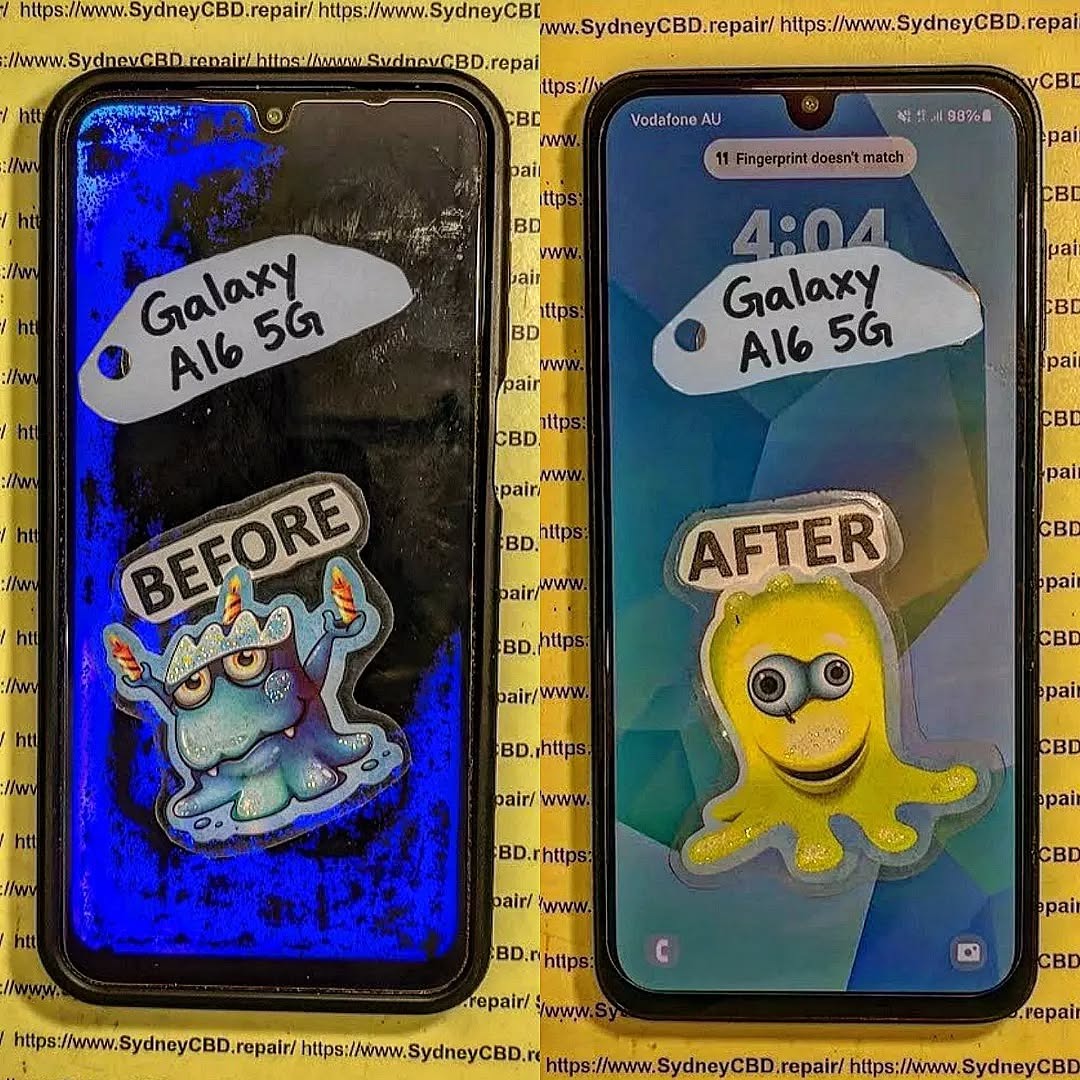
Five Critical Mistakes That Can Ruin Your Samsung Galaxy A16 5G Screen Replacement + 5 Expert Fixes
Introduction
A cracked phone screen is more than an annoying cosmetic problem. It can make everyday tasks difficult, expose the display to additional damage, and eventually affect the way the device responds to touch. When it comes to a Samsung Galaxy A16 5G screen replacement, the quality of the part and the repair process both matter.
The Galaxy A16 5G uses a 6.7-inch FHD+ Super AMOLED display with a resolution of 1080 × 2340 and a refresh rate of up to 90Hz. Samsung also lists the device as IP54-rated for dust and water resistance.
That means replacing its screen isn’t simply a matter of removing broken glass and sticking another panel into place. The technician needs to select a compatible display, handle internal components carefully, align the new assembly correctly, and thoroughly test the phone before handing it back.
Unfortunately, several common mistakes can turn a straightforward repair into a much bigger problem.
Below are five critical mistakes to watch for, along with practical ways to avoid them.
1. Choosing the Wrong Replacement Screen
One of the biggest mistakes during a Samsung Galaxy A16 5G screen replacement is choosing a replacement part based solely on price.
A screen can physically resemble the original and still differ in important ways. Compatibility involves much more than screen size. The display technology, connector, frame design, touch layer, resolution, refresh rate, and software compatibility can all affect the finished repair.
Samsung’s specifications identify the Galaxy A16 5G display as a 6.7-inch FHD+ Super AMOLED panel with a 90Hz maximum refresh rate.
A replacement that doesn’t properly match the original specifications may result in problems such as:
Poor colour reproduction
Reduced brightness
Unresponsive areas of the touchscreen
Inconsistent touch sensitivity
Display flickering
Incorrect screen fit
Lower refresh-rate performance
Uneven bezels
Premature screen failure
In other words, a cheap screen isn’t necessarily a bargain.
1.1 Why Screen Specifications Matter
The Galaxy A16 5G’s Super AMOLED display is an important part of its viewing experience. OLED-based screens produce their own light at the pixel level, which contributes to strong contrast and deep blacks.
A replacement screen using a different technology may technically work while providing a noticeably different experience.
This is why a reputable technician should identify the exact device variant before ordering or installing the part.
Don’t rely solely on the phrase “Galaxy A16.” Samsung sells both LTE and 5G versions, and regional model variations can also exist.
1.2 Genuine vs Low-Quality Replacement Parts
Not every aftermarket display is automatically bad. However, quality can vary considerably between suppliers and grades.
A reliable repair business should be able to explain what type of replacement screen is being installed and what warranty applies to the part.
Ask questions such as:
Is this part specifically compatible with the Galaxy A16 5G?
What display technology does it use?
Does the touchscreen support normal multi-touch operation?
What warranty is provided?
Is the replacement tested before installation?
A transparent answer is a good sign.
1.3 How to Verify the Correct Part
Before a repair begins, confirm the exact model number where possible. Samsung’s Philippines listing, for example, identifies a Galaxy A16 5G model as SM-A166P.
However, model numbers can vary by market and configuration.
Therefore, don’t simply order a screen because an online listing says “A16 5G.” Verify the model number printed on the device, packaging, software information, or other reliable documentation.
1.4 Expert Fix: Match the Part Before the Repair
The simple solution is to verify compatibility before removing the damaged screen.
A professional repair workflow should include:
Confirming the exact phone model
Checking the screen specifications
Inspecting the replacement part
Testing the replacement when practical
Confirming warranty terms
Using appropriate installation materials
It might take a few extra minutes, but that small investment can prevent hours of troubleshooting later.
2. Ignoring the Phone’s Existing Damage
A broken screen doesn’t always mean the screen is the only damaged component.
A phone may have been dropped hard enough to damage its frame, internal connectors, battery, cameras, or other components. Installing a new display without checking those areas can produce disappointing results.
Imagine replacing the screen on a phone whose frame is slightly bent. The new panel may initially appear perfect. However, the uneven frame can place stress on the display assembly or prevent it from sitting correctly.
That’s a recipe for trouble.
2.1 Inspecting the Frame
The frame provides the physical structure that supports the screen assembly.
Before installation, the technician should check for:
Bends
Dents
Cracks
Severe impact marks
Warping around the display opening
Debris or old adhesive
If the frame is badly distorted, simply installing a new screen may not provide a durable repair.
A professional should explain the problem before proceeding rather than quietly installing a replacement that may fail because of underlying structural damage.
2.2 Checking the Display Connector
The display connector and flex cable are critical to the repair.
A connector that is dirty, damaged, misaligned, or incompletely seated can create symptoms that look like a faulty replacement screen.
Possible symptoms include:
No image
Intermittent display
Flickering
Touch problems
Random screen shutdown
Display artefacts
This is why experienced technicians don’t immediately blame the replacement part when something doesn’t work.
They inspect the connection and surrounding components first.
2.3 Battery and Internal Safety
Opening a smartphone requires careful handling of internal components.
The Galaxy A16 5G has a 5,000mAh battery and a non-removable battery design.
A technician should therefore use appropriate tools and procedures when working around the battery and other internal components.
Customers should also avoid attempting a repair using improvised tools or excessive force. A screen replacement isn’t the ideal project for a kitchen knife, metal pry tool, or hairdryer.
When the wrong tool is used, damage can extend beyond the original cracked screen.
2.4 Expert Fix: Diagnose Before Replacing
A good repair starts with diagnosis.
Before installing the new screen, inspect:
The frame
Display connector
Flex cables
Battery area
Cameras
Sensors
Charging port
Signs of liquid or corrosion
This approach helps distinguish screen damage from other faults and gives the customer a clearer understanding of the repair.
3. Using Poor Installation Technique
Even the correct replacement screen can fail if it’s installed poorly.
This is one of the most overlooked parts of a Samsung Galaxy A16 5G screen replacement. People often focus on the quality of the replacement part while forgetting that installation technique is equally important.
A screen must sit correctly, connect securely, remain free of dust, and receive appropriate adhesive support.
3.1 The Danger of Excessive Heat
Heat can be useful during smartphone repairs because it can soften certain adhesives.
But more heat isn’t automatically better.
Excessive or poorly controlled heat can create unnecessary risk for components, adhesives, batteries, and other parts inside the phone.
A professional technician should use suitable equipment and controlled procedures rather than applying extreme heat simply to make the job quicker.
The goal isn’t to rush the repair.
The goal is to separate and install components safely.
3.2 Dust and Debris
Tiny particles can cause surprisingly noticeable problems.
A speck of dust trapped between layers of a display assembly can create a visible spot that remains after the phone is reassembled.
Dust can also interfere with adhesive bonding and create uneven areas.
Before final assembly, the workspace and phone should therefore be clean and carefully inspected.
This is one of those little details that separates a rushed repair from a professional one.
3.3 Incorrect Adhesive
Adhesive plays an important role in keeping the display assembly securely positioned.
Too much adhesive can create mess, interfere with components, or make future repairs unnecessarily difficult.
Too little can allow the screen to lift or move.
Using an inappropriate adhesive can also create problems with alignment and long-term durability.
The technician should use materials appropriate for the phone and the repair method.
3.4 Poor Alignment
A screen that’s slightly misaligned may look acceptable at first glance, but small positioning errors can affect:
Bezel symmetry
Touch operation
Button clearance
Camera alignment
Proximity sensor performance
Overall structural fit
The display should be positioned carefully before the final bonding process.
3.5 Expert Fix: Follow a Controlled Installation Process
A reliable workflow generally involves:
Preparing a clean workspace
Disconnecting components safely
Removing damaged parts carefully
Cleaning old adhesive appropriately
Inspecting the frame
Checking the replacement display
Testing functionality
Aligning the replacement precisely
Applying suitable adhesive
Allowing appropriate bonding time
Performing a final inspection
The details matter.
A phone isn’t properly repaired just because the new screen lights up.
4. Skipping Post-Repair Testing
Another critical mistake is handing the phone back immediately after the new screen turns on.
A display that produces an image isn’t necessarily a fully functional display.
Post-repair testing should cover multiple functions.
The Galaxy A16 5G includes a range of sensors and features that can be affected by repair work, so testing should go beyond simply checking whether the screen displays the home screen. Samsung lists features including a fingerprint sensor, gyroscope, accelerometer, geomagnetic sensor, light sensor, and proximity sensing among the device’s hardware features.
4.1 Touchscreen Testing
The touchscreen should be tested across the entire display.
A technician can check:
Top edge
Bottom edge
Left edge
Right edge
Centre
Corners
Multi-touch response
This can reveal dead zones or areas with inconsistent sensitivity.
If a repair shop doesn’t test the screen thoroughly, you might discover a problem only after returning home.
That’s not ideal.
4.2 Display Testing
The new panel should also be inspected for:
Dead pixels
Bright spots
Dark spots
Uneven brightness
Colour abnormalities
Flickering
Lines
Image retention or other visible defects
Testing against different backgrounds can make defects easier to spot.
A black screen can reveal certain bright-pixel problems, while white or solid-colour backgrounds can make other imperfections more obvious.
4.3 Checking Display Refresh Performance
Samsung lists the Galaxy A16 5G with a maximum display refresh rate of 90Hz.
After replacement, appropriate settings and supported functionality should be checked.
If scrolling feels noticeably different, the technician should investigate rather than simply assuming the difference is normal.
4.4 Sensor and Camera Testing
The front-facing camera, proximity sensing, fingerprint functionality, and other relevant features should be checked after the repair.
For example, if a sensor area is blocked, incorrectly positioned, or affected by installation, the phone may behave differently during calls or other everyday tasks.
Testing these functions before returning the phone helps identify problems while the repair is still on the workbench.
4.5 Expert Fix: Use a Post-Repair Checklist
A professional checklist can include:
Test
What to Check
Display
Brightness, colours, pixels and image quality
Touch
Full-screen response and multi-touch
Refresh
Expected supported refresh behaviour
Front camera
Image quality and operation
Proximity
Behaviour during calls
Fingerprint
Unlock and recognition
Charging
USB-C charging operation
Speakers
Audio output
Buttons
Power and volume operation
Wi-Fi/mobile network
Connectivity after reassembly
The exact tests can vary depending on the repair and the phone’s condition.
The important point is simple: test before you return the device.
5. Forgetting About Water and Dust Resistance
The fifth mistake is assuming that a repaired phone automatically retains exactly the same resistance to environmental exposure as it had before repair.
Samsung states that the Galaxy A16 5G has an IP54 rating for dust and water resistance.
However, opening a smartphone for repair changes the original factory assembly.
That’s why customers shouldn’t assume that a repaired device can be treated exactly like a brand-new, unopened phone.
5.1 Why Sealing Matters
The screen assembly and adhesive contribute to the physical construction of the device.
During replacement, the original bonding materials may be removed or disturbed.
If the new screen isn’t installed and sealed correctly, gaps can potentially develop.
That doesn’t mean every screen replacement automatically destroys all resistance. It means the repair process should account for the phone’s original construction rather than ignoring it.
5.2 Don’t Assume the Original Rating Remains
This is particularly important for customers who regularly use their phone around:
Rain
Kitchens
Swimming pools
Beaches
Bathrooms
Humid environments
Even if the phone worked perfectly before the repair, the repaired device shouldn’t be treated as invulnerable to moisture.
A careful repair business should explain any limitations associated with the repair and avoid making unrealistic promises.
5.3 Aftercare Following Repair
Once the screen replacement is complete, protect the phone while the repair settles according to the technician’s instructions.
Practical precautions include:
Avoid unnecessary moisture exposure
Use a protective case
Add a quality screen protector where appropriate
Don’t place the phone under heavy pressure
Avoid extreme temperatures
Watch for screen lifting or unusual gaps
If the display starts separating from the frame, return to the repair provider promptly.
5.4 Expert Fix: Ask About the Repair Warranty
Before approving a repair, ask what warranty covers the replacement.
Important questions include:
How long is the warranty?
Does it cover display defects?
Does it cover touch problems?
What damage is excluded?
Is accidental damage excluded?
What should I do if the screen develops a fault?
Clear warranty terms give you a better understanding of what happens if a genuine repair-related issue appears later.
The Galaxy A16 5G is designed around a relatively large 6.7-inch Super AMOLED display, making the screen a major part of the device experience. Samsung also specifies FHD+ resolution and up to 90Hz refresh capability for the display.
Because of that, replacing the screen shouldn’t be treated as a purely cosmetic repair.
The replacement needs to preserve as much of the phone’s intended functionality as possible.
Professional repair is particularly useful when:
The screen is completely black
Touch doesn’t work
The glass is badly shattered
The frame is damaged
The display has lines or dark areas
The phone has suffered a major impact
You don’t have suitable repair tools
You want warranty-backed workmanship
Samsung’s official product information is also useful when confirming the specifications of your particular device before repair.
Before taking your phone to a repair shop, make a quick note of its condition.
Back Up Important Data
Although a screen replacement doesn’t normally require erasing your data, backing up important information is always sensible before hardware repair.
Record Existing Problems
If possible, note whether the phone currently has:
Working touch
Working cameras
Working speakers
Working charging
Working fingerprint recognition
Visible display lines
Random shutdowns
This makes it easier to compare the phone before and after repair.
Photograph the Device
Taking photographs of the phone before handing it over can document its pre-repair physical condition.
It’s a simple step that can prevent misunderstandings.
What Makes a Quality Screen Repair?
A quality repair isn’t determined by one factor.
Instead, look for a combination of:
Correct part identification
Experienced workmanship
Proper tools
Clean installation
Careful alignment
Comprehensive testing
Clear warranty terms
Honest communication
A repair shop that explains the process and identifies possible risks is generally easier to work with than one that promises an instant fix without asking questions.
Samsung Galaxy A16 5G Screen Replacement Cost: What Affects the Price?
Repair pricing can vary depending on several factors.
The major considerations include:
Replacement screen quality
Part availability
Local labour costs
Device condition
Frame damage
Additional component damage
Warranty coverage
Repair turnaround time
A very low quote deserves a few questions.
Ask what part is being used and whether the quoted price includes installation and warranty.
The cheapest repair and the lowest total cost aren’t necessarily the same thing. A poor-quality replacement that fails shortly afterward can result in paying for the repair twice.
Frequently Asked Questions
1. How long does a Samsung Galaxy A16 5G screen replacement take?
The exact time depends on the repair shop, parts availability, damage level, and workload. A straightforward screen replacement may be completed relatively quickly, while additional frame or internal damage can increase the repair time.
Always ask the repair provider for an estimated turnaround before authorising the work.
2. Does the Galaxy A16 5G use an AMOLED screen?
Yes. Samsung specifies a 6.7-inch FHD+ Super AMOLED display for the Galaxy A16 5G. Samsung also lists a maximum refresh rate of 90Hz for the model.
3. Should I replace only the cracked glass?
It depends on the type of damage and the repair method available.
If the display and touch layer remain fully functional, some specialised repair processes may address glass damage. However, many repairs involve replacing the complete display assembly.
A technician should inspect the phone before recommending the appropriate approach.
4. Will my data be deleted during a screen replacement?
A normal display replacement doesn’t inherently require deleting the phone’s data. However, hardware repairs always carry some risk, so you should back up important photos, documents, contacts, and other data beforehand.
5. Can I replace the Galaxy A16 5G screen myself?
Technically, smartphone screens can be replaced by experienced DIY technicians. However, the process involves opening the phone and working around delicate internal components.
Without appropriate tools, parts, and experience, a DIY attempt can cause additional damage.
For most users, professional repair is the more straightforward approach.
6. Is every Galaxy A16 screen compatible with the 5G version?
No. You shouldn’t assume that every screen advertised for “Galaxy A16” is compatible with every variant.
The Galaxy A16 family includes different models, including LTE and 5G versions. Samsung’s product listings provide model-specific specifications, so verify the exact model before purchasing a replacement.
7. Will the phone remain water resistant after screen replacement?
You shouldn’t automatically assume that the phone retains its original factory-level resistance after being opened and repaired.
Samsung lists the Galaxy A16 5G as IP54-rated, but repair involves disturbing the device’s original assembly. Ask your technician about sealing and post-repair limitations.
8. What should I do if the replacement screen has a problem?
Contact the repair provider as soon as possible and describe the issue clearly.
Avoid attempting another repair yourself, especially if the phone is still covered by the repairer’s warranty. The provider should inspect the device and determine whether the problem relates to the replacement part, installation, or another component.
Conclusion: Avoiding the Five Critical Screen Replacement Mistakes
A Samsung Galaxy A16 5G screen replacement can restore a damaged phone and make it feel like new again, but the quality of the repair depends on more than simply fitting a new display.
The five major mistakes to avoid are:
Choosing the wrong replacement screen
Ignoring existing frame or internal damage
Using poor installation techniques
Skipping comprehensive post-repair testing
Assuming original water and dust resistance is automatically unchanged
The good news is that these problems are largely avoidable.
Start with the correct model and a suitable replacement part. Inspect the phone before installation. Use appropriate tools and materials. Test every important function after the repair. Finally, understand the limitations and warranty associated with the finished repair.
Samsung’s official specifications confirm that the Galaxy A16 5G features a 6.7-inch FHD+ Super AMOLED display and 90Hz refresh capability, making proper display selection especially important.
When in doubt, don’t gamble with a valuable device. Have the phone inspected by an experienced technician who can identify the correct replacement and complete the job carefully.
A cracked screen is frustrating, but with the right part, the right process, and proper testing, it doesn’t have to mean the end of your Galaxy A16 5G.
David from Sydney CBD Repair Centre – The Best place to fix mobile phones as 7 Years In A Row! Top Mobile Phone Repair In Sydney. More than 2000 Positive Reviews on Google.
We take pride in delivering exceptional repair services for all major phone brands including Apple, Samsung, Google, and more. Our expert technicians use only genuine parts and offer 90days warranty on repairs. Located in the heart of Sydney CBD, we’re your one-stop solution for all mobile device repairs.
Our commitment to excellence has earned us the trust of thousands of satisfied customers. Whether it’s a cracked screen, battery replacement, or water damage repair, we handle it all with professional care and expertise. Walk in today and experience why we’re Sydney’s #1 choice for mobile phone repairs.
Visit us for:
✓ Same Day Express Repairs
✓ Genuine Parts Guarantee
✓ Professional Technicians
✓ Competitive Pricing
✓ 2000+ 5-Star Google Reviews
✓ 7-Time Award Winner for Best Phone Repairs
Sydney CBD Repair Centre – Where Quality Meets Reliability.
Call : +61280114119
Website: Sydney CBD Repair Centre
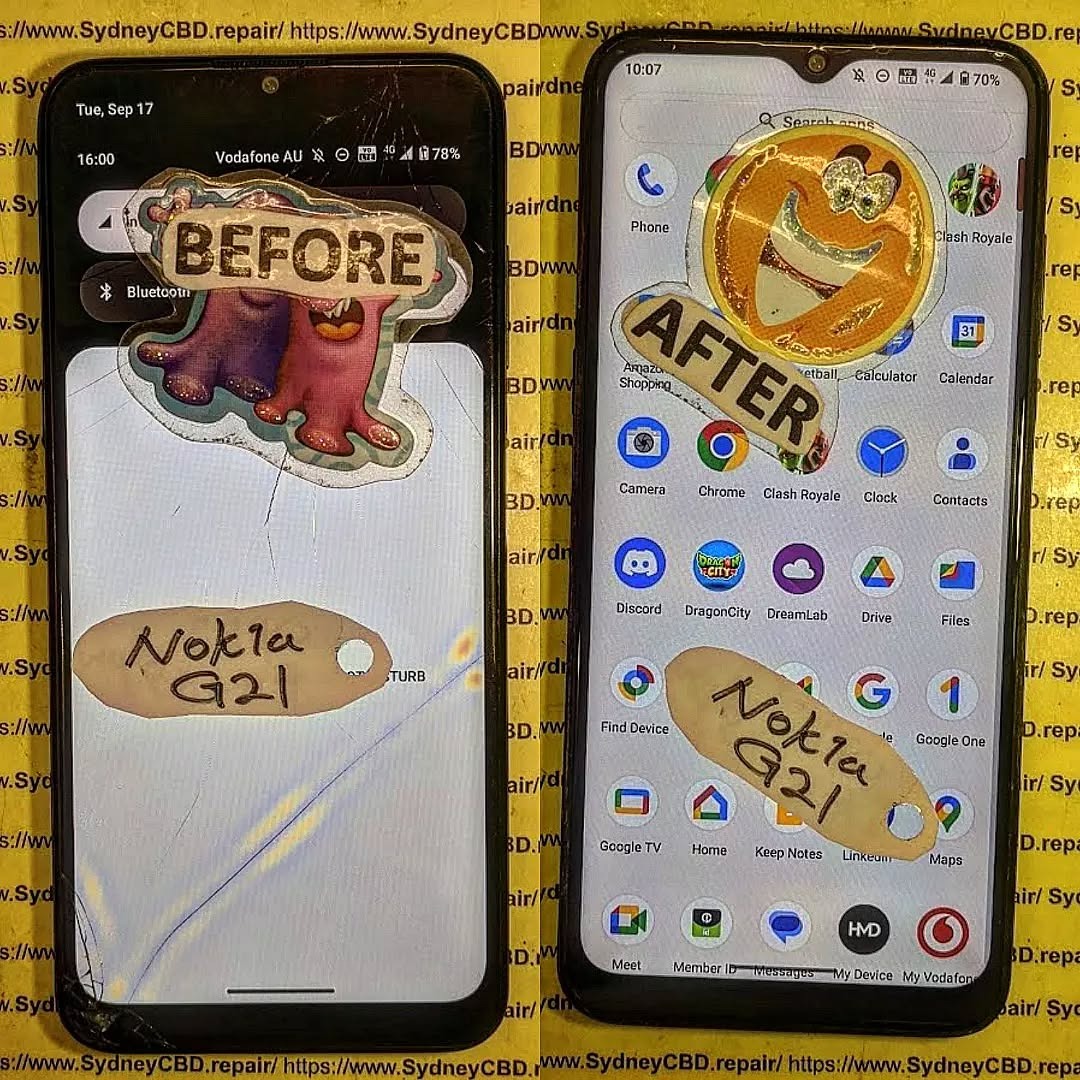
Nokia G21 Cracked LCD Screen Replacement And Frame Separation Guide: 7 Powerful Repair Tips
Introduction
The Nokia G21 cracked LCD screen replacement process requires patience, the correct replacement assembly, suitable tools, and careful handling of the phone’s internal components. A cracked display doesn’t always mean the entire phone is beyond repair. In many cases, a damaged Nokia G21 can be restored by replacing the screen assembly and, when necessary, addressing damage or separation around the frame.
The Nokia G21 features a 6.5-inch display with a 1600 × 720 resolution and an adaptive refresh rate of up to 90 Hz. It also uses a polycarbonate rear panel, while the power/lock button incorporates the fingerprint sensor. These details matter during repair because the display, frame, buttons, connectors, and internal components all need to be protected during disassembly.
If your Nokia G21 has been dropped, sat on, or hit against a hard surface, you may see anything from a small glass crack to complete display failure. The good news is that understanding the type of damage makes it much easier to decide whether you need a screen replacement, frame repair, or a more extensive inspection.
Before reaching for a repair kit, it’s important to understand the difference between cover glass damage, LCD damage, and frame damage.
A crack limited to the outer glass may leave the image and touch functionality working normally. However, if the display has black spots, coloured lines, flickering, bleeding, dead areas, or no image at all, the display assembly itself may be damaged.
Frame separation adds another complication. A strong impact can deform the chassis or cause the display assembly to lift away from its mounting surface. In that situation, simply installing a new screen may not produce a durable repair.
The Nokia G21’s official documentation identifies several model variants, including TA-1404, TA-1405, TA-1412, TA-1415 and TA-1418. Checking the exact model before ordering a replacement component is therefore a sensible first step.
1. Diagnose the Nokia G21 Before Opening It
A proper diagnosis can save you from replacing a perfectly functional component.
If the phone still powers on, begin by checking whether you can see the Nokia logo, lock screen, or Android interface. Next, test touch response across the entire display.
Look carefully for:
Black or completely dark sections.
Vertical or horizontal lines.
Flickering.
Bright spots.
Ink-like LCD bleeding.
Ghost touches.
Areas where touch doesn’t respond.
A screen that is lifting from the frame.
A housing that has become visibly bent.
Gaps between the screen and chassis.
If the display works perfectly except for cracked glass, the situation is different from a phone with a completely dead screen.
Why Diagnosis Matters
It’s tempting to assume that every cracked screen needs the same repair. That’s not necessarily the case.
For example, a phone may have a cracked screen but an undamaged frame. Another device may look similar from the front but have a badly distorted chassis underneath. Installing a replacement display onto a distorted frame can create pressure points and may result in another broken screen.
That’s why frame condition should be checked before final installation.
2. Back Up Your Data Before Screen Replacement
If the Nokia G21 still works, back up important information before beginning the repair.
Ideally, transfer:
Photos and videos.
Contacts.
Important documents.
WhatsApp or other messaging backups.
Authentication information.
Notes.
Important application data.
A screen repair usually doesn’t require deleting the phone’s data. Nevertheless, accidents can happen during any hardware repair. A damaged connector, unexpected power problem, or additional impact could leave the device unusable.
Backing up first is a simple bit of housekeeping that can prevent a major headache later.
3. Prepare the Correct Tools and Replacement Parts
A successful Nokia G21 screen replacement starts before the phone is opened.
Typical repair equipment may include:
Replacement Nokia G21 display assembly.
Precision screwdriver set.
Plastic opening picks.
Plastic spudger.
Suction tool where appropriate.
Tweezers.
Heat source designed for electronics repair.
Cleaning materials suitable for electronic assemblies.
Replacement adhesive.
ESD-safe work equipment.
Soft protective work mat.
Avoid using excessive heat. The objective is to soften adhesive, not cook the internal components.
It’s also important to avoid metal tools around exposed connectors and sensitive circuitry whenever possible. A plastic opening tool is generally safer for separating components.
Choosing the Replacement Screen
Replacement screens can differ in quality.
Before purchasing, verify:
The replacement is specifically compatible with the Nokia G21.
The connector configuration matches the original.
The assembly is intended for the correct model variant.
The display has been inspected or tested.
The seller provides appropriate information about the part.
The replacement doesn’t have visible damage.
The frame dimensions and mounting points match the original assembly.
HMD’s repair information explains that official self-repair programs and parts are available for certain HMD devices through designated partners, while not every Nokia model has the same self-repair support. The company’s current self-repair information specifically highlights devices such as the Nokia G22 and Nokia G42 5G rather than listing the G21 as one of its designated self-repair models.
That distinction is worth remembering if you’re looking for official repair documentation.
4. Safely Open the Nokia G21
Opening the phone is one of the stages where rushing can turn a straightforward repair into a complicated one.
Before opening the device:
Power it down completely.
Remove any SIM or memory card tray as appropriate.
Work on a clean, well-lit surface.
Keep screws organised.
Photograph cable positions before disconnecting them.
Avoid pulling on flex cables.
Don’t force a component that refuses to move.
A teardown of the Nokia G21 screen assembly demonstrates a sequence involving removal of the rear panel, removal of the middle frame, battery disconnection, disconnection of flex cables, and removal of the screen from the case.
This highlights an important point: screen replacement isn’t simply a matter of prying the cracked display from the front and snapping another one into place.
Why Battery Disconnection Matters
Once the phone is opened, the battery should be treated as a critical component.
Disconnecting power before manipulating display connectors helps reduce the risk of electrical damage. Never puncture, bend, crush, or excessively heat a lithium-ion battery.
If the battery is swollen, leaking, badly dented, or producing unusual heat, stop the repair and have the device handled by a qualified technician.
5. Nokia G21 Cracked LCD Screen Removal
Once the phone is safely opened and powered down, the damaged display can be separated from the chassis.
The adhesive holding the screen needs to be loosened carefully. Controlled heat may help soften adhesive, but temperature and application time must be managed carefully.
Work Around the Display Edge
Insert a suitable plastic opening tool gradually around the perimeter.
Don’t push the tool too deeply.
Behind the display are delicate components and flex connections. Excessive pressure can damage something that wasn’t broken in the original accident.
Work slowly around the perimeter rather than trying to lift the display in one large movement.
Disconnect the Display Flex
Once the screen is sufficiently separated, locate the display connector.
The connector should be released carefully using an appropriate plastic tool. Never yank the display cable.
The general principle used in professional phone repair is simple: disconnect connectors by lifting the connector itself, not by pulling on the cable.
Modern HMD repair documentation for other models similarly stresses careful handling of display connectors and recommends using a plastic tool to disconnect them.
After the damaged screen has been removed, inspect the phone before installing anything.
6. Inspect the Frame for Separation or Bending
This is one of the most important stages of the entire repair.
A replacement screen won’t sit correctly if the underlying frame is damaged.
Look at the chassis from several angles. Check whether:
The frame is twisted.
One corner is higher than another.
The display mounting surface is uneven.
Adhesive residue is preventing proper seating.
Clips or mounting points are damaged.
The screen gap changes around the perimeter.
The phone has a visible bow or bend.
The replacement display rocks when placed into position.
What Is Frame Separation?
Frame separation occurs when the display or housing no longer sits securely against its intended mounting surface.
Sometimes this happens because the original adhesive has failed. Other times, an impact has bent the frame.
If the frame itself is distorted, simply adding more adhesive isn’t a proper solution.
More adhesive can actually hide the underlying problem while putting additional stress on the new display.
When the Frame Should Be Replaced
A severely bent or cracked frame may need replacement rather than straightening.
Trying to force a badly distorted metal or plastic structure back into shape can cause further damage. The correct solution depends on the extent and location of the damage.
A technician should also inspect whether the impact has affected internal components.
7. Clean and Prepare the Mounting Surface
Before fitting a new display, remove old adhesive and loose debris.
The mounting surface should be:
Clean.
Dry.
Flat.
Free of broken glass.
Free of loose adhesive.
Free of dust.
Don’t scrape aggressively against delicate components.
This stage may seem boring, but it’s one of those little jobs that makes a big difference. A clean mounting surface helps the new screen sit evenly and reduces the possibility of pressure points.
8. Test the Replacement Display Before Final Installation
Never rush straight into permanent installation.
If practical for the replacement part and repair procedure, connect the replacement display temporarily and perform a functional test before final bonding.
Check:
Display brightness.
Touch response.
Screen uniformity.
Dead pixels or unusual areas.
Colour consistency.
Front camera clearance.
Proximity-related functionality where applicable.
Fingerprint functionality.
Power and volume buttons.
Charging.
General phone operation.
Testing before final installation gives you a much easier opportunity to identify a defective replacement component.
If the replacement doesn’t work, don’t immediately assume the part is faulty. Recheck the connector, cable seating, battery connection, and surrounding components.
9. Install the Replacement Screen Carefully
Once the replacement display has passed testing, prepare it for final installation.
Remove protective films only when appropriate and keep dust away from adhesive surfaces.
Position the display carefully so that:
The edges align with the frame.
The connector reaches its intended location.
The camera opening is correctly positioned.
The display isn’t sitting on debris.
No flex cable is trapped underneath the assembly.
The display should sit naturally within the frame rather than requiring significant force.
HMD repair documentation for other models demonstrates the same basic principle: the display cable must pass through its intended opening, the screen needs to be seated flush with the frame, and the assembly should be secured without forcing it. (HMD – Human Mobile Devices)
10. Avoid Excessive Adhesive
More adhesive isn’t necessarily better.
Too much adhesive can:
Enter unwanted areas.
Make future repairs harder.
Create uneven pressure.
Prevent the screen from sitting flat.
Interfere with buttons or other components.
Use the appropriate adhesive solution for the replacement assembly and follow the part manufacturer’s instructions.
A professional repair should look clean both inside and outside the device.
11. Reassemble the Nokia G21
After the screen is properly seated, reassemble the phone in the reverse order of disassembly.
Reconnect the required components carefully.
Before closing the phone completely, perform another functional check.
Test:
Display.
Touch.
Power button.
Volume controls.
Fingerprint sensor.
Front camera.
Rear cameras.
Speaker.
Microphone.
USB-C charging.
Headphone connection if applicable.
SIM detection.
Wi-Fi and Bluetooth.
Mobile network connectivity.
The Nokia G21 user guide confirms the presence of the USB connector, headset connector, cameras, volume keys, power/lock key and fingerprint sensor, making these useful components to verify after a screen repair.
12. Common Mistakes During Nokia G21 Screen Replacement
Even experienced DIY repairers can make mistakes.
Using Too Much Heat
Heat can soften adhesive, but excessive heat can damage internal components or the battery.
Using a Metal Pry Tool
A metal tool can scratch components, damage connectors, or create electrical shorts.
Pulling the Screen Too Quickly
The display cable may still be connected.
Ignoring Frame Damage
A new screen mounted onto a damaged frame may not last.
Skipping the Pre-Installation Test
If the replacement screen is faulty, discovering the problem after permanent installation creates unnecessary work.
Forgetting Small Screws
Different screws can have different lengths and positions. Keep them organised.
Reusing Damaged Adhesive
Old adhesive may not provide the support required for the new display.
13. Professional Nokia G21 Screen Repair vs DIY Repair
DIY repair can look attractive because it may reduce labour costs. However, the actual difficulty depends heavily on your experience and the condition of the phone.
A professional repair is particularly useful when:
The phone has severe impact damage.
The frame is bent.
The display is completely dead.
The phone has suffered liquid exposure.
The battery appears damaged.
Connectors are damaged.
You don’t have appropriate tools.
You need the repair completed quickly.
The device contains important data.
HMD notes that customers can use its support resources and repair channels, while official self-repair availability depends on the specific device.
For a complicated frame-separation repair, professional inspection can be especially valuable because the technician can assess the condition of the chassis and internal components rather than treating the screen as an isolated part.
14. How to Tell If Your Nokia G21 Needs More Than an LCD Replacement
A damaged display isn’t always the only problem.
Look for these warning signs:
The Phone Won’t Turn On
The impact may have affected the battery, motherboard, charging system, or another internal component.
The Phone Restarts Repeatedly
This may indicate damage beyond the display.
The Camera Doesn’t Work
Check whether the camera connector or surrounding components were disturbed during the impact or repair.
The Frame Is Clearly Bent
A bent chassis should be assessed before a replacement screen is installed.
The Battery Is Swollen
Stop the repair immediately and don’t continue using or charging the phone until the battery is professionally assessed.
The Screen Keeps Lifting
This can indicate poor adhesive, debris under the display, frame distortion, or another structural issue.
15. Nokia G21 Screen Replacement Quality Checklist
After completing the repair, use this checklist:
Test
What to check
Display
Clear image without lines or flicker
Touch
Full response across the screen
Frame
Screen sits evenly
Adhesive
No visible lifting
Camera
Front and rear cameras work
Fingerprint
Sensor responds normally
Buttons
Power and volume operate correctly
Charging
USB-C connection works
Audio
Speaker and microphone function
Network
SIM and mobile connection work
Wi-Fi
Connects normally
Bluetooth
Pairs with accessories
Proximity
Functions normally during calls
Housing
No major gaps or movement
A good repair isn’t simply one where the phone turns on. The goal is to return the device to reliable everyday operation.
Frequently Asked Questions
1. Can a cracked Nokia G21 LCD be replaced?
Yes. A damaged Nokia G21 display can be removed and replaced with a compatible replacement assembly. The exact repair depends on whether the damage is limited to the display or also affects the frame, connectors, or other internal components.
2. Does a cracked screen always mean the LCD is damaged?
No. The outer glass can crack while the display and touch layer continue working. However, black spots, lines, flickering, dead areas, or touch problems can indicate deeper display damage.
3. What should I do if my Nokia G21 screen is separating from the frame?
Don’t simply push it back into place or add large amounts of glue. First determine why it separated. The adhesive may have failed, or the frame may have been bent by an impact. A professional inspection is recommended when the chassis is distorted.
4. Can I replace the Nokia G21 screen myself?
It may be possible for an experienced repairer with suitable tools and a compatible part. However, the repair involves opening the phone, disconnecting internal components, removing adhesive, and handling a lithium-ion battery. Anyone without appropriate experience should consider professional repair.
5. How can I prevent the replacement screen from separating?
Use the correct replacement part, clean the mounting surface thoroughly, make sure the frame is straight, use suitable adhesive, and allow the adhesive to set according to the product instructions.
6. Should I test the new screen before gluing it?
Yes. When the repair procedure and replacement assembly allow it, test the display and touch functionality before permanently installing it. This can prevent unnecessary rework if the replacement component has a problem.
7. Can a bent Nokia G21 frame cause another screen to crack?
Yes. A distorted mounting surface can place uneven pressure on a replacement display. If the frame is visibly bent, it should be assessed before installing a new screen.
8. What tools are needed for a Nokia G21 screen repair?
Tools vary depending on the repair method and replacement assembly, but precision screwdrivers, plastic opening tools, tweezers, suitable adhesive-removal equipment, and an appropriate heat source are commonly used in professional phone repair.
9. Does Nokia still provide support for the G21?
HMD continues to provide Nokia phone support resources and user guides, and its support website lists the Nokia G21 among its documented devices. The G21 itself is now listed as discontinued on HMD’s product page.
10. Is frame separation more serious than a simple cracked screen?
It can be. A cracked display may be limited to the screen assembly, while frame separation can indicate structural damage. If the frame is bent or damaged, replacing only the display may not provide a reliable long-term repair.
Conclusion: Restore Your Nokia G21 the Right Way
A Nokia G21 cracked LCD screen replacement is more than simply removing broken glass and installing another display. A reliable repair starts with accurate diagnosis and continues with careful disassembly, battery safety, connector protection, frame inspection, proper surface preparation, display testing, and precise reassembly.
Frame separation deserves particular attention. If the chassis is bent or the mounting surface has been damaged, installing a new screen without correcting the underlying problem can lead to poor alignment, display pressure, adhesive failure, or another cracked screen.
For DIY repairers, the biggest lesson is simple: don’t rush the job. Keep track of screws, protect flex cables, use suitable plastic tools, control heat carefully, and test the replacement display before final installation.
For customers who aren’t comfortable opening a smartphone, professional repair is often the more straightforward option. A trained technician can inspect the display, frame, connectors, battery, and other components together, helping ensure that the repair addresses the actual cause of the problem rather than just the visible crack.
The Nokia G21 was designed as a durable everyday smartphone, and a damaged screen doesn’t necessarily mean the end of the device. With the right replacement part, careful workmanship, and a proper frame inspection, a damaged G21 can often return to normal everyday use.
David from Sydney CBD Repair Centre – The Best place to fix mobile phones as 7 Years In A Row! Top Mobile Phone Repair In Sydney. More than 2000 Positive Reviews on Google and Same Day Repairs.
We take pride in delivering exceptional repair services for all major phone brands including Apple, Samsung, Google, and more. Our expert technicians use only genuine parts and offer 90days warranty on repairs. Located in the heart of Sydney CBD, we’re your one-stop solution for all mobile device repairs.
Our commitment to excellence has earned us the trust of thousands of satisfied customers. Whether it’s a cracked screen, battery replacement, or water damage repair, we handle it all with professional care and expertise. Walk in today and experience why we’re Sydney’s #1 choice for mobile phone repairs.
Visit us for:
✓ Same Day Express Repairs
✓ Genuine Parts Guarantee
✓ Professional Technicians
✓ Competitive Pricing
✓ 2000+ 5-Star Google Reviews
✓ 7-Time Award Winner for Best Phone Repairs
Google Pixel 9 Pro XL Cracked Super Actua OLED Screen Replacement Guide: 11 Essential Steps for a Safe Repair
Introduction
A cracked display can turn an otherwise excellent smartphone into a frustrating daily problem. If you’ve dropped your Google Pixel 9 Pro XL and the glass is shattered, the touchscreen is unreliable, or black spots have appeared across the panel, a Google Pixel 9 Pro XL cracked Super Actua OLED screen replacement may be necessary.
The Pixel 9 Pro XL uses a 6.8-inch Super Actua LTPO OLED display with a 1344 × 2992 resolution and a 1–120Hz Smooth Display. Google lists the panel at up to 2,000 nits for HDR and up to 3,000 nits peak brightness, making the display an important part of the phone’s premium experience.
Because the screen is more than just a piece of glass, replacement isn’t simply a matter of removing the broken surface and installing another panel. The display assembly, touch layer, frame adhesives, connectors, sensors, and calibration all need appropriate attention.
This detailed guide explains what you should know before arranging a repair and how to approach the process safely.
A small crack may seem harmless at first. However, cracks can spread with everyday pressure, temperature changes, or another minor impact.
More importantly, the damage isn’t necessarily limited to the outer glass.
You may eventually notice:
Touchscreen areas that don’t respond.
Random or ghost touches.
Black or purple OLED blotches.
Green, pink, or white lines.
Flickering.
Uneven brightness.
Dead pixels.
Display discoloration.
Reduced visibility in bright environments.
Glass fragments becoming loose.
Moisture entering through damaged areas.
If the phone still works, backing up your important data should be one of your first steps.
Google specifically recommends backing up your data before repair and provides a Repair Mode designed to make servicing easier while helping protect personal information.
Glass Damage vs. OLED Damage
Not every cracked screen has the same level of damage.
Cracked Cover Glass
If the image remains perfect and every area of the touchscreen works correctly, the damage may appear primarily cosmetic.
However, a cracked cover doesn’t automatically mean that only the glass can be replaced economically or safely. The construction of modern OLED assemblies means professional repair providers often replace the complete display assembly.
Damaged OLED Panel
OLED damage is more serious.
Look for:
Black patches.
Colored vertical or horizontal lines.
Flickering.
Missing sections of the image.
Severe brightness changes.
Permanent discoloration.
These symptoms generally indicate that the display assembly itself has been compromised.
Touchscreen Damage
Another common failure is a working image with unreliable touch input.
For example, you may be able to see everything clearly but find that taps or swipes fail in one section.
This is particularly inconvenient because even a phone that “turns on normally” can become difficult or impossible to use.
Signs You Should Replace the Display
A Google Pixel 9 Pro XL cracked Super Actua OLED screen replacement becomes more urgent when the damage affects functionality.
Consider arranging professional service if:
The touchscreen has stopped responding.
The OLED has developed black spots.
Lines appear across the display.
The screen flickers.
Glass is falling away from the display.
The crack reaches the edge of the screen.
The phone registers touches you didn’t make.
The display becomes difficult to read.
The damage continues spreading.
You can see internal components through the damaged area.
If the phone is still usable, don’t assume that means the damage won’t become worse.
What to Do Before Screen Replacement
Preparation can make the repair safer and reduce the risk of losing important information.
1. Back Up Your Data
Back up:
Photos.
Videos.
Contacts.
Messages.
Documents.
App data where applicable.
Important authentication information.
Google recommends backing up the device before repair.
2. Enable Repair Mode
Where supported, Google recommends using Repair Mode before servicing. This can help technicians diagnose the phone without requiring the normal repair workflow to expose your personal data.
3. Record the Phone’s Condition
Take photographs of the phone before handing it over.
Capture:
Front.
Rear.
Frame.
Camera area.
Existing scratches.
Cracks.
Any other damage.
This creates a simple record of the device’s condition before service.
4. Check Warranty and Repair Eligibility
Don’t immediately assume you’ll have to pay the full repair price.
Google states that accidental damage generally isn’t covered by its standard warranty, while repair options and coverage depend on location, warranty status, and the type of damage.
Google also currently has an Extended Repair Program for eligible Pixel 9 Pro and Pixel 9 Pro XL devices. The program can provide display replacement at no charge for qualifying devices, subject to eligibility and inspection.
The 11 Essential Stages of a Professional Screen Replacement
A professional technician normally approaches a damaged OLED repair methodically rather than simply swapping parts as quickly as possible.
Stage 1: Initial Inspection
The phone should be examined before opening.
A technician should check:
Display condition.
Touch response.
Frame condition.
Rear glass.
Cameras.
Charging.
Buttons.
Signs of liquid damage.
Previous repairs.
This is important because another damaged component can change the repair requirements.
Stage 2: Data and Device Preparation
The phone should be prepared for service.
Important steps include backing up data and using appropriate repair/privacy features where available.
The technician may also document the device condition.
Stage 3: Power Down
The device should be powered down before internal work begins.
Working around electronic components while the phone remains powered can introduce unnecessary risks.
Stage 4: Opening the Device
Modern smartphones use strong adhesives and tightly fitted components.
Opening a Pixel 9 Pro XL therefore requires appropriate tools and controlled technique.
Trying to force the phone open with an unsuitable tool can damage:
The frame.
Internal components.
Cables.
Seals.
The replacement assembly.
Stage 5: Disconnecting the Battery and Display
Once access is obtained, internal connections need to be handled carefully.
The goal is to isolate the damaged display and prevent accidental electrical damage during the replacement.
Stage 6: Removing the Damaged Assembly
The damaged display is separated from the phone.
This stage can be difficult when the glass has shattered extensively because fragments may remain attached to adhesive.
Technicians need to avoid unnecessary force.
Stage 7: Cleaning the Mounting Surface
The old adhesive and debris should be removed from the relevant mounting area.
A clean surface is important because leftover fragments can prevent the replacement assembly from sitting correctly.
Stage 8: Installing the Replacement Display
The replacement screen is positioned carefully.
Alignment matters because a poorly positioned display can create uneven edges, pressure points, or cosmetic problems.
Stage 9: Reconnecting Components
Internal connections are restored before the device is fully closed.
This provides an opportunity to test the replacement before completing the final assembly.
Stage 10: Functional Testing
A professional repair should include testing.
Check:
Touch sensitivity.
Brightness.
Color reproduction.
Refresh-rate behavior.
Proximity-related functions.
Front-facing components.
Charging.
Cameras.
Speakers.
Microphones.
Buttons.
Stage 11: Final Inspection
Finally, the phone should be inspected for:
Display alignment.
Gaps.
Adhesive issues.
Cosmetic damage.
Touch performance.
General functionality.
Only after these checks should the repair be considered complete.
Why Professional Repair Can Be Safer
Replacing a modern OLED assembly requires more than basic screwdriver skills.
There are several reasons to use an experienced technician.
Specialized Tools
A repair center can use appropriate opening tools, inspection equipment, adhesive materials, and diagnostic equipment.
Reduced Risk
An experienced technician understands how to work around delicate internal components.
Better Testing
Professional repair centers can test the phone before returning it.
Appropriate Replacement Parts
A reputable provider should be able to explain whether the replacement is an original, authorized, or compatible component and what warranty applies.
Repair Documentation
A professional service may also document the repair and provide warranty information.
If you want to review Google’s official repair options, use its Pixel phone repair support page before choosing a repair route. Google notes that available repair methods vary according to country and device circumstances.
Can You Replace the Pixel 9 Pro XL Screen Yourself?
Technically, self-repair is possible for people with appropriate experience, tools, documentation, and a controlled workspace.
However, there’s an important difference between “possible” and “practical.”
DIY repair can introduce risks such as:
Damaging internal components.
Breaking connectors.
Damaging the frame.
Installing the display incorrectly.
Creating touch problems.
Introducing dust beneath the screen.
Using unsuitable adhesive.
Losing water-resistance performance.
Damaging another component during disassembly.
If you’ve never opened a modern flagship smartphone, professional repair is generally a more controlled approach.
A cracked screen isn’t worth turning into a damaged motherboard.
How to Choose a Pixel 9 Pro XL Screen Replacement
Not all replacement screens should be treated as identical.
Ask the repair provider these questions before approving the work:
Question
Why It Matters
Is the part specifically for Pixel 9 Pro XL?
Prevents incompatible parts
What type of display is being installed?
Helps establish expected quality
Is the part new or refurbished?
Affects condition and longevity
Is there a repair warranty?
Provides protection after service
Will the phone be tested afterward?
Confirms functionality
Will existing damage be documented?
Clarifies repair condition
Is the final price all-inclusive?
Helps avoid surprises
Will you explain any additional damage?
Prevents unnecessary work
A good technician should be comfortable answering these questions.
How Much Does Pixel 9 Pro XL Screen Replacement Cost?
There isn’t one universal price.
The final cost can depend on:
Location.
Parts availability.
Part quality.
Labor.
Warranty status.
Type of damage.
Additional internal damage.
Repair provider.
For that reason, be cautious of websites advertising one extremely low price without explaining what part is included.
A very cheap screen can become expensive if poor quality causes additional problems.
Likewise, a higher quote doesn’t automatically prove superior service.
The better approach is to compare the part, warranty, technician experience, testing procedure, and total repair price.
Important Repair Risks to Understand
No repair is completely risk-free.
Water Resistance
A phone’s original seals may not provide exactly the same protection after opening and reassembly.
Therefore, don’t assume that a repaired phone has identical resistance to water exposure.
Additional Hidden Damage
A drop strong enough to crack the display can also damage the frame or internal components.
Poor-Quality Replacement Parts
Low-quality panels can have differences in:
Brightness.
Color.
Touch response.
Refresh behavior.
Viewing angles.
Power consumption.
Frame Damage
If the aluminum frame is bent, a replacement display may not seat correctly.
Existing Liquid Damage
Liquid exposure can complicate repair and may affect eligibility under certain repair programs.
Google’s Extended Repair Program information specifically notes that eligibility can be affected by damage such as cracked displays or liquid damage.
Testing Your Phone After the Repair
Don’t simply turn on the phone, see the Google logo, and walk away.
Run a complete test.
Display Test
Open images containing:
White.
Black.
Red.
Green.
Blue.
Look for dead pixels, uneven illumination, discoloration, or strange lines.
Touch Test
Swipe across the entire screen.
Try:
Typing.
Pinching to zoom.
Dragging icons.
Scrolling.
Multi-touch gestures.
Pay particular attention to the corners and edges.
Brightness Test
Increase brightness gradually and check whether the display changes smoothly.
Also test the phone in a bright environment.
Refresh-Rate Test
Use normal scrolling and animation to make sure the display behaves smoothly.
The Pixel 9 Pro XL’s Super Actua display supports a 1–120Hz range, so smooth motion is an important part of its intended experience.
Proximity and Front-Sensor Checks
Make a test call and place the phone near your face.
The screen should behave appropriately when the phone is used during a call.
General Phone Test
Also check:
Wi-Fi.
Bluetooth.
Mobile connectivity.
Cameras.
Speakers.
Microphone.
USB-C charging.
Fingerprint functionality.
Buttons.
Testing everything before leaving the repair shop can save a return visit later.
What to Do if Your Screen Is Cracked but Still Works
You might be tempted to keep using the phone indefinitely.
If the crack is minor, you may be able to continue temporarily, but take sensible precautions.
Use a protective case and avoid putting additional pressure on the damaged area.
Keep the phone away from moisture.
Most importantly, back up your information.
If the screen begins developing lines, black spots, touch problems, or rapidly spreading cracks, arrange a repair rather than waiting for complete failure.
When You Should Stop Using the Phone Immediately
Some damage deserves faster attention.
Stop using the phone and arrange professional assessment if:
The display is lifting away from the frame.
You smell something unusual.
The phone becomes abnormally hot.
The battery appears swollen.
The frame is severely bent.
Internal components are exposed.
The screen has sharp loose fragments.
Liquid has entered the phone.
Don’t press a damaged or lifting display back into place.
If you suspect battery damage, professional inspection is especially important.
Pixel 9 Pro XL Screen Replacement: Professional vs DIY
Factor
Professional Repair
DIY Repair
Tools
Professional equipment
Must be purchased
Experience
Technician-led
User dependent
Repair risk
Lower when properly performed
Higher for inexperienced users
Diagnostics
Usually available
Limited unless equipped
Warranty
May be included
Usually dependent on parts/provider
Convenience
High
Lower
Cost
Labor included
Potentially lower upfront
Troubleshooting
Technician support
User handles problems
The right choice depends on your experience, equipment, location, and tolerance for repair risk.
For many owners, professional service offers a simpler path because it combines parts, labor, testing, and troubleshooting.
Frequently Asked Questions
1. Can a cracked Pixel 9 Pro XL screen be replaced?
Yes. The display assembly can be replaced through appropriate repair channels. The exact repair process and available options depend on your location, warranty status, and device condition.
2. Does a cracked screen always mean the OLED is damaged?
No. The cover glass can crack while the image and touch functions continue working. However, cracks can also damage the OLED or touch layer, so a technician should inspect the phone.
3. Is the Pixel 9 Pro XL screen OLED?
Yes. Google identifies the Pixel 9 Pro XL display as a 6.8-inch Super Actua LTPO OLED panel with a 1344 × 2992 resolution.
4. Should I back up my Pixel before screen replacement?
Yes. Google recommends backing up your data before repair. Repair Mode is also available on supported Pixel devices to assist with servicing.
5. Can I repair the Pixel 9 Pro XL myself?
Self-repair may be possible for experienced technicians or users with suitable tools and documentation. However, opening the phone introduces risks, so inexperienced owners may prefer professional service.
6. Will a replacement screen look exactly like the original?
The result depends on the replacement component and repair quality. A properly matched, high-quality display should preserve the expected visual and touch experience much better than a low-quality incompatible part.
7. Does screen replacement restore water resistance?
You shouldn’t assume that it does. Opening and repairing a phone can affect its original seals, so repaired devices should be treated cautiously around water.
8. Does Google offer repair options for the Pixel 9 Pro XL?
Yes. Google provides repair pathways depending on location and device circumstances. It also currently lists an Extended Repair Program covering eligible Pixel 9 Pro and Pixel 9 Pro XL devices, including display replacement for qualifying devices.
9. How long does screen replacement take?
Timing varies by repair provider, parts availability, and the extent of damage. Walk-in services may sometimes be completed the same day, while mail-in services can take longer. Google notes that repair availability and timing depend on location and service type.
10. What should I test after replacing the screen?
Test the entire display, touch response, brightness, scrolling, cameras, speakers, microphone, charging, connectivity, buttons, and other major functions. A comprehensive check helps identify problems before you leave the repair provider.
Conclusion
A Google Pixel 9 Pro XL cracked Super Actua OLED screen replacement is a specialized repair, but it doesn’t necessarily mean the end of your phone.
The most important steps are straightforward: back up your data, check warranty and repair-program eligibility, identify the actual extent of the damage, choose an appropriate replacement part, and use a technician with the right experience and equipment when professional service is the safer option.
The Pixel 9 Pro XL’s 6.8-inch Super Actua LTPO OLED display is a major part of the phone’s user experience. A quality repair should therefore focus not only on making the cracks disappear but also on restoring reliable touch, brightness, image quality, and everyday functionality.
Before committing to a repair, ask about the replacement part, total price, warranty, testing process, and any additional damage discovered during inspection. A little homework can prevent a lot of headaches later.
If you’re considering an official repair route, Google provides current repair and authorized-partner information through its Pixel support resources.
David from Sydney CBD Repair Centre – The Best place to fix mobile phones as 7 Years In A Row! Top Mobile Phone Repair In Sydney. More than 2000 Positive Reviews on Google and Same Day Repairs.
We take pride in delivering exceptional repair services for all major phone brands including Apple, Samsung, Google, and more. Our expert technicians use only genuine parts and offer 90days warranty on repairs. Located in the heart of Sydney CBD, we’re your one-stop solution for all mobile device repairs.
Our commitment to excellence has earned us the trust of thousands of satisfied customers. Whether it’s a cracked screen, battery replacement, or water damage repair, we handle it all with professional care and expertise. Walk in today and experience why we’re Sydney’s #1 choice for mobile phone repairs.
Visit us for:
✓ Same Day Express Repairs
✓ Genuine Parts Guarantee
✓ Professional Technicians
✓ Competitive Pricing
✓ 2000+ 5-Star Google Reviews
✓ 7-Time Award Winner for Best Phone Repairs
Sydney CBD Repair Centre – Where Quality Meets Reliability.
Call : +61280114119
Website: Sydney CBD Repair Centre
Google Pixel 10 Pro XL Cracked Screen Replacement And Display Repair Guide: 11 Powerful Repair Tips
Introduction: Why Google Pixel 10 Pro XL Screen Repair Matters
The Google Pixel 10 Pro XL cracked screen replacement process is worth understanding before you hand your phone to a repair shop or attempt a repair yourself. A damaged display isn’t just an eyesore. Cracks can interfere with touch input, create sharp glass edges, expose internal components to dust and moisture, and eventually turn a small problem into a much larger repair.
The Pixel 10 Pro XL has a large 6.8-inch Super Actua LTPO OLED display with a 1344 × 2992 resolution, 486 pixels per inch, and a variable 1–120 Hz refresh rate. Google also lists Gorilla Glass Victus 2 as the cover glass, with brightness reaching up to 3,300 nits at peak.
That’s an impressive screen, but premium glass is still glass. One unlucky drop onto concrete, a sharp impact against a table edge, or pressure inside a bag can cause damage.
The good news? A cracked Pixel 10 Pro XL doesn’t automatically mean the entire handset is finished.
Depending on the damage, a technician can inspect the display assembly and determine whether a complete screen replacement is appropriate. Genuine replacement assemblies are available for the Pixel 10 Pro XL, and iFixit’s current parts documentation identifies genuine Google display assemblies compatible with model variants G45RY, GUL82, and GYPW4.
However, there’s an important distinction between screen glass damage and display assembly damage. A phone can have a visible crack while the OLED and touch layer still function. In other cases, the impact damages the display underneath, resulting in black spots, coloured lines, flickering, dead pixels, or unresponsive areas.
So, before jumping straight into a repair, it’s worth understanding what you’re actually dealing with.
The Pixel 10 Pro XL uses a sophisticated OLED display assembly rather than a simple glass panel. Google lists the screen as a 6.8-inch LTPO OLED Super Actua display with Smooth Display technology supporting 1–120 Hz.
The display assembly also involves several interconnected components. These can include the visible cover glass, OLED panel, touch digitizer, display flex cable, adhesive, and related sensor components.
This is why professional screen repair isn’t simply a matter of removing cracked glass and sticking a new piece on top.
In many cases, the practical repair solution is replacement of the complete screen assembly. A genuine Pixel 10 Pro XL screen assembly listed by iFixit includes the display and digitizer, with the integrated fingerprint reader included in the assembly.
That matters because an unsuitable replacement can cause problems such as:
Poor colour reproduction
Reduced brightness
Touch-response problems
Uneven screen illumination
Display flickering
Fingerprint-reader issues
Poor adhesive alignment
Premature failure
A quality repair should restore the phone’s everyday usability rather than merely make the front glass look new.
Not every crack requires exactly the same repair. Look for these symptoms after an accident.
1. Visible Spiderweb Cracks
Multiple cracks spreading from an impact point usually indicate significant cover-glass damage.
2. Black Spots
Black or dark patches can indicate OLED panel damage beneath the glass.
3. Vertical or Horizontal Lines
Persistent lines may indicate damage to the display panel or its circuitry.
4. Flickering
A display that flashes, flickers, or intermittently goes black may have internal panel or connection damage.
5. Unresponsive Touch
If parts of the screen don’t respond to taps or swipes, the digitizer may be damaged.
6. Ghost Touch
When the phone registers touches you aren’t making, the damaged digitizer can become unreliable.
7. Green, Pink, or Other Colour Distortion
Unexpected colour changes can be a warning that the OLED panel has suffered impact damage.
8. Screen Separation
If the display begins lifting away from the frame, stop pressing it back into place. The cause needs to be professionally inspected.
9. Sharp Glass Edges
Even if everything still works, broken glass can injure your fingers.
10. Brightness Problems
If one area appears noticeably darker or behaves differently from the rest, the OLED assembly may have been affected.
11. Multiple Symptoms After a Drop
Cracked glass combined with touch failure, lines, flickering, or black areas strongly suggests that a complete display assembly repair may be necessary.
Cracked Glass vs Damaged Display: What’s the Difference?
This is one of the most important questions in any Pixel 10 Pro XL display repair.
Cover-glass damage may leave the image, brightness, and touch response working normally. The phone may remain usable, although the cracked surface still creates safety and durability concerns.
Display assembly damage goes deeper. You may notice:
Symptom
Possible Issue
Crack only
Cover-glass damage
Crack + dead touch area
Digitizer/display damage
Black blotch
OLED damage
Coloured lines
OLED or display connection damage
Flickering
Display/panel connection issue
Ghost touches
Digitizer damage
Display completely black
Panel, connector, or related hardware issue
A technician should diagnose the device before deciding which repair is appropriate.
It’s also worth remembering that modern phone screens are tightly integrated. Trying to separate individual layers without the correct equipment can turn a relatively straightforward component replacement into a more complicated repair.
Professional vs DIY Google Pixel 10 Pro XL Screen Replacement
There are two broad approaches: professional repair and self-repair.
Google’s repair documentation supports the existence of repair procedures, but its Pixel 10 Pro XL repair manual warns about hazards including electric shock, device damage, fire, and personal injury. It also recommends professional assistance and appropriate tools for repair work.
For most phone owners, professional repair is therefore the simpler option.
Professional Repair
A trained technician can:
Inspect the device.
Confirm the exact model.
Test the display.
Check for frame or internal damage.
Remove the damaged screen.
Clean the frame.
Install the replacement assembly.
Reconnect the display.
Test touch and display performance.
Check relevant sensors and cameras.
Perform final quality checks.
DIY Repair
DIY repair is possible for technically experienced users, but it isn’t risk-free.
The iFixit Pixel 10 Pro XL screen guide describes the repair as a moderate procedure taking approximately 1–2 hours. The procedure involves heating the display adhesive, separating the screen from the frame, disconnecting the screen cable, cleaning old adhesive, and installing the replacement.
In other words, this isn’t a five-minute job.
If you don’t have suitable tools or experience working with delicate electronics, professional repair can help avoid accidental damage to the battery, display cable, frame, or other components.
Why Genuine Replacement Parts Matter
A screen replacement is only as good as the component being installed.
Genuine parts are designed for the specific device. iFixit’s current Pixel 10 Pro XL genuine display listing identifies the part as a Google component and states that the assembly includes the integrated fingerprint reader.
A genuine or properly specified replacement can help preserve expected characteristics such as:
Touch sensitivity
Display clarity
Colour accuracy
Brightness
Screen responsiveness
Fingerprint functionality
Correct physical fit
That doesn’t mean every third-party component is automatically poor. However, extremely cheap screens can vary substantially in quality.
Before agreeing to a repair, ask the technician:
Is the replacement part genuine?
Is it an original service part or aftermarket?
Does the repair include new display adhesive?
What warranty is provided?
Will the fingerprint reader be tested?
Will the phone be checked for additional impact damage?
A reputable repairer should be comfortable answering these questions.
Preparing Your Pixel 10 Pro XL Before Repair
Preparation is often overlooked, but it’s one of the easiest ways to make the repair process smoother.
Back Up Your Data
Before handing over the phone, make sure important photos, contacts, documents, messages, and other data are backed up.
Google specifically recommends backing up your data before repair.
Use Repair Mode When Available
Eligible Pixel phones can use Repair Mode to help protect personal data while allowing technicians to perform diagnostics. Google says eligible devices running Android 14 December 2023 update or higher with at least 2 GB of available space may use Repair Mode.
Remove Your SIM Card
If your repair provider asks you to remove the SIM, do so before handing over the device.
Record the Device Condition
It’s sensible to take photographs of your phone before repair. Capture the front, back, frame, camera area, and any existing damage.
Note Existing Problems
Tell the technician about any symptoms you’ve noticed, such as:
Touch failures
Face or fingerprint authentication problems
Charging problems
Camera issues
Random restarts
Screen flickering
This gives the technician useful information during diagnosis.
What Happens During a Professional Screen Repair?
A professional Google Pixel 10 Pro XL cracked screen replacement generally starts with diagnosis rather than immediately opening the device.
The technician checks the display and determines whether the problem is limited to the screen or whether the phone has additional damage.
The damaged display is then carefully separated from the frame. According to the iFixit repair procedure, the screen is secured using adhesive, requiring controlled heating before separation. The display cable must then be disconnected before the old screen can be removed.
The frame is cleaned thoroughly before new adhesive is applied. This step is more important than it might seem.
Old adhesive residue can prevent the replacement screen from sitting correctly. It can also affect the seal between the display and frame.
After the new assembly is fitted, the technician reconnects the display and carries out functional testing.
A proper repair should include more than simply checking whether the screen turns on.
Display Testing After Replacement
Once the replacement has been installed, several tests should be performed.
Touchscreen Test
Swipe across the entire screen and test different areas.
Brightness Test
Check low, medium, and high brightness settings.
Colour Test
Look for unusual colour shifts, lines, patches, or uneven brightness.
Dead Pixel Test
Display solid colours and inspect the panel for abnormal pixels.
Fingerprint Test
Confirm that the fingerprint reader responds correctly after repair.
Camera Test
Check the front camera and make sure there are no obstructions caused by the repair process.
Speaker and Microphone Test
A complete post-repair check should also confirm that normal audio functions remain operational.
Charging Test
Connect the appropriate charger and confirm that the phone charges normally.
Proximity and Other Sensors
During calls, verify that the screen behaves correctly when the phone is brought close to your face.
Testing takes a little extra time, but it’s much better to catch an issue before leaving the repair centre.
Water Resistance After Screen Repair
Here’s an important point that often gets missed: screen repair can affect the phone’s original water resistance.
The iFixit Pixel 10 Pro XL repair guide specifically warns that any repair can compromise water resistance, and that retaining resistance depends on accurate adhesive application and clean mating surfaces.
That doesn’t mean a properly repaired phone will definitely lose all resistance. It means you shouldn’t assume that the factory condition is automatically restored simply because a new screen has been installed.
After repair:
Avoid unnecessary liquid exposure.
Don’t intentionally submerge the phone.
Keep the device away from pools and seawater.
Don’t use high-pressure water near the phone.
Ask the repairer about their sealing procedure.
If your phone has suffered liquid exposure as well as screen damage, tell the technician before repair.
How Much Does Pixel 10 Pro XL Screen Repair Cost?
There isn’t one universal repair price.
The final cost can depend on:
Replacement part quality
Genuine versus aftermarket components
Labour
Repair location
Warranty status
Additional frame damage
Internal damage
Insurance or protection coverage
Availability of parts
Google provides a repair process where customers can enter the device IMEI or serial number and select the damage to obtain a personalised repair option or estimate where available.
As a result, online prices should be treated as general references rather than guaranteed quotes.
If you’re comparing repair shops, don’t look at the headline price alone. Ask what is included.
A repair quoted at a slightly higher price may include a better-quality component, proper adhesive, diagnostics, post-repair testing, and a service warranty.
Should You Repair or Replace the Pixel 10 Pro XL?
A damaged display doesn’t automatically mean replacement of the entire phone is the sensible next step.
Repair may be worth considering when:
The phone otherwise works normally.
The battery is still performing well.
Cameras and charging work correctly.
The frame isn’t severely bent.
The repair cost is reasonable.
Your data and setup are important to you.
Replacement of the handset may become more relevant when there is extensive internal damage, severe frame deformation, liquid damage, or several expensive components requiring attention.
The best approach is to get an inspection and compare the actual repair cost with the condition and remaining value of the device.
Common Mistakes to Avoid
A few simple mistakes can make screen damage worse.
Don’t Keep Using a Severely Cracked Screen
A damaged panel can deteriorate over time.
Don’t Press Loose Glass Back Into Place
Loose glass can break further and create sharp fragments.
Don’t Use Excessive Heat
Heat is used during professional display removal, but uncontrolled heat can damage components.
Don’t Puncture the Battery
Lithium-ion batteries require careful handling. Google’s repair documentation specifically warns against bending, denting, puncturing, or prying the battery.
Don’t Use Random Adhesive
The display requires appropriately fitted adhesive. iFixit lists a custom-cut genuine display adhesive specifically for the Pixel 10 Pro XL.
Don’t Ignore Post-Repair Testing
A phone that powers on isn’t necessarily fully repaired.
How to Protect Your New Pixel 10 Pro XL Screen
Once your new display is installed, prevention is the name of the game.
Consider using:
A quality screen protector
A protective case with raised edges
A case that protects the corners
A secure phone grip
A dedicated pocket instead of placing the phone loose with keys
Don’t keep the Pixel in the same pocket as coins, keys, or other hard objects.
Also, remember that even a good case isn’t magic. Drops onto corners and hard surfaces can still transmit significant force to the display.
A little care goes a long way.
When Should You Seek Professional Help Immediately?
Some damage deserves prompt attention.
Seek professional inspection if:
The screen is lifting from the frame.
The phone becomes unusually hot.
The battery appears swollen.
You smell something unusual.
The phone repeatedly shuts down after impact.
The display suddenly becomes black.
The device was dropped into liquid.
The frame is visibly bent.
The cracked glass is producing loose shards.
Don’t continue experimenting with a damaged battery. Battery damage can create safety risks, and Google’s repair manual provides specific warnings regarding damaged lithium-ion batteries.
Useful Official and Repair Resources
For official repair availability, Google’s Pixel support page explains how to start a repair, check warranty status, and find available mail-in or walk-in options.
Because repair availability varies by country and region, it’s a good idea to check the current options before travelling to a repair centre. Google’s current support documentation lists specific countries for walk-in and mail-in service.
Frequently Asked Questions
1. Can a cracked Pixel 10 Pro XL screen be replaced?
Yes. The Pixel 10 Pro XL has a replaceable display assembly, and genuine replacement parts are available. A technician can inspect the phone and determine whether a screen assembly replacement is appropriate.
2. Can I replace only the cracked glass?
It depends on the repair method and equipment available. If the OLED and digitizer remain functional, some specialist repair processes can address glass separately. However, many practical repairs use the complete screen assembly. A technician should assess the phone before deciding.
3. Will fingerprint unlocking work after screen replacement?
It should be tested after repair. Genuine Pixel 10 Pro XL display assemblies can include the integrated fingerprint reader, and iFixit notes that Google’s software repair tools may be useful for calibrating the fingerprint sensor following repair.
You shouldn’t automatically assume so. Opening a phone can affect its original sealing. iFixit specifically warns that repair can compromise water resistance and that adhesive application and frame cleanliness affect the resulting seal.
5. Should I back up my Pixel before repair?
Absolutely. Google recommends backing up your data before repair. Depending on the device and repair situation, you may also be able to use Repair Mode.
6. Is DIY Pixel 10 Pro XL screen replacement difficult?
The iFixit guide classifies the repair as moderate and estimates approximately 1–2 hours for the procedure. The process involves heating adhesive, separating the screen, disconnecting the display cable, cleaning the frame, and installing new adhesive.
7. How do I know if I need a full display replacement?
Black spots, persistent lines, flickering, dead touch zones, ghost touches, or a completely non-functional display can indicate damage beyond the outer glass. A professional diagnostic check is the safest way to determine the required repair.
8. Does accidental screen damage come under the standard Google warranty?
Generally, accidental damage such as a cracked screen isn’t covered by a standard manufacturer’s warranty. Google advises checking the warranty and repair options for your specific device and region.
9. Can a repair shop fix the phone on the same day?
Some walk-in repair providers can complete repairs the same day, but timing depends on parts availability, workload, device condition, and location. Google recommends contacting the repair centre to confirm availability and repair timing.
10. What should I ask before approving a screen replacement?
Ask about the replacement part, warranty, estimated completion time, adhesive, fingerprint functionality, post-repair testing, and whether additional damage has been found.
Conclusion: A Cracked Pixel 10 Pro XL Doesn’t Have to Mean the End
A damaged Google Pixel 10 Pro XL screen can be frustrating, especially when the rest of the phone works perfectly. Fortunately, screen replacement is a practical repair option when the underlying device remains in good condition.
The key is choosing the correct replacement assembly, using suitable adhesive, handling the battery and internal components safely, and testing the phone thoroughly after installation.
The Pixel 10 Pro XL’s large 6.8-inch LTPO OLED display is an advanced component, so screen repair shouldn’t be treated like a basic glass replacement job.
If you’re considering a repair, start by backing up your data, documenting the damage, checking warranty or protection coverage, and obtaining a clear quote. If you aren’t experienced with smartphone disassembly, a qualified repair technician can handle the delicate parts of the process and reduce the risk of additional damage.
Most importantly, don’t ignore a badly cracked or malfunctioning display. Getting it inspected early can help you understand the problem before it becomes a bigger headache.
David from Sydney CBD Repair Centre – The Best place to fix mobile phones as 7 Years In A Row! Top Mobile Phone Repair In Sydney. More than 2000 Positive Reviews on Google and Same Day Repairs.
We take pride in delivering exceptional repair services for all major phone brands including Apple, Samsung, Google, and more. Our expert technicians use only genuine parts and offer 90days warranty on repairs. Located in the heart of Sydney CBD, we’re your one-stop solution for all mobile device repairs.
Our commitment to excellence has earned us the trust of thousands of satisfied customers. Whether it’s a cracked screen, battery replacement, or water damage repair, we handle it all with professional care and expertise. Walk in today and experience why we’re Sydney’s #1 choice for mobile phone repairs.
Visit us for:
✓ Same Day Express Repairs
✓ Genuine Parts Guarantee
✓ Professional Technicians
✓ Competitive Pricing
✓ 2000+ 5-Star Google Reviews
✓ 7-Time Award Winner for Best Phone Repairs
Sydney CBD Repair Centre – Where Quality Meets Reliability.
Call : +61280114119
Website: Sydney CBD Repair Centre
Samsung Galaxy Z Flip 7 Inner Folding Screen Replacement: 9 Powerful Steps for a Professional Repair
Introduction
The Samsung Galaxy Z Flip 7 Inner Folding Screen Replacement is a much more delicate repair than replacing the display on a traditional smartphone. Unlike a conventional flat phone, the Galaxy Z Flip 7 uses a flexible inner display that works around a folding mechanism. That means even a small mistake during disassembly, adhesive removal, connector handling, or screen installation can turn a manageable repair into a costly one.
The good news is that a careful, methodical approach can make the process far more predictable.
This guide explains the professional workflow used when dealing with a damaged Galaxy Z Flip 7 inner folding display. It covers diagnosis, preparation, opening the handset, disconnecting the display assembly, installing the replacement, testing the phone, and completing final quality checks.
Important: This is an advanced repair. The inner foldable display and its associated components are delicate. If you’re not experienced with foldable-phone repairs, professional service is strongly recommended. The exact parts, adhesive materials, fasteners, and service procedures can vary by model and regional version.
The Galaxy Z Flip 7’s inner screen isn’t simply a smaller version of a standard smartphone display. It forms part of a foldable system that must tolerate repeated opening and closing.
That creates several additional repair challenges.
The technician has to consider:
Flexible display construction
Display connector and flex cables
Folding mechanism
Adhesive layers
Frame alignment
Screen protection layers
Pressure applied during installation
Dust contamination
Display calibration and functionality
The main display is particularly important because it is the screen users interact with when the phone is unfolded. A replacement that looks perfect but has poor alignment or an improperly seated connector can still produce problems.
That’s why professional technicians don’t treat a foldable screen replacement like an ordinary LCD or OLED repair.
Before Starting: Determine Whether You Actually Need a Screen Replacement
A broken-looking display doesn’t always mean the entire inner screen assembly needs replacing.
First, diagnose the problem.
Common signs of inner display damage
A Galaxy Z Flip 7 may require display service if you notice:
Black areas across the display
Persistent vertical or horizontal lines
Flickering
Dead pixels
Touchscreen failure
Cracks beneath the display surface
A spreading black spot
Display discoloration
An unresponsive section near the folding area
A display that works only at certain folding angles
Physical damage around the center crease is particularly important.
However, software problems, connector issues, or other internal faults can sometimes create symptoms that resemble screen damage.
Perform a basic diagnostic first
Before opening the phone, check whether:
The phone powers on normally.
The cover display works.
The inner display produces an image.
Touch input works across the entire screen.
The problem changes when the device is gently opened or closed.
There are signs of physical impact or liquid exposure.
If the phone has intermittent display behavior, don’t immediately assume the panel itself is defective.
A proper diagnosis can prevent replacing an expensive component unnecessarily.
A professional repair starts with proper preparation.
The exact tools required can vary depending on the replacement assembly and service procedure, but a typical repair workstation may include:
Tool
Purpose
Precision screwdriver set
Removing internal screws
Plastic opening picks
Separating components safely
Suction tool
Helping lift bonded panels
Heat source
Softening suitable adhesives
Fine tweezers
Handling small components
ESD protection
Reducing static discharge risk
Cleaning materials
Preparing adhesive surfaces
Replacement adhesive
Securing components
Replacement inner display assembly
Main repair component
Magnification
Inspecting connectors and edges
Avoid using excessive heat.
Foldable devices contain delicate components, and uncontrolled heat can damage the display, battery, adhesives, sensors, or nearby components.
A professional repair bench should also be clean and well illuminated. Dust is particularly troublesome during screen installation because even a tiny particle trapped beneath an optical surface can become permanently visible.
Safety Preparation Before Disassembly
Back Up the Phone
If the device still operates, back up important data before beginning.
Use Samsung’s supported backup options, cloud services, or another secure method.
A screen replacement should not normally erase user data, but unexpected damage can occur during any hardware repair. A backup provides an important safety net.
Power the Phone Off
Completely shut down the device before opening it.
Don’t rely on simply locking the screen.
Powering down reduces the possibility of electrical damage while connectors are being handled.
Remove Accessories
Take off:
Protective case
SIM tray, where applicable
Screen accessories
Adhesive accessories
Any removable external items
Place screws and small parts in an organized tray.
Mixing screws during reassembly can cause serious problems if an incorrect screw is installed in the wrong location.
Protect the Work Area
Use an ESD-safe workspace where possible.
Keep liquids away from the phone.
Avoid metal tools near exposed circuitry unless they are specifically intended for the task.
Step 1: Power Down and Prepare the Galaxy Z Flip 7
Start with the phone fully powered off.
Before applying heat or attempting to separate bonded components, inspect the exterior carefully.
Look for:
Cracks
Bent frame areas
Gaps between panels
Evidence of impact
Damaged hinge areas
Signs of liquid exposure
This inspection is important because a replacement display may not solve problems caused by a damaged frame or hinge.
If the frame is bent, installing a new display without addressing the underlying structural issue may lead to poor alignment or premature failure.
Take photographs of the device before disassembly.
This creates a useful reference for cable routing, component positioning, and external condition.
Step 2: Remove the External Components Carefully
Foldable phones rely heavily on adhesive.
Unlike some older smartphones that could be opened using a few screws and a removable rear cover, modern foldable designs often require controlled separation of bonded surfaces.
Apply only enough heat to soften the relevant adhesive.
Then use an appropriate plastic opening tool to gradually separate the panel.
Important technique
Don’t force the tool deep into the phone.
A shallow, controlled movement is safer than aggressive insertion.
The goal is to separate adhesive, not cut through internal components.
Move slowly around the perimeter and pay attention to areas where cables, antennas, coils, or other components may be positioned.
If resistance suddenly increases, stop and reassess.
Never assume that more force is the answer.
Step 3: Open the Phone Without Damaging Internal Components
Once the external panel is sufficiently separated, carefully lift it according to the applicable service procedure.
This is one of the stages where experience makes a significant difference.
The internal layout of a foldable phone is compact. Components may be positioned very close to one another, leaving little room for mistakes.
Don’t bend the panel excessively.
Don’t twist the phone around its hinge.
Don’t pull on flexible cables.
If you encounter resistance, identify what is holding the component before continuing.
Why patience matters
Many repair failures happen because a technician becomes impatient.
The display may already be damaged, but that doesn’t mean the rest of the phone can be treated roughly.
The objective is to replace one damaged component while preserving everything else.
Step 4: Disconnect the Battery and Display Connections
After gaining access to the internal components, identify the battery and relevant display connections.
The battery should be disconnected before manipulating sensitive display connectors whenever the service procedure calls for it.
Use a non-conductive tool where appropriate.
Avoid scraping across the motherboard.
Avoid lifting connectors at an angle that could damage their sockets.
Connector handling tips
When disconnecting a flex connector:
Identify the connector carefully.
Confirm how the locking mechanism works.
Lift or release it using the appropriate technique.
Keep pressure controlled.
Never pull directly on the cable.
Inspect the connector after removal.
A damaged connector can create a much bigger repair problem than the original screen damage.
Step 5: Remove the Damaged Inner Folding Display Assembly
This is the most delicate part of the repair.
The inner display is bonded to the device structure, and removal requires careful control.
Don’t rush.
Don’t attempt to peel the display aggressively.
Don’t fold a damaged display more than necessary.
Don’t use excessive heat around sensitive areas.
The replacement procedure can vary depending on whether the replacement is supplied as a complete service assembly or as a particular display component.
Inspect the frame
Once the damaged display has been removed, inspect the mounting surface.
Look for:
Remaining adhesive
Dust
Bent areas
Debris
Damaged clips
Uneven surfaces
Signs of liquid contamination
The mounting surface needs to be clean and properly prepared.
A replacement display installed over uneven adhesive or debris may sit incorrectly.
Step 6: Prepare the Replacement Inner Display
Before permanently installing the new display, inspect it carefully.
Check for:
Scratches
Cracks
Connector damage
Manufacturing defects
Contamination
Incorrect part identification
Do not remove protective films prematurely unless required by the service procedure.
Keep the replacement display on a clean surface.
Dry-fit before final installation
Whenever the repair procedure permits it, carefully position the display before committing to adhesive.
Check:
Alignment
Frame position
Cable routing
Hinge-area positioning
Connector reach
Edge spacing
This step can save a lot of trouble.
If the display is misaligned after adhesive has been applied, correcting it becomes significantly harder.
Step 7: Install the Replacement Screen
With the mounting surface prepared and the replacement display inspected, position it carefully.
Follow the correct adhesive layout for the specific replacement part.
Avoid stretching the display.
Avoid pressing directly on vulnerable areas.
Apply even, controlled pressure where appropriate.
The center fold deserves special attention
The folding area is one of the most important sections of the display.
The screen needs to sit correctly so the phone can open and close without creating abnormal stress.
Don’t force the hinge or fold the phone aggressively during installation.
If the replacement display doesn’t naturally align with the device structure, stop and investigate.
A screen should never need to be forced into position.
Step 8: Reconnect Components and Reassemble the Phone
Once the replacement screen is correctly positioned, reconnect the required flex cables and internal components.
Double-check every connector.
A partially connected display flex can produce symptoms such as:
No image
Flickering
Touch problems
Intermittent operation
Lines across the screen
Before completely sealing the phone, perform an initial functional test if the applicable service procedure allows it.
Testing before final closure is much easier than reopening the device later.
Step 9: Test the Replacement Display Thoroughly
Don’t stop after confirming that an image appears.
A professional test should cover multiple functions.
Display test
Check:
Brightness
Colors
Uniformity
Dead pixels
Flickering
Lines
Black levels
Viewing consistency
Touch test
Test the entire display surface.
Pay particular attention to:
Top edge
Bottom edge
Left side
Right side
Center
Folding region
Open a drawing or keyboard interface and check whether touch input works consistently.
Folding test
Slowly open and close the device.
Watch for:
Flickering
Sudden blackouts
Touch interruptions
Unusual resistance
Abnormal screen behavior
Don’t repeatedly cycle the phone unnecessarily during testing. A controlled functional test is enough.
Common Mistakes During Galaxy Z Flip 7 Screen Replacement
Using Too Much Heat
Excessive heat can damage surrounding components.
Controlled heating is safer than simply increasing the temperature when adhesive doesn’t release quickly.
Using Metal Tools Aggressively
Metal tools can scratch surfaces, puncture components, or create electrical risks.
Use appropriate non-conductive opening tools whenever possible.
Pulling on Flex Cables
Flex cables aren’t handles.
Always manipulate connectors and cables through their proper connection points.
Installing the Screen Over Debris
Even tiny particles can affect alignment or create pressure points.
Cleanliness matters.
Skipping the Test Before Final Closure
This is a classic time-waster.
Test important functions before final sealing whenever the service procedure permits it.
Reusing Damaged Adhesive
Old adhesive may not provide the correct bond or alignment.
Use the correct replacement adhesive for the component and repair method.
Ignoring Frame Damage
A damaged frame can cause a replacement display to sit incorrectly.
If the structural mounting surface isn’t right, simply replacing the screen may not produce a durable repair.
Professional vs DIY Galaxy Z Flip 7 Inner Screen Replacement
A foldable screen repair is not an ideal first smartphone repair.
Traditional battery or charging-port repairs can already require patience, but a foldable inner display introduces additional complexity.
Professional repair is particularly appropriate when:
The phone contains important data.
The display is completely dead.
The hinge has been damaged.
The frame is bent.
The device has suffered liquid exposure.
The phone is still under applicable warranty or protection coverage.
You don’t have foldable-device repair experience.
You don’t have the correct tools.
A qualified technician can also inspect the phone for secondary damage.
That’s important because a cracked inner display may be only one symptom of a larger impact.
How to Reduce the Risk of Future Inner Screen Damage
Once you’ve invested in a screen replacement, a little prevention can go a long way.
Keep the hinge area clean
Dust and debris can become problematic around any moving mechanism.
Avoid pressing hard on the crease
Foldable displays are designed to bend, but that doesn’t mean they should be subjected to unnecessary pressure.
Use a compatible case
A properly designed case can provide additional protection against accidental drops.
Don’t carry sharp objects against the screen
Keys, coins, and other objects can create pressure or scratches when stored improperly.
Close the phone normally
Avoid snapping the phone shut with excessive force.
Have unusual display behavior checked early
If you notice flickering, lines, touch issues, or changes around the crease, professional inspection may prevent further damage.
Quality Control Checklist After Screen Replacement
Before returning the phone to its owner, a technician should complete a final inspection.
Test
Check
Power
Phone starts normally
Inner display
Image is clear
Touch
Full surface responds
Brightness
Adjustment works normally
Folding
Phone opens and closes normally
Cover display
Functions correctly
Cameras
Front and rear cameras operate
Audio
Speakers and microphones work
Charging
Wired charging operates
Connectivity
Wi-Fi/Bluetooth/mobile network checked
Biometrics
Relevant biometric functions checked
Frame
No gaps or loose panels
Exterior
No new scratches or damage
A repair isn’t complete simply because the screen lights up.
A professional repair should restore as much of the phone’s original functionality as possible.
Signs That Your Replacement Wasn’t Installed Correctly
Contact the repair provider if you notice:
Screen flickering
Touch dead zones
New lines
Display discoloration
Uneven edges
Screen lifting
Unusual hinge behavior
Random display shutdowns
New noises when folding
A visible gap between components
Don’t continue using a phone that appears structurally compromised.
The sooner a potential installation issue is identified, the easier it may be to correct.
Frequently Asked Questions
1. Can I replace the Galaxy Z Flip 7 inner screen myself?
Technically, an experienced repair technician can perform the work, but it’s an advanced repair. The inner foldable display, adhesive, connectors, and hinge area require careful handling. Beginners are generally better off using a professional repair service.
2. How long does a Galaxy Z Flip 7 inner screen replacement take?
Repair time depends on the condition of the phone, availability of the correct replacement part, repairer’s experience, and whether additional damage is discovered. A straightforward professional repair can often be completed within a service appointment, while complicated damage may take longer.
3. Does replacing the inner screen erase my data?
A screen replacement itself isn’t intended to erase user data. However, hardware repairs always carry some risk, so backing up important information before service is strongly recommended.
4. Can a cracked folding screen be repaired instead of replaced?
In most cases, significant physical damage to the flexible display requires replacement of the affected display assembly rather than simply repairing the visible crack.
The exact repair solution depends on the type and extent of damage.
5. Why is the foldable screen replacement more difficult than a normal screen replacement?
A foldable display must operate while repeatedly bending. The repair therefore involves additional considerations around flexible components, adhesive, alignment, hinge movement, and the center folding area.
6. Can I use any replacement screen for the Galaxy Z Flip 7?
No. The replacement component should be specifically compatible with the exact Galaxy Z Flip 7 model and regional variant where applicable. Using an incorrect part can result in compatibility, fitment, or functionality problems.
7. What should I do if the new screen works but touch doesn’t?
First, the repair should be checked for connector seating and possible installation issues. If the problem remains, the replacement part itself may require further testing. Avoid repeatedly opening the phone yourself if you don’t have the necessary experience.
8. Is a screen protector necessary after replacement?
A suitable protector may provide additional protection, but foldable displays require compatible products and proper installation. Avoid using an incompatible protector that places excessive pressure on the folding area.
9. Should I repair a damaged hinge at the same time?
If the hinge or frame was involved in the original accident, it should be inspected before installing the new display. A damaged structure can affect the fit and long-term performance of a replacement screen.
When You Should Choose a Professional Repair Centre
There are times when DIY repair simply isn’t worth the risk.
The Galaxy Z Flip 7 is an advanced foldable smartphone, and the inner display is one of its most delicate components. If you don’t have professional tools, suitable replacement parts, ESD protection, or experience working with foldable devices, a repair centre can reduce the risk of accidental secondary damage.
A professional technician can also perform a broader inspection.
For example, if the phone was dropped, the problem might involve the display, frame, hinge, internal connectors, or several components at once.
Getting the device properly diagnosed first can therefore save time and money.
Conclusion
The Samsung Galaxy Z Flip 7 Inner Folding Screen Replacement requires patience, precision, and the right equipment.
The basic workflow is straightforward in theory: diagnose the problem, prepare the phone, carefully disassemble it, disconnect the necessary components, remove the damaged display, prepare the mounting surface, install the replacement, reconnect everything, and perform extensive testing.
In practice, however, foldable-phone repairs leave little room for careless handling.
The biggest lesson is simple: don’t rush the repair.
A clean workstation, correct replacement component, controlled adhesive removal, careful connector handling, accurate alignment, and thorough testing can make a major difference in the quality of the finished repair.
If your Galaxy Z Flip 7 has a cracked inner screen, dead pixels, touch problems, flickering, or damage around the crease, having it professionally inspected is often the safest approach.
For official product information, specifications, and support resources, consult Samsung’s official Galaxy Z Flip 7 resources before arranging a repair.
The Galaxy Z Flip 7 inner display is a sophisticated flexible component that requires specialist handling. A successful Samsung Galaxy Z Flip 7 Inner Folding Screen Replacement involves more than simply removing a broken screen and attaching a new one. Proper diagnosis, safe disassembly, connector protection, adhesive preparation, accurate alignment, and complete post-repair testing are all essential.
When in doubt, choose an experienced foldable-phone repair technician rather than risking additional damage to the device.
David from Sydney CBD Repair Centre – The Best place to fix mobile phones as 7 Years In A Row! Top Mobile Phone Repair In Sydney. More than 2000 Positive Reviews on Google and Same Day Repairs.
We take pride in delivering exceptional repair services for all major phone brands including Apple, Samsung, Google, and more. Our expert technicians use only genuine parts and offer 90days warranty on repairs. Located in the heart of Sydney CBD, we’re your one-stop solution for all mobile device repairs.
Our commitment to excellence has earned us the trust of thousands of satisfied customers. Whether it’s a cracked screen, battery replacement, or water damage repair, we handle it all with professional care and expertise. Walk in today and experience why we’re Sydney’s #1 choice for mobile phone repairs.
Visit us for:
✓ Same Day Express Repairs
✓ Genuine Parts Guarantee
✓ Professional Technicians
✓ Competitive Pricing
✓ 2000+ 5-Star Google Reviews
✓ 7-Time Award Winner for Best Phone Repairs
Sydney CBD Repair Centre – Where Quality Meets Reliability.
Call : +61280114119
Website: Sydney CBD Repair Centre
iPhone 17 Pro Max Screen Replacement Step By Step Display Removal Guide: 55 Essential Steps
Introduction to iPhone 17 Pro Max Screen Replacement
Replacing an iPhone 17 Pro Max display isn’t a simple matter of removing a few screws and installing a new panel. The phone contains delicate display, sensor, battery, and connector components, so careful preparation is essential. This guide explains the iPhone 17 Pro Max screen replacement process in a structured, step-by-step format, based on currently available repair documentation and established repair procedures.
Apple provides an official iPhone 17 Pro Max Repair Manual covering display procedures, safety, tools, diagnostics, and other components.
Important: This is an advanced repair. If you’re not experienced with smartphone disassembly, professional repair is the safer option. Lithium-ion batteries, fragile display cables, and Face ID-related components can be damaged by improper tools or excessive force.
The iPhone 17 Pro Max screen replacement process requires patience, precision, and the right equipment. A damaged display may show cracked glass, black areas, lines, flickering, ghost touches, dead pixels, or complete loss of image. In some cases, however, a screen problem can be caused by a connector or another internal component rather than the display itself.
Apple’s repair documentation for the iPhone 17 Pro Max includes dedicated procedures for the display, battery, front camera, troubleshooting, tools, screws, and safety.
That matters because modern iPhones are tightly integrated. The screen isn’t simply a slab of glass that can be swapped without consequences. Display connectors, sensor assemblies, clips and perimeter adhesive all have to be handled correctly.
The good news is that a careful repair can be approached systematically.
What Does a Screen Replacement Involve?
A complete display replacement generally involves:
Backing up important data.
Powering the iPhone down.
Protecting yourself from broken glass.
Removing the bottom pentalobe screws.
Softening the display adhesive.
Separating the screen from the frame.
Disconnecting the battery.
Disconnecting display and sensor connectors.
Removing the old display.
Transferring components where necessary.
Cleaning the frame.
Installing fresh display adhesive.
Connecting and testing the replacement screen.
Sealing the phone.
Completing software calibration when required.
The current iFixit repair procedure documents this general sequence and contains 55 numbered steps, including display removal, sensor transfer, adhesive installation, testing, and final reassembly.
Before opening the phone, it helps to understand what you’re working with.
The display assembly isn’t only the visible screen. It also interacts with the front sensor system and the phone’s internal electronics through flexible cables and press connectors.
Some replacement displays may arrive with certain components already installed, while others require transferring components from the original display.
Why the Front Sensors Matter
The front sensor assembly is particularly delicate. During a component transfer, excessive force can damage the flexible cable or sensor hardware.
For that reason, the sensor transfer should be treated as a separate operation rather than an afterthought.
If you’re purchasing a replacement display, check exactly what is included before beginning the repair.
Genuine Versus Non-Genuine Displays
Replacement-screen quality varies considerably.
A poor-quality panel can potentially produce differences in:
Brightness
Colour reproduction
Touch responsiveness
Viewing angles
Power consumption
Auto-brightness behavior
True Tone functionality
Long-term reliability
iFixit’s current guide notes that True Tone and auto-brightness may require calibration after replacement, particularly where the replacement display isn’t recognized as genuine.
For a premium phone such as the iPhone 17 Pro Max, using a high-quality replacement component is therefore important.
Before starting, assemble everything. Stopping halfway through a phone repair because you’re missing adhesive is a recipe for frustration.
Essential Tools
A typical display replacement requires tools such as:
P2 pentalobe screwdriver
JIS 00 screwdriver
Y000 tri-point screwdriver
Opening picks
Plastic spudger
Suction handle
Tweezers
Heat source
Safety glasses
Lint-free cloth
High-concentration isopropyl alcohol
Replacement display
Replacement display adhesive
The iFixit guide specifically identifies P2, JIS 00 and Y000 drivers at different stages and recommends replacement screen adhesive.
Recommended Workspace
Work on a clean, flat surface with good lighting.
Keep small screws organized because different screws can look almost identical while having different lengths or positions.
A magnetic project mat or labelled screw tray can make a huge difference.
Safety Preparations Before Starting
Safety should come before speed.
iFixit’s current procedure recommends reducing the battery charge below 25% before starting because a damaged charged lithium-ion battery can present a fire risk.
Also disconnect all external cables and power the iPhone off completely.
Broken Glass Safety
If the display is shattered, tiny pieces of glass can come loose during opening.
Wear eye protection and cover the broken display glass with suitable tape before applying a suction tool. This can help contain loose fragments and improve suction.
Don’t press unnecessarily hard on severely damaged glass.
Heat Safety
Heat is used to soften display adhesive, but excessive heat can damage components.
The iFixit procedure calls for heating individual edges before separating their adhesive.
Use controlled, moderate heat rather than attempting to cook the adhesive loose.
Prepare and Inspect the iPhone
Before opening the device, inspect it carefully.
Check whether:
The display still produces an image.
Touch works.
The phone powers on.
The frame is bent.
The back glass is damaged.
Cameras function.
Face ID works.
Buttons work.
The phone has liquid-damage indicators or signs of moisture.
If the frame is severely bent, installing a replacement display may not solve the underlying problem.
Back Up Your Data
A display replacement normally isn’t intended to erase your data, but repairs always carry some risk.
Create a current backup before opening the phone.
If the device is operational, verify that important photos, contacts and files are synchronized or backed up.
Step 1: Remove the Pentalobe Screws
Begin at the bottom edge of the phone.
The iFixit guide identifies two 7.5 mm pentalobe screws located on either side of the charging port.
Use a suitable P2 pentalobe driver and apply controlled downward pressure.
Avoid slipping because a stripped screw can turn a straightforward repair into a much harder extraction job.
Place both screws in a labelled container.
Step 2: Mark Your Opening Pick
Before inserting an opening pick, limit how deeply it can enter.
The iFixit procedure recommends marking the pick approximately 3 mm from its tip.
This simple preparation is important because deeper insertion can contact internal components or cables.
Think of the pick as a blade with a depth limit: more isn’t better.
Step 3: Heat the Bottom Edge
Apply controlled heat to the bottom edge to soften the adhesive.
The objective isn’t to make the entire phone extremely hot. You’re simply trying to make the adhesive more flexible.
Check the temperature continuously and avoid prolonged heating in one spot.
Step 4: Apply the Suction Handle
Position the suction handle close to the bottom edge.
Apply steady upward force until a small gap forms between the display and frame.
This may require patience.
If the gap doesn’t form, don’t immediately increase force dramatically. Reapply moderate heat and try again.
Step 5: Insert the Opening Pick Carefully
Once the gap forms, insert the opening pick.
The correct insertion point and depth are critical because the display perimeter contains sensitive components and cables.
The iFixit guide specifically warns against inserting the pick deeper than approximately 3 mm.
Step 6: Separate the Bottom Adhesive
Slide the opening pick along the bottom edge.
The goal is to cut through the adhesive rather than pry aggressively against the display.
Keep another pick in the opened section where necessary to prevent the adhesive from resealing.
Step 7: Separate the Right Edge
Heat the right edge before working on its adhesive.
Insert a second opening pick near the bottom-right corner and carefully move it upward.
There are clips around the perimeter, so some resistance is normal.
Don’t force the pick.
If resistance increases unexpectedly, stop and reassess its position.
Step 8: Separate the Top Edge
Apply controlled heat to the top edge.
Move an opening pick along the upper perimeter while staying within the safe working area.
Extra caution is needed around the front sensor area.
The iFixit guide specifically warns that moving too far around the top-left area can damage the ambient-light-sensor cable.
Step 9: Separate the Left Edge
Heat the left edge and use another opening pick.
Move carefully upward, stopping before sensitive button-related areas.
Again, the goal is adhesive separation, not forceful prying.
If the display doesn’t release, don’t assume more pressure is the answer. Reheat and inspect the perimeter.
Step 10: Lift and Prop Up the Display
Once the adhesive and clips are released, the display should separate from the frame.
Lift it carefully.
Don’t yank it away because display cables are still connected.
The iFixit procedure recommends swinging the display over the left side and supporting it so that the cables aren’t strained.
At this stage, the phone should remain stable on your work surface.
Step 11: Remove the Connector Covers
Next, access the internal connector covers.
Keep track of every screw.
Small screws can easily become mixed up, and incorrect screw placement can cause damage.
Use the appropriate driver and remove the screws securing the covers.
Set the covers aside in an organized location.
Step 12: Disconnect the Battery
Disconnecting the battery is an important safety step before manipulating display connectors.
Use a plastic spudger or appropriate non-metallic tool to disconnect the battery press connector.
Avoid slipping across the logic board.
Don’t use excessive force.
Step 13: Disconnect the Display and Sensor Connectors
Once the battery is disconnected, carefully disconnect the display-related press connectors.
Use the appropriate non-metallic tool.
Never force a connector sideways.
A press connector should release from the correct lifting point.
The current iFixit procedure identifies separate screen and front-sensor connectors at this stage.
Step 14: Remove the Old Display
With the connectors disconnected, the old display can be removed.
Place it somewhere safe rather than immediately throwing it away.
If the replacement screen has no front sensor assembly, you’ll need the original sensor hardware for transfer.
This is also a useful opportunity to inspect the inside of the phone for:
Dust
Broken glass
Bent clips
Damaged cables
Adhesive residue
Signs of liquid exposure
Step 15: Transfer the Front Sensor Assembly
This is one of the most delicate parts of the procedure.
If the replacement screen doesn’t already include the required front sensor components, remove the sensor bracket and carefully release the sensor assembly from the old display.
The documented procedure uses a Y000 driver for the sensor screws and controlled heat to soften adhesive.
Take Extra Care
The sensor cable is fragile.
Don’t pry directly against the sensor itself.
Instead, work underneath the appropriate cable or tab and use minimal force.
If the adhesive refuses to release, apply additional controlled heat rather than pulling harder.
Step 16: Install the Front Sensors on the New Display
Position the transferred sensor assembly correctly on the replacement screen.
Ensure the components sit in their designated recesses.
Reinstall the bracket and screws.
The iFixit guide describes securing the front sensor bracket with two 1.0 mm screws.
Before proceeding, visually inspect the sensor cable for folds, tears or incorrect positioning.
Step 17: Clean the iPhone Frame
Old display adhesive must be removed before applying new adhesive.
Use tweezers for larger adhesive pieces and an appropriate plastic tool for residue.
Be careful around grounding clips.
The repair guide recommends high-concentration isopropyl alcohol for stubborn adhesive residue and a lint-free cloth for cleaning.
Why Cleaning Matters
A dirty frame can cause:
Uneven screen seating
Gaps around the display
Poor adhesive bonding
Dust intrusion
Display movement
Reduced sealing performance
Take your time here.
Step 18: Prepare the Replacement Display
Before permanently attaching the replacement display, inspect it.
Check for:
Scratches
Cracks
Damaged flex cables
Missing brackets
Bent clips
Contamination
Incorrect component placement
Never install a visibly damaged replacement panel.
Step 19: Apply New Display Adhesive
Use replacement adhesive designed for the iPhone 17 Pro Max display.
Align it carefully with the frame perimeter.
Don’t rush this stage.
Once pressure is applied to the adhesive, repositioning can be difficult.
The current iFixit procedure specifically notes that correctly aligned adhesive should be pressed into place carefully and that repositioning may require new adhesive.
Step 20: Connect the Replacement Display
Place the new screen beside the phone so its cables reach the logic board without being stretched.
Connect the display connectors carefully.
Press them into position using a finger or the flat side of a suitable spudger.
Don’t force a connector.
If it doesn’t align, lift it and reposition it.
Step 21: Reconnect the Battery
After the display connectors are seated, reconnect the battery.
Make sure the connector is correctly aligned before applying pressure.
A connector that isn’t aligned correctly can potentially damage contacts.
Step 22: Test the Repair Before Sealing
This is one of the most important stages.
Before permanently sealing the display, power on the phone and test it.
Check:
Display image
Brightness
Touch response
Multi-touch
Dead areas
Flickering
Front sensors
Auto-brightness
Face ID-related functionality
Cameras
Earpiece
Proximity behavior
Buttons
Charging
If something doesn’t work, investigate before sealing the phone.
The iFixit procedure explicitly recommends testing the repair before completing final reassembly.
Step 23: Reinstall Connector Covers
Once the replacement display has passed initial testing, reinstall the connector covers.
Ensure each cover sits correctly.
Use the correct screws in their original positions.
Avoid overtightening.
Small electronic-device screws don’t require excessive force.
Step 24: Close the Display
Remove the remaining adhesive liners according to the adhesive layout.
Lower the display carefully, beginning with the appropriate edge and ensuring no cables are trapped.
The display should sit flush against the frame.
If you feel unusual resistance, stop.
A bent perimeter clip or trapped cable can prevent proper seating.
Step 25: Press the Display Into Position
Once correctly aligned, apply even pressure around the display perimeter.
Don’t concentrate all your force on one corner.
The aim is consistent contact between the display and new adhesive.
Step 26: Apply Controlled Heat
Moderate heat can help the adhesive establish a strong bond.
The iFixit guide recommends heating the perimeter after the screen is installed to soften the adhesive and improve bonding.
Don’t overheat the device.
Step 27: Reinstall the Pentalobe Screws
Finally, reinstall the two pentalobe screws beside the charging port.
Confirm that both are correctly seated.
The phone should now have a fully installed replacement display.
Display Calibration and Repair Assistant
Completing the physical installation doesn’t necessarily mean the repair is finished.
Apple provides a Repair Assistant process for supported repairs. The iFixit guide notes that a genuine replacement screen may need calibration through Repair Assistant to restore functions such as True Tone and auto-brightness.
Apple’s official iPhone 17 Pro Max repair documentation also includes diagnostics and display troubleshooting resources.
After installation, check the phone’s Parts & Service History and follow any available on-screen repair-completion instructions.
Common iPhone 17 Pro Max Screen Replacement Problems
Touch Doesn’t Work
Possible causes include:
Display connector not fully seated
Damaged replacement screen
Connector contamination
Cable damage
Disconnect the battery and inspect the connections before repeatedly restarting the device.
Display Is Black
Check:
Battery connection.
Display connector.
Display cable.
Replacement panel.
Signs of internal damage.
Don’t immediately assume the motherboard has failed.
Auto-Brightness Doesn’t Work
Calibration may be required.
Also verify that the relevant front sensor components were transferred correctly.
True Tone Isn’t Available
A replacement display may require Apple’s repair/calibration process.
This is one reason replacement-part quality and post-repair configuration matter.
Screen Sits Unevenly
Inspect for:
Remaining adhesive
Bent clips
Misaligned adhesive
Trapped cables
Debris around the frame
Don’t try to force an uneven display flush with excessive pressure.
Professional Repair Versus DIY Replacement
DIY repair can be appealing, particularly if you already have repair experience.
However, professional repair offers several practical advantages.
DIY Repair
Professional Repair
Lower labor cost
Technician handles disassembly
Requires specialist tools
Professional equipment available
Risk of accidental damage
Controlled repair process
You manage calibration
Repairer can handle post-repair checks
More time required
Often faster
Warranty depends on parts/work
Repair warranty may be available
For a high-value device, the cheapest screen isn’t always the lowest-cost option if it fails shortly afterward.
A professional technician can also identify whether the problem is actually the display before replacing it.
How to Choose a Replacement Screen
When purchasing a replacement display, consider more than price.
Look for:
Correct iPhone 17 Pro Max compatibility
Reliable supplier
Quality display panel
Proper connector configuration
Sensor compatibility
New perimeter adhesive
Warranty
Return policy
Calibration compatibility
Ask whether the replacement is a complete assembly or requires transferring components from your original screen.
That distinction can significantly change the complexity of the repair.
iPhone 17 Pro Max Screen Replacement Checklist
Before finishing, run through this checklist:
Before Opening
Back up data
Power off iPhone
Battery below recommended charge level
Disconnect cables
Wear eye protection
Prepare tools
During Removal
Remove pentalobe screws
Mark opening-pick depth
Apply controlled heat
Separate adhesive carefully
Avoid deep pick insertion
Support display cables
Disconnect battery
Disconnect display connectors
During Installation
Inspect replacement screen
Transfer sensors if necessary
Clean frame
Install new adhesive
Connect display
Reconnect battery
Test before sealing
Install connector covers
Align display
Press perimeter evenly
Reinstall bottom screws
After Repair
Test touch
Test brightness
Test cameras
Test sensors
Test Face ID-related functions
Check charging
Check Parts & Service History
Complete available calibration
Frequently Asked Questions
1. How difficult is an iPhone 17 Pro Max screen replacement?
It’s an advanced repair. The process involves adhesive removal, delicate flex cables, small screws, connector handling and potentially transferring front sensor components. Someone without prior smartphone repair experience may find it challenging.
2. Can I replace the iPhone 17 Pro Max screen myself?
Yes, technically, but the repair requires suitable tools, a compatible replacement assembly and careful handling. Apple’s official repair manual provides documentation for the device, while detailed third-party guides can provide additional visual assistance.
3. Do I need to replace the display adhesive?
Yes. Reusing old display adhesive isn’t recommended when completing a proper screen replacement. A fresh adhesive perimeter helps the replacement display seat correctly.
4. Will Face ID work after screen replacement?
The display replacement itself doesn’t necessarily mean Face ID must stop working. However, the front sensor assembly is delicate, and damage or incorrect transfer of relevant components can cause functionality problems.
5. Why should I disconnect the battery before removing the display?
Disconnecting the battery reduces the chance of accidentally energizing components while manipulating connectors. The documented iFixit procedure disconnects the battery before disconnecting the screen connectors.
6. Why is my replacement display missing True Tone or auto-brightness?
The replacement may require calibration or may not support all original display functions. iFixit specifically notes that True Tone and auto-brightness can require Repair Assistant after replacement.
7. How do I know whether my screen is actually defective?
Look for symptoms such as persistent black areas, broken touch response, lines, flickering, visible physical damage or a display that remains unresponsive after basic troubleshooting. However, connector or logic-board problems can produce similar symptoms, so diagnosis is useful before purchasing a replacement.
8. Can a cracked display be repaired without replacing the whole screen?
That depends on the damage and repair method. A badly damaged display assembly is generally handled by replacing the display assembly rather than attempting a glass-only repair. Glass-only repair requires specialized equipment and is a different procedure.
9. Should I use an aftermarket display?
The decision depends on your priorities and the exact component available. Aftermarket displays can vary significantly in quality and feature compatibility. For a premium device, verify the supplier, warranty, specifications and post-repair functionality before choosing a replacement.
10. What should I do if the new screen doesn’t work?
Don’t seal the phone immediately. Power it down, disconnect the battery and inspect the display connectors for alignment, contamination or damage. If the problem persists with a known-good screen, professional diagnosis may be appropriate.
Conclusion
The iPhone 17 Pro Max screen replacement process is detailed but manageable when approached methodically. The key is not speed. It’s controlling each stage: safely opening the display, protecting internal cables, disconnecting the battery, handling the front sensors carefully, cleaning the frame, applying fresh adhesive and testing the replacement before final sealing.
Apple’s official repair documentation confirms that the iPhone 17 Pro Max has dedicated procedures for display repair, troubleshooting, tools and safety, while current third-party repair documentation provides a detailed 55-step display replacement workflow.
If you’re experienced with electronics repair and have the correct tools, following a structured procedure can make the job much more predictable. If you’re not, professional repair is worth considering because a mistake involving the display cable, battery, sensors or logic board can turn a screen replacement into a much more expensive repair.
Above all, don’t rush. A careful repair today can prevent a costly repair tomorrow.
David from Sydney CBD Repair Centre – The Best place to fix mobile phones as 7 Years In A Row! Top Mobile Phone Repair In Sydney. More than 2000 Positive Reviews on Google and Same Day Repairs.
We take pride in delivering exceptional repair services for all major phone brands including Apple, Samsung, Google, and more. Our expert technicians use only genuine parts and offer 90days warranty on repairs. Located in the heart of Sydney CBD, we’re your one-stop solution for all mobile device repairs.
Our commitment to excellence has earned us the trust of thousands of satisfied customers. Whether it’s a cracked screen, battery replacement, or water damage repair, we handle it all with professional care and expertise. Walk in today and experience why we’re Sydney’s #1 choice for mobile phone repairs.
Visit us for: ✓ Same Day Express Repairs ✓ Genuine Parts Guarantee ✓ Professional Technicians ✓ Competitive Pricing ✓ 2000+ 5-Star Google Reviews ✓ 7-Time Award Winner for Best Phone Repairs
Sydney CBD Repair Centre – Where Quality Meets Reliability. Call : +61280114119 Website: Sydney CBD Repair Centre
Xiaomi 15 Ultra Screen Replacement Step By Step Curved OLED Display Repair Guide: 11 Essential Steps for a Safe Repair
Introduction
The Xiaomi 15 Ultra Screen Replacement Step By Step process is a precision repair that requires patience, suitable tools, and careful handling of the phone’s curved display assembly. Unlike a basic flat-screen replacement, the Xiaomi 15 Ultra uses a flexible 6.73-inch AMOLED panel with a WQHD+ 3200 × 1440 resolution, up to 120Hz refresh rate, and full lamination. Xiaomi also describes the display as an All Around Liquid Display with a wraparound quad-curved design.
That means a cracked screen shouldn’t be treated like a simple piece of glass. The OLED panel, touch layer, frame adhesive, display flex, fingerprint hardware, and surrounding components all need to be protected during the repair.
This guide explains the complete process in practical terms. It is written for trained repair technicians and experienced DIY users who understand that opening a premium smartphone can cause additional damage if the correct procedure isn’t followed.
Important: The exact internal construction, adhesive layout, replacement-part design, and service procedure can vary by production batch and replacement assembly. When possible, compare the procedure with current manufacturer or professional service documentation before beginning.
Before starting a Xiaomi 15 Ultra Screen Replacement Step By Step repair, it’s important to understand what you’re working with.
The Xiaomi 15 Ultra features a 6.73-inch AMOLED display with WQHD+ resolution of 3200 × 1440 pixels. Xiaomi lists a 1–120Hz adaptive refresh rate, up to 300Hz touch sampling, DCI-P3 color coverage, and Xiaomi Shield Glass 2.0. The display uses full lamination and a flexible screen construction.
The flexible OLED design provides excellent image quality while allowing the curved display to follow the phone’s frame. However, flexibility doesn’t mean the panel is immune to damage.
Why the Curved Design Matters
A curved OLED display has several areas that need special attention:
Curved edges are more vulnerable to lifting or bending.
Display flex cables can be delicate.
Excessive heat can damage OLED layers.
Incorrect prying can create pressure marks.
Poor-quality replacement panels may not reproduce the original viewing experience.
Improper adhesive can cause uneven seating around curved edges.
The Xiaomi 15 Ultra also has an ultrasonic in-screen fingerprint sensor, making post-installation testing particularly important.
Original Display Specifications
Feature
Xiaomi 15 Ultra
Display type
AMOLED
Size
6.73 inches
Resolution
3200 × 1440
Pixel density
522 ppi
Refresh rate
1–120Hz
Touch sampling
Up to 300Hz
Peak brightness
Up to 3200 nits
Color depth
68 billion colors
Protection
Xiaomi Shield Glass 2.0
Screen construction
Flexible, fully laminated
Fingerprint
Ultrasonic in-display
These specifications are useful when checking a replacement part. If the new screen behaves noticeably differently, don’t immediately assume the software is responsible. The replacement assembly itself may be the problem.
Not every damaged display requires the same repair.
A phone with only a scratched outer glass may behave normally, while a phone with a damaged OLED panel can show black areas, lines, flickering, dead pixels, or complete display failure.
Common Signs of Display Damage
A complete screen assembly replacement may be appropriate when you notice:
Large cracks across the display.
Black or purple OLED blotches.
Vertical or horizontal lines.
Flickering.
Touch areas that don’t respond.
Ghost touches.
Display failure after a drop.
Severe green, pink, or white tinting.
Separation between display layers.
A display that works intermittently.
Glass Damage vs OLED Damage
This distinction is important.
If only the outer glass is damaged but the image and touch functions remain perfect, specialist glass-only refurbishment may sometimes be possible.
However, modern fully laminated OLED assemblies aren’t designed for casual glass replacement. Separating the glass from the OLED requires specialist equipment, optical adhesive, alignment equipment, and controlled refurbishment procedures.
For most standard repairs, replacing the complete display assembly is the more practical approach.
3. Tools and Parts Required
A professional-looking repair starts with the right equipment.
Recommended Tools
Prepare the following:
Replacement Xiaomi 15 Ultra display assembly.
Precision screwdriver set.
Plastic opening picks.
Suction handle.
Thin plastic card or opening tool.
ESD-safe tweezers.
Spudger.
Controlled heat source.
Isopropyl alcohol suitable for electronics cleaning.
Microfiber cloth.
Soft protective mat.
ESD wrist strap or grounded work area.
Replacement adhesive.
Magnifying lamp, where available.
Display testing equipment, if available.
Don’t Use Excessive Force
A common mistake is assuming that more force makes a repair faster.
It doesn’t.
With a curved OLED phone, excessive force can turn a screen replacement into a motherboard, frame, or camera repair.
The better approach is to soften adhesive gradually, work around the perimeter, and constantly monitor the depth and angle of your opening tool.
4. Prepare the Xiaomi 15 Ultra Before Opening It
Preparation can prevent expensive mistakes.
Back Up the Phone
Before opening the handset, back up important:
Photos
Videos
Contacts
Messages
Authentication data
Documents
WhatsApp or other application data
Device settings
If the screen is still usable, complete the backup before beginning.
Power the Device Down
Switch the phone off completely.
Don’t work on a powered device unless a documented professional procedure specifically requires it.
A powered battery and exposed connectors increase the risk of electrical damage.
Remove External Accessories
Remove:
SIM tray
Case
Screen protector
Camera accessories
Charging cables
Magnetic accessories
Place small parts in a labeled tray rather than leaving them loose on the workbench.
5. Xiaomi 15 Ultra Screen Replacement Step By Step: Removing the Rear Cover
The first physical stage is gaining access to the internal components.
The Xiaomi 15 Ultra has a premium camera-focused construction with a wraparound frame and curved design.
Step 1: Warm the Rear Cover
Use controlled heat to soften the adhesive securing the rear cover.
The goal isn’t to make the phone extremely hot.
Instead, warm the adhesive sufficiently that the opening tool can separate the bonded surfaces without excessive force.
Step 2: Create a Small Opening
Use a suction handle or suitable opening technique to create a tiny separation.
Insert a thin plastic opening pick.
Avoid pushing the tool deeply into the phone.
Step 3: Work Around the Perimeter
Slowly move around the edges.
Do not rush.
If resistance increases, stop and apply controlled heat again.
Step 4: Lift the Cover Carefully
Once the adhesive has been separated, lift the rear cover gradually.
Don’t yank it away.
Check for any attached components or cables before completely removing the panel.
Place the rear cover somewhere safe where dust cannot settle onto its adhesive surface.
6. Disconnect the Battery Before Continuing
This is one of the most important stages of the repair.
After accessing the internal components, identify the battery connector and disconnect it using an appropriate non-conductive tool.
Why Battery Disconnection Matters
Disconnecting the battery reduces the chance of:
Short circuits
Accidental component activation
Connector damage
Electrical faults
Unintended booting during the repair
Never use a metal screwdriver to pry directly against exposed electrical contacts.
Organize the Screws
If screws must be removed, keep them organized by location.
Modern smartphones can use screws with different lengths.
Putting a longer screw into the wrong hole can cause serious internal damage.
A simple magnetic mat with labeled positions can save a lot of trouble.
7. Remove the Damaged Display Assembly
This is the most delicate stage.
The display is bonded to the frame, and the curved edges require additional care.
Step 5: Apply Controlled Heat
Warm the perimeter of the display to soften the adhesive.
Don’t concentrate heat on one location for too long.
Move the heat source evenly.
Step 6: Start at a Suitable Edge
Insert a thin plastic opening pick between the display assembly and frame.
Keep the insertion shallow.
The objective is to separate adhesive, not cut through internal components.
Step 7: Work Around the Curved Edges
This is where patience pays off.
The curved sections can require more careful adhesive separation.
Keep the tool nearly parallel with the display assembly rather than forcing it vertically into the device.
Step 8: Lift the Display Gradually
Once enough adhesive has been released, carefully lift the damaged panel.
Stop if you encounter resistance.
Resistance can indicate remaining adhesive or a connector that hasn’t been released.
Step 9: Disconnect the Display
Once the display assembly is accessible, identify the display connector.
Disconnect it carefully.
Don’t pull on the flexible cable itself.
Use the connector area and an ESD-safe tool.
8. Clean and Inspect the Frame
After removing the old screen, don’t immediately install the replacement.
First inspect the phone.
Look for:
Bent frame sections
Broken glass
Adhesive residue
Dust
Corrosion
Damaged flex cables
Connector damage
Missing brackets
Signs of liquid exposure
The frame must be reasonably clean and flat before installing the new panel.
Cleaning the Adhesive
Remove old adhesive carefully.
Use an appropriate plastic tool first.
A small amount of electronics-safe isopropyl alcohol can help with stubborn residue, but avoid flooding the device.
Don’t scrape the frame aggressively.
A damaged frame may prevent the new display from sitting evenly.
9. Prepare the Replacement OLED Display
Before permanently installing the new display, test it.
This is a critical professional repair habit.
Don’t Remove Protective Films Too Early
Keep protective films on the replacement display while performing initial handling wherever possible.
This reduces fingerprints and accidental scratches.
Inspect the Replacement
Check for:
Cracks
Scratches
Bent edges
Damaged flex cable
Missing protective layers
Uneven frame
Contamination
Manufacturing defects
If something looks wrong before installation, stop.
It’s much easier to address a defective component before it’s glued into the phone.
10. Test the Replacement Screen Before Adhesive
This is one of the most important steps in the entire Xiaomi 15 Ultra screen repair.
Connect the replacement display temporarily according to the appropriate service procedure.
Then power the device on.
Test Image Quality
Check:
Full-screen white
Full-screen black
Red
Green
Blue
Grey
Maximum brightness
Minimum brightness
Uniformity
Dead pixels
Lines
Flickering
Test Touch
Open a drawing or touch-testing application.
Move your finger slowly across:
Top edge
Bottom edge
Left edge
Right edge
Corners
Center
Pay particular attention to the curved areas.
A replacement can look perfect while still having a defective touch layer.
11. Install the New Xiaomi 15 Ultra OLED Display
Once testing is successful, prepare the display for permanent installation.
Step 10: Apply Correct Adhesive
Use suitable display adhesive designed for smartphone screen installation.
Avoid excessive adhesive.
Too much adhesive can:
Squeeze into the frame
Contaminate connectors
Create uneven pressure
Affect buttons
Make future repairs difficult
Step 11: Position the Display
Align the replacement screen carefully with the frame.
Check the edges before applying pressure.
The display should sit evenly around the entire perimeter.
Step 12: Press Evenly
Apply gentle, even pressure around the perimeter.
Don’t press hard on the center of the OLED panel.
The curved edges need particular attention.
12. Reassemble the Phone
After the replacement display has been seated correctly, reverse the disassembly process.
Reconnect the display and battery connections according to the applicable repair procedure.
Reinstall any brackets and screws in their original positions.
Then reinstall the rear cover with appropriate adhesive.
Check Alignment Before Final Sealing
Look at the phone from multiple angles.
The display should be:
Centered
Evenly seated
Flush with the frame
Free from visible gaps
Free from adhesive contamination
If the screen is crooked, don’t try to fix it by forcing one corner down.
Correct the alignment before the adhesive fully sets.
13. Final Display and Touch Testing
The repair isn’t finished simply because the phone turns on.
A proper post-repair test should be systematic.
Display Checklist
Test
Expected Result
Power on
Normal boot
Brightness
Smooth adjustment
Colors
Uniform
Black screen
No abnormal bright patches
White screen
No major tint variation
Touch center
Responsive
Touch corners
Responsive
Curved edges
Responsive
Auto brightness
Functions normally
120Hz mode
Functions according to software settings
Fingerprint
Registers and unlocks normally
Front camera
Clear image
Proximity sensor
Functions normally
Earpiece
Clear audio
Charging
Normal
Wireless functions
Normal
Because the Xiaomi 15 Ultra uses an ultrasonic in-display fingerprint sensor, fingerprint performance should be checked after display installation.
If the fingerprint sensor doesn’t behave normally, don’t assume the screen is automatically defective. Connector seating, calibration requirements, software state, or compatibility of the replacement assembly can all be relevant.
14. Common Xiaomi 15 Ultra Screen Replacement Mistakes
Even experienced technicians can make mistakes when rushing.
Mistake 1: Using Too Much Heat
Excessive heat can damage sensitive components and adhesives.
Better approach: Use controlled heat and work gradually.
Mistake 2: Inserting the Opening Pick Too Deeply
A deep opening tool can damage internal components.
Better approach: Keep the tool shallow and close to the adhesive layer.
Mistake 3: Forgetting the Battery
Working around connectors with the battery connected increases risk.
Better approach: Disconnect the battery as soon as the applicable repair procedure allows.
Mistake 4: Installing Before Testing
A defective replacement panel can waste hours if installed before testing.
Better approach: Test the screen before permanent adhesive installation.
Mistake 5: Using Poor Adhesive
Cheap or unsuitable adhesive can produce gaps and uneven pressure.
Better approach: Use a professional-quality adhesive appropriate for the display and frame.
Mistake 6: Ignoring Frame Damage
A bent frame can prevent correct display seating.
Better approach: Inspect the frame before installing the replacement.
Mistake 7: Forgetting Post-Repair Testing
A phone that boots isn’t necessarily fully repaired.
Better approach: Test display, touch, fingerprint, cameras, charging, audio, and sensors.
15. Troubleshooting After Screen Replacement
The Phone Turns On but the Display Is Black
Check:
Display connector seating.
Flex cable condition.
Battery connection.
Replacement display compatibility.
Signs of connector damage.
If the original screen works but the replacement doesn’t, the replacement assembly becomes a strong suspect.
Touch Doesn’t Work
Check the display connector first.
Then test whether the problem affects the whole panel or only one area.
A dead strip along an edge may indicate display assembly damage.
Display Has Lines
Possible causes include:
Defective OLED
Damaged flex cable
Poor connector seating
Physical damage during installation
Do not press harder on the panel to try to remove lines.
Fingerprint Doesn’t Work
Check the display installation and relevant connections.
The Xiaomi 15 Ultra uses an ultrasonic in-screen fingerprint sensor, so compatibility and proper post-repair functionality matter.
Screen Is Not Sitting Flush
Possible causes include:
Old adhesive remaining on the frame
Bent frame
Excess adhesive
Incorrect replacement assembly
Misalignment
Remove the cause rather than simply applying more pressure.
16. Protecting Water and Dust Resistance After Repair
The Xiaomi 15 Ultra is rated IP68 under specified laboratory conditions. Xiaomi notes that its water-resistance rating applies to particular tested conditions and shouldn’t be treated as a guarantee against all real-world liquid exposure.
A screen repair involves opening the original factory assembly.
Therefore, you shouldn’t casually assume that a repaired phone retains its original level of water resistance.
Professional technicians should use appropriate replacement seals and controlled assembly procedures where applicable.
Customers should also understand that an aftermarket repair may not restore factory sealing performance.
17. OEM, Genuine, Refurbished, and Aftermarket Screens
The replacement component can have a major effect on the final result.
Genuine Replacement
A genuine replacement is designed to match the manufacturer’s specifications.
Potential benefits include:
Better compatibility
Consistent color
Expected touch performance
Proper brightness characteristics
Better fit
Refurbished Original
A refurbished display may use an original OLED panel with a replaced outer glass.
Quality can vary based on refurbishment equipment and workmanship.
Aftermarket Display
Aftermarket parts can be less expensive, but specifications and quality can differ considerably.
Possible differences include:
Brightness
Color accuracy
Touch sensitivity
Refresh behavior
Curved-edge response
Battery consumption
Fingerprint compatibility
For a flagship phone like the Xiaomi 15 Ultra, comparing the part specifications before purchase is worthwhile.
18. When Professional Repair Is the Better Option
DIY repairs can be educational, but a premium curved OLED phone isn’t an ideal first repair project.
Professional repair is especially appropriate when:
The phone contains important data.
The frame is damaged.
The display is completely dead.
Liquid exposure is suspected.
The connector is damaged.
You don’t have ESD-safe tools.
You don’t have controlled heating equipment.
You need warranty-backed work.
The replacement part is expensive.
You need the repair completed quickly.
Xiaomi’s support system provides service-center information, repair options, service tracking, and other after-sales resources.
1. How difficult is a Xiaomi 15 Ultra screen replacement?
It’s a relatively advanced smartphone repair because the device uses a flexible, fully laminated curved AMOLED display. The curved edges and delicate OLED assembly require careful adhesive separation and alignment.
2. Can I replace only the cracked glass?
Sometimes specialist refurbishment can separate and replace damaged glass while retaining a working OLED. However, this requires specialist equipment and isn’t the same as a standard screen replacement.
For most repairs, replacing the complete display assembly is simpler and more predictable.
3. Does the Xiaomi 15 Ultra use an OLED display?
Yes. Xiaomi identifies the display as a 6.73-inch AMOLED panel and states that it uses a flexible screen construction with full lamination.
4. What resolution does the Xiaomi 15 Ultra screen have?
The display has a WQHD+ resolution of 3200 × 1440 pixels and 522 ppi.
5. Does replacing the screen affect the fingerprint sensor?
It can. Because the phone uses an ultrasonic in-display fingerprint sensor, compatibility and correct installation are important. Always test fingerprint registration and unlocking after the repair.
6. Should I test the replacement screen before installing it?
Absolutely. Testing before applying permanent adhesive can save significant time and prevent unnecessary rework.
Test image quality, touch response, brightness, and other relevant functions before final installation.
7. Can a repaired Xiaomi 15 Ultra remain waterproof?
You shouldn’t assume factory water resistance remains unchanged after opening the device. Xiaomi’s IP68 rating is based on specified laboratory conditions, and real-world water resistance can change after repair.
8. Why is my replacement screen darker than the original?
The replacement may use a different panel quality or technology. Check the part’s specifications and compare brightness, color, and viewing behavior before final installation.
9. Why is the curved edge touch not working?
Possible causes include a defective replacement display, connector problems, damaged flex cable, incorrect seating, or an incompatible part.
Test the panel before permanently installing it whenever possible.
10. Should I use genuine replacement parts?
For the most predictable compatibility and performance, genuine parts or high-quality professionally refurbished components are generally preferable. Xiaomi’s own service information emphasizes genuine spare parts in its Xiaomi Care repair offering.
Conclusion
The Xiaomi 15 Ultra Screen Replacement Step By Step process is a detailed repair that demands precision rather than brute force.
The phone’s 6.73-inch flexible AMOLED display, full lamination, curved construction, high resolution, 120Hz refresh capability, and in-display ultrasonic fingerprint technology make it considerably more delicate than a basic flat-screen handset.
The most important principles are simple:
Back up your data first.
Power down before opening.
Use controlled heat.
Work carefully around curved edges.
Disconnect the battery where appropriate.
Test the replacement before permanent installation.
Keep the frame clean and flat.
Use suitable adhesive.
Align the display carefully.
Test every important function after reassembly.
Don’t assume factory water resistance is restored after repair.
If you’re experienced with smartphone repairs and have the appropriate equipment, these principles provide a useful framework for the job. If you’re not comfortable working with flexible OLED panels and delicate connectors, professional repair is the safer route.
David from Sydney CBD Repair Centre – The Best place to fix mobile phones as 7 Years In A Row! Top Mobile Phone Repair In Sydney. More than 2000 Positive Reviews on Google and Same Day Repairs.
We take pride in delivering exceptional repair services for all major phone brands including Apple, Samsung, Google, and more. Our expert technicians use only genuine parts and offer 90days warranty on repairs. Located in the heart of Sydney CBD, we’re your one-stop solution for all mobile device repairs.
Our commitment to excellence has earned us the trust of thousands of satisfied customers. Whether it’s a cracked screen, battery replacement, or water damage repair, we handle it all with professional care and expertise. Walk in today and experience why we’re Sydney’s #1 choice for mobile phone repairs.
Visit us for:
✓ Same Day Express Repairs
✓ Genuine Parts Guarantee
✓ Professional Technicians
✓ Competitive Pricing
✓ 2000+ 5-Star Google Reviews
✓ 7-Time Award Winner for Best Phone Repairs
Sydney CBD Repair Centre – Where Quality Meets Reliability.
The iPhone 16’s Secret Flaw? A Charging Port Repair Deep Dive! + 7 Insights
Introduction: Why the iPhone 16 Charging Port Matters
The charging port may seem like a small component, but it’s the lifeline of your iPhone 16. It not only delivers power but also facilitates data transfer for syncing and backups. A faulty port can cause slow charging, device malfunctions, or even total power failure.
For users experiencing repeated charging issues, understanding the port’s design and how to repair it is crucial. Early detection of problems can save both time and money, avoiding costly motherboard replacements or full device swaps.
The iPhone 16 charging port repair has become one of the most sought-after fixes in Sydney and beyond. As Apple pushes innovation with every new release, subtle design changes can sometimes create hidden issues that users don’t notice until they become a real problem. In this article, we’ll explore the iPhone 16 charging port in detail, uncover its secret flaws, explain repair solutions, and give tips to keep your device power-ready.
Apple made notable changes in the iPhone 16’s charging system. This is not just about a new port shape but also internal alignment, shielding, and material quality.
Lightning vs USB-C: What Changed in iPhone 16?
The iPhone 16 finally embraces USB-C, a shift from the long-standing Lightning connector. While USB-C brings faster charging and higher data transfer rates, it also introduces compatibility issues with older accessories.
Key differences include:
USB-C pins are more fragile compared to Lightning pins.
USB-C connectors are slightly larger, affecting port reinforcement.
Current devices require precision for high-wattage fast charging.
These subtle shifts make the port more susceptible to wear if not handled correctly.
Common Issues Observed in Users
Several recurring problems have been reported among iPhone 16 users:
Issue
Symptom
Loose connection
Charger slips or disconnects easily
Slow charging
Device charges slower than expected
Intermittent recognition
Accessories or computers fail to detect the iPhone
Corrosion
Moisture exposure causing green/white residue inside port
Knowing when to repair your iPhone 16’s charging port is vital. Ignoring early signs can lead to battery damage or motherboard failure.
Slow Charging and Intermittent Power
If your iPhone 16 suddenly stops charging efficiently, or the charging bar fluctuates while plugged in, the port may be dirty, worn, or damaged.
Device Not Recognizing Accessories
A common indicator is when your iPhone fails to detect headphones, USB drives, or computer connections. This is often due to pin misalignment or debris accumulation.
Battery Drain Despite New Battery
Sometimes, users replace the battery but still experience rapid draining. A faulty charging port can prevent proper current flow, leaving the battery undercharged.
Dropping your iPhone or using excessive force with cables can bend internal pins. Even slight misalignment can trigger intermittent connections.
Water and Moisture Exposure
Though the iPhone 16 is water-resistant, prolonged exposure can still cause port corrosion or short circuits, especially if liquids penetrate through the Lightning or USB-C port.
Software vs Hardware Problems
Not all charging problems are hardware-related. Sometimes, outdated software or buggy iOS updates create false “charging error” notifications. Knowing the difference is crucial before repair.
DIY Troubleshooting Before Repair
Before visiting a professional, there are a few safe troubleshooting steps.
Safe Cleaning Methods
Use a soft-bristled brush to remove dust or lint.
Apply isopropyl alcohol (90%) sparingly to clean pins.
Avoid sharp objects like pins or needles that can damage the port.
Software Reset & Updates
Restart your iPhone to reset temporary glitches.
Ensure iOS is up to date, as some charging issues are fixed in updates.
Reset network settings if accessory recognition fails.
Professional iPhone 16 Charging Port Repair
For persistent issues, professional repair is the safest route. Attempting a DIY fix for internal port damage can void warranty or worsen the problem.
What Technicians Do
Technicians perform:
Diagnostic testing to confirm port failure.
Removal of the damaged port assembly.
Installation of a genuine replacement part.
Testing for charge speed, data transfer, and accessory recognition.
Tools and Parts Used
Tool/Part
Purpose
Precision screwdrivers
Open the iPhone without damage
ESD-safe tweezers
Handle small pins and components
Genuine Apple or OEM ports
Ensure optimal performance
Magnification lenses
Check alignment of pins
Cost and Time Expectations
Typical repair cost: $120–$250 AUD (depending on part quality).
Repair duration: 1–2 hours for express service in most repair centers.
Same-day repairs are available at Sydney CBD Repair Centre.
Preventive Measures to Protect Your Charging Port
Prevention is always better than repair.
Using Quality Cables
Stick to Apple-certified cables (MFi).
Avoid cheap knockoffs that can damage pins.
Port Covers & Clean Habits
Use silicone port plugs to prevent dust entry.
Avoid eating or drinking near your device to reduce moisture risk.
Regularly inspect the port for debris and clean safely.
When to Consider Full Replacement
Sometimes, a charging port repair may not be sufficient, especially if:
The motherboard is damaged due to corrosion.
Multiple ports fail repeatedly.
Fast charging doesn’t work after replacement.
In these cases, a full board replacement may be necessary. Always consult professional technicians for evaluation.
FAQs About iPhone 16 Charging Port Repairs
Q1: Can I fix my iPhone 16 charging port myself?
A: Minor cleaning can be done at home, but internal repair should be handled by professionals to avoid voiding warranty.
Q2: How long does a charging port repair take?
A: Most reputable repair centers complete the service in 1–2 hours. Same-day express service is often available.
Q3: Will replacing the port fix all charging issues?
A: It fixes hardware-related issues. Software or battery problems may still require additional troubleshooting.
Q4: Can water damage be repaired?
A: Yes, professional technicians can clean corrosion and replace damaged ports, but severe damage might require a motherboard replacement.
Q5: Is it safe to use third-party cables?
A: Low-quality cables can bend or break pins, so always use certified accessories.
Q6: How can I prevent future charging port issues?
A: Clean the port regularly, avoid moisture exposure, and use protective port plugs and quality cables.
Conclusion: Keep Your iPhone 16 Power-Ready
The iPhone 16 charging port may be a hidden vulnerability, but with proper care and timely professional repairs, you can extend your device’s lifespan and maintain optimal performance. Whether it’s a slow charge, accessory recognition issue, or corrosion, acting promptly is key.
Remember, prevention—like using quality cables, cleaning the port, and avoiding moisture—is always better than repair. Sydney CBD Repair Centre offers expert, same-day charging port repairs to keep your iPhone 16 running smoothly.
David from Sydney CBD Repair Centre – The Best place to fix mobile phones as 7 Years In A Row! Top Mobile Phone Repair In Sydney. More than 2000 Positive Reviews on Google and Same Day Repairs.
We take pride in delivering exceptional repair services for all major phone brands including Apple, Samsung, Google, and more. Our expert technicians use only genuine parts and offer 90 days warranty on repairs. Located in the heart of Sydney CBD, we’re your one-stop solution for all mobile device repairs.
Our commitment to excellence has earned us the trust of thousands of satisfied customers. Whether it’s a cracked screen, battery replacement, or water damage repair, we handle it all with professional care and expertise. Walk in today and experience why we’re Sydney’s #1 choice for mobile phone repairs.
Visit us for:
✓ Same Day Express Repairs
✓ Genuine Parts Guarantee
✓ Professional Technicians
✓ Competitive Pricing
✓ 2000+ 5-Star Google Reviews
✓ 7-Time Award Winner for Best Phone Repairs