




Diagnosing Black Screen And Green Line Glitches On Damaged OPPO Find X5 Pro Displays

Diagnosing Black Screen And Green Line Glitches On Damaged OPPO Find X5 Pro Displays: 11 Powerful Fixes
Introduction
The OPPO Find X5 Pro is equipped with a high-end 6.7-inch curved AMOLED display designed for detailed images, smooth motion, and rich colour reproduction. OPPO’s specifications describe the panel as a 1 Billion Colour Bionic Display with a 120Hz dynamic refresh rate, while the company also lists Gorilla Glass Victus protection and WQHD+ resolution. (OPPO)
However, even a premium display can develop problems after a drop, impact, pressure, liquid exposure, overheating, or internal component failure. Two symptoms that deserve particular attention are a completely black screen and a persistent green line running vertically or horizontally across the display.
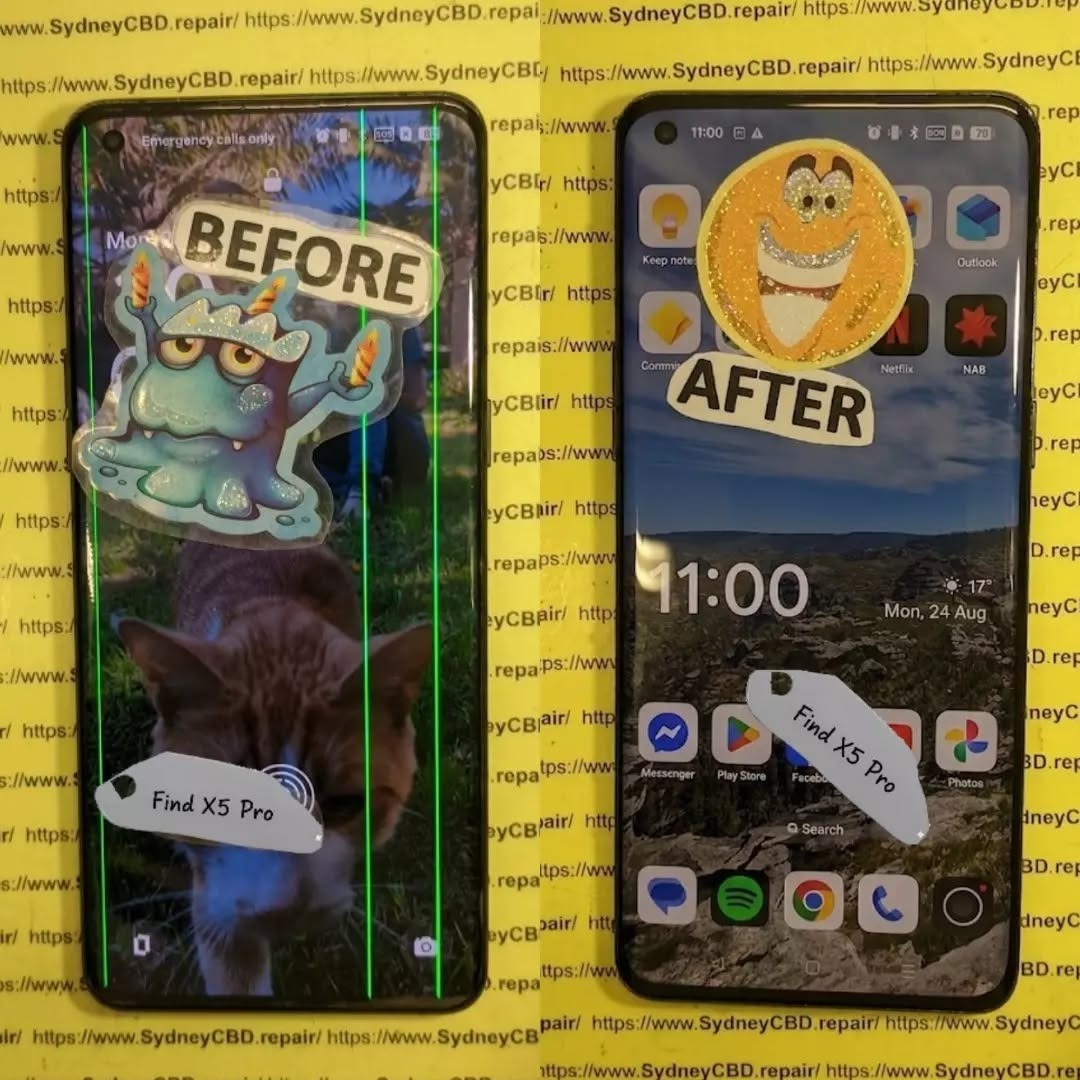
If your phone still vibrates, rings, receives notifications, or connects to a computer while the screen remains black, the problem may be concentrated in the display assembly rather than the entire phone. Likewise, a green line that remains visible after restarting the device can indicate a hardware-related OLED panel problem.
This guide explains how to diagnose these symptoms safely, distinguish software glitches from physical display damage, and determine when professional repair is the sensible next step.
Understanding the OPPO Find X5 Pro Display
The first step in diagnosing a display problem is understanding what you’re dealing with.
The OPPO Find X5 Pro uses a curved AMOLED display. Its official specifications list a 6.7-inch panel, 3216 × 1440 resolution, 10-bit colour depth, and an adaptive refresh rate that can operate up to 120Hz. OPPO also highlights its 1 Billion Colour Bionic Display technology and 8192-level brightness control. (OPPO)
That technology produces an excellent viewing experience, but an AMOLED panel isn’t indestructible.
A modern smartphone display consists of several layers and components working together. Depending on the exact fault, damage can affect:
- The outer protective glass
- Touch-sensitive layers
- The AMOLED/OLED panel
- Display driver circuitry
- Flexible display cables
- Connectors
- Power circuitry
- Mainboard display components
- Software responsible for rendering images
A phone can therefore have a display that looks physically acceptable but has internal damage.
For example, a small impact near the edge of a curved screen may damage the panel underneath the glass. You might initially notice only a tiny line or flicker. Over time, however, additional pixels may stop working.
On the other hand, a phone that suddenly goes black after a fall may have suffered connector damage, panel damage, or a failure in the display power circuit.
That’s why simply looking at the glass isn’t always enough.
Why AMOLED Damage Can Look Different
AMOLED technology produces light at the individual pixel level. This means panel damage can create distinctive symptoms.
A damaged OLED panel might show:
- Green or pink lines
- Black spots
- Flickering
- Partial screen failure
- Brightness abnormalities
- Unusual colour patches
- Ghost-like images
- A completely black display
The symptom can also change depending on how much pressure the phone has experienced.
For example, if the display briefly works when the phone is flexed or squeezed, that’s not a sign that pressing the device is a good repair method. Instead, it may indicate an unstable internal connection or damaged panel.
In short, don’t press, bend, twist, or heat the phone to make the display work again.
That can turn a repairable fault into a more serious one.
1. Common Causes of Black Screen And Green Line Glitches
When diagnosing black screen and green line glitches on damaged OPPO Find X5 Pro displays, technicians generally begin by establishing what happened immediately before the problem appeared.
Accidental Drops and Impacts
Drops are among the most obvious causes.
The Find X5 Pro has a premium curved screen, and an impact can transfer force through the glass into the display assembly. Even when there isn’t a dramatic crack, the AMOLED panel underneath can be affected.
A drop onto:
- A corner
- A hard floor
- The screen surface
- The frame
- A raised object
can produce different forms of damage.
A phone may continue operating normally while the display develops a green line or black section.
Pressure Damage
Pressure can be just as troublesome as an obvious drop.
Sitting on the phone, carrying it tightly in a pocket, or placing heavy objects on it can put stress on the curved panel.
This type of damage may initially appear as a thin line or flickering area.
Liquid Exposure
The OPPO Find X5 Pro has an IP68 rating under specified laboratory conditions, but water resistance isn’t the same as permanent waterproofing. OPPO itself describes the device as water and dust resistant. (OPPO)
Seals can deteriorate with age, previous repairs, impacts, or physical wear.
If the display problem appeared after liquid exposure, avoid repeatedly charging or powering the phone until it has been assessed.
Heat and Component Failure
Heat doesn’t automatically mean a screen is damaged, but excessive heat can contribute to electronic instability.
If a green line appears alongside:
- Severe overheating
- Random restarts
- Charging problems
- Display flickering
- Battery swelling
the device should be inspected rather than repeatedly used.
Previous Screen Repair
A previous repair can also be relevant.
If the phone has already had a display replaced, possible causes include:
- Damaged flex cable
- Poor connector seating
- Incompatible replacement part
- Installation damage
- Contamination around the connector
- Defective replacement panel
This doesn’t mean every replacement screen is problematic. It simply means repair history should form part of the diagnosis.
2. Diagnosing a Completely Black OPPO Find X5 Pro Screen
A black screen doesn’t necessarily mean the entire phone has failed.
Before assuming the display needs replacement, determine whether the device itself is still operating.
Step 1: Check for Signs of Life
Try calling the phone from another device.
Listen for:
- Ringing
- Vibration
- Notification sounds
- Charging sounds
- Haptic feedback
If the phone responds but the screen stays black, that’s useful diagnostic information.
It suggests that the motherboard and operating system may still be functioning.
Step 2: Perform a Forced Restart
A temporary system crash can make a perfectly functional display appear dead.
Use the manufacturer’s recommended restart procedure for your particular software version and device configuration.
If the phone restarts and the screen returns to normal, the original problem may have been software-related.
If the display remains completely black, continue with hardware-focused checks.
Step 3: Connect a Charger
Connect the phone to a known-good charger and cable.
Allow some time for charging.
However, don’t assume that a black screen automatically means the battery is empty. If the phone produces other signs of operation, the display itself may be the problem.
Step 4: Look for Faint Images
In a darker environment, inspect the screen carefully.
Don’t use excessive pressure.
If you can barely see an image under certain lighting conditions, the display may have a brightness or panel problem rather than a total software failure.
Step 5: Check for Recent Physical Damage
Think about what happened immediately before the failure.
Did the phone:
- Fall?
- Get squeezed?
- Get wet?
- Become unusually hot?
- Receive a previous repair?
- Develop a line before going black?
The timeline can provide valuable diagnostic evidence.
3. Diagnosing Green Line Glitches on the Display

A green line can be alarming because it often appears suddenly.
The most important question is whether the line is present across different screens and after restarting the phone.
A Persistent Green Line
If a green line appears:
- On the lock screen
- In apps
- During startup
- After restarting
- At different brightness levels
there’s a stronger reason to suspect a display hardware issue.
A line that remains in exactly the same location is particularly important to document.
A Temporary Green Line
If the line appears briefly and disappears, possible causes can include:
- Temporary software rendering issues
- Display-driver instability
- A loose or compromised connection
- An emerging panel fault
Further testing is needed before deciding on a repair.
Take a Screenshot
A useful diagnostic trick is taking a screenshot while the green line is visible.
Then view that screenshot on another device.
If the line appears in the screenshot, the issue may involve software or the rendered image.
If the screenshot looks normal elsewhere while the physical phone still shows the green line, that points more strongly toward the physical display path.
This test isn’t perfect, but it’s useful evidence.
4. Software Problems Versus Hardware Display Damage
Not every display problem requires a screen replacement.
That’s why diagnosis matters.
| Symptom | Possible Software Cause | Possible Hardware Cause |
|---|---|---|
| Temporary flicker | Yes | Yes |
| Persistent green line | Less likely | More likely |
| Completely black screen | Yes | Yes |
| Screen works after restart | Possible | Possible |
| Cracked glass with no image | Unlikely | Very likely |
| Touch works but image doesn’t | Unlikely | Likely |
| Green line after impact | Unlikely | Strong possibility |
| Problem only in one app | Possible | Less likely |
| Display changes when physically moved | Unlikely | Possible |
This table isn’t a substitute for professional testing. It simply helps narrow down the possibilities.
Software Troubleshooting Worth Trying
Before paying for a repair, reasonable software checks can include:
- Restarting the phone.
- Installing available system updates when the display remains usable.
- Checking whether the issue occurs in different applications.
- Testing display behaviour at different brightness levels.
- Taking screenshots.
- Removing recently installed software if the problem began after an app installation.
- Backing up important data.
If the phone has obvious physical damage and the display remains faulty across the operating system, don’t waste hours repeatedly resetting it.
A factory reset won’t repair a physically damaged OLED panel.
5. Safe Troubleshooting for Black Screen Problems
When a display is damaged, the goal is to gather information without making the problem worse.
Avoid Pressing the Screen
It can be tempting to press around a green line or black area to see whether it disappears.
Don’t.
Pressure can damage the OLED layers or cause cracks to spread.
Avoid DIY Heating Methods
Online repair videos sometimes suggest heating a phone to manipulate adhesives or connections.
That’s a job for trained technicians using controlled equipment.
A household hair dryer doesn’t provide the precision needed for professional display work.
Avoid Opening the Phone Without Experience
The Find X5 Pro has a carefully assembled internal structure.
Opening the device incorrectly can damage:
- Back-cover materials
- Flex cables
- Wireless charging components
- Battery
- Display connectors
- Water-resistant seals
If you’re not experienced with smartphone repair, professional diagnosis is safer.
Back Up Your Data
If the display still works intermittently, back up your important information immediately.
Prioritize:
- Photos
- Contacts
- Messages
- Documents
- Authentication information
- Important application data
A display that works today may stop working completely tomorrow.
6. When Does the OPPO Find X5 Pro Need a Screen Replacement?
A screen replacement may be appropriate when the AMOLED panel itself has suffered physical damage.
Common signs include:
- Persistent green lines
- Large black areas
- No image despite phone activity
- Severe flickering
- Display bleeding
- Dead sections of the panel
- Touch and image failure after impact
- Cracked display combined with visual problems
The key point is that the entire display assembly may need replacement even when the outer glass isn’t badly cracked.
Glass Damage Versus Display Damage
These are not always the same thing.
Glass-only damage may leave:
- Image quality normal
- Touch function normal
- No lines
- No black areas
Panel damage may cause:
- Lines
- Flickering
- Black patches
- Missing image
- Touch problems
- Colour distortion
If you have both cracked glass and display symptoms, replacing only the outer glass generally isn’t enough.
7. What Happens During a Professional Display Diagnosis?
A professional repair technician should diagnose the device before replacing expensive components.
A typical assessment may include:
Visual Inspection
The technician checks the:
- Frame
- Display
- Back cover
- Camera area
- Charging port
- Signs of liquid exposure
Functional Testing
The phone can be checked for:
- Power
- Charging
- Touch
- Display brightness
- Colours
- Cameras
- Speakers
- Microphones
- Buttons
- Connectivity
Connector Inspection
The display connection may be inspected for visible damage or contamination.
Test Display
Where appropriate, a known-good test display can help determine whether the original panel is responsible for the problem.
This is one of the most useful diagnostic methods because it separates display faults from motherboard-related faults.
Mainboard Assessment
If a test display doesn’t solve the issue, technicians may investigate display power and board-level circuitry.
That’s where professional tools and experience become especially valuable.
8. Choosing a Quality Replacement Display
If the diagnosis confirms panel failure, the replacement component matters.
A poor-quality screen can create new problems, including:
- Inaccurate colours
- Lower brightness
- Poor touch response
- Uneven illumination
- Reduced refresh performance
- Compatibility problems
- Premature failure
For a premium device such as the Find X5 Pro, the display isn’t just a basic glass panel. OPPO’s official specifications emphasize its high-resolution AMOLED technology, 10-bit colour capability and adaptive refresh rate. (OPPO)
Ask the repair provider what type of replacement component will be installed and what warranty applies.
A reputable repair service should also explain whether the repair affects any water-resistance characteristics.
Warranty Matters
A written repair warranty provides useful protection if the replacement component develops a fault.
Before approving a repair, ask:
- How long is the repair warranty?
- Does it cover the display?
- Are labour charges covered?
- What happens if the replacement screen develops a line?
- Is accidental damage excluded?
- Will the device be tested before collection?
Clear answers are a good sign of professional repair practices.
9. Protecting Your Data Before a Screen Repair
Data protection is often overlooked when people focus on the broken display.
If the phone is still usable, back it up before handing it over.
If the display is only partially functional, you may still be able to transfer important files.
If the display is completely black, recovery options depend on whether the phone remains operational and what security features are enabled.
Don’t Automatically Factory Reset
A factory reset erases user data.
It doesn’t fix a physically damaged display.
Therefore, don’t reset the phone simply because the screen is black unless there is a specific reason to do so and your important information has already been backed up.
Use Official Support Where Appropriate
OPPO provides regional support and service-centre information. Its Philippines support site includes service-centre and warranty resources, while OPPO’s International Warranty Service information specifically lists the Find X5 series among supported products in applicable markets. (OPPO Support)
10. Preventing Future Green Lines and Black Screens
You can’t eliminate every possible display failure, but you can reduce avoidable damage.
Use a Protective Case
A good case should provide protection around the phone’s corners and edges.
This is especially important for a curved display.
Add Screen Protection
A suitable screen protector can help reduce scratches and minor surface damage.
However, no protector guarantees protection against a major impact.
Avoid Extreme Pressure
Don’t keep your phone underneath heavy objects.
Also avoid placing it in a pocket where it can be heavily compressed.
Keep the Phone Away From Unnecessary Heat
Don’t leave the phone in direct sunlight for long periods or expose it to avoidable high temperatures.
Deal With Damage Early
If a green line appears after an impact, don’t wait for the screen to become completely black.
Early diagnosis can help determine whether the issue is limited to the display or accompanied by other damage.
11. When Should You Stop Troubleshooting?
There’s a point where continued troubleshooting isn’t productive.
Consider professional assessment if:
- The screen remains black after restarting.
- The phone responds to calls but shows no image.
- A green line remains after rebooting.
- The problem began immediately after a drop.
- The screen flickers continuously.
- Touch works inconsistently.
- The display has black patches.
- The phone has been exposed to liquid.
- A previous repair was performed.
- The device becomes unusually hot.
In particular, a black screen combined with physical impact should be treated as a hardware problem until testing proves otherwise.
Trying random internet fixes can sometimes make things worse.
12. Black Screen And Green Line Repair: A Practical Decision Guide
Here’s a simple way to approach the problem.
| Situation | Recommended Next Step |
|---|---|
| Phone works normally after restart | Monitor and check software |
| Green line disappears after restart | Investigate software first |
| Green line remains everywhere | Professional display diagnosis |
| Phone rings but screen stays black | Display and connector diagnosis |
| Screen broke after a drop | Hardware inspection |
| Display is black after liquid exposure | Stop unnecessary use and seek inspection |
| Touch works but image doesn’t | Display diagnosis |
| Previous screen repair was performed | Check replacement and connections |
| Phone is hot and display is failing | Stop use and seek professional assessment |
This approach saves time because it starts with the simplest explanations before moving toward component-level diagnosis.
Frequently Asked Questions
1. Why does my OPPO Find X5 Pro have a green line?
A persistent green line can be associated with an OLED display fault, particularly when it remains after restarting and appears across multiple screens. Physical impact, pressure, panel failure, or internal display-related damage can be possible causes.
2. Can a software update remove a green line?
It depends on the cause. If the line is produced by a software rendering problem, an update may help. However, a physical OLED panel fault won’t normally be repaired by a software update.
3. My OPPO Find X5 Pro screen is black but the phone still rings. What does that mean?
If the phone rings or vibrates but doesn’t display an image, the operating system may still be functioning. The display assembly, connection, display power circuit, or another hardware component may need to be tested.
4. Can a black screen be fixed without replacing the display?
Sometimes. If the problem is caused by a temporary software crash or a connection issue, a display replacement may not be necessary. If the AMOLED panel itself is physically damaged, however, replacement is commonly required.
5. Should I press the screen when the green line appears?
No. Pressing or bending the display can worsen internal damage. It is better to document the symptom and have the device professionally assessed.
6. Does a cracked screen always need replacement?
Not necessarily. A cracked outer glass surface can sometimes leave the display and touch functions working. However, if the OLED panel has lines, black areas, flickering, or image failure, a more comprehensive display repair may be required.
7. Is the OPPO Find X5 Pro display repairable after a drop?
It can often be repaired, but the exact solution depends on the damage. A technician should determine whether the issue involves the screen assembly, connector, frame, or motherboard before recommending a replacement.
8. Will a factory reset fix a black screen?
A factory reset is not a reliable solution for physical display damage. If the screen became black after a drop or shows other hardware symptoms, professional diagnosis is more appropriate.
9. Can water damage cause display problems?
Yes. Liquid exposure can affect electronic components and connections. Although the Find X5 Pro has an IP68 rating under specified conditions, water resistance can be affected by physical damage, wear, age, or previous repairs. (OPPO)
10. Should I repair the phone immediately after a green line appears?
Prompt diagnosis is sensible, particularly if the line appeared after an impact or is accompanied by flickering, black areas, touch problems, or overheating. Getting the issue assessed early can help identify the actual cause before additional symptoms develop.
Conclusion

Diagnosing black screen and green line glitches on damaged OPPO Find X5 Pro displays requires more than simply looking at the glass.
The phone’s premium AMOLED panel contains multiple components that can fail independently. A green line may indicate a display-panel problem, while a completely black screen can result from software instability, display failure, connector damage, or another hardware issue.
Start with safe checks such as restarting the device, checking whether it responds to calls, testing the charger, and documenting when the problem occurs. If the issue began after a drop, pressure, liquid exposure, or previous repair, hardware damage should receive particular attention.
Most importantly, avoid pressing, bending, heating, or opening the phone without appropriate tools and experience.
If the display remains black or the green line persists, professional diagnosis can establish whether the problem requires a screen replacement or whether another component is responsible. Choosing a repair provider that explains the diagnosis, uses an appropriate replacement component, and offers a clear repair warranty can also help protect your investment.
The OPPO Find X5 Pro was designed around a high-resolution 120Hz AMOLED display, so restoring the correct display performance requires attention to both the replacement component and the repair process. (OPPO)
A damaged screen doesn’t necessarily mean your phone is beyond repair. With the right diagnosis and careful repair, many display problems can be resolved while preserving the rest of the device.
Final Repair Checklist
Before approving an OPPO Find X5 Pro display repair, ask:
- Has the phone been fully diagnosed?
- Is the problem definitely the display?
- Has the connector been inspected?
- Will the replacement panel be tested?
- What warranty is included?
- Will touch and display functions be tested after repair?
- Will cameras, speakers, charging, and buttons be checked?
- Has the condition of the frame been assessed?
- Will the technician explain any limitations regarding water resistance after repair?
Taking a few minutes to ask these questions can save you from unnecessary expense and help ensure that the underlying problem—not just the visible symptom—is properly addressed.
David from Sydney CBD Repair Centre – The Best place to fix mobile phones as 7 Years In A Row! Top Mobile Phone Repair In Sydney. More than 2000 Positive Reviews on Google and Same Day Repairs.
We take pride in delivering exceptional repair services for all major phone brands including Apple, Samsung, Google, and more. Our expert technicians use only genuine parts and offer 90days warranty on repairs. Located in the heart of Sydney CBD, we’re your one-stop solution for all mobile device repairs.
Our commitment to excellence has earned us the trust of thousands of satisfied customers. Whether it’s a cracked screen, battery replacement, or water damage repair, we handle it all with professional care and expertise. Walk in today and experience why we’re Sydney’s #1 choice for mobile phone repairs.
Visit us for:
✓ Same Day Express Repairs
✓ Genuine Parts Guarantee
✓ Professional Technicians
✓ Competitive Pricing
✓ 2000+ 5-Star Google Reviews
✓ 7-Time Award Winner for Best Phone Repairs
Sydney CBD Repair Centre – Where Quality Meets Reliability.
Call : +61280114119
Website: Sydney CBD Repair Centre

