




Five Critical Mistakes That Can Ruin Your Samsung Galaxy A16 5G Screen Replacement

Five Critical Mistakes That Can Ruin Your Samsung Galaxy A16 5G Screen Replacement + 5 Expert Fixes
Introduction
A cracked phone screen is more than an annoying cosmetic problem. It can make everyday tasks difficult, expose the display to additional damage, and eventually affect the way the device responds to touch. When it comes to a Samsung Galaxy A16 5G screen replacement, the quality of the part and the repair process both matter.
The Galaxy A16 5G uses a 6.7-inch FHD+ Super AMOLED display with a resolution of 1080 × 2340 and a refresh rate of up to 90Hz. Samsung also lists the device as IP54-rated for dust and water resistance.
That means replacing its screen isn’t simply a matter of removing broken glass and sticking another panel into place. The technician needs to select a compatible display, handle internal components carefully, align the new assembly correctly, and thoroughly test the phone before handing it back.
Unfortunately, several common mistakes can turn a straightforward repair into a much bigger problem.
Below are five critical mistakes to watch for, along with practical ways to avoid them.
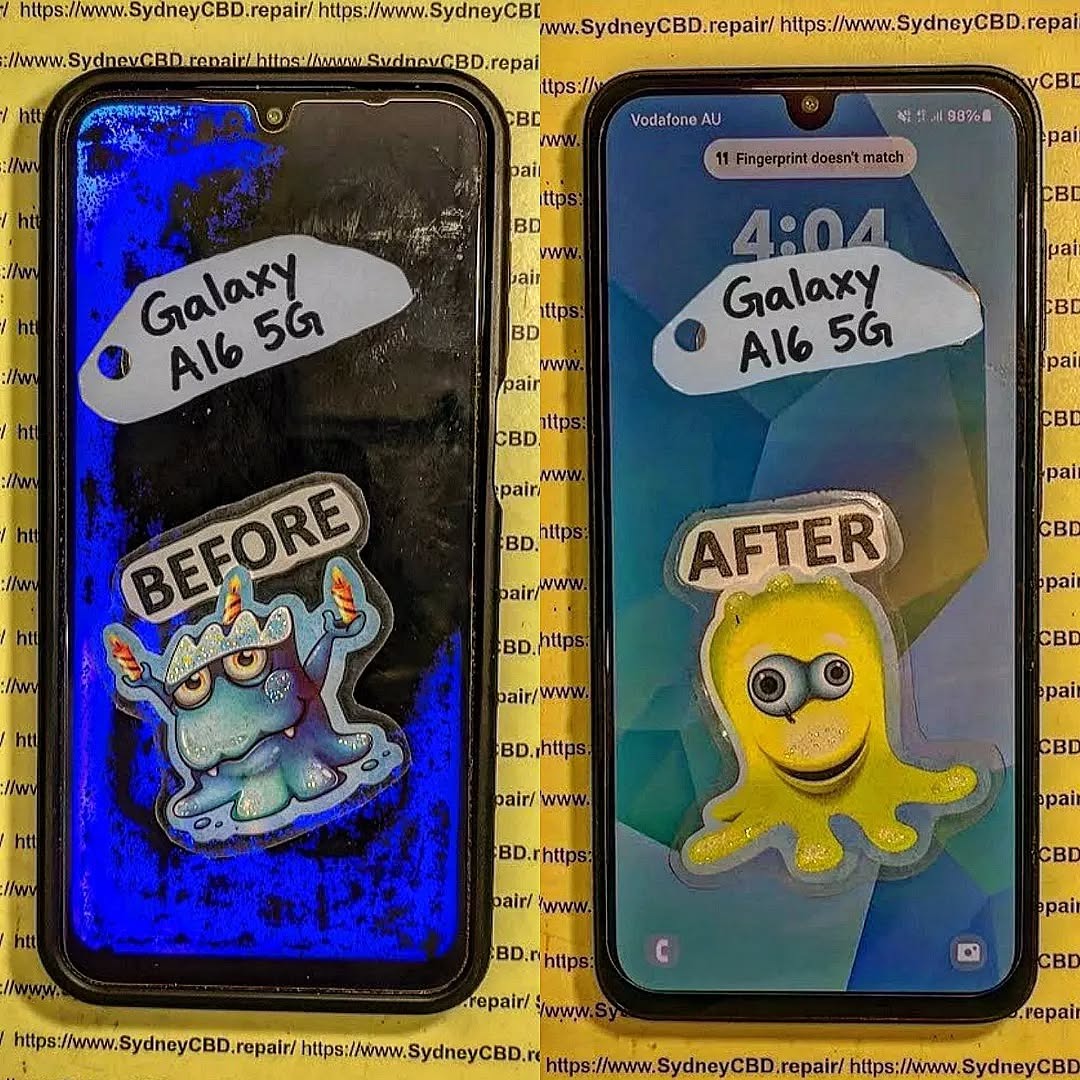
1. Choosing the Wrong Replacement Screen
One of the biggest mistakes during a Samsung Galaxy A16 5G screen replacement is choosing a replacement part based solely on price.
A screen can physically resemble the original and still differ in important ways. Compatibility involves much more than screen size. The display technology, connector, frame design, touch layer, resolution, refresh rate, and software compatibility can all affect the finished repair.
Samsung’s specifications identify the Galaxy A16 5G display as a 6.7-inch FHD+ Super AMOLED panel with a 90Hz maximum refresh rate.
A replacement that doesn’t properly match the original specifications may result in problems such as:
- Poor colour reproduction
- Reduced brightness
- Unresponsive areas of the touchscreen
- Inconsistent touch sensitivity
- Display flickering
- Incorrect screen fit
- Lower refresh-rate performance
- Uneven bezels
- Premature screen failure
In other words, a cheap screen isn’t necessarily a bargain.
1.1 Why Screen Specifications Matter
The Galaxy A16 5G’s Super AMOLED display is an important part of its viewing experience. OLED-based screens produce their own light at the pixel level, which contributes to strong contrast and deep blacks.
A replacement screen using a different technology may technically work while providing a noticeably different experience.
This is why a reputable technician should identify the exact device variant before ordering or installing the part.
Don’t rely solely on the phrase “Galaxy A16.” Samsung sells both LTE and 5G versions, and regional model variations can also exist.
1.2 Genuine vs Low-Quality Replacement Parts
Not every aftermarket display is automatically bad. However, quality can vary considerably between suppliers and grades.
A reliable repair business should be able to explain what type of replacement screen is being installed and what warranty applies to the part.
Ask questions such as:
- Is this part specifically compatible with the Galaxy A16 5G?
- What display technology does it use?
- Does the touchscreen support normal multi-touch operation?
- What warranty is provided?
- Is the replacement tested before installation?
A transparent answer is a good sign.
1.3 How to Verify the Correct Part
Before a repair begins, confirm the exact model number where possible. Samsung’s Philippines listing, for example, identifies a Galaxy A16 5G model as SM-A166P.
However, model numbers can vary by market and configuration.
Therefore, don’t simply order a screen because an online listing says “A16 5G.” Verify the model number printed on the device, packaging, software information, or other reliable documentation.
1.4 Expert Fix: Match the Part Before the Repair
The simple solution is to verify compatibility before removing the damaged screen.
A professional repair workflow should include:
- Confirming the exact phone model
- Checking the screen specifications
- Inspecting the replacement part
- Testing the replacement when practical
- Confirming warranty terms
- Using appropriate installation materials
It might take a few extra minutes, but that small investment can prevent hours of troubleshooting later.
2. Ignoring the Phone’s Existing Damage
A broken screen doesn’t always mean the screen is the only damaged component.
A phone may have been dropped hard enough to damage its frame, internal connectors, battery, cameras, or other components. Installing a new display without checking those areas can produce disappointing results.
Imagine replacing the screen on a phone whose frame is slightly bent. The new panel may initially appear perfect. However, the uneven frame can place stress on the display assembly or prevent it from sitting correctly.
That’s a recipe for trouble.
2.1 Inspecting the Frame
The frame provides the physical structure that supports the screen assembly.
Before installation, the technician should check for:
- Bends
- Dents
- Cracks
- Severe impact marks
- Warping around the display opening
- Debris or old adhesive
If the frame is badly distorted, simply installing a new screen may not provide a durable repair.
A professional should explain the problem before proceeding rather than quietly installing a replacement that may fail because of underlying structural damage.
2.2 Checking the Display Connector
The display connector and flex cable are critical to the repair.
A connector that is dirty, damaged, misaligned, or incompletely seated can create symptoms that look like a faulty replacement screen.
Possible symptoms include:
- No image
- Intermittent display
- Flickering
- Touch problems
- Random screen shutdown
- Display artefacts
This is why experienced technicians don’t immediately blame the replacement part when something doesn’t work.
They inspect the connection and surrounding components first.
2.3 Battery and Internal Safety
Opening a smartphone requires careful handling of internal components.
The Galaxy A16 5G has a 5,000mAh battery and a non-removable battery design.
A technician should therefore use appropriate tools and procedures when working around the battery and other internal components.
Customers should also avoid attempting a repair using improvised tools or excessive force. A screen replacement isn’t the ideal project for a kitchen knife, metal pry tool, or hairdryer.
When the wrong tool is used, damage can extend beyond the original cracked screen.
2.4 Expert Fix: Diagnose Before Replacing
A good repair starts with diagnosis.
Before installing the new screen, inspect:
- The frame
- Display connector
- Flex cables
- Battery area
- Cameras
- Sensors
- Charging port
- Signs of liquid or corrosion
This approach helps distinguish screen damage from other faults and gives the customer a clearer understanding of the repair.
3. Using Poor Installation Technique
Even the correct replacement screen can fail if it’s installed poorly.
This is one of the most overlooked parts of a Samsung Galaxy A16 5G screen replacement. People often focus on the quality of the replacement part while forgetting that installation technique is equally important.
A screen must sit correctly, connect securely, remain free of dust, and receive appropriate adhesive support.
3.1 The Danger of Excessive Heat
Heat can be useful during smartphone repairs because it can soften certain adhesives.
But more heat isn’t automatically better.
Excessive or poorly controlled heat can create unnecessary risk for components, adhesives, batteries, and other parts inside the phone.
A professional technician should use suitable equipment and controlled procedures rather than applying extreme heat simply to make the job quicker.
The goal isn’t to rush the repair.
The goal is to separate and install components safely.
3.2 Dust and Debris
Tiny particles can cause surprisingly noticeable problems.
A speck of dust trapped between layers of a display assembly can create a visible spot that remains after the phone is reassembled.
Dust can also interfere with adhesive bonding and create uneven areas.
Before final assembly, the workspace and phone should therefore be clean and carefully inspected.
This is one of those little details that separates a rushed repair from a professional one.
3.3 Incorrect Adhesive
Adhesive plays an important role in keeping the display assembly securely positioned.
Too much adhesive can create mess, interfere with components, or make future repairs unnecessarily difficult.
Too little can allow the screen to lift or move.
Using an inappropriate adhesive can also create problems with alignment and long-term durability.
The technician should use materials appropriate for the phone and the repair method.
3.4 Poor Alignment
A screen that’s slightly misaligned may look acceptable at first glance, but small positioning errors can affect:
- Bezel symmetry
- Touch operation
- Button clearance
- Camera alignment
- Proximity sensor performance
- Overall structural fit
The display should be positioned carefully before the final bonding process.
3.5 Expert Fix: Follow a Controlled Installation Process
A reliable workflow generally involves:
- Preparing a clean workspace
- Disconnecting components safely
- Removing damaged parts carefully
- Cleaning old adhesive appropriately
- Inspecting the frame
- Checking the replacement display
- Testing functionality
- Aligning the replacement precisely
- Applying suitable adhesive
- Allowing appropriate bonding time
- Performing a final inspection
The details matter.
A phone isn’t properly repaired just because the new screen lights up.
4. Skipping Post-Repair Testing
Another critical mistake is handing the phone back immediately after the new screen turns on.
A display that produces an image isn’t necessarily a fully functional display.
Post-repair testing should cover multiple functions.
The Galaxy A16 5G includes a range of sensors and features that can be affected by repair work, so testing should go beyond simply checking whether the screen displays the home screen. Samsung lists features including a fingerprint sensor, gyroscope, accelerometer, geomagnetic sensor, light sensor, and proximity sensing among the device’s hardware features.
4.1 Touchscreen Testing
The touchscreen should be tested across the entire display.
A technician can check:
- Top edge
- Bottom edge
- Left edge
- Right edge
- Centre
- Corners
- Multi-touch response
This can reveal dead zones or areas with inconsistent sensitivity.
If a repair shop doesn’t test the screen thoroughly, you might discover a problem only after returning home.
That’s not ideal.
4.2 Display Testing
The new panel should also be inspected for:
- Dead pixels
- Bright spots
- Dark spots
- Uneven brightness
- Colour abnormalities
- Flickering
- Lines
- Image retention or other visible defects
Testing against different backgrounds can make defects easier to spot.
A black screen can reveal certain bright-pixel problems, while white or solid-colour backgrounds can make other imperfections more obvious.
4.3 Checking Display Refresh Performance
Samsung lists the Galaxy A16 5G with a maximum display refresh rate of 90Hz.
After replacement, appropriate settings and supported functionality should be checked.
If scrolling feels noticeably different, the technician should investigate rather than simply assuming the difference is normal.
4.4 Sensor and Camera Testing
The front-facing camera, proximity sensing, fingerprint functionality, and other relevant features should be checked after the repair.
For example, if a sensor area is blocked, incorrectly positioned, or affected by installation, the phone may behave differently during calls or other everyday tasks.
Testing these functions before returning the phone helps identify problems while the repair is still on the workbench.
4.5 Expert Fix: Use a Post-Repair Checklist
A professional checklist can include:
| Test | What to Check |
|---|---|
| Display | Brightness, colours, pixels and image quality |
| Touch | Full-screen response and multi-touch |
| Refresh | Expected supported refresh behaviour |
| Front camera | Image quality and operation |
| Proximity | Behaviour during calls |
| Fingerprint | Unlock and recognition |
| Charging | USB-C charging operation |
| Speakers | Audio output |
| Buttons | Power and volume operation |
| Wi-Fi/mobile network | Connectivity after reassembly |
The exact tests can vary depending on the repair and the phone’s condition.
The important point is simple: test before you return the device.
5. Forgetting About Water and Dust Resistance
The fifth mistake is assuming that a repaired phone automatically retains exactly the same resistance to environmental exposure as it had before repair.
Samsung states that the Galaxy A16 5G has an IP54 rating for dust and water resistance.
However, opening a smartphone for repair changes the original factory assembly.
That’s why customers shouldn’t assume that a repaired device can be treated exactly like a brand-new, unopened phone.
5.1 Why Sealing Matters
The screen assembly and adhesive contribute to the physical construction of the device.
During replacement, the original bonding materials may be removed or disturbed.
If the new screen isn’t installed and sealed correctly, gaps can potentially develop.
That doesn’t mean every screen replacement automatically destroys all resistance. It means the repair process should account for the phone’s original construction rather than ignoring it.
5.2 Don’t Assume the Original Rating Remains
This is particularly important for customers who regularly use their phone around:
- Rain
- Kitchens
- Swimming pools
- Beaches
- Bathrooms
- Humid environments
Even if the phone worked perfectly before the repair, the repaired device shouldn’t be treated as invulnerable to moisture.
A careful repair business should explain any limitations associated with the repair and avoid making unrealistic promises.
5.3 Aftercare Following Repair
Once the screen replacement is complete, protect the phone while the repair settles according to the technician’s instructions.
Practical precautions include:
- Avoid unnecessary moisture exposure
- Use a protective case
- Add a quality screen protector where appropriate
- Don’t place the phone under heavy pressure
- Avoid extreme temperatures
- Watch for screen lifting or unusual gaps
If the display starts separating from the frame, return to the repair provider promptly.
5.4 Expert Fix: Ask About the Repair Warranty
Before approving a repair, ask what warranty covers the replacement.
Important questions include:
- How long is the warranty?
- Does it cover display defects?
- Does it cover touch problems?
- What damage is excluded?
- Is accidental damage excluded?
- What should I do if the screen develops a fault?
Clear warranty terms give you a better understanding of what happens if a genuine repair-related issue appears later.
Why Professional Samsung Galaxy A16 5G Screen Replacement Matters
The Galaxy A16 5G is designed around a relatively large 6.7-inch Super AMOLED display, making the screen a major part of the device experience. Samsung also specifies FHD+ resolution and up to 90Hz refresh capability for the display.
Because of that, replacing the screen shouldn’t be treated as a purely cosmetic repair.
The replacement needs to preserve as much of the phone’s intended functionality as possible.
Professional repair is particularly useful when:
- The screen is completely black
- Touch doesn’t work
- The glass is badly shattered
- The frame is damaged
- The display has lines or dark areas
- The phone has suffered a major impact
- You don’t have suitable repair tools
- You want warranty-backed workmanship
Samsung’s official product information is also useful when confirming the specifications of your particular device before repair.
A Simple Pre-Repair Checklist
Before taking your phone to a repair shop, make a quick note of its condition.
Back Up Important Data
Although a screen replacement doesn’t normally require erasing your data, backing up important information is always sensible before hardware repair.
Record Existing Problems
If possible, note whether the phone currently has:
- Working touch
- Working cameras
- Working speakers
- Working charging
- Working fingerprint recognition
- Visible display lines
- Random shutdowns
This makes it easier to compare the phone before and after repair.
Photograph the Device
Taking photographs of the phone before handing it over can document its pre-repair physical condition.
It’s a simple step that can prevent misunderstandings.
What Makes a Quality Screen Repair?
A quality repair isn’t determined by one factor.
Instead, look for a combination of:
- Correct part identification
- Experienced workmanship
- Proper tools
- Clean installation
- Careful alignment
- Comprehensive testing
- Clear warranty terms
- Honest communication
A repair shop that explains the process and identifies possible risks is generally easier to work with than one that promises an instant fix without asking questions.
Samsung Galaxy A16 5G Screen Replacement Cost: What Affects the Price?

Repair pricing can vary depending on several factors.
The major considerations include:
- Replacement screen quality
- Part availability
- Local labour costs
- Device condition
- Frame damage
- Additional component damage
- Warranty coverage
- Repair turnaround time
A very low quote deserves a few questions.
Ask what part is being used and whether the quoted price includes installation and warranty.
The cheapest repair and the lowest total cost aren’t necessarily the same thing. A poor-quality replacement that fails shortly afterward can result in paying for the repair twice.
Frequently Asked Questions
1. How long does a Samsung Galaxy A16 5G screen replacement take?
The exact time depends on the repair shop, parts availability, damage level, and workload. A straightforward screen replacement may be completed relatively quickly, while additional frame or internal damage can increase the repair time.
Always ask the repair provider for an estimated turnaround before authorising the work.
2. Does the Galaxy A16 5G use an AMOLED screen?
Yes. Samsung specifies a 6.7-inch FHD+ Super AMOLED display for the Galaxy A16 5G. Samsung also lists a maximum refresh rate of 90Hz for the model.
3. Should I replace only the cracked glass?
It depends on the type of damage and the repair method available.
If the display and touch layer remain fully functional, some specialised repair processes may address glass damage. However, many repairs involve replacing the complete display assembly.
A technician should inspect the phone before recommending the appropriate approach.
4. Will my data be deleted during a screen replacement?
A normal display replacement doesn’t inherently require deleting the phone’s data. However, hardware repairs always carry some risk, so you should back up important photos, documents, contacts, and other data beforehand.
5. Can I replace the Galaxy A16 5G screen myself?
Technically, smartphone screens can be replaced by experienced DIY technicians. However, the process involves opening the phone and working around delicate internal components.
Without appropriate tools, parts, and experience, a DIY attempt can cause additional damage.
For most users, professional repair is the more straightforward approach.
6. Is every Galaxy A16 screen compatible with the 5G version?
No. You shouldn’t assume that every screen advertised for “Galaxy A16” is compatible with every variant.
The Galaxy A16 family includes different models, including LTE and 5G versions. Samsung’s product listings provide model-specific specifications, so verify the exact model before purchasing a replacement.
7. Will the phone remain water resistant after screen replacement?
You shouldn’t automatically assume that the phone retains its original factory-level resistance after being opened and repaired.
Samsung lists the Galaxy A16 5G as IP54-rated, but repair involves disturbing the device’s original assembly. Ask your technician about sealing and post-repair limitations.
8. What should I do if the replacement screen has a problem?
Contact the repair provider as soon as possible and describe the issue clearly.
Avoid attempting another repair yourself, especially if the phone is still covered by the repairer’s warranty. The provider should inspect the device and determine whether the problem relates to the replacement part, installation, or another component.
Conclusion: Avoiding the Five Critical Screen Replacement Mistakes

A Samsung Galaxy A16 5G screen replacement can restore a damaged phone and make it feel like new again, but the quality of the repair depends on more than simply fitting a new display.
The five major mistakes to avoid are:
- Choosing the wrong replacement screen
- Ignoring existing frame or internal damage
- Using poor installation techniques
- Skipping comprehensive post-repair testing
- Assuming original water and dust resistance is automatically unchanged
The good news is that these problems are largely avoidable.
Start with the correct model and a suitable replacement part. Inspect the phone before installation. Use appropriate tools and materials. Test every important function after the repair. Finally, understand the limitations and warranty associated with the finished repair.
Samsung’s official specifications confirm that the Galaxy A16 5G features a 6.7-inch FHD+ Super AMOLED display and 90Hz refresh capability, making proper display selection especially important.
When in doubt, don’t gamble with a valuable device. Have the phone inspected by an experienced technician who can identify the correct replacement and complete the job carefully.
A cracked screen is frustrating, but with the right part, the right process, and proper testing, it doesn’t have to mean the end of your Galaxy A16 5G.
David from Sydney CBD Repair Centre – The Best place to fix mobile phones as 7 Years In A Row! Top Mobile Phone Repair In Sydney. More than 2000 Positive Reviews on Google.
We take pride in delivering exceptional repair services for all major phone brands including Apple, Samsung, Google, and more. Our expert technicians use only genuine parts and offer 90days warranty on repairs. Located in the heart of Sydney CBD, we’re your one-stop solution for all mobile device repairs.
Our commitment to excellence has earned us the trust of thousands of satisfied customers. Whether it’s a cracked screen, battery replacement, or water damage repair, we handle it all with professional care and expertise. Walk in today and experience why we’re Sydney’s #1 choice for mobile phone repairs.
Visit us for:
✓ Same Day Express Repairs
✓ Genuine Parts Guarantee
✓ Professional Technicians
✓ Competitive Pricing
✓ 2000+ 5-Star Google Reviews
✓ 7-Time Award Winner for Best Phone Repairs
Sydney CBD Repair Centre – Where Quality Meets Reliability.
Call : +61280114119
Website: Sydney CBD Repair Centre

