




Google Pixel 9 Pro XL Cracked Super Actua OLED Screen Replacement Guide

Google Pixel 9 Pro XL Cracked Super Actua OLED Screen Replacement Guide: 11 Essential Steps for a Safe Repair
Introduction
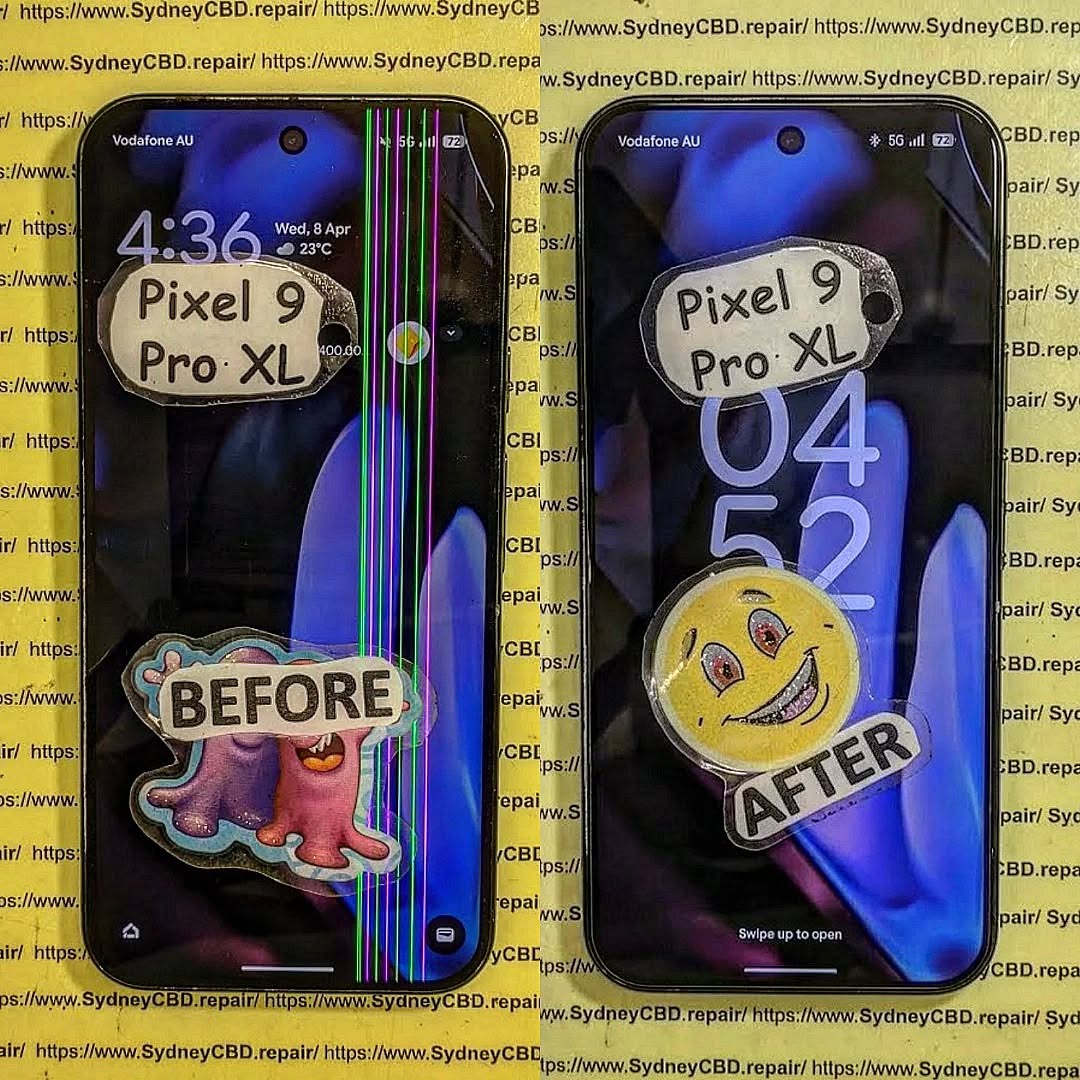
A cracked display can turn an otherwise excellent smartphone into a frustrating daily problem. If you’ve dropped your Google Pixel 9 Pro XL and the glass is shattered, the touchscreen is unreliable, or black spots have appeared across the panel, a Google Pixel 9 Pro XL cracked Super Actua OLED screen replacement may be necessary.
The Pixel 9 Pro XL uses a 6.8-inch Super Actua LTPO OLED display with a 1344 × 2992 resolution and a 1–120Hz Smooth Display. Google lists the panel at up to 2,000 nits for HDR and up to 3,000 nits peak brightness, making the display an important part of the phone’s premium experience.
Because the screen is more than just a piece of glass, replacement isn’t simply a matter of removing the broken surface and installing another panel. The display assembly, touch layer, frame adhesives, connectors, sensors, and calibration all need appropriate attention.
This detailed guide explains what you should know before arranging a repair and how to approach the process safely.
Google Pixel 9 Pro XL Display Specifications at a Glance
Before discussing replacement, it’s useful to understand exactly what you’re repairing.
| Display Feature | Pixel 9 Pro XL |
|---|---|
| Display type | LTPO OLED |
| Marketing name | Super Actua display |
| Screen size | 6.8 inches |
| Resolution | 1344 × 2992 |
| Pixel density | 486 PPI |
| Refresh rate | 1–120Hz |
| Cover glass | Corning Gorilla Glass Victus 2 |
| HDR | Supported |
| HDR brightness | Up to 2,000 nits |
| Peak brightness | Up to 3,000 nits |
| Aspect ratio | 20:9 |
These specifications are based on Google’s published Pixel comparison information.
A replacement screen should therefore be appropriate for the exact Pixel 9 Pro XL model rather than simply being described as a generic “Pixel OLED.”
Why a Cracked Pixel 9 Pro XL Screen Needs Attention
A small crack may seem harmless at first. However, cracks can spread with everyday pressure, temperature changes, or another minor impact.
More importantly, the damage isn’t necessarily limited to the outer glass.
You may eventually notice:
- Touchscreen areas that don’t respond.
- Random or ghost touches.
- Black or purple OLED blotches.
- Green, pink, or white lines.
- Flickering.
- Uneven brightness.
- Dead pixels.
- Display discoloration.
- Reduced visibility in bright environments.
- Glass fragments becoming loose.
- Moisture entering through damaged areas.
If the phone still works, backing up your important data should be one of your first steps.
Google specifically recommends backing up your data before repair and provides a Repair Mode designed to make servicing easier while helping protect personal information.
Glass Damage vs. OLED Damage
Not every cracked screen has the same level of damage.
Cracked Cover Glass
If the image remains perfect and every area of the touchscreen works correctly, the damage may appear primarily cosmetic.
However, a cracked cover doesn’t automatically mean that only the glass can be replaced economically or safely. The construction of modern OLED assemblies means professional repair providers often replace the complete display assembly.
Damaged OLED Panel
OLED damage is more serious.
Look for:
- Black patches.
- Colored vertical or horizontal lines.
- Flickering.
- Missing sections of the image.
- Severe brightness changes.
- Permanent discoloration.
These symptoms generally indicate that the display assembly itself has been compromised.
Touchscreen Damage
Another common failure is a working image with unreliable touch input.
For example, you may be able to see everything clearly but find that taps or swipes fail in one section.
This is particularly inconvenient because even a phone that “turns on normally” can become difficult or impossible to use.
Signs You Should Replace the Display

A Google Pixel 9 Pro XL cracked Super Actua OLED screen replacement becomes more urgent when the damage affects functionality.
Consider arranging professional service if:
- The touchscreen has stopped responding.
- The OLED has developed black spots.
- Lines appear across the display.
- The screen flickers.
- Glass is falling away from the display.
- The crack reaches the edge of the screen.
- The phone registers touches you didn’t make.
- The display becomes difficult to read.
- The damage continues spreading.
- You can see internal components through the damaged area.
If the phone is still usable, don’t assume that means the damage won’t become worse.
What to Do Before Screen Replacement
Preparation can make the repair safer and reduce the risk of losing important information.
1. Back Up Your Data
Back up:
- Photos.
- Videos.
- Contacts.
- Messages.
- Documents.
- App data where applicable.
- Important authentication information.
Google recommends backing up the device before repair.
2. Enable Repair Mode
Where supported, Google recommends using Repair Mode before servicing. This can help technicians diagnose the phone without requiring the normal repair workflow to expose your personal data.
3. Record the Phone’s Condition
Take photographs of the phone before handing it over.
Capture:
- Front.
- Rear.
- Frame.
- Camera area.
- Existing scratches.
- Cracks.
- Any other damage.
This creates a simple record of the device’s condition before service.
4. Check Warranty and Repair Eligibility
Don’t immediately assume you’ll have to pay the full repair price.
Google states that accidental damage generally isn’t covered by its standard warranty, while repair options and coverage depend on location, warranty status, and the type of damage.
Google also currently has an Extended Repair Program for eligible Pixel 9 Pro and Pixel 9 Pro XL devices. The program can provide display replacement at no charge for qualifying devices, subject to eligibility and inspection.
The 11 Essential Stages of a Professional Screen Replacement
A professional technician normally approaches a damaged OLED repair methodically rather than simply swapping parts as quickly as possible.
Stage 1: Initial Inspection
The phone should be examined before opening.
A technician should check:
- Display condition.
- Touch response.
- Frame condition.
- Rear glass.
- Cameras.
- Charging.
- Buttons.
- Signs of liquid damage.
- Previous repairs.
This is important because another damaged component can change the repair requirements.
Stage 2: Data and Device Preparation
The phone should be prepared for service.
Important steps include backing up data and using appropriate repair/privacy features where available.
The technician may also document the device condition.
Stage 3: Power Down
The device should be powered down before internal work begins.
Working around electronic components while the phone remains powered can introduce unnecessary risks.
Stage 4: Opening the Device
Modern smartphones use strong adhesives and tightly fitted components.
Opening a Pixel 9 Pro XL therefore requires appropriate tools and controlled technique.
Trying to force the phone open with an unsuitable tool can damage:
- The frame.
- Internal components.
- Cables.
- Seals.
- The replacement assembly.
Stage 5: Disconnecting the Battery and Display
Once access is obtained, internal connections need to be handled carefully.
The goal is to isolate the damaged display and prevent accidental electrical damage during the replacement.
Stage 6: Removing the Damaged Assembly
The damaged display is separated from the phone.
This stage can be difficult when the glass has shattered extensively because fragments may remain attached to adhesive.
Technicians need to avoid unnecessary force.
Stage 7: Cleaning the Mounting Surface
The old adhesive and debris should be removed from the relevant mounting area.
A clean surface is important because leftover fragments can prevent the replacement assembly from sitting correctly.
Stage 8: Installing the Replacement Display
The replacement screen is positioned carefully.
Alignment matters because a poorly positioned display can create uneven edges, pressure points, or cosmetic problems.
Stage 9: Reconnecting Components
Internal connections are restored before the device is fully closed.
This provides an opportunity to test the replacement before completing the final assembly.
Stage 10: Functional Testing
A professional repair should include testing.
Check:
- Touch sensitivity.
- Brightness.
- Color reproduction.
- Refresh-rate behavior.
- Proximity-related functions.
- Front-facing components.
- Charging.
- Cameras.
- Speakers.
- Microphones.
- Buttons.
Stage 11: Final Inspection
Finally, the phone should be inspected for:
- Display alignment.
- Gaps.
- Adhesive issues.
- Cosmetic damage.
- Touch performance.
- General functionality.
Only after these checks should the repair be considered complete.
Why Professional Repair Can Be Safer
Replacing a modern OLED assembly requires more than basic screwdriver skills.
There are several reasons to use an experienced technician.
Specialized Tools
A repair center can use appropriate opening tools, inspection equipment, adhesive materials, and diagnostic equipment.
Reduced Risk
An experienced technician understands how to work around delicate internal components.
Better Testing
Professional repair centers can test the phone before returning it.
Appropriate Replacement Parts
A reputable provider should be able to explain whether the replacement is an original, authorized, or compatible component and what warranty applies.
Repair Documentation
A professional service may also document the repair and provide warranty information.
If you want to review Google’s official repair options, use its Pixel phone repair support page before choosing a repair route. Google notes that available repair methods vary according to country and device circumstances.
Can You Replace the Pixel 9 Pro XL Screen Yourself?
Technically, self-repair is possible for people with appropriate experience, tools, documentation, and a controlled workspace.
However, there’s an important difference between “possible” and “practical.”
DIY repair can introduce risks such as:
- Damaging internal components.
- Breaking connectors.
- Damaging the frame.
- Installing the display incorrectly.
- Creating touch problems.
- Introducing dust beneath the screen.
- Using unsuitable adhesive.
- Losing water-resistance performance.
- Damaging another component during disassembly.
If you’ve never opened a modern flagship smartphone, professional repair is generally a more controlled approach.
A cracked screen isn’t worth turning into a damaged motherboard.
How to Choose a Pixel 9 Pro XL Screen Replacement
Not all replacement screens should be treated as identical.
Ask the repair provider these questions before approving the work:
| Question | Why It Matters |
|---|---|
| Is the part specifically for Pixel 9 Pro XL? | Prevents incompatible parts |
| What type of display is being installed? | Helps establish expected quality |
| Is the part new or refurbished? | Affects condition and longevity |
| Is there a repair warranty? | Provides protection after service |
| Will the phone be tested afterward? | Confirms functionality |
| Will existing damage be documented? | Clarifies repair condition |
| Is the final price all-inclusive? | Helps avoid surprises |
| Will you explain any additional damage? | Prevents unnecessary work |
A good technician should be comfortable answering these questions.
How Much Does Pixel 9 Pro XL Screen Replacement Cost?
There isn’t one universal price.
The final cost can depend on:
- Location.
- Parts availability.
- Part quality.
- Labor.
- Warranty status.
- Type of damage.
- Additional internal damage.
- Repair provider.
For that reason, be cautious of websites advertising one extremely low price without explaining what part is included.
A very cheap screen can become expensive if poor quality causes additional problems.
Likewise, a higher quote doesn’t automatically prove superior service.
The better approach is to compare the part, warranty, technician experience, testing procedure, and total repair price.
Important Repair Risks to Understand
No repair is completely risk-free.
Water Resistance
A phone’s original seals may not provide exactly the same protection after opening and reassembly.
Therefore, don’t assume that a repaired phone has identical resistance to water exposure.
Additional Hidden Damage
A drop strong enough to crack the display can also damage the frame or internal components.
Poor-Quality Replacement Parts
Low-quality panels can have differences in:
- Brightness.
- Color.
- Touch response.
- Refresh behavior.
- Viewing angles.
- Power consumption.
Frame Damage
If the aluminum frame is bent, a replacement display may not seat correctly.
Existing Liquid Damage
Liquid exposure can complicate repair and may affect eligibility under certain repair programs.
Google’s Extended Repair Program information specifically notes that eligibility can be affected by damage such as cracked displays or liquid damage.
Testing Your Phone After the Repair
Don’t simply turn on the phone, see the Google logo, and walk away.
Run a complete test.
Display Test
Open images containing:
- White.
- Black.
- Red.
- Green.
- Blue.
Look for dead pixels, uneven illumination, discoloration, or strange lines.
Touch Test
Swipe across the entire screen.
Try:
- Typing.
- Pinching to zoom.
- Dragging icons.
- Scrolling.
- Multi-touch gestures.
Pay particular attention to the corners and edges.
Brightness Test
Increase brightness gradually and check whether the display changes smoothly.
Also test the phone in a bright environment.
Refresh-Rate Test
Use normal scrolling and animation to make sure the display behaves smoothly.
The Pixel 9 Pro XL’s Super Actua display supports a 1–120Hz range, so smooth motion is an important part of its intended experience.
Proximity and Front-Sensor Checks
Make a test call and place the phone near your face.
The screen should behave appropriately when the phone is used during a call.
General Phone Test
Also check:
- Wi-Fi.
- Bluetooth.
- Mobile connectivity.
- Cameras.
- Speakers.
- Microphone.
- USB-C charging.
- Fingerprint functionality.
- Buttons.
Testing everything before leaving the repair shop can save a return visit later.
What to Do if Your Screen Is Cracked but Still Works
You might be tempted to keep using the phone indefinitely.
If the crack is minor, you may be able to continue temporarily, but take sensible precautions.
Use a protective case and avoid putting additional pressure on the damaged area.
Keep the phone away from moisture.
Most importantly, back up your information.
If the screen begins developing lines, black spots, touch problems, or rapidly spreading cracks, arrange a repair rather than waiting for complete failure.
When You Should Stop Using the Phone Immediately
Some damage deserves faster attention.
Stop using the phone and arrange professional assessment if:
- The display is lifting away from the frame.
- You smell something unusual.
- The phone becomes abnormally hot.
- The battery appears swollen.
- The frame is severely bent.
- Internal components are exposed.
- The screen has sharp loose fragments.
- Liquid has entered the phone.
Don’t press a damaged or lifting display back into place.
If you suspect battery damage, professional inspection is especially important.
Pixel 9 Pro XL Screen Replacement: Professional vs DIY
| Factor | Professional Repair | DIY Repair |
|---|---|---|
| Tools | Professional equipment | Must be purchased |
| Experience | Technician-led | User dependent |
| Repair risk | Lower when properly performed | Higher for inexperienced users |
| Diagnostics | Usually available | Limited unless equipped |
| Warranty | May be included | Usually dependent on parts/provider |
| Convenience | High | Lower |
| Cost | Labor included | Potentially lower upfront |
| Troubleshooting | Technician support | User handles problems |
The right choice depends on your experience, equipment, location, and tolerance for repair risk.
For many owners, professional service offers a simpler path because it combines parts, labor, testing, and troubleshooting.
Frequently Asked Questions
1. Can a cracked Pixel 9 Pro XL screen be replaced?
Yes. The display assembly can be replaced through appropriate repair channels. The exact repair process and available options depend on your location, warranty status, and device condition.
2. Does a cracked screen always mean the OLED is damaged?
No. The cover glass can crack while the image and touch functions continue working. However, cracks can also damage the OLED or touch layer, so a technician should inspect the phone.
3. Is the Pixel 9 Pro XL screen OLED?
Yes. Google identifies the Pixel 9 Pro XL display as a 6.8-inch Super Actua LTPO OLED panel with a 1344 × 2992 resolution.
4. Should I back up my Pixel before screen replacement?
Yes. Google recommends backing up your data before repair. Repair Mode is also available on supported Pixel devices to assist with servicing.
5. Can I repair the Pixel 9 Pro XL myself?
Self-repair may be possible for experienced technicians or users with suitable tools and documentation. However, opening the phone introduces risks, so inexperienced owners may prefer professional service.
6. Will a replacement screen look exactly like the original?
The result depends on the replacement component and repair quality. A properly matched, high-quality display should preserve the expected visual and touch experience much better than a low-quality incompatible part.
7. Does screen replacement restore water resistance?
You shouldn’t assume that it does. Opening and repairing a phone can affect its original seals, so repaired devices should be treated cautiously around water.
8. Does Google offer repair options for the Pixel 9 Pro XL?
Yes. Google provides repair pathways depending on location and device circumstances. It also currently lists an Extended Repair Program covering eligible Pixel 9 Pro and Pixel 9 Pro XL devices, including display replacement for qualifying devices.
9. How long does screen replacement take?
Timing varies by repair provider, parts availability, and the extent of damage. Walk-in services may sometimes be completed the same day, while mail-in services can take longer. Google notes that repair availability and timing depend on location and service type.
10. What should I test after replacing the screen?
Test the entire display, touch response, brightness, scrolling, cameras, speakers, microphone, charging, connectivity, buttons, and other major functions. A comprehensive check helps identify problems before you leave the repair provider.
Conclusion

A Google Pixel 9 Pro XL cracked Super Actua OLED screen replacement is a specialized repair, but it doesn’t necessarily mean the end of your phone.
The most important steps are straightforward: back up your data, check warranty and repair-program eligibility, identify the actual extent of the damage, choose an appropriate replacement part, and use a technician with the right experience and equipment when professional service is the safer option.
The Pixel 9 Pro XL’s 6.8-inch Super Actua LTPO OLED display is a major part of the phone’s user experience. A quality repair should therefore focus not only on making the cracks disappear but also on restoring reliable touch, brightness, image quality, and everyday functionality.
Before committing to a repair, ask about the replacement part, total price, warranty, testing process, and any additional damage discovered during inspection. A little homework can prevent a lot of headaches later.
If you’re considering an official repair route, Google provides current repair and authorized-partner information through its Pixel support resources.
David from Sydney CBD Repair Centre – The Best place to fix mobile phones as 7 Years In A Row! Top Mobile Phone Repair In Sydney. More than 2000 Positive Reviews on Google and Same Day Repairs.
We take pride in delivering exceptional repair services for all major phone brands including Apple, Samsung, Google, and more. Our expert technicians use only genuine parts and offer 90days warranty on repairs. Located in the heart of Sydney CBD, we’re your one-stop solution for all mobile device repairs.
Our commitment to excellence has earned us the trust of thousands of satisfied customers. Whether it’s a cracked screen, battery replacement, or water damage repair, we handle it all with professional care and expertise. Walk in today and experience why we’re Sydney’s #1 choice for mobile phone repairs.
Visit us for:
✓ Same Day Express Repairs
✓ Genuine Parts Guarantee
✓ Professional Technicians
✓ Competitive Pricing
✓ 2000+ 5-Star Google Reviews
✓ 7-Time Award Winner for Best Phone Repairs
Sydney CBD Repair Centre – Where Quality Meets Reliability.
Call : +61280114119
Website: Sydney CBD Repair Centre

