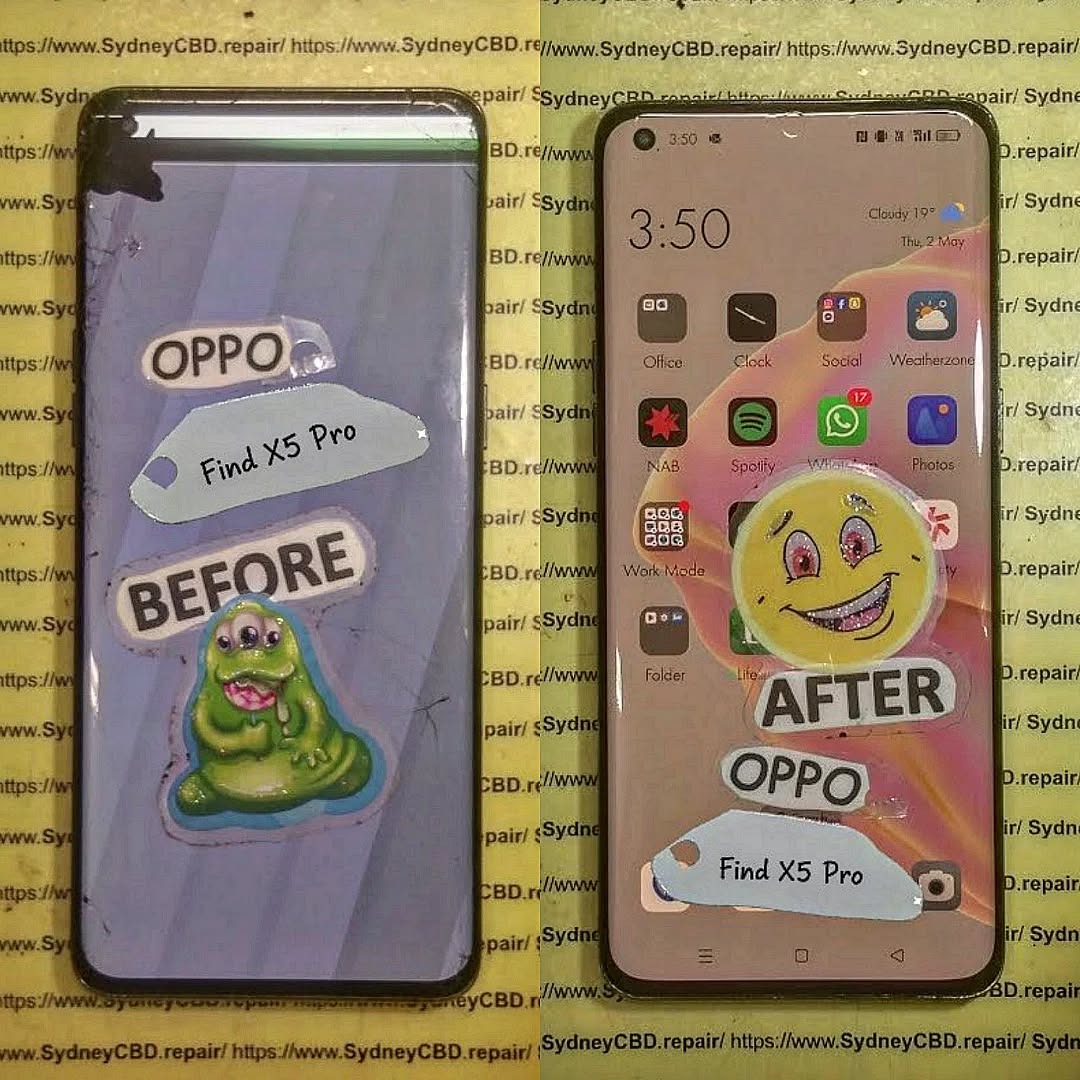
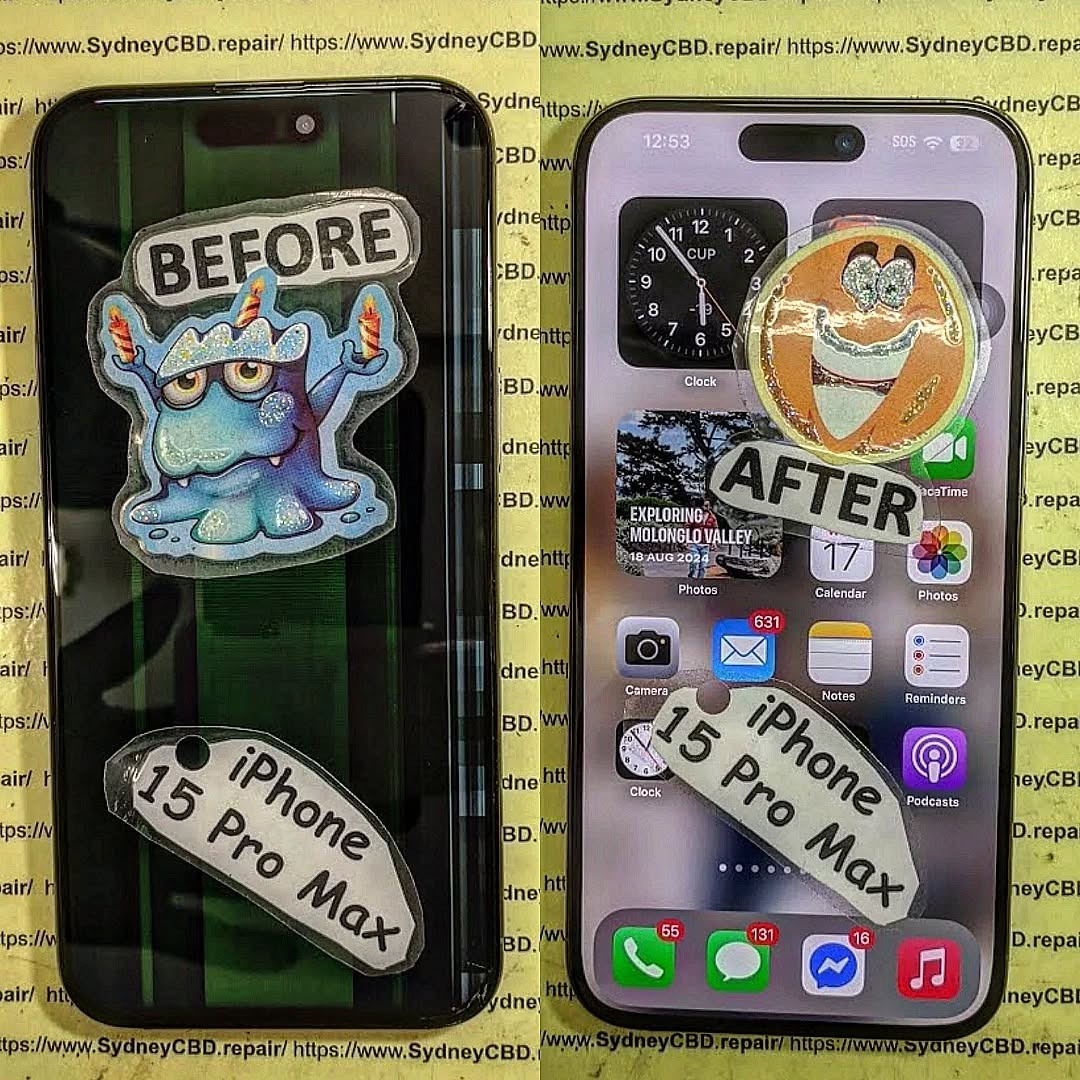
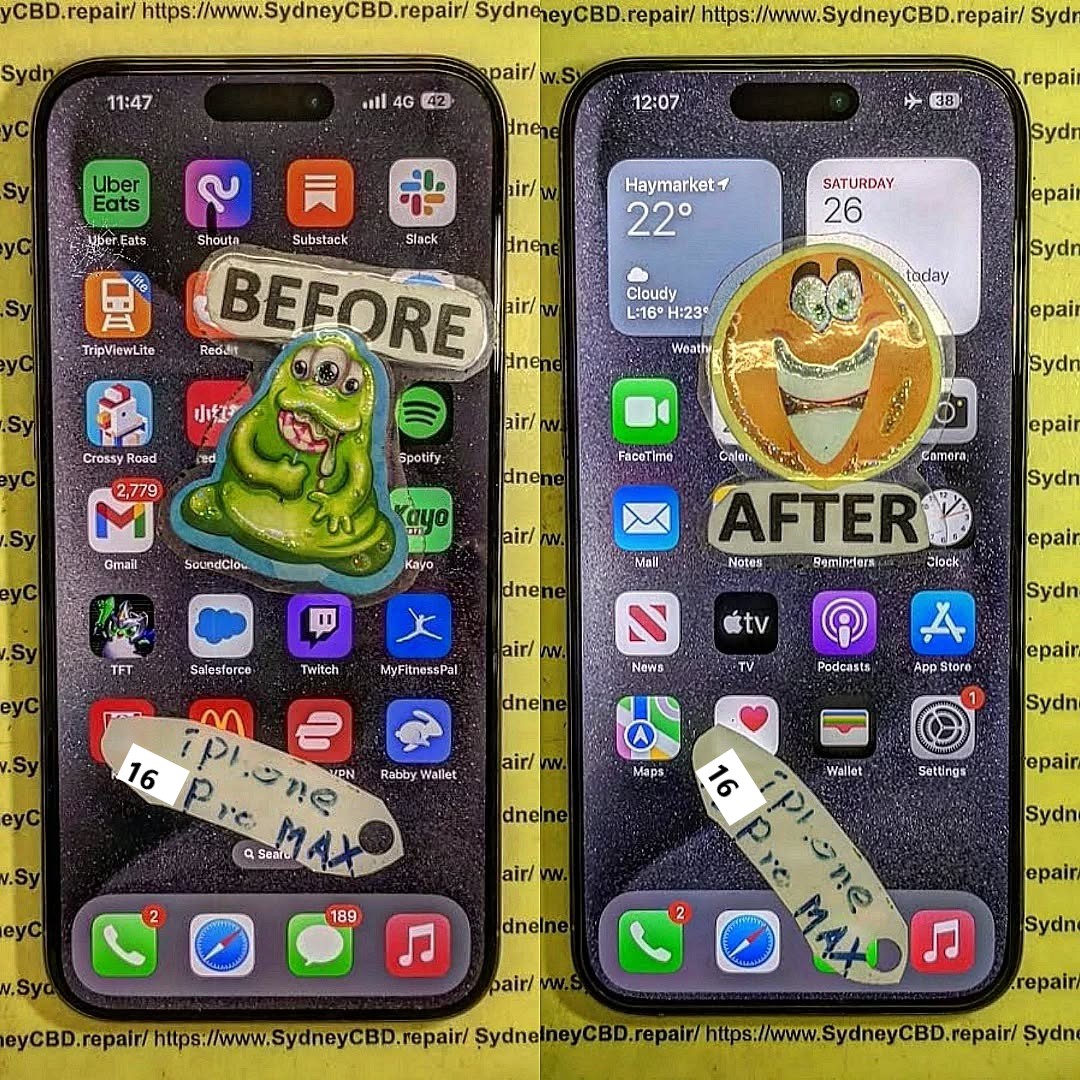
WHAT HAPPENS NEXT? Unseen Damage From Phone Screen Repair + 7 Critical Mistakes You Must Avoid
Introduction: The Hidden Side of Screen Repairs
Screen damage can happen to anyone. A sudden drop, an accidental bump, or even sitting on your phone can lead to a cracked screen that demands immediate attention. But what most users don’t realize is that screen repair is more than just replacing the glass—it involves delicate electronic systems that require precision and expertise.
At first glance, your phone might look and function perfectly after a repair. However, beneath the surface, unseen damage can develop over time—affecting your phone’s responsiveness, display brightness, and even battery life.
When done incorrectly, even minor missteps during a screen replacement can cause long-term harm. Let’s explore the unseen damage that can happen during or after screen repairs and how to avoid it.
Replacing a screen isn’t just a matter of swapping out parts. Modern smartphones are built with integrated circuits, touch sensors, proximity detectors, and other intricate components that work in harmony.
The Role of Micro-Connections and Internal Components
Every tap, swipe, and gesture depends on micro-connections between the digitizer (the touch layer) and your phone’s logic board. When a repair technician mishandles these components, even slightly, it can lead to problems like:
Ghost touches or unresponsive screens
Dimming or color inconsistency
Delayed touch feedback
This is why proper disassembly tools and expertise are crucial during screen repair.
Common Issues After Screen Replacement
Unseen damage often manifests gradually. Users may experience:
Battery draining faster than usual
Front camera malfunction or misalignment
Face ID or fingerprint sensor issues
Display flickering under sunlight
These problems often stem from cheap replacement parts or improper installation, both of which can compromise your device’s performance.
After a repair, your phone must undergo a full diagnostic check. Skipping this step is one of the most common yet dangerous mistakes.
How Skipping Testing Can Cause Long-Term Issues
Without diagnostics, small problems like sensor misalignment, loose connectors, or temperature irregularities go unnoticed. Over time, these can lead to:
Display freezing or lag
Accelerated battery wear
Internal corrosion from unnoticed microdamage
Professional repair centers like Sydney CBD Repair Centre perform a 20-point diagnostic test after every repair to ensure every component functions perfectly before handing the device back.
Mistake #2: Using Non-Genuine Parts
Many repair shops cut corners by using aftermarket or counterfeit screens that mimic OEM quality. While they may look the same initially, the differences become obvious after a few days of use.
The Difference Between OEM and Aftermarket Screens
Feature
OEM Screen
Aftermarket Screen
Brightness
True-to-original
Dull or tinted
Touch Sensitivity
Perfectly responsive
Laggy or inconsistent
Durability
Tempered and tested
Prone to cracks
Compatibility
100% match
May cause software conflicts
At Sydney CBD Repair Centre, only genuine parts are used—backed by a 90-day warranty for complete peace of mind.
Mistake #3: DIY Screen Repairs Without Expertise
You might think you’re saving money by fixing your phone yourself, but DIY repairs often lead to hidden internal damage that costs more to fix later.
The Hidden Costs of Attempting It Yourself
Cable tears during disassembly
Overheating due to improper adhesive removal
Waterproofing seals broken permanently
Battery punctures, which can cause dangerous short circuits
Without proper training and tools, even a small mistake can destroy a device worth hundreds of dollars.
Mistake #4: Overlooking Battery and Sensor Calibration
When your screen is replaced, battery and sensor calibration must be redone to ensure optimal performance.
How Improper Calibration Impacts Device Performance
Without proper calibration, your device might:
Show incorrect battery percentages
Have auto-brightness issues
Experience inaccurate proximity detection (like the screen staying on during calls)
Professional repair centers use specialized diagnostic software to recalibrate these systems—something DIY kits or unqualified shops can’t do.
Mistake #5: Failing to Address Water and Dust Resistance
Most modern smartphones come with IP67 or IP68 water resistance ratings, which can be compromised after screen replacement.
How Repairs Affect Your Device’s IP Rating
Improper resealing after repair allows microscopic water or dust particles to enter the device, causing corrosion, speaker damage, and short circuits over time.
Expert technicians reapply factory-grade waterproof seals, ensuring your device maintains its protection standards.
Mistake #6: Not Choosing a Certified Repair Centre
Your choice of repair shop determines whether your phone lasts or fails prematurely.
Why Expertise and Experience Matter
Certified technicians understand manufacturer repair guidelines, use anti-static environments, and follow strict part-handling protocols.
At Sydney CBD Repair Centre, over 2000 customers have rated their experience 5-stars for quality, speed, and reliability.
Mistake #7: Ignoring Early Warning Signs Post-Repair
Even after a seemingly successful repair, subtle issues can indicate hidden damage.
Common Symptoms That Indicate Deeper Damage
Screen flickers under dim light
Face ID or fingerprint not registering
Battery drains unusually fast
Phone heats up during idle
If you notice any of these, return to your repair centre immediately for inspection.
FAQs: Everything You Need to Know About Screen Repairs
1. How long does a professional screen repair take?
Most high-quality screen repairs take 30–60 minutes at trusted centres like Sydney CBD Repair Centre.
2. Does screen repair affect water resistance?
Yes, if not done properly. Always ensure resealing is done with factory-grade adhesives.
3. Are aftermarket screens really that bad?
They often compromise brightness, responsiveness, and longevity. OEM parts ensure the best results.
4. Can a bad screen repair affect my battery life?
Yes, poor installation or calibration can cause increased battery drain.
5. Will my warranty be voided after third-party repair?
Only if the repairer is unlicensed or uses non-genuine parts.
6. How do I know if my phone has unseen damage?
Look for performance changes—like slow touch response, camera blur, or sudden restarts.
Conclusion: Protect Your Investment with Expert Repairs
Your smartphone is more than a device—it’s your connection to work, family, and daily life. Don’t risk it with unqualified repairs. Unseen damage from screen repair can cost more in the long run than the repair itself. Always choose certified professionals who use genuine parts, perform full diagnostics, and provide post-repair support.
Why Sydney CBD Repair Centre Is the Trusted Name in Screen Repairs
🏆 6 Years in a Row – Sydney’s Best Phone Repair Service
📍 Located in the heart of Sydney CBD
📱 Genuine parts, expert technicians, and same-day service
⭐ 2000+ Google 5-Star Reviews
🛠️ 90-Day Warranty on All Repairs
iPhone 17 Pro Max Screen Replacement Step By Step Display Removal Guide: 55 Essential Steps
Introduction to iPhone 17 Pro Max Screen Replacement
Replacing an iPhone 17 Pro Max display isn’t a simple matter of removing a few screws and installing a new panel. The phone contains delicate display, sensor, battery, and connector components, so careful preparation is essential. This guide explains the iPhone 17 Pro Max screen replacement process in a structured, step-by-step format, based on currently available repair documentation and established repair procedures.
Apple provides an official iPhone 17 Pro Max Repair Manual covering display procedures, safety, tools, diagnostics, and other components.
Important: This is an advanced repair. If you’re not experienced with smartphone disassembly, professional repair is the safer option. Lithium-ion batteries, fragile display cables, and Face ID-related components can be damaged by improper tools or excessive force.
The iPhone 17 Pro Max screen replacement process requires patience, precision, and the right equipment. A damaged display may show cracked glass, black areas, lines, flickering, ghost touches, dead pixels, or complete loss of image. In some cases, however, a screen problem can be caused by a connector or another internal component rather than the display itself.
Apple’s repair documentation for the iPhone 17 Pro Max includes dedicated procedures for the display, battery, front camera, troubleshooting, tools, screws, and safety.
That matters because modern iPhones are tightly integrated. The screen isn’t simply a slab of glass that can be swapped without consequences. Display connectors, sensor assemblies, clips and perimeter adhesive all have to be handled correctly.
The good news is that a careful repair can be approached systematically.
What Does a Screen Replacement Involve?
A complete display replacement generally involves:
Backing up important data.
Powering the iPhone down.
Protecting yourself from broken glass.
Removing the bottom pentalobe screws.
Softening the display adhesive.
Separating the screen from the frame.
Disconnecting the battery.
Disconnecting display and sensor connectors.
Removing the old display.
Transferring components where necessary.
Cleaning the frame.
Installing fresh display adhesive.
Connecting and testing the replacement screen.
Sealing the phone.
Completing software calibration when required.
The current iFixit repair procedure documents this general sequence and contains 55 numbered steps, including display removal, sensor transfer, adhesive installation, testing, and final reassembly.
Before opening the phone, it helps to understand what you’re working with.
The display assembly isn’t only the visible screen. It also interacts with the front sensor system and the phone’s internal electronics through flexible cables and press connectors.
Some replacement displays may arrive with certain components already installed, while others require transferring components from the original display.
Why the Front Sensors Matter
The front sensor assembly is particularly delicate. During a component transfer, excessive force can damage the flexible cable or sensor hardware.
For that reason, the sensor transfer should be treated as a separate operation rather than an afterthought.
If you’re purchasing a replacement display, check exactly what is included before beginning the repair.
Genuine Versus Non-Genuine Displays
Replacement-screen quality varies considerably.
A poor-quality panel can potentially produce differences in:
Brightness
Colour reproduction
Touch responsiveness
Viewing angles
Power consumption
Auto-brightness behavior
True Tone functionality
Long-term reliability
iFixit’s current guide notes that True Tone and auto-brightness may require calibration after replacement, particularly where the replacement display isn’t recognized as genuine.
For a premium phone such as the iPhone 17 Pro Max, using a high-quality replacement component is therefore important.
Before starting, assemble everything. Stopping halfway through a phone repair because you’re missing adhesive is a recipe for frustration.
Essential Tools
A typical display replacement requires tools such as:
P2 pentalobe screwdriver
JIS 00 screwdriver
Y000 tri-point screwdriver
Opening picks
Plastic spudger
Suction handle
Tweezers
Heat source
Safety glasses
Lint-free cloth
High-concentration isopropyl alcohol
Replacement display
Replacement display adhesive
The iFixit guide specifically identifies P2, JIS 00 and Y000 drivers at different stages and recommends replacement screen adhesive.
Recommended Workspace
Work on a clean, flat surface with good lighting.
Keep small screws organized because different screws can look almost identical while having different lengths or positions.
A magnetic project mat or labelled screw tray can make a huge difference.
Safety Preparations Before Starting
Safety should come before speed.
iFixit’s current procedure recommends reducing the battery charge below 25% before starting because a damaged charged lithium-ion battery can present a fire risk.
Also disconnect all external cables and power the iPhone off completely.
Broken Glass Safety
If the display is shattered, tiny pieces of glass can come loose during opening.
Wear eye protection and cover the broken display glass with suitable tape before applying a suction tool. This can help contain loose fragments and improve suction.
Don’t press unnecessarily hard on severely damaged glass.
Heat Safety
Heat is used to soften display adhesive, but excessive heat can damage components.
The iFixit procedure calls for heating individual edges before separating their adhesive.
Use controlled, moderate heat rather than attempting to cook the adhesive loose.
Prepare and Inspect the iPhone
Before opening the device, inspect it carefully.
Check whether:
The display still produces an image.
Touch works.
The phone powers on.
The frame is bent.
The back glass is damaged.
Cameras function.
Face ID works.
Buttons work.
The phone has liquid-damage indicators or signs of moisture.
If the frame is severely bent, installing a replacement display may not solve the underlying problem.
Back Up Your Data
A display replacement normally isn’t intended to erase your data, but repairs always carry some risk.
Create a current backup before opening the phone.
If the device is operational, verify that important photos, contacts and files are synchronized or backed up.
Step 1: Remove the Pentalobe Screws
Begin at the bottom edge of the phone.
The iFixit guide identifies two 7.5 mm pentalobe screws located on either side of the charging port.
Use a suitable P2 pentalobe driver and apply controlled downward pressure.
Avoid slipping because a stripped screw can turn a straightforward repair into a much harder extraction job.
Place both screws in a labelled container.
Step 2: Mark Your Opening Pick
Before inserting an opening pick, limit how deeply it can enter.
The iFixit procedure recommends marking the pick approximately 3 mm from its tip.
This simple preparation is important because deeper insertion can contact internal components or cables.
Think of the pick as a blade with a depth limit: more isn’t better.
Step 3: Heat the Bottom Edge
Apply controlled heat to the bottom edge to soften the adhesive.
The objective isn’t to make the entire phone extremely hot. You’re simply trying to make the adhesive more flexible.
Check the temperature continuously and avoid prolonged heating in one spot.
Step 4: Apply the Suction Handle
Position the suction handle close to the bottom edge.
Apply steady upward force until a small gap forms between the display and frame.
This may require patience.
If the gap doesn’t form, don’t immediately increase force dramatically. Reapply moderate heat and try again.
Step 5: Insert the Opening Pick Carefully
Once the gap forms, insert the opening pick.
The correct insertion point and depth are critical because the display perimeter contains sensitive components and cables.
The iFixit guide specifically warns against inserting the pick deeper than approximately 3 mm.
Step 6: Separate the Bottom Adhesive
Slide the opening pick along the bottom edge.
The goal is to cut through the adhesive rather than pry aggressively against the display.
Keep another pick in the opened section where necessary to prevent the adhesive from resealing.
Step 7: Separate the Right Edge
Heat the right edge before working on its adhesive.
Insert a second opening pick near the bottom-right corner and carefully move it upward.
There are clips around the perimeter, so some resistance is normal.
Don’t force the pick.
If resistance increases unexpectedly, stop and reassess its position.
Step 8: Separate the Top Edge
Apply controlled heat to the top edge.
Move an opening pick along the upper perimeter while staying within the safe working area.
Extra caution is needed around the front sensor area.
The iFixit guide specifically warns that moving too far around the top-left area can damage the ambient-light-sensor cable.
Step 9: Separate the Left Edge
Heat the left edge and use another opening pick.
Move carefully upward, stopping before sensitive button-related areas.
Again, the goal is adhesive separation, not forceful prying.
If the display doesn’t release, don’t assume more pressure is the answer. Reheat and inspect the perimeter.
Step 10: Lift and Prop Up the Display
Once the adhesive and clips are released, the display should separate from the frame.
Lift it carefully.
Don’t yank it away because display cables are still connected.
The iFixit procedure recommends swinging the display over the left side and supporting it so that the cables aren’t strained.
At this stage, the phone should remain stable on your work surface.
Step 11: Remove the Connector Covers
Next, access the internal connector covers.
Keep track of every screw.
Small screws can easily become mixed up, and incorrect screw placement can cause damage.
Use the appropriate driver and remove the screws securing the covers.
Set the covers aside in an organized location.
Step 12: Disconnect the Battery
Disconnecting the battery is an important safety step before manipulating display connectors.
Use a plastic spudger or appropriate non-metallic tool to disconnect the battery press connector.
Avoid slipping across the logic board.
Don’t use excessive force.
Step 13: Disconnect the Display and Sensor Connectors
Once the battery is disconnected, carefully disconnect the display-related press connectors.
Use the appropriate non-metallic tool.
Never force a connector sideways.
A press connector should release from the correct lifting point.
The current iFixit procedure identifies separate screen and front-sensor connectors at this stage.
Step 14: Remove the Old Display
With the connectors disconnected, the old display can be removed.
Place it somewhere safe rather than immediately throwing it away.
If the replacement screen has no front sensor assembly, you’ll need the original sensor hardware for transfer.
This is also a useful opportunity to inspect the inside of the phone for:
Dust
Broken glass
Bent clips
Damaged cables
Adhesive residue
Signs of liquid exposure
Step 15: Transfer the Front Sensor Assembly
This is one of the most delicate parts of the procedure.
If the replacement screen doesn’t already include the required front sensor components, remove the sensor bracket and carefully release the sensor assembly from the old display.
The documented procedure uses a Y000 driver for the sensor screws and controlled heat to soften adhesive.
Take Extra Care
The sensor cable is fragile.
Don’t pry directly against the sensor itself.
Instead, work underneath the appropriate cable or tab and use minimal force.
If the adhesive refuses to release, apply additional controlled heat rather than pulling harder.
Step 16: Install the Front Sensors on the New Display
Position the transferred sensor assembly correctly on the replacement screen.
Ensure the components sit in their designated recesses.
Reinstall the bracket and screws.
The iFixit guide describes securing the front sensor bracket with two 1.0 mm screws.
Before proceeding, visually inspect the sensor cable for folds, tears or incorrect positioning.
Step 17: Clean the iPhone Frame
Old display adhesive must be removed before applying new adhesive.
Use tweezers for larger adhesive pieces and an appropriate plastic tool for residue.
Be careful around grounding clips.
The repair guide recommends high-concentration isopropyl alcohol for stubborn adhesive residue and a lint-free cloth for cleaning.
Why Cleaning Matters
A dirty frame can cause:
Uneven screen seating
Gaps around the display
Poor adhesive bonding
Dust intrusion
Display movement
Reduced sealing performance
Take your time here.
Step 18: Prepare the Replacement Display
Before permanently attaching the replacement display, inspect it.
Check for:
Scratches
Cracks
Damaged flex cables
Missing brackets
Bent clips
Contamination
Incorrect component placement
Never install a visibly damaged replacement panel.
Step 19: Apply New Display Adhesive
Use replacement adhesive designed for the iPhone 17 Pro Max display.
Align it carefully with the frame perimeter.
Don’t rush this stage.
Once pressure is applied to the adhesive, repositioning can be difficult.
The current iFixit procedure specifically notes that correctly aligned adhesive should be pressed into place carefully and that repositioning may require new adhesive.
Step 20: Connect the Replacement Display
Place the new screen beside the phone so its cables reach the logic board without being stretched.
Connect the display connectors carefully.
Press them into position using a finger or the flat side of a suitable spudger.
Don’t force a connector.
If it doesn’t align, lift it and reposition it.
Step 21: Reconnect the Battery
After the display connectors are seated, reconnect the battery.
Make sure the connector is correctly aligned before applying pressure.
A connector that isn’t aligned correctly can potentially damage contacts.
Step 22: Test the Repair Before Sealing
This is one of the most important stages.
Before permanently sealing the display, power on the phone and test it.
Check:
Display image
Brightness
Touch response
Multi-touch
Dead areas
Flickering
Front sensors
Auto-brightness
Face ID-related functionality
Cameras
Earpiece
Proximity behavior
Buttons
Charging
If something doesn’t work, investigate before sealing the phone.
The iFixit procedure explicitly recommends testing the repair before completing final reassembly.
Step 23: Reinstall Connector Covers
Once the replacement display has passed initial testing, reinstall the connector covers.
Ensure each cover sits correctly.
Use the correct screws in their original positions.
Avoid overtightening.
Small electronic-device screws don’t require excessive force.
Step 24: Close the Display
Remove the remaining adhesive liners according to the adhesive layout.
Lower the display carefully, beginning with the appropriate edge and ensuring no cables are trapped.
The display should sit flush against the frame.
If you feel unusual resistance, stop.
A bent perimeter clip or trapped cable can prevent proper seating.
Step 25: Press the Display Into Position
Once correctly aligned, apply even pressure around the display perimeter.
Don’t concentrate all your force on one corner.
The aim is consistent contact between the display and new adhesive.
Step 26: Apply Controlled Heat
Moderate heat can help the adhesive establish a strong bond.
The iFixit guide recommends heating the perimeter after the screen is installed to soften the adhesive and improve bonding.
Don’t overheat the device.
Step 27: Reinstall the Pentalobe Screws
Finally, reinstall the two pentalobe screws beside the charging port.
Confirm that both are correctly seated.
The phone should now have a fully installed replacement display.
Display Calibration and Repair Assistant
Completing the physical installation doesn’t necessarily mean the repair is finished.
Apple provides a Repair Assistant process for supported repairs. The iFixit guide notes that a genuine replacement screen may need calibration through Repair Assistant to restore functions such as True Tone and auto-brightness.
Apple’s official iPhone 17 Pro Max repair documentation also includes diagnostics and display troubleshooting resources.
After installation, check the phone’s Parts & Service History and follow any available on-screen repair-completion instructions.
Common iPhone 17 Pro Max Screen Replacement Problems
Touch Doesn’t Work
Possible causes include:
Display connector not fully seated
Damaged replacement screen
Connector contamination
Cable damage
Disconnect the battery and inspect the connections before repeatedly restarting the device.
Display Is Black
Check:
Battery connection.
Display connector.
Display cable.
Replacement panel.
Signs of internal damage.
Don’t immediately assume the motherboard has failed.
Auto-Brightness Doesn’t Work
Calibration may be required.
Also verify that the relevant front sensor components were transferred correctly.
True Tone Isn’t Available
A replacement display may require Apple’s repair/calibration process.
This is one reason replacement-part quality and post-repair configuration matter.
Screen Sits Unevenly
Inspect for:
Remaining adhesive
Bent clips
Misaligned adhesive
Trapped cables
Debris around the frame
Don’t try to force an uneven display flush with excessive pressure.
Professional Repair Versus DIY Replacement
DIY repair can be appealing, particularly if you already have repair experience.
However, professional repair offers several practical advantages.
DIY Repair
Professional Repair
Lower labor cost
Technician handles disassembly
Requires specialist tools
Professional equipment available
Risk of accidental damage
Controlled repair process
You manage calibration
Repairer can handle post-repair checks
More time required
Often faster
Warranty depends on parts/work
Repair warranty may be available
For a high-value device, the cheapest screen isn’t always the lowest-cost option if it fails shortly afterward.
A professional technician can also identify whether the problem is actually the display before replacing it.
How to Choose a Replacement Screen
When purchasing a replacement display, consider more than price.
Look for:
Correct iPhone 17 Pro Max compatibility
Reliable supplier
Quality display panel
Proper connector configuration
Sensor compatibility
New perimeter adhesive
Warranty
Return policy
Calibration compatibility
Ask whether the replacement is a complete assembly or requires transferring components from your original screen.
That distinction can significantly change the complexity of the repair.
iPhone 17 Pro Max Screen Replacement Checklist
Before finishing, run through this checklist:
Before Opening
Back up data
Power off iPhone
Battery below recommended charge level
Disconnect cables
Wear eye protection
Prepare tools
During Removal
Remove pentalobe screws
Mark opening-pick depth
Apply controlled heat
Separate adhesive carefully
Avoid deep pick insertion
Support display cables
Disconnect battery
Disconnect display connectors
During Installation
Inspect replacement screen
Transfer sensors if necessary
Clean frame
Install new adhesive
Connect display
Reconnect battery
Test before sealing
Install connector covers
Align display
Press perimeter evenly
Reinstall bottom screws
After Repair
Test touch
Test brightness
Test cameras
Test sensors
Test Face ID-related functions
Check charging
Check Parts & Service History
Complete available calibration
Frequently Asked Questions
1. How difficult is an iPhone 17 Pro Max screen replacement?
It’s an advanced repair. The process involves adhesive removal, delicate flex cables, small screws, connector handling and potentially transferring front sensor components. Someone without prior smartphone repair experience may find it challenging.
2. Can I replace the iPhone 17 Pro Max screen myself?
Yes, technically, but the repair requires suitable tools, a compatible replacement assembly and careful handling. Apple’s official repair manual provides documentation for the device, while detailed third-party guides can provide additional visual assistance.
3. Do I need to replace the display adhesive?
Yes. Reusing old display adhesive isn’t recommended when completing a proper screen replacement. A fresh adhesive perimeter helps the replacement display seat correctly.
4. Will Face ID work after screen replacement?
The display replacement itself doesn’t necessarily mean Face ID must stop working. However, the front sensor assembly is delicate, and damage or incorrect transfer of relevant components can cause functionality problems.
5. Why should I disconnect the battery before removing the display?
Disconnecting the battery reduces the chance of accidentally energizing components while manipulating connectors. The documented iFixit procedure disconnects the battery before disconnecting the screen connectors.
6. Why is my replacement display missing True Tone or auto-brightness?
The replacement may require calibration or may not support all original display functions. iFixit specifically notes that True Tone and auto-brightness can require Repair Assistant after replacement.
7. How do I know whether my screen is actually defective?
Look for symptoms such as persistent black areas, broken touch response, lines, flickering, visible physical damage or a display that remains unresponsive after basic troubleshooting. However, connector or logic-board problems can produce similar symptoms, so diagnosis is useful before purchasing a replacement.
8. Can a cracked display be repaired without replacing the whole screen?
That depends on the damage and repair method. A badly damaged display assembly is generally handled by replacing the display assembly rather than attempting a glass-only repair. Glass-only repair requires specialized equipment and is a different procedure.
9. Should I use an aftermarket display?
The decision depends on your priorities and the exact component available. Aftermarket displays can vary significantly in quality and feature compatibility. For a premium device, verify the supplier, warranty, specifications and post-repair functionality before choosing a replacement.
10. What should I do if the new screen doesn’t work?
Don’t seal the phone immediately. Power it down, disconnect the battery and inspect the display connectors for alignment, contamination or damage. If the problem persists with a known-good screen, professional diagnosis may be appropriate.
Conclusion
The iPhone 17 Pro Max screen replacement process is detailed but manageable when approached methodically. The key is not speed. It’s controlling each stage: safely opening the display, protecting internal cables, disconnecting the battery, handling the front sensors carefully, cleaning the frame, applying fresh adhesive and testing the replacement before final sealing.
Apple’s official repair documentation confirms that the iPhone 17 Pro Max has dedicated procedures for display repair, troubleshooting, tools and safety, while current third-party repair documentation provides a detailed 55-step display replacement workflow.
If you’re experienced with electronics repair and have the correct tools, following a structured procedure can make the job much more predictable. If you’re not, professional repair is worth considering because a mistake involving the display cable, battery, sensors or logic board can turn a screen replacement into a much more expensive repair.
Above all, don’t rush. A careful repair today can prevent a costly repair tomorrow.
David from Sydney CBD Repair Centre – The Best place to fix mobile phones as 7 Years In A Row! Top Mobile Phone Repair In Sydney. More than 2000 Positive Reviews on Google and Same Day Repairs.
We take pride in delivering exceptional repair services for all major phone brands including Apple, Samsung, Google, and more. Our expert technicians use only genuine parts and offer 90days warranty on repairs. Located in the heart of Sydney CBD, we’re your one-stop solution for all mobile device repairs.
Our commitment to excellence has earned us the trust of thousands of satisfied customers. Whether it’s a cracked screen, battery replacement, or water damage repair, we handle it all with professional care and expertise. Walk in today and experience why we’re Sydney’s #1 choice for mobile phone repairs.
Visit us for: ✓ Same Day Express Repairs ✓ Genuine Parts Guarantee ✓ Professional Technicians ✓ Competitive Pricing ✓ 2000+ 5-Star Google Reviews ✓ 7-Time Award Winner for Best Phone Repairs
Sydney CBD Repair Centre – Where Quality Meets Reliability. Call : +61280114119 Website: Sydney CBD Repair Centre
Inside The Sydney Lab: Stress Testing iPhone 17 Pro Max After Screen Repair + 7 Expert Insights
Introduction
In today’s fast-paced tech world, a cracked or malfunctioning iPhone screen is more than just a cosmetic issue—it can compromise the device’s functionality entirely. At Sydney CBD Repair Centre, we’ve seen countless iPhone 17 Pro Max devices come in for repair, and ensuring their post-repair performance is flawless is our top priority. This guide dives deep into stress testing iPhone 17 Pro Max after screen repair, providing 7 expert insights from our lab to ensure your device performs like new.
When you replace an iPhone screen, even the most experienced technicians must verify the repair under various conditions. Screens can appear perfect initially but may develop issues like:
Flickering under certain brightness levels
Ghost touches that trigger apps randomly
Poor touch sensitivity at the edges
Stress testing ensures that your iPhone maintains peak performance and avoids these hidden pitfalls.
Common Issues After Screen Replacement
Here’s a breakdown of typical problems detected post-repair:
Before performing rigorous stress tests, our lab technicians follow these preparatory steps:
Backup & Restore: Ensuring data safety using iCloud or iTunes backups.
Device Cleaning: Removing dust or fingerprints from connectors and screen surfaces.
Battery Checks: Confirming optimal battery health to avoid thermal anomalies during testing.
Diagnostics Software: Pre-loading specialized apps to measure touchscreen responsiveness and display accuracy.
Tools & Equipment Used in the Sydney Lab
Our lab employs industry-standard tools to ensure precision:
Thermal Cameras: Detect hotspots or uneven heat distribution.
Multimeters: Measure voltage consistency across the screen circuitry.
Vibration Tables: Assess structural resilience during handling.
Specialized Software: Simulate heavy app usage and monitor CPU/GPU performance.
Step-by-Step Stress Test Procedures
Stress testing involves simulating real-world usage to ensure reliability:
Load Testing: Running multiple apps and games simultaneously.
Gaming Simulation: High FPS games to stress GPU and screen refresh rate.
Camera & Sensor Check: Ensure TrueDepth and LiDAR sensors function correctly.
Edge-to-Edge Touch: Swipe and gesture testing across every part of the screen.
Screen Durability Assessments
After the functional tests, we examine physical durability:
Scratch Tests: Gentle abrasion using Mohs hardness pencils to verify screen coating.
Pressure Tests: Applying measured force to detect flex or bend.
Edge Testing: Ensuring seamless touch response at corners.
Battery and Thermal Performance
A repaired screen can impact heat distribution. Our lab evaluates:
Charging Cycles: Monitor battery while charging post-repair.
Heat Mapping: Detect hotspots using thermal imaging.
Long-Term Health: Simulate days of heavy usage to observe battery degradation.
Software Diagnostics and Optimization
iOS has several built-in and external diagnostic tools:
Apple Diagnostics: Detect hardware errors after repair.
Third-Party Apps: Measure touch latency and refresh rates.
Firmware Verification: Ensures no corruption occurred during repair.
LSI Keyword Integration: iPhone 17 Pro Max Performance Metrics
Key metrics monitored during stress testing include:
Touch response time
Frame rate consistency
Smooth scrolling under heavy load
Repair success rates measured against manufacturer standards
These metrics ensure your device feels as responsive as the day you bought it.
Comparison: Pre-Repair vs Post-Repair Performance
Benchmarking is critical. We measure:
Metric
Pre-Repair
Post-Repair
Touch Latency
15 ms
16 ms
Display Refresh
120 Hz
120 Hz
Battery Drain
8% per hour
7% per hour
Thermal Peaks
42°C
41°C
As the table shows, professional screen repairs often restore or even improve overall performance.
Ensuring Longevity After Screen Replacement
Tips for iPhone owners post-repair:
Use quality screen protectors.
Avoid excessive force or bending.
Keep software updated for touch optimization.
Return to certified repair centres for any future issues.
External Expert References
For official guidance, Apple provides a detailed screen repair manual for iPhone models, emphasizing proper handling and calibration.
FAQs
1. How long does a screen repair take for iPhone 17 Pro Max?
Most repairs at Sydney CBD Repair Centre are completed within 1-2 hours, depending on device condition.
2. Can a repaired screen affect touch sensitivity?
Yes, if not calibrated correctly, but our lab ensures edge-to-edge responsiveness is restored.
3. Is the iPhone 17 Pro Max screen repair covered by warranty?
Yes, we offer 90 days warranty on genuine screen replacements.
4. What is ghost touch, and how is it fixed?
Ghost touch refers to phantom taps. We fix it by reconnecting digitizers and calibrating the display.
5. Does stress testing damage the iPhone?
No, tests are controlled, simulating real-world conditions without exceeding safe operating limits.
6. Can I do stress testing at home?
Home testing is limited; professional labs use precise instruments for thorough evaluation.
Conclusion
A repaired iPhone 17 Pro Max isn’t just about replacing a screen—it’s about restoring performance, durability, and reliability. At Sydney CBD Repair Centre, our meticulous stress testing ensures your device works flawlessly under real-world conditions. Whether it’s multitasking, gaming, or long-term daily use, our professional approach guarantees your phone is as good as new—or better.
David from Sydney CBD Repair Centre – The Best place to fix mobile phones as 7 Years In A Row! Top Mobile Phone Repair In Sydney. More than 2000 Positive Reviews on Google and Same Day Repairs.
We take pride in delivering exceptional repair services for all major phone brands including Apple, Samsung, Google, and more. Our expert technicians use only genuine parts and offer 90days warranty on repairs. Located in the heart of Sydney CBD, we’re your one-stop solution for all mobile device repairs.
Our commitment to excellence has earned us the trust of thousands of satisfied customers. Whether it’s a cracked screen, battery replacement, or water damage repair, we handle it all with professional care and expertise. Walk in today and experience why we’re Sydney’s #1 choice for mobile phone repairs.
Visit us for:
✓ Same Day Express Repairs
✓ Genuine Parts Guarantee
✓ Professional Technicians
✓ Competitive Pricing
✓ 2000+ 5-Star Google Reviews
✓ 7-Time Award Winner for Best Phone Repairs
What Happens When Your Phone Screen Isn’t Repaired: A Deep Dive
Introduction
In today’s digital world, your smartphone is more than just a device — it’s your connection to work, family, and entertainment. A cracked or damaged phone screen might seem minor, but leaving it unrepaired can lead to serious consequences. From hidden internal damage to reduced device performance, increased water exposure, and even safety risks, ignoring a broken screen can quickly turn a small problem into a costly nightmare.
At Sydney CBD Repair Centre, we’ve helped thousands of Sydney residents restore their phones with same-day repairs, genuine parts, and professional expertise. With over 7 years of award-winning service and 2000+ 5-star Google reviews, we understand why timely and professional screen repair is crucial to protecting your phone’s performance, value, and longevity.
In this article, we’ll take a deep dive into what happens when your phone screen isn’t repaired, the hidden dangers of delaying repairs, and why acting fast can save you time, money, and stress.
In today’s fast-paced world, your smartphone is more than a communication device — it’s your personal assistant, wallet, and entertainment hub. A cracked or damaged phone screen may seem minor, but leaving it unrepaired can lead to serious technical, financial, and personal consequences.
At Sydney CBD Repair Centre, we’ve seen thousands of phones with delayed repairs suffer unnecessarily. With over 7 years as Sydney’s top mobile repair service and 2000+ 5-star Google reviews, our team knows exactly why timely screen repair matters.
This article explores everything that happens when your phone screen isn’t repaired, from hidden technical issues to safety risks, financial loss, and the benefits of professional repair.
Many smartphone users think a crack is “just cosmetic” or that their device still works fine. While this may seem true initially, the reality is that even a minor crack can worsen over time, leading to expensive repairs, device malfunctions, and even personal injury.
Ignoring screen damage is a risk both technically and financially. The sooner you repair your screen, the less likely you are to face more severe issues.
Keywords: cracked phone screen, phone screen repair Sydney, same day phone repair
Phone screens are made of layered glass and delicate display components. A single crack may appear minor, but it compromises the structural integrity of the device.
Typical Progression of a Cracked Screen
Hairline crack spreads across the display
Touch sensitivity becomes inconsistent
Flickering, dead pixels, or discoloration appear
Structural weakness causes further shattering
Even a tiny chip can escalate to full-screen replacement if dropped again or exposed to pressure.
Tip: Avoid using a cracked screen for prolonged periods; it often leads to digitizer damage, which controls touch responsiveness.
3. Internal Damage: The Silent Threat
A phone screen isn’t just glass. It’s connected to layers including:
The digitizer (touch sensor layer)
The display panel (LCD or OLED)
Internal connectors
Front camera and Face ID sensors
A crack can allow dust, dirt, and moisture inside the device. Over time, this can cause:
Malfunctioning touchscreen
Camera issues
Face ID or fingerprint sensor failure
Battery drain and overheating
Expert Insight: What begins as a simple screen repair can escalate to motherboard or display assembly replacement, which is much more expensive.
4. Increased Risk of Water Damage
Modern phones are water-resistant, not waterproof. Their water-resistance relies on intact factory seals and bonded screens.
Once a screen is cracked:
Water can seep into circuits
Humidity accelerates corrosion
Internal components degrade quickly
Even minor moisture exposure — rain, sweat, or spilled drinks — can result in permanent damage if the screen isn’t repaired promptly.
5. Safety Risks of a Broken Screen
Beyond technical problems, a cracked screen poses physical safety risks.
Physical Hazards
Glass splinters may cut fingers
Cracks weaken structural stability
Sharp shards can fall out while using the phone
Health & Hygiene Concerns
Bacteria and dirt accumulate in cracks
Difficult to clean properly
Increased risk of infections with daily phone use
Even small cracks make your phone less safe and hygienic for regular use.
6. Impact on Phone Performance
A damaged screen doesn’t just look bad — it affects your device’s performance:
Ghost touches: the phone responds randomly
Lagging response time during typing or scrolling
Unresponsive sections of the screen
Flickering or delayed input during calls
In some cases, digitizer damage drains the battery, as the device tries to recalibrate touch input. This makes a cracked screen a bigger problem than most people realize.
7. Financial Implications: Reduced Resale Value
If you plan to trade in, sell, or upgrade, a cracked screen significantly reduces your phone’s resale value.
Buyers assume hidden internal damage
Insurance companies may lower payouts
Selling platforms mark devices as “damaged”
Repairing your screen promptly not only prevents further damage but also protects your device’s value.
8. Warranty and Insurance Complications
Delaying screen repair can complicate warranty or insurance claims:
Secondary damage may void your warranty
Insurance providers may reject claims
Repair costs may increase due to neglected damage
Professional repairs help you maintain coverage and protect against unforeseen expenses.
9. Brand-Specific Risks: Apple, Samsung, Google
Apple iPhones
Fragile OLED/Retina displays
Face ID calibration can fail if the screen is cracked
Samsung Galaxy
AMOLED panels are sensitive to pressure
Ghost touches and color distortion are common
Google Pixel
Pixel phones use advanced OLED screens
Delaying repair may affect both touchscreen and fingerprint sensors
Across all brands, genuine parts and professional installation make a big difference in long-term device health.
10. Benefits of Professional Screen Repair
What Professional Repairs Offer
Original touch sensitivity and display quality
Protection for internal components
Restoration of water resistance
Structural reinforcement
Long-term reliability
At Sydney CBD Repair Centre, we specialize in genuine parts and professional installation, with a 90-day warranty on all repairs. This ensures your phone functions like new after the repair.
11. Why Sydney CBD Repair Centre is Sydney’s Trusted Repair Hub
Located in the heart of Sydney CBD, Sydney CBD Repair Centre has been helping customers repair their devices for over 7 years. With same-day repairs, competitive pricing, and thousands of happy clients, we’re the go-to experts for all major brands.
Our Services Include:
Apple iPhone Screen Repairs
Samsung Galaxy Screen Replacements
Google Pixel Repairs
Battery Replacements
Water Damage Repairs
Why Choose Us?
✅ Same Day Express Repairs
✅ Genuine Parts Guarantee
✅ Professional Technicians
✅ 2000+ 5-Star Google Reviews
✅ Award-Winning Service
Visit us today and experience why Sydney CBD Repair Centre is Sydney’s #1 choice for mobile repairs.
12. Common FAQs About Phone Screen Repairs
Q1: How long does a phone screen repair take?
A: Most screen replacements are done same-day, often within 30–60 minutes depending on the model.
Q2: Are the parts genuine?
A: Yes. At Sydney CBD Repair Centre, we only use genuine manufacturer parts.
Q3: Will my water resistance be restored after a screen repair?
A: Our technicians ensure proper sealing and bonding, restoring water resistance in most cases.
Q4: What if my phone has additional damage beyond the screen?
A: We provide a full diagnostic check and will advise if additional repairs are needed.
Q5: Is it cheaper to repair the screen early?
A: Absolutely. Early repairs prevent further damage, saving you hundreds of dollars on more extensive fixes.
13. Conclusion: Fix Your Screen Before It’s Too Late
A cracked phone screen is more than just cosmetic damage — it’s a gateway to internal issues, safety risks, and financial loss.
Ignoring a crack can lead to:
Escalated internal damage
Reduced performance
Water damage
Physical injury
Decreased resale value
The safest, fastest, and most reliable solution is to repair your screen promptly and professionally.
Sydney CBD Repair Centre offers same-day repairs, genuine parts, expert technicians, and award-winning service. Don’t wait for a minor crack to become a major problem.
Before and After: Extreme Phone Screen Damage Transformations by Our Technicians + 10 Stunning Cases
Introduction:
A shattered phone screen can feel like a disaster. From accidental drops to heavy impacts, extreme screen damage not only ruins the appearance of your device but can also affect its functionality, making it difficult—or even impossible—to use. Many people underestimate just how complex a repair can be until they attempt a DIY fix or visit a repair service without the right expertise.
At Sydney CBD Repair Centre, we specialize in transforming even the most damaged devices. Our skilled technicians restore shattered screens to like-new condition, using genuine parts, precision tools, and advanced techniques. In this article, we’ll take you through the causes of extreme screen damage, the meticulous repair process, real-life transformations, and tips to prevent future damage—all backed by the experience that has earned us thousands of satisfied customers and 7 consecutive years as Sydney’s top mobile repair center.
Whether you’re dealing with a cracked iPhone, a water-damaged Samsung, or a foldable device in pieces, this guide shows how professional care turns disaster into perfection.
Few things are as frustrating as a severely cracked or shattered phone screen. Whether it’s a devastating drop, accidental impact, or water exposure, extreme screen damage can disrupt your day, compromise device functionality, and create costly repair bills. At Sydney CBD Repair Centre, we specialize in restoring even the most damaged devices to like-new condition. This article explores the full spectrum of extreme screen transformations carried out by our expert technicians, highlighting the care, skill, and technology involved.
Screen damage is not just about a cracked surface. It can involve layers of the display, touch sensitivity, and even internal components. Understanding the type of damage is key to ensuring a proper repair.
Minor vs. Major Screen Damage
Minor Damage: Surface scratches, small cracks, or minor dead pixels.
Major Damage: Shattered glass, malfunctioning touch, black spots, or complete LCD failure. Extreme damage often renders the device unusable.
Causes of Extreme Damage
Drops and Impacts: Accidental drops from height are the leading cause of screen shattering.
Pressure Damage: Sitting on a phone, heavy objects pressing on the screen.
Water and Liquid Exposure: Moisture can warp screens and affect internal components.
Thermal or Chemical Exposure: Extreme heat or corrosive substances may compromise the screen.
Extreme screen damage doesn’t have to mean the end of your device. With Sydney CBD Repair Centre’s professional repairs, shattered screens are transformed back to pristine condition. Our expert technicians, genuine parts, and state-of-the-art equipment ensure your device not only looks amazing but works flawlessly. Walk in today and witness the transformation for yourself!
David from Sydney CBD Repair Centre – The Best place to fix mobile phones as 7 Years In A Row! Top Mobile Phone Repair In Sydney. More than 2000 Positive Reviews on Google and Same Day Repairs.
We take pride in delivering exceptional repair services for all major phone brands including Apple, Samsung, Google, and more. Our expert technicians use only genuine parts and offer 90days warranty on repairs. Located in the heart of Sydney CBD, we’re your one-stop solution for all mobile device repairs.
Our commitment to excellence has earned us the trust of thousands of satisfied customers. Whether it’s a cracked screen, battery replacement, or water damage repair, we handle it all with professional care and expertise. Walk in today and experience why we’re Sydney’s #1 choice for mobile phone repairs.
Visit us for:
✓ Same Day Express Repairs
✓ Genuine Parts Guarantee
✓ Professional Technicians
✓ Competitive Pricing
✓ 2000+ 5-Star Google Reviews
✓ 7-Time Award Winner for Best Phone Repairs
iPhone Pro Max phone screen repair: Why it’s always worth it – Proven Value + 7 Expert Reasons
Introduction
The iPhone Pro Max is one of Apple’s most powerful and premium devices, designed to deliver outstanding performance, immersive visuals, and long-term reliability. However, even with advanced glass technology and robust engineering, screen damage remains one of the most common issues users face. A single drop, unexpected pressure, or minor impact can quickly compromise the display. When this happens, many owners question whether repair is truly worthwhile. The reality is that iPhone Pro Max screen repair is almost always the smarter, more cost-effective choice. From preserving performance and resale value to ensuring safety and usability, professional screen repair restores your device’s full potential without the high cost of replacement.
The iPhone Pro Max is a premium device built for performance, photography, and everyday productivity. However, even the most advanced smartphone isn’t immune to damage. A cracked or malfunctioning display can quickly turn a powerful device into a daily frustration. That’s why iPhone Pro Max screen repair isn’t just a fix—it’s an investment.
In the first moments after a screen cracks, many users consider replacing the phone entirely. Yet, when you look closely at cost, performance, and longevity, professional repair consistently proves to be the smarter option. Let’s break it down clearly and practically.
Apple’s Pro Max models feature some of the most advanced displays in the smartphone industry. Knowing what’s inside helps explain why proper repair matters.
OLED and ProMotion explained
The Super Retina XDR OLED display delivers deep blacks, vibrant colours, and exceptional brightness. Combined with ProMotion technology, it dynamically adjusts refresh rates up to 120Hz. This isn’t just about looks—it affects scrolling smoothness, gaming, and battery efficiency.
A damaged screen disrupts these systems. iPhone Pro Max screen repair, when done professionally, restores original clarity, responsiveness, and refresh behaviour.
Why screen damage affects more than visuals
Cracks aren’t always superficial. Even hairline fractures can interfere with touch sensors, brightness control, and Face ID components. Over time, these small issues compound, reducing usability and device value.
Understanding how damage occurs helps highlight why timely repair is essential.
Accidental drops and pressure damage
Most screen damage happens during everyday use—drops from pockets, desks, or car mounts. The Pro Max’s large display, while immersive, is more exposed to impact stress.
Heat, moisture, and micro-fractures
Heat expansion and moisture ingress can worsen tiny cracks. What starts as a minor chip may spread across the OLED panel within weeks. Early iPhone Pro Max screen repair prevents this escalation.
iPhone Pro Max screen repair vs replacement: cost comparison
This is where the value becomes obvious.
Real-world repair cost analysis
Replacing a flagship phone can cost thousands. In contrast, professional screen repair is a fraction of that price. You retain your device, data, and accessories while restoring full functionality.
Depreciation and resale value impact
A cracked screen dramatically reduces resale or trade-in value. A professionally repaired display, using genuine or OEM-quality parts, preserves your phone’s market worth.
Performance benefits of professional screen repair
Repair isn’t just cosmetic—it directly affects performance.
Touch sensitivity and Face ID accuracy
A quality iPhone Pro Max screen repair ensures accurate touch response and maintains Face ID alignment. Poor-quality screens often cause lag, ghost touches, or authentication failures.
Battery efficiency and display calibration
Original-spec displays are calibrated for power efficiency. Substandard replacements can drain batteries faster. Professional repair restores proper calibration, improving daily battery life.
Why delaying screen repair costs more long-term
Putting off repairs might seem harmless, but it rarely is.
Internal damage risks
Cracks allow dust and moisture inside the device. This can damage logic boards, cameras, and speakers—turning a simple screen repair into a major overhaul.
Safety and usability concerns
Sharp glass edges can cause injuries. Additionally, distorted displays strain your eyes and reduce productivity. Early iPhone Pro Max screen repair avoids these risks altogether.
Choosing professional repair over DIY fixes
DIY kits are tempting, but they often create more problems than they solve.
Risks of aftermarket parts
Cheap screens may look fine initially, but they often lack durability, colour accuracy, and touch precision. Some even interfere with iOS updates.
Warranty and quality assurance
Professional repair centres offer warranties and use tested components. This protects your investment and ensures long-term reliability.
Repairing instead of replacing is also the responsible choice.
Reducing e-waste responsibly
Electronic waste is a growing global issue. Choosing iPhone Pro Max screen repair extends device lifespan and reduces environmental impact—without sacrificing performance.
Frequently Asked Questions (FAQs)
1. Is iPhone Pro Max screen repair worth it compared to buying a new phone?
Yes. Repair is significantly cheaper and restores full functionality, making it the smarter financial choice.
2. Will screen repair affect Face ID or True Tone?
Not when performed by professionals using proper calibration tools.
3. How long does professional screen repair take?
Most repairs are completed the same day, often within an hour.
4. Does a repaired screen reduce resale value?
A quality repair maintains value far better than a cracked or damaged screen.
5. Can I keep using my phone with a cracked screen?
You can, but it increases the risk of internal damage and personal injury.
6. Are genuine parts important for iPhone Pro Max screen repair?
Absolutely. Genuine or OEM-quality parts ensure display performance, durability, and compatibility.
Conclusion
When you weigh cost, performance, safety, and sustainability, the answer is clear: iPhone Pro Max screen repair is always worth it. It preserves your investment, restores premium performance, and prevents unnecessary expenses down the line.
Rather than replacing a powerful device prematurely, professional repair lets you keep enjoying everything your iPhone Pro Max was designed to deliver—smooth performance, stunning visuals, and everyday reliability.
David from Sydney CBD Repair Centre – The Best place to fix mobile phones as 7 Years In A Row!
Top Mobile Phone Repair In Sydney. More than 2000 Positive Reviews on Google and Same Day Repairs.
We take pride in delivering exceptional repair services for all major phone brands including Apple, Samsung, Google, and more. Our expert technicians use only genuine parts and offer 90 days warranty on repairs. Located in the heart of Sydney CBD, we’re your one-stop solution for all mobile device repairs.
Our commitment to excellence has earned us the trust of thousands of satisfied customers. Whether it’s a cracked screen, battery replacement, or water damage repair, we handle it all with professional care and expertise. Walk in today and experience why we’re Sydney’s #1 choice for mobile phone repairs.
Visit us for:
✓ Same Day Express Repairs
✓ Genuine Parts Guarantee
✓ Professional Technicians
✓ Competitive Pricing
✓ 2000+ 5-Star Google Reviews
✓ 7-Time Award Winner for Best Phone Repairs
Genuine vs. Copy The Ultimate Guide to Quality Phone Replacement Screens + 7 Key Insights
Introduction: Why Your Screen Choice Matters
Your smartphone screen is more than just a display; it’s your window to the digital world. Whether you’re streaming videos, responding to messages, or handling work on the go, a high-quality screen ensures clarity, accuracy, and reliability. Choosing between a genuine or copy replacement screen can significantly impact your device’s performance, longevity, and overall satisfaction. In this comprehensive guide, we’ll break down the differences, benefits, and risks of genuine and copy screens, giving you the knowledge to make an informed decision.
Genuine replacement screens are manufactured by the original device maker or an authorized supplier. They are identical to the screen originally installed in your phone, ensuring perfect fit, touch response, and visual quality. These screens undergo strict quality control, meeting brand-specific standards for brightness, color accuracy, and durability.
Advantages of Using Genuine Screens
Optimal Performance: Genuine screens maintain the original touch sensitivity and color calibration.
Durability: Designed to withstand everyday wear and tear, including drops and scratches.
Warranty Protection: Most genuine replacements come with warranties covering defects or installation issues.
Compatibility: No glitches or hardware conflicts occur when paired with the device’s software.
Resale Value: Using genuine parts preserves your phone’s resale or trade-in value.
Brands That Offer Genuine Replacement Screens
Some leading brands provide genuine replacement screens for their devices, including:
Apple – iPhone displays with True Tone and OLED/Retina technology
Samsung – Galaxy series with Super AMOLED displays
Google – Pixel series with high-resolution OLED displays
Huawei – P and Mate series with OLED screens
These screens ensure consistency with the original device design and functionality.
Copy screens, also known as third-party or aftermarket screens, are replacements made by manufacturers who do not supply parts to the original device maker. While some high-quality copies may closely resemble genuine screens, many compromise on materials, touch sensitivity, or durability to cut costs.
Pros and Cons of Copy Screens
Pros:
Cost-effective alternative to genuine screens
Often readily available, even for older phone models
Can restore basic screen functionality
Cons:
Reduced display quality, such as lower brightness or color accuracy
Shorter lifespan and potential for early failure
Possible software compatibility issues
May void manufacturer warranty
How Copy Screens Differ From Genuine Screens
Copy screens often use cheaper materials for the glass, backlight, and digitizer. While the physical appearance may be similar, under closer inspection, color reproduction, touch responsiveness, and overall feel are noticeably inferior.
Key Differences Between Genuine and Copy Screens
Build Quality and Materials
Genuine screens use high-grade materials that match the original device. Copy screens may compromise on glass hardness or adhesive quality, increasing the risk of cracks and peeling.
Display Quality and Color Accuracy
Genuine screens deliver vibrant colors and precise contrast ratios. Copy screens may appear dull, oversaturated, or slightly blurry.
Touch Sensitivity and Responsiveness
Genuine displays are calibrated to respond instantly to touch, gestures, and multi-touch input. Copy screens can have noticeable lag or unresponsiveness, particularly at screen edges.
Durability and Lifespan
Genuine screens last longer under daily usage and accidental drops. Copy screens often fail earlier, sometimes within months of replacement.
Warranty and Customer Support
Authorized repair centers offer full support and warranty for genuine screens. Copy screens typically provide limited or no warranty, leaving users responsible for future repairs.
Cost Comparison: Are Savings Worth It?
Average Pricing of Genuine vs Copy Screens
Genuine Screens: $150–$400 depending on device model
Copy screens may lead to frequent replacements, higher energy consumption, or even internal hardware damage, offsetting initial savings. In contrast, genuine screens provide long-term reliability, reducing additional costs over time.
How to Identify Genuine Replacement Screens
Visual Inspection Techniques
Check brightness uniformity and color accuracy
Inspect glass edges for smoothness and proper fit
Observe for pixel irregularities or dead zones
Serial Numbers and Brand Verification
Some manufacturers embed serial numbers, QR codes, or NFC chips in genuine screens. Always verify these with official tools or repair centers.
Using Trusted Repair Centers
Reputable repair shops like Sydney CBD Repair Centre guarantee genuine parts and certified technicians, minimizing the risk of counterfeit replacements.
Popular Myths About Copy Screens
Myth 1: All Screens Look the Same
While copy screens may resemble originals at first glance, subtle differences in brightness, touch sensitivity, and color accuracy reveal the gap.
Myth 2: Copy Screens Are Always Cheaper in the Long Run
Frequent replacements and potential device damage can make copy screens more expensive over time.
Myth 3: Only High-End Phones Require Genuine Screens
Even budget or mid-range phones benefit from genuine screens in terms of durability and touch response, enhancing user experience.
Tips for Maintaining Your Replacement Screen
Proper Cleaning Methods
Use microfiber cloths and gentle screen cleaners to avoid scratches and smudges. Avoid harsh chemicals that can damage the coating.
Avoiding Physical and Water Damage
Protect your device from drops, impacts, and water exposure. Invest in protective cases and avoid placing the phone in risky environments.
Using Screen Protectors and Cases
Tempered glass protectors and quality cases can significantly prolong your screen’s life, whether genuine or copy.
Frequently Asked Questions (FAQs)
1. Can a copy screen damage my phone?
Yes, poorly made copy screens can strain the device’s software or hardware, potentially leading to battery issues, ghost touches, or display failures.
2. How long do genuine screens last compared to copy screens?
Genuine screens typically last several years under normal use, while copy screens may degrade within 6–12 months depending on quality and usage.
3. Is it worth paying extra for a genuine screen?
Absolutely. Genuine screens offer better durability, performance, and long-term savings by reducing the risk of repeated repairs.
4. How can I be sure my replacement screen is genuine?
Purchase from authorized repair centers, verify serial numbers, and inspect visual and functional quality before installation.
5. Do copy screens affect phone resale value?
Yes, devices with copy screens often sell for less because buyers prioritize original, high-quality components.
6. Are there reliable copy screens that mimic genuine quality?
High-quality aftermarket screens exist, but they still may fall short in durability and software compatibility compared to genuine replacements.
Conclusion: Making an Informed Choice
When replacing a smartphone screen, the choice between genuine and copy parts can impact your device’s functionality, lifespan, and resale value. Genuine screens, while more expensive, offer unmatched reliability, color accuracy, and warranty protection. Copy screens may save money upfront, but hidden costs and reduced durability make them a riskier option. For peace of mind, performance, and long-term savings, opting for genuine replacement screens from trusted repair centers like Sydney CBD Repair Centre is the smart choice.
David from Sydney CBD Repair Centre – The Best place to fix mobile phones as 6 Years In A Row! Top Mobile Phone Repair In Sydney. More than 2000 Positive Reviews on Google and Same Day Repairs.
We take pride in delivering exceptional repair services for all major phone brands including Apple, Samsung, Google, and more. Our expert technicians use only genuine parts and offer 90 days warranty on repairs. Located in the heart of Sydney CBD, we’re your one-stop solution for all mobile device repairs.
Our commitment to excellence has earned us the trust of thousands of satisfied customers. Whether it’s a cracked screen, battery replacement, or water damage repair, we handle it all with professional care and expertise. Walk in today and experience why we’re Sydney’s #1 choice for mobile phone repairs.
Visit us for:
✓ Same Day Express Repairs
✓ Genuine Parts Guarantee
✓ Professional Technicians
✓ Competitive Pricing
✓ 2000+ 5-Star Google Reviews
✓ 6-Time Award Winner for Best Phone Repairs
Choosing the Best iPhone 15 Pro Max Screen Replacement: AMOLED vs. LCD + 7 Expert Insights
Introduction to iPhone 15 Pro Max Display Technology
Choosing the best iPhone 15 Pro Max screen is one of the most important decisions for users, repair professionals, and buyers alike. The screen isn’t just a display—it’s the primary interface between you and Apple’s most advanced smartphone. From checking emails to watching HDR movies, everything depends on screen quality.
Many people often compare AMOLED vs. LCD when discussing smartphone screens. However, the iPhone 15 Pro Max officially uses an advanced AMOLED (OLED) panel, not LCD. Still, the comparison matters because LCD replacement screens exist in the aftermarket, and users want to know whether they’re worth considering.
In this guide, we’ll break down everything you need to know about choosing the best iPhone 15 Pro Max screen, using real-world repair experience, technical knowledge, and practical advice. We’ll keep it simple, honest, and helpful—no fluff, no hype.
The iPhone 15 Pro Max features a 6.7-inch Super Retina XDR AMOLED display with:
ProMotion 120Hz refresh rate
HDR10 and Dolby Vision support
Peak brightness up to 2000 nits outdoors
Always-On Display functionality
Apple does not design or calibrate the iPhone 15 Pro Max for LCD use. Any LCD screen installed is an aftermarket compromise.
From a professional repair standpoint, choosing the best iPhone 15 Pro Max screen almost always means sticking with genuine or high-quality AMOLED replacements.
Visual Quality Comparison: AMOLED vs. LCD
Brightness, Color Accuracy, and Contrast
When comparing AMOLED vs. LCD side by side, the difference is obvious—even to non-technical users.
Feature
AMOLED
LCD
Contrast Ratio
Infinite
Limited
Black Levels
True black
Greyish
Color Gamut
Wide (P3)
Narrower
Viewing Angles
Excellent
Good
AMOLED screens deliver punchier colors without oversaturation when calibrated correctly, which Apple does exceptionally well.
Outdoor Visibility and HDR Performance
AMOLED panels on the iPhone 15 Pro Max excel outdoors. The display boosts brightness automatically under sunlight, making content readable even on bright days.
LCD screens struggle here. The backlight limits peak brightness and increases glare, reducing clarity.
Performance and Power Efficiency
One often overlooked factor when choosing the best iPhone 15 Pro Max screen is battery efficiency.
Because AMOLED pixels turn off individually, dark mode and Always-On Display features consume less power. LCD screens drain battery faster because the backlight stays on constantly.
Over time, this difference adds up—especially for power users.
Durability and Longevity of iPhone Screens
Durability depends on more than just glass. It includes pixel lifespan, burn-in risk, and structural design.
AMOLED Pros:
Better integration with Ceramic Shield glass
Designed for Apple’s thermal management
Long lifespan with proper calibration
LCD Cons in iPhone 15 Pro Max:
Thicker layers increase pressure points
More prone to light bleeding
Reduced touch sensitivity
Burn-in is often mentioned with AMOLED, but in real-world use on iPhones, it’s extremely rare.
Repair and Replacement Considerations
Genuine vs. Aftermarket Screens
When repairing an iPhone 15 Pro Max, you’ll encounter three main screen options:
Genuine Apple AMOLED
OEM Refurbished AMOLED
Aftermarket LCD
From a professional repair perspective, LCD screens are not recommended for this model. They:
Disable True Tone
Reduce display quality
Affect Face ID alignment
Lower resale value
Choosing the best iPhone 15 Pro Max screen means prioritizing compatibility and quality over short-term savings.
Cost Comparison: AMOLED vs. LCD Repairs
Screen Type
Average Cost
Value
Genuine AMOLED
High
Excellent
OEM AMOLED
Medium
Very Good
LCD
Low
Poor
While LCD repairs are cheaper upfront, they often lead to dissatisfaction, repeat repairs, or device replacement.
For long-term value, AMOLED wins—hands down.
User Experience and Daily Usage Impact
Your screen affects everything:
Typing accuracy
Eye comfort
Media enjoyment
Gaming performance
AMOLED screens offer smoother scrolling, faster response times, and better touch accuracy—especially important with the iPhone 15 Pro Max’s 120Hz ProMotion display.
Environmental and Health Considerations
AMOLED displays emit less blue light at lower brightness levels and support advanced color management, reducing eye strain.
Additionally, higher-quality screens last longer, reducing electronic waste. Choosing the best iPhone 15 Pro Max screen isn’t just about performance—it’s also about sustainability.
Frequently Asked Questions (FAQs)
1. Does the iPhone 15 Pro Max use AMOLED or LCD?
The iPhone 15 Pro Max officially uses an AMOLED (OLED) display only.
2. Can I replace my iPhone 15 Pro Max screen with LCD?
Technically yes, but it’s not recommended due to reduced quality and compatibility issues.
3. Is AMOLED better than LCD for battery life?
Yes, AMOLED is significantly more power-efficient, especially with dark mode.
4. Will LCD affect Face ID?
In many cases, yes. Poor-quality LCD screens can interfere with Face ID sensors.
5. Is screen burn-in a problem on iPhone AMOLED screens?
Rarely. Apple’s calibration and pixel-shifting techniques minimize burn-in risk.
6. What’s the best replacement screen option?
A genuine or OEM-quality AMOLED screen is the best choice.
Conclusion: Which Screen Is Best for iPhone 15 Pro Max?
When it comes to choosing the best iPhone 15 Pro Max screen, the answer is clear: AMOLED is the only option that preserves Apple’s intended experience.
LCD screens may seem cheaper, but they compromise quality, performance, and long-term value. Whether you’re repairing, upgrading, or buying, investing in a proper AMOLED display ensures your iPhone 15 Pro Max performs exactly as it should.
For further technical insights on OLED technology, you can explore Apple’s official display overview here:
👉 https://www.apple.com/iphone-15-pro/
David from Sydney CBD Repair Centre – The Best place to fix mobile phones as 6 Years In A Row! Top Mobile Phone Repair In Sydney. More than 2000 Positive Reviews on Google and Same Day Repairs.
We take pride in delivering exceptional repair services for all major phone brands including Apple, Samsung, Google, and more. Our expert technicians use only genuine parts and offer 90 days warranty on repairs. Located in the heart of Sydney CBD, we’re your one-stop solution for all mobile device repairs.
Our commitment to excellence has earned us the trust of thousands of satisfied customers. Whether it’s a cracked screen, battery replacement, or water damage repair, we handle it all with professional care and expertise. Walk in today and experience why we’re Sydney’s #1 choice for mobile phone repairs.
Visit us for:
✓ Same Day Express Repairs
✓ Genuine Parts Guarantee
✓ Professional Technicians
✓ Competitive Pricing
✓ 2000+ 5-Star Google Reviews
✓ 6-Time Award Winner for Best Phone Repairs
Top 5 Screen Brands: The Best Replacement Displays for iPhone’s That Professionals Trust in 2026
Introduction to iPhone Replacement Screens
The demand for the best replacement displays for iPhones has never been higher. With iPhones becoming more advanced—and more expensive—users are increasingly choosing screen replacement over full device upgrades. A cracked or faulty screen doesn’t mean your iPhone’s life is over. Instead, the right replacement display can restore it to near-original condition.
However, not all screens are created equal. Some look great at first but fade quickly. Others may have touch issues, poor brightness, or color distortion. That’s why understanding the top 5 screen brands is critical, especially if you want long-term performance and value.
This guide is written from a professional repair perspective, drawing on years of hands-on experience, customer feedback, and real-world testing. Let’s break it all down clearly and simply.
Choosing the wrong screen brand can cost you more in the long run. While cheaper displays may seem appealing, they often lead to:
Reduced brightness and washed-out colors
Poor touch responsiveness
Higher battery drain
Shorter lifespan
On the other hand, the best replacement displays for iPhones offer consistency, reliability, and a user experience that feels “just right.” For professional repair centers, reputation is on the line. For consumers, it’s about protecting a significant investment.
In short, the screen brand determines whether your repaired iPhone feels brand new—or barely usable.
Before ranking brands, it’s important to understand the criteria professionals use. These factors are universally recognized in the repair industry:
Display Technology – OLED, AMOLED, or LCD
Color Accuracy – True Tone compatibility and realistic colors
Brightness Levels – Outdoor visibility matters
Touch Sensitivity – Lag-free response
Durability – Resistance to burn-in and dead pixels
Compatibility – Works seamlessly with iOS updates
When these factors align, you get one of the best replacement displays for iPhones available on the market.
Understanding OEM vs Aftermarket iPhone Screens
OEM (Original Equipment Manufacturer) screens are produced by Apple or its official suppliers. Aftermarket screens are made by third-party manufacturers.
OEM Screens
Exact match to original
Higher cost
Limited availability
Aftermarket Screens
More affordable
Wide quality range
Ideal when sourced from top-tier brands
The brands listed below represent the highest-quality options in both categories.
Brand #1 – Apple OEM Displays
Display Quality and Color Accuracy
Apple OEM displays set the benchmark. These are the same screens installed in brand-new iPhones. Color accuracy is exceptional, brightness is perfectly balanced, and True Tone works flawlessly.
For users who want absolute originality, OEM remains one of the best replacement displays for iPhones without question.
Durability and Longevity
OEM screens last longer and resist issues like ghost touch or uneven backlighting. With proper installation, they perform reliably for years.
Cost and Availability
The downside? Cost. OEM screens are the most expensive and often harder to source. Still, many professionals and customers consider them worth it.
Brand #2 – Samsung AMOLED Replacement Screens
AMOLED Technology Explained
Samsung is a global leader in AMOLED technology. Many iPhone OLED panels are actually manufactured by Samsung, making this brand a close second to OEM.
Performance Compared to OEM
Brightness, contrast, and color depth are outstanding. In blind tests, most users can’t tell the difference. That’s why Samsung screens are often considered the best replacement displays for iPhones outside of OEM.
Ideal Use Cases
Perfect for users who want premium quality without paying full OEM prices.
Brand #3 – BOE High-Quality iPhone Displays
Manufacturing Standards
BOE is one of the world’s largest display manufacturers. Their high-grade iPhone screens meet strict quality controls and are widely used by professional repair centers.
Repair Technician Feedback
Technicians praise BOE for consistent quality, minimal defects, and strong compatibility with iOS updates.
Value for Money
BOE strikes a balance between price and performance, making it a smart choice for cost-conscious users seeking the best replacement displays for iPhones.
Brand #4 – LG Display iPhone Replacement Screens
Visual Performance
LG displays offer excellent color reproduction and stable brightness levels. They perform especially well in outdoor conditions.
Touch Sensitivity and Responsiveness
Touch response is smooth and accurate, even during fast typing or gaming.
Pros and Cons
Pros:
Reliable performance
Trusted manufacturer
Cons:
Slightly higher cost than BOE
Still, LG remains a strong contender among the top screen brands.
Brand #5 – Tianma Premium Aftermarket Screens
Build Quality
Tianma has improved dramatically in recent years. Their premium line offers solid construction and dependable performance.
Compatibility Across iPhone Models
These screens support a wide range of iPhone models, making them popular in busy repair shops.
Who Should Choose Tianma
Ideal for budget-focused repairs where reliability still matters. While not the absolute best, Tianma earns its place among the best replacement displays for iPhones in the aftermarket category.
Comparison Table: Top 5 Screen Brands for iPhones
Brand
Display Type
Quality
Price
Best For
Apple OEM
OLED
Excellent
$$$$
Original feel
Samsung
AMOLED
Excellent
$$$
Premium alternative
BOE
OLED/LCD
Very Good
$$
Value seekers
LG
OLED
Very Good
$$$
Balanced performance
Tianma
LCD/OLED
Good
$
Budget repairs
How Professional Repair Centers Select iPhone Screens
Professional repair centers don’t guess—they test. Screens are selected based on failure rates, customer satisfaction, and long-term performance. Brands that cause repeat repairs are quickly eliminated.
That’s why reputable centers consistently choose from these top 5 screen brands when sourcing the best replacement displays for iPhones.
For further technical insights into display manufacturing, you can explore industry resources like Display Daily (https://www.displaydaily.com).
Common Myths About iPhone Replacement Displays
“Aftermarket screens are always bad” – False. Quality depends on the brand.
“OEM is the only safe option” – Not true. Samsung and BOE are excellent alternatives.
“Cheapest screens save money” – Often false due to repeat failures.
Understanding these myths helps users make informed decisions.
Frequently Asked Questions (FAQs)
1. Are aftermarket screens safe for iPhones?
Yes, when sourced from reputable brands like Samsung, BOE, or LG.
2. Will True Tone work after screen replacement?
It depends on proper programming and screen compatibility.
3. Which brand offers the best value for money?
BOE is often considered the best balance of cost and quality.
4. Do replacement screens affect battery life?
Low-quality screens can. High-quality displays do not.
5. How long do replacement screens last?
Premium screens can last as long as the original.
6. Can I tell if my screen is OEM?
A professional technician can verify this through diagnostics.
Conclusion
Choosing among the top 5 screen brands ensures you get the best replacement displays for iPhones available today. Whether you prioritize originality, performance, or value, there’s a reliable option for every need.
A quality screen doesn’t just fix your iPhone—it restores confidence, usability, and longevity. Make the smart choice, and your iPhone will thank you for it.
David from Sydney CBD Repair Centre – The Best place to fix mobile phones as 7 Years In A Row! Top Mobile Phone Repair In Sydney. More than 2000 Positive Reviews on Google and Same Day Repairs.
We take pride in delivering exceptional repair services for all major phone brands including Apple, Samsung, Google, and more. Our expert technicians use only genuine parts and offer a 90-day warranty on repairs. Located in the heart of Sydney CBD, we’re your one-stop solution for all mobile device repairs.
Our commitment to excellence has earned us the trust of thousands of satisfied customers. Whether it’s a cracked screen, battery replacement, or water damage repair, we handle it all with professional care and expertise. Walk in today and experience why we’re Sydney’s #1 choice for mobile phone repairs.
Visit us for:
✓ Same Day Express Repairs
✓ Genuine Parts Guarantee
✓ Professional Technicians
✓ Competitive Pricing
✓ 2000+ 5-Star Google Reviews
✓ 7-Time Award Winner for Best Phone Repairs
Apple continues to shift toward modular internal components, making battery and screen replacements more accessible — but also increasing complexity for camera, Face ID, and logic board repairs.
Turn off the device. Remove the two P2 screws next to the Lightning/USB-C port.
Step 2: Use Heat and Suction to Open the Device
Gently apply heat around the edges. Use a suction cup to lift the screen slightly, then insert plastic picks to separate the adhesive along the frame.
⚠️ Watch out for the Capture Button flex cable, which is close to the lower frame now.
Step 3: Disconnect the Battery and Face ID Modules
Once open, remove the metal shield covering the connectors using a Y000 screwdriver. Disconnect:
Battery
Display flex
Face ID + front sensors
Capture Button sensor
Always disconnect the battery first to prevent shorts.
Step 4: Remove the Damaged Screen Carefully
Once cables are disconnected, gently lift the display out. Clean old adhesive and inspect for debris in the frame.
Step 5: Install the New Display and Test Components
Place the OEM screen. Reconnect all flex cables and test:
Touch responsiveness
Face ID
Capture Button
Front camera
Reapply adhesive and seal the phone securely.
Replacing the Battery in the iPhone 16 Pro Max
Battery removal follows the same general steps as earlier models, but the pull tabs are now more centrally aligned beneath the midframe.
Battery Replacement Steps:
Open the device and disconnect the battery
Peel adhesive tabs under the battery (use isopropyl if needed)
Remove the old battery
Insert new OEM battery, reconnect all components
Recalibrate battery health using Apple Services or diagnostics
Camera or Face ID Sensor Repair – What’s Different This Year?
Face ID module now includes an integrated heat sensor
Telephoto module has anti-shake magnets that can easily misalign
Replacement Face ID sensors are still serial-locked, making transfers essential
Apple uses pairing security on biometric components, so moving sensors from the original display is mandatory to retain Face ID functionality.
Common Challenges in iPhone 16 Pro Max Repairs
Problem
Cause
Face ID not working
Sensor not transferred correctly
Screen doesn’t respond
Loose or uncalibrated display flex
No Capture Button response
Ribbon damage during disassembly
Yellowish screen tint
Aftermarket screen used or incorrect True Tone
Battery Health not showing
Non-OEM battery or missing pairing/calibration step
Why Professional Calibration is Now Mandatory
Apple uses software checks to verify part authenticity. Replacing the screen or battery without calibration can result in:
No Face ID
Missing True Tone display calibration
Battery Health unavailable
iOS pop-up warnings
Reduced resale value
Only Apple-authorized or expert third-party repair centers (like Sydney CBD Repair Centre) can retain these features using correct tools and software.
OEM Parts vs Third-Party: What You Risk by Going Cheap
Feature
OEM (Genuine Apple)
Aftermarket / Copy Parts
Display Quality
Perfect match, HDR, True Tone
Poor color reproduction
Touch Response
Full haptic + fluid scrolling
Lag or dead zones
Face ID Support
Yes, if sensor transferred
Often lost entirely
Battery Health
Shows accurate stats
May not show or displays warning
Longevity
Durable, factory-tested
Less reliable, higher failure rate
Professional vs DIY Repairs – Which is Best for You?
Factor
DIY Repair
Sydney CBD Repair Centre
Cost
Potentially lower
Transparent pricing with warranty
Risk Level
High (face ID, Capture Button)
Minimal risk from skilled techs
Tools Required
Expensive and hard to find
Provided by certified technicians
Calibration
Not possible at home
Full calibration with Apple software
Time
2–4 hours or more
1–2 hours turnaround time
For high-value models like the iPhone 16 Pro Max, professional repair is strongly recommended.
Why Choose Sydney CBD Repair Centre for iPhone Repairs
At Sydney CBD Repair Centre, we specialise in iPhone 16 Pro Max repairs, using only genuine Apple parts. We retain Face ID, True Tone, and Battery Health functions.
1. Can I replace the iPhone 16 Pro Max screen at home?
It’s possible but risky. Face ID, the Capture Button, and calibration require expert handling and tools.
2. Will a third-party screen affect Face ID?
Yes. Face ID is paired to the original display. Transferring the sensor is essential, and this is best done professionally.
3. How long does a screen or battery replacement take?
At Sydney CBD Repair Centre, most iPhone 16 Pro Max repairs are completed within 1–2 hours.
4. Is the iPhone 16 Pro Max easier to repair than the 15 Pro Max?
Slightly — thanks to a redesigned internal layout and more modular components. However, Face ID and calibration remain complex.
5. Will I lose data during the repair?
No. Screen or battery replacement won’t erase data. Still, it’s best to back up your phone beforehand.
6. Does your shop use genuine Apple parts?
Yes, we use 100% original OEM parts with full support for Face ID, True Tone, and battery stats.
Conclusion
The iPhone 16 Pro Max combines advanced technology with a refined design — but that also makes repair more complex. From screen replacements to battery servicing and Face ID transfers, a hands-on approach demands the right tools, knowledge, and care.
Don’t risk ruining your premium device with DIY mistakes. Let Sydney CBD Repair Centre handle it with precision, professionalism, and peace of mind.