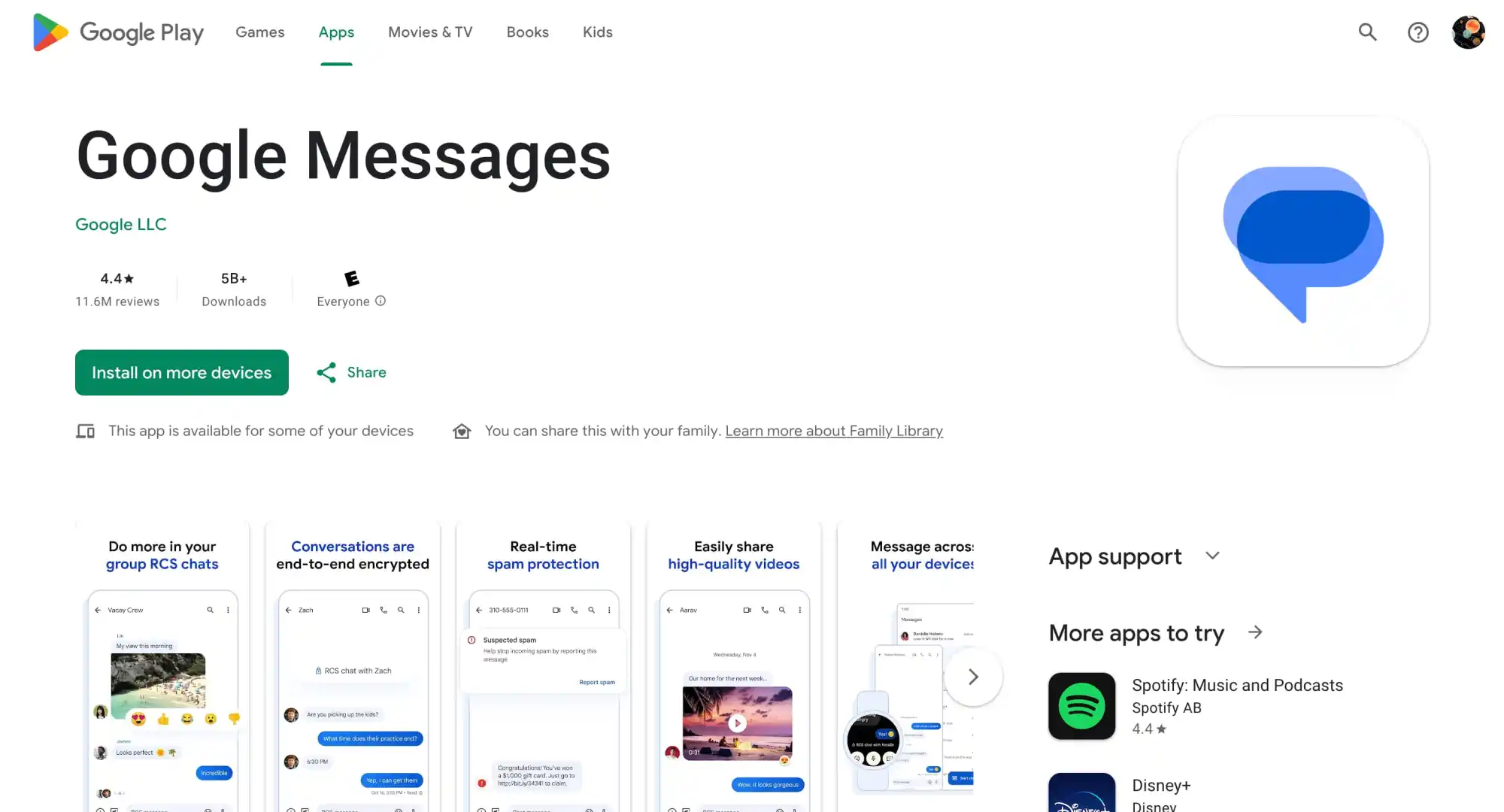
End users just called it “Google Messages,” and that’s now the name in the Play Store listing. The new branding is also reflected in yesterday’s blog post:
To celebrate our one billion milestone, Google Messages is introducing seven fun new ways to express yourself when communicating and connecting with other Android users – from shared themes and screen effects to AI-powered reactions.
Before this, the big homescreen redesign paired the four-color “G” with “Messages” in the top-left corner of the app bar.
The application is still just called “Messages” on Android. It remains to be seen whether “Phone by Google” will be getting a similar update to “Google Phone.”
Meanwhile, here’s a look at the upcoming Custom Bubbles feature that we enabled. From a conversation’s overflow menu, you’ll find a new “Change colors” option. Including the default, there are nine themes in total, with the picker providing a preview. The color you or the recipient selects will remain synced. It is not yet widely rolled out for beta users.
Screen protectors can often be a little clunky or annoying, but they’re still a great way to keep your device safe. Google Pixel phones have had a special mode for a while to boost touch sensitivity while using a screen protector, and on the Pixel 8 series, that setting can actually apply itself automatically.
On Pixel phones, “Screen Protector Mode” is found under Settings > Display, and is described very briefly saying:
Increase touch sensitivity and improve touch when using a screen protector.
While the results are often negligible, the biggest hurdle with the feature is remembering to turn it on. But, with the Pixel 8 series, Screen Protector Mode can actually turn itself on automatically when a screen protector is detected as being installed.
Recently, some users have noticed a notification appearing on Pixel 8 devices when a screen protector is installed or removed noting that Screen Protector Mode should be turned on or off. The feature was first spotted back in October, but hasn’t really appeared widely until recently. Some folks on Reddit note that they’ve seen it recently, though in my experience getting through a few screen protectors on my Pixel 8 Pro and my wife’s Pixel 8 since October, I’ve not seen the notification at all. That said, Screen Protector Mode is enabled on my Pixel 8 Pro, and I don’t recall doing that manually.
Presumably, the feature only recently was enabled widely, perhaps by a recent security patch. In any case, it’s a super neat feature, and one that seems pretty useful too.
As Android Police notes, the feature is actually referred to by Google as a “screen protector detector,” which is just delightful, but it’s exclusive to the Pixel 8 series for now. The feature isn’t available to older Pixel phones at this time.
In November, Google started the Android 14 QPR2 preview earlier than expected, and Beta 2 is now rolling out for Pixel phones, Fold, and Tablet.
Following the launch of QPR1 at the start of December, QPR2 is expected to hit stable in March. The preview program for that next release and Pixel Feature Drop should have kicked off this month. Instead, it started in mid-November and was followed by a .1 patch less than a week later.
QPRs are relatively stable and launch as betas rather than developer previews. Google officially says they are “suitable for general use.” Known issues include:
Sometimes when a user unlocks the device using their fingerprint, there is no haptic feedback.
For Pixel Fold devices, sometimes after a user unlocks the device while it’s folded, the inner display doesn’t turn on after unfolding the device.
The Assistant At a Glance widget sometimes displays weather information for the wrong location.
Google identifies the following fixes in AP11.231117.006 with the December 2023 security patch:
Fixed an issue where battery usage information that was reported in system settings was sometimes incorrect. (Issue #312121998)
Fixed an issue where the fingerprint icon on the lock screen would sometimes display before other information had loaded in always-on display mode. (Issue #311265905)
Fixed an issue that sometimes caused the biometric prompt to crash, causing it to be dismissed before a user could interact with it.
Fixed an issue that sometimes caused the Internet Quick Settings tile to indicate that there was no Wi-Fi connection, even when the device was connected to a Wi-Fi network.
The Android Beta Feedback app is available on Pixel devices to submit bugs. You can access it from the app drawer or via Quick Settings to file bugs in the Google issue tracker, while the Android Beta community is on Reddit.
Android 14 QPR2 Beta 2 is available for the Pixel 5a, Pixel 6, Pixel 6 Pro, Pixel 6a, Pixel 7, Pixel 7 Pro, Pixel 7a, Pixel Tablet, Pixel Fold, Pixel 8, and Pixel 8 Pro, as well as the Android Emulator.
Most people will install it via the Android Beta Program, but you can also flash or sideload the update.
The Pixel 8 Pro brings an updated camera system, an impressive display, a new and improved chipset, the promise of 7 years of software support, and an unexpected design change – what is Google’s flagship phone for 2023 all about and should you get one?
The bread and butter of Pixel phones has been their camera, and the 8 Pro has no shortage of improvements in that field. Key among those is the ultrawide on the back, which gets a new, larger sensor, while the main camera and the telephoto get revamped optics. It may not sound like a lot, but evolutionary steps can mean a lot when they add up.
Super Actua display is Google’s branding for the new panel on the Pixel 8 Pro that should go as bright as 2400nits – while we didn’t quite get that, we measured some remarkable numbers elsewhere. The Tensor G3 chipset’s performance in the things Google deems important is more difficult to measure, but it’s undoubtedly an upgrade over the previous generation in the things we can quantify. Putting a number on software support is also somewhat difficult, but 7 does sound remarkable – years of updates, that is.
And while the Pixel design language has been mostly dialed in these last couple of years, it turned out that 2023 did still have something new to bring – or, rather, the well-forgotten old flat display. Time is a flat circle and all that.
Here’s a quick refresher on the key specs of the Pixel 8 Pro before we move forward with the unboxing.
Disclaimer. We can not guarantee that the information on this page is 100% correct.
Google Pixel 8 Pro unboxing
Not that there’s a whole lot of unboxing to be done, really. The Pixel 8 Pro shows up in a rather standard half-height white cardboard box with a likeness of the phone printed on the lid.
Inside, the list of accessories is pretty short – you get a USB-C cable and a USB-A-to-C adapter to facilitate data transfer from as many types of older phones as possible. Sure, there’s also a SIM eject pin and some paperwork, but nothing all that useful, like a charger.
Competition
Being the company’s ultimate smartphone, the Pixel 8 Pro only competes with similarly top-tier offerings from rival brands. And with the increased price this year (€1,100/$1,000), looking at it from the perspective of a value proposition isn’t quite as justified as before.
A Galaxy S23 Ultra costs about as much as the Google flagship and has a lot going for it – the S Pen is essentially a one-of-a-kind feature, battery life is better on the Galaxy, the Samsung cameras are about as close to the Pixel’s in versatility as it gets. The Pixel 8 Pro does counter with unique features of its own (in supported regions), the longest software support in the industry, and, if we have to admit it – a camera experience which, if you’re a fan of, you can’t really be entirely happy with a Galaxy.
Pixel 8 Pro (left) next to Galaxy S23 Ultra
Another similar comparison is against the iPhone 15 Pro – that non-tangible and very subjective ‘it’s about how it makes you feel’ debate. On the objective side of things, we have the iPhone’s generally superior video quality and notably longer battery life, which the Pixel counters with €350/$200 of savings, though the situation gets trickier if the 15 Pro non-Max joins the discussion. We’d be happy to leave this dilemma to ecosystem considerations and personal preference.
Pixel 8 Pro (right) next to iPhone 15 Pro Max
Less obvious alternatives can be found too. For example, the OnePlus 11 can save you several hundred Euros or dollars (depending on who you ask and when, but around €300/$300), and it’s only going to be a significant compromise if you’re after long reach with your camera. Or, of course, the Google software, but that’s a concession you might be forced to make anyway.
An unorthodox option could be a Xiaomi 13 Pro – we’d consider the Ultra, but that could prove difficult to track down. For about Pixel 8 Pro money, you could get a higher-specced 13 Pro with a 1-inch sensor main camera and a unique close-focusing telephoto – it’s not the Pixel’s camera system, but it’s a hugely capable camera system that may align more closely with your wants and needs.
Last, but not least, why not an Xperia 1 V? It’s about as Pixel-like as you’d get in this bunch when it comes to software, before you get to its myriad camera apps, and those can open a world of possibilities for your photo and video capture. And the Sony also has quite remarkable imaging hardware, even if not all of it translates into real-world image quality. It does also feature a microSD slot and a headphone jack, if you’re that kind of person.
Samsung Galaxy S23 Ultra • Apple iPhone 15 Pro Max • OnePlus 11 • Xiaomi 13 Pro • Sony Xperia 1 V
Verdict
With the Pixel 8 Pro Google has made strides to address a host of the complaints we had about the previous generation. No longer is the selfie camera a hit-and-miss affair, and the new ultrawide is also miles better than before. The improvement in charging speed didn’t go unnoticed either, but the Pixel had so much to catch up here that it couldn’t all happen in one generation.
Some of the old pain points remain, however, key among them is the battery life that’s a bit below average. The in-house chipset isn’t quite up to the standard of the day in absolute performance and doesn’t handle sustained load with much grace. The limited regional availability of the exclusive software features also rubs us the wrong way, though a valid counterargument is that if Google doesn’t sell it in your country, you can’t expect it to work to its fullest in your country.
Moving to the good stuff, it’s not just that the ultrawide camera is no longer a source of grievances, but the telephoto has been improved too. So, with both flanks of an already great main camera now covered, the normally excellent cameraphone is now somehow even better.
The brand-new display is now up there with the leading efforts in the industry – not that the old one was bad, it’s just that this Super Actua panel is more deserving of high praise, than a simple ‘yeah, that’s good enough’. Similarly, the already stellar software support gets promoted to best-in-business – we’ll see how quickly Google will forget about that 7-year promise, but right now, it sounds really nice.
When first introduced, the visor on the back of the Pixel 6 Pro was quite polarizing, but two years later, it’s evolved into a somewhat appealing trademark design element. This year Google has also fitted a thermometer in there – we’re not quite sure just how useful it is yet, but if no one else has one, it has to be a plus for the Pixel 8 Pro. What we find to be another welcome development is the flat display – even one of the biggest supporters of curves in this office has grown to appreciate screen protectors and truly trouble-free handling.
In the end, we think the Pixel 8 Pro is the evolutionary upgrade you’d expect it to be and then some. Google could have done less this generation and still charged the extra $100/€200, but instead, they actually did bring some meaningful improvements that move the series forward. We approve.
Pros
Always evolving, the visor still makes for a recognizable design; the flat screen helps with usability and screen protectors.
Spectacularly bright display, but also sharp, color-accurate, and with a competent adaptive refresh rate.
Android from the source, exclusive feature set, 7 years of software support.
Great camera quality overall.
There’s a thermometer on board?
Cons
Battery life is not competitive.
While improved, charging speed is still behind the curve.
Some software features are limited to certain countries.
The Tensor G3 chipset doesn’t compare well in raw performance or stability under load.
With the November security patch, Google today is rolling out the first update to Android 14 since launch for the following Pixel devices: 4a 5G, 5, 5a, 6, 6 Pro, 6a, 7, 7 Pro, 7a, Tablet, Fold, 8, and 8 Pro.
There are 17 security issues resolved in the Android 14 November patch dated 2023-11-01 and 22 for 2023-11-05. Vulnerabilities range from high to critical. The dedicated bulletin for Google devices lists eight additional security fixes. As of today, there are just global builds.
Google lists seven fixes across Display & Graphics, NFC, System, User Interface, and Touch.
Of note, the 4a 5G and 5 are still seeing updates. While the Pixel 5 technically met its “guaranteed security updates” date in October, the 4a 5G doesn’t hit it until November. Google might as well update both. The Pixel 4a also sees another Android 13 ipdate.
Monthly Pixel security bulletin now includes changelog of ‘Functional updates’ & fixes
Several months ago, Google added a section in the main Android Security Bulletin that listed patches specific to Pixel and Nexus devices. For October, that list was broken out into a dedicated “Pixel / Nexus Security Bulletin.” With the November patch, Google has added a section detailing “Functional updates” like bug fixes for its devices.
After listing the various security issues that have been patched for Pixel/Nexus devices, Google displays a new section called “Functional updates” or “issues not related to the security of Pixel devices.”
These updates are included to address functionality issues not related to the security of Pixel devices. The table includes associated references; the affected category, such as Bluetooth or mobile data; and a summary of the issue.
Notably, it only references “Pixel devices,” though this changelog of sorts does not specifically identify any particular phone or tablet, leaving the original Pixel, Pixel 2, and Pixel C as possible recipients of these fixes.
Each entry includes a description of the “Improvements” and a category, like Audio, Bluetooth, Camera, Mobile data, and Stability. There are also reference numbers, though it does not correlate to any publicly accessible bug tracker.
In November, 12 items are listed, with the bulk related to Bluetooth, including resolving issues related to cars and general pairing.
This is a very good step towards transparency and provides a centralized repository to list what has been resolved. In the past, Google has relied on posts in the User Community. This comes as the Pixel 2 and Pixel 2 XL are due for a slate of fixes for display issues, high-pitched noises, and clicking sounds.
Depending on the device, this issue can result in the primary user being unable to access media storage. Alternatively, the issue can reboot the device with a “Factory data reset” message. If this message is accepted, data that is not backed up can be lost, and if it is declined, the device repeatedly reboots with the “Pixel is starting” message.
Google starts by saying that this storage issue impacts the “Pixel 6 and later models” that “have both received the Android 14 update and have multiple users (other than the primary user) set up.” This includes “users, guests, restricted profiles, and child users,” but not simply having more than one Google Account signed in “within the primary user or work profiles.”
The company has already rolled out a Google Play system update to “help prevent this issue from being triggered on additional devices.” To install, open Settings > Security & privacy > System & update > Google Play system update. The latest version we’re seeing today is October 1, 2023.
For those currently “unable to access media storage,” Google is working on a system update that “will repair the issue and restore access to media files without requiring a factory reset.”
Google is also “investigating methods that may be able to recover some data” for devices in a “Pixel is starting” boot loop. However, this seems more tentative: “We’ll provide more information as soon as it is available.”
For all other users, including those that factory reset their device, Google says to avoid “creating or logging into a secondary user on the device until the OTA update is available.”
Google ends with an apology:
We’re sorry for the inconvenience this has caused, and we appreciate your patience.
Android 14 breaks storage on Pixel 6 phones with multiple user profiles
Android 14 is a solid update to Google’s smartphone OS, but the update does seem to be causing some significant issues regarding user profiles on Pixel 6 series devices.
Following the update to Android 14 that rolled out earlier this month, some Google Pixel 6, Pixel 6 Pro, and Pixel 6a owners are seeing some considerable issues with their devices, specifically around storage becoming unusable. A growing number of users across Google’sforums, Reddit, and elsewhere reporting that their Pixel 6 and Pixel 6 Pro devices are drastically hindered, to the point of breaking most tasks users would perform on their devices.
The storage problem takes effect if the user, before installing Android 14, had multiple profiles on the device.
Following the installation of Android 14, the main profile on a Pixel 6 series device seems to lose access to storage, which prevents users from taking photos or videos, downloading files, and both installing or uninstalling applications. However, on the second profile, things seem to work as expected.
Other limitations include that apps report the device as having no available storage, Google Photos can’t refresh a user’s library (only showing low-quality previews), and files can’t be accessed via USB from a connected PC, as one of our readers explained in an email.
Given that Android’s user profiles are more of a niche feature on smartphones (primarily used for personal and work profiles), this issue doesn’t appear excessively widespread, but the symptoms of the problem are affecting users pretty consistently.
Google has, so far, not offered any solution for this issue or public statement.
As was first announced at the Made by Google event at the beginning of the month, you can now use the Google Assistant to ask if an incoming call from a contact is urgent.
For years now, Pixel phones have offered an option to “Screen call,” allowing the Google Assistant to speak to an incoming caller on your behalf to find out who they are and what they want. This method is surprisingly effective for filtering out unwanted calls from unknown numbers, as many spam callers will hang up automatically, but it’s much less useful when you know who’s calling.
If someone in your contact list calls, you have the same option to screen their call and have the Assistant ask for more information. You can ask anyone who’s ever accidentally used the Assistant to screen a call from a family member why this is a terrible idea.
To address that, the Google Assistant call screening has gained a new option that only appears for people who are on your contact list. Appearing in the incoming call screen as “Ask if urgent,” tapping the option gives your friend or family member a somewhat friendlier greeting from the Google Assistant.
Hi I’m a Google virtual assistant on a recorded line. The person you are trying to reach wanted me to check is it urgent?
As before, Assistant transcribes and displays what the caller says in response, while the Phone app offers tappable options to ask for more information.
The feature was first demonstrated at the Pixel 8 unveiling event, with the company confirming the feature would be rolling out soon. As noted by Mishaal Rahman on X, the rollout has begun and includes older Pixel phones, not just the newly released Pixel 8 and Pixel 8 Pro. We’ve confirmed the new “Ask if urgent” option appeared on a Pixel 7 Pro over the weekend, but let us know in the comments if it appears on your older Pixel phone too.
I guess when Google said "soon" they meant "immediately" then. At least it's good to know this isn't exclusive to the Pixel 8, since my tipster saw this on their Pixel Fold.
Google brings Action Blocks customization to all Assistant Routines
Google is rolling out a number of new accessibility features, including the ability to use Action Blocks as Assistant Routine shortcuts on your Android homescreen.
Today, going to Assistant Settings > Routines lets you select one and add it to your homescreen as an app icon-sized shortcut that can start the macro.
Google will soon let you have Routines appear as “Custom rounded” or “Custom rectangle” widgets on your homescreen, with the old icon shortcut still supported. Besides being resizable, these Google Assistant Routine widgets support custom images and text without having to download the dedicated Action Blocks app.
Research has shown that this personalization can be particularly helpful for people with cognitive differences and disabilities and hope it will bring the helpfulness of Assistant Routines to even more people.
Google Maps Live View last year added the ability to search for nearby places, like restaurants, shops, transit stations, and ATMs, within the AR interface. Available in select cities, this feature is adding screen reader support starting today on iOS, with Android following “later this year.”
If your screen reader is enabled, you’ll receive auditory feedback of the places around you with helpful information like the name and category of a place and how far away it is.
Google Maps and Search business listings are gaining support for a “new identity attribute for the disability community.”
Google Maps is rolling out wheelchair-accessible walking routes. These stair-free routes can also be helpful for “people traveling with things like luggage or strollers.” This will be available “globally on iOS and Android wherever we have data available.”
Similarly, wheelchair accessibility information will be surfaced in the Android Auto and Automotive apps to find step-free entrances, as well as locations that have accessible parking, seating, and restrooms. Look for a wheelchair icon next to the search results.
Chrome on desktop can already “detect URL typos and suggest websites based on the corrections.” This is now coming to the Android and iOS browsers. It’s especially meant for people with “dyslexia, language learners, or anyone who may have typos.”
Finally, there’s the new Magnifier app for Pixel phones that Google designed in collaboration with the Royal National Institute of Blind People and the National Federation of the Blind.
Exactly two weeks after the previous release, Android 14 QPR1 Beta 2.1 is rolling out today with a handful of bug fixes, but the Pixel 8 and 8 Pro aren’t getting updated right away.
There are just three fixes for Pixel devices, which are getting U1B2.230922.010 today with the October 2023 security patch:
Fixed issues with biometric authentication, such as an issue that sometimes prevented the under-display fingerprint sensor from activating while always-on display features were enabled.
Fixed an issue where, in some cases after swapping SIM cards on a device, the device couldn’t connect to cellular service.
Fixed various issues that were impacting system stability and performance.
Google says the “Pixel 8 and 8 Pro will receive this update at a later time.” The initial Beta 2 update rolled out a week ago.
The OTA and factory images are now available, while the on-device OTA is also rolling out immediately (66MB on the Pixel Fold and 7 Pro).
Google wants every Android version to be ‘higher quality than the previous release’
Dave Burke, VP of Engineering for Android, was interviewed during The Android Show today and shared a lot of interesting tidbits, especially around quality and performance.
In the context of Android releases, Burke considers quality the “number one feature” given how much we use our phones:
If you think about how much we depend on our devices and how much we use them [in] a day, it’s just really important that the device runs really, really well. Really, really reliably. The highest performance, highest fidelity.
The Android team has a “pledge” internally to “ensure that every release was higher quality than the previous release by a set of expanding metrics that we measure in the lab and in the field.”
We’ve been holding ourselves to that. It’s difficult, I can tell you, because you’re only as good as the weakest metric. So you’ve got to chase everything down, but it’s really causing us to force the bar higher and higher.
Burke described one way the team is doing that:
Even internally, we’re looking at actually changing some of our developer practices in 2024 where rather than sort of go[ing] off for a year and work[ing] on a release for a very long time, we break that up into chunks internally so that we sort of keep the branch green as we go.
From the description we have today, this just seems to be an internal change rather than anything that would impact the yearly cycle.
On Android 14, Burke highlighted expression (gen AI wallpapers, lockscreen clocks, and shortcuts) and performance as the big tentpoles. Burke said the team “may not have talked enough” about performance. (Frankly, Google should have discussed it on-stage at I/O in May.)
We’ve done a ton of work to reduce CPU activity of background apps, and the result is that there’s 30% less cold starts now on Android 14. Cold starts are when you have to literally read the code pages off the flash and read them into memory before you execute them. A 30% reduction is pretty dramatic, and you feel that as a user.
This involved increasing the number of cached processes, but doing so risks increased CPU usage and, therefore, battery drain. Android 14 does a better job of properly freezing the processes.
Burke also mentioned how large-screen-related work, like the transient taskbar, was originally part of Android 14 but moved up into Android 13 (QPR2) as Google worked to be more competitive in the space and to support foldables.
With Android 14 and Wear OS 4 both now fully released, this month’s Google System Updates showcase a few other improvements coming for our phones, tablets, and smartwatches, including the ability to connect a Wear OS watch to “multiple phones.”
Aside from the major annual updates to Android, Wear OS, and Google TV, devices based on Android also receive numerous monthly upgrades delivered through the Play Store. Core components of Android can be updated through “Play System updates,” while new versions of Google Play Services, Android System Webview, and the Play Store keep even older phones feeling fresh.
Google rounds up the various improvements to these apps/services – collectively called the “Google System” – each month and publishes the patch notes. The company will often add new details throughout the month, and we do our best to keep track and explain the most important ones here.
The easiest way to check whether you need to update Google Play Services on your phone is to follow a direct link to the app’s Play Store listing and update from there, if available. To update the Play Store, tap your avatar in the corner, then “Settings.” Under the “About” section, you’ll see an option to “Update Play Store.” Meanwhile, Google Play system updates can be found through the Settings app, under About phone > Android version > Google Play system update.
Updating Google Play Services
Updating Play Store
Updating Play Store
Updating Play System
Updating Play System
Thus far, many of the patch notes for October 2023 have been fairly minor, but a few key details have stuck out to us. For starters, Google notes that Play Services version 23.39 enables the ability to connect a Wear OS watch to “multiple phones seamlessly.” We currently assume that this is referring to Wear OS 4’s ability to transfer your watch from one phone to another without needing to reset the watch.
Meanwhile, Play Services 23.40 is set to tweak where the files you receive via Nearby Sharing are saved. Before the change, incoming files and photos are saved to a dedicated “Nearby Share” folder inside your Downloads folder. The company doesn’t specify where files will now be saved, and this version has not yet been rolled out to our devices.
In the Play Store, as of version 37.8, there will be a “new design on the app details page,” which Google says will make it easier to “discover and learn about” apps for your other Android devices, like your watch, tablet, gaming handheld, etc.
Android WebView
Improvements to security and privacy and updates for bug fixes.
New developer features for Google & 3rd party app developers to support functionality related to displaying web content in their apps.
Developer Services
[Phone] New developer features for Google and third party app developers to support Utilities related processes in their apps.
Device Connectivity
[Phone] Support to connect your watch to multiple phones seamlessly.
[Phone] Content received over Nearby Share is stored in a new location.
[Phone] New developer features for Google and third party app developers to support Device Connectivity related processes in their apps.
Google Play Store
[Phone] New design on the app details page to help you discover and learn about apps for your non-phone devices.
[Phone] You’ll be able to add apps to your Google Play library directly when apps ask Google Play to download new content or functionality.
[Phone] Payments legal documents being shown on a dedicated acceptance screen that the user must accept to proceed with the purchase.
Wallet
[Phone] Route Google Wallet notifications through the Google Wallet app, if present.
System Management
[Auto, PC, Phone, TV, Wear] Updates to system management services that improve Stability.
[Phone] Updates to system management services that improve Device Connectivity, Network Usage, Security, Stability, and Updatability.
[Phone] Bug fixes for System Management & Diagnostics related services.
Google has been making its own smartphones since 2016, but it’s really never felt as though the company has really hit the nail on the head. Each model has had some random dealbreaker or quirk that left it just short of really getting it all right. After the Pixel 7 Pro showed that Google was finally pointing itself in the right direction, the Pixel 8 Pro feels like it is the device that brings everything together.
Hardware & display
This feels like a Google phone
Every brand has its own key voice that you feel throughout, and for Google, it’s felt like that vision diminished in the past few years, at least on the hardware and aesthetic level. Where the pre-Tensor Pixel era culminated in the Pixel 4 series, which felt like the ultimate in Google design with its high-contrast colors and quirky design choices, the Pixel 6 and Pixel 7 both felt a little more generic.
With the Pixel 8 Pro, as well as the smaller Pixel 8, Google feels like it is finally letting itself be different.
This starts with the delightful rounded design of these phones. The four corners are less boxy compared to the previous two generations and have bezels that perfectly (at least to my eyes) match those curved corners. The metal rails, which are unfortunately still polished, meld into the camera bar that wraps around to the other side of the phone. It’s a great look, and the “camera bar” is a design that, three years in, is really standing the test of time when it comes to keeping an iconic look despite some big hardware changes.
On the Pixel 8 Pro, Google also steps back into a design trait where, back in 2018, the company was ahead of the curve. The Pixel 3 and Pixel 4 were glass phones with a matte finish, but the Pixel 6 and Pixel 7 both ignored that and went glossy, just in time for literally every other brand to go all-in on matte finishes. The Pixel 8 Pro revives a matte finish, and it’s just delightful. The soft back doesn’t feel as nice as it did on the Pixel 4 (mainly due to the lack of matte side rails), but it feels wonderful in the hand and grippier than some other matte finishes I’ve used.
And, in the color department, Google has something for everyone this year. There is, of course, the typical black, called “Obsidian.” This variant is clean, easy on the eyes, and less boring thanks to the matte textures. “Porcelain” is an off-white and a top pick in my eyes. But the signature “Bay” is a wonderful, if slightly polarizing, blue. The light shade looks great, especially in less intense lighting and really sticks out in a world that is otherwise full of pastels (Apple’s “blue” on the iPhone 15 is literally just white). But, some folks don’t seem to like it, and I think it just boils down to personal preference.
I’m a huge fan of the blue here, but if you’re not, the black and white colors are equally great this time around.
This is the best display in a smartphone (at least here)
The other big new hardware change on the Pixel 8 Pro is the new “Super Actua” display. Google’s branding for the LTPO AMOLED display is meant to stand out, and I think it genuinely does. The display tops out at a massive 2,400 nits, which beats every other smartphone sold in the US market. It’s a wild change for Google, which has, in years past, tended to shy away from beating out the competition on specs.
Of course, like any other very bright display, you’ll only see that peak when viewing HDR content. This happens when viewing pictures taken by the Pixel 8 Pro through Google Photos, for instance, with the app taking advantage of Android 14’s Ultra HDR support. This leads to the occasional jarringly-bright image on the display, but Google’s implementation feels less aggressive compared to the iPhone 15 Pro I used recently. You won’t really see this used in a lot of places outside of Google Photos, though. Netflix uses it on select content, and it looks great, as Max Weinbach tells me. I think that I also saw HDR active on a couple of Reels on Instagram, but it was definitely showing less frequently than on the iPhone.
“Super Actua” also tops out at 120 Hz but can move between 1 Hz and 120 Hz as needed. I still don’t feel like Android takes full advantage of this, but in day-to-day use, all you’ll see is a smooth display.
The panel’s overall quality is also quite stunning beyond its brightness. Colors are vibrant but not oversaturated, and this display feels sharper than past Pixels. Where the Pixel 6 Pro and Pixel 7 Pro both almost felt like there was more space between the glass and the actual display panel, the Pixel 8 Pro feels more like “paper.” For lack of a better comparison, it feels on par with the iPhone or a Galaxy S23 series device and is the first Pixel I’ve felt has managed that feeling since the Pixel 4/XL.
Genuinely, I’d argue that this is the best display you can get in a smartphone in North America today, both in terms of its raw specs and how it performs in real life. You can do better internationally, but right here, right now, this is as good as it gets in the US market.
The 6.7-inch size of the Pixel 8 Pro feels familiar compared to the Pixel 7 Pro and 6 Pro and very much fits with the rest of the flagship smartphone space. But, as more and more time on foldables has shown me, I also really love using smaller smartphone displays. The Pixel 8 seems like the obvious answer there, but I do feel that Google has struck a decent balance on its Pro device. It’s not so unwieldy that I don’t want to use it (which happened with Galaxy S23 Ultra over time) but also not so small that I feel like it’s not big enough.
It’s a flat display, finally
While the quality of Google’s panel really speaks for itself in person, an even more practical benefit this year is to the display’s hardware. Not only are the bezels smaller and symmetrical, but Google has finally ditched the stupid curved glass trend and has a flat display in place on the Pixel 8 Pro.
Of course, like many devices, the glass isn’t totally flat, with a very slight curve on the very edges of the screen. But this, importantly, doesn’t impact screen protectors or anything else. It’s purely an ergonomic choice, as the curve feels a little nicer under the finger.
That said, I immediately slapped a screen protector on this device. It cost me $10, and I did it out of pure principle for the literal hundreds of dollars I’ve spent trying to keep a good screen protector on Pixel 6 Pro and Pixel 7 Pro.
Curved screens are dumb.
Software & performance
Android 14 is a great update, treated as a vehicle for Google AI
Android is a very mature operating system, so I’ve largely not expected much from its yearly updates for a while now. That said, the Android 14 update feels like one that’s actually rather good. My favorite change year-over-year is to the lockscreen, which I can now customize with more clock faces. It’s not nearly approaching the flexibility that iOS currently offers in this area, but I think that’s in part because the lockscreen serves two entirely different purposes across Android and iOS.
The rest of Android 14 is less impactful but just welcome on the whole. I like that the new back gesture is more visually apparent, that the system share menu has become more capable and, in turn, more widely used by apps, and that I can now have the system automatically unlock when I enter my PIN (as long as it’s six digits long). I also love that my little notification shade shortcut to open the clock app (by tapping the time), has finally returned.
We’ve got a full breakdown of what’s new in Android 14 over on YouTube. Overall, though, I think the update really just boils down to a lot of quality-of-life changes that make for a more polished Android experience, and I’m all here for it.
On Pixel, though, Android 14 really just acts as the delivery method for a heaping helping of Google AI.
That includes existing applications of this, like Google Assistant. While many long-time Android users have started to feel like Google Assistant is losing its touch, it’s easy to forget that, if you’re coming from an iPhone and Siri, Google Assistant is actually incredibly accurate and intelligent, and AI is just making it even more useful.
A good example of this is the “Summarize” feature in Google Assistant. This feature, with the help of Chrome, can create a bulleted summary of a webpage. It’s a neat little trick that in theory can save time, but I don’t trust it enough to use it on anything remotely important. The feature gets most things right but can occasionally get little details wrong, or just be missing really important context.
The one thing I really want the feature to do is summarize a recipe thanks to the annoying trend of appending a novel to every recipe for butter chicken. But, really, “Summarize” is just not good at this. Some pages don’t work at all, and the ones that do give me a summary that’s of minimal help. For instance, on a butter chicken recipe, the summary tells me a few ingredients and how the chicken is cooked, but what I’d actually want to know here is what ingredients are used and what cooking tools I’d need.
“Summarize” is a genuinely great idea in theory, but right now, I don’t think we’re quite there. An AI specific to the topic at hand will likely be better at generating these summaries, because it can change to better suit the specific needs. And, while I’m certainly biased, I think a good source that you can trust is still a far better way to get information than using AI when it comes to news.
Another feature I’ve quite enjoyed is AI wallpapers. Using generative AI, you can now create custom wallpapers directly from the Pixel Launcher, and it’s low-key my favorite use of generative AI to date. Google’s wallpaper generator isn’t as limitless as something like ChatGPT or Bard on the text side, or Dall-E or Midjourney on the image side, but it gives you some preset styles, patterns, and ideas that you can choose from to create a unique look for your wallpaper. It works fairly quickly, and the results are consistently pretty stellar. I think that’s the advantage to having some restrictions – you can’t really screw this up.
And really, this is just scratching the surface. We’ll get into the camera stuff later, but Google also has way more features coming over the next few months, including the arrival of Bard in the Google Assistant.
Tensor G3 seems good, but only time will tell
What has really been the make or break point for Pixel phones since the Tensor reboot of 2021 has been that chip, Google Tensor. The customized chip had a strong foundation, but it’s become very clear that its first two generations were not really up to par. Heat issues were by far the biggest problem, but poor modem performance has also been a problem, as has a bit of a deficit when it comes to more GPU-intensive applications, such as games.
Tensor G3, though, really steps it up on a hardware level.
The new chip is based on a 4 nm process and has hardware that’s comparable to the Snapdragon 8 Gen 2, at least on paper. At the helm is a Cortex-X3 core, backed up by eight other cores – four Cortex-A715 cores and four Cortex-A510 cores. While these cores from Arm are just a few months from being a generation behind, they’re a massive step up (especially on the power-efficient cores) compared to Tensor and Tensor G2.
But, how does this hold up in actual use?
Thankfully, things are looking bright in the first few days I’ve been using the Pixel 8 Pro. In normal use, the phone doesn’t get hot, which is a big step up from the past couple of years. My Pixel Fold especially showed just how insanely hot Tensor could get – I literally can’t recommend the phone as a result. But the Pixel 8 Pro feels more on par with everything else I’ve used this year. It gets a little warm from time to time, just like the Galaxy S23 Ultra, Flip 5, OnePlus 11, and iPhone 15 Pro have, but only when the situation made reasonable sense. For instance, playing a few matches in Rocket League Sideswipe left the phone feeling a little warm but not to the same extent as on previous Tensor-powered Pixels. And other casual games I’ve tried have been roughly the same. However, at the same time, other reviewers I’ve spoken to have seen random issues with heat in other games, so your results may vary.
Overall, though, thermals on Pixel 8 Pro and Google Tensor G3 seem to be a considerable improvement.
I think perhaps the biggest testament to that, for me at least, has been in wireless charging while under load. I had the Pixel 8 Pro in my car on a wireless charger while running wireless Android Auto for almost two hours, and it didn’t break a sweat. My Pixel 7 Pro in that same use once had me legitimately worried it might shut down due to the heat being generated.
Where I think you’ll still see thermals struggle is on cellular networks. Any time I have felt the phone get unexpectedly warm, it’s been while on LTE or 5G.
How’s the performance? It feels roughly the same. Everything is smooth and fluid for the most part, but thanks to the seemingly better thermal situation, I don’t find myself running into dropped frames like I commonly found on the Pixel Fold. But, as expected, Tensor isn’t going to really hold up to something like the Snapdragon 8 Gen 2. Rocket League Sideswipe wasn’t running very smoothly for me, but I suspect that may simply be an optimization problem. Little Big Workshop is a console port I’ve really enjoyed playing on Android but which struggled on Tensor G2. On both Pixel Fold and Pixel Tablet, I had to drop the game to low settings to keep it playable. On Tensor G3, things are noticeably better, with medium settings running the game without any issues.
But, really, it’s hard to talk about this when I’ve only used the phone for six days and when those six days have included some of the coldest temperatures in my area in a while. Over the next few weeks, I want to do a lot more day-to-day testing to see how Tensor G3 holds up.
Seven years of Android
The most unexpected but most impactful thing about the Pixel 8 series is that Google is going to support these phones for seven years – through 2030. And that’s not just security patches; it’s OS upgrades and new features, too. It’s unprecedented in the mobile industry, beating even Apple, and that’s something that I think people should care about.
Some folks have brought out concern that Google is going to go back on its promise of delivering seven years of support. I vehemently disagree because, frankly, Google would be on the losing end of that battle. Google kills products over money, not this malicious intent that so many people truly seem to believe the company has against the products you love. The backlash and literal lawsuits that would come from pulling the rug on this promise outweigh any benefit that might come from not delivering a couple of OTA updates.
2030 is a long time away. Could Google kill the Pixel in that time? Maybe. I can’t say that’s impossible. But even if it did, I don’t think that would result in Google suddenly ending updates for existing devices.
I think the far bigger question people should be asking is how the hardware will actually hold up to seven years of use. I recently ditched my iPhone X, a device I kept around for just occasional use, and six years later, it was running slow even though I’d barely used it. With Tensor G3’s lower ceiling on performance, I’m far more worried that the hardware won’t physically be up to the task of running whatever Android looks like in 2030. But, genuinely, there’s no way to get an answer to that question any time soon.
Battery life & charging
On par with any other modern flagship
Something that Google has always struggled with on Pixel phones is battery life, which can vary wildly from user to user. In my testing so far on Pixel 8 Pro, Google isn’t exactly making drastic steps here, but it’s also not getting worse.
Generally speaking, the 5,050 mAh battery in Pixel 8 Pro has been enough for about a day of use.
My average day runs from around 8 a.m. to 11 p.m., give or take, with lots of messaging, social media, and other tasks thrown in throughout the day, mostly but not entirely on Wi-Fi. On Pixel 8 Pro, I’ve been able to comfortably get to about 4-5 hours of screen time in that use and about 25% left by bedtime.
Heavier days when I’m out more have also been well within my expectations. A Saturday spent outdoors brought me up to around four hours of screen time with about 15% left by bedtime.. a very busy Sunday running from 6 a.m. to 1 a.m. with lots of photography and videos, messaging, maps, social media, browsing, and more left me with around 5.5 hours of screen time and 30% left by bedtime, but that also included about 15 minutes on a USB-C charger after the battery dipped to 25% by 5 p.m. and about 25 more minutes on a wireless charger while running Android Auto wirelessly. It’s one of the heaviest days I’ve put a smartphone through in a while, and I’ve got to say, I’m pleased overall with how the Pixel held up.
The Pixel 8 Pro by no means has even remotely the best battery life on a smartphone right now. I think the Galaxy Z Fold 5, OnePlus 11, and Galaxy S23 Ultra all beat it out on the Android side of things. But, I do think Google is at least in the same ballpark as Apple right now. I don’t have an iPhone 15 Pro Max to compare, but the results I saw this week on the Pixel 8 Pro felt pretty close to what I was seeing on my iPhone 15 Pro. In my eyes, that’s an overall win.
Charging speeds won’t exactly blow you away, either. Pixel 8 Pro tops out at 30W, up from 22W last year, which is fine. I’ve never felt like this is slow, but it’s also not crazy fast like you see in a device from OnePlus. Nine times out of ten, though, I’m usually charging via Qi on the Pixel Stand 2.
Camera
The Pixel legacy continues
Google Pixel phones have staked their legacy mainly on the camera, and not to beat around the bush, that legacy just continues to get better. But this year’s focus is clearly on AI over all else.
To start, let’s talk about the basics.
The updated 50 MP main sensor isn’t all that different from last year, and the results are still absolutely stunning. Google isn’t breaking any new ground here. The average shot feels, for the most part, about equal to what I was getting on last year’s Pixel 7 Pro.
New features on the Pixel 8 Pro include the option to shoot in “High-Res,” which turns off pixel binning and exports a 50 MP image. This results in better fine details, but it’s often a bit of a struggle to handle camera shake. It also means you’ll be eating up a lot more storage, whether that’s on the phone itself or on Google Photos. It is something I appreciated a lot more than I expected, though.
Google is also adding “Ultra HDR” this year, which provides a noticeable pop to pictures, at least when you view them in Google Photos, but unfortunately, we can’t show them here on our website. You can, however, view our full-size samples on Google Photos, and any supported devices will give you the full HDR experience.
The new 48 MP ultrawide sensor is also solid, though I can’t say I’ve noticed too much of a difference. I’m not much of an ultrawide guy anyway, though.
What remains my favorite part of Google’s camera hardware suite is the 5x telephoto, which is capable of some truly stunning shots. I had the pleasure of putting the Pixel 8 Pro’s camera through its paces during the US Disc Golf Championship this past weekend, and the 5x lens came in handy for getting in closer to get shots.
Another new feature on the Pixel 8 Pro is support for manual controls. You can now adjust shutter speed, ISO, and focus to your heart’s desire, which is certainly handy for occasional tricky shots. That said, I think this somewhat defeats the purpose of the Pixel camera, which is so good because the computational side of it is so trustworthy. But, really, there’s no harm in adding this – only benefits.
Video is also extremely solid on the Pixel 8 Pro but still not hard to trip up. If I captured video from the main lens, it was generally very good and I had no complaints. However, when moving to the telephoto lens, I often felt like focus could drift off of the subject easily, and I had a lot of trouble with jarring movements at anything over 10x. Overall, though, I remain quite happy with the Pixel video experience, and I can’t wait to try out “Video Boost” later this year to see how it makes further improvements.
One last thing I will add is that, both in video and photos, Google has done a great job in smoothing out the experience of switching lenses. It’s still not perfect, but it’s also not at all bad. The most jarring change is usually just when the feed turns over to a new lens, with a difference in quality noticeable especially when zooming in quickly.
Did you know this camera had AI?
But the real focus, as mentioned, is on AI features that come in after the shot has been taken.
That includes some longtime Pixel AI features, such as Top Shot and facial recognition, as well as Real Tone, which can also help adjust skin tones in video this year.
The headliner is Best Take, which can detect multiple photos that were shot around the same time and of the same people and use AI to replace faces to create the group shot you actually wanted.
While this feature makes some folks uncomfortable, I think it’s going to be a huge point of attraction for families. Really, I just compare it to a good wedding photographer. Taking multiple shots means you can fix mistakes, and any good wedding photographer has probably pulled this exact trick without you knowing it. The Pixel can just help you do it now, and a whole lot faster.
The results, though, tend to be a mixed bag.
As people move their heads, their bodies also move, which can make some face replacements look a little unnatural. This is mainly a problem if the subjects move between shots. Burst mode can go a long way to fix this, but that also slightly defeats the purpose. That said, if you never saw the original, you’d be hard-pressed to actually notice if a shot was edited with Best Take. And, sometimes, the AI just can’t fix the shot, resulting in some weird artifacting.
Magic Editor is Google’s other big flashy feature and, honestly, I just don’t get it. The pitch here is basically AI-powered Photoshop, but on your phone. And that’s a good pitch. But the implementation leaves a lot to be desired. The UI just tells you to circle the object you want to interact with, but fails to give you any further control. Google has mentioned changing the sky on a few occasions, but the generative AI just does it on its own. You have little to no control over what the results are.
But, beyond that, I just didn’t find myself wanting to use this. Some of Google’s demos, like moving someone further into the frame, seem useful, but everything else just seems like a party trick, or something better handled by other tools. Half the time, it feels like Magic Editor just wants to be Magic Eraser, and it’s not like it’s any better at that job. Magic Editor feels like a solution to an obvious problem, but a solution that skips a lot of the steps in between.
There are also new AI features in video, such as Audio Eraser. This allows you to effectively mute other sounds in your video that aren’t the focus of the clip. And it works rather well, as least from my very limited testing. More to come on that when this review gets finalized in the weeks to come.
The selfie camera is a big step up
On a hardware level, Google is really stepping up the selfie camera on Pixel 8 Pro. The 10.5 MP sensor now has autofocus, a feature that’s been revived five years after it first showed up on 2018’s Pixel 3 series. The quality of the camera feels much better as a result, at least in the main camera app, but 9to5Google’s resident selfie camera expert, Max Weinbach says that third-party apps have taken a hit.
Max explains:
The selfie camera on the Pixel 8 is a good improvement over the Pixel 7; it fixes the issues with a fixed focal length while keeping the quality of a Pixel camera. The issue remains in lower than perfect lighting and third party apps. In lower than perfect lighting there is a slight dark tint.
Year over year, the quality of Pixel selfie camera has decreased in apps like Snapchat, Instagram, and TikTok. Rather than getting pictures that look like they’re from the default camera app, like we saw from Pixel 2-4, it now looks like any other Android phone. This is likely due to Snapchat tuning for performance rather than quality, but still ends up with a not appealing end result. It’s inconsistent, but if you’re outside on a nice day, you can almost assume every shot will be great.
That new selfie camera is also being used for better Face Unlock, which this year works with payment apps. You can see more about that in our initial review of the smaller Pixel 8.
Tidbits
Fingerprint sensor & Face Unlock
The fingerprint sensor hardware on Pixel 8 Pro is unchanged from the Pixel 7 Pro and feels roughly the same. I’ve noticed maybe a 10% boost in accuracy, but the speed feels identical (both through screen protectors). In my eyes, it’s fine. I’d rather see Google move over to an ultrasonic sensor like Samsung uses, or at least get closer to OnePlus when it comes to speed, but it hasn’t taken any enjoyment out of my experience. Your results, of course, may vary because that’s just how things have gone with Pixel fingerprint sensors.
On the other hand, there’s Face Unlock. As mentioned, Abner Li took a closer look at this in our Pixel 8 review, but the short story is this. Face Unlock is a welcome addition, and it’s definitely better on Pixel 8 Pro than it was during the Pixel 7 generation. The best part of the whole system is that you can run face and fingerprint in parallel because, when acting as each other’s redundancies, the unlocking experience feels pretty much instant.
Haptics
The vibrations on Pixel 8 Pro also feel roughly identical to the Pixel 7 Pro, which is to say they’re pretty solid. The haptic motors feel tight and precise, and the Pixel version of Android 14 does a good job in showing off those motors. Just don’t go in expecting any improvements here. And, since I have a point of context in the iPhone 15 Pro, I do think Apple’s haptics are stronger, but not inherently better than what Google is using.
Signal performance
And then there’s the signal performance. Cellular connections have been a major pain point of Pixel phones powered by Tensor, and that’s largely due to using Samsung modems. Pixel 8 Pro continues with a Samsung modem, the Exynos 5300. The firmware on that modem has reportedly been updated (the review has been updated to correct that only firmware has changed) from when it debuted on Tensor G2, and in theory, the hardware and software both should be more mature, given the Pixel 7 series was running that modem before Samsung formally released it.
The short version here after six days of use is that the signal is mostly fine. Connection strength was as expected in all of my normal areas, and I was getting solid speeds on Verizon’s C-Band while at the US Disc Golf Championship at Winthrop University in Rock Hill, SC. That faster connection didn’t seem to push the modem to generate more heat or suck up more power, either, a flaw I’ve noticed in the past. In more rural areas, the same applied, but I wasn’t able to do any side-by-side testing of actual signal strength and speed.
We’re hoping to do that test in the weeks to come, much like we did on Google Tensor G2, so stay tuned!
The thermometer is kind of stupid
There’s one thing about the Pixel 8 Pro we’ve not talked about thus far, and it’s the built-in thermometer. The reason we haven’t talked about it is because, well, it’s pretty dumb in its current form.
The infrared thermometer can quickly grab the surface temperature of nearby objects through a simple app. It does work rather well, but, honestly, I just cannot even begin to understand the point of it. Google has pitched the idea on multiple occasions of using the sensor to see the temperature of a pan on the stove, which is something I’ve literally never had the impulse to do or have even heard of someone trying to do. I tried it, just for fun, and yeah, it works. However, I have no idea what to do with that information. Have you ever heard of a recipe saying to heat your pan to 300 degrees? I sure haven’t. Measuring my pan to learn it’s 227 degrees isn’t helpful information without context.
Another use case was the temperature of a baby bottle, which is a decent idea, but the 2-inch distance for an accurate temperature makes that one seem a little tough in practice.
Honestly, I can’t think of a single genuinely useful application of this feature. It’s a neat party trick that I’m sure will come in handy for someone out there, but if this survives to the Pixel 9 Pro, I’d be absolutely shocked.
Google is working to get FDA clearance to use this for getting the temperature of the human body, but even that seems like an insanely niche use case. I guess it might be kind of nice to have a body thermometer just on hand, but I think the added cost of the sensor in the phone outweighs its usefulness. As 9to5’s Seth Weintraub says, it’s absolutely a gimmick, and this slot would have been better used by a Flir-style heat mapping camera, or just using a 3D LiDAR camera like Apple’s Pro phones use.
For me, if we’re going to get a kind of pointless gimmick, I’d rather just see Google bring back the IR blaster instead. At least that could come in handy from time to time.
The verdict, so far
It sounds like a cliche at this point, but the Pixel 8 Pro is genuinely Google’s best phone yet and the culmination of the entire Pixel series thus far.
It takes the camera and AI legacy of the first few Pixel phones and mixes that with the improved hardware that’s come from everything after the Tensor reboot, as well as finally (probably, maybe, hopefully) getting that chip right. Throw in that the Pixel ecosystem is getting much stronger and that this phone is potentially going to have better resale value thanks to its seven-year update promise, and you’ve got a pretty compelling device in my opinion.
I’ve enjoyed every minute with the Pixel 8 Pro so far, and I can’t wait to keep running it daily. I don’t think anyone who picks up a Pixel 8 Pro will regret it.
Pixel 8 Pro is the biggest leap Google has taken in smartphones since the first Pixel device, and really for the first time in years, this is a device that feels like it’s not just waiting on a better future but is ready for customers today.
Where to buy the Pixel 8 Pro
You can buy the Google Pixel 8 Pro from most major retailers and carriers in the US. Below, we’ve linked some of the main places to buy. And, if you’re buying before October 12, you can take advantage of getting a free Pixel Watch 2.