




Battery Swelling and Screen Lines: Why Replacing One Might Not Fix Both

Battery Swelling and Screen Lines: Why Replacing One Might Not Fix Both – 9 Powerful Facts Every Phone Owner Should Know
Introduction
Modern smartphones are powerful, sleek, and packed with advanced technology. However, they’re also delicate devices that can suffer from multiple hardware problems at once. Two of the most frustrating issues users face are battery swelling and screen lines. While these problems may appear connected, replacing one damaged component doesn’t always fix the other.
Many phone owners assume that a swollen battery is the direct cause of display lines or flickering screens. In some cases, that’s true. Yet the reality is often more complicated. A damaged display can remain faulty even after installing a new battery, while screen replacement alone may leave dangerous battery problems unresolved.
Understanding how these issues develop can save time, money, and stress. More importantly, it can help prevent further damage to your smartphone and protect your safety.
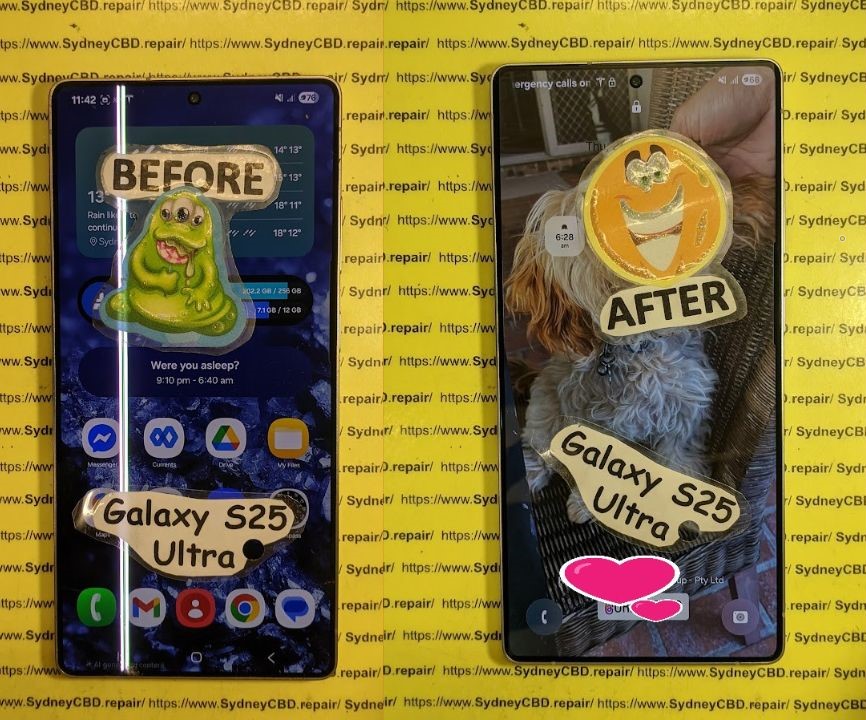
Understanding Battery Swelling in Smartphones
Battery swelling occurs when gases build up inside a lithium-ion battery. These gases create pressure that expands the battery pack, causing it to bulge inside the phone.
Smartphones today rely heavily on lithium-ion technology because it’s lightweight and efficient. However, these batteries degrade over time. Once damaged, they can become unstable and dangerous.
What Causes a Battery to Swell?
Several factors contribute to battery swelling:
- Overcharging
- Excessive heat exposure
- Physical damage
- Manufacturing defects
- Aging batteries
- Cheap replacement chargers
- Power surges
Heat is one of the biggest culprits. Leaving a phone inside a hot car or constantly gaming while charging increases internal temperatures significantly. Over time, this stress damages the battery’s chemical structure.
Using low-quality charging accessories can also accelerate deterioration. Cheap cables and adapters may deliver unstable voltage, which harms battery cells.
Early Warning Signs of Battery Swelling
Spotting battery swelling early can prevent major damage. Common warning signs include:
| Warning Sign | What It Means |
|---|---|
| Screen lifting from frame | Battery pushing against display |
| Phone overheating | Battery instability |
| Reduced battery life | Internal cell degradation |
| Random shutdowns | Power delivery issues |
| Thick or bulging back cover | Expanding battery pack |
If you notice any of these symptoms, stop using the phone immediately and seek professional assistance.
Understanding Screen Lines on Mobile Phones
Screen lines are another widespread issue affecting smartphones. These lines can appear vertically or horizontally and often indicate hardware damage.
Some lines are temporary, while others become permanent. The severity depends on the root cause.
Common Types of Screen Lines
There are several kinds of screen line problems:
- Green vertical lines
- White flickering lines
- Purple OLED streaks
- Horizontal dead pixels
- Rainbow-colored distortions
OLED displays are especially vulnerable because they use organic light-emitting compounds that degrade over time.
Why Screen Lines Appear Suddenly
Screen lines can develop without warning. Common causes include:
- Physical drops
- Water damage
- Pressure damage
- Overheating
- Faulty display connectors
- Manufacturing defects
In some cases, the phone still functions normally despite visible lines. In others, touch responsiveness may fail completely.
The Connection Between Battery Swelling and Screen Damage

Battery swelling and screen lines often appear together because internal phone components are tightly packed.
A swollen battery pushes upward against the display assembly. This pressure can damage fragile OLED or LCD layers.
Pressure Inside the Device
Modern smartphones are designed with minimal internal space. When the battery expands, it places stress on nearby components.
This pressure can cause:
- Display discoloration
- Touchscreen failure
- Vertical line formation
- Screen separation
- Cracked OLED layers
OLED screens are particularly sensitive to pressure because of their ultra-thin construction.
Heat and Internal Component Stress
Battery swelling also creates heat. Excessive heat weakens adhesives and damages display circuitry.
As temperatures rise:
- Screen connectors loosen
- Pixels degrade faster
- Internal solder joints weaken
- Logic board components become unstable
Unfortunately, even after replacing the swollen battery, the screen damage may already be permanent.
Why Replacing the Battery Alone May Not Solve Screen Lines
One of the biggest misconceptions in smartphone repair is assuming a battery replacement automatically fixes display issues.
While removing the swollen battery eliminates pressure, the display itself may already be damaged beyond repair.
Permanent OLED and LCD Damage
OLED panels contain microscopic layers that don’t recover once broken.
If pressure from battery swelling damages these layers, users may still experience:
- Persistent vertical lines
- Dead pixels
- Flickering brightness
- Black spots
- Ghost touch problems
Even with a brand-new battery installed, these display defects often remain.
Connector and Logic Board Issues
Sometimes the issue extends deeper than the screen.
A swollen battery can bend internal components or partially disconnect display cables. In severe cases, the motherboard itself may suffer damage.
Technicians frequently discover:
- Torn display flex cables
- Damaged display IC chips
- Corroded connectors
- Short circuits caused by heat
This is why professional diagnostics are essential before replacing parts.
Why Replacing the Screen Alone May Not Solve Battery Problems
On the other hand, replacing only the screen while ignoring battery swelling can be risky.
A swollen battery remains unstable even if the display looks normal after repair.
Hidden Battery Damage
Some batteries swell internally before visible expansion occurs. Users may focus on fixing the display while missing dangerous warning signs.
Symptoms can include:
- Rapid battery drain
- Random reboots
- Charging inconsistencies
- Excessive heat during use
Ignoring these problems increases the chance of further device damage.
Safety Risks of Ignoring Battery Swelling
Lithium-ion batteries can become hazardous when compromised.
Potential risks include:
- Fire
- Smoke emission
- Chemical leakage
- Device explosion
According to Samsung Official Support and Apple Support, swollen batteries should never be punctured or reused.
That’s why reputable technicians replace swollen batteries immediately rather than attempting temporary fixes.
How Technicians Diagnose Both Problems
Professional repair technicians follow a detailed inspection process to identify the true source of the issue.
Accurate diagnosis prevents unnecessary repairs and saves customers money.
Professional Inspection Process
A complete diagnostic typically includes:
- Visual inspection
- Battery health testing
- Display functionality checks
- Internal connector examination
- Thermal analysis
- Charging circuit testing
Technicians may disassemble the device to inspect internal pressure damage.
Testing Internal Components
Specialized tools help determine whether the screen or motherboard has suffered permanent damage.
Technicians often test:
| Component | Purpose |
|---|---|
| OLED panel | Detect pixel damage |
| Battery voltage | Measure battery stability |
| Display flex cable | Check signal transmission |
| Motherboard circuits | Identify shorts |
| Charging IC | Verify power management |
Without these tests, replacing parts becomes guesswork.
Repair vs Replacement: Which Option Is Better?
Deciding whether to repair or replace a phone depends on several factors.
Sometimes repairing both the battery swelling and screen lines makes financial sense. Other times, replacement is the smarter choice.
When Repair Is Worth It
Repairing the device may be worthwhile if:
- The phone is relatively new
- Damage is limited
- Genuine parts are available
- The motherboard is intact
- Repair costs remain reasonable
Flagship devices often justify repair because replacement phones cost significantly more.
When It’s Time for a New Phone
Replacement may be the better option when:
- Repair costs exceed device value
- The motherboard is damaged
- Multiple components have failed
- Water damage is severe
- Battery swelling caused extensive internal stress
Older devices sometimes become unreliable even after repair.
Preventing Battery Swelling and Screen Lines
Preventative care dramatically reduces the risk of both battery swelling and screen damage.
Good habits extend smartphone lifespan and improve performance.
Charging Habits That Matter
Healthy charging practices include:
- Avoid overnight charging constantly
- Use genuine chargers
- Keep battery levels between 20% and 80%
- Avoid heavy gaming while charging
- Disconnect chargers during overheating
These simple habits reduce battery stress significantly.
Environmental Factors to Avoid
External conditions also play a major role.
Avoid:
- Direct sunlight exposure
- Hot vehicles
- Humid environments
- Cheap charging accessories
- Excessive phone pressure inside pockets
Protective cases can help minimize physical damage, but they won’t stop internal battery deterioration entirely.
Importance of Professional Repairs
DIY repairs may seem tempting, especially with online tutorials everywhere. However, modern smartphones are extremely delicate.
Improper handling can worsen both battery swelling and screen lines.
Professional repair centers offer:
- Genuine replacement parts
- Safe battery disposal
- Proper adhesive sealing
- Water resistance restoration
- Warranty-backed repairs
Experienced technicians also identify hidden issues that casual users may miss.
For official safety guidance regarding lithium-ion batteries, visit Battery University.
Frequently Asked Questions
Can battery swelling cause green lines on a phone screen?
Yes. Battery swelling can place pressure on OLED displays, damaging delicate layers and causing green or white vertical lines.
Will replacing the battery remove screen lines?
Not always. If the display has already suffered permanent damage, screen lines may remain even after battery replacement.
Is a swollen phone battery dangerous?
Yes. Swollen lithium-ion batteries can leak, overheat, catch fire, or explode if ignored.
Why does my screen still flicker after replacing the battery?
The display connector, OLED panel, or motherboard may already be damaged from heat or internal pressure.
Can screen lines disappear on their own?
Temporary lines caused by loose connectors may disappear briefly. However, permanent OLED damage usually worsens over time.
Should I stop using my phone if the battery swells?
Absolutely. Continued use increases safety risks and may cause further internal damage.
Is it cheaper to repair or replace a phone with both issues?
It depends on the phone model and damage severity. High-end phones are often worth repairing, while older devices may be better replaced.
Conclusion

Battery swelling and screen lines are serious smartphone problems that frequently appear together. However, replacing one component doesn’t always solve the other issue.
A swollen battery can permanently damage a display, while a faulty screen repair may overlook dangerous battery instability. That’s why proper diagnostics matter so much.
Understanding the relationship between battery swelling and screen lines helps users make smarter repair decisions. More importantly, it protects both device performance and personal safety.
Professional technicians can accurately identify whether the battery, screen, motherboard, or multiple components require attention. Acting quickly often prevents further damage and reduces repair costs.
If your phone shows signs of swelling, overheating, or screen distortion, don’t ignore it. Early intervention can make all the difference.
David from Sydney CBD Repair Centre – The Best place to fix mobile phones as 7 Years In A Row! Top Mobile Phone Repair In Sydney. More than 2000 Positive Reviews on Google and Same Day Repairs.
We take pride in delivering exceptional repair services for all major phone brands including Apple, Samsung, Google, and more. Our expert technicians use only genuine parts and offer 90days warranty on repairs. Located in the heart of Sydney CBD, we’re your one-stop solution for all mobile device repairs.
Our commitment to excellence has earned us the trust of thousands of satisfied customers. Whether it’s a cracked screen, battery replacement, or water damage repair, we handle it all with professional care and expertise. Walk in today and experience why we’re Sydney’s #1 choice for mobile phone repairs.
Visit us for:
✓ Same Day Express Repairs
✓ Genuine Parts Guarantee
✓ Professional Technicians
✓ Competitive Pricing
✓ 2000+ 5-Star Google Reviews
✓ 7-Time Award Winner for Best Phone Repairs
Sydney CBD Repair Centre – Where Quality Meets Reliability.
Call : +61280114119
Website: Sydney CBD Repair Centre

