




Is Fixing A Broken Google Pixel 11 Pro XL Screen Worth The Repair Price?

Is Fixing A Broken Google Pixel 11 Pro XL Screen Worth The Repair Price?
Introduction: Is Screen Replacement Really Worth It?
A broken smartphone screen can turn an otherwise excellent device into an expensive headache. When your Google Pixel 11 Pro XL suffers a cracked display, flickering pixels, black patches, or touch problems, you face an important question: should you repair it or spend more money on a replacement phone?
The answer depends on more than the repair quotation. Display quality, genuine replacement parts, device condition, repair warranty, and expected remaining lifespan all matter.
In this comprehensive guide, we’ll examine the real value of repairing a damaged Google Pixel 11 Pro XL screen, explain the factors that influence replacement costs, and share practical advice to help you avoid costly mistakes.
The Google Pixel 11 Pro XL is a premium smartphone designed for users who expect excellent display quality, powerful performance, and a smooth everyday experience. However, even an expensive flagship phone isn’t immune to accidental drops, pressure damage, scratches, or unexpected display failures.
A cracked screen can happen in seconds. One moment, you’re taking photos or checking messages; the next, you’re looking at shattered glass, colourful lines, or an unresponsive touchscreen.
So, is fixing a broken Google Pixel 11 Pro XL screen worth the repair price?
In many situations, yes. Repairing the display can be a smart financial decision, particularly when the phone is otherwise in excellent condition. However, the decision should depend on the actual replacement quotation, the quality of the replacement screen, and whether the phone has suffered additional internal damage.
Google lists the Pixel 11 Pro XL with a 6.8-inch Super Actua LTPO OLED display, a 1344 × 2992 resolution, a 1–120Hz refresh rate, and Gorilla Glass Victus 2 protection. These premium display features make replacement quality especially important.
Let’s explore the repair costs, replacement options, potential risks, and ten expert tips that can help you make the right decision.
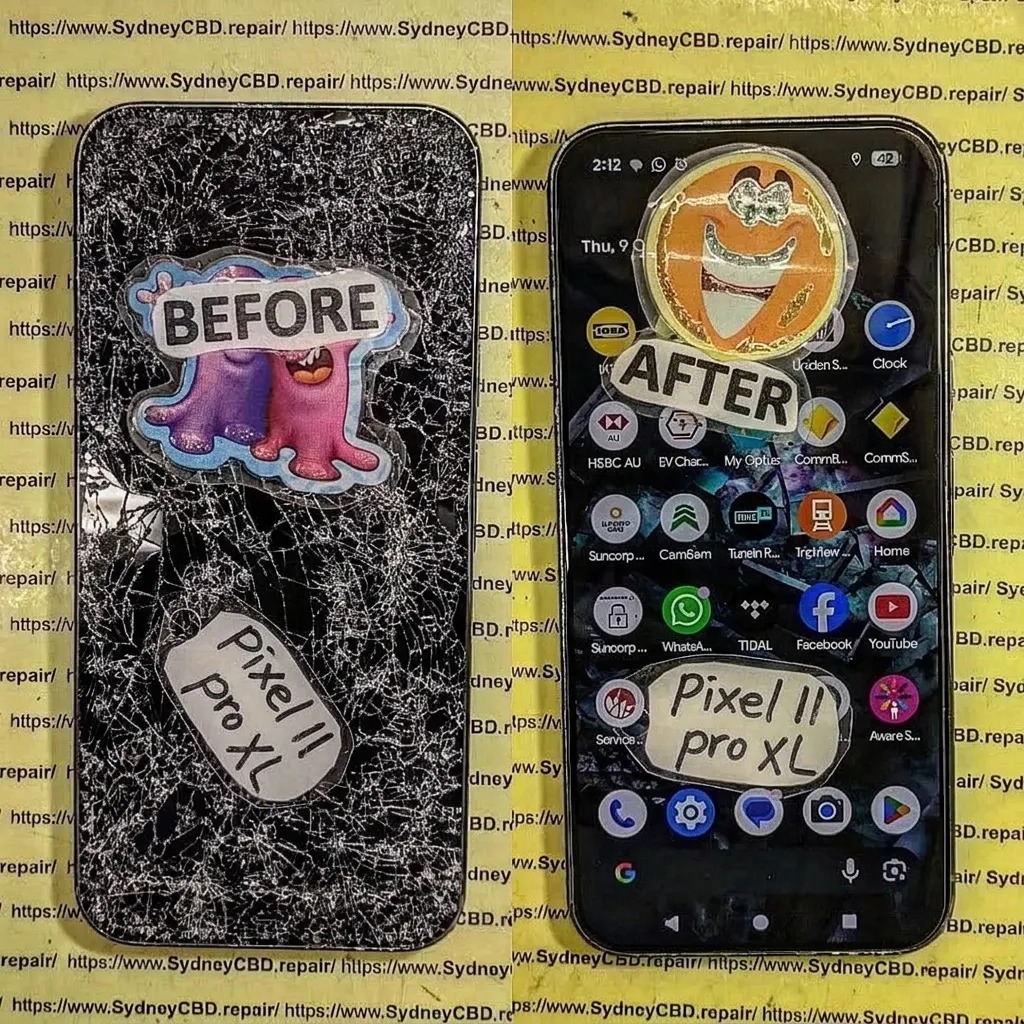
1. Understanding Google Pixel 11 Pro XL Screen Damage
Before deciding whether a screen replacement is worthwhile, you need to understand exactly what’s wrong with your device.
Not every cracked screen requires the same repair. Sometimes, the outer glass is damaged while the OLED panel continues working. In other cases, the impact damages the display underneath, creating much more serious problems.
1.1 Cracked Front Glass
Cracked front glass is one of the most common smartphone problems.
A phone can fall from a desk, slip out of a pocket, or hit a hard surface. Even a seemingly minor impact can create cracks across the display.
Typical symptoms include:
-
Small cracks around the corners.
-
Spiderweb-shaped glass damage.
-
Sharp edges that can cut your fingers.
-
Cracks spreading across the viewing area.
-
Glass fragments becoming loose.
If the picture and touchscreen still work, you might think the damage isn’t serious. Unfortunately, damaged glass can become worse with everyday use.
Dust and moisture may enter through damaged areas, while additional pressure can cause the OLED panel to fail.
Expert advice: Don’t wait until the display becomes completely unusable. Get the phone inspected before a minor problem turns into a more expensive repair.
1.2 Black Spots and Ink-Like Display Damage
Black patches are a strong indication that the OLED panel has suffered physical damage.
Unlike surface scratches, these marks originate within the display assembly.
You might notice:
-
Black spots around the impact area.
-
Dark patches spreading across the screen.
-
Missing sections of the picture.
-
Purple or green discolouration.
-
Flickering around damaged pixels.
These problems usually require a complete display assembly replacement rather than simple glass repair.
1.3 Green Lines, Flickering and Colour Problems
Vertical green lines can make a phone frustrating to use.
They may appear after physical impact, internal display damage, or an electronic connection problem.
However, don’t automatically assume every green line means the OLED panel needs replacing. A technician should inspect the display connector and surrounding components first.
A proper diagnosis prevents unnecessary repairs.
1.4 Touchscreen Failure
Sometimes the picture looks perfectly normal, but the touchscreen doesn’t respond correctly.
Common symptoms include:
-
Unresponsive areas.
-
Ghost touches.
-
Random screen selections.
-
Delayed typing.
-
Touch input working only around certain edges.
If the touch-sensitive layer or display assembly has failed, replacement may be necessary.
1.5 When Is Replacement Necessary?
The following table provides a useful starting point.
| Screen problem | Possible repair |
|---|---|
| Minor surface scratches | Protective film or glass assessment |
| Cracked outer glass | Glass repair assessment |
| Black OLED patches | Display assembly replacement |
| Green vertical lines | Display and connector diagnosis |
| No display picture | Hardware diagnosis |
| Touchscreen failure | Touch and display testing |
| Severe shattered screen | Complete display replacement |
Remember, these are general repair guidelines. The correct solution depends on the actual condition of your phone.
2. Google Pixel 11 Pro XL Screen Replacement Cost: What Determines The Price?
One of the biggest concerns for smartphone owners is the cost of replacing a premium display.
Unfortunately, there isn’t one universal price that applies to every repair centre.
The final quotation depends on parts availability, replacement component quality, labour, additional damage, and local service conditions.
2.1 Why Premium OLED Displays Cost More
The Pixel 11 Pro XL uses advanced OLED display technology.
Its display isn’t simply a piece of glass. It’s an integrated electronic assembly responsible for producing images, responding to touch, controlling brightness, and delivering smooth motion.
Several features influence replacement costs:
-
High-resolution OLED technology.
-
Large 6.8-inch display size.
-
LTPO refresh-rate technology.
-
Touchscreen integration.
-
Display connectors and associated components.
-
Replacement part availability.
-
Installation requirements.
A replacement screen that doesn’t properly support the phone’s display functions can affect the overall experience.
That’s why choosing the cheapest available screen isn’t always the best decision.
2.2 Genuine Parts Versus Aftermarket Screens
One of the most important questions to ask a repair technician is whether the replacement display is genuine, refurbished, or aftermarket.
| Display type | Potential advantages | Considerations |
|---|---|---|
| Genuine replacement | Designed for the original device | Usually more expensive |
| Refurbished original | May retain original display characteristics | Condition and refurbishment quality matter |
| Premium aftermarket | Can reduce repair costs | Performance varies between suppliers |
| Low-quality aftermarket | Lower initial price | Greater uncertainty about brightness, touch and durability |
Not every aftermarket display is automatically poor quality. Likewise, the word genuine shouldn’t be accepted without clarification.
Ask the repair centre to explain exactly what part they’re supplying.
2.3 Additional Damage Can Increase The Repair Price
A damaged screen isn’t always the only problem.
An impact can also affect:
-
The display connector.
-
Internal frame alignment.
-
Front-facing camera components.
-
Battery connections.
-
Internal flex cables.
-
Other nearby electronic components.
For example, if the phone has a bent frame, fitting a new screen without addressing the frame damage could create pressure points.
This may lead to another cracked display.
A proper technician should inspect the entire device before providing a final quotation.
2.4 How To Compare Repair Quotations
Don’t compare prices without checking what’s included.
Ask each repair provider these questions:
-
Is the replacement screen genuine or aftermarket?
-
Does the quotation include installation?
-
Is there a warranty on the replacement part?
-
Will the touchscreen be tested?
-
Will brightness and colour performance be checked?
-
Are additional frame repairs included?
-
Will the original device data remain untouched?
-
Are there any additional diagnostic charges?
Google also explains that out-of-warranty repair prices can vary and that repair partners should communicate additional costs before proceeding.
Pixel Phone Help+1
2.5 Is An Expensive Repair Always A Bad Deal?
Not necessarily.
Suppose you receive two quotations:
| Item | Repair A | Repair B |
|---|---|---|
| Display quality | Unclear | Clearly specified |
| Installation | Included | Included |
| Testing | Not confirmed | Included |
| Warranty | Not offered | Offered |
| Price | Lower | Higher |
Repair B might provide better long-term value despite costing more.
The important thing is to compare the complete repair service rather than focusing on the initial price alone.
3. Repair Or Replace? Making The Financial Decision
This is where the real decision begins.
A broken Google Pixel 11 Pro XL doesn’t automatically mean you need another smartphone.
If the battery, cameras, processor, charging system, and internal components remain in good condition, replacing the screen could restore much of the device’s everyday usefulness.
3.1 Calculate The True Cost Of Repair
Start by obtaining a written repair quotation.
Then compare it with the cost of purchasing an equivalent replacement phone.
Use this simple calculation:
Repair value percentage = (Screen repair cost ÷ Replacement phone cost) × 100
For example, imagine the following hypothetical figures:
-
Screen replacement: $350.
-
Equivalent replacement phone: $1,200.
The calculation would be:
In this example, the repair costs approximately 29% of the replacement phone’s price.
This could represent good value if the device is otherwise healthy.
These figures are examples only, not confirmed Pixel 11 Pro XL repair prices.
3.2 When Repairing Makes Financial Sense
Repairing is often worth considering when:
-
Your phone is relatively new.
-
The motherboard works correctly.
-
Battery performance remains acceptable.
-
The cameras are undamaged.
-
The charging system works.
-
The phone has sufficient storage.
-
The repair includes a reliable warranty.
-
The replacement display meets your expectations.
A successful screen replacement can extend the useful life of your smartphone without requiring another major purchase.
3.3 When Replacing The Phone Might Be Better
There are situations where spending money on a screen repair isn’t sensible.
Consider replacing the phone if:
-
The motherboard has serious damage.
-
The battery is swollen or severely degraded.
-
The frame is badly bent.
-
The camera system is damaged.
-
The charging system has major faults.
-
Multiple repairs are required.
-
The total repair quotation approaches the price of an equivalent replacement.
For instance, imagine a phone requiring a display replacement, battery replacement, and motherboard repair.
The combined quotation might be much higher than expected.
At that point, compare the total repair cost against the price of another device.
3.4 The Hidden Value Of Keeping Your Existing Phone
Replacing a smartphone involves more than purchasing new hardware.
You may also need to:
-
Transfer applications.
-
Restore photos and videos.
-
Reconfigure banking applications.
-
Reconnect email accounts.
-
Set up security features.
-
Transfer important documents.
-
Reconnect accessories.
Repairing your existing phone can save time and avoid unnecessary disruption.
There’s also an environmental benefit. Extending a device’s useful life reduces electronic waste and delays the need to manufacture another smartphone.
3.5 A Simple Repair Decision Table
| Device condition | Suggested decision |
|---|---|
| Excellent condition apart from screen | Consider repairing |
| Minor battery ageing | Compare repair and battery costs |
| Screen and frame damage | Obtain a complete quotation |
| Screen and motherboard damage | Carefully compare total costs |
| Multiple serious hardware faults | Consider replacement |
| Expensive phone with low repair quotation | Repair may offer strong value |
The most important rule is simple: don’t make your decision based on screen damage alone.
4. Understanding The Google Pixel 11 Pro XL Display Technology
A replacement screen should preserve the features that make your original device enjoyable to use.
The Google Pixel 11 Pro XL’s display specifications make this particularly important.
4.1 What Is Super Actua LTPO OLED?
OLED stands for Organic Light-Emitting Diode.
Unlike traditional LCD displays that depend on a separate backlight, OLED pixels produce their own light.
This technology provides several advantages:
-
Deep black levels.
-
Strong contrast.
-
Rich colours.
-
Fast response.
-
Excellent image quality.
-
Efficient operation when displaying darker content.
The LTPO technology also supports variable refresh rates.
This allows the display to adjust its refresh rate depending on what you’re doing.
4.2 Why Refresh Rate Matters
A refresh rate measures how many times a display updates its image each second.
The Pixel 11 Pro XL supports a 1–120Hz Smooth Display according to Google’s specifications.
Pixel Phone Help
A higher refresh rate can make:
-
Scrolling feel smoother.
-
Animations appear more fluid.
-
Supported games feel more responsive.
-
Screen transitions look cleaner.
A replacement display that doesn’t properly support the expected refresh-rate behaviour could reduce the experience.
4.3 Brightness And Outdoor Visibility
Premium display brightness matters when using a phone outside.
You might regularly use your device for:
-
Navigation.
-
Photography.
-
Outdoor messaging.
-
Reading documents.
-
Watching videos.
A low-quality replacement screen may have different brightness characteristics.
Ask the technician whether the replacement part meets the required performance standards.
4.4 Touch Sensitivity And Responsiveness
The touchscreen is just as important as picture quality.
After installation, technicians should check:
-
Touch response across the entire display.
-
Multi-touch functionality.
-
Keyboard accuracy.
-
Edge sensitivity.
-
Scrolling.
-
Gesture navigation.
A screen that looks beautiful but doesn’t respond properly isn’t a successful repair.
4.5 Display Compatibility Is Essential
Never assume that two Pixel displays are interchangeable because they look similar.
Different models can have different connectors, dimensions, mounting points, and electronic requirements.
Always confirm that the replacement component is specifically compatible with the Google Pixel 11 Pro XL.
5. Professional Google Pixel 11 Pro XL Screen Replacement Process
Professional installation is important because modern smartphones contain delicate components.
A careless repair can cause more problems than the original cracked screen.
Here’s what a responsible repair process should involve.
5.1 Initial Device Inspection
Before opening the phone, the technician should examine its external condition.
This includes checking:
-
Screen damage.
-
Frame alignment.
-
Rear cover condition.
-
Camera lenses.
-
Buttons.
-
Charging port.
-
Signs of liquid exposure.
The technician should also discuss the reported symptoms with the customer.
5.2 Safe Device Opening
Modern smartphones use carefully fitted components and adhesives.
Opening the phone requires suitable tools and controlled techniques.
Excessive force can damage internal cables, connectors, or surrounding components.
5.3 Disconnecting The Battery
A technician should follow the appropriate service procedure to isolate power before working on sensitive internal connections.
This reduces the risk of electrical damage during the repair.
5.4 Removing The Damaged Display
The damaged display assembly must be carefully separated from the device.
The technician needs to avoid damaging:
-
Internal cables.
-
Frame surfaces.
-
Nearby sensors.
-
Connectors.
-
Other sensitive components.
The mounting area should be inspected before installing the replacement.
5.5 Installing The Replacement Screen
The replacement screen must be correctly aligned and connected.
Important installation considerations include:
-
Correct part compatibility.
-
Clean mounting surfaces.
-
Appropriate adhesive.
-
Proper cable positioning.
-
No trapped dust.
-
No excessive pressure.
-
Correct frame alignment.
The technician should follow the appropriate service instructions for the exact model.
5.6 Testing Before Final Assembly
Testing is essential.
A professional repair shouldn’t be considered complete simply because the screen turns on.
The technician should check the display and other relevant functions before returning the device.
5.7 Final Quality Inspection
The final inspection should include:
| Test | What it checks |
|---|---|
| Display test | Picture and colour performance |
| Touch test | Response across the screen |
| Brightness test | Brightness adjustment |
| Refresh-rate test | Supported display behaviour |
| Camera test | Camera operation |
| Audio test | Speaker and microphone |
| Charging test | Charging functionality |
| Frame inspection | Correct screen alignment |
Not every repair requires the same tests, but the technician should verify all functions affected by the repair.
6. Ten Expert Tips Before Paying For A Google Pixel 11 Pro XL Screen Repair
Choosing the right repair service can make the difference between a successful repair and another expensive problem.
Here are ten practical tips to help you get the best value from your repair investment.
Tip 1: Get A Proper Diagnosis Before Approving The Repair
Never assume that a cracked screen is the only problem.
A phone might have additional damage that isn’t immediately visible.
Ask the technician to inspect the display connector, internal frame, battery condition, and other affected components.
A proper diagnosis helps prevent unexpected expenses.
Tip 2: Ask Whether The Replacement Screen Is Genuine
The quality of the replacement display matters.
Ask whether the screen is:
-
Genuine original equipment.
-
Refurbished original equipment.
-
Premium aftermarket.
-
Standard aftermarket.
Get a clear explanation rather than relying on marketing descriptions.
A genuine replacement part may cost more initially, but component quality and compatibility should be part of your decision.
Tip 3: Compare At Least Two Repair Quotations
Don’t rush into the first repair offer you receive.
Compare two or three reputable repair providers where possible.
Look at the complete service, including parts, installation, warranty, and testing.
A cheaper quotation isn’t necessarily a better deal.
Tip 4: Check The Repair Warranty
A reliable repair provider should clearly explain its warranty conditions.
Ask:
-
How long does the warranty last?
-
Does it cover display defects?
-
Does it cover touchscreen problems?
-
Are installation-related issues covered?
-
What happens if the replacement screen develops a fault?
Remember that accidental damage after the repair may not be covered.
Always request written warranty information.
Tip 5: Avoid Extremely Cheap Replacement Screens
If a quotation looks unusually cheap, ask why.
The provider might be using a lower-grade replacement component, a refurbished part, or a screen with different specifications.
A low purchase price can become expensive if the display fails or needs replacement again.
Focus on long-term value rather than the cheapest possible repair.
Tip 6: Protect Your Personal Data
Before handing over your smartphone, back up important information.
Consider saving:
-
Photos and videos.
-
Contacts.
-
Documents.
-
Important messages.
-
Application information.
-
Account recovery details.
Google recommends backing up your device before sending it for repair. Eligible Pixel devices may also support Repair Mode, which can help technicians perform diagnostics without requiring the same level of access to personal information.
Pixel Phone Help+1
Never share your account password unnecessarily.
Tip 7: Ask About Same-Day Repair Availability
A broken screen can interrupt your work and personal life.
If you need your phone urgently, ask whether the repair provider has the correct replacement component in stock.
Same-day repairs may be possible, but availability depends on the part, damage, and technician workload.
Don’t assume every premium Pixel repair can be completed immediately.
Tip 8: Check Touchscreen And Display Performance Before Leaving
Once the repair is finished, test the phone yourself.
Open different applications, type a message, scroll through menus, and adjust brightness.
Check for:
-
Dead pixels.
-
Uneven brightness.
-
Display flickering.
-
Touchscreen delays.
-
Ghost touches.
-
Incorrect colour reproduction.
Report any concerns before accepting the completed repair.
Tip 9: Ask About Water-Resistance Considerations
A smartphone’s original water-resistance design shouldn’t be taken for granted after opening the device.
The repair process may disturb factory seals and adhesives.
Ask whether the technician replaces the relevant seals and whether any suitable post-repair testing is available.
Remember, a successful repair doesn’t automatically guarantee that the phone retains its original water-resistance rating.
Avoid deliberately exposing the repaired device to water.
Tip 10: Consider The Remaining Life Of Your Phone
Finally, think about how long you expect to keep the Pixel 11 Pro XL.
If the device performs well and meets your needs, repairing the screen could be a sensible investment.
However, if the battery is failing, the frame is damaged, and other components are approaching the end of their useful life, a replacement phone might be more economical.
The smartest decision considers the entire device rather than just its display.
7. Common Mistakes To Avoid When Repairing A Broken Pixel 11 Pro XL
Even when you choose to repair your phone, several mistakes can reduce the value of the repair.
7.1 Choosing A Repair Shop Based Only On Price
A very low quotation can be tempting.
However, screen replacement requires suitable parts, technical knowledge, and careful installation.
Before choosing a provider, check its experience with Google Pixel devices.
Ask about previous repairs, replacement component quality, and warranty conditions.
7.2 Ignoring Frame Damage
A damaged frame can create uneven pressure against a replacement display.
This is especially concerning when the frame is bent near the corners.
Installing a new screen without addressing serious structural damage may lead to another failure.
7.3 Attempting DIY Screen Replacement Without Experience
DIY repairs can be useful for people with the right training, equipment, and experience.
However, premium smartphone displays are delicate.
Incorrect opening techniques, excessive heat, damaged connectors, and poor adhesive installation can cause expensive problems.
Before attempting a DIY repair, consider the cost of replacement parts, specialist tools, and the possibility of damaging other components.
7.4 Assuming Every Replacement Screen Offers The Same Performance
Two screens might look identical in an online photograph but perform very differently.
Brightness, colour accuracy, touch response, refresh-rate support, and durability can vary.
Always ask for clear information about the component being installed.
7.5 Forgetting To Test The Entire Device
A successful screen repair should not leave you with a phone that has new problems.
Check the cameras, charging, speakers, microphones, buttons, and connectivity.
If something worked before the repair but doesn’t work afterwards, raise the issue with the service provider immediately.
7.6 Ignoring The Repair Warranty
A verbal promise isn’t a substitute for clear warranty conditions.
Get the repair coverage in writing and keep your receipt.
This provides a reference if the replacement component develops a fault later.
8. Benefits Of Repairing Your Google Pixel 11 Pro XL Instead Of Replacing It
There are several advantages to repairing your existing smartphone.
8.1 Save Money Compared With Buying Another Flagship
A premium smartphone represents a significant investment.
If only the screen is damaged, replacing the entire device may be unnecessary.
A properly priced display repair can restore usability without the expense of purchasing another flagship.
8.2 Keep Your Familiar Smartphone Experience
You already know your device.
Your applications, settings, photographs, and personal preferences are arranged the way you like them.
Repairing the screen allows you to continue using the same phone without going through a complete device replacement process.
8.3 Maintain Access To Your Existing Data
Although important data should always be backed up, keeping the original device can make the transition easier.
You may avoid some of the inconvenience associated with transferring accounts, files, and application settings.
However, no repair provider should guarantee that data will never be affected. Backups remain essential.
8.4 Reduce Electronic Waste
Smartphone manufacturing requires materials, energy, and transportation.
Extending the life of an existing phone can reduce the need for an early replacement.
A screen repair is therefore not just a financial decision. It can also support more responsible electronics consumption.
8.5 Restore Everyday Productivity
A broken screen can interfere with nearly everything you do.
After a successful repair, you can return to:
-
Making calls.
-
Sending messages.
-
Managing appointments.
-
Taking photographs.
-
Watching videos.
-
Using navigation.
-
Managing business activities.
-
Accessing important applications.
For people who rely on their smartphone every day, restoring the display can make a substantial difference.
8.6 Preserve A Premium Display Experience
When the correct replacement component is installed, the goal is to restore the display experience as closely as possible to the original.
That includes appropriate brightness, colour, resolution, touch responsiveness, and refresh-rate behaviour.
This is why selecting a suitable replacement screen is so important.
9. How To Prepare Your Google Pixel 11 Pro XL Before Screen Replacement
Preparation can make the repair process easier and help protect your information.
Follow these steps before taking your smartphone to a repair centre.
9.1 Back Up Important Information
Use your preferred backup method to save important data.
Check that your photos, contacts, documents, and other essential information have been backed up successfully.
If your screen is already unresponsive, use any previously configured backup or recovery options available to you.
9.2 Record The Existing Problems
Make a list of everything that isn’t working.
For example:
-
Screen has a green line.
-
Touchscreen doesn’t respond in the upper corner.
-
Front camera works normally.
-
Phone charges correctly.
-
Battery drains faster than usual.
This information helps the technician understand the original condition of the device.
9.3 Check Your Warranty
Before paying for an accidental-damage repair, check your device’s warranty and any additional protection plan.
Google explains that accidental damage is generally not covered by its standard limited warranty, although coverage depends on the applicable terms and region.
Pixel Phone Help+1
You can start by visiting Google’s official Pixel repair and support page.
9.4 Remove Personal Accessories
Remove your phone case and any accessories that could interfere with inspection.
If possible, remove the SIM card before handing over the device.
Follow the repair provider’s instructions regarding eSIMs and other device security settings.
9.5 Ask For A Written Quotation
Before approving the repair, make sure the quotation explains:
-
Replacement component type.
-
Labour charges.
-
Additional repair costs.
-
Estimated completion time.
-
Warranty coverage.
-
Payment terms.
A written quotation makes it easier to compare different repair providers.
9.6 Understand What Happens After Repair
Ask whether the technician will perform a final inspection and functional test.
Also confirm whether the original display will be returned if requested and permitted by the service provider.
Understanding these details helps you avoid surprises.
10. Frequently Asked Questions About Google Pixel 11 Pro XL Screen Repair
Here are ten common questions smartphone owners ask before deciding whether to replace a damaged display.
FAQ 1: Is Fixing A Broken Google Pixel 11 Pro XL Screen Worth The Repair Price?
Yes, it can be worthwhile if the rest of the phone is in good working condition.
Compare the replacement quotation with the cost of purchasing an equivalent device. Also consider the quality of the replacement display, installation, and warranty.
If the repair is reasonably priced and the phone has no major internal damage, screen replacement can be an excellent option.
FAQ 2: How Much Does It Cost To Replace A Google Pixel 11 Pro XL Screen?
The price depends on the replacement screen, parts availability, labour, and repair location.
There isn’t a universal price that applies to every repair centre.
Request a current quotation that clearly identifies the replacement component and includes installation and warranty information.
FAQ 3: Can I Replace Only The Glass Instead Of The Entire Display?
Sometimes glass-only repair is technically possible, but it depends on the damage and the available repair equipment.
If the OLED panel and touch functions are damaged, replacing the complete display assembly is generally the more appropriate solution.
A technician should inspect the screen before recommending either option.
FAQ 4: Will A Replacement Screen Have The Same Quality As The Original?
That depends on the replacement component.
A suitable genuine replacement can offer the closest match to the original specifications. Refurbished and aftermarket displays can vary in quality.
Ask about resolution, brightness, refresh-rate support, colour performance, and touch responsiveness before approving the repair.
FAQ 5: How Long Does Google Pixel 11 Pro XL Screen Replacement Take?
Repair time depends on parts availability, the extent of damage, and the repair provider’s workload.
Some straightforward screen replacements may be completed on the same day.
However, additional internal damage or unavailable components can extend the repair period.
Always confirm the estimated completion time before leaving your phone.
FAQ 6: Will Screen Replacement Delete My Photos And Personal Data?
A screen replacement doesn’t normally require deleting personal data.
However, unexpected problems can occur during repairs, and some service procedures may require a factory reset.
Back up your information before handing over the phone.
Google also recommends using Repair Mode on eligible devices where available.
FAQ 7: Will My Pixel 11 Pro XL Remain Water-Resistant After Screen Replacement?
The original water-resistance rating shouldn’t automatically be assumed after a repair.
Opening the phone can disturb its original seals and adhesives.
Ask whether the repair includes appropriate replacement seals and whether suitable post-repair testing is performed.
Even after professional servicing, avoid unnecessary water exposure.
FAQ 8: Can A Cracked Pixel Screen Damage Other Components?
Yes.
A severe impact can damage the OLED panel, connectors, frame, battery connections, and other internal components.
Cracked glass can also become a safety concern.
Have the device inspected promptly rather than continuing to apply pressure to the damaged screen.
FAQ 9: Is An Aftermarket Google Pixel 11 Pro XL Screen Worth Buying?
It depends on the component’s quality, compatibility, and price.
Some aftermarket displays may offer reasonable value, while low-quality options can have problems with brightness, colour, touch response, and durability.
Compare the specifications and warranty rather than choosing purely based on price.
FAQ 10: Should I Repair My Pixel 11 Pro XL Or Buy A New Phone?
Repairing is generally worth considering when the display is the main problem and the rest of the phone is healthy.
Replacing the phone may make more sense if it has several expensive hardware faults or the combined repair costs are too high.
Get a complete diagnosis and compare the total costs before making your decision.
Conclusion: Is Fixing A Broken Google Pixel 11 Pro XL Screen Worth It?

So, is fixing a broken Google Pixel 11 Pro XL screen worth the repair price?
For many smartphone owners, the answer is yes.
The Pixel 11 Pro XL is a premium device with advanced OLED display technology and features designed for demanding everyday use. If the phone is otherwise working correctly, replacing the damaged display can be a sensible alternative to purchasing another expensive smartphone.
However, choosing the right repair service is just as important as deciding to repair the device.
Before approving a replacement, remember these essential points:
-
Get a complete diagnosis of the damage.
-
Compare repair prices from reputable providers.
-
Ask about genuine replacement screen availability.
-
Check display quality and compatibility.
-
Confirm warranty conditions.
-
Avoid extremely cheap, questionable components.
-
Request proper touchscreen and display testing.
-
Check the frame and internal components.
-
Back up your personal information.
-
Compare the total repair cost against replacement value.
Ultimately, the best repair is one that restores your phone’s usability, protects your investment, and provides dependable performance.
Don’t let a cracked screen convince you that an otherwise excellent smartphone has reached the end of its life.
Get a professional assessment, compare your options, and make an informed decision before spending money on another device.
Professional Google Pixel Screen Repair At Sydney CBD Repair Centre
If your Google Pixel 11 Pro XL or another smartphone has suffered screen damage, choosing an experienced repair centre can make all the difference.
At Sydney CBD Repair Centre, we take pride in delivering professional mobile phone repair services with quality workmanship and customer satisfaction at the centre of everything we do.
Whether you’re dealing with a shattered screen, black display, green lines, touchscreen failure, battery problems, or water damage, our technicians are ready to help.
We service major smartphone brands, including Google, Apple, Samsung, and more.
Our goal is to provide reliable repairs, transparent pricing, and convenient service for customers in Sydney and beyond.
We also welcome mail-in repair enquiries from customers who cannot visit our Sydney CBD location.
Why choose Sydney CBD Repair Centre?
-
Same-day express repairs for eligible services.
-
Genuine parts guarantee.
-
Professional technicians.
-
Competitive pricing.
-
90-day repair warranty.
-
More than 2,000 positive Google reviews.
-
Seven-time award winner for best phone repairs.
Visit our website to enquire about your repair:
Sydney CBD Repair Centre – Repair Enquiries and LocationDavid from Sydney CBD Repair Centre – The Best place to fix mobile phones as 7 Years In A Row! Top Mobile Phone Repair In Sydney. More than 2000 Positive Reviews on Google and Same Day Repairs.
We take pride in delivering exceptional repair services for all major phone brands including Apple, Samsung, Google, and more. Our expert technicians use only genuine parts and offer 90days warranty on repairs. Located in the heart of Sydney CBD, we’re your one-stop solution for all mobile device repairs.
Our commitment to excellence has earned us the trust of thousands of satisfied customers. Whether it’s a cracked screen, battery replacement, or water damage repair, we handle it all with professional care and expertise. Walk in today and experience why we’re Sydney’s #1 choice for phone repairs.
Visit us for:
✓ Same Day Express Repairs
✓ Genuine Parts Guarantee
✓ Professional Technicians
✓ Competitive Pricing
✓ 2000+ 5-Star Google Reviews
✓ 7-Time Award Winner for Best Phone Repairs
Sydney CBD Repair Centre – Where Quality Meets Reliability.
Call: +61280114119
Website: https://SydneyCBD.repair/locate-us

