




MICROSURGERY ON THE EDGE: Samsung Galaxy S25 Ultra Digitizer Flex Cable Restoration

MICROSURGERY ON THE EDGE: Samsung Galaxy S25 Ultra Digitizer Flex Cable Restoration + 10 Power Tips
Introduction to Digitizer Flex Cables
When it comes to the Samsung Galaxy S25 Ultra, the digitizer flex cable is one of the most critical components that ensures seamless touch functionality. This tiny, ribbon-like connector serves as the nervous system of your phone’s display, transmitting your every swipe and tap from the glass surface to the motherboard. Damage to this component can manifest as unresponsive touch, ghost touches, or complete screen failure, making understanding its function and restoration process essential.
Many users underestimate the fragility of the flex cable. Even minor bending, accidental punctures, or exposure to moisture can compromise its integrity. Fortunately, with precision tools, careful techniques, and a step-by-step microsurgical approach, the Samsung Galaxy S25 Ultra digitizer flex cable can be restored, saving both cost and data.
In this article, we’ll explore the anatomy of the digitizer flex cable, common causes of damage, essential tools for repair, detailed restoration steps, troubleshooting, preventive measures, and a real-world case study from the Sydney CBD Repair Centre. By the end, you’ll have a comprehensive understanding of how to tackle one of the trickiest yet most rewarding repairs for the S25 Ultra.
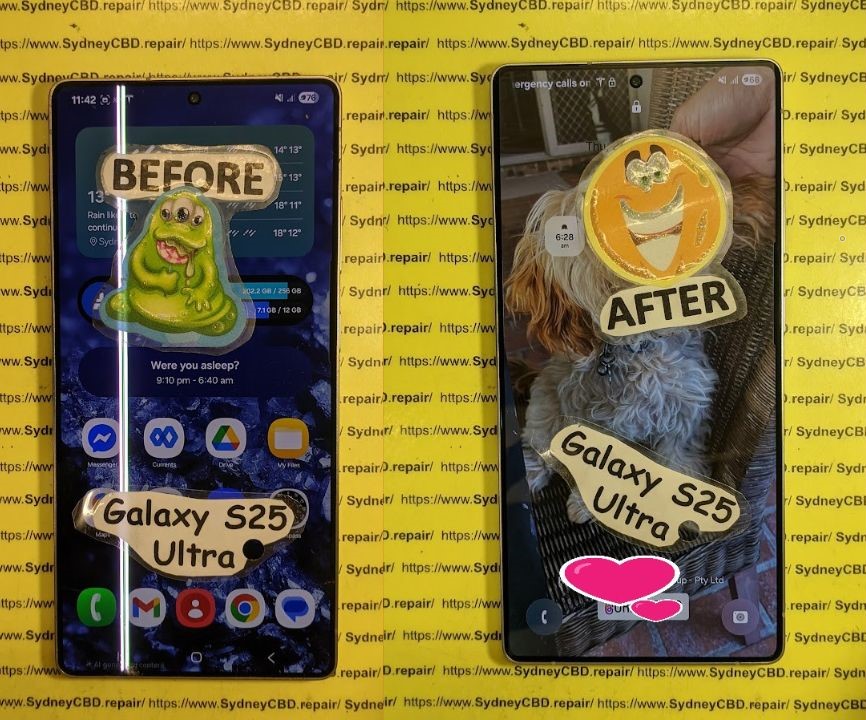
Understanding the Importance of the Digitizer Flex Cable
Anatomy of the Samsung Galaxy S25 Ultra Digitizer Flex Cable
The digitizer flex cable is more than just a connector—it’s a complex network of conductive traces designed to relay touch input with incredible precision. In the S25 Ultra, it consists of:
- Connector pins: Tiny metallic contacts that slot into the motherboard.
- Ribbon pathways: Flexible circuits that run across the back of the OLED panel.
- Reinforcement layers: Thin polymer layers that prevent accidental tearing.
- Integrated sensors: In some models, pressure-sensitive areas for advanced touch features.
Understanding these components is crucial because any improper handling during repair can permanently damage the cable. Even a slight misalignment when reattaching can lead to partial touch failure or flickering.
Common Causes of Digitizer Flex Cable Damage
Flex cables are surprisingly fragile. Here are the most frequent culprits behind failure:
- Physical stress – Dropping, bending, or squeezing the phone can crack the ribbon traces.
- Water and moisture exposure – Liquids cause corrosion of the metallic contacts.
- Poor manufacturing tolerances – Rare, but occasional defects in solder points or connectors.
- Improper DIY repair attempts – Without proper tools, flex cables are prone to tearing.
- Heat exposure – Excessive heat during charging or soldering can warp the cable.
Identifying the root cause helps technicians determine whether a full replacement or cleaning-and-restoration approach is required.
Tools Required for Microsurgery-Level Repairs
Precision is everything when restoring a Samsung S25 Ultra digitizer flex cable. Here’s what professionals use:
| Tool | Purpose |
|---|---|
| Anti-static wrist strap | Prevents electrostatic discharge (ESD) from frying the motherboard |
| Microscrewdriver set | For safely removing tiny screws without damaging the chassis |
| Spudgers & plastic picks | Gently separate screen and body without scratches |
| Magnifying microscope | Inspect cable traces for breaks or corrosion |
| Isopropyl alcohol (99%) | Cleans contacts and removes residue |
| Fine-tip tweezers | Handle delicate flex cable safely |
| Heat gun / iOpener | Softens adhesive without overheating the panel |
| Multimeter | Tests continuity of flex traces |
Essential Safety Precautions
- Always work on an ESD-safe mat to prevent static damage.
- Keep the workspace dust-free and well-lit to avoid contamination.
- Avoid excessive bending; flex cables can tear under slight pressure.
- Always power off the device before attempting any disassembly.
These precautions reduce the risk of permanent damage and ensure a smooth restoration process.
Step-by-Step Restoration Process

Disassembly of the S25 Ultra Screen
- Power off the device and remove any SIM cards or accessories.
- Heat the edges using a heat gun or iOpener to soften the adhesive.
- Use plastic picks or spudgers to gently separate the OLED screen from the frame.
- Lift the screen carefully, taking note of ribbon cable locations to avoid tension.
- Disconnect the battery first, followed by the digitizer and display connectors.
Pro tip: Avoid using metal tools directly on the OLED panel to prevent scratches or dead pixels.
Flex Cable Diagnosis and Cleaning
- Inspect the flex cable under a microscope.
- Look for broken traces, kinks, or corrosion.
- Clean contacts with 99% isopropyl alcohol and a lint-free cloth.
- Use a multimeter to check continuity along the flex cable. Broken pathways often indicate the need for replacement rather than repair.
Installing the New Digitizer Flex Cable
- Align the new cable carefully with the connectors.
- Press gently until it clicks into place.
- Avoid twisting or bending; ensure the cable follows the original path without tension.
- Reconnect the battery temporarily to test touch response before final assembly.
Reassembling the Device Safely
- Reapply adhesive strips or use liquid adhesive sparingly.
- Replace the screen carefully, ensuring even pressure to avoid air bubbles.
- Reinsert all screws and connectors.
- Power on the device to confirm full functionality.
Testing and Calibration
After assembly, testing is critical:
- Perform touch sensitivity tests across all areas of the screen.
- Check for ghost touches or unresponsive zones.
- Run calibration software if necessary to ensure the touch controller is fully aligned.
- Repeat testing after 24 hours to catch any delayed issues caused by adhesive settling.
Troubleshooting Common Post-Repair Issues
Even experienced technicians encounter issues post-repair:
| Issue | Cause | Solution |
|---|---|---|
| Ghost touches | Flex cable misalignment or debris | Re-seat and clean contacts |
| Partial touch failure | Broken trace undetected | Replace flex cable |
| Flickering screen | Loose connectors | Secure and test connections |
| Screen unresponsive | ESD damage | Evaluate motherboard; may need replacement |
Proactive troubleshooting ensures the repair holds up over time.
Preventive Measures to Extend Flex Cable Life
- Always use a protective case to avoid accidental bends.
- Keep your phone away from moisture and extreme heat.
- Avoid DIY screen repairs unless trained.
- Clean the screen and edges carefully to prevent debris accumulation.
- Regularly inspect for signs of flex cable wear, especially after drops or impacts.
Cost Analysis: DIY vs Professional Repair
| Option | Average Cost | Pros | Cons |
|---|---|---|---|
| DIY Repair | $50-$120 | Lower cost, hands-on learning | High risk of permanent damage |
| Professional Repair | $180-$300 | Warranty, genuine parts, expertise | Higher upfront cost |
Professional repairs like those at Sydney CBD Repair Centre offer peace of mind with guaranteed functionality and genuine parts.
Case Study: Sydney CBD Repair Centre Success Stories
At Sydney CBD Repair Centre, technicians handle complex microsurgeries on S25 Ultra devices daily. Here’s a recent success:
- Issue: Unresponsive digitizer due to flex cable tear.
- Solution: Complete microsurgical restoration using genuine replacement cable.
- Result: Full touch functionality restored, same-day service, 90-day warranty.
Thousands of satisfied customers trust the centre for high-risk repairs, highlighting the importance of experience, precision, and quality parts.
Frequently Asked Questions (FAQs)
Q1: Can a damaged flex cable be repaired without replacement?
A1: Minor corrosion or dirt can sometimes be cleaned, but torn traces usually require a replacement for reliable performance.
Q2: How long does an S25 Ultra digitizer flex cable repair take?
A2: Professional repair typically takes 2–3 hours, including diagnosis, restoration, and testing.
Q3: Is DIY repair safe for beginners?
A3: Not recommended. Flex cables are fragile, and incorrect handling can cause permanent screen or motherboard damage.
Q4: How can I prevent future flex cable damage?
A4: Use protective cases, avoid bending, and keep the device away from liquids and heat.
Q5: Will a replacement cable affect touch sensitivity?
A5: Genuine replacement cables restore full touch sensitivity. Non-genuine parts may result in ghost touches or lag.
Q6: Does professional repair come with a warranty?
A6: Yes. Sydney CBD Repair Centre offers a 90-day warranty on all flex cable repairs, ensuring peace of mind.
Conclusion

The Samsung Galaxy S25 Ultra digitizer flex cable is a delicate but vital component. Proper restoration requires precision, specialized tools, and careful adherence to microsurgical techniques. Whether you’re attempting a DIY fix or choosing a professional service, understanding the anatomy, causes of damage, restoration steps, and preventive measures ensures long-term performance.
For complex repairs, professional assistance from experienced technicians, like those at Sydney CBD Repair Centre, guarantees reliability, genuine parts, and peace of mind. With the right approach, your S25 Ultra can continue delivering a smooth, responsive touch experience for years to come.
David from Sydney CBD Repair Centre – The Best place to fix mobile phones as 7 Years In A Row! Top Mobile Phone Repair In Sydney. More than 2000 Positive Reviews on Google and Same Day Repairs.
We take pride in delivering exceptional repair services for all major phone brands including Apple, Samsung, Google, and more. Our expert technicians use only genuine parts and offer 90days warranty on repairs. Located in the heart of Sydney CBD, we’re your one-stop solution for all mobile device repairs.
Our commitment to excellence has earned us the trust of thousands of satisfied customers. Whether it’s a cracked screen, battery replacement, or water damage repair, we handle it all with professional care and expertise. Walk in today and experience why we’re Sydney’s #1 choice for mobile phone repairs.
Visit us for:
✓ Same Day Express Repairs
✓ Genuine Parts Guarantee
✓ Professional Technicians
✓ Competitive Pricing
✓ 2000+ 5-Star Google Reviews
✓ 7-Time Award Winner for Best Phone Repairs
Sydney CBD Repair Centre – Where Quality Meets Reliability.
Call : +61280114119
Website: https://SydneyCBD.repair/locate-us

