


Solving Your Charging Mystery Diagnosing Flashing Lights and Dead Batteries

Solving Your Charging Mystery: Diagnosing Flashing Lights and Dead Batteries That Finally Make Sense ⚡ (7-Step Expert Guide)
Introduction: Why Charging Problems Are So Confusing
Few things are more frustrating than plugging in your phone and seeing nothing happen—or worse, watching a tiny light blink at you like it’s mocking your effort. Solving your charging mystery can feel overwhelming because charging problems don’t always have one clear cause. Sometimes it’s the battery. Other times, it’s the charger, cable, port, or even the software playing tricks.
What makes diagnosing flashing lights and dead batteries especially tricky is that symptoms often overlap. A flashing red light might mean low battery, overheating, or a hardware fault depending on the brand. A phone that won’t charge today might work perfectly tomorrow. That uncertainty is why many users delay repairs, hoping the problem magically disappears.
The good news? It doesn’t have to stay mysterious. By understanding how charging systems work and what common warning signs really mean, you can take confident steps toward a solution—whether that’s a quick fix at home or a professional repair.
Understanding the Basics of Phone Charging Systems
Before solving your charging mystery, it helps to know what’s actually happening when you plug your phone in.
How Power Flows From Charger to Battery
When you connect a charger, electricity travels from the power outlet, through the adapter, along the cable, and into your phone’s charging port. From there, the charging IC (integrated circuit) regulates voltage and current before sending power to the battery.
If any point along this chain fails—even slightly—you may see slow charging, flashing lights, or a completely dead battery. That’s why charging issues are rarely caused by just one component.
Role of Charging IC and Battery Management
The charging IC is essentially your phone’s gatekeeper. It decides how much power enters the battery and when to stop charging. Modern smartphones also rely on battery management software to prevent overheating and overcharging.
If this system detects abnormal voltage, moisture, or temperature issues, it may intentionally stop charging. From the user’s perspective, it looks like a fault—but in reality, it’s a safety feature doing its job.
What Flashing Lights Really Mean
Flashing lights are one of the most misunderstood charging signals.
Common LED Indicators Explained
While meanings vary by brand, some general rules apply:
- Flashing red light: Extremely low battery or charging error
- Flashing orange/amber: Charging paused due to temperature
- Blinking white: Notification alert, not charging-related
- No light at all: Possible battery, port, or motherboard issue
Understanding these signals is a major step in solving your charging mystery, because they point you toward the right diagnosis faster.
Brand-Specific Charging Light Behaviors
Different manufacturers interpret LED signals differently. For example, Samsung devices often flash red when charging fails, while some Android models blink when moisture is detected. Apple devices rely more on on-screen alerts than LEDs.
If you’re unsure, checking the manufacturer’s support page—or a trusted repair guide like those from iFixit—can help clarify what your device is trying to tell you.
👉 External resource: iFixit Smartphone Charging Guides
The Real Reasons Behind Dead Batteries
A phone that won’t power on isn’t always “dead” in the way people think.
Battery Aging and Chemical Degradation
Lithium-ion batteries degrade over time. After 2–3 years, most phone batteries lose a noticeable amount of capacity. They may drain quickly, shut down unexpectedly, or refuse to charge past a certain percentage.
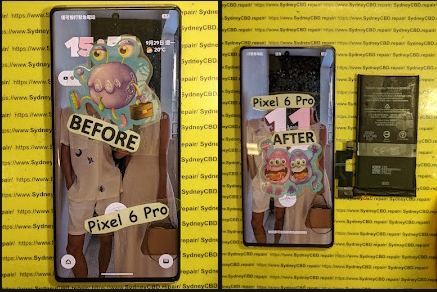
In many cases, users assume the phone is broken when in reality, a simple battery replacement would restore normal performance. This is one of the most common discoveries when solving your charging mystery.
Software vs Hardware Battery Failures
Not all battery issues are physical. Corrupted firmware, failed updates, or power management bugs can cause incorrect battery readings. Your phone might show 0% even when the battery still has charge.
Restarting the device, performing a forced reboot, or updating the operating system can sometimes resolve these issues without hardware repairs.
Charging Cables, Adapters, and Power Sources

Never underestimate the importance of accessories.
Why Cheap Chargers Cause Big Problems
Low-quality chargers often deliver unstable voltage. Over time, this can damage the charging IC or battery. Even if the phone still charges, it may do so slowly or inconsistently.
Certified chargers are designed to communicate properly with your phone. Using the correct adapter is a simple but powerful step in solving your charging mystery.
Port Problems: The Hidden Culprit
Charging ports are exposed to daily wear and tear.
Dust, Corrosion, and Bent Pins
Pocket lint, dust, and debris can block the connection between the cable and port. Moisture can cause corrosion, while repeated force can bend internal pins.
A professional cleaning often restores charging instantly. However, attempting to scrape inside the port with metal tools can cause permanent damage—so caution is key.
Software Glitches That Stop Charging
Modern phones rely heavily on software.
Updates, Bugs, and Power Management Errors
Sometimes, charging issues begin right after a software update. Background processes may drain power faster than it charges, giving the illusion of a dead battery.
Safe mode testing, clearing cache partitions, or performing a factory reset (as a last resort) can help identify whether software is the root cause.
Advanced Diagnostics: When DIY Isn’t Enough
If you’ve tried multiple chargers, cables, and outlets with no success, the issue may be internal. Faulty charging ICs, damaged motherboards, or battery connectors require professional diagnostic tools.
At this stage, solving your charging mystery usually means visiting a trusted repair centre with experience in board-level diagnostics.
Professional Repair vs Replacement Decisions
Many people assume replacement is cheaper than repair—but that’s not always true. Battery and port replacements are often far more affordable than buying a new device.
A professional technician can assess whether repair is cost-effective and advise honestly, saving you money in the long run.
Preventing Future Charging Issues
Prevention goes a long way:
- Use certified chargers
- Avoid charging in extreme heat
- Keep the charging port clean
- Don’t let batteries drain to 0% regularly
- Update software responsibly
Small habits can significantly extend battery life and reduce charging failures.
Frequently Asked Questions (FAQs)
Why is my phone flashing but not charging?
This often indicates low battery, overheating, or a charging error caused by the cable, port, or battery.
Can a dead battery be revived?
In some cases, yes. Deeply discharged batteries may recover with a stable charger, but many require replacement.
Does wireless charging fix charging port issues?
It can be a temporary workaround, but it doesn’t fix underlying port or battery problems.
Is it safe to keep trying different chargers?
Yes, as long as they’re certified. Avoid cheap, unregulated chargers.
How long should a phone battery last?
Typically 2–3 years with normal use before noticeable degradation.
When should I see a professional repairer?
If the phone won’t charge after basic troubleshooting, professional diagnostics are recommended.
Conclusion: Ending Your Charging Mystery for Good

Charging issues don’t have to remain frustrating or mysterious. By understanding how your phone’s charging system works and recognizing the signs behind flashing lights and dead batteries, you’re already halfway toward a solution. Whether it’s a simple cable swap, a battery replacement, or expert diagnostics, solving your charging mystery is entirely possible with the right approach.
David from Sydney CBD Repair Centre – The Best Place to Fix Mobile Phones, 6 Years In A Row!
We take pride in delivering exceptional repair services for all major phone brands including Apple, Samsung, Google, and more. Our expert technicians use only genuine parts and offer a 90-day warranty on repairs. Located in the heart of Sydney CBD, we’re your one-stop solution for all mobile device repairs.
Our commitment to excellence has earned us the trust of thousands of satisfied customers. Whether it’s a cracked screen, battery replacement, or water damage repair, we handle it all with professional care and expertise. Walk in today and experience why we’re Sydney’s #1 choice for mobile phone repairs.
Visit us for:
✓ Same Day Express Repairs
✓ Genuine Parts Guarantee
✓ Professional Technicians
✓ Competitive Pricing
✓ 2000+ 5-Star Google Reviews
✓ 6-Time Award Winner for Best Phone Repairs
Sydney CBD Repair Centre – Where Quality Meets Reliability.
📞 Call: +61 2 8011 4119
🌐 Website: https://SydneyCBD.repair/locate-us

