


Green Line Fix: Does a New Screen Prevent Future Samsung Issues?

Green Line Fix: Does a New Screen Prevent Future Samsung Issues? Proven Insights & 7 Expert Facts
Introduction to the Samsung Green Line Issue
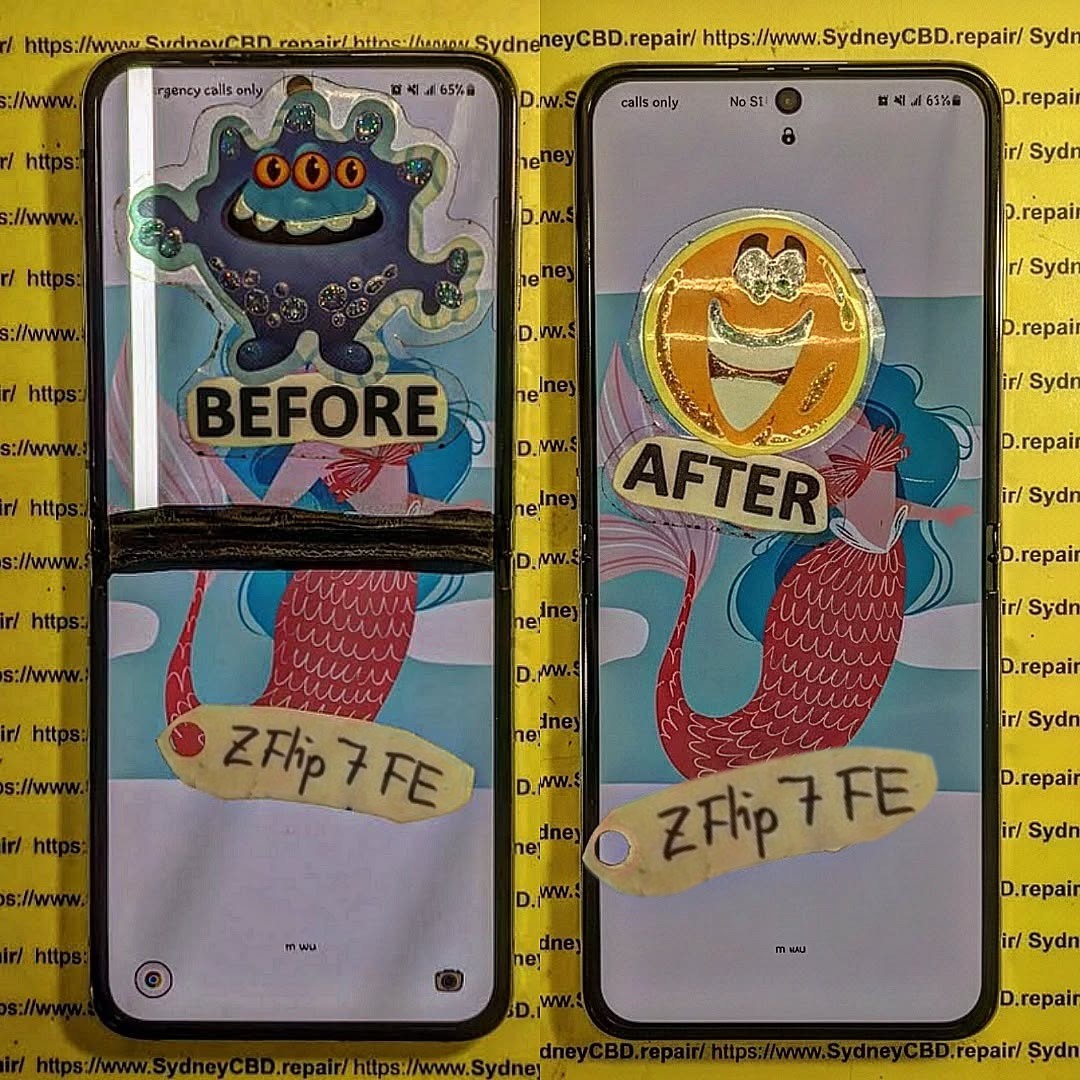
The Green Line Fix has become a hot topic among Samsung users worldwide. If you’ve ever unlocked your phone only to see a bright green vertical line cutting through your display, you’re not alone. This issue has been reported across multiple Samsung models, especially those using AMOLED screens. Naturally, the big question follows: does replacing the screen actually prevent future Samsung issues, or is it just a temporary patch?
In this in-depth guide, we’ll unpack the truth behind the Samsung green line problem. We’ll look at why it happens, whether a Green Line Fix through screen replacement is effective long term, and what you can realistically do to prevent it from coming back. The goal here is simple—clear answers, expert-backed insights, and practical advice you can trust.
Root Causes Behind the Green Line on Samsung Displays
What Is the Green Line Problem?
The green line issue usually appears as a thin, vertical neon-green stripe running from the top to the bottom of the screen. It may start faint and grow brighter over time. In many cases, the line is always visible, regardless of apps or background color.
This problem is most often linked to the display panel itself, not the glass on top. That’s why restarting the phone or resetting software rarely makes it disappear for good.
Why Samsung Phones Are Commonly Affected
Samsung is a global leader in AMOLED display technology. Ironically, that innovation also makes these screens more susceptible to certain failures. AMOLED panels rely on self-emissive pixels, which degrade unevenly over time. When one vertical pixel line fails, you get the dreaded green stripe.
Models frequently reported with this issue include the Galaxy S20, S21, S22, Note series, and some A-series devices.
AMOLED Technology Explained
Pixel Degradation and Burn-In
AMOLED screens don’t use a backlight. Each pixel produces its own light. Over time, these pixels wear out at different rates. Green subpixels often last longer than red or blue ones, which can cause color imbalance.
When a specific column of pixels degrades abnormally, it may lock into a green output—hence the line. At this point, no software tweak can reverse physical pixel damage.
Software vs Hardware Triggers
Some users notice the green line after a system update. While this feels like a software issue, updates can push hardware harder—higher brightness, new color profiles, or thermal changes. These stresses can reveal an existing weakness in the display rather than create a new one.
According to Samsung display documentation and general AMOLED behavior, once pixel circuitry is damaged, replacement is the only permanent Green Line Fix (Samsung Display Insights).
Green Line Fix Explained: Does Replacing the Screen Really Work?

This is the moment of truth. Does a new screen actually solve the problem?
When Screen Replacement Is Effective
In the vast majority of cases, yes. A full display replacement removes the faulty AMOLED panel entirely. Since the green line originates from damaged pixels or display driver circuits, installing a new screen resets that risk to zero—at least initially.
For phones without motherboard-level display controller damage, a professional Green Line Fix using a genuine Samsung screen is highly effective and visually restores the device to like-new condition.
Limitations of a New Screen
However, replacing the screen doesn’t magically change how AMOLED technology works. If the same usage patterns continue—high brightness, static images, overheating—the new display may eventually develop similar issues years down the line.
Importance of Genuine Parts
Using non-genuine or low-quality screens increases the risk of recurrence. Aftermarket displays may lack proper calibration or thermal protection. A genuine Samsung display is engineered to work seamlessly with the phone’s hardware and firmware, reducing stress on pixels over time.
Preventing Future Samsung Green Line Issues
While no method is foolproof, smart habits go a long way.
Usage Habits That Matter
- Keep brightness below maximum when possible
- Avoid long-term static images (navigation bars, TikTok UI, gaming HUDs)
- Use dark mode to reduce pixel strain
- Don’t leave your phone in hot environments
These small changes help extend AMOLED lifespan and support the long-term success of any Green Line Fix.
Software Maintenance Best Practices
- Install updates gradually, not immediately on release
- Restart your device weekly
- Avoid unofficial firmware or display mods
Software stability helps regulate power delivery to the screen, minimizing uneven pixel aging.
Professional Repair vs DIY Fixes
Risks of DIY Repairs
DIY screen replacement videos make the process look easy. In reality, Samsung displays are fragile, expensive, and bonded with industrial adhesive. One slip can damage the fingerprint sensor, motherboard, or frame.
A failed DIY attempt often ends up costing more than a professional repair.
Benefits of Certified Repair Centres
Certified technicians use proper tools, anti-static protection, and calibrated displays. They also test thermal output and display drivers after installation. That’s a level of care you simply can’t replicate at home.
A professional Green Line Fix also usually comes with a warranty, giving you peace of mind.
Frequently Asked Questions (FAQs)
1. Is the green line issue covered under Samsung warranty?
Sometimes. If the device is within warranty and shows no physical damage, Samsung may replace the screen.
2. Can a software update fix the green line?
No. Software may hide symptoms briefly, but it cannot repair damaged pixels.
3. Will factory reset remove the green line?
No. A factory reset does not affect hardware-level display issues.
4. Is the green line dangerous to use?
Not dangerous, but it can worsen over time and reduce resale value.
5. How long does a screen replacement take?
Typically 1–2 hours at a professional repair centre.
6. Can the green line come back after screen replacement?
Rarely, if genuine parts and proper usage habits are followed.
Conclusion: Is a New Screen the Final Answer?

So, does a new screen prevent future Samsung issues? In practical terms—yes. A professional Green Line Fix using a genuine display is the most reliable and permanent solution available today. While it doesn’t eliminate the inherent aging nature of AMOLED technology, it resets the clock and restores full visual performance.
Pair that replacement with smart usage habits and proper software care, and you can confidently enjoy your Samsung device for years without seeing that green line again.
David from Sydney CBD Repair Centre – The Best place to fix mobile phones as 7 Years In A Row! Top Mobile Phone Repair In Sydney. More than 2000 Positive Reviews on Google and Same Day Repairs.
We take pride in delivering exceptional repair services for all major phone brands including Apple, Samsung, Google, and more. Our expert technicians use only genuine parts and offer 90days warranty on repairs. Located in the heart of Sydney CBD, we’re your one-stop solution for all mobile device repairs.
Our commitment to excellence has earned us the trust of thousands of satisfied customers. Whether it’s a cracked screen, battery replacement, or water damage repair, we handle it all with professional care and expertise. Walk in today and experience why we’re Sydney’s #1 choice for mobile phone repairs.
Visit us for:
✓ Same Day Express Repairs
✓ Genuine Parts Guarantee
✓ Professional Technicians
✓ Competitive Pricing
✓ 2000+ 5-Star Google Reviews
✓ 7-Time Award Winner for Best Phone Repairs
Sydney CBD Repair Centre – Where Quality Meets Reliability.
Call : +61280114119
Website: https://SydneyCBD.repair/locate-us

