❤ Clips gets its biggest update ever


Clips 3.0 makes it easier than ever for anyone to pick up an iPhone or iPad and start creating fun, multiclip videos.
Apple’s video creation app for iPhone and iPad features a refreshed interface, support for vertical and horizontal video, and HDR recording with iPhone 12
Clips, Apple’s video creation app for iOS, receives its biggest update yet with highly requested features that make it easier than ever for anyone to pick up an iPhone or iPad and start creating fun, multiclip videos — no editing experience needed. Clips 3.0, available today in the App Store, features a streamlined interface and full-screen browsers on iPhone that make it even simpler to record and add effects. On iPad, Clips supports landscape orientation, Scribble with Apple Pencil, and the use of a Bluetooth mouse or trackpad. The new version also lets users make videos in multiple aspect ratios, including horizontal and vertical, ideal for creating eye-catching content for Instagram Stories, Snapchat, YouTube, and more. And Clips 3.0 is optimized to record and share content in HDR using the rear-facing cameras on all iPhone 12 models, resulting in videos with more vibrant colors and contrast.
“Since its introduction, Clips has become one of the most popular iOS video creation apps, and millions of projects are made every day with it. Users love how easy it is to create fun, expressive videos for sharing with friends, family, and classmates with just a few taps on their iPhone or iPad screens,” said Susan Prescott, Apple’s vice president of Apps Product Marketing. “Today’s update, with a streamlined interface, support for vertical and horizontal video, HDR video capture using the new iPhone 12 or iPhone 12 Pro, and fun new effects, will help users create Clips videos with more personality and polish than ever before.”
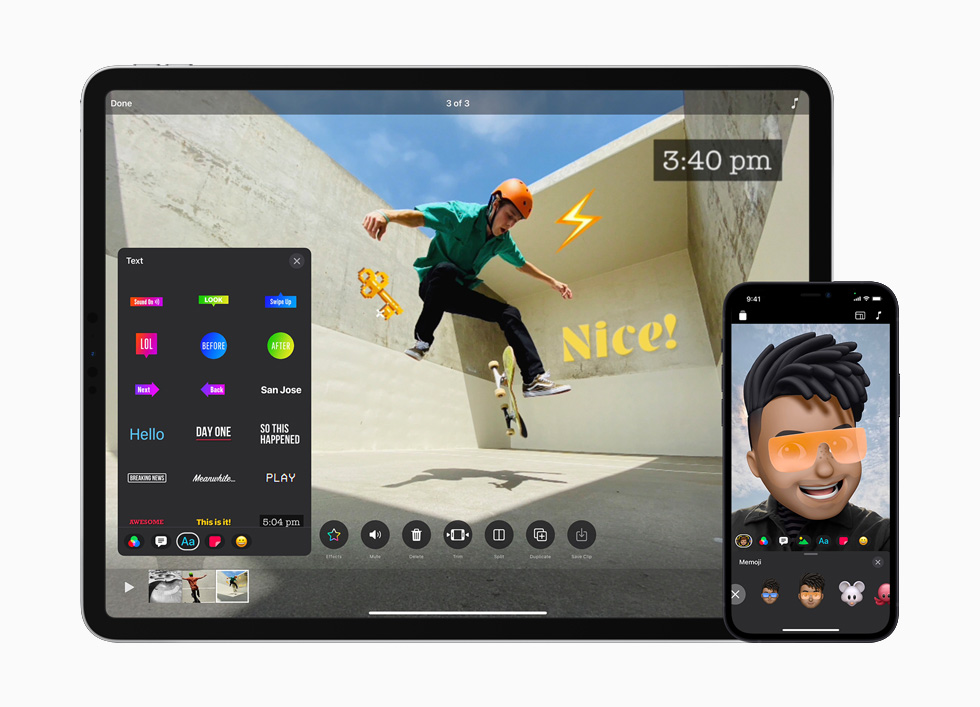
The app now features a fresh, streamlined user interface across iPhone and iPad for faster access to fun effects.
Fresh, Streamlined Interface
Setting the stage for even more creativity, Clips adds a fresh feel with a redesigned record screen that floats on top of the viewer when shooting vertically or horizontally. Users can view more content at once with redesigned Effects, Media, and Projects browsers. And swiping up on any Effects browser displays a full-height card that fills the screen with stickers or text labels that let users personalize their videos. In addition, Clips adds a collection of new content including eight new stickers that are perfect for social posts, six additional arrows and shapes, and 25 new soundtracks that automatically adjust to match the length of videos.

Clips includes new stickers for social and 25 new soundtracks that automatically adjust to match the length of videos.
Amped-up iPad Experience
With a redesigned iPad interface featuring large Effects browsers and an easy-to-reach record button, Clips on iPad makes it even simpler for young creators, students, and teachers to make great videos. Users can take full advantage of the iPad display by recording and editing in landscape orientation — an experience that is further optimized when paired with Magic Keyboard or Smart Keyboard, and a Bluetooth mouse or trackpad. Clips automatically opens to a new 4:3 landscape project, the optimal size for full-screen videos on iPad. And Clips now supports the new Scribble feature in iPadOS 14, converting handwritten text with Apple Pencil into typed text in labels and posters.

The Clips experience on iPad is better than ever when used in landscape orientation and with Magic Keyboard or Smart Keyboard.
Record and Create in Multiple Aspect Ratios
With support for vertical and horizontal videos, Clips is a great tool for creating stories for Instagram and Snapchat, as well as landscape video masterpieces for YouTube. Clips on iPhone automatically opens to a new 16:9 vertical project, making it quick to record video for social platforms. Plus all filters, posters, Live Titles, and Selfie Scenes have been updated to record in all-new sizes for the perfect finishing touch on a new post. The updated share sheet also shows a video preview before sending, and videos can be shared in any supported size using new export options.

Clips expands options for social media sharing with support for vertical and horizontal aspect ratios.
Record in HDR Using iPhone 12
For videos that stand out with amazing color and contrast, Clips supports HDR video capture using the rear-facing cameras on iPhone 12 and iPhone 12 Pro. Clips users can record HDR footage directly into their project and add more HDR photos and videos from their Photos library. Clips will even share the final video automatically as a Dolby Vision HDR file.
About Clips
With Clips for iPhone and iPad, users can create personal video messages, slideshows, school projects, and mini-movies with amazing features like Live Titles, which automatically generates animated captions from a user’s voice, and 360-degree immersive Selfie Scenes with the TrueDepth camera on iPhone. Clips lets users add personality to their videos with dozens of filters, animated stickers, and full-screen animated posters. The app includes more than 100 soundtracks that automatically adjust to match the length of videos.
Availability
Clips 3.0 is available today as a free update on the App Store for iPhone, iPad, and iPod touch running iOS 14 or iPadOS 14 or later. Recording HDR video requires iPhone 12 models, and editing and sharing HDR video requires iPhone SE (2nd generation), iPhone 8 Plus, iPhone X or later, iPad mini (5th generation), iPad (7th generation) or later, iPad Air 3 or later, and 10.5-inch iPad Pro or later. Selfie Scenes and Memoji require iPhone or iPad models with TrueDepth camera.