


Phone Not Charging? Simple DIY Fixes You Can Try!

Phone Not Charging? 10 Simple DIY Fixes You Can Try Today!
Introduction: Why Phones Stop Charging
Few things are more frustrating than plugging in your smartphone only to find it’s not charging. This issue can happen to Apple, Samsung, Google Pixel, or any Android device, and it doesn’t always mean your phone is dead. Sometimes, the problem is as small as a dirty port or a faulty cable. Other times, it could be a deeper hardware or battery issue.
The good news? Before rushing to a repair shop, you can try a few simple DIY fixes that might bring your phone back to life.
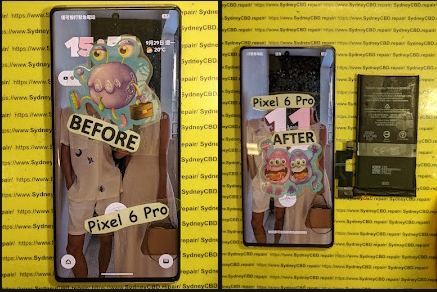
Understanding the Common Charging Issues
Not charging doesn’t always mean your battery is broken. Let’s break down the most common culprits.
Battery vs. Charger Problems
Sometimes the issue isn’t your phone but the charging adapter or cable. A worn-out charger can’t deliver enough power.
Port and Cable Concerns
If your USB-C or Lightning port has lint, dirt, or bent pins, charging can fail.
Software-Related Glitches
Bugs in the OS or background apps may interfere with charging recognition. Updating software can fix these.
DIY Fix #1: Check Your Charging Cable
- Try another cable
- Look for frays, bends, or discoloration
- Use original or certified cables for Apple, Samsung, and Google phones
DIY Fix #2: Inspect the Charging Port
- Shine a light into the port
- Look for dust, dirt, or bent pins
- Gently clean with a toothpick or compressed air
DIY Fix #3: Try a Different Power Source
- Plug into a different wall socket
- Avoid cheap power strips
- Try charging from a laptop or power bank
DIY Fix #4: Clean Out Dust and Debris
- Use a soft brush or dry cotton swab
- Avoid liquid cleaners
- Check if the cable fits snugly afterward
DIY Fix #5: Restart or Force Reboot Your Phone
- A quick restart refreshes the system
- For frozen devices, perform a hard reset (key combo varies by model)
DIY Fix #6: Update Your Phone’s Software
- Go to Settings → Software Update
- Install latest patches
- Fixes bugs affecting charging detection
DIY Fix #7: Switch to Safe Mode
- Boot into Safe Mode
- Helps identify if third-party apps are interfering with charging
DIY Fix #8: Calibrate the Battery
- Let your phone fully drain to 0%
- Charge it to 100% without interruption
- Helps reset the battery’s reporting system
DIY Fix #9: Try Wireless Charging (If Available)
- If your phone supports Qi wireless charging, try it
- Helps confirm if the issue is cable or port related
DIY Fix #10: Factory Reset as a Last Resort
- Back up your data
- Perform a factory reset to rule out software conflicts
- Only do this if nothing else works
When to Seek Professional Help
If none of these work, it’s time to visit an expert.
Signs You Need Expert Repairs
- Phone only charges when cable is bent
- Port feels loose
- Battery drains too quickly even after charging
- Phone overheats while charging
Why Choosing the Right Repair Centre Matters
Not all repair shops are equal. A trusted provider like Sydney CBD Repair Centre offers:
- Same-day express repairs
- Genuine parts guarantee
- 90-day warranty
- Over 2000 five-star Google reviews
- Recognized as a 6-time award winner for best phone repairs in Sydney
FAQs

Q1: Why is my phone not charging even with a new cable?
A: The charging port may be dirty or damaged, or the adapter might be faulty.
Q2: Can software issues stop a phone from charging?
A: Yes, outdated or buggy software can prevent proper charging. Updating usually fixes it.
Q3: How do I clean my charging port safely?
A: Use a toothpick, compressed air, or a soft brush—never liquid cleaners.
Q4: Is wireless charging safer than cable charging?
A: Both are safe, but wireless avoids wear on the charging port.
Q5: How long should I try DIY fixes before seeking repair?
A: If none work after a day, visit a professional repair centre.
Q6: Can I replace my phone battery myself?
A: It’s not recommended. Modern phones are sealed, and DIY battery swaps can damage your device.
Conclusion

A phone that won’t charge can throw your day off, but many times the fix is simple—like cleaning the port, swapping the cable, or rebooting the device. If these DIY fixes don’t solve it, it’s best to seek professional help.
For Sydney locals, David and his team at Sydney CBD Repair Centre have been the #1 choice for 6 years running. With same-day service, genuine parts, and award-winning technicians, you can trust your device is in the best hands.
David from Sydney CBD Repair Centre – The Best place to fix mobile phones as 6 Years In A Row! Top Mobile Phone Repair In Sydney. More than 2000 Positive Reviews on Google and Same Day Repairs.
📍 Visit us today for:
✓ Same Day Express Repairs
✓ Genuine Parts Guarantee
✓ Professional Technicians
✓ Competitive Pricing
✓ 2000+ 5-Star Google Reviews
✓ 6-Time Award Winner for Best Phone Repairs
Sydney CBD Repair Centre – Where Quality Meets Reliability.
📞 Call : +61280114119
🌐 Website: https://SydneyCBD.repair/locate-us

