




Top Five Critical Traps When Replacing A Galaxy Z Flip 7 FE Display

Top Five Critical Traps When Replacing a Galaxy Z Flip 7 FE Display: Ultimate Guide to 5 Costly Repair Mistakes
Introduction
Replacing a Galaxy Z Flip 7 FE display might seem like a straightforward repair, but one small mistake can lead to expensive damage. From choosing the wrong replacement screen to damaging delicate internal components, foldable phone repairs require specialist knowledge, careful handling, and the right tools. The Samsung Galaxy Z Flip 7 FE features an advanced folding display, a separate cover screen, and a precision-engineered hinge, making it important to understand the risks before starting any repair. Whether you’re dealing with a cracked inner screen, black spots, flickering, or a lifting protective film, identifying the real problem is the first step toward a reliable solution. In this guide, we’ll reveal the top five critical traps when replacing a Galaxy Z Flip 7 FE display, explain how to avoid common repair mistakes, and share practical tips for choosing suitable replacement parts and professional repair services. By understanding these risks, you can protect your device, avoid unnecessary expenses, and make a smarter decision about restoring your foldable phone.
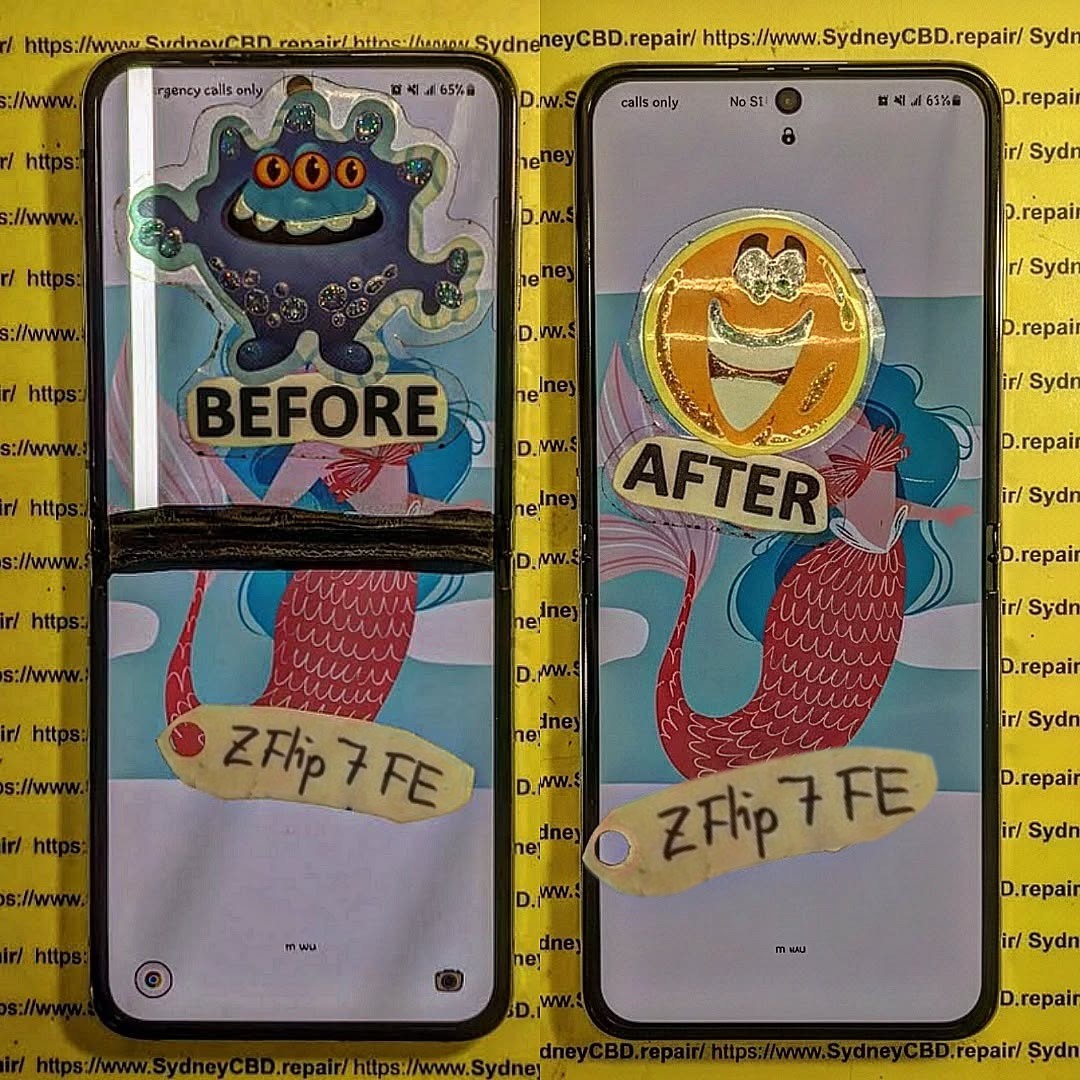
Understanding the Samsung Galaxy Z Flip 7 FE Display
The Samsung Galaxy Z Flip 7 FE is designed for people who want a powerful smartphone in a compact, foldable body. Its folding design makes it convenient to carry, but it also creates repair challenges that you wouldn’t usually face with a traditional smartphone.
Samsung lists two separate displays for the device. The main screen is a 6.7-inch Dynamic AMOLED 2X display with a 120Hz adaptive refresh rate, while the outer cover screen is a 3.4-inch Super AMOLED display. These screens serve different purposes and must not be confused when ordering a replacement.
The main display also needs special care because it bends repeatedly during normal use. The hinge, flexible connections, protective layers, and surrounding frame all play a role in how the phone operates.
A repair that looks simple from the outside can involve several delicate components. For instance, a phone that shows a black inner screen might have a damaged display assembly, a connection problem, or other internal damage caused by a drop. Replacing a screen without checking the underlying fault can lead to unnecessary costs.
Another important point is that visible damage doesn’t always tell the whole story. A cracked outer cover screen, a damaged inner display, and a lifting protective film are three different problems. Each requires a different assessment.
The best repair decision starts with accurate diagnosis. By understanding the five critical traps below, owners can avoid preventable damage and choose a repair service that protects their device.
Trap 1: Choosing the Wrong Replacement Display
One of the most expensive mistakes during foldable phone repair is ordering the wrong display assembly. This may sound obvious, but it can happen when someone searches for a replacement using only the phone’s marketing name.
The Galaxy Z Flip 7 FE has both an inner folding display and an outer cover display. Although both are screens, they are not interchangeable. They differ in size, display technology, physical shape, and function. A replacement intended for the wrong screen will not solve the problem.
Why Accurate Model Identification Matters
Smartphone manufacturers release several models within the same product family. Their names may look almost identical, yet the internal components can differ.
The Galaxy Z Flip 7 FE is also closely related in appearance to other Galaxy Z Flip models. However, a similar design doesn’t automatically mean that the replacement parts are compatible.
Before ordering a screen, a technician should confirm the exact model through the device information, service documentation, or appropriate identification markings.
The following details deserve attention:
- Exact model: Confirm that the phone is a Galaxy Z Flip 7 FE, not a different Z Flip generation.
- Screen location: Establish whether the damaged component is the inner folding display or outer cover display.
- Part compatibility: Verify that the replacement is specifically listed for the device and intended assembly.
- Component condition: Check whether the display is the only damaged part or whether the frame, hinge, or connectors also need attention.
- Part history: Determine whether the replacement is new, refurbished, reclaimed, or otherwise used.
These checks may seem like extra work, but they reduce the risk of buying an expensive part that cannot be installed correctly.
The Danger of Misdiagnosing a Fault
Imagine that your phone opens normally, but the inner display suddenly turns black. You might assume that the display has failed completely.
That could be the case, but it shouldn’t be treated as a certainty before inspection. A technician needs to consider the history of the fault, any visible impact damage, the behaviour of the cover screen, and other relevant symptoms.
Samsung explains that physical impact can result in cracked glass, black spots, and unusual coloured or dark lines. Internal display damage can occur even when the visible surface doesn’t have an obvious crack.
For example, black ink-like areas spreading across the screen may indicate damage inside the display panel. A phone that flickers only when opening or closing may need a more detailed inspection of its display connections and folding mechanism.
Neither symptom should automatically lead to a screen order without further diagnosis.
Why Replacing Only the Visible Damage Can Be Risky
A foldable phone’s display is part of a larger assembly. Depending on the specific replacement design, other components, mounting points, or connected parts may need to be transferred or checked.
If the frame is bent or the hinge has suffered impact damage, installing a new display without addressing the underlying problem may create pressure on the replacement panel.
That pressure could contribute to further display damage or prevent the device from folding as intended.
A reliable technician therefore evaluates the surrounding hardware before recommending a repair. The goal isn’t simply to make the display turn on again. It is to restore normal use without introducing a new fault.
How to Avoid This Trap
Start by describing the symptoms clearly. Tell the repair technician whether the phone was dropped, exposed to liquid, or damaged while folded. Explain whether the inner screen, cover screen, or both are affected.
Ask the technician to confirm the exact replacement part before work begins. A written quotation should identify the component being replaced and explain whether any additional damage has been found.
Key lesson: The right diagnosis must come before the right replacement part. A few careful checks can prevent wasted money, unnecessary repairs, and avoidable damage.
Trap 2: Confusing Screen Protector Damage With Display Failure
Another common mistake is assuming that every mark, bubble, line, or crack on a foldable screen means the entire display needs replacement.
The Galaxy Z Flip 7 FE’s inner screen uses foldable display technology and requires more careful handling than an ordinary rigid smartphone panel. Its factory-fitted protective film serves a different purpose from the display itself.
Treating those layers as if they were the same can turn a minor problem into a major repair.
Understanding the Difference Between a Protector and a Display
The screen protector sits above the display panel. It helps protect the surface, but it is not the component that produces the image.
A damaged protector may develop lifting edges, bubbles, scratches, or other visible marks. A damaged display panel may produce dead pixels, black patches, coloured lines, flickering, or complete image failure.
These symptoms can overlap, so appearance alone isn’t always enough to identify the fault. A technician should inspect the screen carefully before deciding what needs to be replaced.
| Symptom | Possible Explanation | Recommended Action |
|---|---|---|
| Small bubble near the folding crease | Protective film lifting or separating | Professional inspection of the film |
| Surface scratches | Damage to the film or display surface | Assess depth and location |
| Black patch spreading across the image | Internal display panel damage | Prompt professional assessment |
| Green or pink lines | Display damage or another display-related fault | Diagnose before ordering parts |
| Inner screen completely black | Panel, connection, or other internal fault | Full diagnostic inspection |
| Touch works inconsistently | Film, touch layer, software, or hardware issue | Test before replacing components |
This table is a starting point, not a definitive diagnostic tool. Two phones with similar symptoms can have different underlying problems.
The Factory Protective Film Trap
The factory-fitted protective film on a foldable’s main screen is particularly important. Some owners try to remove it when it begins to lift or when bubbles appear along the crease.
That approach can be risky.
Samsung’s guidance for Galaxy foldable devices warns that removing the main-screen protective film or installing an unapproved alternative can cause touch abnormalities or screen damage. The company recommends seeking service assistance when the film needs replacement.
In other words, don’t assume that a lifting film is simply a standard phone screen protector that you can peel off and replace at home. The inner display is designed to fold repeatedly. Careless pressure or pulling can damage the delicate layers underneath.
Why the Folding Crease Needs Careful Assessment
A visible crease is a known characteristic of foldable display technology. Its presence alone doesn’t prove that the screen is faulty. The important question is whether the appearance has changed or whether new symptoms have developed.
For example, a normal crease is different from a crease accompanied by spreading black areas, unusual lines, loss of touch response, or visible structural damage. A sudden change deserves attention, especially following a drop or excessive pressure.
Owners should also avoid pressing hard on the crease to see whether the mark will disappear. Extra pressure isn’t a safe way to test a foldable display. Samsung specifically advises against applying excessive pressure to the main screen and warns that sharp objects can scratch or damage it.
What Should You Do If the Film Starts Lifting?
- Avoid peeling the film, pushing trapped air toward the crease, or applying random adhesives.
- Stop using any cleaning method that involves strong solvents or excessive moisture. These may affect the screen surface or damage surrounding materials.
- Arrange an assessment with a technician familiar with foldable devices. Explain whether the problem appeared gradually or immediately after the phone was dropped.
If the screen still displays an image correctly and responds to touch, the issue may be different from a failed display panel. However, this should be confirmed rather than assumed.
Why Early Attention Can Save Money
A small protective-film issue might need a limited service rather than a complete display assembly. On the other hand, an ignored display crack may worsen during normal use.
Correctly identifying the problem helps prevent unnecessary replacement costs while reducing the risk of further damage.
Key lesson: Don’t peel, press, or puncture a foldable screen to investigate a problem. Have the protective film and display panel assessed separately before agreeing to a major repair.
Trap 3: Damaging Internal Components During Disassembly
The third trap is assuming that removing a foldable phone’s display is similar to opening an ordinary smartphone. It isn’t.
Foldable devices have compact internal layouts, flexible connections, a hinge assembly, and components positioned around moving sections of the body. An inexperienced repair attempt can damage parts that were working perfectly before the phone was opened.
Even if the original fault appears limited to the display, careless disassembly may introduce new problems.
Why Heat and Prying Require Special Care
Many smartphone assemblies use adhesives to hold components in place. Professional repair may involve controlled heating and specialist tools to separate bonded parts.
The difficulty lies in applying the right method to the correct area without stressing the display, frame, or nearby components.
Too much heat may affect sensitive materials. An incorrectly positioned prying tool may cut, bend, or puncture something that should remain untouched. Excessive force can also distort the frame or damage attachment points.
For the Galaxy Z Flip 7 FE, the repair approach must account for the folding structure and the exact assembly being removed. Model-specific instructions and appropriate tools matter more than speed.
The Flexible Connection Trap
Displays and other internal components may connect to the phone’s circuitry through delicate flexible cables and connectors. If a connector is pulled, twisted, or handled incorrectly, the phone may develop additional faults.
Depending on the component affected, symptoms may include an unresponsive display, no image, flickering, intermittent operation, or loss of another function.
This is one reason a phone should be tested and inspected before the technician begins removing components. The original symptoms need to be documented so that a new problem can be distinguished from the initial fault.
Small pieces of debris or misplaced screws can also cause punctures or display failure when the device is closed.
Don’t Ignore the Hinge and Folding Frame
The hinge is central to the phone’s everyday operation. It helps the device open and close while keeping the two halves aligned. A previous drop can affect the hinge or frame even when the screen appears to be the main problem.
Watch for symptoms such as:
- The phone no longer opens or closes smoothly.
- One side of the display appears raised or uneven.
- The frame has visible dents or bends.
- The hinge makes an unusual noise following impact.
- The screen develops new problems when the phone is opened.
Samsung cautions owners against folding the device incorrectly or placing foreign objects between the two sides, as these actions can severely damage the main display.
Why DIY Repairs Can Become Expensive
Online videos can make a repair look straightforward because they show a prepared work area, suitable tools, and a device that may have been designed for demonstration. They may not show the full range of problems that can arise when a part resists removal or an internal component has suffered previous damage.
If the repair fails, the owner may then need to pay for both the original fault and the secondary damage created during the teardown.
How a Professional Repair Reduces Risk
A qualified technician inspects the phone, selects the correct repair method, handles delicate connections carefully, and checks the device throughout the process.
The technician will also stop if previously hidden damage changes the scope of the job—such as discovering a twisted frame or compromised hinge.
Key lesson: Precision matters more than speed. Protecting the hinge, frame, cables, and surrounding components is just as important as installing a working screen.
Trap 4: Buying Cheap or Incompatible Replacement Parts
The fourth trap is choosing a replacement display based on price alone.
It makes sense to compare repair costs. Nobody wants to spend more than necessary to restore a phone. However, the cheapest part isn’t automatically the best value, particularly when the replacement must work with a sophisticated foldable display system.
Not Every Replacement Screen Has the Same Quality
Replacement components may be sold as original service parts, refurbished assemblies, reclaimed components, or aftermarket parts. Their performance and condition should not be assumed to be identical.
Before agreeing to a repair, ask what kind of display will be installed and whether its origin can be verified. Compatibility and performance need to be confirmed, not judged solely from an online photograph.
Display Quality Is More Than Brightness
Samsung specifies a 6.7-inch Dynamic AMOLED 2X main display with a 120Hz adaptive refresh rate for the Galaxy Z Flip 7 FE, while its outer 3.4-inch screen uses Super AMOLED technology.
A poor-quality or incompatible component may introduce issues such as:
- Uneven brightness or colour tinting.
- Inconsistent touch responsiveness.
- Visible lines, flickering, or image abnormalities.
- Unexpected power consumption and increased battery drain.
- Poor fit, thicker profile, or misalignment along the bezel.
- Reduced operational lifespan and premature crease cracking.
The Hidden Cost of a Cheap Screen
The true cost of a repair includes more than the replacement component; it covers labour, diagnosis, reassembly, testing, and potential return visits if the part fails prematurely.
| Factor | Questions to Ask |
|---|---|
| Part origin | Is it an original service part, refurbished component, or aftermarket replacement? |
| Compatibility | Has the part been confirmed for my exact model? |
| Condition | Is it new, used, or refurbished? |
| Display performance | What tests confirm brightness, image quality, and touch response? |
| Warranty | What coverage applies to the component and the labour? |
| Installation | Does the price include inspection, fitting, and final testing? |
| Additional damage | Will the technician explain any extra work needed? |
Check the Warranty Before Paying
Ask how long the warranty lasts, what types of faults are included, and whether accidental damage or liquid damage is excluded. Always obtain these terms in writing rather than relying on a verbal guarantee.
Why Genuine Parts Can Be Worth Considering
Genuine parts ensure accurate compatibility, optimal refresh rate handling, and reliable fold cycles. Ensure your repairer provides transparent details regarding whether parts are OEM or third-party equivalents.
Key lesson: Choose a replacement based on verified compatibility and overall value, not on price alone. A clear quote and a meaningful warranty are vital parts of a dependable repair.
Trap 5: Ignoring Adhesive, Sealing, and Final Testing
The fifth trap occurs after the damaged screen has been removed.
A replacement can look perfect when the phone is switched on, yet still suffer from fitting issues, poor touch response, edge separation, or compromised ingress protection. Poor reassembly can undermine an otherwise successful repair.
Why Adhesive and Fit Matter
Smartphones use precise pre-cut adhesives and mounting brackets to hold components in position. Reusing damaged adhesive or applying generic liquid glue can cause uneven seating or create dangerous pressure points beneath a folding display.
A foldable display bends every time the phone opens and closes. If the panel is misaligned by even a fraction of a millimetre, repeated folding will quickly stress the substrate and result in panel failure.
Water Resistance Must Not Be Assumed
The Galaxy Z Flip 7 FE is built with an IP48 dust- and water-resistance rating. However, opening any sealed phone compromises original gaskets and factory seals.
Even when a repair shop uses fresh seals, reassembled phones should not be assumed to retain their original factory water resistance. After repair, avoid deliberately exposing the phone to liquids.
The Final Testing Trap
A properly completed repair requires comprehensive quality control beyond verifying that the screen turns on. Technicians should systematically assess:
- Image quality: Checking for dead pixels, lines, flickering, and uniform backlighting.
- Touch response: Testing digitizer tracking across the entire surface, including the crease area.
- Folding behaviour: Verifying smooth hinge action without tension, popping noises, or display distortion.
- Cover display: Ensuring the outer mini screen continues to synchronize and respond correctly.
- Buttons and hardware: Confirming side sensors, cameras, microphones, and speakers operate properly.
- Physical fit: Inspecting bezels, seams, and glass flushness for uniform adhesion.
- Charging & connectivity: Validating wireless charging, NFC, and port integrity.
Compare Condition Before and After
Documenting faults before opening the device establishes a baseline. This ensures any pre-existing motherboard or camera issues are not confused with repair-related complications.
Key lesson: Proper reassembly and rigorous final testing are essential. Don’t judge a foldable screen repair solely by whether the screen lights up.
How to Prepare Your Phone for a Professional Repair

- Back Up Important Data: Back up all personal photos, messages, documents, and accounts to the cloud or an external drive.
- Record the Symptoms: Make detailed notes of how the issue began (e.g., following a drop, liquid contact, or spontaneous line appearance).
- Check the Physical Condition: Inspect the frame, back glass, and hinge for dents or bends and report them upfront.
- Ask for a Written Quote: Request an itemised breakdown covering part specifications, labour, turnaround time, and warranty terms.
- Protect Your Personal Information: Enable Samsung Maintenance Mode where possible, or log out of sensitive accounts before handing over the device.
Is Professional Repair Better Than DIY?
For standard flat phones, DIY screen replacements are relatively common. However, for a dual-screen foldable phone like the Galaxy Z Flip 7 FE, the complexity increases significantly.
| Consideration | DIY Repair | Professional Repair |
|---|---|---|
| Initial cost | May appear lower if tools are already available | Includes labour, equipment overhead, and service costs |
| Technical skill | Requires experience with flexible assemblies | Performed by trained technicians |
| Risk of extra damage | High if unfamiliar with fragile flex cables and hinges | Significantly lower with established workshop protocols |
| Part selection | Owner must independently source and verify parts | Repair provider verifies part source and functionality |
| Diagnosis | Limited to basic visual inspection | Includes dedicated bench diagnostic tools |
| Final testing | Limited to owner’s observation | Comprehensive multi-point functional check |
| Warranty | Typically restricted to individual part return policies | Written warranty covering both parts and labour |
| Water resistance | Difficult to recreate without dedicated press jigs | Applied using structured seals and adhesive kits |
Samsung’s official guidance consistently recommends authorized or professional inspection for foldable screen damage. You can review the official Samsung screen-damage support guide for manufacturer recommendations.
Repair Checklist: Before and After Display Replacement
Before Repair
- Confirm that the phone is a Galaxy Z Flip 7 FE.
- Identify whether the inner display, outer display, or both are damaged.
- Back up all essential files and photos.
- Document symptoms, impact history, or liquid exposure.
- Request hinge and frame alignment checks.
- Verify part authenticity, tier (OEM vs. aftermarket), and model match.
- Obtain a written quotation and service warranty terms.
After Repair
- Inspect visual clarity, brightness, and refresh rate behaviour.
- Perform a digitizer touch test across the entire display.
- Test cover display operation and widget functionality.
- Open and fold the phone repeatedly to ensure smooth hinge motion.
- Examine edges and perimeter seams for flush adhesive bonding.
- Test cameras, microphones, side buttons, and biometrics.
- Verify normal cable and wireless charging speeds.
- Collect your itemised invoice and warranty documentation.
Frequently Asked Questions
1. How do I know whether my Galaxy Z Flip 7 FE needs a new display?
Signs of display panel damage include black ink-like spots, permanent vertical or horizontal lines, complete blackout, display flickering, or touch dead-zones. A technician must inspect the handset to differentiate between panel damage, a loose flex connector, or a simple protective film detachment.
2. Can I replace the Galaxy Z Flip 7 FE display at home?
While possible with advanced repair skills, precision heat stations, and specific tools, it carries high risks. Damaging the hinge or tearing internal ribbon cables can quickly render the device unrepairable. Professional service is strongly advised for foldable devices.
3. Is the inner screen the same as the outer cover screen?
No. The inner folding screen is a flexible 6.7-inch Dynamic AMOLED 2X panel (120Hz), while the outer cover display is a rigid 3.4-inch Super AMOLED screen. They require completely different replacement parts.
4. Should I remove the protective film if it starts bubbling?
No. Do not peel off the factory-fitted protective film forcefully. Peeling it can pull against the ultra-thin glass layer and cause instant panel failure. Have it replaced by a professional using specialized alignment jigs.
5. Can a cheap replacement screen work as well as an original part?
Low-cost aftermarket foldable screens often suffer from diminished brightness, poor colour reproduction, fixed 60Hz refresh rates, and weaker folding endurance along the crease. Verified OEM or premium-grade replacements are critical for long-term reliability.
6. Will my phone remain water-resistant after a display replacement?
Factory ingress ratings (such as IP48) are difficult to fully guarantee once a phone has been opened. While quality technicians apply new seals and perimeter gaskets, you should always handle a repaired phone with care around liquids.
7. How long does a Galaxy Z Flip 7 FE screen repair take?
A standard display assembly swap typically takes between 1 to 3 hours if parts are in stock. If the repair requires hinge repairs, frame realignments, or adhesive curing, turnaround times may vary.
8. Is it worth repairing a damaged Galaxy Z Flip 7 FE?
Yes, provided the total repair quote is substantially less than purchasing a replacement device and the internal motherboard is undamaged. Getting an upfront diagnosis will clarify whether repair is the most economical path.
Conclusion: Avoid These Five Traps for a Safer Repair

The Galaxy Z Flip 7 FE offers the convenience of a foldable smartphone, but repairing its display requires careful planning and the right expertise.
The five biggest traps are choosing the wrong replacement part, confusing protective-film damage with display failure, damaging internal components during disassembly, buying unsuitable replacement parts, and overlooking adhesive, sealing, and final testing.
Each mistake can increase the cost of repair or create new problems that could have been prevented. The most effective way to avoid these issues is to start with an accurate diagnosis, confirm the replacement part’s compatibility, and choose a technician who understands foldable devices.

