Another privacy issue for Apple as allegations on Messages logging all your contacts reached by the app seems to be messed up. Is it all true?
Messages, Apple\’s SMS proprietary app have many great features and gimmicks like the overlays and stickers. It was brought bundled with the new iOS 10. However, you may want to reconsider using this app if you want a completely discreet chats with your contact list.
Previously known as iMessages, Messages is said to be used by Apple to log contacts reached using this app. This apparently allows the company and law enforcement agencies to get into who you have texted in the past. Now, that\’s a shocker.
The report is based on a document provided to The Intercept by the Florida Department of Law Enforcement\’s Electronic Surveillance Support Team, which details to law enforcement what kind of information can be successfully subpoenaed from a suspect\’s iPhone.
On the more positive side, these logged information won\’t contain and won\’t be extracted with the contents of the messages. However, it will still show the phone numbers that Messages attempted to get in touch with. Not only that, also the time and date of the messages and most probably the location using the IP address.
Why do Apple have this feature?
Apple seems to be using this feature (which we didn\’t know existed until now) to check if an SMS or chat is sent to another Messages user. If this is the case, Messages will enable special features of the app. The difference can be seen through various colors sported by chat bubbles inside Messages. Blue means both users use Messages, green means normal SMS apps and services are used.
Apple says these logs are deleted after 30 days, though any repeated interaction with new members in your contacts list – or any other iOS app with similar access to the servers – may refresh the saved information.
Is it legal?
It is very normal for phone carriers to record contact information of all its users and they can surrender information to law enforcers who have proper warrants to do so.
Maybe we can take Apple\’s word on privacy from last year while they are promoting Messages as a more advanced option compared to conventional SMS texting. However, if you are unsure of this news and wants more updates, you still have other options you can use: Whatsapp, Facebook Messenger, and Allo. You choose.
Local iPhone backups are easier to crack in iOS 10
Though it may not involve iCloud storage, it seems that it is best to wait for the new iOS 10 security updates to back up your iPhone.
It seems that Applehave a problem with the new iOS 10 update that makes security on iPhones weaker. This could lead to a potential breach and unauthorized access to local backups.
This comes from a Russian firm, Elcomsoft, that makes tools to break into iPhones. They discovered this as they are updating their phone breaking tool software. They found out that local backups made to a user’s computer when they update to iOS 10 uses a new verification system that omits some security checks. In short, it’s easier to get inside these local files.
Why would you care?
If you have updated to iOS 10 using your computer, then you should be wary of attacks due to these weaker security mechanisms. Password-protected backups made by iOS 10 are primary targets. If an attacker can get hold of a copy of these backups, Elcomsoft’s new software would allow it to crack the encryption 2500 time faster to the old security mechanism used in iOS 9.
Through this statistics, they can process 2400 passwords per second in iOS 9 while 6 million passwords per second in iOS 10. Pretty huge difference.
The iTunes backups’ weakness may well be a weak link for iPhone security, for iOS 10 users of course. Elcomsoft said that breaking into the physical phone or even iCloud accounts have been more difficult lately, however, an access to a backup stored locally inside a computer allows for some direct access. Forcing an iPhone or an iPad to produce an offline backup and analyze the resulting data are the very few options available for devices running iOS 10.
Apple’s Response
According to a statement provided to Forbes, Appleis aware of the issue and is working to correct it:
“We’re aware of an issue that affects the encryption strength for backups of devices on iOS 10 when backing up to iTunes on the Mac or PC. We are addressing this issue in an upcoming security update. This does not affect iCloud backups,” a spokesperson said. “We recommend users ensure their Mac or PC are protected with strong passwords and can only be accessed by authorized users. Additional security is also available with FileVault whole disk encryption.”
Our suggestion, wait till the next stable update for iOS 10 before backing up your iPhone.
We all know it’s generally a bad idea to access unsecured networks via WiFi, but it’s not every day your phone warns against it. According to Florida-based Apple beta tester Jeb Stuart, iOS 10 will do exactly that.
After connecting to an open network, iOS 10 will display a “Security Recommendation” notification beneath the network’s name in the WiFi menu settings. When a user opens up the Security Recommendation, they’re greeted with a notification that “open networks provide no security and expose all network traffic.” There’s also a recommendation to configure your router to use AES encryption for the network.
It seems like a missed opportunity, as Stuart notes, to warn users after they’ve already connected, but it’s an important step forward in keeping users safe and ensuring they understand why what they’re doing carries important implications.
Many mobile devices are water-resistant (some more than others), but they’ll rarely tell you when there’s a less-than-obvious danger. You might not find out that you’ve soaked something important until a gadget doesn’t work. Apple appears to have a solution, though: recent betas for iOS 10 will serve a warning when there’s liquid detected in your device’s Lightning port. Ideally, this gives you time to pull an accessory (and dry out your gear) before there’s any real damage.
So far, the feature is only known to work with newer iPhones like the 6s, 6s Plus and SE. We’ve reached out to Apple for confirmation of the feature and will let you know if it has something to say. With that said, it’s not at all shocking that Apple would go this route. It’s helpful to both the company and customers: you might rescue your device when there’s a close call, while Apple spends less time and money on repairs.
Rumor has it that Apple isn’t going to reinvent the iPhone this year, but you definitely can’t say the same about its software. iOS 10 was unveiled to the world late in the company’s Worldwide Developer Conference keynote, and for good reason — there were many, many new software features to unpack.
And now it’s time to play. Assuming you have the guts to install unfinished software, you’ll be able to grab the iOS 10 public beta soon (as long as you’re part of the Apple Beta Software Program, anyway). As a quick reminder, the preview is compatible with the iPhone 5 and newer, the iPad mini 2 and newer, and the sixth-generation iPod touch. Before you choose your sacrificial iDevice, though, read on to get a better sense of what works in the beta, what doesn’t and how Apple’s approach to software continues to evolve.
The caveat
I’ve been using the public beta build on an iPhone 6s for two days, and so far it’s been remarkably stable. Don’t get me wrong, I’ve already encountered a handful of hiccups and bugs, but I haven’t run into any full-blown showstoppers either. Still, if you’d prefer not to troubleshoot or restart your phone, you’re better off steering clear of the Apple Beta Software Program. But that goes without saying.
Here’s what you need to keep in mind: Not all the features Apple previewed at WWDC are live yet. In fact, some of the most interesting ones aren’t. (Same goes for Apple’s macOS Sierra preview, as a matter of fact.) Most of Siri’s improvements center on linking up with third-party apps to let you send money through Square Cash, for instance, or tracking runs with MapMyRun just by asking. Sorry! You can’t do that today; it’ll be a few months yet before developers get their SiriKit-enabled apps ready.
Ditto for applications like Skype and WhatsApp: When updated this fall, they’ll display calls on your lock screen as though they were regular phone calls. This version of iOS 10 also doesn’t consistently transcribe your voicemails either or get lyrics for your songs or let you use Apple Pay on the web. The list goes on. Suffice to say the software going live today is just a taste of the software Apple plans to ship in the fall.
The look
It’ll likely be a while yet before we see a redesign as thorough as what we got with iOS 7, but, hey, iOS 10 still feels like a refreshing change of pace. Apple’s typeface is thicker by default, and notifications and widgets are neatly contained in bubbles, all of which goes a long way toward making things feel cleaner. Speaking of notifications, you can use 3D Touch on supported iPhones to take action without even having to jump between apps. Think giving a Facebook message a thumbs-up or archiving emails in Outlook. Alas, you can’t do any of this while the phone is locked.
Those bubbly new widgets appear when you use 3D Touch on supported apps too, and from there it takes one more touch to add it to your Today feed. They can be a little temperamental, though: Only after two days of testing did the weather widget finally decide to display the outside temperature. (The answer: too darn hot.) Naturally, Apple redesigned lots of other bits and bobs for this release. The Control Center you invoke by dragging up from the bottom of the screen has been split into two pages, one of which is reserved for music controls.
Now back to the big, bold aesthetic Apple is pushing this year: It can be hard to avoid. Perhaps the best example of this is the radically redesigned Music app, which is … divisive, to say the least. It’s all about punchy colors and extreme legibility. I don’t mind it, but others who have seen it are not thrilled. Pro tip: You can change the font size used in the Music app from the device’s settings. This new aesthetic carries over into other redesigned apps like Health (which now also lets you opt in for organ donation) and the Clock app (which now has a bedtime mode to keep you well rested).
The fun
Nearly all the neat features in the updated Messages app work fine. You can “handwrite” notes by turning the iPhone on its side, send heartbeats with digital touch, leave “tapback” reactions on things people send you and more. My favorite so far: using bubble effects to basically yell at other people using iOS 10. Quickly sending GIFs with the included #images iMessage app is a close second; in case you forgot, Messages is one of those Apple-made apps that will soon benefit from third-party developer support. For now, though, the only other available iMessage apps let you share your recently played music or share animated images like the ones Apple uses on its Watch.
It’s also now dead simple to share a recent photo, since you have a live camera preview as soon as you tap the photo icon. One touch snaps a shot and preps it for sending, though there’s a noticeable delay in this beta build. Oh, word to the wise: If you don’t want to get caught in flagrante delicto, hold off on sending racy messages. If you send a message obscured by invisible ink to someone who doesn’t have iOS 10, the message appears normally with a follow-up that says “sent with invisible ink.” The app sometimes says the secret message hasn’t been delivered to the non-iOS 10 device, but it almost always is.
Apple has added plenty to the traditional messaging experience and it’s all pretty fun, but it sometimes feels like a bit much. Apple is facing stiff competition from Snapchat, Facebook Messenger and others, but with all that’s going on here, I can’t help but think the company is throwing stuff against a wall to see what sticks.
It’s not strictly part of the upgraded Message app, but there’s a lot of fun to be had with the keyboard as well. By default, the keyboard suggests an emoji when it detects a word that matches it. If you switch to the emoji keyboard in that case, all the words that can be emoji-fied glow orange. Tapping any of them replaces the word with the pictograph. Too bad that other keyboard tricks, like free-time suggestions based on your calendar, don’t seem to work all the time yet. For now only specific phrasing (like “I am available at …”) seems to trigger the schedule suggestion.
The helpful
You’d be forgiven for thinking Apple didn’t do much with its Photos app; at first glance, there aren’t many obvious changes. (Your albums are now laid out in a grid instead of a list, so enjoy.) The biggest difference here is that iOS doesn’t just use your photos’ metadata to organize everything; it can organize them based on what’s depicted in them too. It’s a lot like Google Photos, except all the machine learning magic happens on the phone itself. The downside? If you have a ton of photos like I do, it takes iOS a long time to initially scan them all. Side note: Don’t be shocked if this blows through your battery.
The results are usually great. You can now search for broad categories like “cat” or “drink” or “bikes” in addition to places, and the results have been almost completely been right on the mark. One search result for “bikes” returned a photo from Barcelona where a moped lay at the bottom of the frame, shrouded in shadows. Not bad, Apple. Your photos automatically get bunched into Memories too, like “best of the year” and “last weekend.” There’s more to memories than an array of photos: You’ll get to see where the photos were taken and who’s in them.
It’s too bad the auto-created video montages (“memory movies”) have never loaded properly for me. Maybe your luck will be better than mine. On the plus side, you can edit Live Photos now, and all the changes you make apply to the still and the video that surrounds it. Live Photos still aren’t my jam, but this is a welcome move nonetheless.
Engadget’s parent company might own MapQuest (which is apparently still a thing), but I’m all about Google Maps. My devotion has been more or less unwavering, but Apple Maps in iOS 10 scored major points with me, thanks to the improved (and enlarged) navigation interface. Seriously, it’s so much easier to read at a glance than Google Maps that I can almost see myself switching. There’s also a little weather display in the corner, and the app is better about suggesting places you might want to go and how to get there. You’ll eventually see other apps like OpenTable hook into listings you find in Maps, but we’ll have to wait a few months before that functionality becomes available.
The overdue
There’s a lot more going on with the Music app than a new look: The whole flow has changed. By default, you’re dropped off in the Library upon launch, where you can access all the songs you’ve saved or downloaded. Simple enough. It’s the For You section that seems to have gotten the most attention. Instead of just giving you a bunch of random playlists you might like, Apple now does a better job of explaining why its choices might be up your alley. The Connect tab is gone this time, so posts from acts you follow are in For You as well. Thankfully, they’re buried at the bottom and easy to ignore if you find them as utterly pointless as I do. Perhaps the most important interface change is that search gets a tab of its own, making it easier to find your perfect summer jam.
Like Music, Apple News also received a facelift that’s heavy on bright colors and large text. And again, the biggest change is the For You section, which is to say it now actually works. The Top Stories were the same between devices running iOS 9 and the iOS 10 beta, but the update brings subsections of stories that seem better tuned to your interests. In my case, those subsections included the Middle East, currency markets, startups and technology — all things I dig and have searched for recently. Throw in notifications for breaking news and we finally have an Apple News that feels like it’s worth using.
The odds and ends
Not everything fits neatly into a box, but here are a few changes to the iOS formula that you should definitely be aware of.
Yes, you can remove Apple’s first-party apps, and yes, it is glorious. Technically, it’s just user data that’s deleted; the app itself remains hidden on the device, but I’ll take that symbolic victory.
Raise to Wake does exactly what it says, and it works remarkably well for checking the time and your notifications.
You can swipe left from the lock screen to launch the camera. (It takes a little getting used to.)
I didn’t always love how fast the TouchID sensor worked on the 6s and 6s Plus. Coincidentally, Apple now requires you to push the home button to unlock instead of laying a finger on it. No more inadvertent unlocks (though you can revert to the old way in settings)!
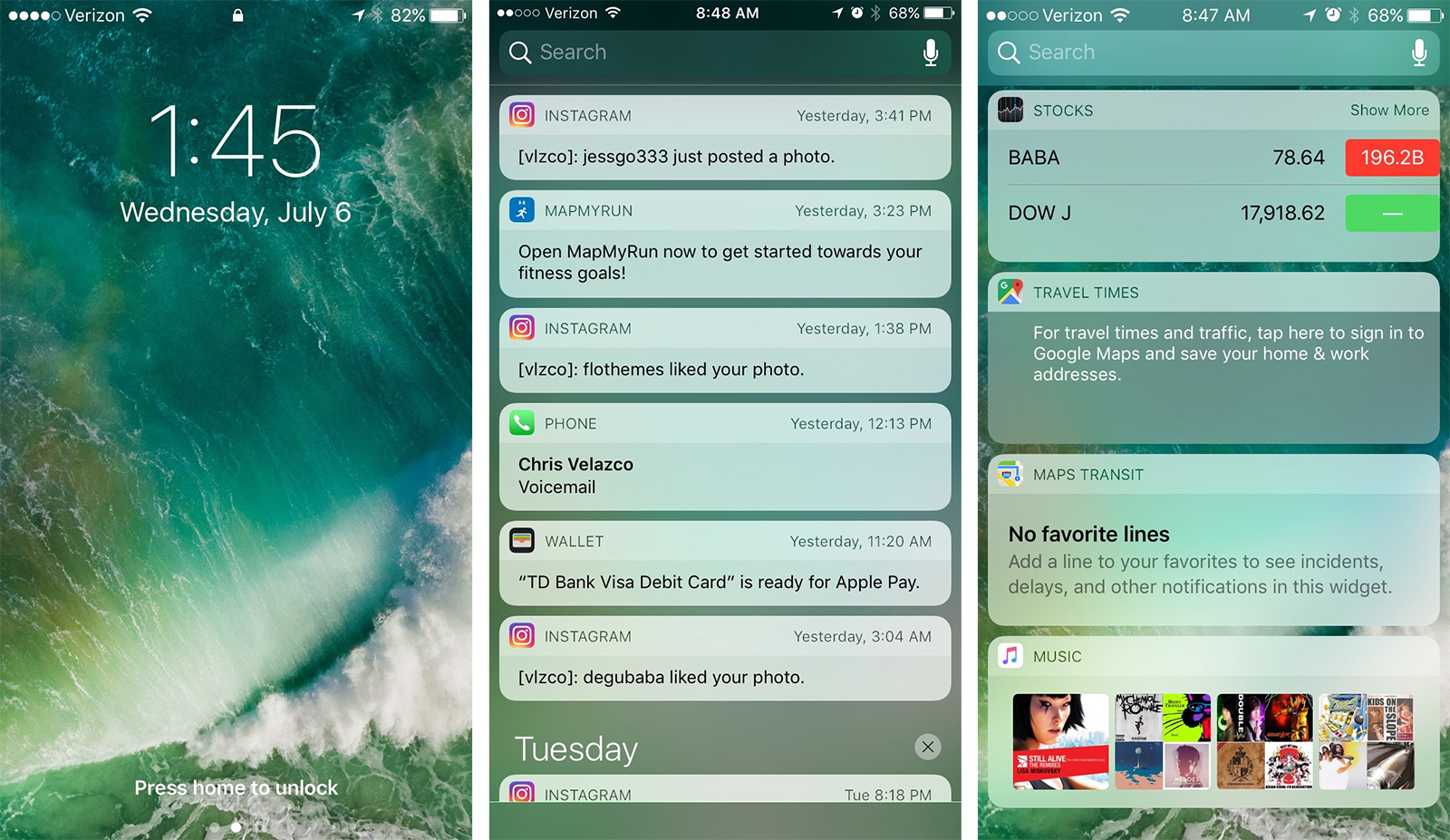
You can access Spotlight search from just about anywhere, since the search bar now appears at the top of the drag-down notifications shade.
Apple’s Home app is pretty (there’s that bold aesthetic again), but I couldn’t properly test it since I didn’t have any HomeKit gear on hand. Check back for our impressions in our eventual full review.
We can’t issue a verdict on iOS 10 until it launches this fall, but Apple has taken some significant steps forward here. iOS 9 built the foundation for a lot of these features, and with iOS 10 we’re seeing Apple try to figure out how they best work together. Sometimes that means rewriting the rules, and other times that means letting people build on top of the existing platform. How well that will work is the big question, and we should have our answer in a few months.
Just when Apple told from the WWDC keynote that users can now delete stock apps from their iPhones, it was not entirely correct. There’s more to it than just deleting the apps.
A huge correction from the current announcement and was then all over the news that the new iOS 10 will delete stock apps like Stocks, iMessage, iTunes from the iPhone. The news also includes how these apps can be restored by re-downloading it again from the App Store. Apparently, this is not entirely true.
Craig Federighi, the Senior Vice President of software engineering talked about this on the John Gruber\’s The Talk Show podcast at WWDC and pointed out that Apple is not deleting its stock apps. The scripts and binary files that make up the app is still in the device. The only thing deleted are the user data and hiding the app icon from your home screen.
It is basically deactivating the app and takes out access accounts from it. If combined, the total storage size of all the built-apps on IOS is 150MB or less. For 16GB iPhones, that\’s a huge savings for storage.
Thank you for using
Themify Popup
This is a sample pop up. Themify Builder or Builder Lite (free) plugin is recommended to design the pop up layouts.