




Detailed Internal Teardown and Full Screen Restoration of Google Pixel 10

Detailed Internal Teardown and Full Screen Restoration of Google Pixel 10: Ultimate Guide 2026
Introduction to Google Pixel 10 Screen Restoration
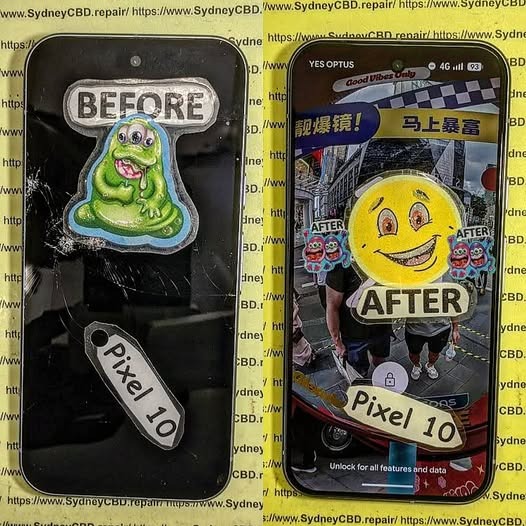
The Google Pixel 10 represents the latest advancement in smartphone engineering, combining premium materials, cutting-edge display technology, and intelligent software integration. Despite its durability, accidental drops, pressure damage, and impact events can still lead to display failures. When this happens, a Google Pixel 10 screen restoration becomes essential to return the device to full functionality.
A successful Google Pixel 10 screen restoration involves much more than simply replacing the front glass. Modern smartphones integrate touch layers, OLED panels, fingerprint sensors, proximity sensors, and display controllers into a tightly engineered assembly. Therefore, technicians must carefully dismantle the device and evaluate every internal component before proceeding with repairs.
In this comprehensive guide, we’ll explore the complete teardown process, restoration procedures, diagnostic methods, and testing requirements involved in professional Google Pixel 10 screen restoration.
Understanding the Google Pixel 10 Internal Architecture
Modern smartphones are engineering marvels, and the Google Pixel 10 is no exception.
Design Evolution of the Pixel Series
Over the years, Google has refined its Pixel lineup with stronger frames, thinner bezels, and improved repairability. The Pixel 10 continues this trend while maintaining a sleek profile and advanced hardware integration.
Key design improvements include:
- Enhanced OLED panel technology
- Improved thermal management
- Stronger internal frame construction
- Advanced camera stabilization systems
- Optimized battery placement
These improvements help increase device longevity while maintaining premium performance.
Core Hardware Components
Inside the Pixel 10, technicians encounter several critical modules:
| Component | Function |
|---|---|
| OLED Display | Visual output |
| Battery | Power storage |
| Motherboard | Main processing unit |
| Camera Modules | Image capture |
| Speaker Assembly | Audio output |
| USB-C Port | Charging and data transfer |
| Antenna System | Wireless communication |
| Cooling Components | Thermal regulation |
Understanding component placement is crucial before beginning any Google Pixel 10 screen restoration procedure.
Tools Required for Professional Teardown
Successful repairs depend heavily on using the correct equipment.
Professional technicians commonly use:
- Precision screwdriver set
- Plastic opening picks
- Anti-static mat
- Suction cup tools
- Heat pad or heat gun
- Tweezers
- Isopropyl alcohol
- Display adhesive strips
- Magnetic parts tray
- Microscope for inspection
Using specialized tools minimizes the risk of damaging delicate connectors and flex cables.
Safety Precautions Before Opening the Device
Before opening any smartphone:
- Power off the device.
- Discharge the battery below 25%.
- Remove SIM trays.
- Wear anti-static protection.
- Organize workspace components carefully.
- Document screw locations.
These precautions help prevent accidental short circuits and component damage.
Initial Diagnostic Assessment

Before beginning repairs, technicians perform a detailed evaluation.
Common Screen Failure Symptoms
Indicators that a Google Pixel 10 screen restoration may be required include:
- Black display
- Flickering screen
- Green line defects
- Dead touch zones
- OLED bleeding
- Display separation
- Random ghost touches
Each symptom can reveal different underlying issues.
Determining Repair Feasibility
Not every damaged device requires a complete replacement.
Technicians assess:
- Frame condition
- Motherboard integrity
- Battery safety
- Connector condition
- Water damage indicators
- Camera alignment
A thorough diagnosis ensures that restoration efforts will produce reliable results.
Step-by-Step Google Pixel 10 Teardown Process
The teardown process requires patience and precision.
Removing the Display Assembly
The repair begins by softening the adhesive securing the display.
Steps include:
- Apply controlled heat around screen edges.
- Attach suction tool.
- Insert opening pick.
- Separate adhesive slowly.
- Lift display carefully.
Excessive force can crack internal OLED layers or damage display cables.
Disconnecting Internal Components
Once inside, technicians disconnect:
- Battery connector
- Display flex cables
- Sensor cables
- Charging assembly connectors
This eliminates power flow and protects components during repairs.
Battery and Motherboard Access
After disconnecting the battery:
- Midframe shields are removed.
- Internal screws are cataloged.
- Motherboard access becomes available.
- Internal inspection begins.
This stage is critical for identifying hidden damage.
Inspecting Internal Damage
Internal inspections often reveal problems not visible externally.
Frame Damage Analysis
A bent frame can prevent proper display installation.
Technicians inspect:
- Corner deformation
- Chassis warping
- Screw mount damage
- Structural integrity
Minor frame issues can often be corrected before screen installation.
Connector and Flex Cable Inspection
Under magnification, technicians evaluate:
- Torn flex cables
- Bent pins
- Corrosion
- Connector wear
Replacing a screen without addressing damaged connectors can lead to recurring failures.
Full Screen Restoration Procedure
This is the most important phase of the repair process.
Installing a New OLED Display
The replacement display must be:
- Correct model specification
- Factory calibrated
- Free of manufacturing defects
- Compatible with fingerprint systems
Installation process:
- Clean frame thoroughly.
- Apply new adhesive.
- Route display flex cables.
- Align screen precisely.
- Connect display assembly.
A properly aligned display improves both durability and appearance.
Reconnecting Internal Components
Technicians reconnect:
- Display flex cables
- Battery connector
- Sensor assemblies
- Camera modules
Every connector is tested for secure seating before final assembly.
A professional Google Pixel 10 screen restoration always includes multiple verification steps before sealing the device.
Testing and Quality Control
Testing ensures repair reliability.
Display Function Verification
Technicians examine:
- Brightness consistency
- Color accuracy
- Refresh rate performance
- Pixel integrity
- Uniformity
Specialized software helps detect hidden display defects.
Touchscreen and Sensor Calibration
Additional testing includes:
- Multi-touch responsiveness
- Fingerprint recognition
- Ambient light sensors
- Proximity sensor accuracy
- Gesture functionality
Successful calibration confirms complete Google Pixel 10 screen restoration performance.
Common Challenges During Restoration
Even experienced technicians encounter obstacles.
Common issues include:
Adhesive Removal Difficulties
Modern waterproof adhesives are extremely strong. Improper removal can damage:
- OLED panels
- Frame surfaces
- Internal cables
Hidden Structural Damage
Impact forces often affect:
- Motherboard corners
- Battery cells
- Camera stabilization systems
Sensor Alignment Issues
Improper positioning may cause:
- Face detection failures
- Auto-brightness problems
- Fingerprint scanner inconsistencies
Addressing these challenges requires technical expertise and proper diagnostic equipment.
Preventative Maintenance After Repair
Following a successful Google Pixel 10 screen restoration, preventative care becomes essential.
Recommended practices:
Use a Quality Protective Case
A shock-absorbing case helps reduce future impact damage.
Install Tempered Glass Protection
Additional protection minimizes scratch and crack risks.
Avoid Extreme Temperatures
Excessive heat or cold can affect:
- Battery performance
- Adhesive strength
- OLED lifespan
Keep Charging Ports Clean
Dust accumulation may lead to charging issues over time.
Routine maintenance significantly extends device longevity.
Benefits of Professional Repair Services
While DIY repair videos are widely available, professional service offers substantial advantages.
Advanced Diagnostic Equipment
Professionals use:
- Thermal imaging
- Microscopes
- Board-level testing tools
- Calibration software
Genuine Component Compatibility
High-quality parts ensure:
- Better durability
- Improved display quality
- Enhanced touch responsiveness
- Reliable fingerprint functionality
Warranty Coverage
Many repair providers offer warranties that protect customers against defects and installation issues.
Faster Turnaround Times
Experienced technicians can often complete a Google Pixel 10 screen restoration efficiently while maintaining quality standards.
Frequently Asked Questions
1. How long does a Google Pixel 10 screen restoration take?
Most professional repairs are completed within a few hours, depending on component availability and device condition.
2. Can a cracked Pixel 10 screen still be repaired?
Yes. In most cases, damaged screens can be replaced successfully unless severe motherboard damage is also present.
3. Will waterproofing remain after repair?
Professional technicians apply new adhesive seals to restore resistance against dust and moisture, though factory waterproof ratings cannot always be fully guaranteed.
4. Is OLED replacement better than glass-only repair?
Yes. Full OLED replacement ensures proper touch functionality, display quality, and long-term reliability.
5. Can impact damage affect internal components?
Absolutely. Drops may damage batteries, connectors, cameras, and motherboards even when external damage appears minor.
6. Why does my screen show green lines after a drop?
Green lines typically indicate OLED layer damage or display controller failure, often requiring complete screen replacement.
7. Should I repair or replace my Pixel 10?
If the motherboard remains healthy, repair is usually far more economical than purchasing a new device.
8. Does screen replacement affect performance?
A properly installed display should perform exactly like the original and have no negative impact on system performance.
Conclusion

The process of Google Pixel 10 screen restoration involves far more than replacing a broken display. Professional technicians must carefully diagnose hidden damage, safely dismantle the device, inspect critical internal components, install a high-quality replacement OLED assembly, and perform extensive testing before returning the phone to service.
As smartphone technology becomes increasingly sophisticated, successful repairs require specialized knowledge, professional tools, and attention to detail. By following proven restoration procedures, technicians can restore damaged Pixel 10 devices to near-original condition while maximizing reliability and longevity.
For users facing screen damage, investing in professional Google Pixel 10 screen restoration remains one of the most effective ways to extend the life of a premium smartphone and avoid the expense of full device replacement.
For additional information about Google devices, visit the official Google Pixel Support resource center.
David from Sydney CBD Repair Centre – The Best place to fix mobile phones as 7 Years In A Row! Top Mobile Phone Repair In Sydney. More than 2000 Positive Reviews on Google and Same Day Repairs.
We take pride in delivering exceptional repair services for all major phone brands including Apple, Samsung, Google, and more. Our expert technicians use only genuine parts and offer 90days warranty on repairs. Located in the heart of Sydney CBD, we’re your one-stop solution for all mobile device repairs.
Our commitment to excellence has earned us the trust of thousands of satisfied customers. Whether it’s a cracked screen, battery replacement, or water damage repair, we handle it all with professional care and expertise. Walk in today and experience why we’re Sydney’s #1 choice for mobile phone repairs.
Visit us for:
✓ Same Day Express Repairs
✓ Genuine Parts Guarantee
✓ Professional Technicians
✓ Competitive Pricing
✓ 2000+ 5-Star Google Reviews
✓ 7-Time Award Winner for Best Phone Repairs
Sydney CBD Repair Centre – Where Quality Meets Reliability.
Call : +61280114119
Website: https://SydneyCBD.repair/locate-us

