Call Screen is a feature on Pixel phones that allows the phone to manually, or automatically respond to spam calls using the Google Assistant. Now, Google is working to simplify the feature’s settings, for better or worse.
As first spotted by some Reddit users late last week, an update to the Google Phone app on Pixel phones is changing the settings for Call Screen.
The existing interface for tweaking Call Screen allows users granular controls over the automatic answering, with the ability to turn Call Screen on or off for spam, faked numbers, first-time callers, and private/hidden numbers. Users can opt to have Call Screen automatically answer the call on your behalf, weeding out spam by speaking to the caller on your behalf before handing the call over to you. Alternatively, the call can just come through as usual depending on the category. The granular controls give the feature quite a bit of flexibility.
The new settings for Call Screen on Pixel, though, change things up to be a bit simpler.
Instead of showing granular settings, there’s a “Protection Level” that users can select which includes three options as the folks at Android Police were able to show. “Basic” will decline only “known spam.” “Medium” will then decline spam and screen calls that are considered suspicious. Finally “Maximum” will decline spam and screen any call that is from an unknown number.
It’s noted that this change is appearing for some users on with Google Phone v106.0.534575879, but it doesn’t seem very widely available at this point.
This seems like a bad change on the whole.
Removing granular controls to this extent severely limits the usefulness of Call Screen on Pixel, and if anything ruins certain use cases. The “Maximum” setting seems far too aggressive, especially given that, at least in our experience, most real callers presented with Call Screen tend to just hang up after a few second. Beyond that, even “Medium” doesn’t seem to be a great middle ground.
Moving from a granular, customizable setup is just bad for everyone. It might be slightly easier to understand for the general user – having a single toggle for automatic call screening is the best change here – but it hurts the usefulness of Call Screen overall.
Android 14 Beta 2 is an “incremental Beta-quality release” following the initial Android Beta Program version that rolled out via over-the-air update last month.
With Beta 2, you’ll get a more complete and stable build for continuing your testing and development.
Fixed an issue where a device couldn’t be unlocked using a fingerprint after tapping a notification or choosing a notification action on the lock screen. (Issue #278174846)
Fixed an issue on some devices that caused sound to play through the speakers instead of headphones that were connected. (Issue #278043129)
Fixed an issue that caused icons on the home screen to appear almost invisible. (Issue #277970542)
Fixed issues with gesture navigation that occurred when using a custom launcher:
The Home screen content wouldn’t display and the animation would fail to render when swiping up to go Home. (Issue #277981298)
The list of recently used apps couldn’t be accessed using the normal gesture. (Issue #277983179)
Fixed issues that prevented users from interacting with notifications in the notification shade. (Issue #278339342, Issue #276534576)
Fixed an issue that could cause a device to crash after finishing audio or video calls. (Issue #279539689)
Other resolved issues
Fixed an issue where, after entering and exiting picture-in-picture mode, the screen flickered when any apps were launched.
Fixed an issue where user restrictions set by DPC admins were not being enforced in Settings.
Fixed an issue where, after taking pictures with the Google Camera app, opening the latest picture from the thumbnail in the app briefly displayed a green-colored shade over the image.
Fixed an issue that could cause the battery percentage to be displayed as 0% after a device reboot regardless of the actual charge level of the device.
Fixed an issue that could cause a device to crash, and then when the device rebooted any wallpapers that were selected before the reboot were reset.
Fixed issues that prevented the Better Bug app from uploading bug reports.
Fixed issues that caused the back-to-home gesture to stop working.
Fixed an issue that could cause the system Settings app to crash repeatedly.
Fixed an issue that prevented users from searching within the system Settings app.
Fixed issues that sometimes caused null pointer exceptions for input method editors (IMEs).
Fixed an issue that sometimes increased system-wide memory usage unnecessarily.
Fixed system issues that could sometimes cause deadlocks.
Leave feedback using the Android Beta Feedback app on Pixel devices. You can access it from the drawer or via Quick Settings to file bugs in the Google issue tracker. There’s also the Android Beta community on Reddit.
Android 14 Beta 2 (UPB2.230407.014) with the May 2023 security patch is available for the Pixel 4a 5G, Pixel 5, Pixel 5a, Pixel 6, Pixel 6 Pro, Pixel 6a, Pixel 7, and Pixel 7 Pro, as well as the Android Emulator.
Pixel 6, Pixel 6 Pro, and Pixel 6a devices that use Verizon as their carrier: April 2023 / UPB2.230407.014.A1
Most people will be installing via the Android Beta Program, but you can also flash or sideload.
If you need help, here’s our full guide on installing Android 14.
As Google’s biggest show of the year, every I/O brings a ton of news. However, the stakes for I/O 2023 seem bigger, with announcements that could more thoroughly change how people use Google’s biggest products.
Google AI
Gmail, Docs, and Workspace
Artificial intelligence is, of course, responsible for this. Google has already shown generative AI features in Gmail and Google Docs, with testing already underway. Meanwhile, Google has briefly previewed bringing image generators into Google Slides and having Google Meet automatically create notes from a video call.
At I/O 2023, Google needs to provide a fuller picture of how AI will integrate into its Workspace apps beyond individual features. Equally important are details on a public launch and how they will be available to the (non-Workspace) public. The latter might be where Google One comes into play. For initial testing, it makes sense for features like those that have already been announced in Gmail and Google Docs to be free.
However, since generative AI is computationally expensive, it makes sense for Google to eventually put them behind a paid subscription. Today, 2TB or higher Google One tiers ($9.99+/month) provide premium Google Meet features like 1080p streaming and longer calls, and it would make sense for some (if not most) generative AI features to be locked behind that.
Search
As Google’s crown jewel, many stakeholders will want an update on how AI is coming to Search. There’s, of course, the Wall Street crowd, while end users have shown that chatbot-style queries and answers are something they’re at least interested in. The company has already previewed AI Insights in Search when it announced Bard, but we need a fuller look at the end-to-end experience.
Chrome
Having a chatbot in Chrome that lets you ask questions about the page you’re currently viewing has been rumored and does indeed sound useful. As a significant entry point for how people use Google, a generative AI presence needs to exist in Chrome.
Assistant
Generative AI and its conversational nature seem ripe for voice assistants. As we’ve talked about in the past, Google Assistant is at an impasse, with its feature set shrinking. The team behind it is currently tasked with Bard development, so it’s unclear whether Google is at a point where it’s ready to announce upgrades. If it did, Google could position Assistant as being more capable than Siri or Alexa, while Microsoft expressly does not currently have a voice assistant.
For the sake of end users, I think Google needs to publicly recommit to Assistant at this I/O to assure them their devices still have a long future. It would be nice if the company provided an upgrade roadmap, but even assurances would be a start at this point after months of no real developments.
Developer tools
I/O’s roots are as a developer conference, and there will undoubtedly be AI stuff for that crowd. Of particular interest will be assistive tools in Android Studio to aid app development.
Android
Android 14
We will obviously be getting the major tentpoles for Google’s upcoming mobile release at I/O 2023, followed by Android 14 Beta 2 to hopefully test some of them out. So far, Android 14 feels like an iterative update that continues to build on Material You. For example, we spotted that bolder Dynamic Color theming is coming.
Android XR
Samsung teased an XR device (headset) running Android in February. We’ve yet to hear anything about the OS, and I/O would be the time to announce it (which also has the benefit of preempting Apple’s realityOS announcement this June). This starts the long road to third-party developer buy-in.
Google needs to share its vision for this form factor, both short and long-term. In the near term, bulkier headsets could allow for productivity and entertainment use cases. Glasses are the future, but until then, we need devices and an OS that will let developers start experimenting with these experiences. It was recently rumored that Apple’s upcoming headset will run iPad apps. Does Google have the same idea, thus providing another reason for Android pushing into large-screen development?
Wear OS
Wear OS 3 was announced in 2021, and we quietly got version 3.5 last year. The timing would be about right for Wear OS 4, which will in all likelihood coincide with an underlying upgrade to Android 13, which brings Material You.
Better Together: ChromeOS, Wear OS, Google TV
As of late, the Android team has been very big on cross-device experiences that emphasize the benefit of going all-in with the ecosystem. Earlier this month, Google released a Cross-Device Services app to power ChromeOS app streaming. We’ll presumably get a demo and launch date for that at I/O. We’re also waiting for the ability to unlock your Android phone with a paired Wear OS watch.
On the entertainment front, we’re waiting for more entertainment-focused Better Together initiatives. Previously, rumors have mentioned connecting Nest and third-party speakers to Google/Android TV devices, while easier-to-access smart home controls and other integrations are on the roadmap (for 2024). We’re also waiting for Fast Pair to arrive for Google TV and Android TV.
Find My Device
Somewhat related to Better Together and the Android ecosystem is Find My Device becoming a broader network that includes third-party accessories. Google has been laying the groundwork for this by saying it would be “encrypting and storing your device’s most recent location with Google.” Meanwhile, there have been persistent rumors of a Google-made tracker.
Made by Google
Pixel 7a, Tablet, and Fold
It seems like we’re back to immediate availability with the Pixel 7a. This was the case for Pixel 3a at I/O 2019 and seemed to be what Google was aiming for in subsequent years, but the world had other ideas.
We should finally get launch details about the Pixel Tablet a year after it was first teased, while Google will be entering a new hardware category with the Pixel Fold.
Last May 2022, Google gave an “early preview” of the Pixel 7 series and Watch, as well as a “sneak peek” of the Pixel Tablet, in what seemed to be a rather unprecedented teaser.
In the case of the phone, it allowed Google to really get ahead of leaks. Before I/O, there were only a pair of leaked renders that got some things about the design right. It was somewhat less successful for the Pixel Watch, which leaked in full (left at a restaurant) and even had an AMA, while the Pixel Tablet reveal dovetailed nicely with the large-screen Android app push.
Ahead of I/O 2023, the company could certainly replicate the strategy for the same reasons. These previews are meant to provide only a high-level overview. For the Pixel 7, it was the design and how the language introduced the year prior would continue but with a modified camera bar, as well as how a second-generation Tensor chip was coming.
The design of the Pixel 8 and 8 Pro have more thoroughly leaked via renders at this point, so Google would be covering the same ground and would get a chance to reveal the colors itself. It would be nice if a “Tensor G3” mention touched upon what the improvements actually are, while the thing everyone really wants to known is what the camera improvements will be, especially given that new sensor on 8 Pro.
The case for a Pixel Watch 2 teaser is somewhat more mixed. As a first-generation product, we don’t know what the update cadence will be. An annual cycle would make a great deal of sense if we look at the Apple Watch and Samsung Galaxy Watch, but the Fitbit Sense and Versa lines were refreshed every two years. The improvements for a Pixel Watch 2 would be obvious, with a newer chip, more activated sensors (SpO2 and skin temperature changes estimation), and a bigger battery.
I don’t expect the domed design to drastically change beyond maybe thinner bezels, with the band system at least staying for another generation to ensure accessory capability. A Pixel Watch 2 teaser would have to touch on some new hardware features, but I’m not sure Google would want to do that and break the high-level overview nature of these previews.
As always, another factor in doing teasers is possibly cannibalizing sales of the existing Pixel Watch and Pixel 7 series. Google doesn’t seem to mind or at least has different priorities, but it does seem wild to make the effective life span as the latest and greatest product be only 7-8 months.
I think a teaser would more significantly impact sales of the first-generation wearable. As a prospective buyer of the mid-cycle Pixel Watch, knowing that a second-gen was coming in the fall would give me pause if I wanted a more future-proofed purchase. Today’s version is fine and has a battery that can last you a full day, but it’s unknown how it will continue to perform, especially once major OS updates arrive.
Fitbit
After major removals with the promise of new capabilities on the horizon, Fitbit needs to start sharing the second part of its plan, from a redesigned app to new capabilities. I/O would be the time to do that. Meanwhile, Fitbit integration to show live exercise stats on Google TV has already been rumored to continue the Better Together tentpole.
Google Home
Besides the Google Home app currently being in Public Preview, the company teased a number of other features last year. This includes the web-based Script Editor and more grouping options with Custom Spaces. We’ll hopefully get more updates on that.
Flash notifications on Pixel will let you emulate a notification LED
Android 14 Developer Preview 2 includes a “Flash notifications” function that will let Pixel owners emulate the long-lost notification LED in the upcoming build.
One of the most notable features that has been missing from many top-tier smartphones in recent years is the notification LED. Many OEMs have offered workarounds that utilize the camera LED flash to let you know when you have an unread or urgent notification waiting to be accessed.
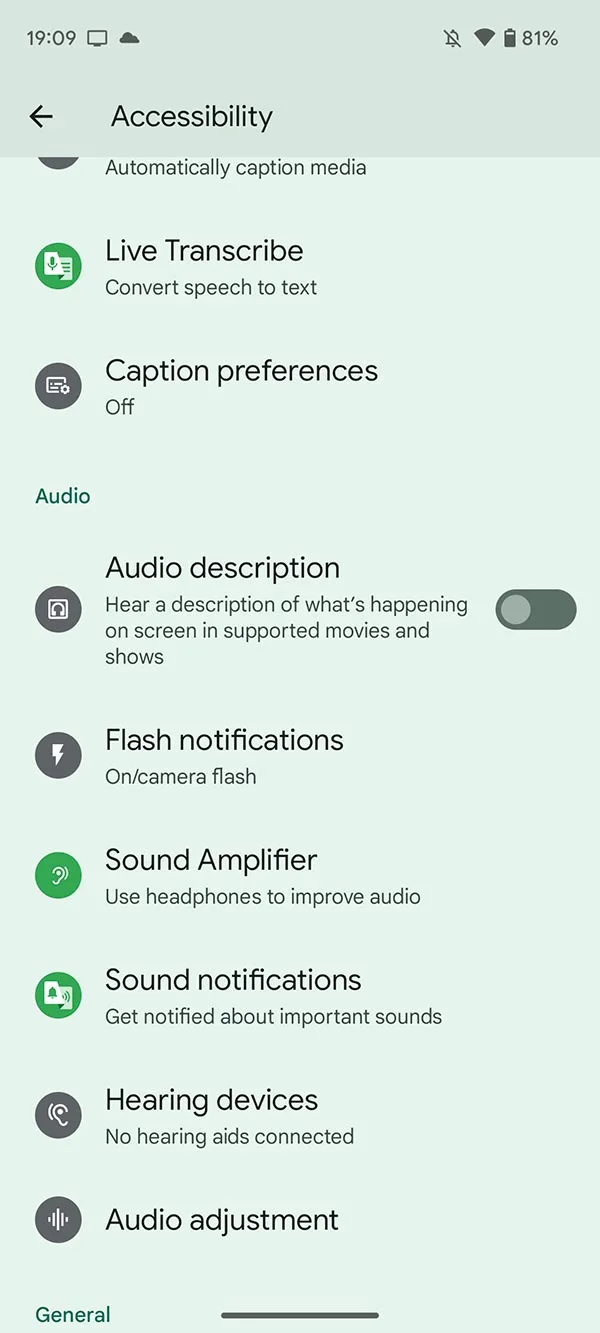
One notable absentee has been the Pixel lineup, but this could change soon as Google has added the “Flash notifications” option within the Accessibility panel in Android 14 Developer Preview 2. This section could be useful for those with hearing impairments, as it’s an extra visual clue that you have a call, SMS, or general app notification incoming.
You can enable “Camera flash notifications” or “Screen flash notifications” independently or simultaneously by heading to Settings > Accessibility > Flash notifications. From this new menu, you can tweak and toggle the options and even get a preview of the options in action.
If you enable “Camera flash notifications” in Android 14 Developer Preview 2, when a notification is received, the LED flash on your Pixel camera system will turn on and off briefly. Google has gone a step further here too. The flashlight/torch toggle in Quick Settings will be highlighted to indicate something has been received and that you have camera flash notifications enabled.
This is similar to what is already available on iOS and some other Android devices. Sadly, Android 14 Developer Preview 2 offers no ability to tune or tweak this setting, at least at this stage. However, if you enable the “Screen flash notifications” option, you can choose a color in which your screen will flash from one of 12 options, all of which are bright neon-style hues for visibility.
These changes might not fully replace a true RGB-capable notification LED on your Pixel, but at least you’ll be able to get an extra visual representation of regular on-device notifications when Android 14 does eventually launch.
Android 14 DP2: Pixel phones gain monochrome theme, prep for custom clocks
As part of the second preview of Android 14, Pixel phones have gained a new monochrome Material You theme and are preparing to add custom lock screen clocks.
Since the launch of Material You with Android 12, Google has been steadily building upon that colorful foundation, adding things like color variations that use your wallpaper palette in new ways and preset themes that aren’t based on your wallpaper.
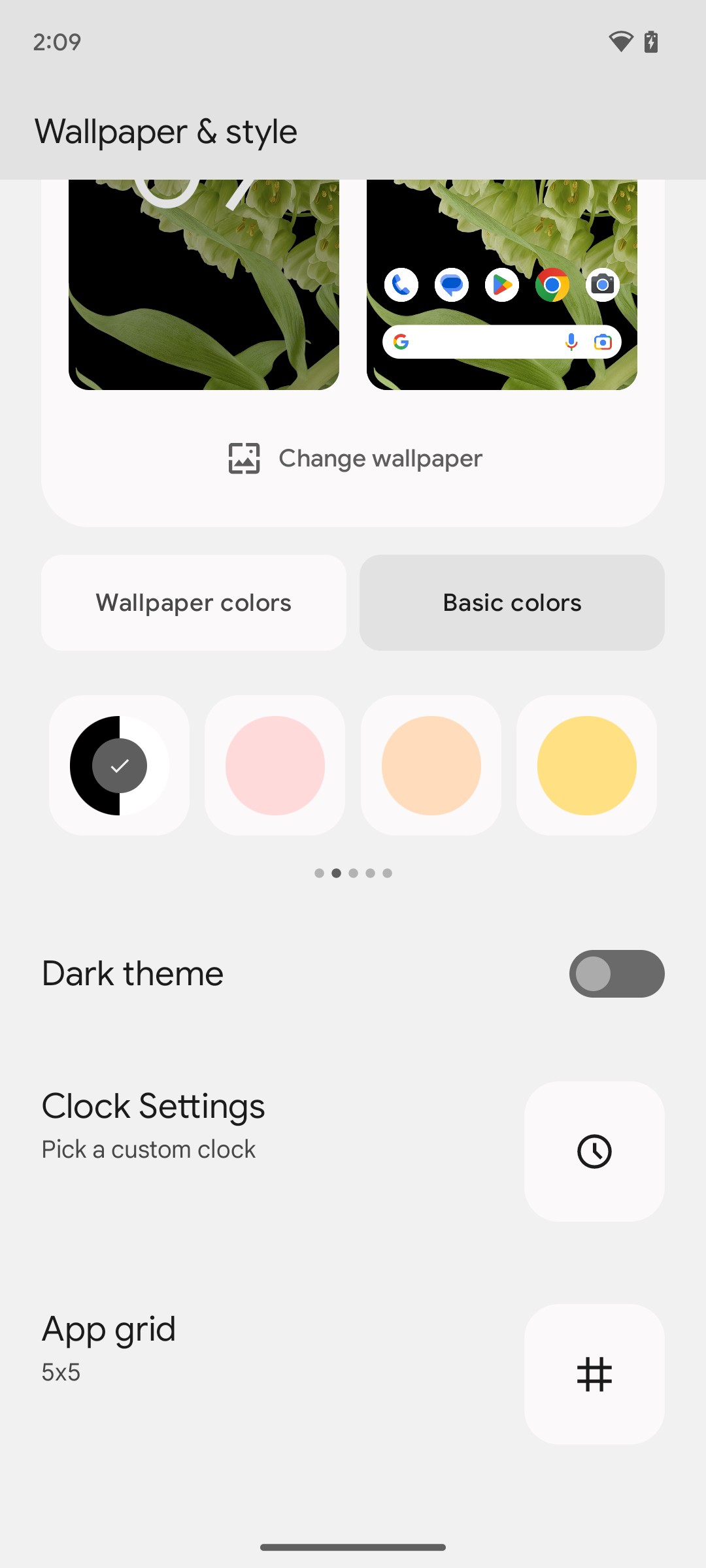
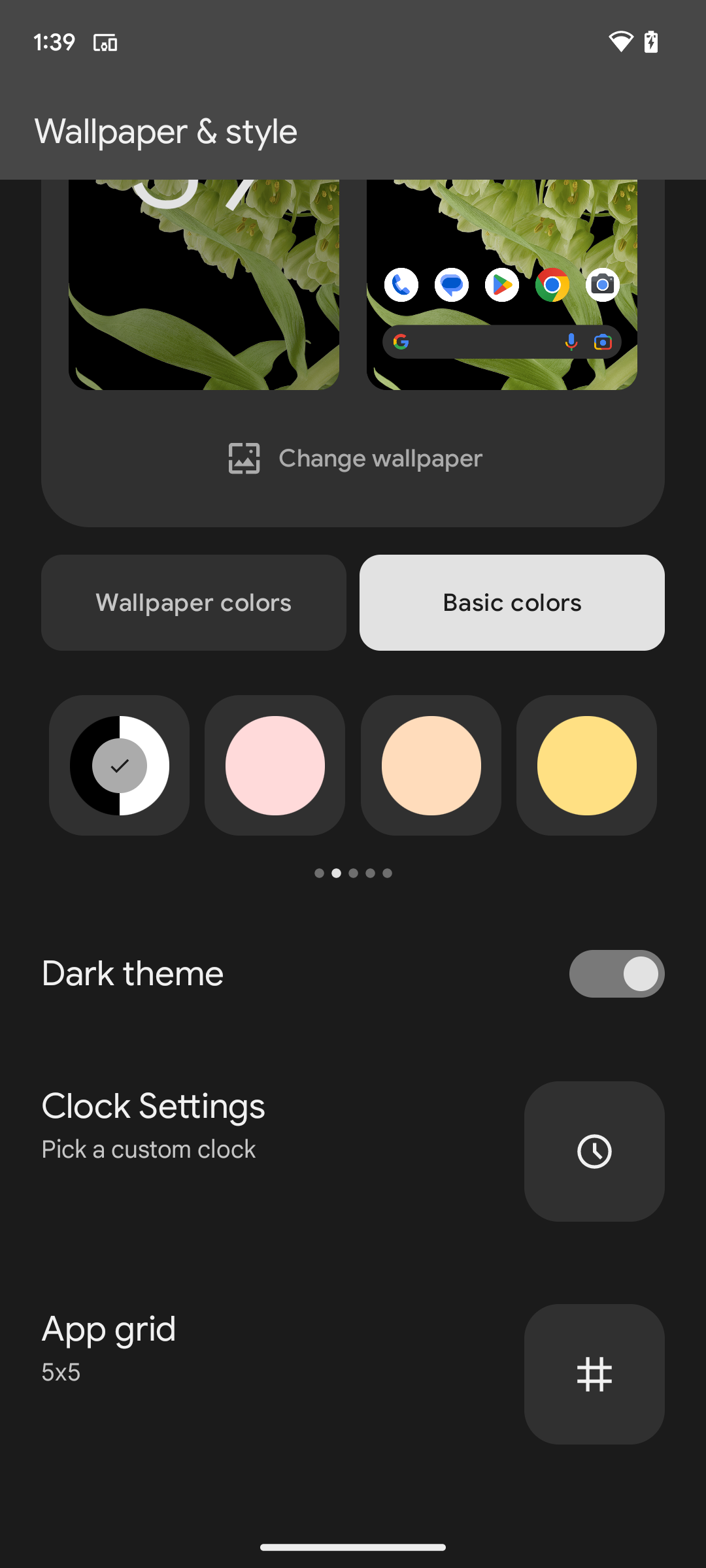
In the latter category, Android 14 DP2 introduces a new monochrome theme, marked by a black-and-white circle in the theme selector. As you’d expect, the theme saps all color out of Android’s menus and any Material You-compatible apps.
Besides looking kinda cool, the new monochrome Material You theme is actually added as an accessibility feature. I previously spoke with a person living with cataplexy; they noted that the colors of Google’s Material You themes would occasionally trigger seizures. For someone like that, a monochrome theme would likely go a long way toward making a Pixel phone more usable without disabling colors altogether.
Meanwhile, adding custom clocks to Pixel phones has long been a goal for Google, with work on it dating back to at least 2019. As seen in the screenshots above, it looks like the company is making another attempt at it with Android 14, as the Wallpaper & style applet includes a prominently placed option labeled “Clock Settings.”
The subheading reveals that this should allow you to “Pick a custom clock.” For now, however, this option does nothing, presumably because there aren’t any custom clocks installed from which to choose. As the custom clock option appears without needing to be forcibly enabled by our team, it’s quite possible that Google intends for the feature to launch as part of Android 14’s final release.
Another tidbit in Wallpaper & style that’s worth mentioning is a new bug related to Material You-themed icons. If you do a fresh install of Android 14 DP2 onto a device, rather than simply updating an already set up phone, the “Themed icons” toggle is not available. We’re not sure what the solution to this issue will be, though it will likely be fixed with a future DP2.1 update.
Android 14 DP2: Media player gains new animations and UI enhancements
Android 14 Developer Preview 2 is now available, and it wouldn’t be an early access build without Google making Media player tweaks.
The latest developer-focused build is the second such version of Android 14 that you can — and probably shouldn’t — flash on your eligible Google Pixel. Android 14 Developer Preview 1 didn’t tweak or tune the Media player which is used across the Quick Settings panel and lockscreen. This time, though, Google has made a number of small tweaks that will be noticeable right away.
A very minor animation tweak is visible when viewing the lockscreen media player. In Android 13, the player will slide up and expand into view into the Always-on display. Here in Android 14 Developer Preview 2, the Media player will slide down into view. It’s another minor change, but one that you’ll spot and wonder just what feels different.
That’s not all, as when interacting with the player controls you’ll see a wave glow animation effect to indicate that something has been accessed or activated. Google has also restored the glowing animation effect when audio is playing that was originally added in Android 13 QPR2 Beta 1. Both glow effects will use a complimentary color to the album art of the media being played, and this appears to work with most apps compatible with the Media player in Android 14 Developer Preview 2.
The changes continue with the media output switcher. This area will now show any nearby or available speakers and Cast-enabled devices; what’s more, the volume control slider now has a new icon to indicate that audio is muted on your device.
Historically, Google updates its Pixel phones on the first Monday of the month at 10 a.m. PT. That’s today, but there’s no March update yet in an unexpected delay for Google Pixel.
Update 1: As of 10:30 a.m. PT, there’s still no Pixel update, but the Android Security Bulletin—March 2023 has been published. There are 31 security issues resolved in the Android 13 March patch dated 2023-03-01 and 29 for 2023-03-05.
As of the usual time, there are zero blogs from Google announcing the March update for Pixel phones, while there are no new factory or OTA images.
Even if the update doesn’t roll out immediately for some phones, Google usually still details the release. For example, the Tensor-powered Pixel 6 and 6 Pro in 2021 often received their updates — factory images and on-device OTAs — a few weeks after older phones.
One recent example of Google deviating from the norm was last August, but that was due to Android 13 coming in the middle of that month. Google made no announcements on Monday, August 1 and waited until Thursday, August 4 to roll out an “additional update” just for the Pixel 6 series and 6a. The Android 13 update for all remaining phones came on Monday, August 15.
It’s not clear what’s causing this delay, or how long it will last. Android 13 QPR2 progressed through the Android Beta Program normally and is not the biggest update in terms of user-facing changes. One possibility is that Google found a showstopper bug that derailed today’s update.
New Google ‘phone’ shows up at FCC, likely Pixel 7a or Pixel Fold
A new Google device, labeled as a “phone,” has shown up for approval from the FCC, likely putting the Pixel 7a or Pixel Fold closer to release.
Before any device with wireless connectivity can be released, it needs to get approval from the various governmental regulators around the world, such as the FCC in the United States. This evening, a trio of new listings appeared at the FCC, all of which point to a single new “phone” coming soon from Google.
The new listings — G0DZQ, GHL1X, and GWKK3 — all make reference to one another and one includes a mention of another model, G82U8. To make the connection more explicit, one document that Google submitted to the FCC explains the differences between most of the new models.
FCC ID: A4RG0DZQ (parent model for NFC), FCC ID: A4RGWKK3 (parent model for BT/WLAN) and FCC ID: A4RGHL1X (variant model) use the same identical internal printed circuit board layouts, while the variant models depopulates mmWave related components and populated a different MHB ENDC module, details are available in the operational description.
Knowing that all four of these model numbers should be describing the same phone, the bigger question is which device we’re actually looking at. Up to this point, there have been leaks of the upcoming Pixel 7a, which is set to significantly upgrade Google’s previously midrange A-Series phones with things like a better camera, wireless charging, and 90Hz display.
Meanwhile, the long-awaited Pixel Fold has also been rumored to be on track to release this year, marking Google’s third recent attempt at releasing a foldable phone. Last week, we exclusively reported that the Pixel Fold is set to be heavier than the Galaxy Fold 4, likely due to its larger battery size.
Unfortunately, nothing in the FCC listings seems to indicate the physical size of this new phone, which would be an immediate giveaway to whether this is the Pixel Fold or Pixel 7a. The availability of an mmWave model doesn’t rule out this being the Pixel 7a, as even the Pixel 6a was available with mmWave through Verizon.
One potential clue lies in the inclusion of serial numbers of the devices that were tested, each typically beginning with “28291FQHN” or “28251FQHN.” In a hands-on leak of an early model of the Pixel 7a, a serial number beginning with “2A281FQHN” was visible, which appears to be quite similar.
The only thing we can know for sure is that this latest Pixel phone should release well before the usual fall Made by Google event, as the FCC’s confidentiality (which temporarily hides device images and manuals from the public) expires in six months. That means we’re almost certainly looking at something releasing midyear, like A-Series Pixel phones typically do.
The dates for Google I/O have not yet been announced, but that would be the next most likely opportunity for the company to showcase its latest hardware. This appearance at the FCC is just one step of many along the path to release. We’ll be keeping an eye on this mystery Pixel phone and any other devices Google may have up its sleeve between now and Google I/O.
Android 13 QPR2 Beta 3 is rolling out today as what should be the final major preview before the stable launch in March.
It notably still features the January 2023 security patch, which could be addressed with an update (like a Beta 3.1) later on. The following issues have been resolved with Beta 3 (T2B3.230109.002):
Developer-reported and user-reported issues
Fixed an issue where notifications in a notification group were sometimes displayed with straight corners instead of rounded corners. (Issue #264287776, Issue #265529116)
Fixed an issue where the message in the notification shade that indicates an active VPN connection overlapped with the message about apps with active foreground services. (Issue #266075977)
Fixed an issue where the overflow menu couldn’t be accessed when editing Quick Settings tiles. (Issue #263484657)
Fixed an issue that sometimes caused a device with vibration enabled to vibrate for too long after it received a notification. (Issue #239676913)
Other resolved issues
Fixed an issue that sometimes caused messaging apps to crash or fail to send notifications.
Fixed a GPU issue that prevented apps from using certain visual effects.
Fixed an issue where Quick Settings tiles for a work profile were not added after setting up a new device.
Fixed an issue that sometimes caused the Pixel launcher to crash when using the Search bar in the app drawer.
Fixed an issue that sometimes prevented a device from being unlocked using a pattern after the Google Assistant was activated.
Fixed an issue in the com.android.qns system process that sometimes caused crashes.
Fixed an issue with the Pixel launcher that prevented Chinese text input from being recognized when typing in the Search bar in the app drawer.
Fixed an issue where when entering and exiting Picture-in-picture (PiP) mode from an app after changing the screen orientation, the system Settings app crashed with a “Settings keeps stopping” message and then the system Settings app couldn’t be opened.
Fixed an issue with the System UI that sometimes caused it to crash from a null pointer exception.
Fixed an issue where the connection status of a Bluetooth device sometimes did not match the actual device state.
Fixed an issue where the Pixel launcher crashed when a user tapped a web search suggestion for a query term.
Fixed an issue that caused status bar icons to overlap with the date text when font and display settings were set to their maximum level on a device.
However, there’s still one remaining issue with how the “list of Recent apps sometimes becomes unresponsive if the screen orientation is changed while the list is open.”
Android 13 QPR2 Beta 3 remaining on the January 2023 security patch level is quite odd as Google usually releases betas after the latest monthly Android security patch has launched. That is not expected until Monday, February 6.
If you have installed the QPR2 Beta, leaving the program will result in a wipe and your next opportunity to exit without losing data will be in March after the stable launch.
Android 13 QPR2 Beta 3 system images are available for the Pixel 4a, Pixel 4a 5G, Pixel 5, Pixel 5a, Pixel 6, Pixel 6 Pro, Pixel 6a, Pixel 7, and Pixel 7 Pro. as well as in the Android Emulator.
Most users will be installing Beta 3 from the Android Beta Program website. You can expect an OTA update in the coming hours. If you need help, here’s our full guide on installing Android 13.
Pixel phones offer two lockscreen shortcuts that are locked to Google Wallet and Home, but Android 13 QPR2 reveals possible work on letting users change that.
At the bottom left, you have device controls to quickly toggle on/off as well as adjust smart home tiles that you’ve selected to appear. Android 13 conveniently added the ability to “control external devices without unlocking.”
Meanwhile, Wallet is in the right corner. In December, Google made it so that a tap opens the full Google Wallet app on the Pixel 7 and 7 Pro. On older Pixel phones, you get another intermediary screen (from Cards & Passes) that quickly loads your carousel of stored cards.
At the moment, your only options are to enable or disable each shortcut.
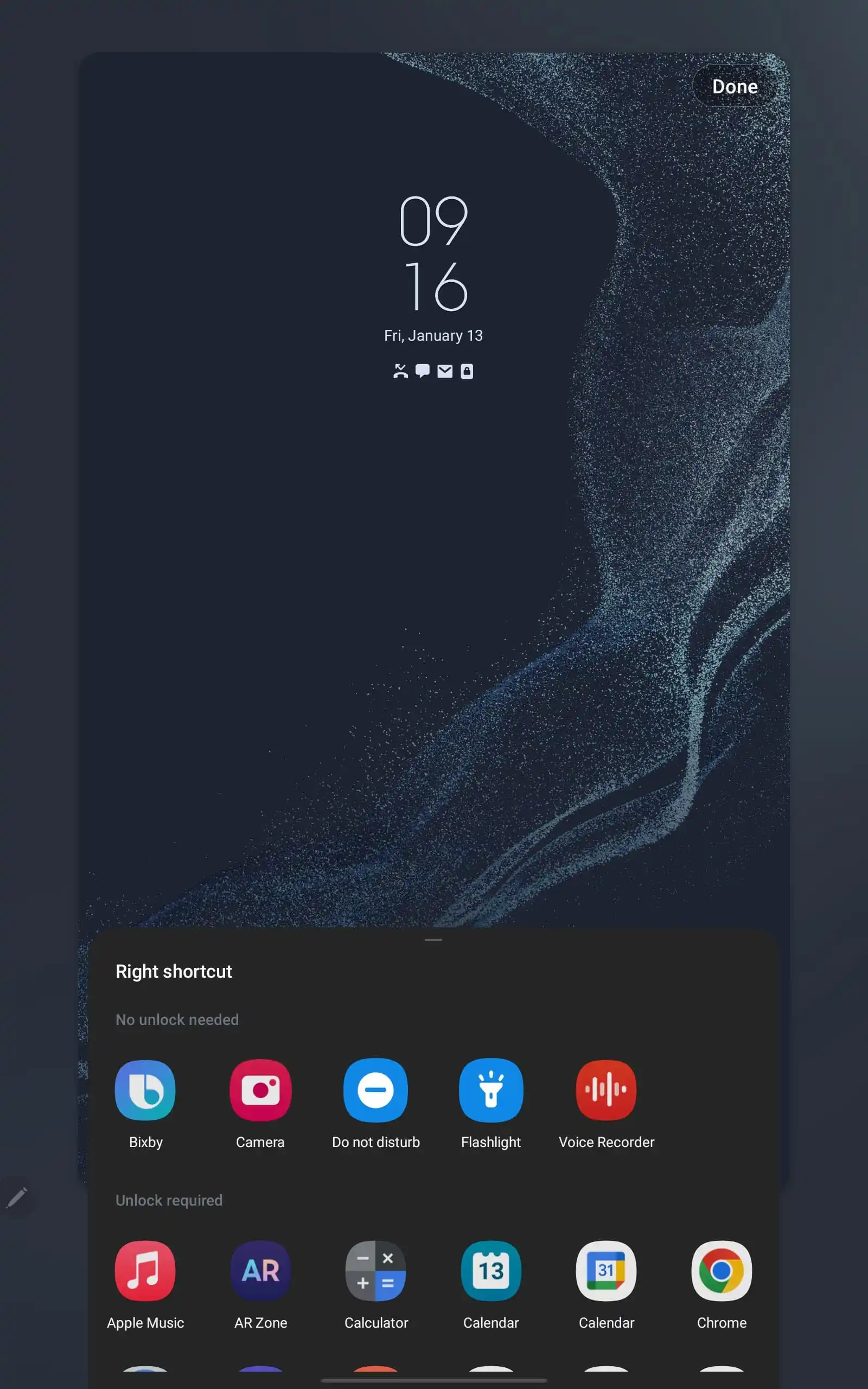
Android 13 QPR2 Beta 2 reveals work on letting you select other functionality. In addition to Home and Wallet, you’ll be able to choose from the flashlight, camera, and QR code scanner.
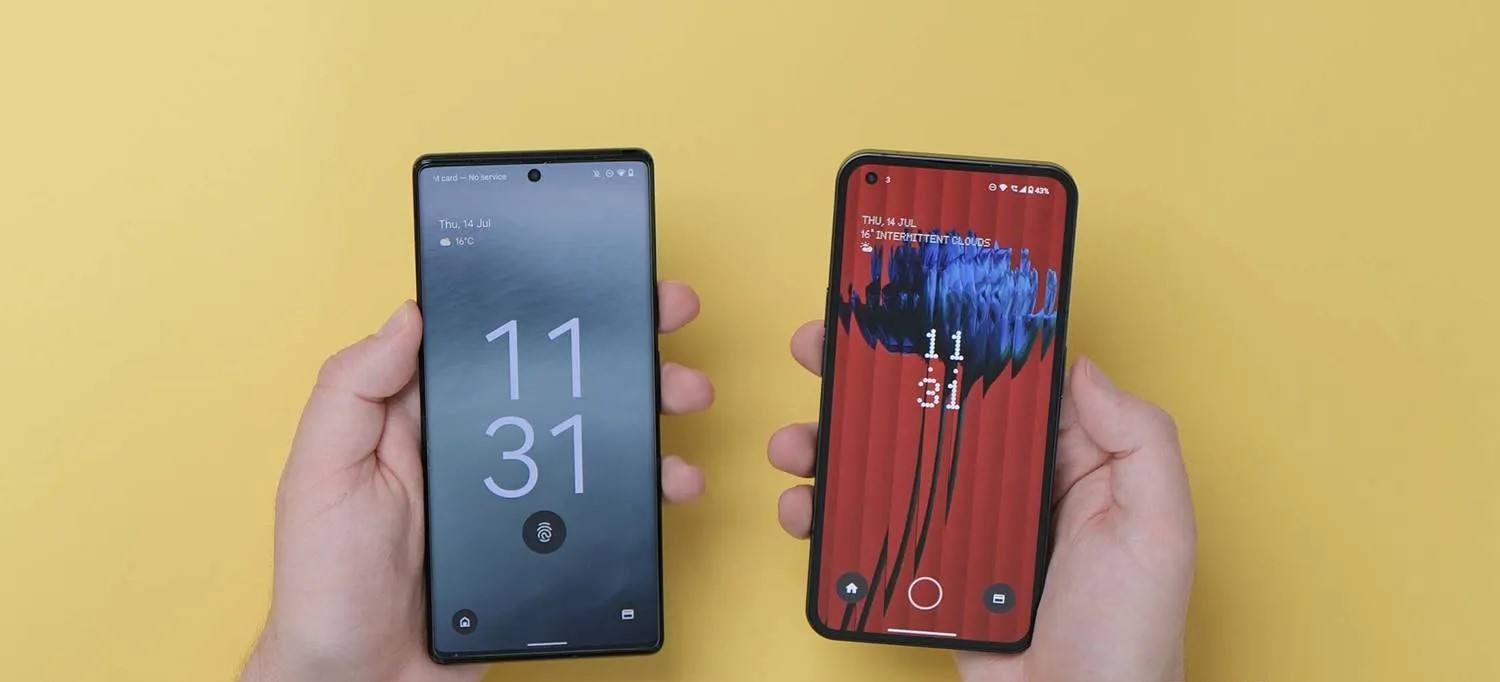
You currently aren’t able to select any app as a shortcut, which is something that Samsung allows. Rather, you’ll most likely stick to that predefined list, which presumably includes none, just like the implementation the Nothing Phone just added in beta.
So, here's a fun one. Nothing OS 1.5.1 (Android 13 Beta 2) contains various fun features… Including the ability to customize the lockscreen shortcuts!
Google started working on it in their latest beta (QPR2). But Nothing implemented it themselves 🙂 pic.twitter.com/yWj4G0jDiw
Meanwhile, Google is making it so that you have to “Press and hold to activate” the shortcuts compared to the current simple tap. That would be especially necessary in the case of flashlight and camera shortcuts to prevent accidental, in-pocket activations.
<string name=”keyguard_affordance_press_too_short”>Press and hold to activate</string>
Lastly, we’ve enabled a very early look at what the Pixel UI change to the lockscreen “Shortcuts” might look like. It clearly doesn’t work right now, but it’s somewhat modeled after the existing Wallpaper & style interface:
The year in Pixel updates gets underway today with the Android 13 January security patch for the Pixel 4a, 4a 5G, 5, 5a, 6, 6 Pro, 6a, 7 and 7 Pro.
There are 20 security issues resolved in the Android 13 January patch dated 2023-01-01 and 40 for 2023-01-05. Vulnerabilities range from high to critical.
In the most recent Android Security & Privacy Year in Review, Google notes that “no critical security vulnerabilities affecting the Android platform were publicly disclosed without a security update or mitigation available for Android devices.” Additionally, there was an 84% year-over-year jump in security patches during Q4 2018 compared to the prior year.
The dedicated bulletin for Google devices lists eight additional security fixes, with the Pixel 7 and 7 Pro featuring their own build for Australia’s Telstra.
Pixel 7 gets seven fixes and additions with January 2023 update
After rolling out the January 2023 update for the Pixel 7 this morning, Google has detailed what’s fixed and added, as well as listing other currently supported phones.
The Pixel’s January 2023 update adds support for Spatial Audio, and the Pixel Buds Pro will get the required update in the “coming weeks” with head tracking as well.
The Pixel 7 benefits from everything, including improved under-display fingerprint performance, which is also for the Pixel 6a.
Use the following device key to interpret the Pixel January 2023 changelog:
Fixes are available for all supported Pixel devices unless otherwise indicated below.
*[1] Included on Pixel 6, Pixel 6 Pro, Pixel 7, Pixel 7 Pro
*[2] Included on Pixel 6a, Pixel 7
*[3] Included on Pixel 7, Pixel 7 Pro
Audio
Add support for Spatial Audio with certain devices and accessories *[1]
Biometrics
Additional improvements for fingerprint recognition and response in certain conditions *[2]
Bluetooth
Fix for issue occasionally preventing certain Bluetooth Low Energy devices or accessories from pairing or reconnecting
Fix for issue preventing audio from playing over certain headphones or accessories while connected in certain conditions
Camera
Fix for issue occasionally causing captured photos to appear corrupted or distorted while zoomed in *[3]
Display & Graphics
Fix for issue occasionally preventing display from waking or appearing turned off while device is powered on *[3]
User Interface
Fix for issue occasionally causing UI to display in landscape layout while device is held in portrait mode
Per Verizon, the next GooglePixel update with the January security patch is rolling out tomorrow.
GooglePixel updates typically start rolling out on the first Monday of the month, but that falls on when New Year’s Day is observed this year. It’s coming on Tuesday as a result, according to Verizon, similar to last year:
Pixel 4a last updated 01/03/2023
Pixel 4a 5G UW last updated 01/03/2023
Pixel 5 last updated 01/03/2023
Pixel 6 last updated 01/03/2023
Pixel 6 Pro last updated 01/03/2023
Pixel 6a last updated 01/03/2023
Pixel 7 last updated 01/03/2023
Pixel 7 Pro last updated 01/03/2023
The US carrier refreshed the Device Software Updates list a day early, and the Pixel 4a to 7 Pro is set to receive it on January 3 instead of next week. Given the premature update, the actual changelogs are not live yet.
We’re not expecting anything major since the December Feature Drop with Android 13 QPR1 just arrived, though bug fixes would be welcome. For example, the Home and Wallet shortcuts have a tendency of initially appearing on the always-on display. Rather, the next big update — QPR2 — is coming in March.
Instead, the main update this month should be for Pixel Buds Pro to enable spatial audio, though there could be a phone component.
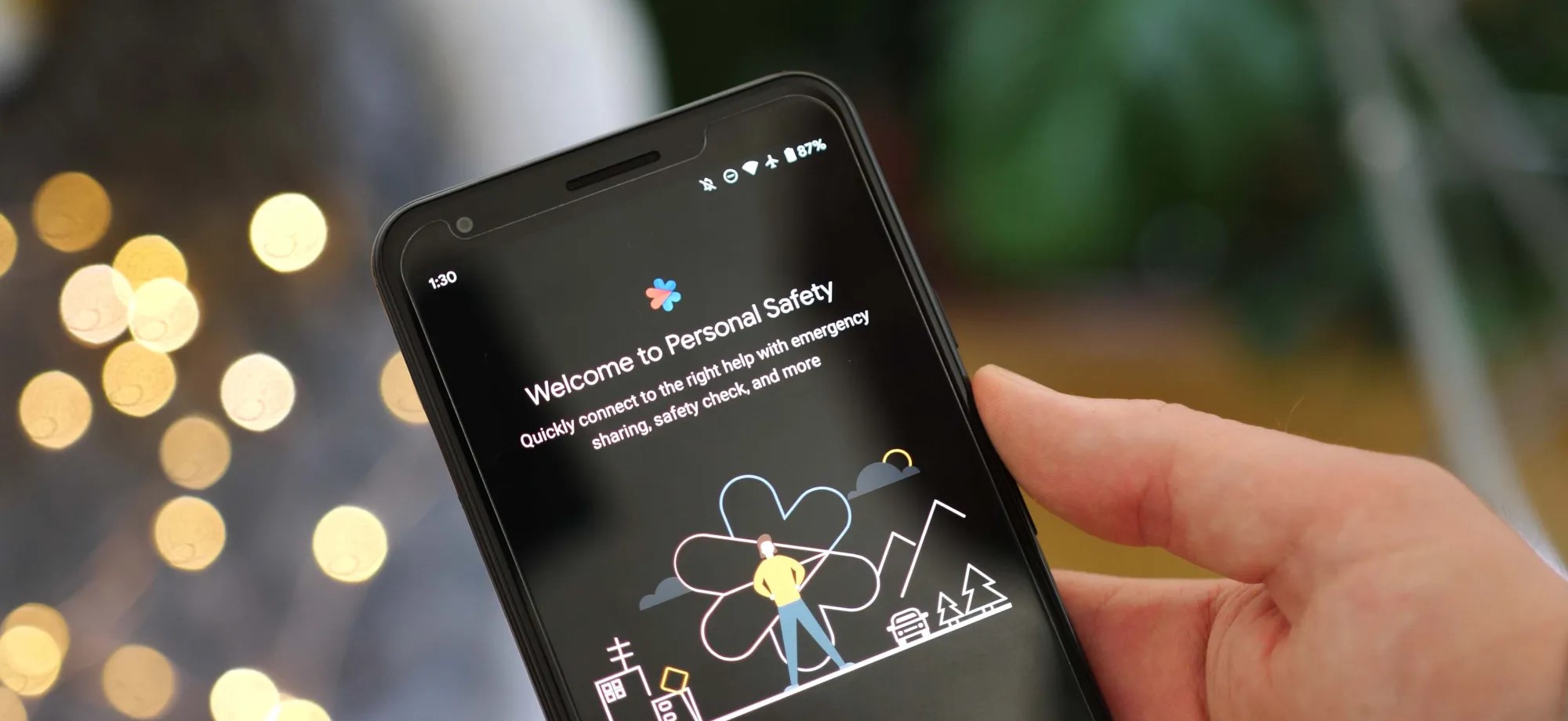
As Android 13 rolls out to more phones, the update is bringing the once Pixel-exclusive Personal Safety app to more devices including those from Sony Xperia and Vivo.
On Pixel phones today, the Personal Safety app includes a full suite of features designed to make sure you’re ready should any type of disaster strike. You can add/edit critical medical information, assign emergency contacts, get alerts for nearby crises, and on some devices even call for help when a car crash is detected.
While this was originally built as an exclusive set of features for Pixel phones, with the release of Android 13, Google has decided to make Personal Safety available as an option for other phone makers. As noted by Mishaal Rahman on Twitter, there is already a small selection of phones that are gaining access to Personal Safety as part of Android 13.
While Samsung certainly has the broadest profile of devices on Android 13 today, no Galaxy phones are currently opted in for Google’s safety suite. Instead, the current list of non-Pixel Android devices with Personal Safety contains phones from Sony Xperia, Vivo, iQOO, and Nothing.
Nothing Phone (1)
Sony Xperia 5 IV
Sony Xperia 1 IV
iQOO 7
iQOO 8 Pro
iQOO 9 SE
iQOO 9 Pro
iQOO 9T
iQOO I2202
iQOO 11
iQOO Neo7
Vivo X80 Pro
Vivo X90
Vivo X90 Pro
The actual experience of using Personal Safety on these phones is straightforward and quite similar to the app’s older (pre Android 13) experience on Pixels. Rather than appearing as a dedicated app in the drawer, you can navigate to Personal Safety through the Settings app, in the “Safety & emergency” section.
From there, as expected, you can manage your emergency information and get enrolled for alerts. However, for all currently supported phones, the Android 13 update does not bring the car crash detection that Personal Safety is best known for.
Google has opened car crash detection to non-Pixel phones, but it requires device makers to implement Android’s “Context Hub.” This feature is designed to let small, ambient programs — such as sensing a sudden stop, in the case of car crash detection — run without using excess power. As adding support for Context Hub would require a system update, it’s not likely that any of these phones will gain car crash detection in Personal Safety any time soon. Despite that, it’s still great to see Google offer some of the Pixel series’ exclusive features to more Android phones.