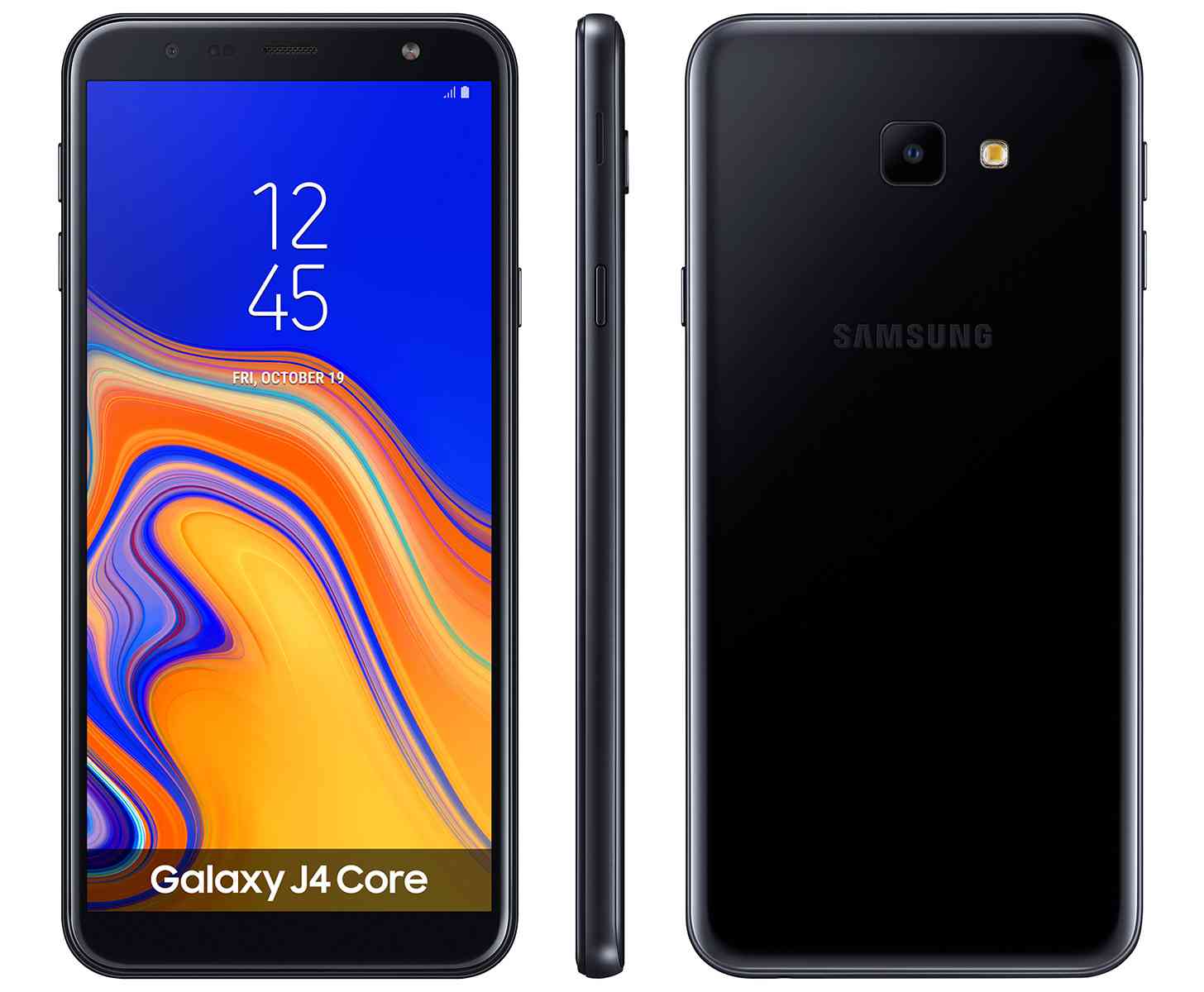
After debuting its first Android Go phone in August, Samsung is back with its second such model.
The Samsung Galaxy J4 Core boasts a 6-inch 1480×720 display — up from the 5-inch 960×540 screen on the Galaxy J2 Core — as well as an 8MP rear camera and 5MP front-facing camera. There’s 16GB of storage built into the Galaxy J4 Core, but if that’s not enough, Samsung has included a microSD card slot so that you can add more storage.
Powering the J4 Core is a 1.4GHz quad-core processor paired with 1GB of RAM and a 3300mAh battery. On the software side, Samsung has preloaded the Galaxy J4 Core with Android 8.1 Oreo (Go edition). Android Go devices come with fewer preinstalled apps and smaller app sizes, giving you access to more storage. Google’s suite of Go apps are more lightweight and are meant to work smoothly on devices with entry-level specs.
The Samsung Galaxy J4 Core looks like a nice option for folks who are interested in Android Go, but want something with slightly improved specs compare to the Galaxy J2 Core. Compared to the J2 Core, the J4 Core has a larger and higher-res screen that could be better for watching content on the go, and it also comes with double the built-in storage and a beefier battery. There’s no word yet on when the Galaxy J4 Core will launch or how much it’ll cost when it does, but because it’s an Android Go device, it should be too hard on buyers’ wallets.
A smartwatch that’s more than just a great conversation starter. It tracks your activity and monitors your sleep, it plays music and handles mobile payments, and yes, it even tells the time with remarkable accuracy! But is spending over $300 on Samsung’s latest smartwatch a wise investment? I used it for several weeks to find out.
In the box:
Samsung Galaxy Watch
Small and large wrist band
Wireless charging cradle
Wall adapter (with non-detachable microUSB cable)
Quick start guide
Design and comfort
The age-old “if it ain’t broke, don’t fix it” mantra is in full effect here, as the Samsung Galaxy Watch looks and feels a lot like the company’s last few smartwatches. It retains the classic appearance and circular design, allowing it to look more like a lifestyle accessory and less like a geeky toy. Whether I’m at the office, out for dinner, or exploring the great outdoors, the watch doesn’t seem out of place on my wrist.
What’s new is that the Samsung Galaxy Watch comes in two sizes. I wore the smaller, 42mm Galaxy Watch throughout the first week of my testing. This model would more easily appeal to a broader audience not only because of its size, but also with the colors it comes in: the decidedly feminine Rose Gold (which we have here) and the much more neutral Midnight Black. However, most of my lady friends who gave it a try did find the watch rather thick.
From left to right – Garmin FR 645, Galaxy Watch 42mm, Apple Watch, Galaxy Watch 46mm
Meanwhile, the larger, 46mm Galaxy Watch only comes in Silver. It is thicker and noticeably heavier, with a pronounced masculine appearance. I also found it more likely to get caught in the sleeve of my shirt. But if you’re already used to wearing extra-large timepieces, then this is the model you should be considering. Admittedly, I got used to its size after wearing it for a couple of days and didn’t think about switching back to the smaller variant.
By the way, the 42mm and 46mm sizes refer to the width of the body of the watch, not to the diameter of its display.
As far as durability goes, the Samsung Galaxy Watch is as tough as you’d expect. It is waterproof down to 50 meters so it is safe to swim with it. It complies with military standards for resistance against shock, extreme temperatures, solar radiation, and other environmental factors. The display is protected by the raised bezel around it, as well as by a layer of Gorilla Glass DX+ scratch-resistant glass developed with watches in mind. And the stainless steel construction resists dents and scratches much better than aluminum would. After several weeks of use, my review units are showing no signs of wear or physical damage.
The soft, rubbery band supplied by Samsung is nice and bendy, and the metal clasp ensures a reliable fit. There’s a bit of stretch to it, which helps with comfort. The only issue that I noticed was that the strap bundled with my 46mm model easily attracts dust and dirt, but a wet towel cleans it easily. Since the band mechanisms are not proprietary, they can be replaced with standard 20- or 22-mm bands, depending on whether you have the 42mm or 46mm Galaxy Watch. Samsung itself is offering leather bands for about $40 apiece.
Display and controls
The 42mm and 46mm Galaxy Watch models come with 1.2- and 1.3-inch displays respectively, both with a resolution of 360 by 360 pixels. Colors are vivid, outdoor visibility is excellent, and text is always displayed in white against a black background, so it is sharp and easy to read. Moreover, since these are OLED screens we’re dealing with, having the watch face always on is an option – although one disabled by default as it shortens battery life. I kept it on nonetheless because it looks awesome.
Samsung‘s trademark rotating bezel is one of the coolest Galaxy Watch features. For those not familiar, it is used for navigating through the interface – for switching between widgets, for example, or for scrolling down an email without obscuring anything on the screen with your finger. All in all, the bezel is a welcome convenience, and there’s something oddly satisfying about the way it clicks with each rotation. Additionally, there are two more buttons on the side – one that takes you back a step and another for accessing the app drawer or going back to the home screen.
As any other touchscreen, the one on the Galaxy Watch may become less responsive as moisture accumulates on it during intense exercises, but I didn’t run into any major issues with it. A special mode locks the display while tracking swimming exercises.
Interface and functionality
The Galaxy Watch runs Samsung‘s own Tizen 4 operating system, which excels in many key areas, one being speed. Both sizes are powered by a new, dual-core Exynos 9110 chip which is both more powerful and more power-efficient than those used in previous Samsung smartwatches. Navigation is swift, and the UI responds instantly to input.
Slowdowns are rare and have a negligible impact on the user experience. It is worth noting that we have the non-LTE Galaxy Watch models for review. These come with 768MB of RAM, while the LTE versions have twice as much, and that might result in even faster performance.
The software itself is easy to get the hang of. Your watch face serves as a “home screen”, naturally, and raising your wrist turns the screen on. From there, much of the navigation can be done conveniently through twists of the rotating bezel. Turning it to the left takes you to your notifications, and you cycle through your widgets by a turn of the bezel to the right. There’s also an app drawer which is accessed by a press of a button on the right side. A swipe down from the top of the screen give access to quick settings and status information.
Notifications arrive on the Samsung Galaxy Watch only moments after they appear on your phone, and dismissing them on one device makes them disappear from the other as well. Neat! You can respond to incoming messages with a predefined answer, by typing or swiping in your response, or by using voice input. As you’d expect, typing on a tiny on-screen keyboard can be frustrating, so I used primarily Samsung‘s more convenient swipe input method where you swipe letters on the touchscreen one by one.
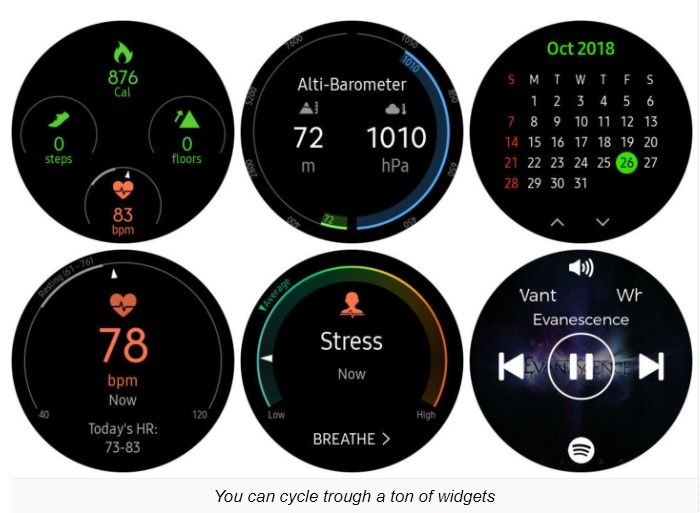
By twisting the rotating bezel to the right, you cycle through your widgets, and once I configured these to my liking, no action felt like it took too many steps to perform. The selection of widgets covers all essential needs: weather information, app shortcuts, quick access to contacts, reminders, music playback controls, and many more. Dedicated widgets also let you easily start an exercise, view your activity at a glance, or measure your pulse or stress level.
Samsung has equipped the Galaxy Watch with a fair amount of customizable watch faces designed to fit most user’s needs. Some have a clean and classic design, while others are sportier, with complications displaying activity stats. Out of the box, the selection isn’t very broad, but many more watch faces are available for download from the Galaxy Apps store.
Bixby – Samsung‘s virtual assistant – is present on the Galaxy Watch and can be triggered with a double press of a button on the side. This lets you use voice commands to do things like calling a friend, starting an exercise, asking for the weather or setting a reminder. All in all, Bixby has the basic covered, but it leaves room for improvement. Her voice, for instance, is decidedly robotic, unlike that of Siri or the Google Assistant. Secondly, she can be a bit slow with her responses, and I run into multiple issues, such as troubles with setting reminders. When I asked questions like “How long is a marathon?” or “What is 24 miles in kilometers”, I was asked to check those on my device instead.
Health and activity tracking
“Time to get moving!” – this is the message that pops up every time when I’ve been sitting on my desk for too long. Inactivity reminders may be annoying, but they’re ultimately for our own good, and I’m glad to see them present on the Galaxy Watch.
Of course, the watch can track a wide variety of activities, from running and cycling to a multitude of gym exercises. Swimmers should know that Samsung‘s software lets you have a custom pool length instead of several predefined ones. And I had no issues tracking my soccer games which I tracked as a Running exercise. I noticed that longer walks are logged as well – automatically. For many activities you get detailed data, such as the distance
you’ve traveled along with a map of your trip (if relevant), the calories you’ve burned, and the heart rate zones you spent time in. But I ran into issues as well. For example, there are presets for squats and jumping jacks, but the watch has a hard time keeping count of my repetitions. I ended up doing twice as many reps because the watch simply couldn’t detect that I’ve jumped or squatted. My legs still hurt a bit.
Sleep tracking is also available on the Galaxy Watch. In the morning, I’m given a breakdown of my sleeping stats, including how much time I’ve actually spent sleeping and how much time I’ve spent in each stage: Light, Deep, and REM sleep. Samsung‘s sleep tracking definitely works, but I really wish I was given a clearer idea of whether my sleep patterns are normal. With the way stats are currently displayed, I don’t see a clear indication of whether the 2 hours of REM sleep that I got last night are enough and whether I should do something about it. Also, I find sleeping with the Galaxy Watch on my wrist rather uncomfortable.
Stress monitoring is another new feature of the Galaxy Watch. By default, stress is measured manually on demand, but you can have it measured constantly. This, however, has a noticeable impact on battery life. If a high stress level is detected, the Galaxy Watch will suggest a brief breathing exercise to calm you down. Personally, I’m not convinced in the accuracy of these readings. At times when I did feel pretty stressed, such as when nearing a deadline at work or after 30 minutes of driving during rush hour, the needle was still pointing at a stress level below the average.
Connectivity
Throughout my testing, I used the Samsung Galaxy Watch together with a Galaxy S9+smartphone. Pairing was quick and easy, as the phone automatically detects the presence of the wearable nearby and initiates the setup process at the press of a button. The watch works with iPhones and non-Galaxy Android phones as well, although your experience may differ. Samsung Pay, for example, can’t be used when the watch is paired with an iPhone.
The Galaxy Watch talks to your smartphone over Bluetooth and maintains a decent connection within a range of at least 30 feet. Once it falls out of range, it will search for a known Wi-Fi network, and it is neat that all Wi-Fi passwords stored on my Galaxy phone were automatically transferred to the watch. Notifications from my phone did arrive even when I was on Wi-Fi, albeit with some delay. The only annoyance that I noticed was that it takes about a minute for the watch to connect to Wi-Fi once Bluetooth connectivity is lost. GPS connectivity is on board for precise location tracking during exercises. In addition, NFC is available for making mobile payments via Samsung Pay. However, you can’t use the watch with older terminals using a magnetic stripe.
Samsung is also offering LTE variants of the Galaxy Watch, thus enabling it to be online all the time. LTE can be useful for streaming music without having your phone around, as well as for making calls or sending texts. We’re not sure how much of an impact LTE connectivity would have.
Phone calls, multimedia, Spotify support
Whether you have an LTE model or not, the Samsung Galaxy Watch can be used to make phone calls. On a non-LTE model, the watch simply acts as a Bluetooth speaker while the call itself is handled by your phone. Call quality isn’t stellar, but it is acceptable. The speaker built into the watch is sufficiently loud and produces clear voice tones. Voices do sound muffled and digitized on the other side of the line, but having a conversation in a relatively quiet environment is definitely possible without much effort.
If you ever want to, you have the option to copy images and music from your phone to your Galaxy Watch. There are 4GB of built-in storage (about 2.5GB user-available), which is less than what an Apple Watch offers, but enough to store several hundred songs.
Spotify is available for download on the Galaxy Watch. This allows you to stream music over Wi-Fi or LTE and listen to your playlists during exercises, or simply download audio for offline use. Music can be listened to from the watch’s built-in speaker, but I would strongly recommend pairing the wearable to a set of Bluetooth headphones instead. While tracking an exercise, playback controls are easily accessible with a twist of the bezel to the left. By the way, I had numerous connectivity issues with Spotify on my review unit, but these were rectified through a recent software update. It now works just fine and maintains a strong connection with my wireless earphones.
Battery life and charging
Just like Samsung’s last few smartwatches, the Galaxy Watch delivers solid battery life. The smaller, 42mm variant easily lasted through 2 full days between charges, while the bigger, 46mm model got me through 3 full days – with the screen always enabled on both. Disabling the Always-On Display feature makes them last a day extra.
Of course, your mileage may vary, depending on how you’re using your Galaxy Watch. Music listening over Bluetooth, for example, takes its toll. On the bigger Galaxy Watch, Spotify consumes 13% of battery life when streaming over Wi-Fi and 10% if you’re listening offline. Fortunately, Sleep tracking consumes only about 7% per night.
Both Samsung Galaxy Watch models require around 2 hours and 20 minutes to charge completely. That’s not particularly fast, but if just give them a quick, 30-minute boost as you’re getting ready for work, you’ll have enough charge in the tank to last through the day. Charging is done by placing the watch on the provided magnetic wireless charging stand.
Conclusion
A smartwatch is still the kind of gadget that you don’t necessarily need, but having one is kinda neat nonetheless. Sure, it is yet another gizmo that you have to charge regularly, but you gain more than just a timepiece that glows in the dark. It helps you keep track of your schedule, it tells you precisely how active (or inactive) you are, and it conveniently delivers your notifications to your wrist.
To those in the market for a smartwatch, the Samsung Galaxy Watch is easy to recommend. It is fast, good-looking, and has great battery life for a device of its class. But it isn’t quite the smartwatch for everyone. iPhone users, for instance, would still be better off with a last-gen Apple Watch, while serious athletes and fitness enthusiasts will be probably served better by other brands. For the rest of us – who may be looking for a high-tech lifestyle accessory blending style, function, and self-expression – the Galaxy Watch would be a great choice.
Currently, the Samsung Galaxy Watch starts at $330 for the 42mm model and $350 for the bigger, 46mm variant. Adding LTE with T-Mobile to the list of features brings the prices up to $380 and $400, respectively. That’s not exactly pocket change, but not expensive either, seeing that Samsung’s most expensive Galaxy Watch model costs as much as the cheapest Apple Watch Series 4. Whether it’s a worthy investment is totally up to you to decide.
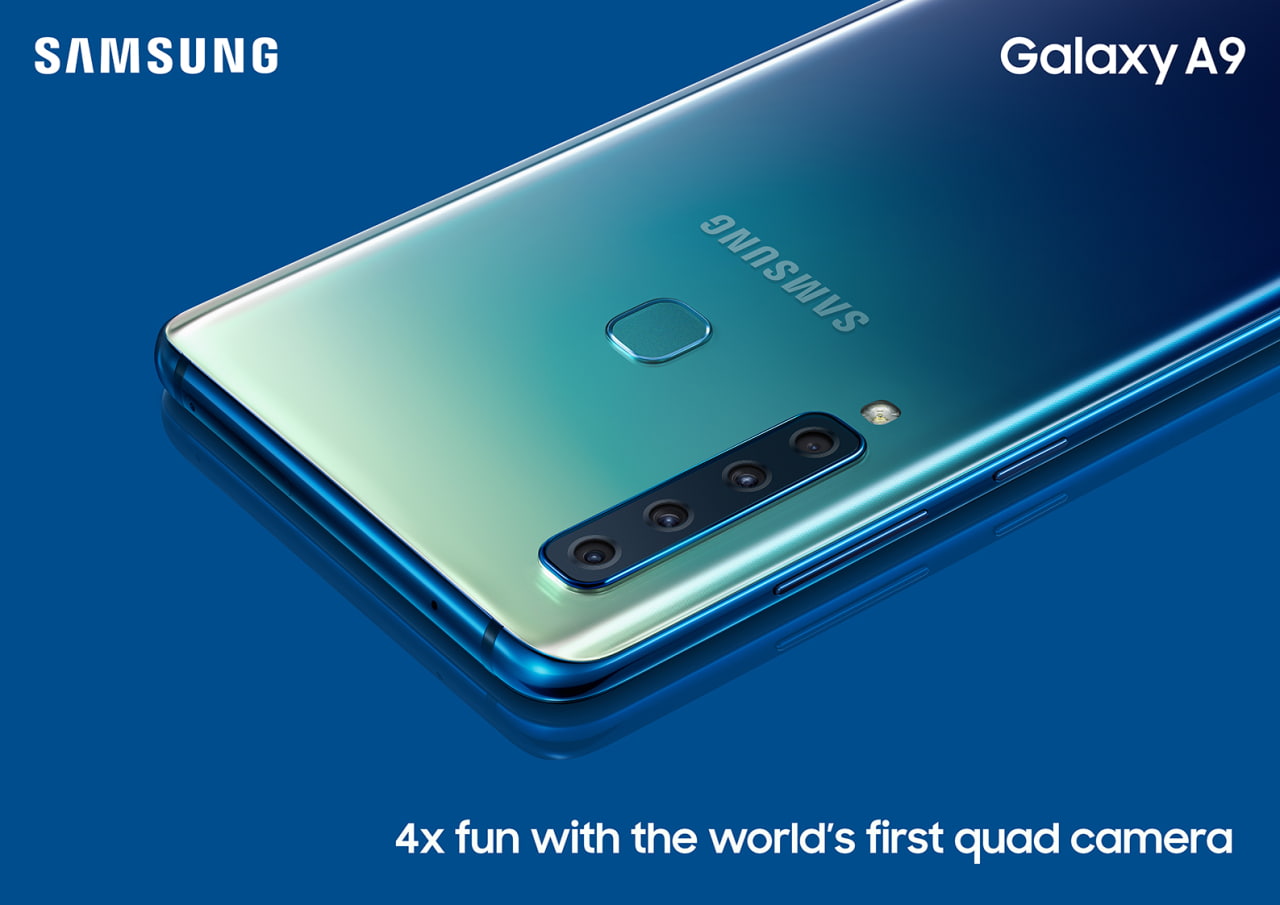
Samsung has unveiled its new Galaxy A9 smartphone featuring the world’s first rear quad camera.
The Galaxy A9 is tailored for those who know what they want, and go after it. Whether it’s capturing a dare-devil selfie or that perfect panorama, the Galaxy A9 is the ultimate companion for capturing and sharing everyday adventures, no matter where life takes you.
“As a global leader in smartphone innovation, we understand the demand for meaningful innovation in a fast-paced world driven by visual communication,” said DJ Koh, President and CEO of IT & Mobile Communications Division at Samsung Electronics. “Building on our legacy in smartphone camera development we’re introducing next-generation technology across our entire Galaxy portfolio to give more consumers the opportunity to experience cutting-edge innovation. We’re excited to deliver on this promise and debut world leading smartphone camera technology with the Galaxy A9.”
Rear Quad Camera
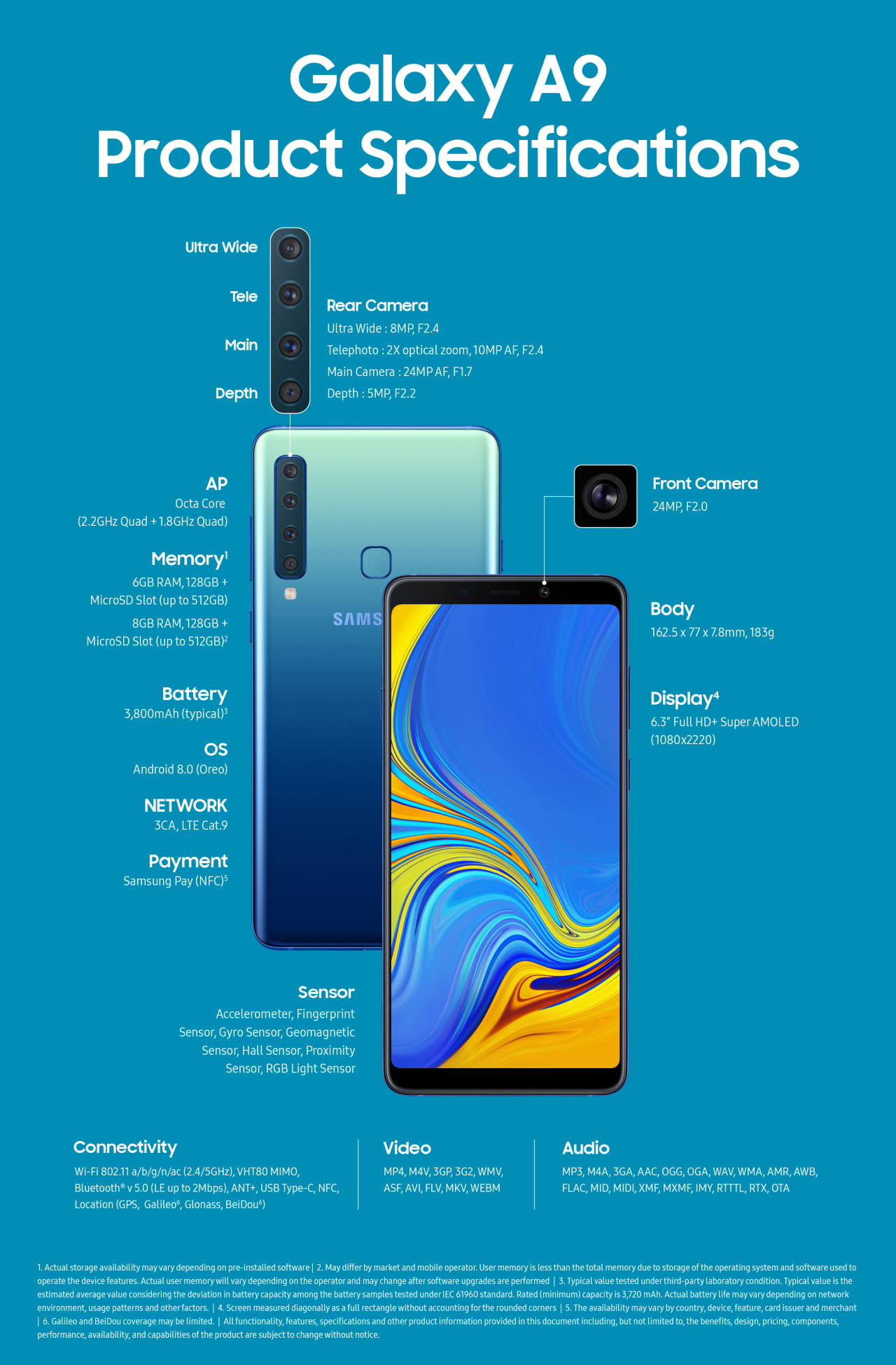
The Galaxy A9‘s rear lenses include a main 24MP F1.7 lens, a telephoto 2X optical 10MP F2.4 lens, an ultra wide 120 degree 8MP F2.4 lens, and a 5MP F2.2 depth lens.
● Get close without compromise with 2x Optical Zoom for incredible and detailed close-up shots even from far away.
● Capture the world in its fullest and without limit, with the Ultra Wide Lens, and shoot like a pro with the Scene Optimizer. Thanks to AI Scene Recognition, your camera is now smarter, and able to identify the subject and adjust settings accordingly for the best photo, in an instant.
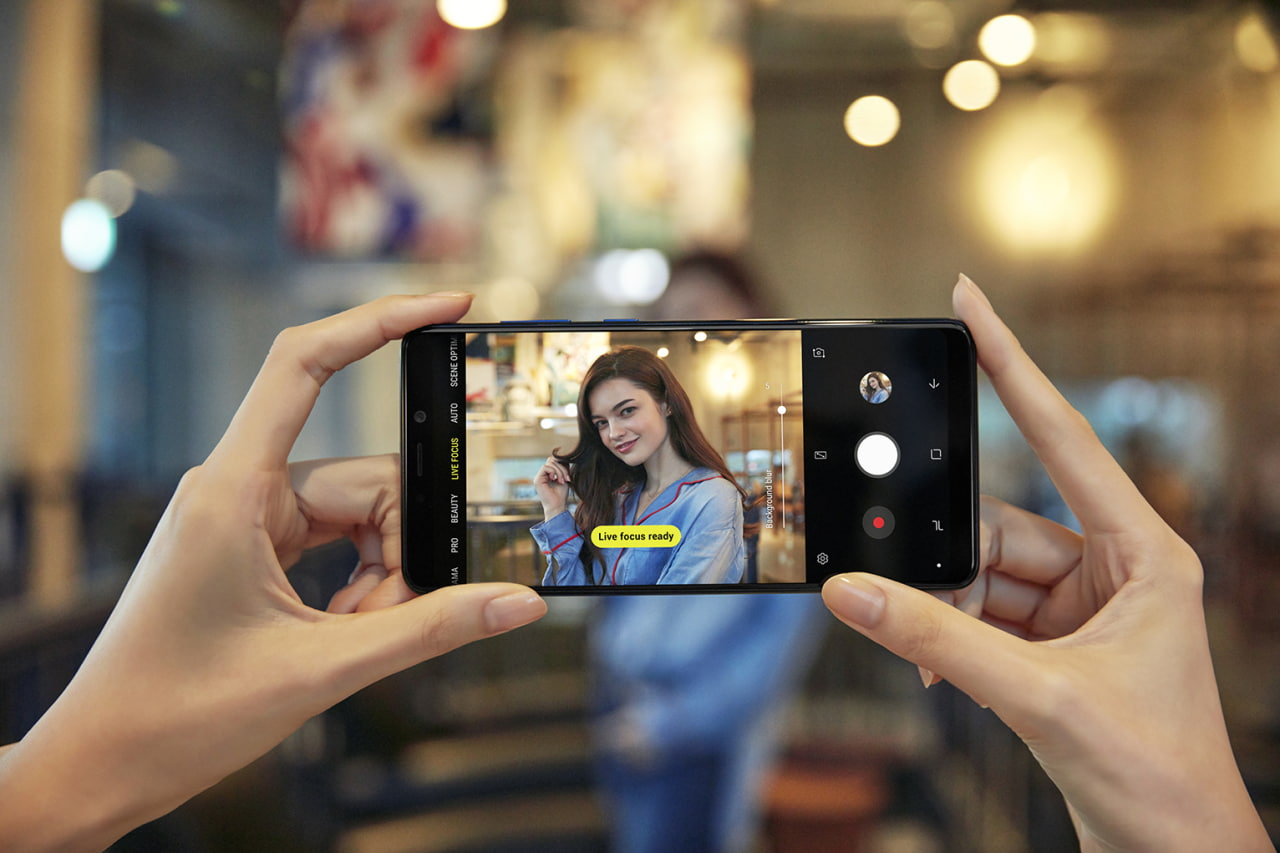
● Express your creativity with the Depth Lens, giving you the freedom to manually manage the photos’ depth of field and focus on the subject for stunning, professional looking images.
● Capture clear and bright images in both bright and low light conditions with Galaxy A9’s 24MP Main Lens, for gorgeous photos at any time of the day.
Features:
The Galaxy A9 features a 3,800mAh battery, 128GB of storage, and up to 512GB of expandable memory. It has a 6.3-inch Full HD+ Super AMOLED display with a resolution of 1080×2220 and a Octa Core (2.2GHz Quad + 1.8GHz Quad) processor. You can purchase the device with 6GB or 8GB of RAM.
Availability:
The Galaxy A9 comes in three colors: Caviar Black, Lemonade Blue and Bubblegum Pink. It will be released in select markets from November.
The Galaxy A9 (2018) is the world’s first smartphone with a quad camera. Samsung is obviously going to tout this. It has become the only come to launch such a device. The new Galaxy A9 was unveiled at an event in Kuala Lumpur yesterday. With the launch out of the way, Samsung can now get down to the business of selling this device.
It has released the first Galaxy A9 TV commercial. As expected, the quad camera is the star of the show. The entire commercial is dedicated to the camera’s capabilities with no mention of any of the handset’s other abilities.
You’ll buy it for the camera after all
The device itself isn’t all that different from other mid-range Samsung handsets. It’s similar in more ways than one to the Galaxy A8 Star. The only thing that sets it apart is the quad camera system. The Galaxy A9 (2018) arrives not long after the new Galaxy A7, Samsung’s first smartphone with a triple camera.
The quad camera system is what this TV commercial focuses on. It starts off by highlighting the 8-megapixel Ultra-Wide lens that has a 120-degree FOV. The 10-megapixel telephoto lens with 2x optical zoom gets its moment to shine as well. The 5-megapixel Depth lens allows for Live Focus photos, adding bokeh (blur) effect to images. The primary 24-megapixel lens is a solid shooter in its own right. Check out our samples from all four of the Galaxy A9’s cameras.
We mentioned in our Galaxy A9 hands-on that the quad camera system on this device works as advertised. There are some handy software features as well to enhance the imaging experience. Other than that, it’s a run of the mill mid-ranger from Samsung.
Samsung said yesterday that the Galaxy A9 will launch in mid-November. We have already told you how much the Galaxy A9 (2018) will cost.
Samsung‘s Galaxy A9 SM-A920F specifications and features: this is a 6.3″(167.64mm) device with a FHD + 108 x 2220 screen resolution. The phone is powered by the Qualcomm Snapdragon 660 soc with a Quad-Core 2.2GHz & Quad-Core 1.8 GHz configuration. Memory is 6GB, with the device offering 128GB internal storage and up to 512GB of external memory. The Galaxy A9 features Accelerometer, Fingerprint Sensor, Gyro Sensor, Geomagnetic Sensor and Hall Sensor. Notable features include Samsung Pay (NFC). The device measures 162.5 x 77 x 7.8mm and weighs 183g.
Samsung has officially launched the Galaxy J6+ and Galaxy J4+. These entry-level handsets have been leaked considerably over the past few weeks. There’s nothing in today’s announcement that’s going to surprise us. At least the official pricing and availability information about these devices is now public.
Samsung says that these new devices have been “created especially for young millennials.” It has focused on combining a modern design with new features. The Galaxy J series is one of the most popular smartphone series in India. It makes up almost a third of all smartphones sold in the country, according to Samsung.
Galaxy J6+ and Galaxy J4+ official
The Galaxy J6+ and Galaxy J4+ both feature a glass finish, reflective back and 6-inch HD+ Infinity Design displays. Dolby Atmos is onboard as well. They’re relying on the same Snapdragon 425 chip, 3,300mAh battery and Android Oreo. The Galaxy J6+ will be available with 4G RAM/64GB storage and the Galaxy J4+ with 2GB RAM/32GB storage. The Galaxy J6+ also features a side-mounted fingerprint sensor. It’s actually the first Galaxy device with a fingerprint sensor on the side. The Galaxy J4+ does not have a fingerprint sensor.
The Galaxy J6+ has a 13-megapixel + 5-megapixel dual rear camera with features like Background Blur and Dolly Zoom. There’s an 8-megapixel front camera as well. The Galaxy J4+ gets a 13-megapixel rear and 5-megapixel front camera. There’s a new Emotify feature on both devices. It will let users customize messages and use creative ways to express themselves. Emotify avatars will be available in 22 Indian languages which can be shared on social media and popular messaging apps. Other features include the ability to install apps to SD card.
The Galaxy J6+ will be available in red, black and blue colors for INR 15,990 (~$220). Samsung will sell the Galaxy J4+ in gold, black and blue for INR 10,990 (~$150). Both devices will be available from September 25 across Samsung’s countrywide retail network, Amazon, Flipkart and the Samsung Shop. Samsung will likely offer these handsets in other markets as well. The company’s regional divisions will confirm pricing and availability information for their respective markets.
GALAXY J4+ SM-J415F SPECIFICATIONS
Samsung‘s Galaxy J4+ SM-J415F specifications and features: this is a 6.0″ (152.4mm) device with a HD + 720×1480 screen resolution. The phone is powered by the Qualcomm Snapdragon 425 soc with a 1.4GHz configuration. Memory is 2GB, 3GB, with the device offering 16GB, 32GB internal storage and of external memory. The Galaxy J4+ features Accelerometer, Fingerprint Sensor(NA), Gyro Sensor(NA), Geomagnetic Sensor(NA) and Hall Sensor(NA). The device measures 161.4 x 76.9 x 7.9mm and weighs 178g.
Samsung‘s Galaxy J6+ SM-J610F specifications and features: this is a 6.0″ (152.4mm) device with a HD + 720×1480 screen resolution. The phone is powered by the Qualcomm Sanpdragon 425 soc with a 1.4GHz configuration. Memory is 3GB, 4GB, with the device offering 32GB, 64GB internal storage and of external memory. The Galaxy J6+ features Accelerometer, side Fingerprint Sensor, Gyro Sensor, Geomagnetic Sensor and Hall Sensor(NA). The device measures 161.4 x 76.9 x 7.9mm and weighs 178g.
Samsung Electronics today announced the Galaxy A7, the latest addition to the Galaxy A series family. With a powerful rear triple camera, sleek design and must have everyday features, the innovative Galaxy A7 is the ultimate device for wherever life leads you.
“Samsung is committed to delivering meaningful innovation to all consumers across the Galaxy family, no matter who they are or where they are in the world” said DJ Koh, President and CEO of IT & Mobile Communications Division at Samsung Electronics. “That’s why we’re excited to introduce innovative new features to the A series with the Galaxy A7, a practical but powerful device that is built to help make your everyday both convenient and extraordinary.”
Snap and share experiences with the Galaxy A7’s powerful triple camera;
Never miss a moment with the Galaxy A7’s 8MP 120° Ultra Wide Lens. With the same viewing angle as the human eye, the Galaxy A7 captures the world exactly as you see it for unrestricted wide-angle photos.
With the 24MP Lens and Depth Lens, the Galaxy A7’s Live Focus feature lets you control the depth of field by allowing you to adjust the bokeh effect to create stunning photos.
Get crisp clear photos in both bright and low light conditions. The Galaxy A7’s 24MP Lens automatically lets more light in by combining four pixels into one pixel in low light conditions.
The Galaxy A7 brings out the best in what it sees. Featuring Samsung’s intelligent Scene Optimizer, the Galaxy A7’s camera categorizes your subject and adjusts the color, contrast and brightness to instantly optimize image quality1.
Snap bright, clear selfies any time of day and never worry about searching for the ideal lighting again, with the Galaxy A7’s 24MP front camera and adjustable LED flash. Take bokeh effect selfies with Selfie Focus, and mimic professional studio lighting with Pro Lighting Mode. Add a personal touch and express yourself with AR emoji, and flattering filters.
Featuring a premium 6.0-inch Super AMOLED display, the Galaxy A7 lets you experience and share the world as you see it. Adding on, Samsung’s signature Infinity Display makes the most of uninterrupted, immersive viewing. The Galaxy A7 also supports Dolby Atmos®2 immersive sound technology, which brings entertainment to life through moving audio that flows all around you. When it comes to style, the Galaxy A7 does not compromise. Coming with a premium glass design, a side fingerprint sensor for greater convenience and smooth seamless curves, it’s both practical and comfortable in your hand. Available in four stylish colors to suit your personal style – blue, black, gold and pink3 – expressing yourself with the Galaxy A7 has never been easier.
Designed to make life more convenient, the Galaxy A7 comes with Bixby4, Samsung Pay5 and Samsung Health.
The Galaxy A7 will be available in select European and Asian markets from this fall and expand to additional markets in the near future.
On October 11, 2018, Samsung Electronics will welcome a new member to the Galaxy family. To celebrate the launch of the upcoming device, the company is hosting a Samsung A Galaxy Event on October 11, 2018 at 5:00pm (MYT).
Galaxy A7 Product Specifications:
Galaxy A7
Display
6.0” FHD+ (1080×2220) Super AMOLED
*Screen measured diagonally as a full rectangle without accounting for the rounded corners
Camera
Rear: Triple camera
– 24MP AF (F1.7)
– Ultra Wide: 8MP (F2.4), 120°
– Depth: 5MP(F2.2)
Front: 24MP FF (F2.0)
Body
159.8 x 76.8 x 7.5 mm, 168g
AP
Octa Core 2.2GHz
*May differ by market and mobile operator
Memory
4GB RAM, 64 Internal Storage+MicroSD Slot(Up to 512GB)
4GB RAM, 128 Internal Storage
6GB RAM, 128 Internal Storage
*May differ by market and mobile operator
Battery
3,300mAh
OS
Android 8.0
Network
LTE Cat.6, 2CA
Connectivity
Wi-Fi 802.11 a/b/g/n/ac (2.4/5GHz), VHT80, Bluetooth® v 5.0 (LE up to 2Mbps), ANT+, USB Type-B, NFC(optional*), Location (GPS, Glonass, BeiDou**)
*May vary by country
**BeiDou coverage may be limited.
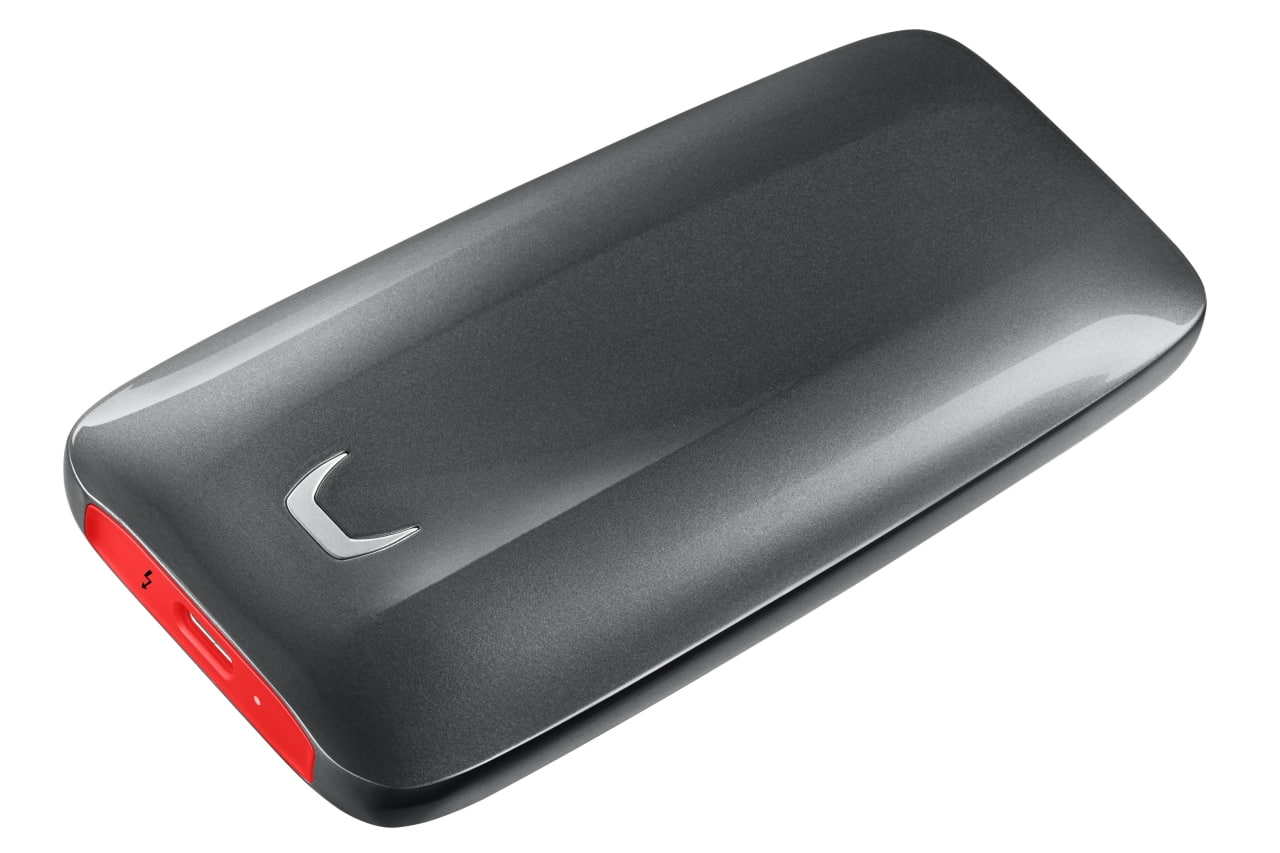
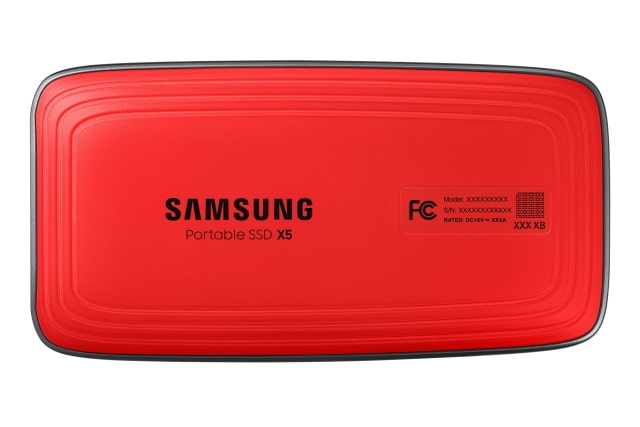
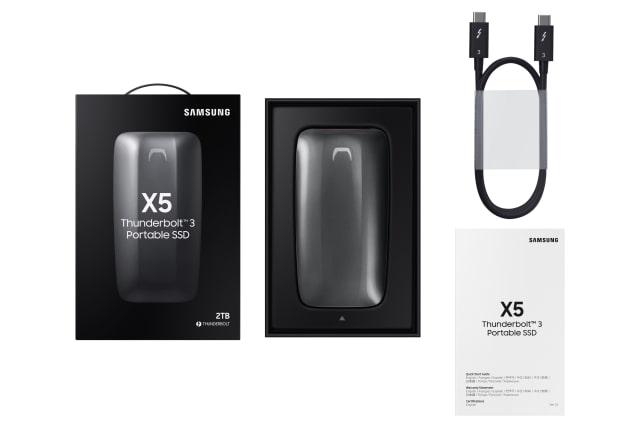
Samsung has unveiled a new NVMe-based ‘Portable SSD X5‘ featuring Thunderbolt 3 connectivity and speeds of up to 2,800 MB/s.
Based on the cutting-edge Thunderbolt 3 technology, the new X5 features exceptional speeds in a compact and durable form factor, making it an ideal portable storage for content creators and IT professionals on the go.
“As a leader in high-performance and reliable storage solutions, we are thrilled to continue to advance the external SSD market with the introduction of our first Thunderbolt 3 portable SSD,” said Dr. Mike Mang, vice president of Brand Product Marketing, Memory Business at Samsung Electronics. “The X5 is yet another testament to Samsung’s commitment to providing innovative portable storage solutions that enable faster transfer of large data files, saving users’ valuable time.”
Highlights:
Whether editing 4K videos, creating real-time 3D rendering images or compiling high-resolution photos, consumers want fast and convenient ways to store and transfer their data. Leveraging synergies between NVMe and Thunderbolt 3 technologies, Samsung’s X5 delivers maximized performance levels for professionals working with heavy multimedia files. Thanks to Thunderbolt 3’s 40Gbps bandwidth – up to four times faster than USB 3.1 – the X5 offers a read speed of up to 2,800 MB/s, which is up to 5.2 times faster than the widely-used SATA interface portable SSDs and up to 25.5 times faster than external HDDs. The drive also boasts the fastest maximum write speed of 2,300 MB/s, enabling users to transfer a 20GB-sized 4K UHD video in just 12 seconds. Designed for Macs and PCs with Thunderbolt 3 ports, the X5 allows users to enjoy the speed benefits in a lightweight and portable design, with capacity options up to 2TB.
Design:
The X5 features a full-metal body with a glossy finish and non-slip bottom mat. A shock-resistant internal frame and rugged metal housing can withstand accidental drops of up to two meters (6.6 feet). In addition, the Dynamic Thermal Guard technology and a heat sink – a mechanical internal solution – safeguard the X5 from overheating, ensuring reliability while maintaining optimal operating temperatures. The X5 also offers powerful data protection with ‘Samsung Portable SSD Software’, based on the AES 256-bit hardware data encryption, including optional password protection and easy configuration of security settings.
Pricing and Availability:
The X5 comes with a three-year limited warranty and ships Sept. 3, 2018, with a MSRP starting at $399.99 for the 500GB model, $699.99 for the 1TB model and $1,399.99 for the 2TB model.
Samsung announced the Galaxy Note 9 today at its Unpacked event in Brooklyn, New York. The Galaxy Note 9, for the most part, lives up to the many leaks that surfaced ahead of the official announcement. But it is still shaping up to be a pretty impressive device from many aspects. Particularly the S Pen. This year, Samsung made more changes to the S Pen then it has ever before. Not only has it changed up the paint job on the S Pen, but it has made it, essentially, a remote control for the Galaxy Note 9. We’ve spent some time – albeit brief – with the Galaxy Note 9, and have some thoughts, so let’s talk about Samsung’s latest Big Thing.
The Galaxy Note 9 does look a whole lot like the Galaxy Note 8, and that’s not a surprise at all. Samsung, like the majority of the smartphone world, doesn’t change up its smartphone design every single year. So seeing the similarities here is not a surprise. But you do get a slightly larger display here, at 6.4-inches. Though the overall size of the Galaxy Note 9 is the same as the Galaxy Note 8. That means that the bezels are just a tad bit thinner this year. Under-the-hood, you’re getting all of the hardware you’d expect in a phone that costs $999. And that includes the Snapdragon 845 chipset, 6GB of RAM and comes with 128GB of storage as the base model. That’s definitely a good look for 2018, and shows that this is going to be a future-proof smartphone for a few years. Samsung also packed in a 4000mAh capacity battery, so it’ll last you all-day and then some. At least that is what Samsung is hoping here.
Samsung has brought out some new colors for the Galaxy Note 9 this year, and it’s a pretty bold color palette. In the US, there’s the Ocean Blue and Lavender Purple, while internationally, the Midnight Black and Metallic Copper are also available. The Lavender Purple is a really good color here, while the Ocean Blue is a bit darker than the “blue” colors that Samsung has used on other smartphones. The Ocean Blue also gets a Yellow S Pen while the others match the phone’s color. The rest of the design here is not too flashy, but it gets the job done – and yes Samsung kept the headphone jack.
The biggest change, as already mentioned, is actually in the S Pen. On the surface, it’s the same S Pen as before, but Samsung has included Bluetooth connectivity this time around. This allows you to use the S Pen as a remote and do different things throughout the OS. One of the biggest features that Samsung is showing off is the fact that you can long-press the button on the S Pen to open the camera, and then press it to take a photo. You can switch from the back to the front camera (and vice versa) by double-clicking the button as well. This means that you can get selfies without holding your phone nearby, giving you a really great shot. Now the S Pen is able to do this in other apps too. Like the gallery. You can press once to go forward, or double-tap to go back.
Speaking of pictures, the Galaxy Note 9’s camera is supposedly “all-new” this year. Now we did check out the camera on the Galaxy Note 9 here in Brooklyn, but this was in a controlled environment – and likely on unfinished software. So we’ll have to take that with a grain of salt, but it did a really great job. The camera can also adjust the aperture automatically, depending on the situation, which is a step above the variable aperture that Samsung showed off on the Galaxy S9 Plus earlier this year. This is going to allow those that aren’t professional photographers to get some great shots as well.
Finally, the software. It’s still Samsung Experience and unsurprisingly, it is running on Android Oreo. This isn’t surprising, given the fact that Android Pie only went stable on Monday, so most new smartphones are still going to be sporting Android Oreo for the next few months. But the software has all of the great Samsung apps you’d expect, including the Screen-Off Memo, which now uses the same color as your phone. So if you have the Ocean Blue Galaxy Note 9, it’ll be shown in “Ocean Blue” on your Galaxy Note 9. It’s a small thing, but it looks really nice.
Samsung announced that pre-orders start tonight at midnight EDT, and the Galaxy Note 9 will go on sale on August 24. The Galaxy Note 9 will start out with 128GB of storage at $999, and for those that need more storage, there is a 512GB model available for $1249. In the UK, the prices are similar, at £899 and £1199 respectively.
With Samsung DeX, longer-lasting battery and the refined S Pen, the Samsung Galaxy Tab S4 makes for easier productivity and more immersive entertainment – anytime, anywhere
Samsung Electronics today announced the Samsung Galaxy Tab S4, a new 2-in-1 Android tablet designed for people who want to do more on the go—from home to the office and everywhere in between. The Samsung Galaxy Tab S4 delivers an experience that helps you work smarter by keeping you operating at the highest levels. Paired with a polished modern design, an immersive display, four speakers and enhanced entertainment features, the Samsung Galaxy Tab S4 is the perfect device for those who need something portable like a tablet and capable like a PC.
“At Samsung, we believe tablets play an increasingly important role in making lives easier and improving the mobile experience for everyone,” said DJ Koh, President and CEO of Samsung Electronics. “With the Galaxy Tab S4, we’re introducing a premium tablet, equipped with Samsung DeX that helps consumers perform their absolute best wherever they go. We look forward to providing our customers with a sense of leisure and comfort knowing that this new addition to our ecosystem of connected devices is also packed with features to help them stay entertained.”
Productivity with Samsung DeX and S Pen
With the Galaxy Tab S4, Samsung is bringing Samsung DeX to the tablet for the first time. When connected to the optional Book Cover Keyboard (sold separately) or launched from the Quick Panel, the Galaxy Tab S4 powers on Samsung DeX, giving users the option to switch from the Android interface to a desktop experience. With Samsung DeX, you can open multiple desktop-style windows for your Android apps, including the Microsoft Office suite, directly on the Galaxy Tab S4, and re-size them when needed. Drag and drop content between apps and use keyboard shortcuts and commands for efficiency.
If more screen is needed, there is also an option to extend Samsung DeX to an external monitor with a compatible HDMI to USB-C multi-port adapter (not included). When connected, the Galaxy Tab S4 can serve as a track pad or a sketch pad, and new this year, the Galaxy Tab S4 can continue to work as a fully functional Android tablet, giving users two screens to accomplish tasks.
Whether at the office, at home, or on-the-go, the Galaxy Tab S4 keeps you going with a 7,300mAh battery that provides up to 16 hours of video playback.1Additionally, with Samsung Knox, Samsung’s defense-grade mobile security platform, customers and companies can ensure critical information is protected at multiple levels of the device. IT managers can also tailor the employee interface to align with business needs.
Samsung’s S Pen comes in the box with the Galaxy Tab S4 to satisfy even more productive needs. It offers users a great way to express their creativity and communicate. They can take notes on the fly through the Screen-Off Memo feature, as well as navigate, translate and organize notes through Samsung Notes, and even send personalized texts through Samsung Live Message – all with the S Pen.
A Screen Fit for Any Job – or Movie
It’s easier to get more done when you have the right screen. Even the busiest professionals still take time to sit back with a game or movie. Now you can enjoy a more immersive experience on a device you can take anywhere. While similar in size to the Galaxy Tab S3, the Galaxy Tab S4 sports narrower bezels to fit a large 10.5-inch display with Super AMOLED technology, as well as a 16:10 screen ratio with 2560×1600, 287 pixels per inch (PPI) resolution for vivid picture detail and true-to-life visuals. When it comes to audio, the Galaxy Tab S4 also comes with four speakers tuned by AKG and Dolby Atmos® immersive sound technology, which brings entertainment to life through moving audio that flows all around you. With Dolby Atmos®, the Galaxy Tab S4 supports crisper dialogue, enveloping sound fields, maximized loudness without distortion, and consistent playback volume.
Enhanced Connectivity to Make Your Life Easier
The Galaxy Tab S4 also features new and improved capabilities designed to manage your connected devices and lifestyle. Samsung Flow allows users to manage all of their devices easily by connecting and transferring files, tasks and notifications seamlessly. The SmartThings app2 on the Galaxy Tab S4 makes it easy to monitor and control your smart home devices right from the tablet. Plus, the Galaxy Tab S4’s Daily Board3 allows you to view your favorite photos and everyday information such as the weather, calendar and time in one, easy-to-access place.
1 Battery life may vary depending on usage and settings. Based on laboratory testing.
2 Availability of features varies by region.
3 At the time of availability, Daily Board will feature Photo Gallery, Weather, Clock and Calendar.
4 Memory and storage capacities vary by region.
*All functionality, features, specifications and other product information provided in this document including, but not limited to, the benefits, design, pricing, components, performance, availability, and capabilities of the product are subject to change without notice.
Samsung smartphones come with a very useful feature that you rely on in difficult situations for help. It’s aptly called Emergency mode and lets you access important emergency features and helps conserve the handset’s battery power to extend its standby time for as long as possible. It also limits the device’s functionality in order to conserve battery life.
The home screen is changed to a simple black theme and simplified when the Emergency mode is enabled. The brightness and frame rate are lowered while the CPU speed is limited. It restricts app usage to the essential apps that you select and turns off mobile data when the screen is off. Other connectivity features such as Wi-Fi and Bluetooth are disabled as well. The location settings remain as they were in the Emergency mode once it’s turned off.
It’s basically the ultra power saving mode with the ability to send a distress signal from your phone. Once the Emergency mode is enabled, you can turn on the flash to use it as a torch, send your location to a contact through text message, sound an emergency alarm on your phone, browse the internet and make/receive phone calls.
How to use Emergency mode on Samsung smartphones
Step 1: Press and hold the power button for a few seconds and then tap on Emergency mode.
Step 2: Read and agree to the terms and conditions, then select Turn on in the popup window that shows up to enable emergency mode.
Step 3: Use the “+” button to add one additional app to the simplified home screen if you need. Only select apps work in this mode.
That’s it. Emergency mode is very easy to enable and use and will certainly come in handy if you ever find yourself in a difficult situation. Tap on the relevant options to activate the emergency alarm and torch or to share your location and make a phone call.
Samsung has made it very simple to understand and use. The emergency alarm is a particularly good option as it loudly beeps when enabled. To turn off the Emergency mode, just tap on the overflow menu (the three-dot icon) in the top right corner and tap on the relevant option. You can also manage your emergency contacts by tapping the Manage emergency contacts option in the overflow menu.
Samsung has been on a roll in the Indian smartphone market launching new budget smartphones almost every other week. The company has been launching so many models to prevent its market share from eroding further. Recently, it launched the Galaxy J8 to take on the likes of the Redmi Note 5 Pro and Asus ZenFone Max Pro M1.
The Galaxy J8 has the typical traits of a budget Samsung smartphone with relatively weak internals, but the company has improved the device in other aspects. If you are interested in buying the Galaxy J8, check out our FAQ below to know everything about the device.
Q) What are the full specifications of the Galaxy J8 FAQ?
A) The full specs of the Galaxy J8 are as follows:
Dimensions: 159.2 x 75.7 x 8.2 mm
Weight: 191g
Display: 6-inch 720p+ Super AMOLED
Chipset: 1.8GHz octa-core Snapdragon 450
GPU: Mali T830-MP2
RAM: 4GB
Storage: 64GB, microSD card slot
Rear camera: 16MP PDAF, F/1.7 aperture, 5MP F/1.9 secondary camera, LED flash, Full HD video recording
Front camera: 16MP, F/1.9 aperture, Front flash
Sensors: Fingerprint scanner, Accelerometer, Proximity, Hall sensor, Face unlock
Connectivity: LTE, Dual-SIM slots, GPS, Wi-Fi b/g/n(2.4), Bluetooth 4.2, microUSB
Battery: 3500mAh non-removable
Others: Android 8.0 Oreo, Chat-Over-Video,
Q) Is the battery of the handset removable?
A) Since the Galaxy J8 features a unibody aluminum build, its battery and rear cover is not removable.
Q) Is the Galaxy J8 water-resistant?
A) No, the handset is not water-resistant.
Q) Is there Always-On Display on the Galaxy J8?
A) Despite coming with a Super AMOLED Display, the Galaxy J8 lacks Always-On Display.
Q) What kind of SIM card slot does the phone have? Can I use two SIM cards and a microSD card at the same time?
A) The Galaxy J8 features two nanoSIM card slots along with a microSD card slot.
Q) Is the display on the Galaxy J8 protected by Gorilla Glass?
A) No, the display is not protected by Gorilla Glass.
Q) Is there a gyroscope on the Galaxy J8?
A) No, the handset does not feature a gyroscope sensor. This means that any apps which rely on the gyroscope to work properly will fail to work on the J8.
Q) What about auto brightness?
A) No. Since the Galaxy J8 lacks an ambient light sensor it does not have auto brightness.
Q) Where is the fingerprint scanner on the Galaxy J8 located?
A) Its located at the rear just below the camera sensor.
Q) Is there Samsung Pay support on the Galaxy J8?
A) No, the handset does not come with Samsung Pay support.
Q) How many fingerprints can one register on the Galaxy J8?
A) 5.
Q) Can you record slow-motion videos on the Galaxy J8?
A) No, you cannot. The handset is limited to recording videos in Full HD resolution at 30fps.
Q) Which version of Android does the handset run on?
A) Android 8.0 Oreo. The handset also features Samsung’s Experience UI on top with plenty of customization options and features.
Q) Does the Galaxy J8 support LTE and VoLTe networks? Will a Reliance Jio SIM work on the phone?
A) Yes, it supports LTE and VoLTE out of the box. Like with many other phones, the handset will also work with a Reliance Jio SIM out of the box.
Q) Is there dual VoLTE support on the Galaxy J8?
A) No, the handset does not have dual VoLTE support. This means you cannot use two Jio SIM cards on the phone at the same time.
Q) Is fast charging supported on the Galaxy J8?
A) There’s no fast charging support on the handset.
Q) How much free storage space does the Galaxy J8 have out of the box?
A) Almost 51GB.
Q) Can you uninstall or disable pre-installed apps on the handset?
A) Yes, you can uninstall or disable some pre-installed apps on the Galaxy J8, but not all.
Q) Does the Galaxy J8 feature capacitive keys?
A) No. Since the handset comes with an 18.5:9 aspect ratio display, it makes use of on-screen navigation bar.
Q) Does the Galaxy J8 feature face unlock?
A) Yes, the Galaxy J8 features face unlock.
Q) What contents do you get inside the retail box of the Galaxy J8?
A) You get the phone, a 2A charger, a USB cable, SIM ejector tool, earphones, and some regulatory papers. No case or screen guard is bundled with the phone.
Q) Does the handset support USB OTG?
A) Yes, the Galaxy J8 supports USB On-The-Go. This allows you to directly connect pen drives, external hard disks and more using an adapter to the device.
Q) How many variants of the Galaxy J8 is Samsung selling in India?
A) Only one which comes with 4GB RAM and 64GB storage.
Q) What color variants of the Galaxy J8 is Samsung selling in India?
A) Samsung is selling the Galaxy J8 in black, gold, and blue colors in India. All three variants, however, come with a black front.
Q) When does the Galaxy J8 go on sale and where?
A) You can buy the Galaxy J8 from Flipkart, Paytm Mall, and Samsung’s own online store. You can buy the phone from here. The company is offering one-time screen replacement and Rs 2,000 as cashback on Paytm Mall or for ICICI debit/credit card holders.
Q) What’s the price of the Galaxy J8?
A) The base variant of the Galaxy J8 is priced at Rs 18,990.