Last year’s Huawei P20 Pro flagship set a new bar for Huawei in terms of photography capabilities and popularity for the company’s new design language. After hitting a stride, the new Huawei P30 Pro takes everything that made the P20 Pro a hit and aims to build on it. The question is whether the new handset does enough to stand out in today’s competitive marketplace.
Photography, design, and performance have all been knocked up a notch this year. The new camera boasts much improved low light and zoom capabilities, there’s a new Kirin 980 SoC onboard, and that awesome looking Amber Sunrise color option. But does the P30 Pro do enough to make it a worthwhile yearly upgrade?
Specs vs specs
The two handsets are similarly sized, though the P30 Pro is slightly larger. The handset offers more screen real estate thanks to its thinner bezels and lack of chin. The P30 Pro offers a 6.47-inch curved OLED with a taller 19.5:9 aspect ratio. The P20 Pro features a 6.1-inch OLED panel with 18.7:9 ratio. As such, the P30 Pro offers 2,340 x 1,080 pixels of resolution versus 2,240 x 1,080.
The heart of the latest Huawei P-series models replaces the Kirin 970 with a faster Kirin 980. That’s the same chip found inside last year’s Huawei Mate 20 Pro. The Kirin 980 also doubles the power of its NPU for AI and machine learning applications, while also providing a faster Cat. 21 LTE modem and better power efficiency thanks to its 7nm manufacturing node.
The chip boasts faster CPU and GPU capabilities too. Numbers point to a 46-percent boost to graphics performance and a 75-percent jump in single-core CPU grunt. If you’re after raw performance, the Huawei P30 Pro certainly trumps the Huawei P20 Pro, although the Kirin 970 is no slouch in day-to-day applications.
Huawei P30 Pro
Huawei P20 Pro
Display
6.47-inch dual-curved OLED display
19.5:9 aspect ratio
2,340 x 1,080 resolution
6.1-inch OLED display
18.7:9 aspect ratio
2,240 x 1,080 resolution
Huawei has beefed up the RAM available in the P30 Pro. Capacity is set at 8GB versus 6GB inside the Huawei P20 Pro. Although both are overkill for Android’s needs and handle multi-task demanding apps without issue.
A bigger win for the P30 Pro can be found in memory. The P20 Pro is available with 128GB of memory and sans any external storage option. That’s a reasonable allowance, but heavy media users will probably want more. The Huawei P30 Pro starts at 128GB and is available in 256 and 512GB. The handset also supports Huawei’s Nano Memory card. Although we would prefer the cheaper and more universal microSD card format.
A 4,200mAh battery powers the new handset, which is a fraction larger than the Huawei P20 Pro’s 4,000mAh cell. Both phones easily take the vast majority of users into a second day on a single full charge. Perhaps more importantly, the P30 Pro boasts the 40W SuperCharge capabilities from the Mate 20 Pro. This can save you up to 40 minutes on a full charge cycle versus the already very fast charging P20 Pro.
Huawei P30 Pro vs P20 Pro cameras
Enough techno-waffle, if you’re interested in a new Huawei phone then you’re probably someone who likes to take the odd picture or two. Quite a lot has changed with their cameras between the Huawei P20 Pro and new P30 Pro, although there are some similarities to the formula.
To recap, the Huawei P20 Pro offered the industry’s biggest sensor in a while, clocking in at 40MP for highly details shots. This was paired up with a 20MP monochrome sensor used to enhance dynamic range and low light detail. Finally, an 8MP 3x telephoto lens offered flexible shooting at a distance. It was a solid package that continues to be one of the best performing smartphone cameras.
Huawei ditched the monochrome sensor in last year’s Mate 20 Pro in favor of the extra shooting flexibility offered by a wide-angle camera. This setup remains in place with the P30 Pro. However, the 40MP main sensor has been revamped with a new RYB design that should improve low-light performance. Huawei was keen to highlight this particular point during its launch presentation. Based on my hands-on time with the phone, well lit shots look much the same as the P20 Pro (although I’m tempted to give the lead to the older model). We’ll have to see how well the phone performs in low light to draw final conclusions.
OIS across all sensors is a big improvement over the P20 Pro, which relied on software stabilization
Another major change is the introduction of a periscope zoom camera in the P30 Pro. This replaces the 3x telephoto lens in the P20 Pro. The newer model boasts a 5x optical zoom, extendable up to 10x with Huawei’s super-resolution Hybrid Zoom technology. Detail at a distance is simply excellent with the P30 Pro, although at medium zoom ranges is a much closer contest. The Huawei P30 Pro also supports a TOF sensor for AR/VR applications and improved bokeh blur. The P20 Pro’s Portrait mode suffers from common edge detection issues with hair and transparent objects. Hopefully, the TOF sensor will iron out these issues.
On paper, the Huawei P30 Pro is certainly the more flexible shooter. But we’ll have to wait and see which of the two is best in terms of quality.
Extra features make the difference
In this P20 Pro user’s option, the biggest differentiator in the Huawei P30 Pro vs P20 Pro battle comes down to the extras. The P20 Pro was arguably lacking many of the little touches that make Samsung Galaxy handsets worth the premium. Fortunately, Huawei has addressed this with the P30 Pro.
Wireless charging is a premium feature that the P20 Pro really missed out on. Competitors including Samsung and LG have been offering this feature for a while, so it’s great that Huawei is finally caught up. The option to use reverse wireless charging to power up your Qi-enabled accessories is another nice touch.
The P30 Pro also boasts a slightly improved IP68 versus IP67 rating for water and dust resistance. The optical in-display fingerprint scanner is also neat. Although the P20 Pro’s capacitive scanner is so fast that some might prefer the older design. Using the display as a speaker is another cool trick right out of LG’s playbook, although there’s nothing wrong with a conventional speaker.
The P30 Pro packs in the the extras, but its improved design is the biggest draw.
Personally, I think the P30 Pro pulls ahead in terms of design. Aesthetically, the rear camera design, notch, and curved display look a lot better than the P20 Pro — and that phone is already a looker. Better still, the curved back and front glass means the P30 Pro sits perfectly in the hand. It’s an even nicer phone to hold and use than the P20 Pro, which already handles better than most other over-six-inch handsets.
The P30 Pro doesn’t get everything perfect. The lack of a headphone jack will be a sore thumb for some, EMUI 9.1 still has a few too many settings just like EMUI 9, and the camera interface could certainly be better. Fortunately, both phones are running Android 9 Pie and Huawei’s software is perfectly serviceable and nippy to boot.
Huawei P30 Pro vs P20 Pro: Which should I buy?
The Huawei P30 Pro price tag starts at 999 euros ($1,130) and can cost up to 1,249 euros ($1,410) for the 512GB model. The 128GB P20 Pro launched at 100 euros cheaper, just 899 euros. The P30 Pro is offering more for your money, but it’s on the expensive side. Especially now that you can grab a P20 Pro for around 500 euros, which is even cheaper than the regular Huawei P30 too.
If you want all the latest tech that Huawei has to offer, there’s no arguing with the value proposition of the new Huawei P30 Pro. Between an excellent camera, high-end performance, and an improved design, buyers won’t be left disappointed. However, the P20 Pro still offers value for those looking for an excellent camera experience in a hardware and software package that still feels up-to-date. Those who already own a P20 Pro probably won’t be feeling the urge to upgrade already.
“Foldable” is clearly the buzz -word of 2019. Well, that and 5G – a rather confusing situation that has been causing some evident confusion among manufacturers. Huawei clearly decided on a Pokemnon, “Gotta Catch ‘EM All” approach to the situation with the Mate X – a truly head-turning device that both rocks a foldable display and what Huawei claims is the faster 5G connectivity around.
Having said that, “rocks” is kind of a misleading way to put things, since the Mate X is far from a finished device ready for end-user markets. In fact, it falls squarely in the prototype category for quite a few reasons. Not only did it stop by and MWC with pretty much no hardware details, but it was also showcased vary sparingly, mostly from a distance and often even in a glass box.
This seems to be a common theme when it comes to this initial batch of foldable display handsets. The Samsung Galaxy Fold got very limited exposure. Clearly the tech just isn’t ready for prime time quite yet – a slightly annoying fact we’ve just had to deal with at MWC 2019.
Having said all thins, it should come as no surprise that the Mate X, in its current form, fas mostly teases from a design standpoint, lacking almost any particulars about hardware. Still, a first look is better than nothing, so read on for a more in-depth look into what could very well be the near mobile future.
Design
We still have a very limited pool of foldable display devices to use as reference points from a design standpoint. The Samsung Galaxy Fold and a few scattered concept devices are hardly anything to go by. Especially seeing how getting some actual hands-on time with any of them is nearly impossible at this stage.
That being said, we feel confident enough in saying that Huawei‘s first approach to the foldable trend is radically different from Samsung’s. If nothing else, Huawei has its panel on the outside surface of the device.
Whether or not that’s a better approach overall still remain to be seen in the long run, but there are some particular details that already stand out. First off, a panel on the outside is clearly more exposed. With this particular design, there will probably be no way of handling the Mate X without you or some potentially harder surface being in contact with a portion of the screen.
No big deal right? Just let Gorilla Glass or whatever flexible alternative there is handle that. Well, there is still little info or any actual practical real-world experience to go by when in comes to the durability of this new breed of foldable displays. From our brief contact with a few our initial impressions are that the surface lack most of that hard glass feeling we have grown used to with Corning’s Gorilla Glass offerings. Instead It feels a bit more “silky”, if that makes any sense. We are hesitant to outright call it plastic, though. But even so, the feeling it gives off is not instantly confidence-inducing.
We’ll just leave it at that for now, but it is worth noting that Huawei will be offering what it calls a “Full cover case” for the Mate X. Whatever one might look like.
Before we move on to the rest of the Mate X‘s body and construction we do have another note to make about its display and particularly the way it looks in person. Even since we laid eyes on the first foldable OLED concepts we have been wondering about visual fidelity, panel quality and especially distortion. From what we saw of the Samsung Galaxy Fold on stage, there was definitely a noticeable seam on its display, even when fully unfolded.
Now, this might be an early prototype unit issue. We sure hope so. But even so, when fully unfolded the Mate X looks almost perfectly flat and nearly distortion-free. Unfortunately, without more extensive access to either device that’s as far as we can take this preliminary comparison.
Introduce any angle of fold and distortions become the main thing that gets displayed on the seam of the Mate X. Hardly surprising. Huawei is clearly aware of this, since the are of the screen right above the fold gets disabled when the Mate X is closed up. Folding phones naturally present challenges beyond the display itself. Purely mechanical ones at that – something the mobile industry had mostly left in the past during the “slab” design era of smartphone. Well, the hinge found its way back on to blueprints and its going to be a very important part of this new breed of devices. Huawei calls its design falcon wing.
It has five joints which deliver pretty fluent motion. There seems to be some built-in lock in the fully open state and although the joint never really appears straight, the display seems to lay almost perfectly flat. Like we already mentioned. When fully folded, the Mate X is held in its compact state by a few small pins on the inside of a groove on what we would call the back of the device?
It’s all rather relative, of course, but the Mate X does have a slightly thicker segment on one end, which houses the camera setup and a type-C port. Probably more less apparent hardware as well. Said segment measures 11mm and exactly represents the total or maximum thickness of the Mate X. Unfolded, the displays are just around 5.4mm thick.
There might just be a power button, plus fingerprint reader combo somewhere on that segment of the phone as well, since Huawei did mention it as one of the few Mate X specs details it shared. The side of the phone appears to have a volume rocker and a fingerprint reader underneath. There is clearly a button beneath the camera arrangement as well, though in an admittedly odd location. Join us on the next page for a run-down of the other hardware details we know about the Mate X.
We’ve been tiptoeing around this in the design section, but the two segments of the Mate X‘s panel are clearly different in size. The smaller one is a 6.38-inch one, with a resolution of 2480×892 and an aspect of 25:9. The other is a 6.6-inch unit, with a resolution of 2480×1148 and a 19.5:9 aspect. When fully unfolded those add up to a total surface area of 8 inches and a resolution of 2480 x 2038 (8:7.1). Quite a respectable tablet-grade work area.
We also feel like we should mention that the panel is of the AMOLED variety. Though in the current state of display tech folding is only achievable with OLED.
Another aspect of the Mate X we’ve already put off talking about for long enough is its 5G connectivity. As per Huawei‘s own PR team, the Mate X hold the title of world’s fastest 5G phone. While on the subject of titles, the same team has also tossed around: “world’s slimmest foldable phone”, as well as the more general: “world’s fasted charging phone”, “best in-class selfies” and “world’s fastest 5G phone”. We’ll get to charging in a bit.
As far as 5G goes, Huawei will have its own Balong 5000 modem inside the Mate X. Apparently thanks to its quad antenna design it can achieve speeds up to 4.6Gbps, while competitors like Qualcomm’s X50 and the Exynos 5100 cap out at around 2.4Gbps. Clearly all this will depend on the quality of the network available. Which, by the way, is still mostly non-existent in most places and won’t really become a thing for some time to come. This leaves us mostly doubting the practicality of this “weird flex”, so to say.
In fact, the thing we are more curious about is whether Huawei has managed or alternatively is planning to attach the Balong 5000 to anything other than the Kirin 980 chipset. Rumors and leaks prior to MWC featured numerous mentions of a familiar Kirin 980 chip. So did Huawei‘s presentation at the event. While not intrinsically bad in any way, it is already rather dated silicon and will only age more before the Mate X gets released.
Moving on to battery, Huawei quoted 4,500mAh for the Mate X. The design incorporates a dual battery design, similar to the Samsung Galaxy Fold. Circling back to the self-awarded “world’s fasted charging phone” title, the Mate X should feature 55W Huawei SuperCharge tech. Huawei says this should be able to pump the battery from empty to a whopping 85% in just 30 minutes. Indeed, SuperCharge is currently the top dog around when it comes to fast charging.
Last, but not least, we should probably address the camera situation on the Mate X and the last of those titles we mentioned earlier. Unfortunately, like most hardware aspects of the phone at this stage, its camera setup is clearly not finalized nor is Huawei offering any details on it. In fact, we spotted the Mate X with a four camera arrangement in some of the company’s renders.
The actual unit we got to see at the Barcelona show floor appeared to have a trio of snappers along with a single flash and the familiar Leica logo. Naturally, there is no dedicated selfie camera. You just use the main one for that, along with a viewfinder on the folded smaller display section.
Final notes
Unfortunately that’s all the hardware info we currently have on the Huawei Mate X. Many potentially important pieces are still missing from the puzzle. Judging by the company’s often vague answers to particular questions and the fact that the unit we was on the show floor was the only unit available, we don’t really expect to many particulars to get cleared up in the immediate future.
Circling back to our original point – everybody is clearly excited about foldable displays, as well as 5G and the possibilities they enable. We don’t wish to sound cynical either – we are very pumped about the new generation of blazing fast and ultra low-latency mobile networks. Even more so about the major upcoming well overdue shift in mobile phone design. We can’t wait to see what manufacturers do with some tried and true old form factors and some new ones that are now achievable.
It’s just that sheer excitement appears to be tampling practicality and market realities and possibilities at the moment. It seems to be a common trend at MWC this year and one that Huawei is participating fully in with the Mate X – the single prototype for a future dream it decided to bring to the Barcelona show.
You can expect initial Huawei Mate X availability in the second half of this year, with an eye-watering price tag of EUR 2299 for an 8GB + 512GB unit.
Smartphones have grown steadily bigger over the years as screens have increased in size and manufacturers have tried to balance things by shrinking down bezels so that our devices are still manageable. This is a trend that can only be pushed so far, and there’s a new design on the horizon that could bring us phones that are easy to handle one-handed and slip into a pocket, but that also fold out to give us more screen space. If folding phones are to herald a new age of creativity for smartphone design, the success of the first two big releases in this category will be paramount.
After teasing for months we finally got a better look at the Samsung Galaxy Fold recently, though it remains behind glass and off limits for hands-on testing. Meanwhile, the Huawei Mate X popped up as an alternative that we were allowed to touch. We don’t know everything about these two folding phones, but we have some details, so let’s take a look at how they measure up.
SPECS
Samsung Galaxy Fold
Huawei Mate X
Size
Unfolded: ? × ? × ?mm, Folded: ? × ? × 17 mm
Unfolded: 161.3 × 146.2 × 5.4 mm, Folded: 161.3 × 78.3 × 11 mm
Weight
TBC
295 grams (10.41 ounces)
Screen size
7.3-inch AMOLED and 4.6-inch AMOLED
8-inch AMOLED folds down to 6.6 and 6.3 inches
Screen resolution
2,152 x 1,536 pixels and 1,960 x 840 pixels
2,480 x 2,200 pixels and 2,480 x 1,148 pixels, 2,480 x 892 pixels
Operating system
Android 9.0 Pie
Android 9.0 Pie
Storage space
512GB
512GB
MicroSD card slot
No
Yes
Tap-to-pay services
Google Pay, Samsung Pay
Google Pay
Processor
Qualcomm Snapdragon 855 (TBC)
Kirin 980
RAM
12GB
8GB
Camera
Triple-lens ultra wide-angle 16-megapixel, standard 12MP with OIS and variable aperture, and telephoto 12MP with OIS rear, 10MP front closed, 10MP and 8MP front open
Quad-lens ultra-wide-angle 16-megapixel, standard 40MP with OIS, 8MP telephoto, and TOF camera rear
Video
2160p at 60 frames per second, 1080p at 240 fps, 720p at 960 fps
2160p at 30 frames per second, 1080p at 30 fps
Bluetooth version
Bluetooth 5.0
Bluetooth 5.0
Ports
USB-C
USB-C
Fingerprint sensor
Yes (side)
Yes (side)
Water resistance
TBC
TBC
Battery
4,380mAhQuick Charge 2.0 (18W)
Qi wireless charging
4,500mAhHuawei SuperCharge (55W)
App marketplace
Google Play Store
Google Play Store
Network support
AT&T, T-Mobile
TBC
Colors
Cosmos Black, Space Silver, Martian Green, or Astro Blue
When Samsung showed off the Galaxy Fold, it didn’t specify the chip inside, merely calling it a 7nm processor, but given that it’s using the Qualcomm Snapdragon 855 in the S10 range, and doesn’t seem to have developed a 7nm chip itself yet, we’re going to assume it’s the Snapdragon 855 here. It goes up against Huawei’s Kirin 980 in the Mate X. These processors offer similar performance, but benchmark tests suggest the Qualcomm chip has a very slight edge and may be a touch better for mobile gaming.
Samsung has also thrown in a whopping 12GB of RAM, which seems excessive until you consider that the Samsung Galaxy Fold has two screens to transition between and enough screen space for you to use three apps simultaneously, as it showed in the demo. Huawei has gone with 8GB of RAM in the Mate X, which will likely be plenty. Both have 512GB of storage, but only the Huawei Mate X has a MicroSD card slot for expansion.
There is only 120mAh difference in the battery sizes, but the bigger Huawei Mate X battery can also be charged up faster thanks to Huawei’s 55W SuperCharge, which can take the battery from zero to 85 percent in just 30 minutes. By contrast, Samsung has stuck with Qualcomm’s older Quick Charge 2.0 standard, which goes up to 18W. When you plug in the Galaxy Fold, it is going to take a lot longer to charge than the Mate X. The Samsung Galaxy Fold does also support Qi wireless charging, though, which is lacking in the Huawei Mate X.
DESIGN AND DURABILITY
The designs of these two folding phones are very different. While Samsung has opted to go for a separate cover display which you will use when the main display is folded up, Huawei has gone with a single folding screen. Both fold down to phone size like a book, but Huawei’s screen is the cover, whereas Samsung’s Infinity Flex display is tucked away inside. This design allows the Huawei Mate X to go from an 8-inch screen with a camera module on the back to a 6.6-inch screen with the camera on the back or a 6.3-inch screen with the camera facing you (the device switches on whatever one you’re looking at automatically). The Huawei Mate X is 11 mm when folded.
Samsung’s design necessitates a notch on the main 7.3-inch display for a dual-lens front-facing camera, then there is a triple-lens camera on the back, and another single-lens camera on the front with the 4.6-inch cover display. The Samsung Galaxy Fold is 17 mm when folded.
These are both expensive, fragile-looking devices, and case manufacturers really have their work cut out, but there’s no obvious difference between them in terms of durability. Neither has any stated IP rating for water resistance.
Not only does Huawei’s design mean more screen real estate, it also seems like a more elegant solution to us.
DISPLAY
You have a 4.6-inch display with a 7.3-inch display inside in the Galaxy Fold or an 8-inch display that folds down to a 6.6-inch display on one side and a 6.3-inch display on the other in the Mate X. Both the Huawei Mate X and the Samsung Galaxy Fold have AMOLED screens with very similar resolutions and the differences in size translate to almost identical pixel densities, so they are both plenty sharp enough. Samsung has an edge in display quality in the smartphone market generally, but it’s not yet clear if this translates to the folding category. Given that the real raison d’être here is a larger display, we think the Huawei Mate X has an obvious edge.
CAMERA
On paper, the Samsung Galaxy Fold has a whopping six lenses, with a triple-lens main camera on the back, a dual-lens front-facing camera in a notch at the top of the main screen, and a single-lens front-facing camera above the cover screen. The main camera looks to be the same as the triple-lens setup in the S10 range which combines a 12-megapixel standard lens with a variable aperture (f/1.5 to f/2.4), an ultra wide-angle 16-megapixel lens with a 123 degree field of view and an f/2.2 aperture, and a 12-megapixel telephoto lens with an f/2.4 aperture that allows for 2x optical zoom.
The Huawei Mate X has one quad-lens camera module that combines a 40-megapixel standard lens, an ultra-wide-angle 16-megapixel lens, an 8-megapixel telephoto lens, and a Time of Flight (TOF) camera that can map depth by measuring the distance between the sensor and objects. We haven’t had a chance to try out the camera suites on either device, so we can’t call a winner here, but both seem to be very well-equipped.
SOFTWARE AND UPDATES
You can expect to find Android 9.0 Pie on both devices, but the Samsung Galaxy Fold will have the One UI on top while the Huawei Mate X features EMUI 9.1.1. Both offer a range of handy extras and some clutter, but we prefer One UI on normal phones. Much depends on how the software handles screen switching and multitasking, which we simply can’t say much about until we get some proper time with these folding phones. The way Android is designed, most apps and games should adapt to the different sizes automatically.
Sadly, both Huawei and Samsung have a poor track record with Android updates and both tend to take quite a few months to update their devices when a new version comes out.
SPECIAL FEATURES
The folding screens are obviously the real standout features, but both manufacturers like to offer a lot of extra value. Samsung showed off the Multi-Active Window with three apps open at once and talked about App Continuity enabling you to switch screens seamlessly. You’ll also get support for the Dex desktop mode, Bixby, Samsung Pay, Knox, Health, and a few other bits and pieces.
Huawei seems to be sticking with Android’s usual split-screen mode, but the Mate X does support Mirror Shooting when folded, enabling subject and photographer to preview shots in real time. There’s also the impressive 55W SuperCharge, which will enable that incredible zero to 85 percent wired charging in just half an hour.
PRICE AND AVAILABILITY
The Samsung Galaxy Fold will come in 4G LTE or 5G versions starting from $1,980. The 5G version will presumably be more expensive. We know that AT&T and T-Mobile will carry it, but other carriers may pick it up. It will be available from April 26 in the U.S. and May 3 in Europe.
The Huawei Mate X will only come in a 5G version costing 2,300 euros (around $2,600). It will be released around the world when carriers and 5G networks are ready, which is likely to be early summer this year. There’s no word on a U.S. release, which is unsurprising given Huawei’s difficulties in the States.
When it comes to offering consumers the most bang for the buck, the OnePlus 6T has proven itself in being untouchable. Few are the phones as compelling as the 6T, which blends high-end specs and excellent performance with affordable cost. Well, that’s until now with the release of the Honor View 20! Huawei’s sub-brand has taken nearly everything found with flagship Huawei smartphones and put it in a phone with a refreshingly new design slapped with an aggressive price point – a formula to give the OnePlus 6T a run for its money. Knowing all of that, who’s going to come out on top?
Design
Put them side by side, and we’d bet that most people would take fancy in the Honor View 20’s design. That’s attributed primarily to the gleaming V-shaped effect on the back of the phone courtesy of the nanolithography technique that Honor has employed, resulting in a hypnotic, irresistible look. The OnePlus 6T continues to feel like a premium smartphone, but its glass-meets-metal construction doesn’t have nearly the same level of pop and style that accompanies the Honor View 20.
Supplementing that too is how the Honor View 20 manages to package in a standard 3.5mm headphone jack and an IR blaster. Yes, the OnePlus 6T’s in-screen fingerprint sensor is neat and forward thinking, but we don’t mind having the finger print sensor on the rear of the Honor View 20. We’ll happily trade that for a headphone jack any day of the week, seeing that it’s still a valuable thing to have in a smartphone for many people!
Front View
6.2 x 2.94 x 0.32 inches
157.5 x 74.8 x 8.2 mm
6.53 oz (185 g) OnePlus 6T
6.18 x 2.97 x 0.32 inches
156.9 x 75.4 x 8.1 mm
6.35 oz (180 g) Honor View20
Side View
6.2 x 2.94 x 0.32 inches
157.5 x 74.8 x 8.2 mm
6.53 oz (185 g) OnePlus 6T
6.18 x 2.97 x 0.32 inches
156.9 x 75.4 x 8.1 mm
6.35 oz (180 g) Honor View20
Display
Most people would agree that the two phones have gorgeous, high-resolution displays that command attention. It’s a 6.4-inch 1080 x 2340 AMOLED display for the OnePlus 6T, while the Honor View 20 sizes up nicely with its 6.4-inch 1080 x 2310 IPS LCD panel.
An aspect we have to consider is how both phones attempt to achieve that all-screen look. We’re basically faced with the OnePlus 6T’s teardrop notch and the Honor View 20’s hole-punch display cutout. In all honesty, there isn’t as much of a disparity here – so we’re content with their respective implementations. We’ll gladly take either over the traditional notches we’ve been getting for the last year.
Display measurements and quality
Interface and functionality
Right away, there’s a clear and defined philosophy with each of the two interfaces. On one hand, we absolutely adore the simplicity and cleanliness of OxygenOS with the OnePlus 6T. It’s no wonder why so many people rave about OnePlus’ interface, since it doesn’t attempt to inundate or overwhelm users with an abundance of redundant features. Power users will still appreciate the experience here, seeing that the core Android features are at their disposal – like side-by-side multitasking.
The OnePlus 6T comes with the familiar OnePlus OxygenOS interface
Magic UI 2.0.1 on the Honor View20
On the flip side, the Honor View 20’s Magic UI doesn’t look as polished on the surface, but it certainly makes it up with its enhanced extended desktop experience. You can attach the phone to an external display, connect a mouse and keyboard, and convert it to a desktop PC of sorts with this mode. Not everyone may end up using this feature, but it’s nonetheless useful and adds to the overall experience. At the core, though, we’ll still give it to the OnePlus 6T for presenting us with the more favorable day-to-day experience.
Processor and Performance
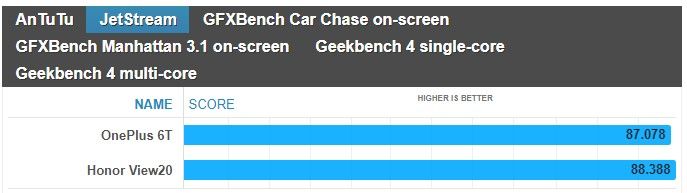
Battling it out for supremacy, the OnePlus 6T is powered by the Qualcomm Snapdragon 845 chipset, while the Honor View 20 leverages the Kirin 980 chipset. Even though the synthetic benchmarks nearly have the two smartphones matching one another, the OnePlus 6T continues to exhibit the more fluid responses with navigation. We can easily notice how instantaneous it is with its actions, like scrolling, which we feel weighs more in the greater scheme of things than those traditional synthetic tests.
Neither phone offers expandable storage, but you can sleep knowing that they’re offered with generous capacities. Starting off with 128GB of storage, there’s also the option of having 256GB of storage as well if you’re the kind to be liberal when it comes to snapping photos, downloading movies, and recording video in 4K resolution.
Performance benchmarks
Camera
Now this is where things really get juicy, given how these two cameras are highly respected. On the OnePlus 6T you have a dual camera on the back: a 16-megapixel main shooter with an f/1.7 lens, a 25mm focal distance and optical image stabilization (OIS), as well as a secondary, 20-megapixel camera used to acquire depth information for bokeh effects. The Honor View 20 features a 48MP 1/2-inch Sony IMX586 stacked CMOS image sensor, with a nearby 3D camera that emits infrared light to measure the distance from the phone to the subject – enabling it to deliver the same portrait and aperture effects found on other dual-camera phones. However, the View20 does not have optical image stabilization. Additionally, both phones are well equipped in the selfie camera department, seeing that the OnePlus 6T sizes up with a 16MP snapper, while the Honor View 20 ups it to a 25MP camera.
Image Quality
For this comparison, we captured samples using the 12MP stills option and AI camera mode set to on with the Honor View 20. As for the OnePlus 6T, the only option we enabled was Auto HDR mode. Under ideal lighting conditions, it’s sometimes difficult to gauge who’s delivering the better shots. At times, one seems to offer better dynamic range, but then in another scene, it’s the other way around. Details capture, too, is for the most part identical between the two.
If you love taking selfies, you won’t be disappointed by either phone because they capture a ton of fine details. We’re talking about skin imperfections, like wrinkles, that are clearly defined with the two. However, we do notice that even with the Auto HDR more set to on with the OnePlus 6T, it tends to be more under exposed. It’s not terrible and doesn’t diminish the overall quality, but the Honor View 20 does a better job of evenly exposing the entire shot.
OnePlus 6T vs Honor View 20
Things become more interesting under low light, which tends to be the main differentiator with most phones. Under the automatic settings, they both do a pretty decent job of minimizing noise – with the slight edge going to the Honor View 20 because shadows are boosted a smidgen more to draw out details. Even though they both have their respective night modes, the Honor View 20 yet again shows its superiority in brightening up the scenery.
Video Quality
Recording video at 4K UHD resolution at 30 FPS, both handle ideal lighting conditions by delivering punchy colors and strong details. The only noticeable difference between the two is in how the OnePlus 6T’s stabilization pales in comparison to the Honor View 20’s EIS. Besides that, the two seem to offer tight exposure adjustment and auto-focus.
Neither are particularly great under extreme low-light situations, given how noisy looking their footages appear. It’s quite distracting, especially when details become muddy. However, the Honor View 20 seems to have a very subtle advantage with exposure. It’s just barely brighter than the OnePlus 6T, but that’s the only defining quality we can pick up from comparing the two.
OnePlus 6T vs Honor View 20
Multimedia
Watching video is a treat on both smartphones, more so when there are no distracting notches to deal with. Their respective implementations allow video to be viewed without any major obstructions, so to that end, we’re happy that clips can be enjoyed using the full real estate.
Adding to its multimedia package, we absolutely appreciate how the Honor View 20 features a standard 3.5mm headphone jack. The convenience of being able to plug in a pair of headphones is invaluable, whereas with the OnePlus 6T, it of course requires the aid of an adapter. Furthermore, the IR blaster of the Honor View 20 doubles the phone as a universal remote – allowing us to quickly control a myriad of home entertainment gadgets.
Call Quality
For the most part, conducting phone conversations won’t be an issue with either smartphone. They’re ideal for casual conversations, exhibiting clear voices and very little distortion in the process.
Battery life
It’s a longevity battle between the OnePlus 6T and Honor Views 20, which respectively feature battery cells of 3700 mAh and 4000 mAh. In our experience, the Honor View 20 seems to have a little bit more juice in the tank by the day’s end. Both are more than adequate in getting us through a full day’s worth of normal usage, but like we said, there’s just still more leftover charge with the Honor View 20.
Over on the recharging side, it’s the OnePlus 6T that effortlessly beats the Honor View 20 with its speedy clocked time of 85 minutes – versus the longer 120 minutes required by the Honor View 20 to be completely full.
Battery recharge
Conclusion
Before we wrap things up, it’s worth noting that the Honor View 20 isn’t commercially available for purchase in the US – so the OnePlus 6T definitely has an advantage in this area by being readily accessible to US consumers. You also get proper 4G LTE support in the US thanks in part to LTE Advanced connectivity with a Category 16 LTE modem on the OnePlus 6T. All in all, it simply means that you won’t have as much of a problem using the OnePlus 6T on your carrier here in the US.
Now comes the defining quality of both devices: the price. The edge still goes to the OnePlus 6T with its starting price of $550 in the US or 550 euro in Europe, but the price gap is next to negligible. Currently, the Honor View 20 can be had for about 570 euro in European markets where it’s being sold. While our sentiments about the OnePlus 6T don’t change at all, being one of the best bang for the buck smartphone deals around, there are still compelling reasons for the Honor View 20. You’re paying only a bit more for the convenience of a 3.5mm headphone jack and an IR blaster, longer battery life, an extended desktop experience mode, slightly better performing cameras, and the more attractive design.
All of those things do add up in giving the Honor View 20 an equally compelling package. The OnePlus 6T, on the other hand, is still the better pick if you prefer a cleaner, smoother software experience out of the box.
Huawei Nova 4 launches with 48MP rear camera and a display hole for the front camera
Huawei has been teasing a new release for a while now and the Huawei Nova 4 is finally here. Leaked photos showed a display hole ala the Samsung Galaxy A8s, and now that it’s finally here it’s confirmed that, yes, there is a display hole on the top left of the device for the camera. Display holes are the next attempt at a fully bezel-less smartphone, with the screen wrapping around the camera instead of a cut out at the top of the display. Functionally, they’re the same as a corner notch, but they don’t look like one which adds to their appeal.
The Huawei Nova 4 isn’t just a device that pioneers a new design we’ll likely see a lot of in 2018. No, it also features flagship specifications including a 48MP triple rear camera, possibly the highest in a smartphone yet. Huawei has really been pushing camera performance as of late, and the Nova 4 is no different. There’s also a Kirin 970 onboard combined with 8GB of RAM.
Is the inclusion of a display hole here an indication of things to come? It’s a lot less unsightly than a notch, and it functions more or less the same. It’s probably the best way to have a bezel-less display on a smartphone without implementing some form of sliding camera mechanism. The earpiece is housed above the display, which is also likely where other sensors are too.
Huawei Nova 4 Specifications
Specs
Huawei Nova 4
SoC
HiSilicon Kirin 970 @ 2.4 GHz
RAM
8GB
Camera
Rear: 48MP (f/1.8) + 16MP (f/2.2) + 2MP (f/2.4), 4k video recording supportFront: 25MP (f/2.0) 1080p video recording
Storage
128GB, expandable to 512GB with a MicroSD card
Display
6.4-inch 2310×1080 IPS LCD
Audio
3.5mm headphone jack, speaker
Battery
3,750mAh with 18W charging (9V, 2A)
Ports
One USB-C port, 3.5mm headphone jack
Miscellaneous
Dual Nano-SIM
Price
3,399 Yuan (~$492) in January 2019 in China, with a release in Europe likely
Huawei Nova 4 Performance
The Huawei Nova 4 packs the HiSilicon Kirin 970 system-on-chip, a chipset heralded for its AI performance. It’s certainly no slouch in day-to-day tasks either and is a contributing factor in what grants Huawei smartphones excellent battery life. It’ll handle basically anything you throw at it, and coupled with 8GB of RAM it should have no trouble holding your applications in memory either. The Kirin 970 has a Mali G72 GPU, which is, admittedly, considerably weaker than the Adreno line of GPUs from Qualcomm. As a result, game performance may be a little bit weaker than what you’re used to. It should still be fine though and should be more than adequate for the job. 128GB of storage with MicroSD card support ensures that you won’t run out of space either. Finally, the Huawei Nova 4 comes with EMUI, which is going to be a little bit heavier on the system than something closer to stock Android like OxygenOS. It’s based on Android Pie, so you’ll get all of the latest and greatest features.
Huawei Nova 4 Display
The display on the Huawei Nova 4 is a 6.4-inch 2310×1080 IPS LCD display. This is ultimately where the biggest change is, with a display hole in place of a notch. As mentioned above, it’s functionally the same as a notch as it can’t really allow a user to make use of more screen real estate, but it arguably looks nicer than a notch and takes up slightly less space.
The display is 1080p, the bare minimum resolution for a flagship display. The lack of AMOLED may be disappointing to some, but it’s not as if that is usually a deal breaker. Flagship IPS displays nowadays are just as good as AMOLED displays, with the only difference being the lack of deeper blacks.
Huawei Nova 4 Camera
Huawei’s cameras in the last year or two have been nothing short of excellent, with the Huawei Nova 4 not looking to buck that trend. The 48MP camera included should allow Huawei to, yet again, work their low light magic. Coupled with that, are two other cameras as well, coming in at 16MP and 2MP. Their exact function is unknown at this time, but it’s impossible to deny that the company is pushing their cameras as defining features of their smartphones. While it’s always best for real-world camera samples to come out before deciding whether this is your next camera-phone, it’s a safe bet to say that this will be one of the best cameras on a smartphone once it launches. Huawei has had no trouble getting it right before, and with better hardware, there’s no reason to assume that they won’t get it right again.
Huawei Nova 4 Battery
Yet another usual win for Huawei, the Huawei Nova 4 should have excellent battery life. That’s thanks to the 3,750 mAh battery in tandem with the power efficient Kirin 970. It should have no trouble getting you through a day of use, and it’ll charge fast as well at 18W (9V, 2A).
Huawei Nova 4 Pricing and Availability
The Huawei Nova 4 is set to launch in China at a price of 3,399 Yuan, around $492. While it hasn’t been announced in Europe yet, it’s expected to launch soon after given that its predecessor did.
Display tech has come a long way for smartphones, but what makes a good TV doesn’t work so well on mobile handsets.
This year, we partnered with our friends at Spectracal to kick the proverbial tires on the displays of all the Android phones we tested, to see just how good they could get. For the most part, phones tend to sacrifice color accuracy for screen brightness. However, while many phones are happy to make their screen as blue as tolerably possible (looking at you, LG G7 ThinQ) for brightness, there are a handful of phones with extremely good displays. Let’s explore!
What makes a good smartphone screen?
What’s “best” generally requires a certain philosophy. That may not make a lot of sense to you now, but it will in a minute.
When you ask someone what the best TV is, you generally assume you’ll be using it in a somewhat darker room, and all your content is going to be in 24, 30, or 60fps. What makes the best TV is very straightforward: you want the most accurate screen you can find — in color, grayscale, and so on.
Smartphones go with you wherever you go. They need to work as well in bright sunlight as a dark room, so your mobile needs are very different than someone making a home theater setup.
Color temperature (K)
Closer to 6500 is better
Smartphone screens need to be accurate, of course, but they also need to be bright. This poses a lot of issues for smartphones, and satisfying both demands has frustrated many manufacturers.
Peak brightness (cd/m^2)
Higher is Better
Display makers have a tough choice to make: do you boost blue values to make the overall brightness higher, or suck it up and stick with color accuracy?
When we look at color accuracy, it’s generally accepted that anything under 1 (DeltaE2000) is pretty much where nobody can tell the difference between a perfect image and an imperfect one, however for smartphones we find that the expanded gamuts mean our eyes are a little more forgiving than that. While TV calibrators look for values as close to this as possible, it’s just not something smartphones really try to do — for a number of reasons. Mostly because nobody cares how accurate the screen is if you can’t see it.
Color accuracy is outstanding in Samsung’s Cinema mode, even in the DCI-P3 gamut.
This is why our criteria for a good screen is a lot more unforgiving than what you’d find elsewhere. A good smartphone screen should meet these criteria:
It should be brighter than 500cd/cm2, so you can see it outdoors without any help from shadows.
Its display color error should be under 5 (DeltaE2000).
Its greyscale values should be reasonably accurate (how the phone transitions from black to white).
Its refresh rate needs to be able to handle common content.
It should target a color temperature under 8000K, but above 6500K
To be clear, a lot of phones meet these criteria, but not all measurements are as important as others. This is why we needed an internal scoring algorithm. Even after feeding all this data through, every phone charted above did exceptionally well, and the differences between ranks aren’t as substantial as awarding one phone “best” would imply. About 20 out of the 30 phones tested failed one of the main criteria — it’s why that 2018 Average bar is so high in that color error chart.
The Samsung Galaxy Note 9 boasts the top display of 2018
If you’ve ever noticed your screen looks more orange or blue than it should, what you’re seeing is what’s called a “color temperature” that’s not where it should be. If a color temperature is above 6500K, the screen will look more blue. If it’s lower than 6500K, it will look more orange.
This has all sorts of consequences for picture quality, but most manufacturers are banking on the fact that most people will only notice the increased screen brightness. For an extreme example, the LG G7 does this by wildly tuning the default screen color to a bluish tint. By doing this, it can achieve screen brightness no other phone can touch — at the expense of color accuracy.
The LG G7 ThinQ’s boosted blue levels increase color error but also peak brightness.
For the record, the LG G7 ThinQ isn’t a bad phone. It gambles on the needs of general consumers outweighing the needs of hardcore movie enthusiasts, and I think it was the right call for that phone. However, the display is nowhere near where it needs to be to make this list.
The Samsung Galaxy S9 and its bigger brother the S9 Plus both have surprisingly dim screens, so if you need a little extra juice, any of the phones in the charts below will offer you a little more screen brightness with the least possible tradeoffs in picture quality among the twenty-nine Android phones and one iPhone we put through the wringer.
It may not be obvious right away, but a wonky color temperature is something you can’t unsee.
That’s just a small taste of the testing we went through, but you should start seeing more comparisons in the near future — our database is jam-packed with every measurement you can probably think of. We also tested gamma, greyscale performance, brightness, and a few other oddities that came up along the way. If you’re wondering why we don’t compare pixel densities, it’s because all of the phones listed meet or exceed the quality someone with 20/20 vision would notice during normal use.
The Samsung Galaxy Note 9 has the best screen for most
After we collected the data from thirty phones, and fed all of our results through our custom scoring algorithms, the Samsung Galaxy Note 9 just barely edged out the OnePlus 6T, Samsung Galaxy S9 Plus, and Huawei Mate 20 Pro. These phones showed their mettle by offering the most accurate colors, as well as the least gamma errors.
However I have to say, many won’t notice a difference between each display. If I could award them all, I would.
The Samsung Galaxy Note 9 only beat out the OnePlus 6T, and its little brothers the Galaxy S9 and S9 Plus because of its much brighter screen. Even against the whole field, the Note 9 only edges the other phones out for the top spot by a couple hundredths of a point out of 100 possible points.
If you find yourself in the desert, the southern U.S., or more tropical locales, you may want to go with the Huawei Mate 20 Pro instead. It has just that extra little burst of brightness with only a minor tradeoff in picture quality when the sun is directly overhead. For everyone who spends time in offices, subways, buses, and other situations where you don’t need to melt your retinas, springing for the Samsung Galaxy Note 9 is probably your best bet.
Display competition has become incredibly fierce, but Samsung still leads the way.
It tops the charts along with its smaller brethren the Samsung Galaxy S9 and S9 Plus in gamma error and color error, also nailing color temperature closer than all other phones outside of the Samsung Galaxy S9. While it’s got picture quality on lock, what sets it apart is the peak brightness. It trounces its brethren, offering a picture 20 percent brighter, and only 30cd/m2 behind the brightest display in our top eight. If you want a phone display that does everything well, the Samsung Galaxy Note 9 is the best in the biz. We also tested the iPhone XS Max for giggles, but as it’s the only phone here that uses the much narrower sRGB gamut, we didn’t want people thinking its low error scores meant it’s better than the Android phones’ DCI-P3 screens.
However, this year more than any other there are so many good displays you’ll be happy with any of the ones we listed here. Among the contestant phones, all of the following were within a few points of each other, and you probably won’t notice much of a difference between them:
Samsung Galaxy Note 9
Huawei Mate 20 Pro
Samsung Galaxy S9
Xiaomi Mi 8
Vivo V11 Pro
Razer Phone 2
OnePlus 6T (though it’s quite dim)
Google Pixel 3 XL (though it’s quite dim)
These are the leaders of the pack — unless you’re gamer.
The Razer Phone 2 has the best screen for gamers
While more and more gaming smartphones have come out, Razer’s 120Hz screen is something special. It’s not as technically accurate as the Samsung Galaxy S9, but it’s close enough. It also offers something no other phone does: a higher than 90Hz framerate (sorry, Asus). Even if that’s something not many people really need, the vast majority of phones don’t even attempt to pass 60Hz. By experimenting with this kind of power in a display, Razer is making strides others should definitely attempt to follow if mobile gaming, gamecasting, and high-framerate content picks up. In short, its screen is a bit more future-proof than the rest. Even if you don’t need it now, it’s nice to have just in case you ever want it in the future.
The IGZO IPS LCD panel isn’t going to make anyone forget an OLED’s superior quality in dimmer lighting situations, but you’ll appreciate the ability to turn up the max brightness a little further than every other model listed here — except the LG G7 and Huawei Mate 20 Pro. In a weird way, this phone is better suited for more lighting situations than the more accurate phones out there. However, the Razer Phone 2 isn’t getting our attention because it’s the winner of some Byzantine competition of hardware performance — it’s because the phone is swinging for the fences in a way nobody else is.
While the Asus ROG phone technically does better with picture quality, the refresh rate isn’t where it needs to be to future-proof for changes in content. That’s where Razer holds the edge. If the differences in picture quality aren’t as noticeable as something like the framerate, that makes this comparison a rather easy one.
A final note on testing
Obviously, if our winner’s margin of victory is as razor thin as the Samsung Galaxy Note 9’s is, chances are pretty good that you might like another display better simply because it’s attached to a phone that’s not $1,000. Our scoring is designed to meet the needs of most people, not all people (that would be impossible).
If you add money to the equation, you absolutely have standing to say a display like the OnePlus 6T’s is more appropriate for you. That’s fine! There’s plenty of data to back up the argument that another display would suit you better. Be on the lookout for comparison articles in the future to help you pick between similar phones using the data we’ve collected.
While we aren’t ready to publish our internal scores, I invite everyone to read up on how we arrive at them anyways. We go to great lengths to squish outlier data points and get a much better picture of the story, as well as properly contextualize results that might not matter all that much to your average Joe or Jane. We don’t want test results people can’t experience for themselves to skew things one way or the other, so we avoid making recommendations without being as exact as possible.
Huawei has grown from a local Chinese phone maker known elsewhere for not more than making cellular network equipment to smartphone stardom in a matter of just a few years. And while the company was denied access to the US market, based on suspicions of ties with the Chinese Government, it is taking over the rest of the world with aggressively priced phones with great design.
These days, however, Huawei is no longer interested in selling just affordable devices: its latest Huawei Mate 20 Pro is an all-out premium phone packed with the latest technology including a futuristic in-screen finger scanner, a 3D face recognition system, an ambitious triple-camera, and a fast-charging battery, all encased in a beautiful body. And all of that does not come cheap: it’s right there at about the same price as the iPhone XS series, and it’s more expensive than previous Android price champions like the Samsung Galaxy Note 9.
So… is Huawei ready for prime time with its new Mate 20 Pro? And should you buy one for yourself? Let’s dive in the review to find out.
What’s in the box:
Huawei Mate 20 Pro
40-watt Huawei SuperCharge wall charger
USB-C to standard USB cable
USB-C to 3.5mm audio dongle
Silicon Case
SIM tool
User manuals
Design
All the right curves in all the right places
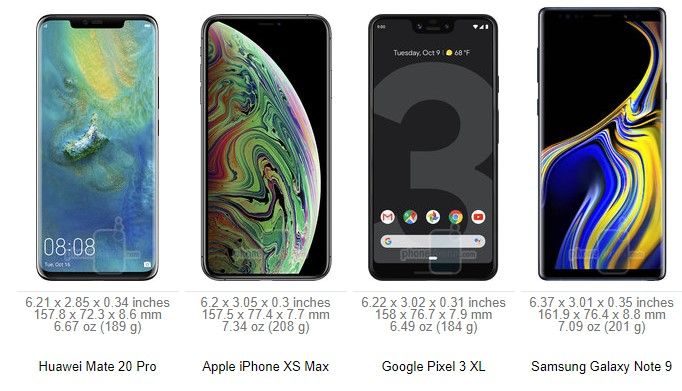
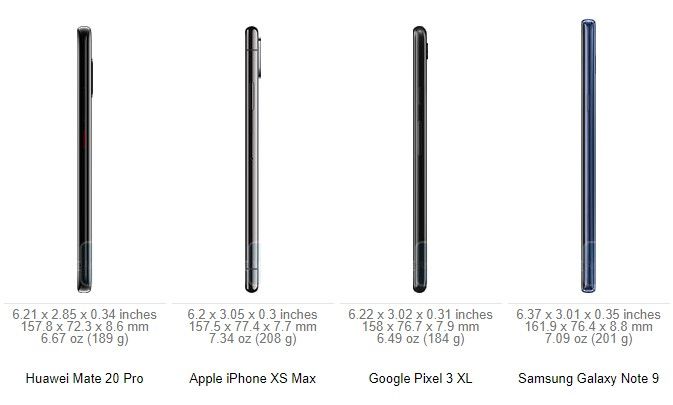
The Huawei Mate 20 Pro has a surprisingly thin and narrow body for a phone with a 6.4-inch screen. Both the screen and the back are curved at the edges, much like a Samsung Galaxy phone, and there is very little bezel around the side and the bottoms, which has allowed Huawei to make the Mate 20 Pro much narrower than, say, the iPhone XS Max or the Galaxy Note 9. Indeed, the Mate 20 Pro fits very nicely in the palm and is easier to operate with just one hand than the aforementioned two bigger phones. Still, the tall body is not small by any conventional means, and just like with other big phones, you won’t feel very comfortable walking with the Mate 20 Pro in the front pocket of your jeans.
Huawei offers a few different colors for this new Mate: we have the signature Twilight color gradient which looks stunning, but you also have a new “Midnight Blue Hyper Optical” finish that is glass, but treated in a special way so it is better at resisting fingerprint smudges and is not as slippery in the hand. You also have a black version, a Pink Gold one and an Emerald Green model.
All physical buttons on the Mate 20 Pro are located on the right side: you have a power key and volume buttons above it. The buttons are made of metal, just like the side of the phone, and have a good amount of travel and click.
Up at the top, you can find an infrared (IR) blaster, so you can use your Mate as a remote control for a TV, A/C unit, or whatever else you have in your home that uses infrared controls. This works best with the Smart Remote application that comes pre-installed on the phone.
There is no 3.5mm headphone jack on board here (Huawei does provide a USB-C to 3.5mm audio dongle in the box) and instead you are encouraged to use wireless buds or USB-C headphones.
The Mate 20 Pro also features dual speakers, but with a surprising, clever implementation: the secondary speaker is actually embedded in the USB-C port, so audio comes at you from the earpiece and the USB-C port. This means that when your phone is plugged in for a charge, audio will sound a bit muffled, in case you wondered.
One more thing: this phone is also IP68 water protected, which translates into an ability to survive drops in water of up to 6 feet deep for as long as 30 minutes.
In-screen Fingerprint Scanner
The Mate 20 Pro is one of the first phones out there to feature a brand new type of a fingerprint scanner: one embedded in the screen. This new in-screen fingerprint scanner is an optical one, rather than the ultrasonic one that Qualcomm is developing. And you can see how the screen of the phone lights up for a second when you tap your finger against it, so that the phone can get a proper, bright scan of the finger.
How does it work? Mostly well, but… it is not quite perfect. We have gotten used to traditional fingerprint scanners that are lightning quick, where you just tap your finger on the fingerprint area and the phone unlocks instantly. In the case of the Mate 20 Pro there are two things that get in the way: the first one is the fact that there is no physical boundary that would give a tactile indication of where the fingerprint scanner lies, so you need to look down at your phone to nail the exact position where your finger needs to be every time; the second thing is the actual force required to get a proper finger scan, as you need to press a lot firmer and longer than the gentle tap required from a traditional fingerprint reader. If you don’t press as hard, the phone will not unlock and you would need to try again. At the end of the day, you do get used to it, and sure, the accuracy is good enough, but even after hundreds of attempts, the in-screen fingerprint scanner still did not feel as fast and as effortless as a traditional one.
Face Recognition
Thankfully, there is one more way to securely unlock the Mate 20 Pro and it’s called 3D depth-sensing face recognition.
This system is basically a copy of Face ID, which Apple introduced last year on the iPhone X, and it uses a similar array of components: a dot projector, a flood illuminator, an infrared camera and the rest.
How does it work? Quite great, actually! We are happy to report that 3D face recognition on the Mate 20 Pro works at least as fast as Face ID on the iPhone X/XS and can accurately recognize your face as it changes from your puffy-eyed self in the early mornings to your 5 o’clock evening stubble self and to those times when you grow a beard; it’s able to recognize your face during the day and at pitch black conditions at night, with or without a hat, with glasses and so on. We set it up once and never had a problem with it. We also tried fooling it with a photograph and faces of other people, and it wasn’t fooled.
So… all is perfect, right? There is one tiny detail that we have to mention: the almost non-existant raise to wake functionality. While technically raise to wake is present on the Mate 20 Pro, it requires a very swift and well defined hand movement, which we almost never do in real life. This means that for all its worth, raise to wake does not work properly on the Mate 20 Pro and you need to first press the power key before the phone starts recognizing your face. This might sound like just one step, but it’s one step that you do tens, if not hundreds of times every day, and it adds unnecessary complication. Having a raise to wake feature would make using 3D face recognition truly a fluid and intuitive experience, and we hope Huawei listens and brings this to the phone in a future update.
Still, after using the Mate 20 Pro for more than a week now, we are convinced that face recognition is a more effortless security system than the in-screen fingerprint scanner and we have stopped using the in-screen fingerprint scanner completely. Of course, it’s nice having this choice, and it will be up to everyone to find what works best for them, but Huawei has really implemented face recognition in a nearly flawless manner.
Display
Excellent AMOLED screen.
Being a premium phone, it’s no surprise that the Mate 20 Pro sports a beautiful AMOLED screen with lively, rich colors. It’s a 6.4-inch display with a 19.5:9 aspect ratio, the same as on Apple’s iPhones, but with a higher, Quad HD+ resolution of 1440 x 3120 pixels
The screen is slightly curved at the sides and has very thin bezel, which makes for an immersive experience and a screen-to-body ratio of nearly 88%, one of the highest in the industry.
And yes, there is a notch here as well, justified by the complex front camera system required for 3D face recognition. You can hide it via an option in settings (and when you do, system icons at the top still appear in the “ears”, but against a black background).
The screen also gets very bright during the day, and you have the Eye Comfort option for use at night. There is even a Natural Tone mode that adjusts the white balance to the surrounding conditions so you get more natural, warmer white colors at night when you are at home. The Always-on Screen mode is not enabled by default, but it is here and you can turn it on from Settings > Display.
Interface
EMUI 9.0 is cleaner and better, but the gesture navigation needs more polish
The Mate 20 Pro ships with its own interface, Emotion UI, also known as EMUI, in its most refined, 9.0 version on top of the latest Android 9 Pie.
EMUI is in many ways a copy of iOS: there is no app drawer, it uses the same swipe-down home for a quick search shortcut, it even uses copycat icons for apps like Phone, Health, Settings, Calendar, Weather, and others. And yes, that is just shameful, but if you are willing to overlook this, EMUI actually works fairly smoothly.Compared to earlier versions of the interface, there is now way less clutter, and controls for apps are conveniently located on the bottom of the screen, rather than the top, for easier reach.
The Mate 20 Pro is also an Android phone, which comes with the options to customize it fully to your liking (great!), but it also means that you don’t know when future updates will arrive and if they will arrive (not so great!).
There are a few particularities that we have also noted when using EMUI on the Mate 20 Pro: first, there is no way to quickly swipe down to reveal your notifications shortcut. You have to reach all the way to the top, which is definitely not very convenient on such a tall phone. Instead, a swipe down in EMUI brings up an iOS-like search menu. This is an interesting thing to have and makes searching for apps on an interface without an app drawer much easier. If we had to nit-pick, we’d say that we wish the keyboard for this search appeared with less of a delay, but that’s really a minor thing.
The Mate 20 Pro also comes with a brand new gesture navigation. You can either use the old, three-button Android navigation or use gestures and enjoy the full screen, without any buttons taking up space on it. The gestures are the following: swipe up from the bottom to go home, swipe up and hold to see multitasking cards, and swipe sideways from the edge of the screen to go back. This is basically the iOS way of doing gestures, so does it work as well?
It’s not quite perfectly polished, and here are a few examples why: first, bringing up the multitasking cards from home requires a very long gesture and is too hard to pull off. Second, the back gesture requires that you go from the very edge of the screen, and when you are in a hurry, you don’t always get it right. Often you have to repeat it again and again. Third, when you swipe up to go home, apps close with a very jittery animation. And lastly, we wish you did not have to wait for each animation to finish before you could move on to the next swipe or gesture that you are about to do. Those little things pile up, and while overall gesture navigation on the Mate 20 Pro definitely does work, it also definitely does not feel as polished as one would expect on a premium phone.
One thing that we appreciate on the Mate 20 Pro is the dark mode in the interface that you enable by going into Settings > Battery > and here you toggle the “Darken interface colors” option on. This will turn the background in the settings menu and notification shade to black, a color that’s easier on the eyes at night and that contributes to battery savings on phones with OLED screens.
Processor, Performance and Memory
Android’s fastest chip
The Mate 20 Pro is powered by Huawei’s newest in-house Kirin 980 chip. The Kirin 980 is a powerful chip that beats the Qualcomm Snapdragon 845 in benchmarks and the first in an Android phone built on a 7nm manufacturing technology. Huawei says that it has spent years and big money on developing this chip, and it’s impressive how the company has outpaced Qualcomm in the 7nm race and has managed to be the first one to introduce a 7nm Android device.
The Kirin 980 works alongside 6GB of RAM and features the Mali G76 GPU, which is good news for gamers. Huawei, however, is most proud of its new dual neural-engine processor that helps with AI and machine learning, enabling features like the 1,500 different scenes that the Mate 20 Pro camera can recognize and a few cool new tricks in video.
Keep in mind, though, that by default the phone runs in a power-optimized manner, and you would need to enable the Performance mode (go to Settings > Battery > toggle Performance Mode on) in order to use the full power of the chip.
When you look at benchmark results, the Kirin 980 ranks better than the Snapdragon 845, but it is no match for Apple’s A12 chip, the world’s first 7nm chip.
You also have a generous 128GB of on-board storage here with support for a brand new type of memory card that Huawei calls nanoSD. This is done to optimize space as a nanoSD card is about the same size as a nanoSIM card. Here is how it works: you have a new SIM tray that has two slots, but rather than the two slots being one next to the other and take up a lot of space, the slot are one on top of the other. This also means that you can use the Mate 20 Pro as a dual SIM phone or use one nanoSD + one nanoSIM
Internet and Connectivity
Hybrid dual SIM slot and 4G LTE connectivity
The Mate 20 Pro comes packed with 4G LTE bands that ensure that it will work properly on most networks across the globe. Yet still, let us remind you that the phone is not officially sold in the United States, and if you are planning to import it, it would be best to check with your carrier to see whether it would be compatible.
Again, let us reiterate that you can use the Mate as either a dual SIM phone, or use the secondary slot for the new nanoSD card standard, the choice is yours.
In terms of other connectivity options, you also have dual-channel Wi-Fi, Bluetooth 5.0 and NFC support.
Camera
A triple camera with great versatility
The Mate 20 Pro comes with three cameras on its back: we have a main, 40-megapixel f/1.8 shooter, a secondary, 20-megapixel ultra-wide angle, 16mm lens, and a third, 8-megapixel telephoto camera with 3X zoom and optical image stabilization for an equivalent of 80mm focal reach. You also have a pre-set 5X zoom option (135mm), which is an improved digital zoom that uses information from both the main sensor and the telephoto camera.
There are few phones that can go as wide without a third-party lens adapter and none other that can zoom so far away with such a clarity as the Mate 20 Pro, so it’s definitely a very alluring camera phone with unmatched versatility.
Image Quality
So… how do images actually turn out?
Pretty good, in fact. The Huawei Mate 20 Pro captures photos with a wide range of colors and at different focal lengths, but is just a step below the two current leaders in smartphone cameras, the iPhone XS series and the Google Pixel 3 series.
Why? The biggest reason currently lies in the color reproduction. Colors are just a tiny bit too dull and not as lively and dynamic as on the iPhones and Pixels. When you look closer, you would also notice there is a lesser amount of detail and noticeable oversharpening happening on photos from the Mate 20 Pro main camera. Let us clarify: we think that images from the Mate 20 Pro still look excellent and are comparable to something out of the Galaxy Note 9, for example. AThey are definitely a cut above most other phones, but a step short of the very, very best in the industry.
At night, the Mate 20 Pro does a trick that other phones don’t: it sharpens photos by asking you to hold the camera still for much longer than a regular snap. This means snapping photos at night is much slower, but in exchange you get a brighter photo with more detail. Oftentimes, this results in great shots that have a better exposure at night than on rival phones, so good job on this, Huawei!
There are two areas, however, where the Mate 20 Pro truly excels: one is for zoomed-in shots with the telephoto camera and the second is the cool, ultra-wide angle perspective that you cannot get on most other phones.
When comparing images shot using the 3x and 5x zoom modes on the Mate 20 Pro to photos from its rivals, it’s clear that the Mate produces a very clean, noise-free photo that looks great and very rich in terms of detail. Even at 5x, the amount of detail you get in a shot is simply incredible for a smartphone camera.
Video quality
On the video side, you have 4K30 video support, but no 60fps video recording mode.
We found video recording quality to be a bit of a letdown, however. Again, we should clarify that we’re comparing with the very best phones at the top prices, the same tier where Huawei positions its Mate 20 Pro. So, the phone uses electronic means to stabilize the footage, but the implementation leaves a lot to be desired as there is a lot of jitter from the slightest movement and some very weird wobbly artifacts at the edges of the frame when recording video. Using the telephoto lens for video is also not a great idea. Footage is well stabilized at 3x zoom, but the phone often fades in and out of focus. Detail and colors are mostly alright, though.
Huawei introduces a few new video recording modes powered by artificial intelligence. The first one is called AI color and it turns the whole scene black and white, with only the person remaining in color. It’s a very cool effect, and we’re impressed with the accuracy of the Mate 20 Pro and how it’s able to detect a moving person in real time. The other effect is called background blur and it has a person in sharp focus, while the background is left blurred out.
There is also a new cinematic mode with a 21:9 aspect ratio and superb video stabilization, but unfortunately, quality here is limited to 1080p. Still, we enjoyed this mode tremendously, as the videos in it turn out really moody and different.
Sound Quality
Sound quality via the loudspeakers on the Mate 20 Pro is loud and clear. As we’ve already mentioned, one speaker (the weaker one) is in the earpiece and you have a secondary speaker that fires through the USB-C port. This is a clever implementation on Huawei’s part and we like how you have a rich, full sound with a nice amount of oomph to it.
Once again, let us remind you that the Mate 20 Pro does not have a headphone jack. It does come with a dongle, so you can still use wired headphones with it, or just go with USB-C buds or wireless cans.
Call Quality
When it comes to call quality, we had no problems with the Mate 20 Pro. Calls came through crisp, with clarity in the earpiece and a nice amount of volume, so you can hear callers even on a busy street, and the same is true for the other end of the line.
Battery life
Solid battery performer with an impressively fast charging at no extra cost
The Mate 20 Pro sports a massive, 4,200mAh battery inside, bigger than even the battery on the Samsung Galaxy Note 9.
So how about the actual battery life?
In our real-world testing, the Mate lasted a full day with ease, and for most users this would extend to a day and a half, but if you were hoping for a full two days off the charger, we’re not yet there.
Unfortunately, we could not run our proprietary test on the Mate 20 Pro. The reason for this lies in the brightness controls on this phone. Just like many other Huawei and Honor devices, even when you set the brightness to a manual level, it would continue changing, and for our test it is absolutely mandatory that screen brightness remains at the same level.
Turning over to probably the biggest innovation in the Mate 20 Pro, let’s talk fast charging. This new Mate comes with a super powerful 40-watt Huawei SuperCharge wall charger in the box that charges the phone fully in just about an hour and a few minutes.
These are unprecedented charging speeds, and we’re really impressed how quickly the battery on this phone tops up.
The Mate 20 Pro also supports wireless charging with the Qi standard, so you can just leave it on a charger at a desk and not have to worry about cables.
Last but not least, you can use the Mate 20 Pro as a wireless charger to top up other phones that support wireless charging. You need to enable this first: go into Settings > Battery and scroll to the bottom to toggle ‘Wireless reverse charging’ on. It all works just as you’d expect and while it is a bit of a gimmick, it’s a cool one nonetheless.
Price and Alternatives
Huawei has made a phone that goes all out in terms of features, but it sadly does so in terms of price too. The official price for the Mate 20 Pro is set at around 1,050 euro, which is just slightly shy of the iPhone XS price, and the Mate 20 Pro is much more expensive than the Galaxy Note 9, which already costs 800 euro.
Once again, the Mate 20 Pro will not be officially sold in the United States, so there is no US dollar price (the global price translates to some $1200 dollars, in case you were curious).
Your alternatives? Get the Note 9 if you want a cheaper phone with an excellent screen, camera and performance. Get the Pixel 3 if you want the best camera on Android. And consider an iPhone XS if you are after the world’s fastest-performing chip and top cameras. And if you want to save a buck, it would be a wise idea to wait for the OnePlus 6T that is coming soon at about half the price and similar performance.
Conclusion
Summing it all up, the Huawei Mate 20 Pro is a fast Android phone with a beautiful design and a gorgeous screen. It has a solid battery life, super fast charging and one of the most versatile cameras around. And it has a ton of storage on board. Add to that not one, but two innovative secure unlock systems: the optical in-screen fingerprint scanner (which mostly works, but is a bit fiddly), and the fast and reliable 3D face recognition system (which works like a breeze).
There is so much to like about the Mate 20 Pro and it would have been an easy recommendation, if not for the high price. The slightly jittery gesture navigation, the good, but not quite best-in-class camera experience and the unclear software update future make this phone feel a bit overpriced. But if money is not an issue, the Mate 20 Pro is right there with the very best Android phones, and you definitely will not regret using it.
Huawei has revealed a brand-new chipset, the Kirin 710, with its Nova 3i smartphone.
The new chipset represents the biggest leap in power for Huawei’s lower-tier phones since 2016.
It’s unclear whether the processor is indeed a successor to the Kirin 650 series of budget chips.
Huawei has quietly announced the Nova 3i this week, a less powerful version of the standard Nova 3. Nevertheless, the new phone is a landmark moment for the company, as it’s running the all-new Kirin 710 chipset.
Aimed at devices below the flagship level, the Kirin 710 is the biggest step for mid-range Huawei chips since the Kirin 650 in 2016’s P9 Lite.
Every Kirin 65X chip since the Kirin 650 has delivered the same octa-core Cortex-A53 CPU setup, the same aging Mali T830-MP2 GPU combination, and a 16nm manufacturing process. So aside from storage, RAM and clock speed improvements, the P9 Lite is roughly as powerful as the latest P20 Lite.
Now, the Kirin 710 has landed and it looks like a massive improvement upon the older mid-range chipsets. It packs four lightweight Cortex-A53 cores and four Cortex-A73 cores which, while not as powerful as the latest Cortex-A75 and A55 cores, still represent a big upgrade. The new chip’s CPU setup is similar to Huawei’s recent flagship processors, which also feature four Cortex-A53 cores and four Cortex-A73 cores.
The new Nova 3i listing doesn’t reveal the GPU, but an XDA article notes that it’s 1.5 times better than the Kirin 659’s GPU. So while we are getting improved graphics, we expected a bigger leap in performance because the Kirin 659’s GPU was a mid-range GPU even back in 2016. It’s also a few versions behind the new Mali-G72 GPU seen in the likes of the Mediatek Helio P60 and Huawei’s flagship Kirin 970 processor.
Rounding out the list of major changes is a shift to a 12nm manufacturing process, which is slightly smaller than the 16nm on the Kirin 655, 658 and 659. The smaller process usually translates to better-sustained performance and longer endurance.
Earlier rumors suggested the Kirin 710 would offer a neural processing unit (NPU), akin to the Kirin 970 flagship chip. This doesn’t seem to be the case in the finished product, although the Nova 3i does indeed support various AI-branded functions, such as scene recognition and Apple-inspired animated emoji.
The big question is how Huawei plans to use the new chipset — will it replace the Kirin 659 processor or is it an entirely new family? In the case of the former, we can expect a power boost for Huawei’s mid-range devices, from the Lite series to even the mid-range Honor phones.
If the Chinese brand plans to use the Kirin 710 for “upper mid-range” devices, it’ll still be a boon for non-flagship Huawei and Honor smartphones. Either way, the gap between mid-range and high-end power might be plugged by the new chipset.
What to know about Nova 3i?
The Nova 3i shares a few features with the standard Nova 3, such as a 24MP+2MP front camera pairing, a virtually identical 6.3-inch full HD+ display, animated emoji, and up to 128GB of storage. But the similarities seem to end here.
The Nova 3 has a Kirin 970 chipset with an NPU and 6GB of RAM — the Nova 3i has the less powerful Kirin 710 and 4GB RAM. The standard Nova model also sports a 24MP+16MP f/1.8 rear camera pairing, while the Nova 3i has a 16MP+2MP rear camera setup. Finally, the Nova 3 has a larger 3,750mAh battery and USB Type-C connectivity compared to the 3i’s 3,340mAh battery and microUSB port.
According to a listing on the Huawei Philippines website, the Nova 3i has a retail price of 15,990 Philippine pesos (~$298). Meanwhile, the Nova 3 has a ~$446 price tag in China. The Nova 3i’s price bodes well for those hoping the Kirin 710 comes to more affordable devices, but we’ll have to wait and see anyway.
Beefed-up Honor 10 comes with 8GB of RAM, GPU Turbo tech, and a new camera mode for night shots.
Pricing has yet to be confirmed.
Honor has unveiled a souped-up version of the Honor 10 with 8GB of RAM and pre-loaded with the recently announced GPU Turbo tech update. The new model, dubbed the Honor 10 GT, will begin shipping on July 24 in China via the HiHonor store and JD.com.
With the exception of the increased RAM count, GPU Turbo update, and a new camera mode for taking night shots, the Honor 10 GT is identical to the standard Honor 10 that debuted in May.
That means the Honor 10 GT benefits from Huawei’s Kirin 970 SoC, a 5.84-inch FullView HD+ display (19:9), and a 16MP + 24MP dual-lens rear camera. It also runs the Oreo-based EMUI 8.1 update out-of-the-box, and features an ultrasonic fingerprint sensor.
Aside from the RAM increase, the main draw for prospective buyers is the GPU Turbo update, which is based on the same graphics processing acceleration tech that powered the Honor Play.
Honor says the update will offer smoother performance, better frame rates, and increased battery efficiency when playing graphically-intensive games. The boost is achieved by increase graphics efficiency by 60 percent and reducing system-on-chip energy usage by 30 percent.
While the Honor 10 GT won’t be rivaling the likes of the Razer Phone, Xiaomi’s Black Shark, or the upcoming Asus ROG Phone, it’s release is yet another sign that phones built for and marketed towards gamers are on the rise.
The Honor 10 is already a very capable phone, with a latest gen Kirin 970 processor and 6GB of RAM. But in case you want something more from your phone, Honor has you covered. If you’re in China, at least.
The company has announced the Honor 10 GT, a slightly souped up version of the Honor 10 for the Chinese market. The differences are slight but worth the upgrade if you haven’t picked one up already. The device features 8GB of RAM, a first for the company, as well as some new software features.
The GPU Turbo feature claims a 60% increase in performance while reducing power draw by 30%. This is great for gaming, now that high profile games like PUBG Mobile have come to Android. It should be noted that this feature will roll out to older phones as well.
The device will also support tripod-free Super Night Scene via a beta version of the software, a feature that trickles down from the P20 series.
Otherwise, it’s the same as the standard Honor 10. It will feature a 5.84-inch 19:9 display with a notch, dual 24MP + 16MP cameras on the rear, a 24MP selfie camera, 128GB of storage, a 3,400 mAh battery, and those gorgeous rainbow colors. A price hasn’t been announced but it should cost a bit more than the standard model.





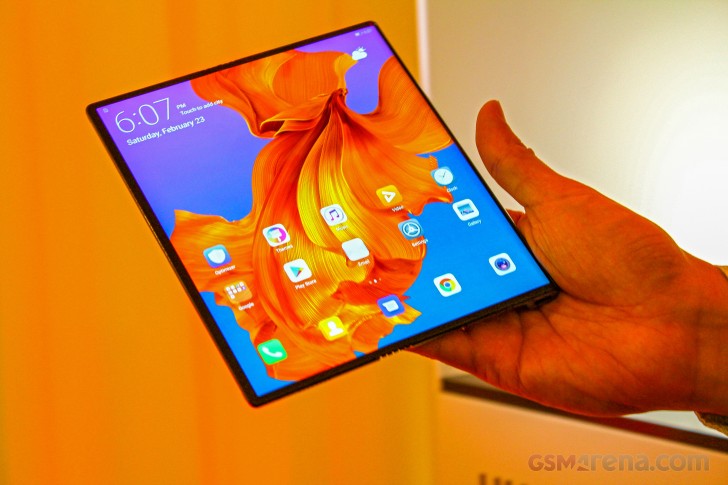
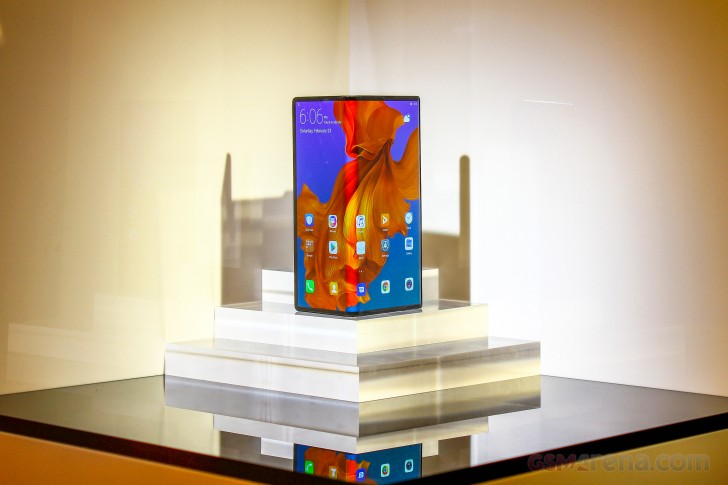
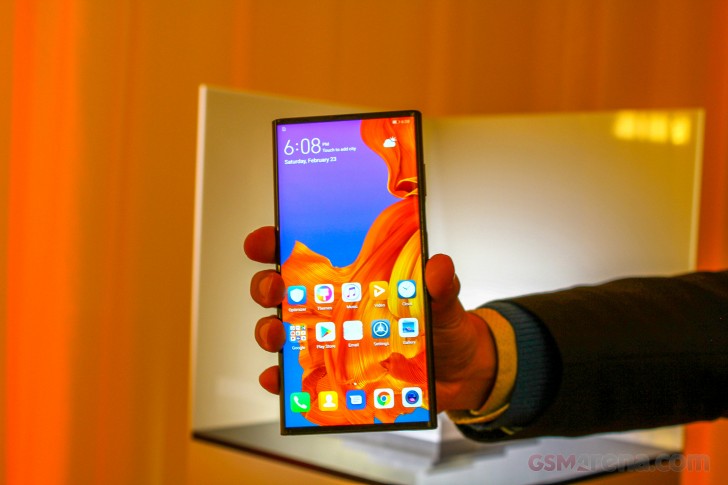
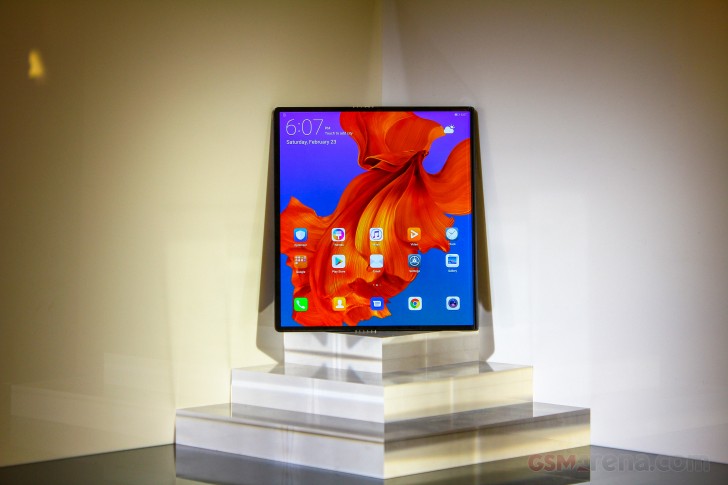
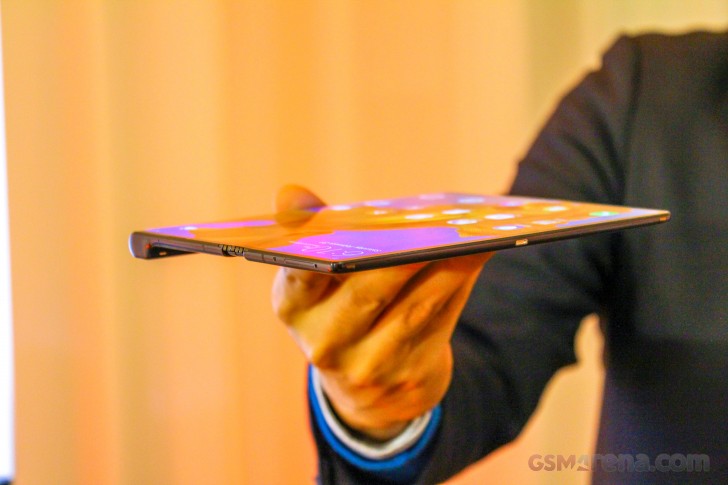
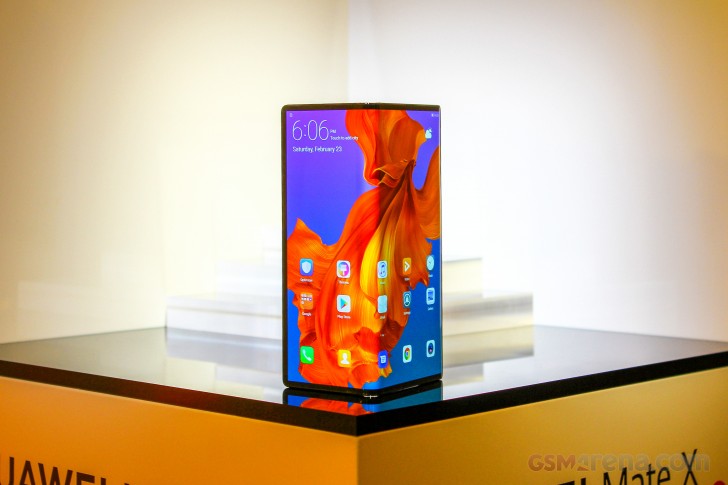
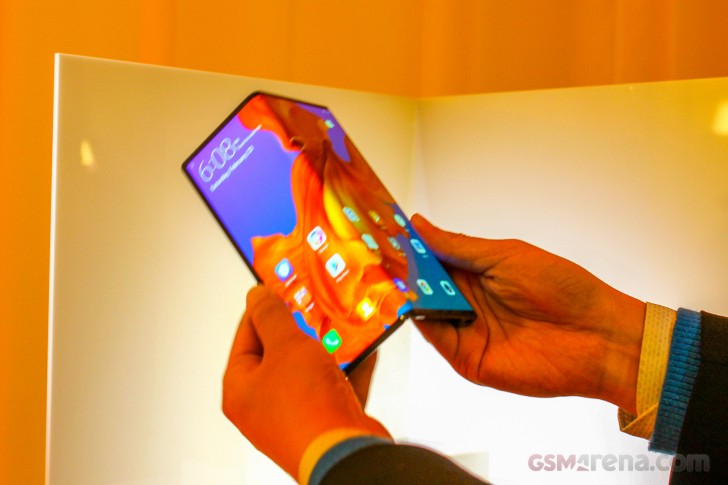

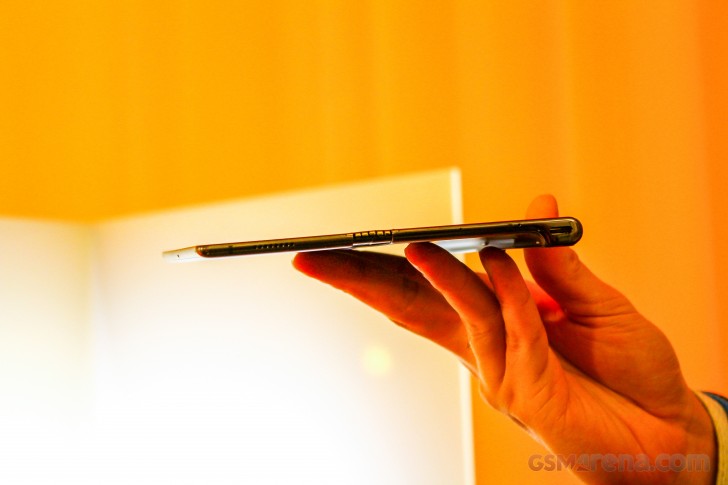
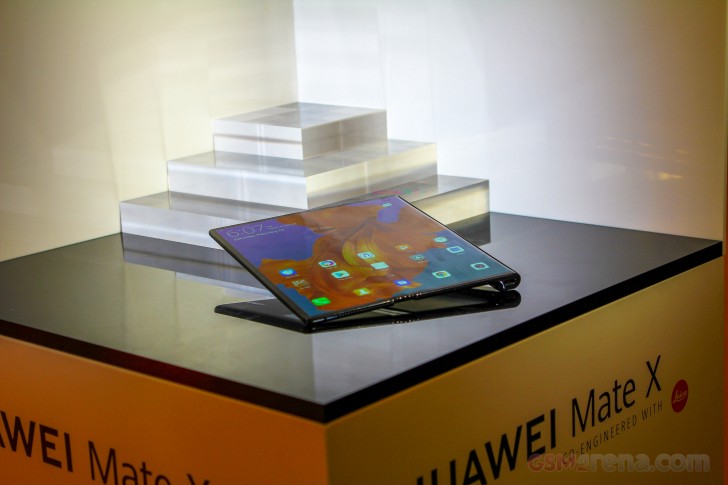
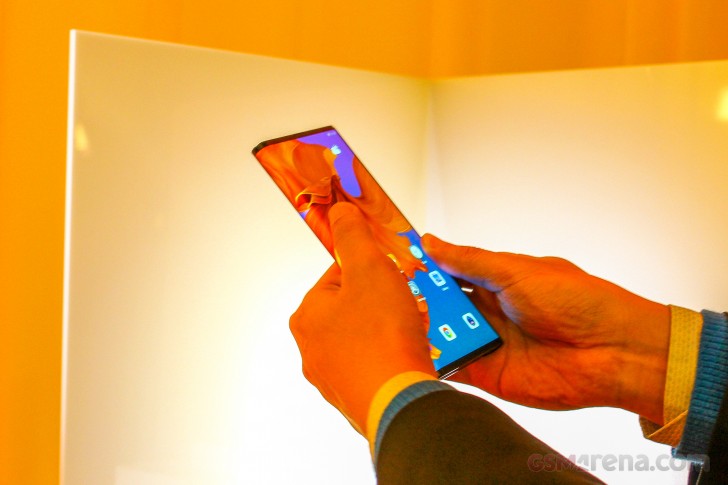
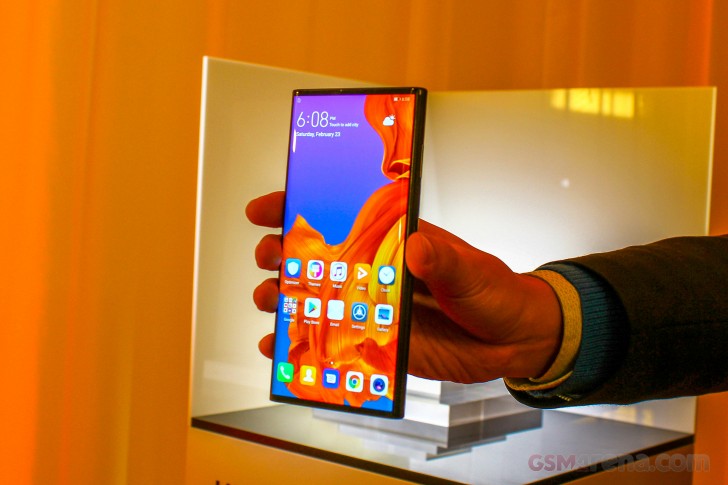
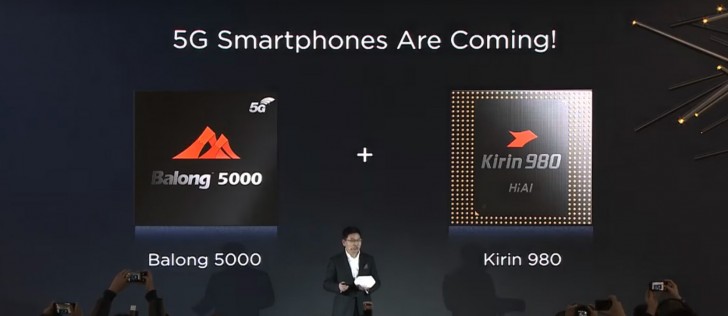
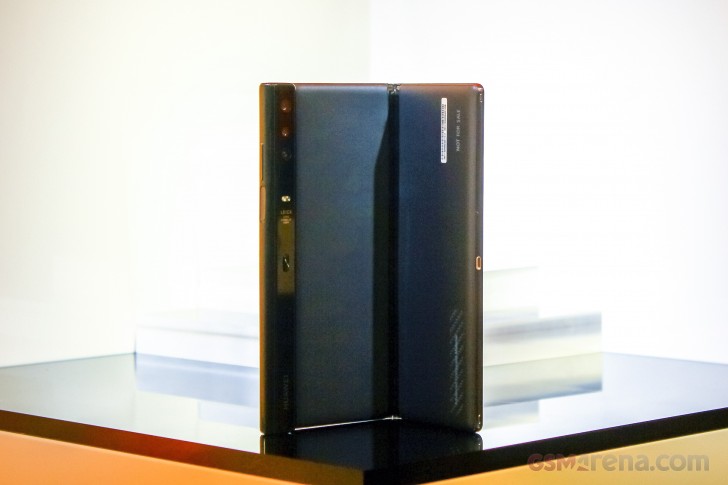
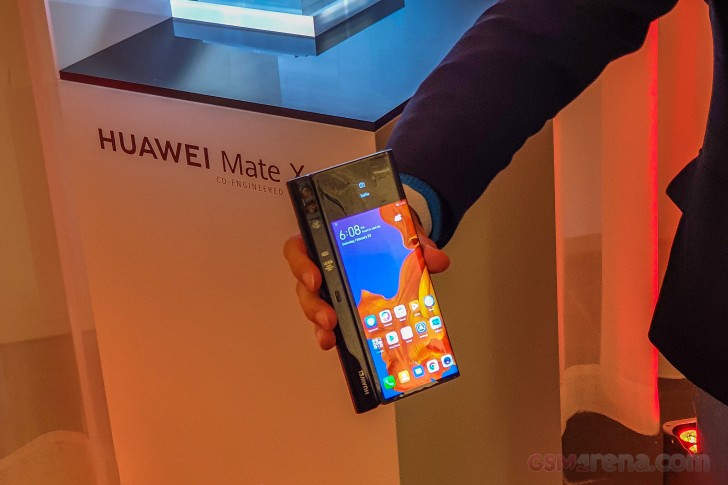
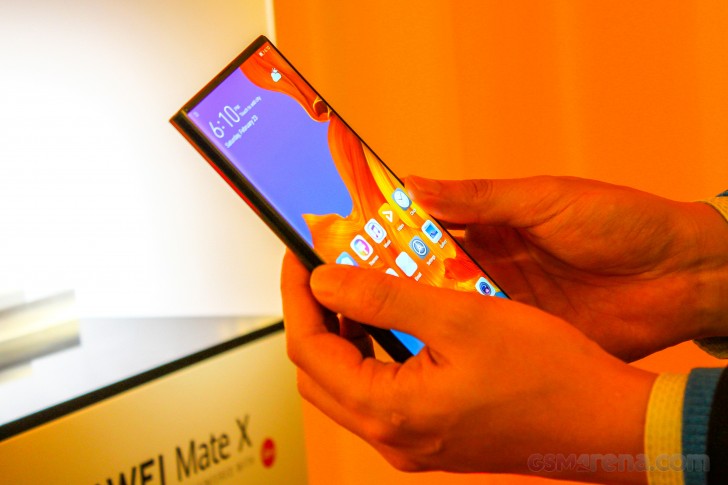
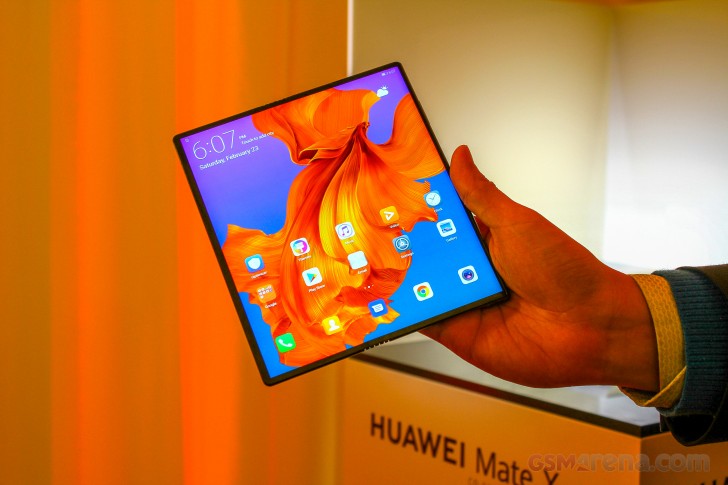
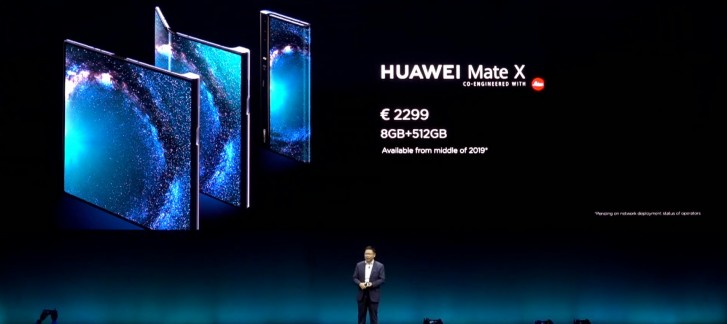


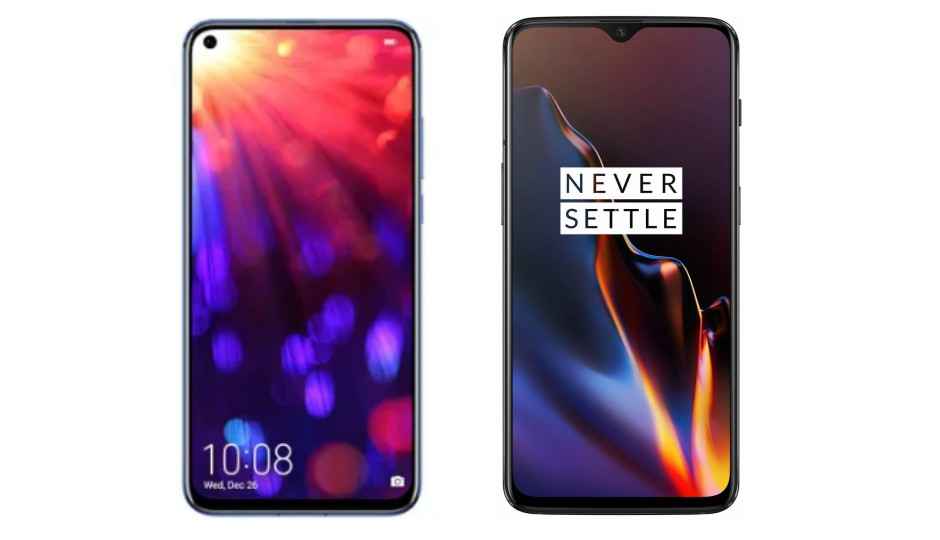


 Magic UI 2.0.1 on the Honor View20