


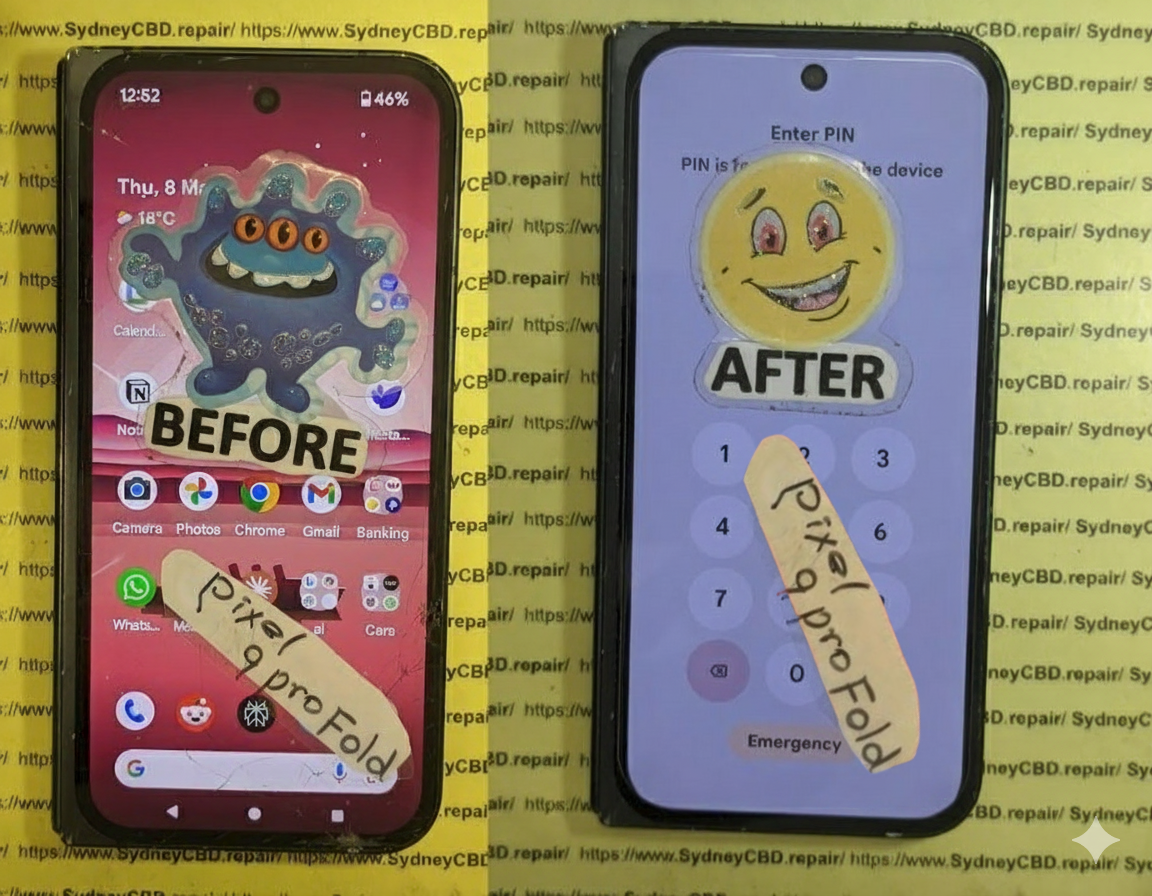
From Pieces to Perfection Restoring a Smashed Google Pixel Fold Using OEM Parts

From Pieces to Perfection: Restoring a Smashed Google Pixel Fold Using OEM Parts + 7 Proven Techniques
Introduction
The Google Pixel Fold represents a groundbreaking leap in mobile technology, combining the portability of a smartphone with the expansive experience of a tablet. Its sleek foldable design allows users to multitask, enjoy larger screens for media, and carry advanced technology in a compact form. However, with innovation comes vulnerability. The delicate foldable screen, intricate hinge mechanism, and ultra-thin internal components make the Pixel Fold prone to damage from drops, pressure, or even minor mishandling.
Restoring a smashed Pixel Fold isn’t just about replacing a screen or battery—it’s about understanding the device’s unique engineering, using high-quality OEM parts, and following precise repair techniques to ensure the device functions like new. Whether you’re a DIY enthusiast looking to attempt the repair yourself or considering professional service, knowing the step-by-step process, potential pitfalls, and the importance of genuine parts is essential.
In this comprehensive guide, we’ll explore everything from identifying damage, sourcing the right OEM components, executing meticulous repairs, to preventing future issues. By the end, you’ll have the knowledge and confidence to bring your Pixel Fold back from “pieces to perfection.”
Understanding the Google Pixel Fold: Features and Vulnerabilities
The Google Pixel Fold is a marvel of modern mobile technology, combining a tablet-sized screen with a pocketable form factor. Its foldable design offers versatility, but it also introduces vulnerabilities not seen in standard smartphones. The foldable hinge, ultra-thin OLED display, and flexible internal components are prone to cracking, creasing, or malfunctioning if mishandled. Understanding these weaknesses is the first step toward effective repair.
Unlike traditional smartphones, even minor pressure in the wrong spot can lead to permanent screen damage. Many users overlook hinge care, which can result in misalignment, screen separation, or internal component stress. Being proactive and understanding the Pixel Fold’s unique engineering ensures a higher success rate when restoring a smashed device.
Key Features That Require Special Care:
- Foldable OLED Display
- Ultra-thin Glass Layer
- Complex Hinge Mechanism
- Integrated Sensors and Cameras
- Advanced Battery Placement
Common Causes of Google Pixel Fold Damage
Understanding why the Google Pixel Fold gets damaged helps prevent repeated mishaps. Typical causes include:
- Accidental Drops: The foldable screen is delicate; even a minor drop can cause fractures.
- Pressure Damage: Sitting on the device, keeping it in tight pockets, or heavy objects on it.
- Water or Moisture Exposure: Despite some IP resistance, water can seep through hinge crevices.
- Heat Damage: Prolonged exposure to high temperatures can warp the hinge or delaminate adhesive layers.
- Software Glitches Leading to Hardware Strain: Unresponsive screens or fold sensors can cause repeated calibration issues.
These causes reinforce why timely intervention using high-quality OEM parts is crucial for restoring functionality.
Why OEM Parts Matter in Repair
OEM (Original Equipment Manufacturer) parts are designed specifically for your device. Using genuine OEM components ensures:
- Perfect Fit: Aligns exactly with Pixel Fold’s unique hinge and display system.
- Maintained Warranty Compliance: Avoids voiding potential service agreements.
- Enhanced Longevity: OEM components often last longer than third-party alternatives.
- Optimal Performance: Touch sensitivity, color calibration, and hinge mechanics remain accurate.
Third-party replacements can save money but may compromise device integrity or screen quality, leading to faster wear.
Tools and Equipment Needed for Pixel Fold Repair

Before diving into repair, ensure your workspace is equipped with:
- Precision screwdriver set
- Plastic pry tools and spudgers
- Heat gun for adhesive loosening
- Anti-static mat and wristband
- Suction cup and tweezers
- Replacement OEM parts: screen, battery, hinge components
Having the right tools drastically reduces repair risk and improves efficiency.
Preparing Your Workspace for Repair
Creating a controlled environment is essential:
- Clean Surface: Dust can scratch internal components.
- Good Lighting: Spot issues in tiny connectors and adhesive layers.
- Anti-static Measures: Prevent circuit board damage.
- Organized Parts Tray: Avoid losing screws or small components during reassembly.
Preparation is half the battle; rushing increases chances of irreversible damage.
Step-by-Step Guide to Screen Replacement
Replacing the Pixel Fold screen is intricate but achievable with patience and proper OEM components.
Removing the Damaged Display
- Power off the device.
- Heat the edges gently to soften adhesive.
- Use a suction cup and spudger to lift the screen without bending the OLED.
- Disconnect ribbon cables carefully to avoid tearing.
Installing the New OEM Screen
- Align the new screen precisely with the hinge and frame.
- Connect ribbon cables securely.
- Test functionality before sealing with adhesive.
- Press gently to ensure adhesion without warping.
Battery Replacement and Optimization
A damaged battery can reduce performance even after a screen replacement. When replacing:
- Use OEM batteries only.
- Avoid bending or puncturing the battery.
- Calibrate after installation by charging to 100% and discharging fully once.
Proper battery replacement ensures longer lifespan and prevents overheating.
Repairing Internal Components
Other internal repairs include:
- Logic Board Fixes: Address short circuits or flex cable damage.
- Camera Replacement: Carefully detach connectors.
- Hinge Adjustment: Replace worn bushings or lubricate hinge pins.
- Sensor Alignment: Ensure fold detection sensors function properly.
All repairs require OEM parts and patience to avoid cascading failures.
Reassembling the Device Safely
Reassembly involves:
- Using correct screws for each component
- Applying adhesive only where necessary
- Aligning hinge for smooth folding
- Checking screen flushness and touch sensitivity
Skipping any step can result in poor fold mechanics or uneven display.
Software Calibration After Repair
Once hardware is restored:
- Check touchscreen responsiveness across the fold
- Test fold sensors and animations
- Update software to the latest patch
- Run built-in diagnostics to confirm component integrity
This ensures the device functions as if it were new.
Preventative Tips to Avoid Future Damage
- Use a robust foldable case
- Apply high-quality screen protectors
- Avoid sitting on the device or storing in tight spaces
- Keep away from heat and moisture
- Schedule routine diagnostics if fold responsiveness declines
These simple steps extend the Pixel Fold’s lifespan dramatically.
Cost Analysis: DIY vs Professional Repair
| Factor | DIY | Professional |
|---|---|---|
| Cost | Lower upfront but risk of mistakes | Higher but includes warranty |
| Tools | Must buy precision tools | Provided by technician |
| Time | Can take hours | Typically same-day or 1-2 days |
| Risk | High if inexperienced | Low, experts handle delicate parts |
| Warranty | None if DIY | Usually 90 days+ with OEM parts |
While DIY is tempting, professional repair ensures longevity and preserves device value.
FAQ Section
Q1: Can I use non-OEM screens for Pixel Fold repair?
A1: Technically yes, but non-OEM screens can have reduced durability, touch sensitivity issues, and color inaccuracies.
Q2: How long does a Pixel Fold screen replacement take?
A2: With experience, 60–90 minutes. For DIY beginners, allow 2–3 hours.
Q3: Does replacing the battery affect fold performance?
A3: Only if improper handling bends internal components; OEM batteries maintain normal fold mechanics.
Q4: How can I prevent hinge damage?
A4: Avoid placing stress on the fold, keep it free of dust, and consider professional lubrication.
Q5: Is software calibration necessary after screen replacement?
A5: Absolutely. Calibration ensures touchscreen responsiveness and correct fold detection.
Q6: What warranty applies to OEM part replacements?
A6: Typically, professional repairs with OEM parts provide at least 90 days warranty, covering defects and functionality issues.
Conclusion

Restoring a smashed Google Pixel Fold using OEM parts is both feasible and highly recommended. OEM components preserve device integrity, ensure optimal performance, and reduce future maintenance. Whether opting for professional repair or a carefully planned DIY approach, understanding the unique vulnerabilities of the Pixel Fold, using the right tools, and following precise steps can return your foldable device to “as-new” condition. For additional support and genuine parts, visit Google Support.
David from Sydney CBD Repair Centre – The Best place to fix mobile phones as 7 Years In A Row! Top Mobile Phone Repair In Sydney. More than 2000 Positive Reviews on Google and Same Day Repairs.
We take pride in delivering exceptional repair services for all major phone brands including Apple, Samsung, Google, and more. Our expert technicians use only genuine parts and offer 90days warranty on repairs. Located in the heart of Sydney CBD, we’re your one-stop solution for all mobile device repairs.
Our commitment to excellence has earned us the trust of thousands of satisfied customers. Whether it’s a cracked screen, battery replacement, or water damage repair, we handle it all with professional care and expertise. Walk in today and experience why we’re Sydney’s #1 choice for mobile phone repairs.
Visit us for:
✓ Same Day Express Repairs
✓ Genuine Parts Guarantee
✓ Professional Technicians
✓ Competitive Pricing
✓ 2000+ 5-Star Google Reviews
✓ 7-Time Award Winner for Best Phone Repairs
Sydney CBD Repair Centre – Where Quality Meets Reliability.
Call : +61280114119
Website: https://SydneyCBD.repair/locate-us

