



❤ Apple Watch Series 5

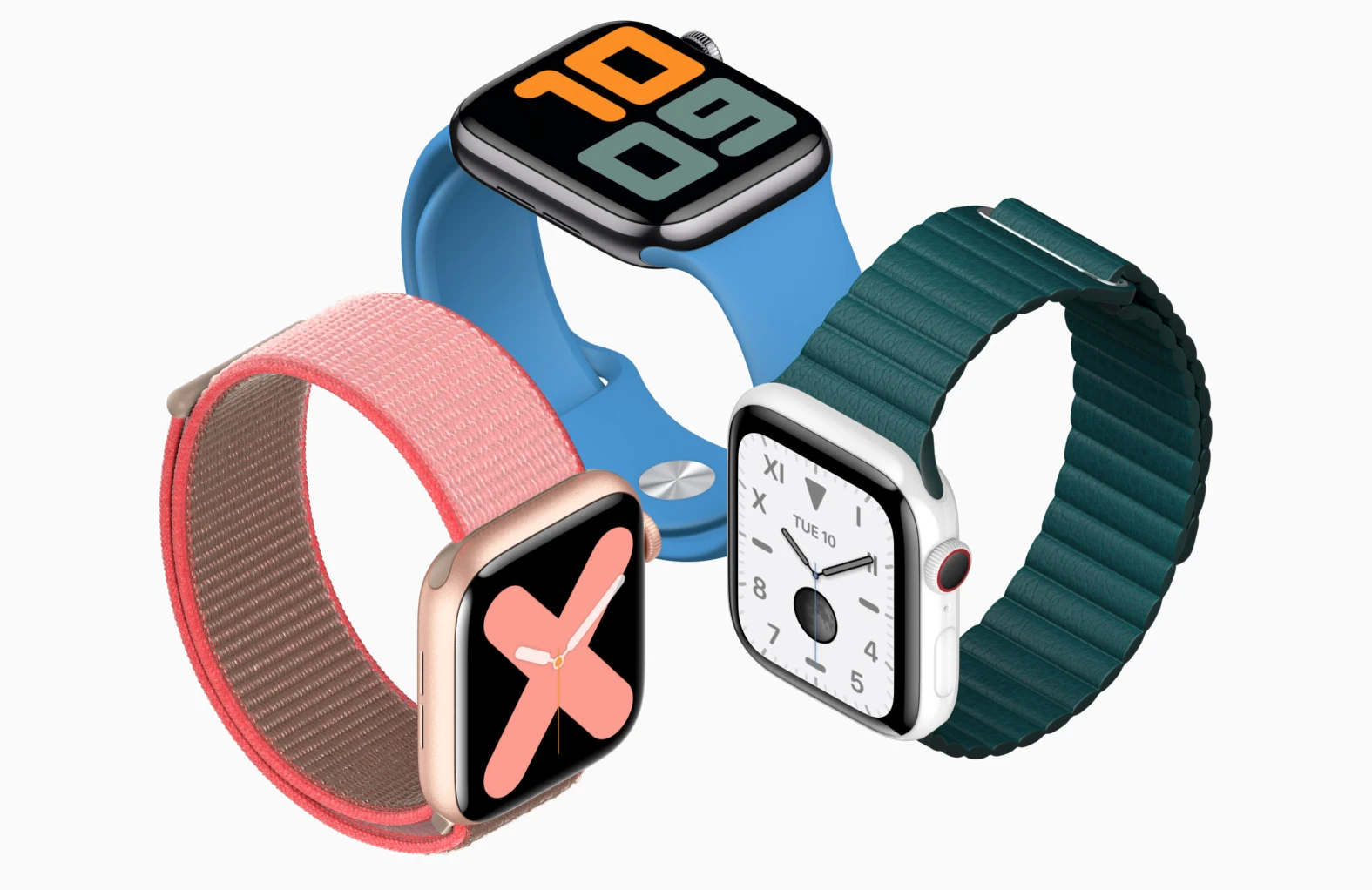
You’ve never seen a watch like this.
ALL VERSIONS
44MM (LTE) 40MM (LTE)
LTE versions: A2156 40mm, A2157 44mm (Global); A2094 40mm, A2095 44mm (USA, LATAM, Canada)
| NETWORK | Technology | GSM / HSPA / LTE |
|---|
| LAUNCH | Announced | 2019, September |
|---|---|---|
| Status | Available. Released 2019, September |
| BODY | Dimensions | 44 x 38 x 10.7 mm (1.73 x 1.50 x 0.42 in) |
|---|---|---|
| Weight | 47.8 g (1.69 oz) | |
| Build | Glass front (Sapphire crystal), ceramic/sapphire crystal back, stainless steel frame | |
| SIM | eSIM | |
| 50m water resistant ECG certified (region dependent SW application; HW available on all models) |
| DISPLAY | Type | LTPO OLED capacitive touchscreen, 16M colors |
|---|---|---|
| Size | 1.78 inches, 10.0 cm2 (~60.0% screen-to-body ratio) | |
| Resolution | 448 x 368 pixels (~326 ppi density) | |
| Protection | Sapphire crystal glass | |
| 3D Touch display 1000 nits max brightness (advertised) Always-on display |
| PLATFORM | OS | watchOS 6.0, upgradable to 6.2.8 |
|---|---|---|
| Chipset | Apple S5 | |
| GPU | PowerVR |
| MEMORY | Card slot | No |
|---|---|---|
| Internal | 32GB 1GB RAM |
| CAMERA | No |
|---|
| SOUND | Loudspeaker | Yes |
|---|---|---|
| 3.5mm jack | No |
| COMMS | WLAN | Wi-Fi 802.11 b/g/n |
|---|---|---|
| Bluetooth | 5.0, A2DP, LE | |
| GPS | Yes, with A-GPS, GLONASS, GALILEO, QZSS | |
| NFC | Yes | |
| Radio | No | |
| USB | No |
| FEATURES | Sensors | Accelerometer, gyro, heart rate (2nd gen), barometer, compass |
|---|---|---|
| Natural language commands and dictation (talking mode) |
| BATTERY | Non-removable Li-Po 296 mAh battery (1.13 Wh) | |
|---|---|---|
| Charging | Wireless charging | |
| Stand-by | Up to 18 h (mixed usage) |
| MISC | Colors | Space Black, Silver, Gold |
|---|---|---|
| Models | A2156, A2157, A2094, A2095 | |
| Price | About 750 EUR |
The highest praise I can give the new Apple Watch Series 5 is simply this: it’s an Apple Watch.
There’s a running joke in my recent iPad reviews: I just get to say “it’s an iPad,” and everybody knows what that means. It’s a sign that the product isn’t changing year over year, sure. But more importantly, it’s a promise that it’s good, that it will do what you expect it to do, and that you don’t need to overthink how it will fit into your life.
Not very many products reach that level. Even the iPhone has ups and downs, with some years being a little more inconsistent than others. But minus a rough start and a cellular hiccup a couple of years ago, the Apple Watch has been on a very steady trajectory: slightly better every year. It starts at the same $399 price point as last year, and cellular or material upgrades will add to that cost.
Compared to the Series 4, the Series 5 has only a few minor updates. Chief among them is a new always-on screen. Compared to the rest of the smartwatch market, the Apple Watch Series 5 is in a completely different league.
GOOD STUFF
- Finally, an always-on screen
- Big, beautiful display
- New apps round out its capabilities
BAD STUFF
- Battery life hasn’t improved
- Still no third-party watchfaces
- Doesn’t work with Android phones
Relative to the Series 4, there are four new things on the Apple Watch Series 5. The first is that Apple is offering new materials for the casing. You can get it in the standard aluminum and steel, but you can also spend more for titanium or ceramic now.
There are some subtle weight differences on the more expensive materials, and they also have sapphire glass on the front of the Watch. But you should not spend the extra money on those more premium materials in the hope that they’ll be better from a feature perspective. They’re the same Apple Watch; you’d just be paying more for something fancier. Some people like doing that!


The second new feature is the big update this year: an always-on screen. I feel like a lot of users have been asking for this since the very first Apple Watch was announced five years ago alongside the iPhone 6 and Apple Pay. It’s something other smartwatches were already doing back then, and it was annoying that Apple didn’t figure out a way to do it.
Now it has, and in typical Apple fashion, it’s saying it was able to do so because of some slick new screen technology that mitigates the usual battery trade-offs. Specifically, Apple says it can dynamically change the screen’s refresh rate from as fast as 60Hz to as slow as 1Hz, updating just once per second.
Doing that allows the screen to draw radically less power when it’s in ambient mode. It also means that if you want an always-on display, you’re going to have to pony up for the Series 5. It’s not something that will be added to older models via software updates.
The technology that makes that possible is a low-temperature polycrystalline oxide (LTPO for short) display that Apple developed. The tech behind an LTPO version of an OLED screen is interesting — especially since it was first introduced in the Series 4 — but it’s not something you really need to understand. The screen looks identical to the Series 4; it’s just as big and bright.
What last year’s Watch lacks are the chips to control the refresh rate on that LTPO screen so it won’t be able to do always-on. Specifically, the Series 5 has an “ultra-low power display driver, efficient power management integrated circuit and new ambient light sensor,” according to Apple.

I love the always-on screen on the Series 5. Apple’s implementation is better than other smartwatches I’ve used for two reasons: it legitimately doesn’t hurt the battery life as much, and Apple keeps a little color visible in ambient mode.
For whatever reason, I’ve never been able to get earlier Apple Watches to show their screens with subtle wrist movements. I’ve always had to cartoonishly raise my arm. An always-on screen means I am a little bit less of a jerk in conversations and meetings.
AN ALWAYS-ON SCREEN WAS MY NUMBER ONE FEATURE REQUEST — IT TOOK FIVE YEARS, BUT WE GOT IT
But the big question is battery life: Apple claims it still gets 18 hours with standard use, and I have gotten that. So, box checked — except that the Series 4 usually outperformed that estimate. I won’t go so far as to say that the Series 5 gets notably worse battery life than the Series 4, but at best, it’s on par. You’ll be charging it every day.
But let’s not grade on a curve here. The Apple Watch is better than any other computer-on-your-wrist-style smartwatch by a country mile, but there are other watches with smart features that can last for days, weeks, or even months. The Garmins and Fitbits and Withings of the world are all meant for different things than the Apple Watch, but many can do some of the basics, like notifications and weather, nearly as well.
The last two new features on the Apple Watch Series 5 are a built-in compass and cellular bands that can work internationally. The former could be useful for day hikers, while the latter really only allows the cellular version to make emergency calls anywhere in the world. To get service in more places, you’ll need to wait for Apple to make more carrier deals.

So to sum up: new case materials, new always-on screen, a compass, and more cellular bands. All in all, that’s a very minor update. But the truth is that Apple could have done literally nothing, and the Apple Watch would still have been the best smartwatch for iPhone users by far.
If you have a current Apple Watch and are thinking of upgrading, I strongly recommend you wait for watchOS 6 to arrive for your current Watch. It might be good enough for you to hang on to what you have or, more rarely, these updates can make older Watches feel slower. Either way, it’s worth it to wait a bit.
The big headline feature for watchOS 6 is that it has an independent App Store that allows you to download and install apps without needing your iPhone. It does exactly that, but make sure you have your iPhone handy the first time to enter some passwords. There will be other times when some of the apps will not work on your Watch until they can communicate with a paired app on your iPhone. Apple tells me that after watchOS 6 launches, many fully independent Watch apps will be available and featured on the main page of the Watch version of the App Store.
I think the hope is that an onboard App Store may spur more usage and make supporting the Apple Watch more worthwhile to third-party developers. We’ll see, but I’m not holding my breath just yet. So far, it’s been a moneymaker mainly for Apple. Apple has done a decent job of curating apps for the main page on the App Store, but otherwise, it’s not as easy to browse as it is on your phone.
The new App Store on the Watch doesn’t make it any more independent from the iPhone, however. You still need an iPhone to set up and use the Apple Watch, even if you have a Watch with an LTE connection and its own version of the App Store. This is still an accessory to the iPhone and not a truly independent device. Though, with watchOS 6, you can start to see the hazy outlines of that path.
Alongside the App Store are a few new and updated apps directly from Apple. The most important in my mind is the new Cycle Tracking app for tracking menstrual cycles. It took Apple longer than it should have to prioritize features designed for the health of people who have periods. But now that it’s here, it seems as though the company has done a good job.
Apple has taken a cautious approach. The complication doesn’t show information, for example, and it won’t be overconfident in guessing the dates for your predicted periods and fertility windows. If you’re planning on using this to gather data for family planning purposes, you should talk to your doctor before acting on any of the data this app collects.
Apple also has put some thought and care into whether and when to show various Cycle Tracking options, depending on the age and gender information it knows. You can also turn certain types of tracking (like fertility) off if you want. There’s a specific onboarding flow that happens on the phone only because it’s better able to communicate information and nuance than your tiny Watch screen.
And if you’d like to remove the Cycles app entirely, for the first time, watchOS 6 will allow users to delete some of Apple’s own apps from the Watch. (To do that, you need to have your app view set in the hexagonal grid view. Then, long-press any app to go into jiggly mode, at which point, you’ll be able to tap an X to uninstall.)
Other new apps include an updated Reminders app and a Voice Memos app, both of which sync automatically with their paired apps on the iPhone. There’s also a Calculator app. (Why the Apple Watch has a first-party Calculator app while the iPad does not is a riddle for all iPad users.)
The Apple Watch can now also detect ambient noise. If it gets too loud, it will warn you, and it will also track your overall ambient noise level over time. It confirmed that the BART trains in San Francisco are ridiculously loud.
Apple put in a few new watchfaces, as usual. And as usual, I find them to be nice but always a few degrees off from what I actually want. I respect that Apple is opinionated about the aesthetics of the Apple Watch, but I’m increasingly annoyed that it won’t allow third-party watchfaces.
However, Apple has finally made a change that I’m over the moon about: on most watchfaces, when you set a custom color, it sets all of the complications to monochrome to match that color. I found too many of them to be garishly colorful before, and now I can tone them down to my preferred color.
Last and (given its reputation) possibly least, Siri has a few small updates. It’s able to recognize music when you ask for it, and it can present answers to questions with web links now, too. Yes, you can still open webpages on the Apple Watch. And yes, it’s still as adorable as ever. Fortunately, it also still defaults to opening specific articles in Safari Reader Mode.
If you’re interested in the cellular version, I can report that it works about the same in watchOS 6 as it did before, which is to say everything works, but it all feels just a little slower and worse than it would if you had your phone with you. Calls aren’t as crisp, latency is a bit higher when using data, and, of course, it’ll ding your battery more. But again, slightly worse than ideal for the Apple Watch is still many multiples better than most of the competition.

It is about time that Apple added an always-on screen to the Apple Watch Series 5, but that’s not the best thing about it. Nor is it the LTPO technology that enables it or the new compass or the noise meter or any single one of the features I’ve brought up in this review.
The best part of the Apple Watch is that I’m able to talk about those features at all. Every other smartwatch I have used in the past few years (and, reader, I have used a lot) has failed to cross very basic thresholds of usability. Some don’t last more than 12 hours, some can’t seem to open apps in fewer than 10 seconds, some are hard to navigate, and some have really buggy software.
The lion’s share of the blame for those issues lies with the various companies that have tried and failed to make great smartwatches. But I want to save some portion for Apple because it allows the Apple Watch to have deeper and better integrations with the iPhone than it will give to third parties. It automatically “just works” with Apple’s apps, notification frameworks, and — critically — iMessage.
That Apple integration cuts both ways. Because it’s tied so closely to the iPhone, the possibility that it will ever be an option for Android users seems to be getting smaller. That’s a shame because there are many, many more Android users, all of whom don’t have great smartwatch options.
In fact, look closer at the Android world, and you will see just how far ahead the Apple Watch truly is. Google’s Wear OS platform is in the midst of its umpteenth strategic reboot, and it’s not going well. Samsung’s Tizen platform is better, but it has struggled to gain wider adoption among anybody but Samsung users. Fitbit has hung on to a loyal following for its basic fitness trackers, but its attempts at more advanced smartwatches have been disappointing.
It’s as if the Apple Watch is in high school and taking AP courses while everybody else is repeating the 7th grade for the third time. Sure, the Apple Watch Series 5 hasn’t reached anything close to its full potential yet, but right now, this thing is an overachiever.
It’s an Apple Watch.

