Depending on the device, this issue can result in the primary user being unable to access media storage. Alternatively, the issue can reboot the device with a “Factory data reset” message. If this message is accepted, data that is not backed up can be lost, and if it is declined, the device repeatedly reboots with the “Pixel is starting” message.
Google starts by saying that this storage issue impacts the “Pixel 6 and later models” that “have both received the Android 14 update and have multiple users (other than the primary user) set up.” This includes “users, guests, restricted profiles, and child users,” but not simply having more than one Google Account signed in “within the primary user or work profiles.”
The company has already rolled out a Google Play system update to “help prevent this issue from being triggered on additional devices.” To install, open Settings > Security & privacy > System & update > Google Play system update. The latest version we’re seeing today is October 1, 2023.
For those currently “unable to access media storage,” Google is working on a system update that “will repair the issue and restore access to media files without requiring a factory reset.”
Google is also “investigating methods that may be able to recover some data” for devices in a “Pixel is starting” boot loop. However, this seems more tentative: “We’ll provide more information as soon as it is available.”
For all other users, including those that factory reset their device, Google says to avoid “creating or logging into a secondary user on the device until the OTA update is available.”
Google ends with an apology:
We’re sorry for the inconvenience this has caused, and we appreciate your patience.
Android 14 breaks storage on Pixel 6 phones with multiple user profiles
Android 14 is a solid update to Google’s smartphone OS, but the update does seem to be causing some significant issues regarding user profiles on Pixel 6 series devices.
Following the update to Android 14 that rolled out earlier this month, some Google Pixel 6, Pixel 6 Pro, and Pixel 6a owners are seeing some considerable issues with their devices, specifically around storage becoming unusable. A growing number of users across Google’sforums, Reddit, and elsewhere reporting that their Pixel 6 and Pixel 6 Pro devices are drastically hindered, to the point of breaking most tasks users would perform on their devices.
The storage problem takes effect if the user, before installing Android 14, had multiple profiles on the device.
Following the installation of Android 14, the main profile on a Pixel 6 series device seems to lose access to storage, which prevents users from taking photos or videos, downloading files, and both installing or uninstalling applications. However, on the second profile, things seem to work as expected.
Other limitations include that apps report the device as having no available storage, Google Photos can’t refresh a user’s library (only showing low-quality previews), and files can’t be accessed via USB from a connected PC, as one of our readers explained in an email.
Given that Android’s user profiles are more of a niche feature on smartphones (primarily used for personal and work profiles), this issue doesn’t appear excessively widespread, but the symptoms of the problem are affecting users pretty consistently.
Google has, so far, not offered any solution for this issue or public statement.
As was first announced at the Made by Google event at the beginning of the month, you can now use the Google Assistant to ask if an incoming call from a contact is urgent.
For years now, Pixel phones have offered an option to “Screen call,” allowing the Google Assistant to speak to an incoming caller on your behalf to find out who they are and what they want. This method is surprisingly effective for filtering out unwanted calls from unknown numbers, as many spam callers will hang up automatically, but it’s much less useful when you know who’s calling.
If someone in your contact list calls, you have the same option to screen their call and have the Assistant ask for more information. You can ask anyone who’s ever accidentally used the Assistant to screen a call from a family member why this is a terrible idea.
To address that, the Google Assistant call screening has gained a new option that only appears for people who are on your contact list. Appearing in the incoming call screen as “Ask if urgent,” tapping the option gives your friend or family member a somewhat friendlier greeting from the Google Assistant.
Hi I’m a Google virtual assistant on a recorded line. The person you are trying to reach wanted me to check is it urgent?
As before, Assistant transcribes and displays what the caller says in response, while the Phone app offers tappable options to ask for more information.
The feature was first demonstrated at the Pixel 8 unveiling event, with the company confirming the feature would be rolling out soon. As noted by Mishaal Rahman on X, the rollout has begun and includes older Pixel phones, not just the newly released Pixel 8 and Pixel 8 Pro. We’ve confirmed the new “Ask if urgent” option appeared on a Pixel 7 Pro over the weekend, but let us know in the comments if it appears on your older Pixel phone too.
I guess when Google said "soon" they meant "immediately" then. At least it's good to know this isn't exclusive to the Pixel 8, since my tipster saw this on their Pixel Fold.
Google brings Action Blocks customization to all Assistant Routines
Google is rolling out a number of new accessibility features, including the ability to use Action Blocks as Assistant Routine shortcuts on your Android homescreen.
Today, going to Assistant Settings > Routines lets you select one and add it to your homescreen as an app icon-sized shortcut that can start the macro.
Google will soon let you have Routines appear as “Custom rounded” or “Custom rectangle” widgets on your homescreen, with the old icon shortcut still supported. Besides being resizable, these Google Assistant Routine widgets support custom images and text without having to download the dedicated Action Blocks app.
Research has shown that this personalization can be particularly helpful for people with cognitive differences and disabilities and hope it will bring the helpfulness of Assistant Routines to even more people.
Google Maps Live View last year added the ability to search for nearby places, like restaurants, shops, transit stations, and ATMs, within the AR interface. Available in select cities, this feature is adding screen reader support starting today on iOS, with Android following “later this year.”
If your screen reader is enabled, you’ll receive auditory feedback of the places around you with helpful information like the name and category of a place and how far away it is.
Google Maps and Search business listings are gaining support for a “new identity attribute for the disability community.”
Google Maps is rolling out wheelchair-accessible walking routes. These stair-free routes can also be helpful for “people traveling with things like luggage or strollers.” This will be available “globally on iOS and Android wherever we have data available.”
Similarly, wheelchair accessibility information will be surfaced in the Android Auto and Automotive apps to find step-free entrances, as well as locations that have accessible parking, seating, and restrooms. Look for a wheelchair icon next to the search results.
Chrome on desktop can already “detect URL typos and suggest websites based on the corrections.” This is now coming to the Android and iOS browsers. It’s especially meant for people with “dyslexia, language learners, or anyone who may have typos.”
Finally, there’s the new Magnifier app for Pixel phones that Google designed in collaboration with the Royal National Institute of Blind People and the National Federation of the Blind.
Exactly two weeks after the previous release, Android 14 QPR1 Beta 2.1 is rolling out today with a handful of bug fixes, but the Pixel 8 and 8 Pro aren’t getting updated right away.
There are just three fixes for Pixel devices, which are getting U1B2.230922.010 today with the October 2023 security patch:
Fixed issues with biometric authentication, such as an issue that sometimes prevented the under-display fingerprint sensor from activating while always-on display features were enabled.
Fixed an issue where, in some cases after swapping SIM cards on a device, the device couldn’t connect to cellular service.
Fixed various issues that were impacting system stability and performance.
Google says the “Pixel 8 and 8 Pro will receive this update at a later time.” The initial Beta 2 update rolled out a week ago.
The OTA and factory images are now available, while the on-device OTA is also rolling out immediately (66MB on the Pixel Fold and 7 Pro).
Google wants every Android version to be ‘higher quality than the previous release’
Dave Burke, VP of Engineering for Android, was interviewed during The Android Show today and shared a lot of interesting tidbits, especially around quality and performance.
In the context of Android releases, Burke considers quality the “number one feature” given how much we use our phones:
If you think about how much we depend on our devices and how much we use them [in] a day, it’s just really important that the device runs really, really well. Really, really reliably. The highest performance, highest fidelity.
The Android team has a “pledge” internally to “ensure that every release was higher quality than the previous release by a set of expanding metrics that we measure in the lab and in the field.”
We’ve been holding ourselves to that. It’s difficult, I can tell you, because you’re only as good as the weakest metric. So you’ve got to chase everything down, but it’s really causing us to force the bar higher and higher.
Burke described one way the team is doing that:
Even internally, we’re looking at actually changing some of our developer practices in 2024 where rather than sort of go[ing] off for a year and work[ing] on a release for a very long time, we break that up into chunks internally so that we sort of keep the branch green as we go.
From the description we have today, this just seems to be an internal change rather than anything that would impact the yearly cycle.
On Android 14, Burke highlighted expression (gen AI wallpapers, lockscreen clocks, and shortcuts) and performance as the big tentpoles. Burke said the team “may not have talked enough” about performance. (Frankly, Google should have discussed it on-stage at I/O in May.)
We’ve done a ton of work to reduce CPU activity of background apps, and the result is that there’s 30% less cold starts now on Android 14. Cold starts are when you have to literally read the code pages off the flash and read them into memory before you execute them. A 30% reduction is pretty dramatic, and you feel that as a user.
This involved increasing the number of cached processes, but doing so risks increased CPU usage and, therefore, battery drain. Android 14 does a better job of properly freezing the processes.
Burke also mentioned how large-screen-related work, like the transient taskbar, was originally part of Android 14 but moved up into Android 13 (QPR2) as Google worked to be more competitive in the space and to support foldables.
Following this morning’s announcement, Android 14 is now rolling out to the following Pixel devices: 4a 5G, 5, 5a, 6, 6 Pro, 6a, 7, 7 Pro, 7a, Tablet, and Fold.
There are 26 security issues resolved in the Android 14 October patch dated 2023-10-01, 26 for 2023-10-05, and one for 2023-10-06. Vulnerabilities range from high to critical. The dedicated bulletin for Google devices has 28 additional security fixes.
In a repeat of the schedule from two years ago, Google looks to be rolling out Android 14 on the same day as the Pixel 8 launch event.
According to Telus, “Android U” has an “Approx date” of Wednesday, October 4. The Canadian carrier says this update is coming to the Google Pixel 7a, Pixel 7 Pro, Pixel 7, Pixel 6a, Pixel 6 Pro, Pixel 6, Pixel 5, Pixel 4a (5G), and Pixel 4a.
Everything about the last device on that list is correct. The Pixel 4a is no longer getting OS updates and was never eligible for the Android 14 Beta. The carrier says “All dates are approximate and subject to change,” and that to “Please note posted dates reflect when the update is targeted for release but can take a few weeks to roll out to all devices.”
This Software Update Schedule list was updated on September 29.
Many expected the upcoming OS to hit stable in early September. Instead, Google looks to be rolling out Android 14 on the same day it unveils the Pixel 8 and 8 Pro. The last time this happened was with Android 12 and the Pixel 6. That update with a Material You overhaul warranted the later release. From what we have today, Android 14 is not that big of a release and doesn’t feature major changes.
Announcing new phones and software on the same day is somewhat overwhelming from a news perspective, but does give existing owners something to immediately experience.
Android 14 Beta 5.3 was the last preview on September 6 before Google started testing Android 14 QPR1. Even though the stable release is not out yet, Google has to start testing the next Quarterly Platform Release in order to hit a December launch.
For the third time this cycle, Google is rolling out another bug fixer with Android 14 Beta 5.3 for all Pixel devices. With this patch, it does seem the stable release might be further off.
There are nine fixes with UPB5.230623.009 for Pixel phones, as well as the Pixel Fold and Tablet. It’s notable that Google has moved back to a single build. Looking ahead, this update is still running the August 2023 security patch, with another release bringing September’s seeming likely.
Fixed an issue where apps crashed in some cases after a CallStyle notification was posted.
Fixed various issues that could cause call or carrier service interruptions.
Fixed an issue where the system was using an inefficient path when placing CPU restrictions on apps running in the background.
Fixed issues with SurfaceFlinger that were causing a loss in system performance.
Fixed an issue on Pixel Fold and Pixel Tablet devices where the taskbar sometimes turned invisible while interacting with it.
Fixed an issue on Pixel Fold and Pixel Tablet devices where the animation on animated wallpapers stuttered when launching apps.
Fixed an issue on Pixel Fold devices where the interface layout was misaligned while customizing the Home screen.
Fixed an issue on Pixel Fold devices where the clock on the lock screen was flickering while animating.
Fixed various issues that were impacting system stability and performance.
If you’re currently enrolled in the Android Beta Program and running the latest Beta 5 builds, you will automatically get offered an over-the-air (OTA) update to Android 14 Beta 5.3.
Android 14 Beta 5.3 with the August 2023 security patch is available for the Pixel 4a 5G, Pixel 5, Pixel 5a, Pixel 6, Pixel 6 Pro, Pixel 6a, Pixel 7, Pixel 7 Pro, Pixel 7a, Pixel Tablet, and Pixel Fold, as well as the Android Emulator.
Instead of the stable release of Android 14 for Pixel phones, as well as the Fold and Tablet, we got a series of Google app updates and updated branding this morning. While unexpected, this isn’t Google’s latest OS release just yet.
With Beta 5 at the start of last month, Android 14 looked on track for a stable launch as soon as mid-August, which would have mirrored Android 13’s August 15th rollout. At the time, Google said the “official release” was “only weeks away.” Beta 5 was followed by 5.1 and 5.2, with no other release this cycle seeing a second patch. While Beta 5 was the “last scheduled update in our Android 14 beta program,” Google doesn’t consider patches to be scheduled, so there’s nothing unexpected about those bug fixers.
With no launch in August, the next window shifted to September 5th (since the first Monday of the month is a holiday in the US). Considering that window has now also passed, let’s look at the recent history of Android launches:
The latest launch in recent memory is Android 12, which had an AOSP release in early October followed by an October 19 Pixel launch tied to the Pixel 6 and 6 Pro announcement. However, in the case of Android 12, the last beta milestone (5) came a month before (in September). Before that, Google has launched in August or September since 2016.
The fact we don’t have a stable yet is complicated by the fact that Android 14 does not seem to be a major release from a visual or new features perceptive. Given the Material You redesign, it made sense why Android 12 took so long.
Android 14’s stage presence during the I/O 2023 keynote in May was unusually limited. We’ve been beta testing lockscreen clock and customization shortcuts for some time now, while generative AI wallpapers hardly seem like a showstopper (and are something I’d expect to debut first on the Pixel 8 anyway before coming to older phones with the December 2023 Feature Drop).
Speaking of Pixel Feature Drops, there clearly wasn’t one today. There also wasn’t one in September of 2021 or 2022, with Google waiting until December both years.
For those waiting, Android 14 Beta 5.2 is quite stable on the Pixel 7 series, Tablet, and Fold. I’ve been using it as my daily driver for several weeks now without issues, thus adding to the intrigue of why it isn’t out yet.
It will be interesting to see whether there will be Android 13 or Android 14 Beta 5.3 with the September security patch at this point. Depending on how many bugs are addressed in the latter, that could signal how far away we are from a stable launch.
Google updates the Android brand with new logo and 3D robot
Following our previous report, Google is officially unveiling a new 3D logo for Android. The broad goal of this updated branding is to “help connect Android to Google,” and it follows the previous modernization in 2019.
Each time we overhaul our branding, we evaluate not only changing needs, but also future goals. We know people today want more choice and autonomy, and we want our brand to be reflective of Android: something that gives people the freedom to create on their terms. As an open platform, it’s important that both our technology and brand are an invitation for people to create, connect and do more with Google on Android devices.
Google says it drew “inspiration from Material design to complement the Google brand palette, as well as be adaptable.”
It starts by moving away from Android’s “longstanding lowercase stylization” to help elevate the logo and add “more weight to its appearance when placed next to Google’s logo” (as seen above in the top-left corner).
While we’ve added more curves and personality unique to Android, the new Android stylization more closely mirrors Google’s logo and creates balance between the two. We hope these small but significant updates to the Android typeface will better communicate the relationship between Android devices and the Google apps and services people already know.
The other big aspect is the Android robot, which, since 2019, has appeared alongside the wordmark. In going 3D, Google gave the bugdroid “more dimension, and a lot more character.” It can be depicted with different materials, colors, and even accessories.
As a visual signifier of our brand, we wanted the bugdroid to appear as dynamic as Android itself.
Google has also updated the full-body appearance to “ensure it can easily transition between digital and real-life environments, making it a versatile and reliable companion across channels, platforms and contexts.” The body is now a domed capsule instead of having a flat bottom and legs protruding from it. With the last branding update, it seemed that Google was moving away from this version.
The updated logo, 3D bugdroid, and brand identity will “appear on Android devices and in more places starting this year.”
Redesigned Assistant At a Glance widget rolling out to all Android phones
Android is rolling out its quarterly drop of new features today, with a redesign of the Assistant At a Glance widget being the highlight.
The current widget available on all Android phones was never updated when the fixed Pixel Launcher version was updated with Android 12. Now, it features a Material You redesign in which the weather is prominently shown in an M3 shape at the right, while text appears at the left. Two lines of text are supported, while a three-dot overflow menu provides additional options, as we previously enabled.
This At a Glance redesign is available for all Android 9+ devices and is rolling out starting today.
In terms of new app features, Google is rolling out the ability to ask questions – by voice or typing – about images with Lookout. Announced back in May, this uses a visual language model to describe images that do not have alt text. Lookout is also adding support for 11 new languages (including Japanese, Korean, and Chinese) for a total of 34.
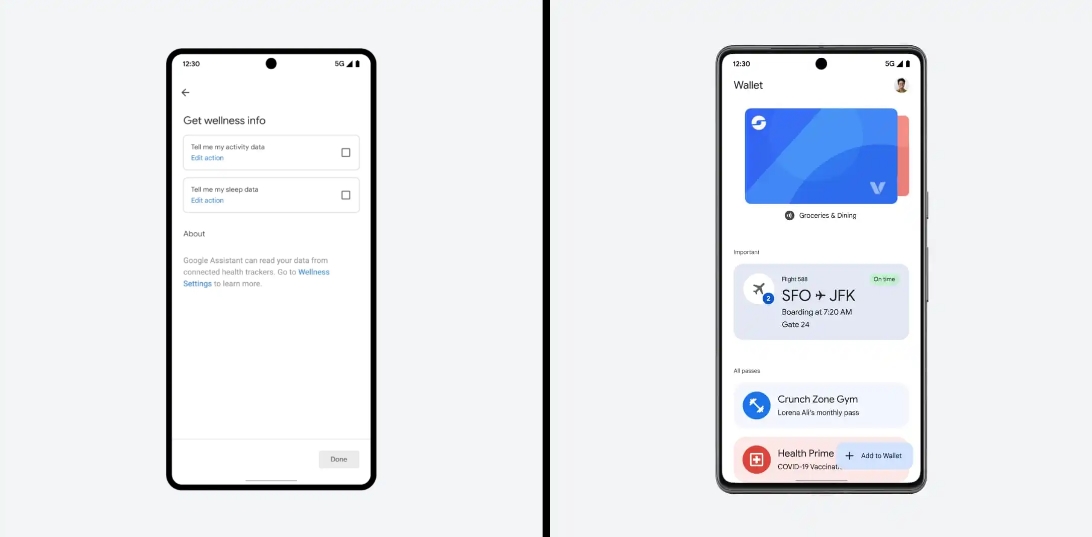
Google Wallet is also rolling out the previously announced ability to import/upload passes with QR codes or barcodes. This could be used with some library or gym cards, parking passes, and tickets.
You can add what time you slept and how many hours (from Google Fit or Fitbit) to your Google Assistant “Good morning” Routine.
Rounding out the app front are Android Auto apps from Zoom and Webex that will let users join conference calls (by audio) and browse meeting schedules. Google says all “active calls are managed through Android Auto,” with the ability to mute your microphone as needed.
Following the last update just over a week ago that did not introduce any new features, Google is rolling out Android 14 Beta 5.1 as another bug fixer.
While Beta 5 was said to be the “last scheduled update” and that the “official release is next,” Google does not consider .1 patches to be milestones. A similar thing happened during last year’s preview cycle.
There are just four fixes with UPB5.230623.005 for Pixel phones and UPB5.230623.005.A1 on the Pixel Fold and Tablet. Notably, Google has disabled the trademark live wallpaper on the Pixel Fold for performance reasons.
Fixed an issue that caused the system to stop detecting a SIM card if Fixed Dialing Number (FDN) features were enabled.
Fixed an issue that caused connectivity interruptions for devices with carriers using 5G standalone (SA) mode.
Fixed an issue for some devices where a blank home screen displayed after unlocking the device.
Fixed a performance issue by temporarily disabling feather-styled live wallpaper on Pixel Fold. The live wallpaper version will be re-enabled after the other underlying issues are fixed.
Android 14 Beta 5.1 with the August 2023 security patch is available for the Pixel 4a 5G, Pixel 5, Pixel 5a, Pixel 6, Pixel 6 Pro, Pixel 6a, Pixel 7, Pixel 7 Pro, Pixel 7a, Pixel Tablet, and Pixel Fold, as well as the Android Emulator.
Ahead of the public launch, Android 14 is getting a Beta 5 for Pixel phones, the Tablet, and Fold. It comes a month after the last major release and is the final scheduled update.
With the official release of Android 14 only weeks away, today we’re bringing you Beta 5, the last scheduled update in our Android 14 beta program. It’s the last chance to make sure your apps are ready and provide feedback before non-beta users start getting Android 14.
GOOGLE
This is the third Platform Stable Android 14 release for final app testing and addresses a number of issues:
Fixed an issue where after unlocking a device using a PIN, TalkBack provides incorrect audio.
Fixed an issue where Wi-Fi scanning was consuming too much battery.
Fixed an issue where some pictures would glitch with extra shadow blocks.
Fixed an issue where in some cases, the fingerprint sensor icon wouldn’t appear as expected.
Fixed an issue where voice over Wi-Fi wasn’t enabled by default.
Fixed an issue on Pixel Fold devices where the device loses antenna ranging session information and cannot recover it.
Fixed an issue where an extraneous white bar would appear in some apps.
Fixed a background color issue with the UI used to add a shortcut to the home screen.
Fixed a launcher issue that was causing frequent crashes and other quality issues.
Fixed an issue on Pixel tablets where user interaction during the transition from screen saver to low-light clock causes a SysUI crash.
Fixed a Pixel Fold issue where tapping would fail to wake the device.
Fixed a Pixel Fold issue where the system buttons would have inconsistent positions after folding and unfolding.
Fixed an issue causing SysUI crashes when removing an app pair in landscape.
Fixed an issue the launcher doesn’t fully render after setup.
Fixed an issue where the system displayed an incorrect mobile connection type.
Fixed an issue where navigating back to exit an app leads to users no longer being able to open the app.
Fixed an issue where wallpaper previews were sometimes blank.
Fixed an issue where the system theme changes from yellow to pink after rebooting.
Fixed an overscroll issue with ScrollView.
Fixed an issue where certain color palettes were difficult to see when the lock screen was activated.
Fixed an issue where users couldn’t enable battery sharing if a work profile exists on the device.
Fixed an issue where a tablet screen inappropriately turns off when docked.
Fixed an issue where the device policy manager was preventing notifications from appearing.
Fixed an issue where group notifications couldn’t be expanded.
Fixed an issue where the lockscreen didn’t properly display the clock.
Fixed various camera issues that were causing crashes and reductions in quality.
Fixed an issue with power consumption during video playback.
Fixed a Weather clock rendering issue.
Fixed an issue where the lock screen customization preview didn’t match the end result.
Fixed an issue that was causing the wallpaper selection screen to crash.
Fixed an issue where Pixel devices weren’t connecting with some routers.
Fixed a toast search result issue where the color was too similar with the background color.
Fixed an issue where tapping a notification before using facial unlock does not open the notification.
Fixed an issue on Pixel Fold where two clocks were displayed at the same time when in widescreen.
Fixed an issue where widgets would overlap and stack incorrectly.
Fixed an issue where closing the PiP window doesn’t stop YouTube playback.
Fixed an issue with switching call audio sources.
Fixed an issue where after unlocking a device, only the background appears.
Fixed an issue with dragging folders to remove them.
Users can submit problems via Android Beta Feedback on Pixel devices. Access it from the app drawer or via Quick Settings to file bugs in the Google issue tracker. There’s also the Android Beta community on Reddit.
Android 14 Beta 5 (UPB5.230623.003) with the August 2023 security patch is available for the Pixel 4a 5G, Pixel 5, Pixel 5a, Pixel 6, Pixel 6 Pro, Pixel 6a, Pixel 7, Pixel 7 Pro, Pixel 7a, Pixel Tablet, and Pixel Fold, as well as the Android Emulator.
Most people will be installing via the Android Beta Program, but you can also flash or sideload. If you need help, here’s our full guide on installing Android 14.
After years of being the lone option, Samsung finally has some foldable competition in the US, and that partially takes the form of Google’s Pixel Fold, which comes in at the same price as Samsung’s brand-new Galaxy Z Fold 5. But after using both devices, there’s a clear better option.
Galaxy Z Fold 5 vs. Pixel Fold: How they compare on paper
When you look at the spec sheet alone, Google’s Pixel Fold and Samsung’s Galaxy Z Fold 5 are rather similar. Both have 7.6-inch inner displays, plenty of RAM and storage and hinges that are rated for at least 200,000 folds.
The differences really come down to the details. The Pixel Fold has a wider aspect ratio to both of its displays. The 17.4:9 ratio of the outer display is short and wide compared to the Fold 5’s 23.1:9 ratio, which is extremely tall and narrow. The Pixel is also considerably thinner at 12.1mm to the Fold 5’s 13.4mm. Despite that, Pixel Fold also has a bigger battery at 4,821 mAh.
Google Pixel Fold
Galaxy Z Fold 5
Outer display
5.8 inch, 17.4:9 ratio
6.2 inch 23.1:9 ratio
Inner display
7.6 inch, 6:5 ratio
7.6 inch, 21.6:18 ratio
Processor
Google Tensor G2
Snapdragon 8 Gen 2 for Galaxy
Storage/RAM
256GB/512GB UFS 3.1 + 12GB RAM
256/512GB/1TB UFS 4.0 + 12GB RAM
Hinge rating
200,000 open/close
200,000 open/close
Thickness
12.1mm folded/5.8mm unfolded
13.4mm folded/6.1mm unfolded
Battery
4,821 mAh
4,400 mAh
Cameras (rear)
48MP/10.8MP 5x/10.8MP UW
50MP/10MP 3x/12MP UW
Price
$1,799
$1,799
How the two compare, though, really comes down to actually using them.
The Galaxy Z Fold 5 is boring in the best way
If you’ve looked into a foldable before now, you’ve likely looked at the Galaxy Z Fold series. And through that eye, the Galaxy Z Fold 5 doesn’t seem all that new, and that’s because it isn’t. The design of the device hasn’t really changed much at all over the past three years, and compared to the Galaxy Z Fold 4 before it, the Fold 5 really only has a new hinge, and that’s about it.
But the lack of major upgrades in Samsung’s flagship foldable has led to something perhaps more important.
Samsung’s foldable tech has just gotten really, really polished over the past couple of generations. The company has spent its time addressing the little problems, like improving the screen brightness, extending battery life, and improving the hinge, rather than hitting bigger issues like the display crease and cameras. In Samsung’s eyes, it seems, those aspects are “good enough,” where others still need work. And after using the Fold 5 for a few weeks, I mostly agree. The Galaxy Z Fold 5 really just feels like it’s as good as this particular form factor can get without bigger changes. And if you like this overall package, it’s really just a great refined product.
Beyond that, another strength of the Galaxy Z Fold 5 is its software. While One UI is a heavy skin on top of Android, it’s packed with features that are useful on the Fold 5’s bigger display and ones that Google’s cleaner Android build just doesn’t have.
Of course, none of this is to say the Galaxy Z Fold 5 isn’t without its flaws. The tall and narrow outer display isn’t great for typing and doesn’t play very well with some apps. The inner display’s taller nature also means that a lot of apps never trigger a tablet interface, which makes some apps feel less optimized for the form factor.
Pixel Fold is undeniably good – it’s just not as good
That’s why the Pixel Fold falls – death by a thousand cuts.
The Pixel Fold’s downsides really just outweigh the good. The Tensor chip inside is plenty powerful, but it’s prone to overheating very easily, which is a really hard pill to swallow at this price point.
The screens also aren’t nearly as bright as Samsung’s, and Google’s crease isn’t any better either. Samsung’s crease still isn’t good, and it’s very noticeable, but Google’s is wider and thus felt more often.
There’s also the hinge. While I stand by the opinion that the Pixel’s hinge not easily sitting at 180 degrees isn’t a problem, I’ve much enjoyed not having to apply the bit of extra pressure on the hinge when using the Fold 5. It’s just a much more consistent feel. Similarly, the Fold 5’s inner display is much easier to type on because Google’s phone is just way too wide.
Battery life is also another sore point for the Google device. Whereas Samsung’s latest generation has pulled off some kind of miracle by upping endurance significantly compared to the last model, the Pixel Fold suffers from mediocre battery life. Often I find the device struggling to make it through a long day, whereas the Galaxy just seems to keep on chugging along.
Really, the perks of Pixel Fold come down to just two aspects.
Firstly, there’s the aspect ratio. Google’s device has a short and wide outer display that makes way for a very wide inner display. This means that the outside is far more usable than Samsung’s, and the inner display triggers more tablet apps. I still think this leads to too many poor app experiences (like Instagram, Reddit, and so on), but when it works, it just works really nicely.
Google Weather on the Pixel Fold
The other point is, of course, the camera. Google’s Pixel line has built its entire legacy on the camera, and that translates wonderfully to the Fold. The 48MP primary camera takes shots that look great and that, more importantly, I can trust. The Galaxy Z Fold 5 will pump out a good shot now and then, but it’s not consistent enough. Two shots taken back to back can look drastically different, for example. Plus, the Pixel Fold has a much better 5x telephoto camera that absolutely destroys the Galaxy Z Fold 5’s camera setup at range. There’s just no competition there: Google has the way better camera.
Tensor is a real problem in a pricey foldable
Google’s Tensor processor is unique to Pixel phones, and it’s not a terrible chip. It has plenty of power, and Google uses its AI strengths to optimize a few features and the camera experience too. However, Tensor is just not as good as a modern Snapdragon chip.
Tensor tends to overheat quickly and struggles with battery efficiency when on a cellular network, especially if signal is spotty. The Snapdragon 8 Gen 2 in the Galaxy Z Fold 5, though, is as good as it gets in an Android phone. It’s exceptionally powerful and extremely efficient, which leads to great battery life on the Fold 5.
Personally, I’m usually willing to put up with Tensor’s deficiencies because Pixel phones are usually a lot cheaper than the competition, but that’s not the case with the Pixel Fold. Google’s foldable costs $1,799, the same as Samsung’s device, and Google doesn’t offer the same discounts and trade-ins to go with that. Tensor shouldn’t be a deal-breaker for a normal Pixel phone, but it is absolutely a valid killer on the Fold.
Galaxy Z Fold 5 is the better foldable
Where the Pixel’s aspect ratio and cameras are genuine improvements in many ways, the Galaxy Z Fold 5 makes strides where it counts. The screen is brighter and better. The hinge is smoother and tougher. The chip inside is stronger and much less prone to overheating. And there are perks Google just can’t match, like stylus support and a much more fleshed-out accessories ecosystem.
Don’t think it can be argued. Objectively, the Galaxy Z Fold 5 is the better foldable.
But…
Why some still using the Pixel Fold
Despite the Pixel Fold’s many shortcomings, it’s the one some going to keep using. Why? It really boils down to one thing – the camera.
Samsung’s Galaxy Z Fold 5 gets a whole lot right, but its camera is a deal-breaker for me. It’s too unreliable, and as such, I’ve always dual-wielded a Pixel phone alongside a Galaxy Z Fold device for the past three years. But now that I have the option to get a foldable Pixel, that’s what I choose to carry because, most of the time, I only want to carry one device.
David is gonna fix a Google Pixel 6A with a cracked display. He’s gonna do it by prying on the sides and taking his time so not to damage the connector on the motherboard.
We’re gonna remove the old display, bend the connector, and then test the replacement display. While it’s booting up, David is removing the fingerprint scanner from the old display and transplanting it to the replacement display.
The Google Pixel 6A replacement screen is secured with heat resistant tape and the plastic for the front camera lens is transplanted. The front of the device is just mostly screen.
If you have a Google Pixel 6A or an iPhone 13 or 11, that you need to have fixed, we perform screen replacement, battery replacement and charging port replacement so that you will not spend a lot of your money to the companies that overcharge you here.